Normal view

There are new articles available, click to refresh the page.
Before yesterdayCombined | Arts and Tech

Last Week on My Mac: Didn’t macOS have a GUI?

By: hoakley
26 April 2026 at 15:00

Each week brings news of more ClickFix atttacks. Last week’s, dubbed Mach-O Man by Mauro Eldritch and detailed on ANY.RUN’s blog, tricks targets into “fixing” a fake connection problem by pasting a malicious command into Terminal. I have previously argued that these attacks are preventable by changing user behaviour. Here I consider the role of macOS and its increasing reliance on the command line.

This was inspired by Apple’s recent warning to administrators of forthcoming changes in network security, where Apple instructs them to copy and paste a near-unintelligible command in what mimics a ClickFix attack. Although a brief explanation of that command is given, this is bad practice. The reason it’s deemed necessary is that the utility provided in macOS for the last ten years to access the log, Console, simply isn’t up to the task.

I took the lengthy predicate recommended in Apple’s article
"p=appstoreagent|appstored|managedappdistributionagent|managedappdistributiond|ManagedClient|ManagedClientAgent|
mdmclient|mdmd|mdmuserd|MuseBuddyApp|NanoSettings|Preferences|profiled|profiles|RemoteManagementAgent|
remotemanagementd|Setup|'Setup Assistant'|'System Settings'|teslad|TVSettings|TVSetup|XPCAcmeService AND s=com.apple.network AND m:'ATS Violation'|'ATS FCPv2.1 violation'"

and broke it down into the far more understandable
(subsystem = 'com.apple.network') AND ((message CONTAINS[cd] 'ATS Violation') OR (message CONTAINS[cd] 'ATS FCPv2.1 violation'))
and pasted that to use as a one-off predicate in LogUI.
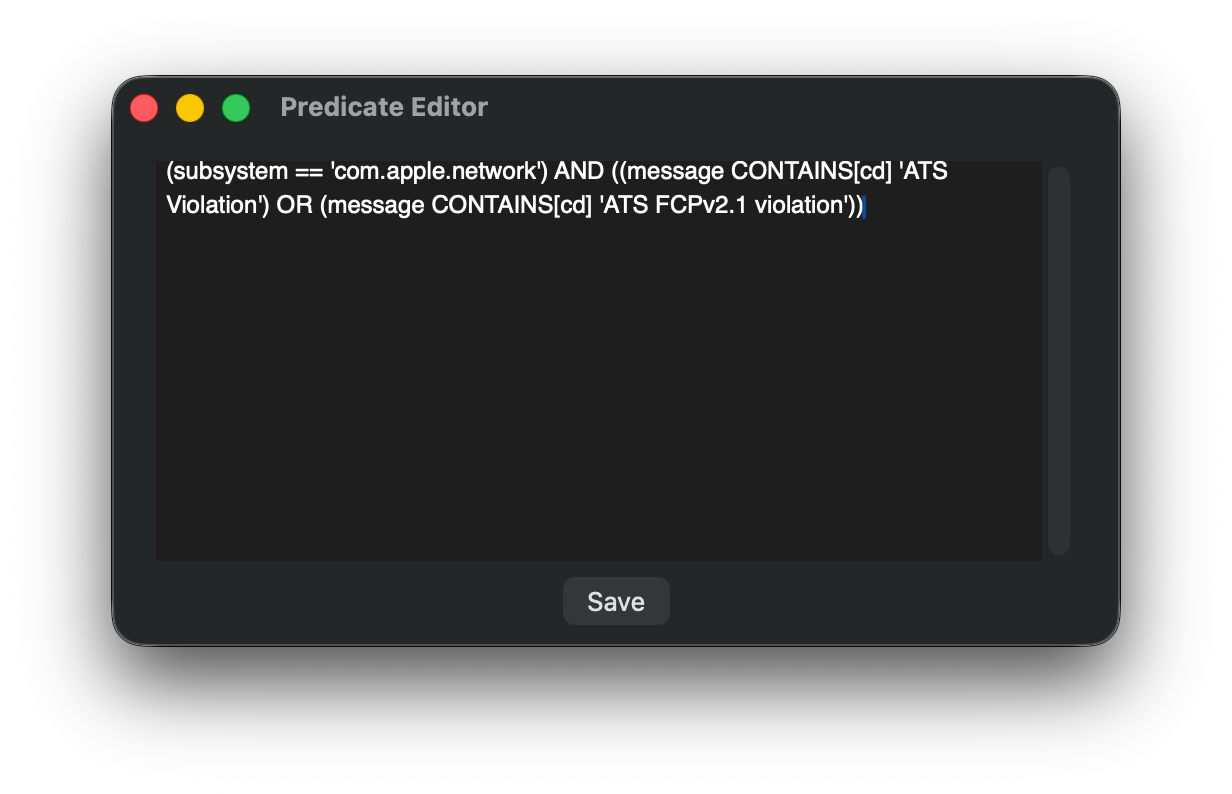
Over a ten-minute period of network access, that returned a workably small number of log entries for further checking.
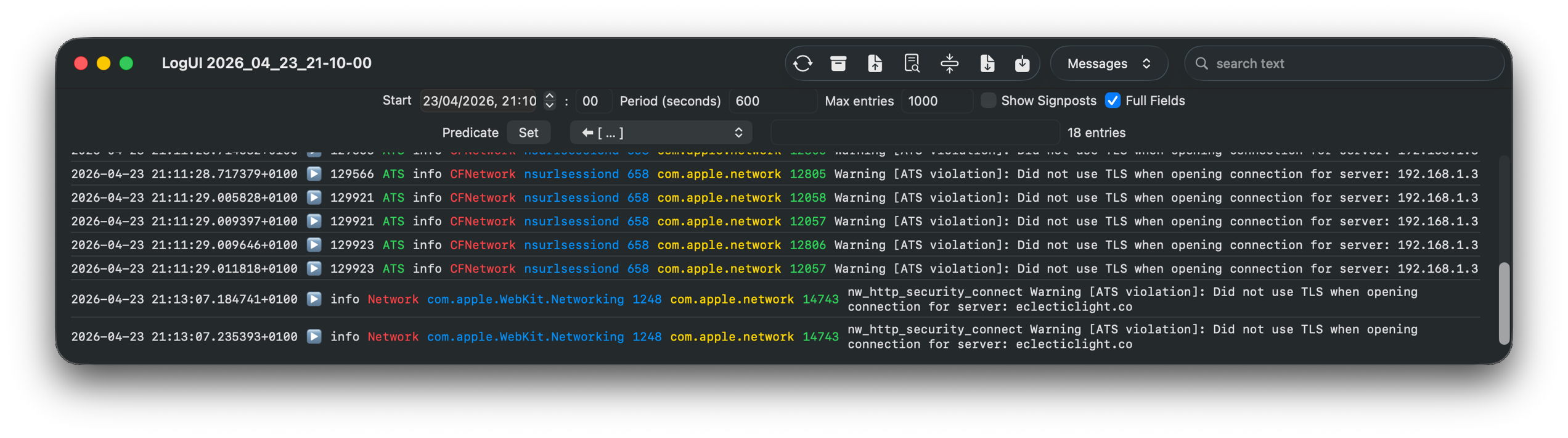
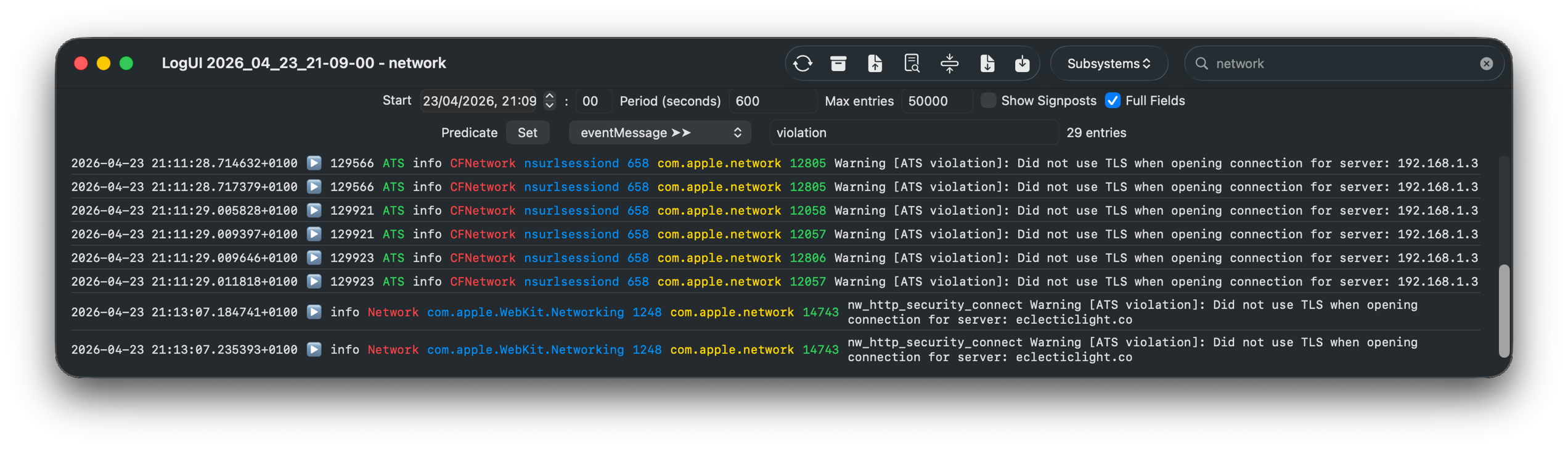
A little careful thought suggested a more logical approach, effectively using the predicate
(message CONTAINS[cd] 'violation')
using LogUI’s popup predicate menu, then filtering those few entries using the word network in their subsystem field, with exactly the same results.
It really isn’t that hard to come up with a log browser that can handle such tasks far better than the command line ever could. But from the start it has been clear that Console isn’t intended to assist browsing the Unified log, only to discourage it.

Few of those now working for Apple can remember that for the first 17 years of Macs, until the arrival of Mac OS X, there was no command line at all. We got by with utilities crafted by Apple like ResEdit.

prefsresedit

Here ResEdit is displaying the resources of QuarkXPress version 4.11 from around 2000. The app icons shown are stored in a resource of type BNDL, a ‘bundle’, but not in the later sense of the term.

serveradmin

I feel sure that more engineers will recall the GUI provided in Mac OS X Server, in its Server Admin app that wrapped many of its tricky tasks in a familiar interface, making administration a true joy. One weak area was DNS management, for which there were third-party alternatives including that from Men&Mice, now part of BlueCat.

serverstarted

In later, more consumer-oriented versions, Server.app was more concise but remained rich in function. Its sidebar let you manage users and groups, monitor your server, control its services, manage hardware, and control system, network and storage settings. Below that the Next Steps button provided access to help topics and useful suggestions.

In the years since, Apple has steadily stripped out many of those utilities that provided ordinary users with an alternative to the command line.

Ping a remote site in Network Utility for a quick check of connectivity.

Network Utility contained a friendly front-end to a suite of valuable tools to help diagnose network problems. It was deprecated in Big Sur, then removed, with Apple explicitly advising the use of command tools instead.

Other utilities have followed a similar pattern. Initially, some of their more advanced features are removed, then the app is hidden away in /System/Library/CoreServices/Applications to discourage its use, in preparation for telemetry to justify its removal on the grounds of lack of use. Once it has gone all we have left is a clumsy conglomeration of options in a *util command tool, and users forced to copy and paste in training for a ClickFix attack.

This is good news for indie developers like Michael Tsai at C-Command, and Bryan Christianson, who can then build replacement apps such as DropDMG and WhatRoute, and some of my own utilities like Spundle. But they can only reach a limited audience, and the majority are left to rehearse for ClickFix.

At the same time that Apple has been normalising the use of the command line, it has invested heavily in app security, from Gatekeeper and quarantine, to XProtect and notarisation. Predictably, ClickFix attacks sidestep past those and exploit the behaviour that its victims have been conditioned to because macOS doesn’t provide the apps needed for its administration and maintenance.

ClickFix is thus largely self-inflicted by a modern macOS that places greater priority on apps that generate income, and design fads like Liquid Glass.
Naturalists: The modern meal

By: hoakley
10 April 2026 at 19:30

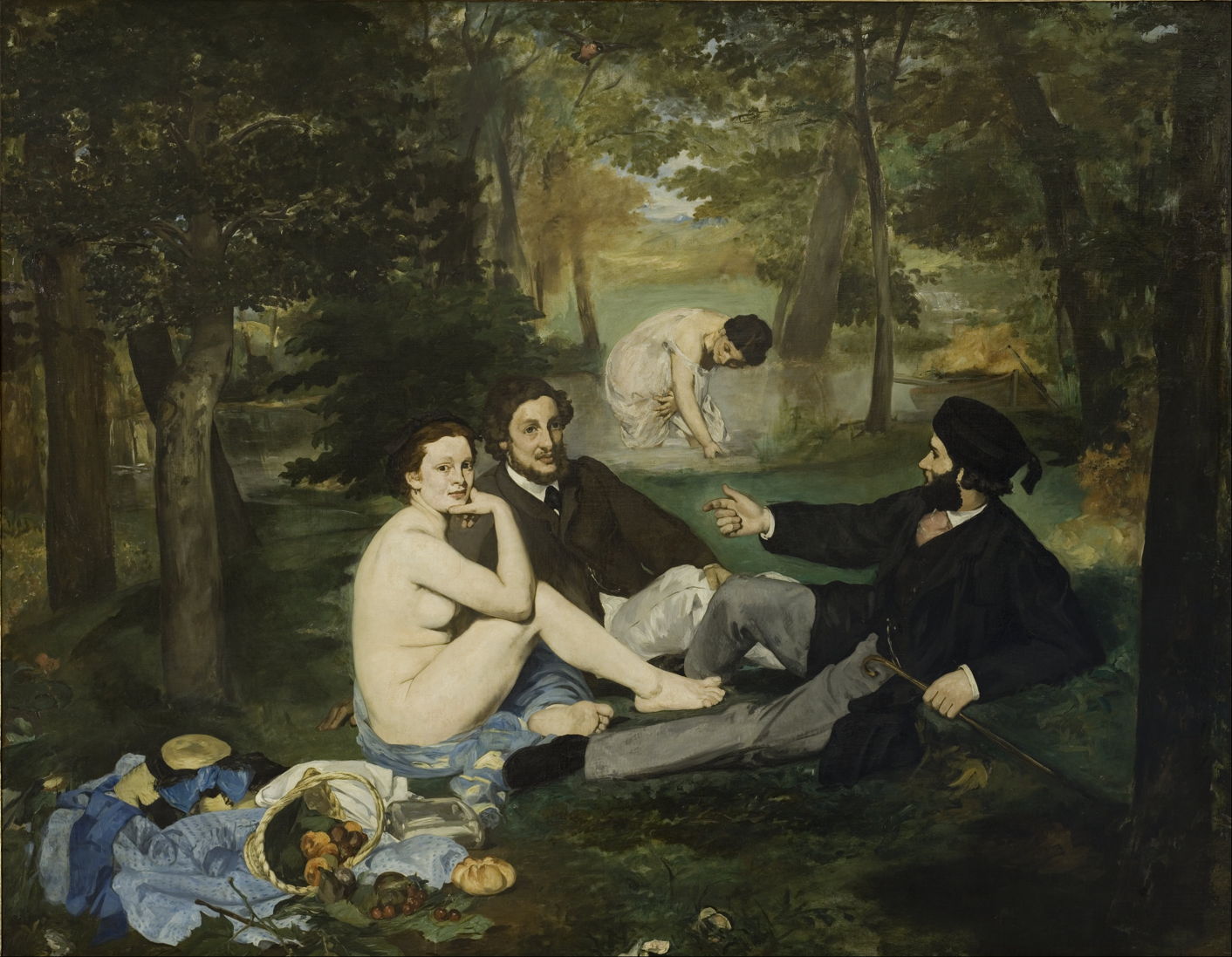
Eating together with family and friends is one of the great social events, and became a popular theme in nineteenth century painting. It was enthusiastically adopted by several of the leading Naturalist painters, as shown below.

manetluncheonongrass
Édouard Manet (1832-1883), Le Déjeuner sur l’herbe (Luncheon on the Grass) (1863), oil on canvas, 208 × 264.5 cm, Musée d’Orsay, Paris. Wikimedia Commons.

Édouard Manet’s Le Déjeuner sur l’herbe from 1863 is one of the best-known if not infamous paintings of a social meal. Two couples are apparently disinterested in the token picnic of fruit and bread that has spilled out from its basket in the left foreground. As the two men talk, fully dressed, a conspicuously naked woman stares unnervingly at the viewer, and the other woman is washing herself in the river behind. This was rejected by the Salon of that year, ensuring its lasting fame and influence.

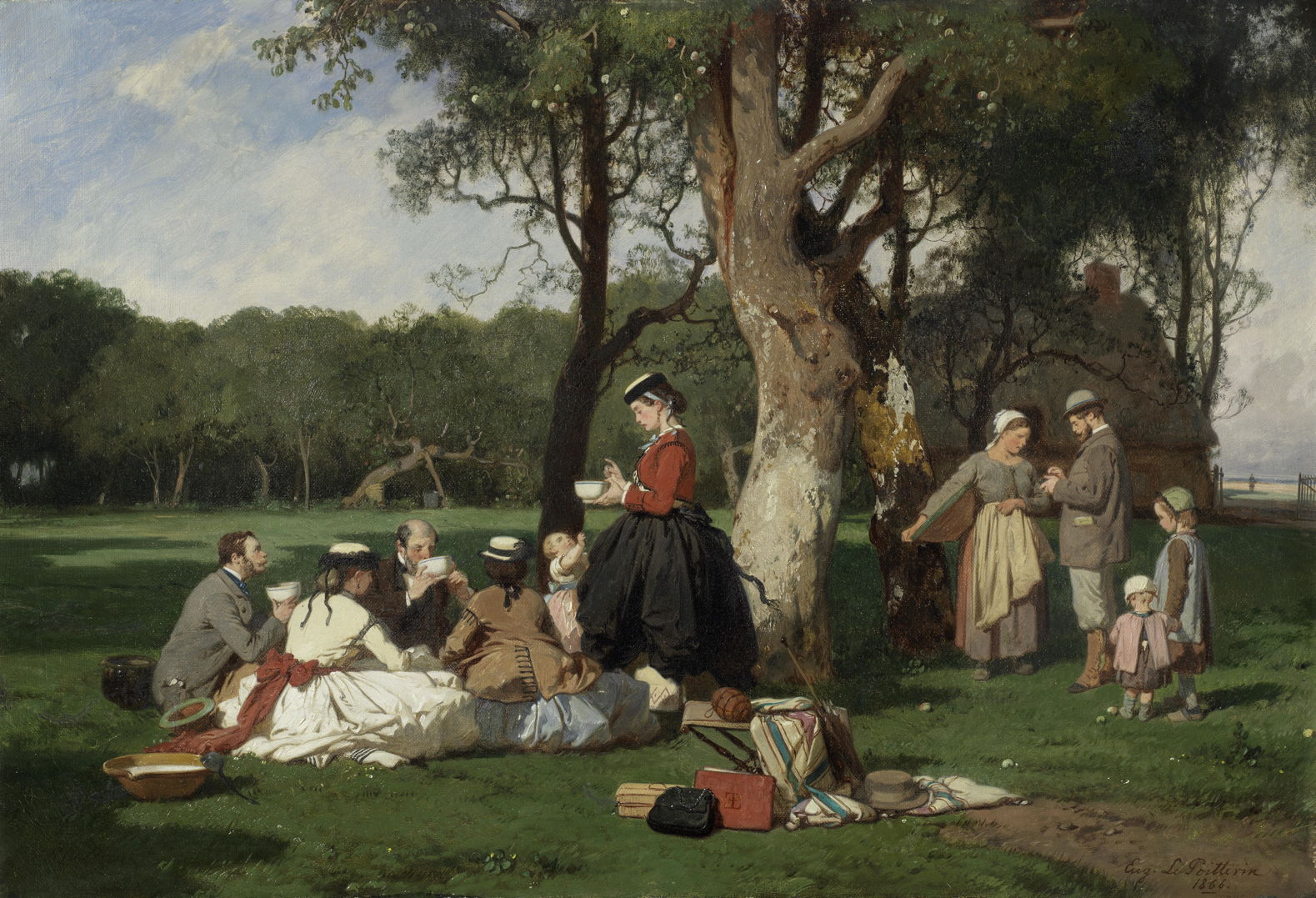
lepoittevinpicnic
Eugène Lepoittevin (1806-1870), A Picnic (1866), oil on canvas, 43 x 62.5 cm, location not known. Wikimedia Commons.

A far cry from Manet’s meal, Eugène Lepoittevin’s Picnic from 1866 captures a picnic’s distinctive combination of the planned and impromptu. This group has lugged crockery, soup and a folding stool for their simple meal sitting on the grass under some trees.

renoirluncheonboatingparty
Pierre-Auguste Renoir (1841–1919), Luncheon of the Boating Party (1880-81), oil on canvas, 130.2 x 175.6 cm, The Phillips Collection, Washington, DC. Wikimedia Commons.

Renoir’s masterpiece Luncheon of the Boating Party (1880-81) is set on the Île de Chatou under the awning of the Restaurant Fournaise. Among his models are his partner and later wife Aline Charigot (left foreground, with affenpinscher dog), the actress Jeanne Samary (upper right), and fellow artist Gustave Caillebotte (seated, lower right). This meal seems all but over, the wineglasses near-empty as the party turns from eating to conversation.

denittisbreakfastingarden
Giuseppe De Nittis (1846–1884), Breakfast in the Garden (c 1883), oil on canvas, 81 x 117 cm, Pinacoteca De Nittis, Barletta, Italy. By LPLT, via Wikimedia Commons.

In summer, breakfast became a favourite meal in your own garden. Just a year before his untimely death in 1884, the Italian peri-Impressionist Giuseppe De Nittis painted this startling Breakfast in the Garden, with its contrast between the detail of the glass soda syphon, covered bowl, glasses, and other reflective materials on the table, and its wonderfully sketchy garden background.

ringboygirllunch
Laurits Andersen Ring (1854–1933), A Boy and a Girl Eating Lunch (1884), oil on canvas, 44 x 56 cm, location not known. Wikimedia Commons.

Laurits Andersen Ring was more pointed in his social message in A Boy and a Girl Eating Lunch, from 1884. Paupers’ children, they have a single bowl of broth between them, and there’s not even a hint of wine and fruit. The girl looks up in tears, hoping for a miracle to change their lives, and take them away from this bare wooden table and blackened walls.

MSKG - Het begrafenismaal - Léon Frédéric (1886)
Léon Frédéric (1856–1940), The Funeral Meal (1886), oil on canvas, 125.5 x 177.5 cm, Museum voor Schone Kunsten, Ghent, Belgium. Image by Ophelia2, via Wikimedia Commons.

Léon Frédéric’s Funeral Meal from 1886 shows a large group of mourners sitting outside in the summer sunshine to remember the deceased following their funeral. Their meal is simple if not frugal, and there are neither glasses of wine nor mugs of beer. This is the moment that grace, or perhaps a eulogy for the deceased, is being read.

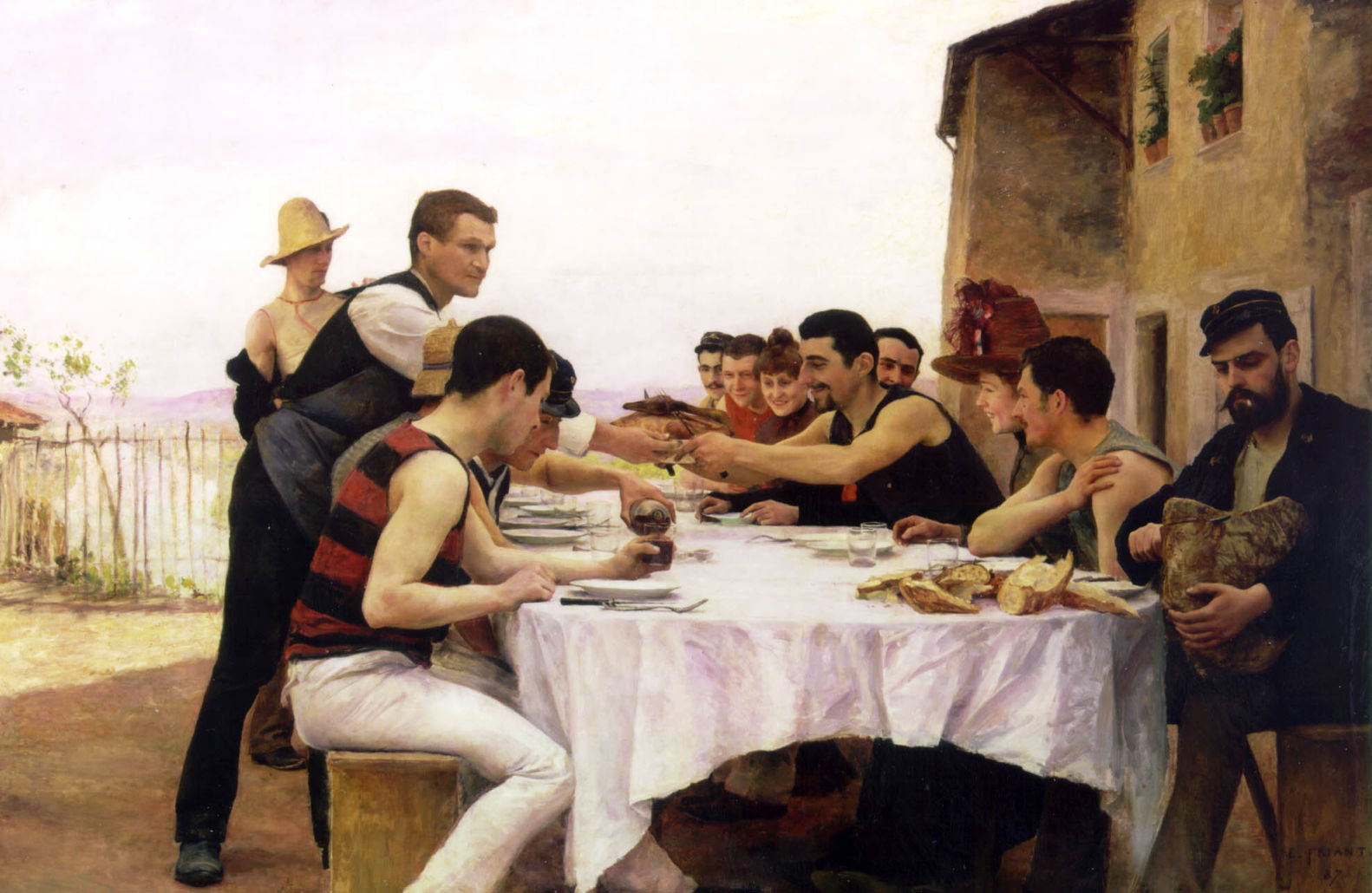
friantcanotiersmeurthe
Émile Friant (1863–1932), The Meurthe Boating Party (Reunion of the Meurthe Boating Party) (1887), oil on canvas, 110 x 166 cm, Musée de l’École de Nancy, Nancy, France. Wikimedia Commons.

Now almost forgotten is Émile Friant’s masterpiece The Meurthe Boating Party, also known as Reunion of the Meurthe Boating Party or The Oarsmen of the Meurthe, from 1887. This shows the artist’s watersporting friends eating lunch together on the river Meurthe in Nancy. This can be read as a broad message of well-being and conviviality: healthy, fit young men engaged in team sports; fraternity; and harmony across different classes within society. It was exhibited at the Salon in 1888, and as a result of its success was featured as a full page in the popular magazine Le Monde Illustré, bringing Friant instant fame.

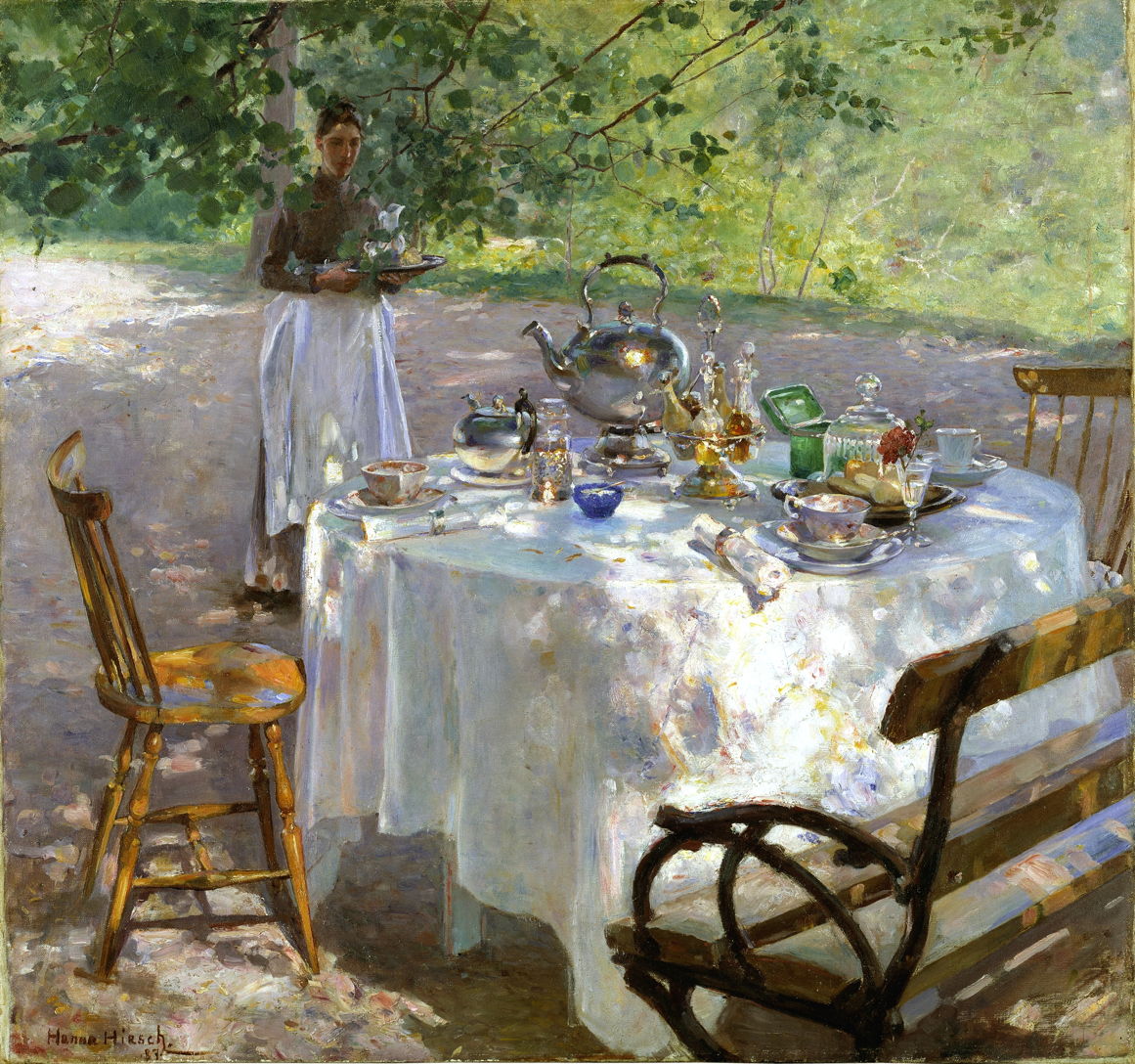
paulibreakfasttime
Hanna Pauli (1864-1940), Breakfast-Time (1887), oil on canvas, 87 x 91 cm, Nationalmuseum, Stockholm, Sweden. Wikimedia Commons.

That same year the 23-year-old Swedish painter Hanna Pauli made the meal table the centrepiece of her virtuoso painting of Breakfast-Time (1887). She uses it as a demonstration of her skills in depicting the reflective surfaces of silverware, porcelain and abundant glassware, but its table is now deserted.

Émile Claus, Pique-nique, paysage la Lys (The Picnic) (1887), oil on canvas, 129 x 198 cm, Institut Royal du Patrimoine artistique, Brussels. WikiArt.
Émile Claus (1849-1924), Pique-nique, paysage la Lys (The Picnic) (1887), oil on canvas, 129 x 198 cm, Institut Royal du Patrimoine artistique, Brussels. WikiArt.

The Belgian artist Émile Claus also painted The Picnic in 1887. It’s set in the French/Belgian countryside around the River Lys, in the area of Ypres, which was devastated during the First World War. The plain clothing worn indicates these are poor farmworkers rather than landowners.

Understanding and testing iCloud

By: hoakley
6 April 2026 at 14:30

iCloud has changed a great deal in the nearly 15 years since its introduction, and now provides many discrete services. These include synchronisation of app databases using CloudKit, file storage and sharing using iCloud Drive, update and support services for macOS and Apple’s other OSes, and a loose group of miscellaneous services including Private Relay.

Well-known examples of those include:

  • CloudKit – shared calendars, address books and notes;
  • iCloud Drive – folders and files in the Finder’s iCloud Drive location;
  • macOS support – XProtect updates for Sequoia and Tahoe, optional language support and additional dictionaries downloaded on demand;
  • miscellaneous – iCloud+ Private Relay, Find My.

One of the most common confusions is to assume that a problem with one service cause problems with others. Although they can, that all depends on where the fault lies.

There are also two major online services provided by Apple that are separate from iCloud: its software update servers to deliver OS updates as well as security data and other system support through Software Update; Private Cloud Compute to deliver off-device AI services.

Network basics

All iCloud services have their own local client, such as CloudKit for syncing shared data, which in turn relies on low-level network services in macOS. Those communicate through your network’s router, and so pass out to the Internet to connect with a remote server. Although Apple does have at least one of its own data centres, much of iCloud is thought to be hosted on Amazon Web Services (AWS) and/or Google Cloud Platform.

These are important details when investigating iCloud problems. There’s no point in fiddling with local iCloud settings if the problem results from any link in this chain beyond your Mac. One of the most valuable early steps is to point your browser at Apple’s local service status page and check whether that service is reported as working normally. If that loads briskly, works as expected, and claims the iCloud service you’re having problems with should be working normally, you can turn your attention to what might be going wrong in your Mac.

One important factor to be taken into account is whether a local Content Caching server is in use. Unless iCloud content is excluded, a local server should cache changes in iCloud data, enabling other Macs and devices to sync within the local network. Enabling a Content Caching server can itself address some iCloud problems, and is well worth considering.

Testing

The most common fault with iCloud’s services is failure to sync local contents with those stored in iCloud. Failures are hard to investigate even in a controlled test, as there’s no way for a user to tell directly what’s going on in iCloud without relying on another Mac or device syncing (or the iCloud.com web service updating). The following tests are relatively quick and simple, and can provide helpful information about the state of iCloud services on your Mac.

CloudKit

The only controls provided for CloudKit are those in the iCloud section of your Apple Account settings, and any in apps that use CloudKit. For each service you use, ensure that Sync this Mac is enabled before going any further.

To test syncing of Notes, open the app on your test Mac and other Macs and devices. Write one note in the test app and wait for it to sync to the others. On one of the other systems, write another note, and wait for that to sync to the test Mac. Syncing isn’t immediate even if you’re using a local Caching server, but it should occur within a couple of minutes when there are good connections to iCloud.

There are times when syncing can take much longer. To ensure that CloudKit server resources are shared fairly, CloudKit imposes limits on transfers, and can throttle traffic. Throttling is likely to occur when a CloudKit app issues many requests over a short period, or uses CloudKit inappropriately, perhaps triggering simultaneous peaks in request rates from several devices at the same time. In some situations, where you suspect that one or more CloudKit-based apps are causing throttling or hitting limits, you can disable their syncing to see if that enables other apps to sync better.

The definitive way to investigate CloudKit problems is in the log, and is a fearsome task even for developers, as detailed here.

iCloud Drive

The most important control over iCloud Drive is in the Drive item of the iCloud section of Apple Account settings, where Sync this Mac must be enabled. You should also check syncing in the list of apps there.

The Optimise Mac Storage control determines how iCloud Drive works. In the past, it relied on its own features in macOS, and for many those were flawed. Evicting a file from local storage left a local stub file as a place-marker, but in 2021-23 iCloud migrated to use a new FileProvider framework common to all cloud services.

Since then, iCloud Drive has worked in either of two distinct modes:

  • When Optimise Mac Storage is turned off, iCloud Drive is a replicating FileProvider, and maintains complete local copies of all files stored in iCloud servers. This prevents you or macOS from removing their downloaded data.
  • When Optimise Mac Storage is turned on, iCloud Drive is a non-replicating FileProvider, and can remove the downloaded data of local files, a process known as eviction. Rather than leaving stub files, the same files remain but they are dataless. You and macOS can thus choose whether to evict files or download them, and you can opt to keep them downloaded, or ‘pinned’ locally.

iCloud Drive syncing is also believed to be subject to throttling to prevent servers from being overwhelmed, although that appears infrequent and lasts but a few hundred milliseconds if it does occur. Files for transfer are divided into chunks of just over 15 KB, although the system maximum may be as large as 28 MB or even 33 MB. Some iCloud servers may also impose a maximum limit on the number of connections.

The simplest way to test iCloud Drive syncing reproducibly is using the Test Upload feature available in the Window menu of Cirrus. This transfers a 1 MB file named co.eclecticlight.Cirrus.data, which should appear almost instantly at the top level of the iCloud Drive folder, so is readily visible on Macs and devices connected to the same iCloud Drive account. There’s also a Clean up Test command to delete that test file.

Having established that your iCloud Drive does sync promptly using that test file, the more difficult problem is to discover why some files appear to be stuck. Unfortunately, the best way to identify them is from the log.

macOS support updates

Testing updates is harder, unless your Mac is running Sequoia or later and isn’t yet running the current version of XProtect. You can check that by comparing the version installed given by
xprotect version
with that available from iCloud, revealed by the command
sudo xprotect check
If the second version is greater than the first, then running
sudo xprotect update
should download and install the update, a worthwhile procedure in any case.

Tests work, but iCloud still doesn’t

iCloud is one area where you shouldn’t simply follow the adage of “try turning it off and back on”. Repeatedly changing its settings without good cause can make problems worse rather than solving them. The best reset or off switch for iCloud is to shut a Mac or device down, to allow iCloud services to shut down as normally as possible, then for them to be re-established when starting up again.

This applies most particularly to the Optimise Mac Storage setting. As that changes the type of FileProvider used, it can take many hours or days to sync correctly to a new setting. Although not specifically recommended, starting up in Safe mode, leaving the Mac to settle for several minutes or longer, then restarting back into normal user mode, can sometimes help.

During the transition from the old iCloud Drive to the new FileProvider mechanism, some users found it necessary to leave their Macs syncing with iCloud Drive for several days. That can still be a worthwhile strategy for what appear to be otherwise intractable problems with syncing.

Persistent problems should be taken to Apple Support, as only they have access to specialist iCloud engineers.

Explainer: AppKit and SwiftUI

By: hoakley
4 April 2026 at 15:00

Look across a range of third-party apps on your Mac and you’ll see how different their interfaces are. Casting aside those based on cross-platform frameworks like Electron, most of the best either use traditional AppKit, or its more recent successor SwiftUI. This article explains how those have come about, and how they differ.

AppKit is descended from the UI framework in NeXTSTEP, and has been at the core of Mac OS X from the start. For much of the last 26 years, it has provided the interface for the Finder and Apple’s own apps. When Apple designed iOS and iPadOS, they were given equivalents in UIKit, which isn’t as extensive, and hasn’t facilitated cross-platform development.

Although AppKit apps can construct their interface procedurally, most rely on Interface Builder, a GUI tool built into Xcode that separates the design of menus, windows, their views and controls from the largely procedural or imperative code used to drive them. You can often tell apart apps using AppKit by their use of Storyboard files in the Resources folder in their app bundle.

SwiftUI was announced at WWDC in June 2019, and first became available in macOS 10.15 Catalina. One of its primary goals is make it easier for apps to run across multiple Apple operating systems. It adopts a declarative approach, so rather than separating interface design into a graphical editor, its windows, their views and controls are built from data structures as in the example given in the Appendix below. Their code can then be previewed in real-time, but there’s no direct manipulation in those previews, which are developed iteratively in code.

For example, to increase the size of an AppKit text entry box in Interface Builder, the developer can either drag the box to its new size, or adjust its dimensions in a control, and see the result immediately. In SwiftUI, those dimensions are edited in the code defining that box within its view and window, which is then converted into a graphical preview. Although this difference may appear subtle, it’s fundamental. Apps that use SwiftUI without AppKit don’t have Storyboards in the Resources folder in their app bundle.

The two come from different eras in human interfaces.

AppKit presents a more static approach, where the contents of its views are their dynamic, as demonstrated in SilentKnight version 2 below.

sk221

SwiftUI is thoroughly dynamic, reconfiguring its look using animations and transitions in layouts that adapt to their purpose, as shown in a prototype for SilentKnight version 3 below. Although AppKit is thoroughly accessible from Swift code, it was developed for Objective-C, while as its name implies, SwiftUI is thoroughly Swift-oriented.

silentknight32

While there are still many fine apps that only use AppKit, SwiftUI remains work in progress, and it’s common for apps still to dip into AppKit to handle tasks that can’t be achieved in SwiftUI alone. Among many examples remaining is the display of PDF documents, which is still only achievable from an AppKit view. This is improving as SwiftUI evolves, but that in turn poses problems with macOS support.

For example, one of the most substantial changes in SwiftUI has been the move from its Observable Object protocol to the Observable macro, which affects the back end of apps. But the Observable macro is only available in apps written for macOS 14 or iOS 17 or later, which explains why so many apps using SwiftUI require a minimum of macOS 14.6, so they can take advantage of this architectural change. It’s not just the more obvious features in new versions of macOS that limit backward compatibility of apps.

Among the archipelago of delights brought in SwiftUI are its List View, and Swift Charts.

AppKit has excellent support for Attributed Strings that are essentially their underlying data for Rich Text. Log entries shown in my AppKit-based log browser Ulbow demonstrate how its NSTextView can handle tens of thousands of lines of Attributed String data representing log entries.

In LogUI, I have replaced that with a SwiftUI List View, which is far more versatile, but doesn’t use Attributed Strings.

Although in recent versions of macOS this readily copes with tens or even hundreds of thousands of lines, it’s still prone to displaying blank areas when scrolling.

Implementing charts in Logistician relies entirely on the capabilities of Swift Charts, but those are only available in macOS 13 and later.

Although it might appear that Mac developers are now spoilt for choice between AppKit and SwiftUI, there are many occasions when they’d prefer taking the best bits of each and building something more coherent and comprehensive, and better tailored to the desktop rather than the device.

Appendix: Example SwiftUI code

struct ContentView: View {
    @State private var messageInfo = Logger()
    
    var body: some View {
        let _ = messageInfo.getMessages()
        if (self.messageInfo.logList.count > 0) {
            VStack {
                List(self.messageInfo.logList) { line in
                MessageRow(line: line)
                }
            }
            .frame(minWidth: 900, minHeight: 200, alignment: .center)
        } else {
            Text("No results returned from the log for your query.")
                .font(.largeTitle)
        }
    }
}

struct MessageRow: View {
    let line: LogEntry

    var body: some View {
        HStack {
            Text(line.date + "  ")
            if #available(macOS 14.0, *) {
                Text("\(line.type)")
                    .foregroundStyle(.red)
            } else {
                Text("\(line.type)")
                    .foregroundColor(.red)
            }
            if !line.activityIdentifier.isEmpty {
                Text(line.activityIdentifier)
            }
//          etc.
            Text(line.composedMessage)
            }
        }
    }

Who called git, and how Claude was caught red-handed

By: hoakley
17 March 2026 at 15:30

When the same unusual dialog appears twice within a few days for two different people, you begin to suspect a pattern. This article explores a rabbit hole that involves git, the log and the fickleness of AI.

On 8 March, Guy wondered whether an XProtect update earlier this month could have been responsible for a dialog reading The “git” command requires the following command line developer tools. Would you like to install the tools now? As the request seemed legitimate but its cause remained unknown, we mulled a couple of possible culprits, and he went off to investigate.

Five days later, after he had installed the update to SilentKnight 2.13, Greg emailed me and asked whether that might be responsible for exactly the same request appearing on his Mac. This time, Greg had consulted Claude, which asked him to obtain a log extract using the pasted command
log show --start "2026-03-13 07:07:00" --end "2026-03-13 07:10:00" --style compact --info | grep -E "14207|spawn|exec|git|python|ruby|make"

Armed with that extract, Claude suggested that SilentKight had been the trigger for that dialog.

I reassured Greg that, while SilentKnight does rely on some command tools, it only uses those bundled with macOS, and never calls git even when it’s feeling bored. While I was confident that my app couldn’t have been responsible, I wondered if its reliance on making connections to databases in my Github might somehow be confounding this.

While I knew Claude was wrong over its attribution, the log extract it had obtained proved to be conclusive. Within a few minutes of looking through the entries, I had found the first recording the request for command line tools:
30.212 git Command Line Tools installation request from '[private]' (PID 14205), parent process '[private]' (parent PID 14161)
30.212 git Command Line Tools installation request from '[private]' (PID 14206), parent process '[private]' (parent PID 14161)

As ever, the log chose to censor the most important information in those entries, but it’s dumb enough to provide that information elsewhere. All I had to do was look back to discover what had the process ID of 14161, as its parent. Less than 6 seconds earlier is:
24.868 launchd [pid/14161 [Claude]:] uncorking exec source upfront

Just to be sure, I found matching entries for SilentKnight and the system_profiler tool it called after the attempt to run git:
30.153 launchd [pid/14137 [SilentKnight]:] uncorking exec source upfront
30.336 launchd [pid/14139 [system_profiler]:] uncorking exec source upfront

There was one small mystery remaining, though: why did Claude’s log show command also look for process ID 14207? That was the PID of the installondemand process that caused the dialog to be displayed:
30.215 launchd [gui/502/com.apple.dt.CommandLineTools.installondemand [14207]:] xpcproxy spawned with pid 14207

Following its previous denial, when Claude was confronted with my reading of the log, it accepted that its desktop app had triggered this dialog. Its explanation, though, isn’t convincing:
“the Claude desktop app calls git at launch — likely for one of a few mundane reasons like checking for updates, querying version information, or probing the environment. It’s not malicious, but it’s poorly considered behavior for an app that can’t assume developer tools are present on every Mac.”

In fact, it was Guy who had probably found the real reason, that the Claude app has Github as one of its four external connectors. However, that shouldn’t give it cause to try running the git command, resulting in this completely inappropriate request.

Conclusions

  • Claude might know how to use the log show command, but it still can’t understand the contents of the Unified log.
  • If you’re ever prompted to install developer command tools to enable git to be run, suspect Claude.
  • What a fickle and ever-changing thing is an AI.*

I’m very grateful to Greg and Guy for providing the information about this curious problem.

* This is based on a well-known English translation of a line from Virgil’s Aeneid, Book 4: “Varium et mutabile semper femina”, “what a fickle and ever-changing thing is a woman”. While all of us should dispute that, there’s abundant evidence that it’s true of Claude and other AI.

A weekend with Misia: 2

By: hoakley
15 March 2026 at 20:30

In 1904, Misia Natanson, née Godebska, patron and muse of artists in Paris, was in the process of transferring her affection from her first husband Thadée Natanson to Alfred Edwards, the publishing magnate who was providing him with capital in return.

bonnardmisiadog
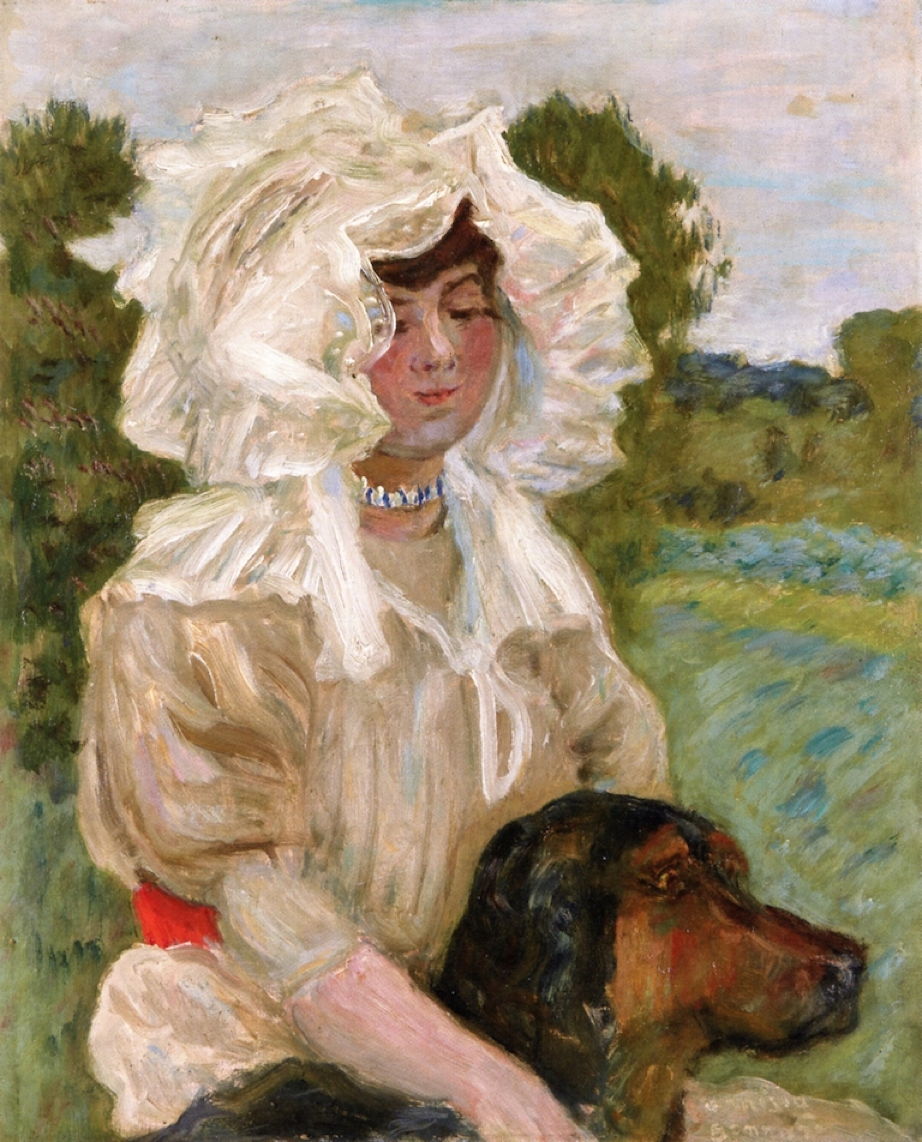
Pierre Bonnard (1867-1947), Misia Natanson and Her Dog (c 1904), oil on panel, 46 x 37 cm, Private collection. The Athenaeum.

Pierre Bonnard sees a completely different figure from those in Renoir’s portraits. In Misia Natanson and Her Dog from about 1904, she’s out in the country with her dog, wearing an ornate white lace hat, more like a character from a nursery rhyme than the mistress of a newspaper magnate.

The following year, Misia married Edwards, and her circle of artists and composers benefited from new patronage with even deeper pockets. Misia and her husband had a yacht, by which I mean a large, crewed vessel, not a dinky little dinghy. In the summer of 1905, they took Bonnard, Maurice Ravel, and others on the yacht’s maiden cruise to Belgium, the Netherlands and Germany.

renoirmisialapdogbarnes1906
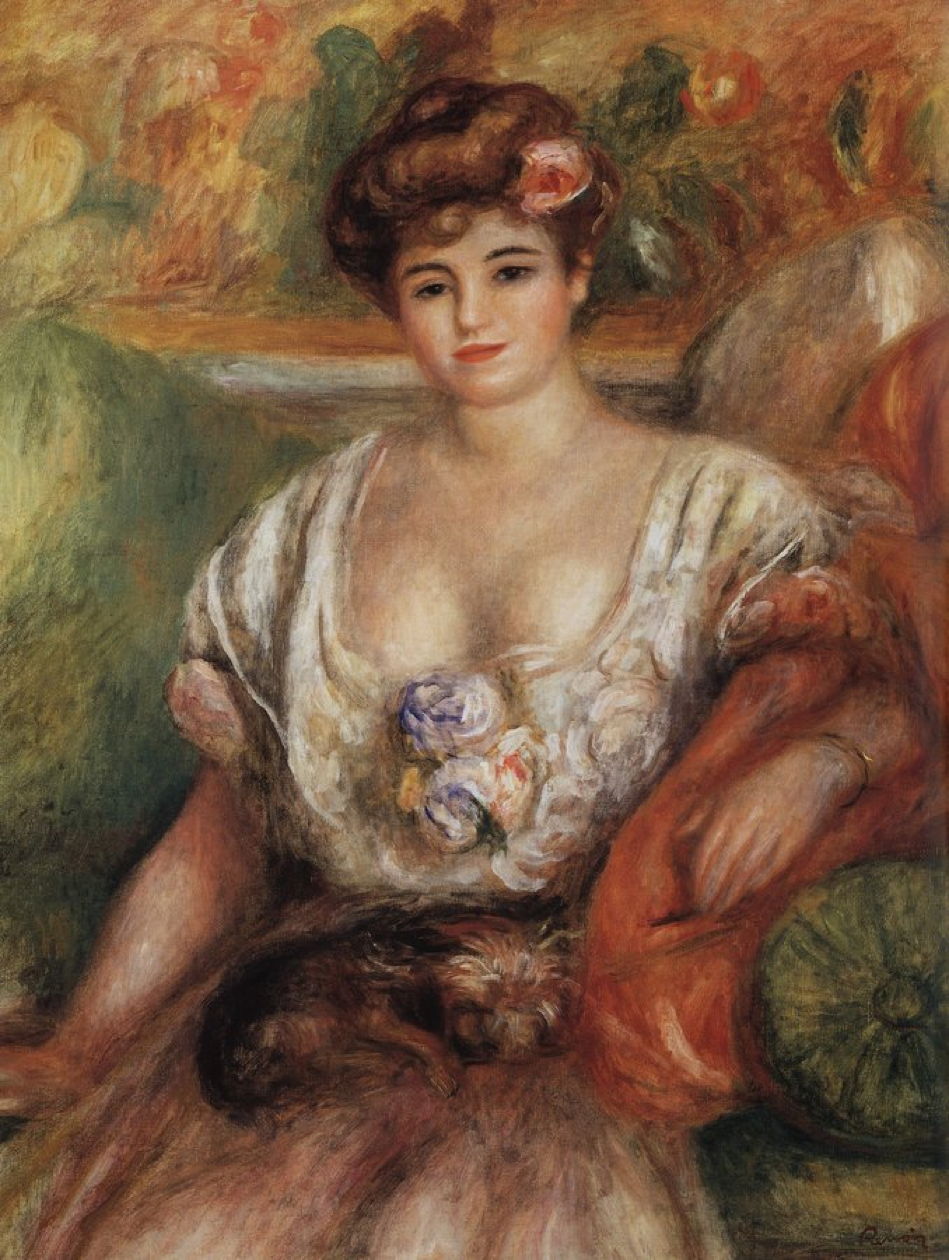
Pierre-Auguste Renoir (1841–1919), Misia Sert with a Lap Dog (Young Woman with a Lap-Dog) (c 1906), oil on canvas, 92.5 x 73.5 cm, Barnes Foundation, Philadelphia, PA. Wikimedia Commons.

Misia, though, looks no happier in Renoir’s third portrait of Misia Sert with a Lap Dog (Young Woman with a Lap-Dog) from after her second marriage in about 1906. And the dog has changed to a toy breed, probably a Brussels Griffon.

bonnardcasamisiasert
Pierre Bonnard (1867-1947), La Casa de Misia Sert (The House of Misia Sert) (1906), tempera on canvas, 38 x 46 cm, Musée d’Orsay, Paris. The Athenaeum.

Bonnard dedicated his painting of The House of Misia Sert (1906) to the former Misia Natanson, muse, close friend, and patron. This was made using tempera rather than oils.

He continued to keep company with Misia and her husband. Maurice Ravel dedicated two of his most beautiful compositions to her: The Swan from Histoires Naturelles, and The Waltz.

bonnardpleasure1906
Pierre Bonnard (1867-1947), Pleasure (1906), oil on cardboard, 250 x 300 cm, Private collection. The Athenaeum.

Works created for Misia extended beyond mere portraits. In Pierre Bonnard’s large painting of Pleasure or Games from 1906, one of four panels he made for Misia and Alfred Edwards’ apartment in Paris, decorative edging includes images of birds and monkeys, whose innocent playfulness is seen as being pleasurable.

bonnardmisia1908
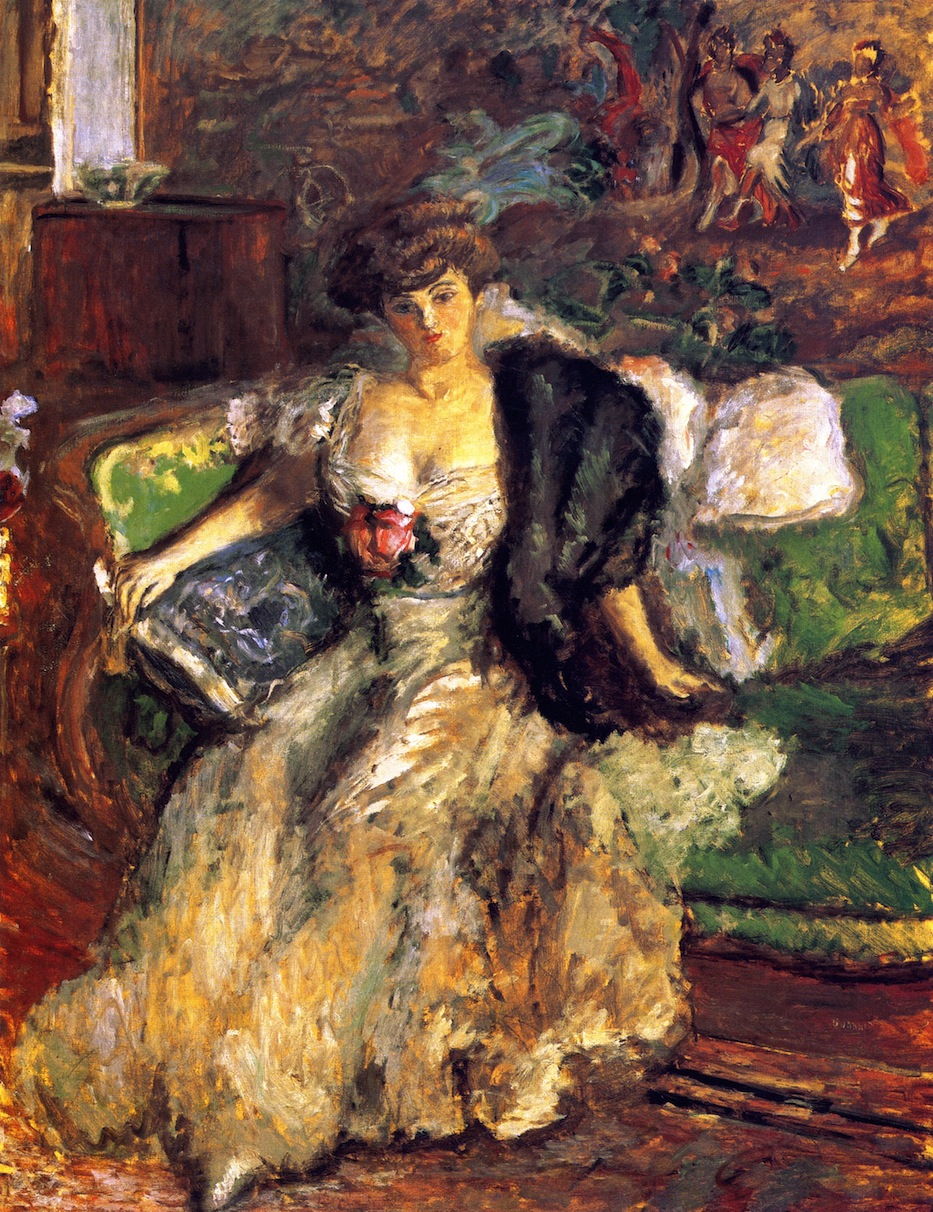
Pierre Bonnard (1867-1947), Misia (1908), oil on canvas, 145 x 114 cm, Museo Nacional Thyssen-Bornemisza, Madrid, Spain. The Athenaeum.

In 1908, Bonnard painted at least three portraits of Misia. Gone is the illusion of the shepherdess: she now sits in a lavishly-decorated room, with what appear to be Gobelin tapestries behind her.

bonnardmisiapinkcorsage
Pierre Bonnard (1867-1947), Misia with a Pink Corsage (c 1908), oil on canvas, 157.2 x 117.9 cm, Private collection. The Athenaeum.

In Misia with a Pink Corsage, Bonnard closes in for a straight head-and-shoulders.

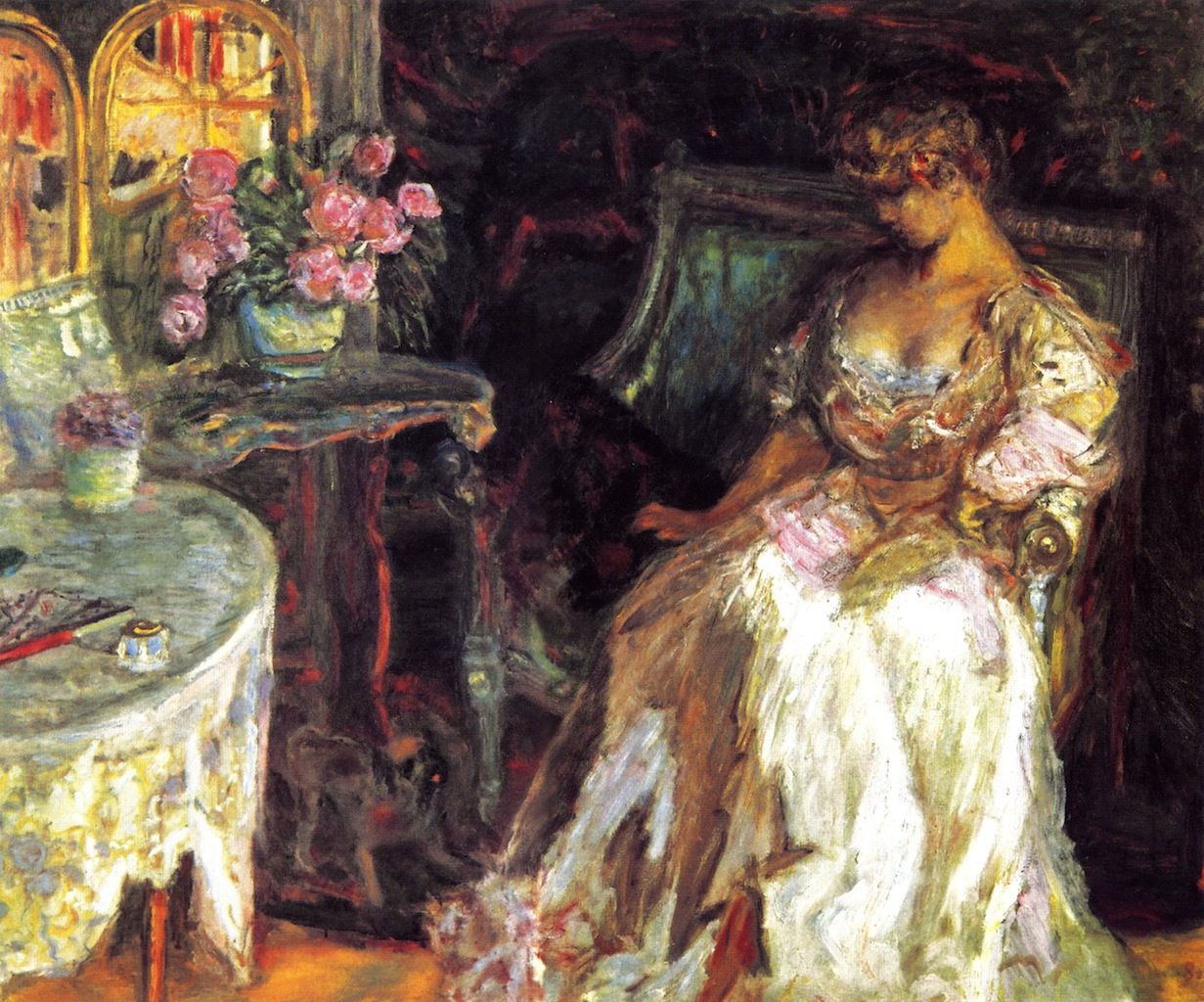
bonnardmisiaroses
Pierre Bonnard (1867-1947), Misia with Roses (1908), oil on cardboard, 114 x 146.5 cm, Private collection. The Athenaeum.

In Misia with Roses, she looks down at an almost unseen pet she is stroking beside her.

As could have been expected, Alfred Edwards proved unfaithful to Misia. She divorced him in 1909, by which time she was already in a relationship with the Spanish painter Josep Maria Sert (1874-1945). He had been on the periphery of the Nabis since moving to Paris in 1899.

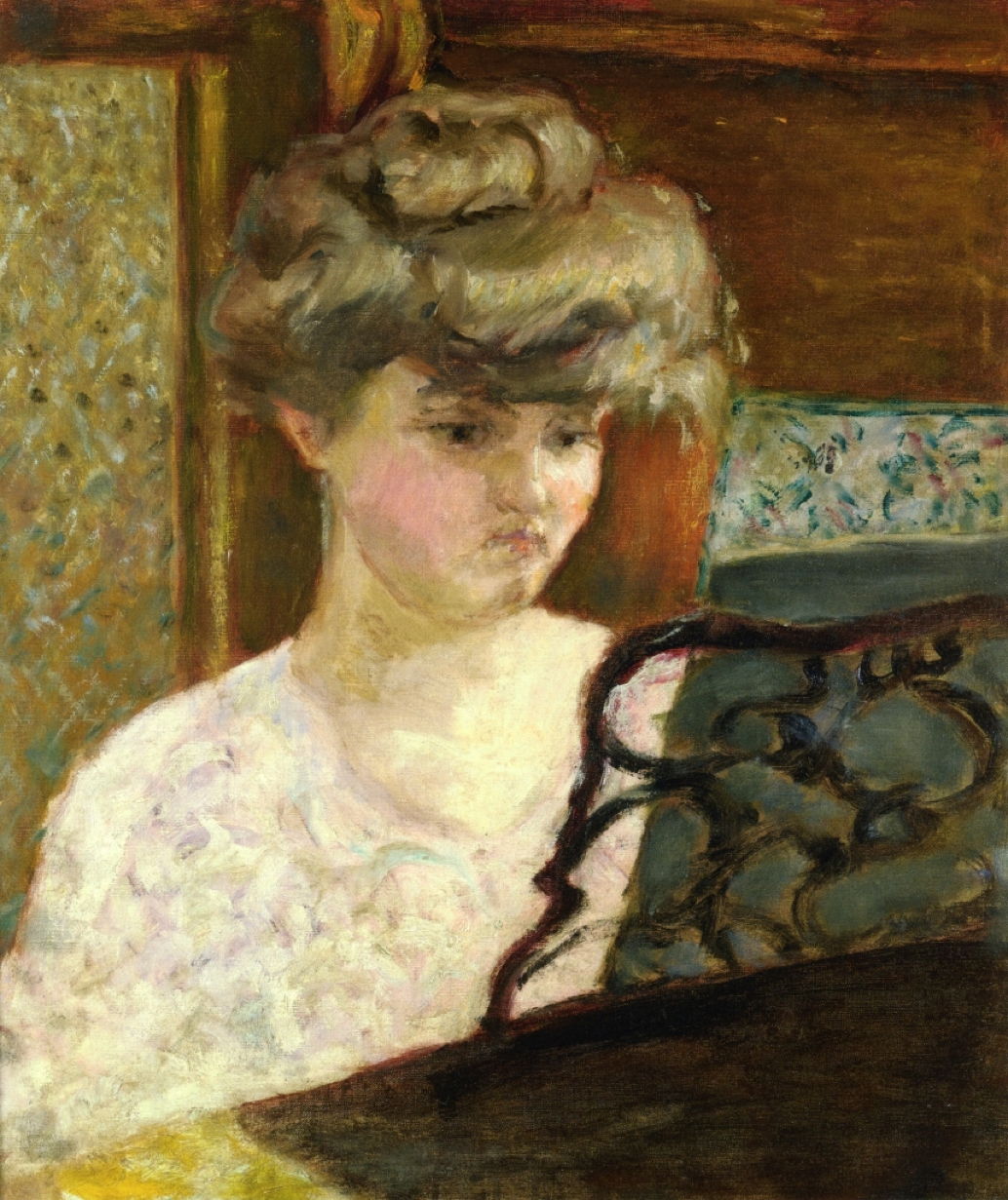
bonnardmisiawriting
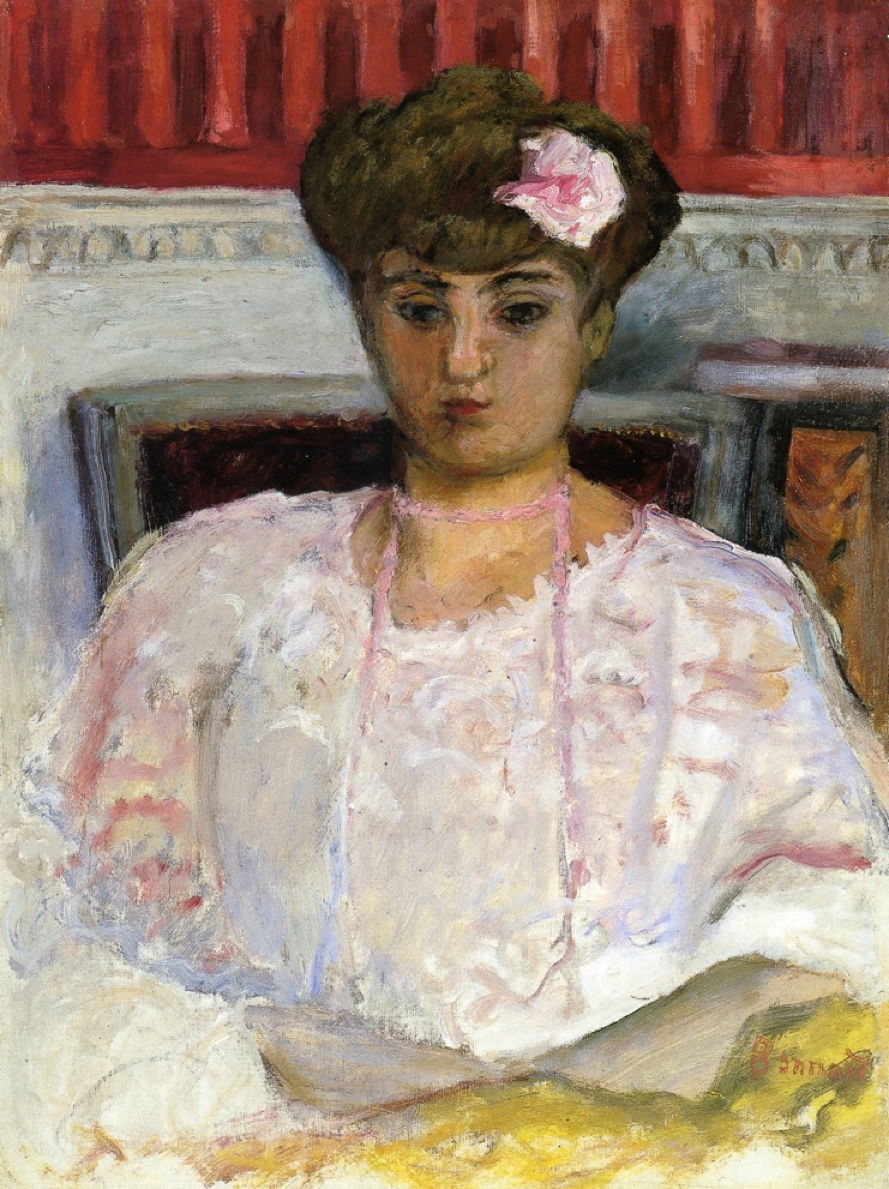
Pierre Bonnard (1867-1947), Misia Godebska Writing (c 1910), oil on canvas, 64.4 x 50 cm, Private collection. The Athenaeum.

The last portrait that I can find by Bonnard, of Misia Godebska Writing, was painted in about 1910. It’s back to head-and-shoulders, although here the artist has used a little mirror play to reveal her chignon, a feature that Bonnard seemed to like.

Misia didn’t marry Sert until 1920, by which time she was established as the cultural arbiter in Paris, and a close friend of Coco Chanel. Her husband, a friend of Salvador Dalí, specialised in murals, and strangely never appears to have painted her portrait. Instead, he spent over thirty years painting murals in the Vic Cathedral in Barcelona, and having affairs of his own. In 1927, Sert divorced Misia to marry the sculptor Isabelle Roussadana Mdivani (1906-1938), known for short as Roussy, who for a time had lived with the Serts in a ménage à trois.

The Serts had been strong supporters of Sergei Diaghilev’s Ballets Russes, which was based in Paris from 1909. Josep Maria Sert painted sets and designed costumes from 1914 onwards. Misia was also heavily involved, often raising money to save a production from seemingly overwhelming debts.

Léon Bakst had also been painting and designing for Diaghilev and his Ballets Russes. Diaghilev proved highly successful, and commissioned music from Igor Stravinsky, Claude Debussy, Sergei Prokofiev and other major composers of the day. Other painters who produced work for the Ballets included Vasily Kandinsky, Pablo Picasso and Henri Matisse. Coco Chanel also created costume designs.

bakstlesorientales
Léon Bakst (1866–1924), Set design for ballet “Les Orientales” (1908), watercolour, pencil, gouache, 73.2 x 43 cm, scenic design for the Ballets Russes, location not known. Wikimedia Commons.

Misia remained close to Diaghilev, and in August 1929 she comforted him as he died in Venice of diabetes, then paid for his funeral from her own pocket.

Just before the Second World War, Roussy Sert died, and Misia and Josep Maria Sert reconciled, and sort of lived together in separate apartments in Paris. Misia’s reputation remained unblemished during the Nazi occupation of Paris, and she died there on 15 October 1950, at the age of 78.

Without Misia’s influence and support, a great deal of the painting, music, and ballet of the first half of the twentieth century simply wouldn’t have happened.

Reference

Wikipedia.

A weekend with Misia: 1

By: hoakley
14 March 2026 at 20:30

One of the myths about nineteenth and twentieth century art is that it freed itself from patronage that had bedevilled its past. What did change was that patrons of the arts were seldom royalty or nobility, although their power and influence were just the same. Between about 1895 and the late 1930s, one of the most important patrons in France was a Polish woman, born Maria Zofia Zenajda Godebska in 1872, but subsequently known as Misia Natanson, Edwards, or Sert. Her father was Cyprian Godebski, a major sculptor who was a professor at the Imperial Academy in Saint Petersburg. This weekend I tell a little of her story, with a succession of portraits by her many admirers.

Misia’s mother died shortly after the girl’s birth, so she was sent to her grandparents in Brussels. This took her from sculpture to music, as those grandparents had musical circles including Franz Liszt. She was brought up as a pianist, and when her father moved her to Paris, she studied under Gabriel Fauré.

Misia married for the first time at the age of twenty-one, to her cousin Thadée Natanson, who had socialist ideals and lived in artistic circles. The Natansons entertained Marcel Proust, Stéphane Mallarmé, André Gide and Claude Debussy. But they were closest to their painter friends: Claude Monet, Pierre-Auguste Renoir, Odilon Redon, Paul Signac, and Henri de Toulouse-Lautrec.

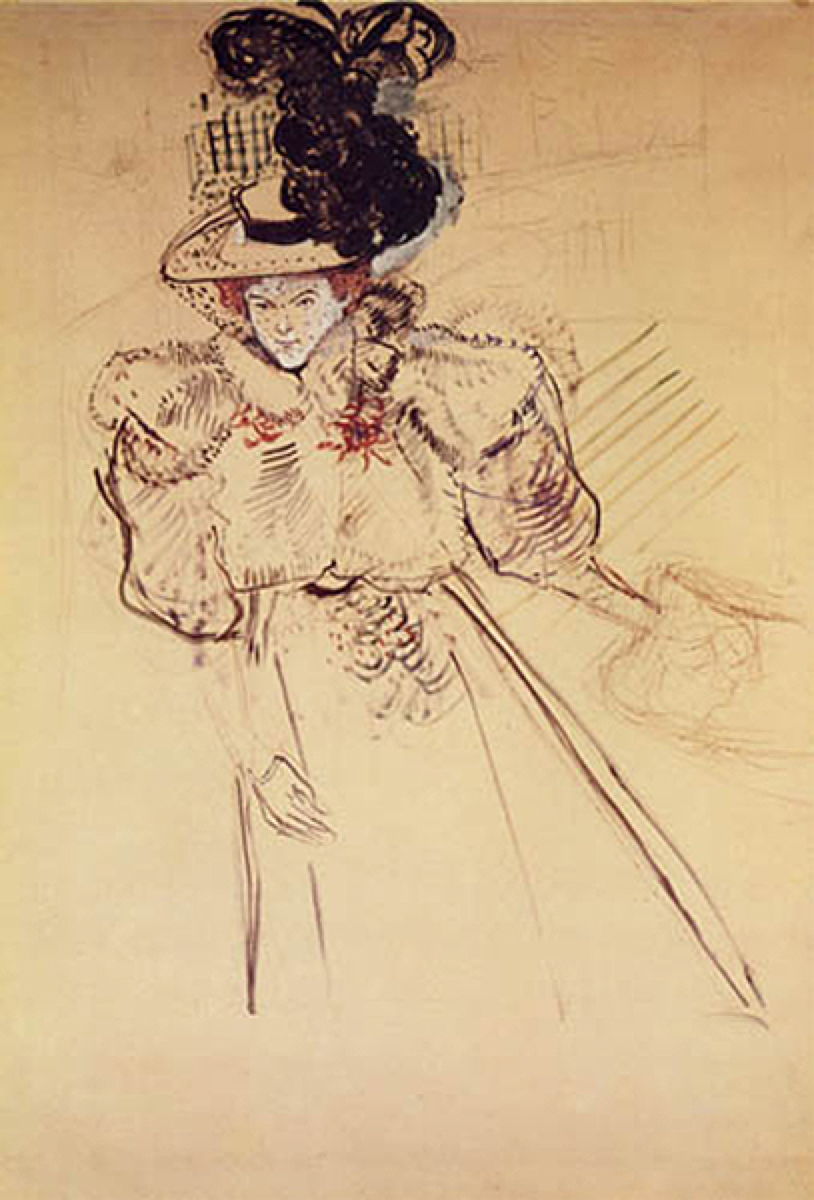
toulouselautrecmisia1895
Henri de Toulouse-Lautrec (1864–1901), Portrait of Misia Natanson (Sert) (1895), further details not known. Wikimedia Commons.

It was probably Toulouse-Lautrec who first started to draw and paint Misia, as in his Portrait of Misia Natanson of 1895.

toulouselautrecrevueblanche1895
Henri de Toulouse-Lautrec (1864–1901), Poster for La revue blanche (1895), further details not known. Wikimedia Commons.

In 1895 he turned that into his Poster for “La revue blanche”, the arts magazine co-founded in 1889 by Misia’s husband, which was the platform that promoted the Nabis, including Pierre Bonnard.

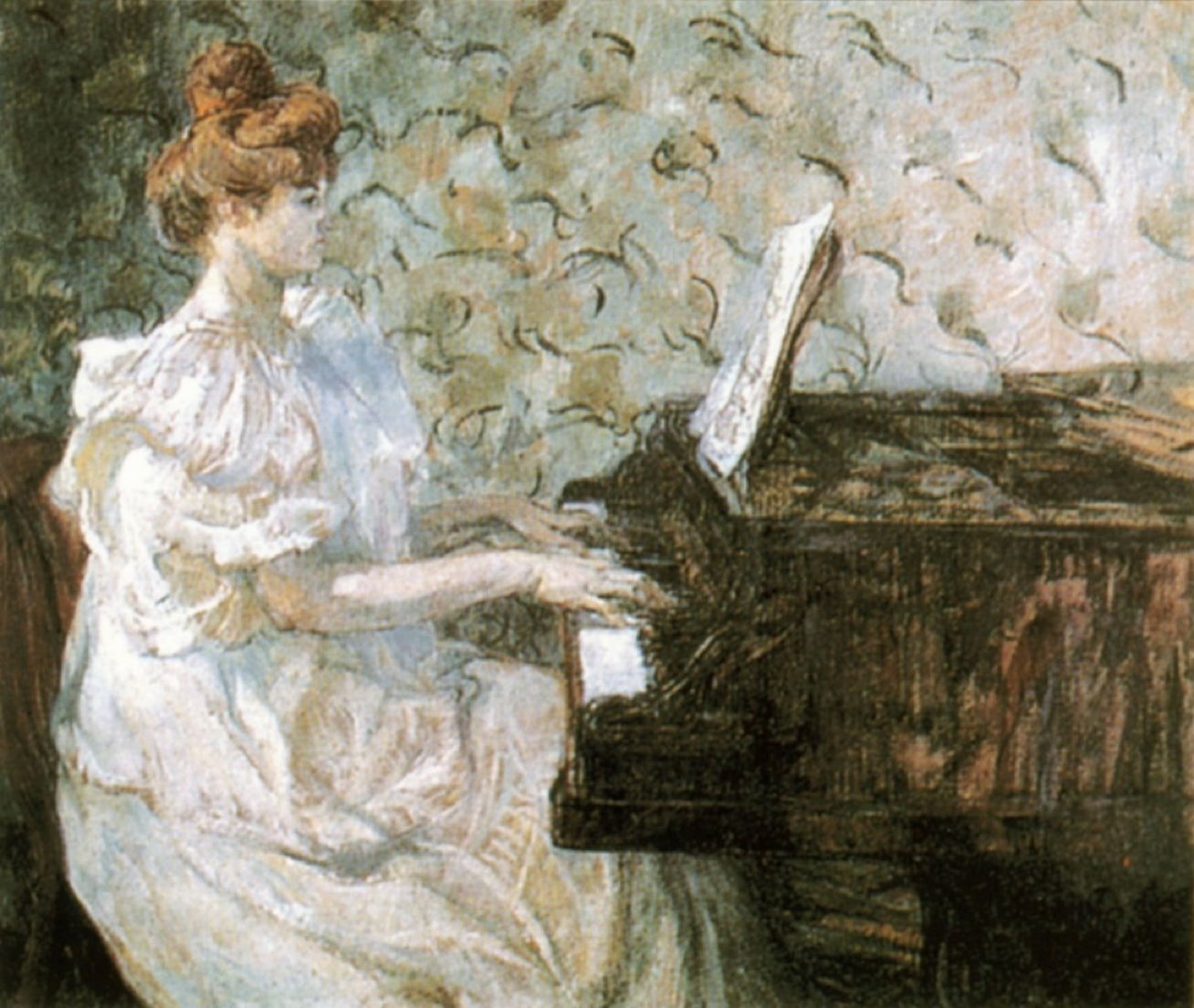
toulouselautrecmisia1897
Henri de Toulouse-Lautrec (1864–1901), Misia Natanson (1897), media and dimensions not known, Musée des Beaux-Arts, Berne, Switzerland. Image by J Frey, via Wikimedia Commons.

Toulouse-Lautrec later painted Misia Natanson playing the piano in 1897.

The Nabis themselves painted Misia’s portraits, not just as their main patron, but in informal settings, as more of a friend and muse.

vuillardvallottonatmisias1897
Édouard Vuillard (1868–1940), Vallotton at the Natansons (1897), further details not known. Wikimedia Commons.

Édouard Vuillard’s Vallotton at the Natansons shows Misia watching Félix Vallotton painting in 1897, at the Natanson’s home.

vallottonmisiadressingtable
Félix Vallotton (1865–1925), Misia at Her Dressing Table (1898), distemper on cardboard, 36 x 29 cm, Musée d’Orsay, Paris. Wikimedia Commons.

Félix Vallotton provides a glimpse into her private life in his Misia at Her Dressing Table from 1898.

bonnardmisiabreakfast
Pierre Bonnard (1867-1947), Misia Natanson at Breakfast (c 1899), oil on wood, 32 x 41 cm, Private collection. The Athenaeum.

In his turn, Pierre Bonnard painted Misia Natanson at Breakfast in about 1899, with one of the family’s maids at work in the background.

bonnardmisiapiano
Pierre Bonnard (1867-1947), Misia at the Piano (Portrait of Misia Natanson) (c 1902), oil on canvas, 46.2 x 39 cm, Private collection. The Athenaeum.

Bonnard’s Misia at the Piano from about 1902 shows Misia doing what she loved most.

At this time, Thadée Natanson needed more capital to support his publishing and other activities. He found a source in Alfred Edwards, a publishing magnate who had founded and published the major newspaper in Paris at the time, Le Matin. Unfortunately, Edwards and Misia fell in love, and Misia became Edwards’ mistress in 1903. As Natanson wanted his capital, so Edwards wanted Misia, and that became a condition of the deal between them.

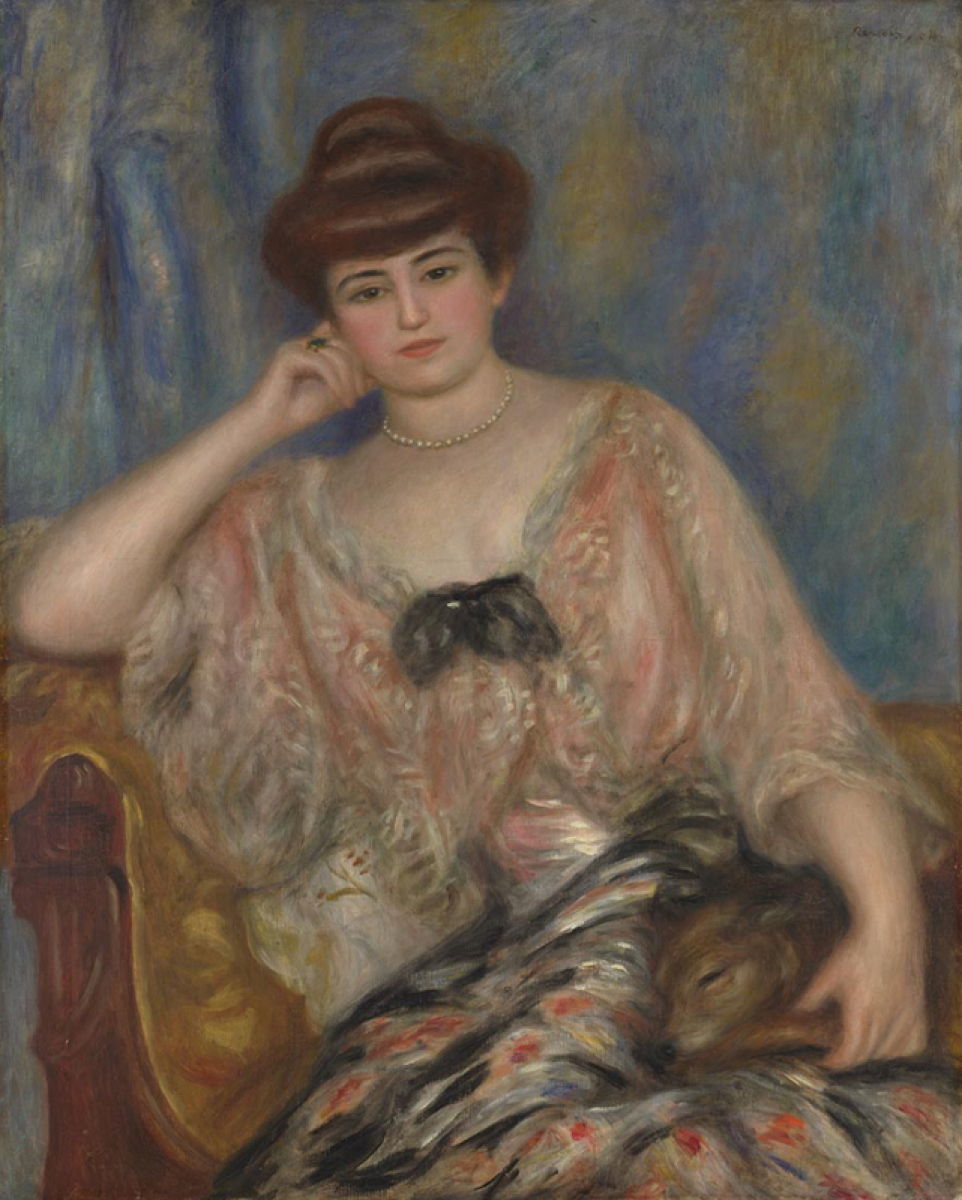
renoirmisiang1904
Pierre-Auguste Renoir (1841-1919), Misia Sert (1904), oil on canvas, 92.1 x 73 cm, The National Gallery (Bought, 1960), London. Courtesy of and © The National Gallery, London.

Renoir painted this and the next portrait of Misia Sert while this was being settled, in 1904. Of the two, this is the better-known, as it hangs in the National Gallery in London. I can’t help feeling that she appears unhappy here.

renoirmisia1904
Pierre-Auguste Renoir (1841–1919), Portrait of Misia Sert (1904), oil on canvas, 55.5 × 66.5 cm, Tel Aviv Museum of Art, Tel Aviv, Israel. Wikimedia Commons.

In this second of Renoir’s portraits of Misia from 1904, now in Tel Aviv, she is as sumptuously dressed, but her head is buried in a book.

Reference

Wikipedia.

❌
❌