I hope you enjoyed Saturday’s Mac Riddles, episode 361. Here are my solutions to them.
1: This second was actually the sixth and bumped up by 20.
Click for a solution
Macintosh II
This second (II) was actually the sixth (there had been five previous Mac models) and bumped up by 20 (its CPU was the first 68020 used in a Mac).
2: Its A5 followed the A4, without any one, and a third thinner.
Click for a solution
iPad 2
Its A5 (its chip) followed the A4 (the chip in the original iPad), without any one (there was no iPad 1), and a third thinner (it was claimed to be about 33% thinner than the original iPad).
3: First with a 750 followed the 604, but there was neither 1 nor 2.
Click for a solution
Power Macintosh G3
First with a 750 (it was one of the first Macs with a PowerPC 750 processor) followed the 604 (previous models had PowerPC 601-604 processors), but there was neither 1 nor 2 (Apple didn’t start naming Power Macs by generation until the G3).
The common factor
Click for a solution
They were each the first model in their series to be numbered, but didn’t start at 1.
I hope you enjoyed Saturday’s Mac Riddles, episode 360. Here are my solutions to them.
1: With parents born in 1984 and 1989, it was born a server and raised with aqua.
Click for a solution
Mac OS X
With parents born in 1984 (Classic Mac OS) and 1989 (NeXTSTEP), it was born a server (first released as Mac OS X Server 1.0 in 1999) and raised with aqua (its initial GUI, explained by Steve Jobs as “when you saw it you wanted to lick it”).
2: First with Face ID and no Home to go to in 2017.
Click for a solution
iPhone X
First with Face ID (it was the first iPhone to feature it) and no Home to go to (it was the first iPhone without a Home button) in 2017 (announced in September, and released in November).
3: It shocked without MIDI in 2009, and ten years later went solo.
Click for a solution
QuickTime X
It shocked without MIDI in 2009 (it first shipped with Snow Leopard, and dropped MIDI support), and ten years later went solo (when Catalina was released in 2019, support for previous 32-bit QuickTime was removed, leaving just QuickTime X).
The common factor
Click for a solution
They each use the Roman numeral X for decimal 10, and should be pronounced ‘ten’ rather than ‘ecks’.
I hope you enjoyed Saturday’s Mac Riddles, episode 359. Here are my solutions to them.
1: Could in theory be 995 or unreal apparatus for running old macOS.
Click for a solution
VM
Could in theory be 995 (Roman numerals VM, although that’s not how the Romans would have done it) or unreal (virtual) apparatus (machine) for running old macOS (one of their purposes).
2: More than a superlative manager at the heart of 1.
Click for a solution
Hypervisor
More than a superlative (hyper) manager (supervisor) at the heart of 1 (it’s central to virtualisation).
3: Unreal input and output from Rusty Russell for 1.
Click for a solution
Virtio
Unreal (virtual) input and output (I/O) from Rusty Russell (it was originally proposed by him) for 1 (it provides the device support for VMs).
The common factor
Click for a solution
They’re all involved in virtualisation on Apple silicon.
I hope you enjoyed Saturday’s Mac Riddles, episode 358. Here are my solutions to them.
1: Thinly dispersed line of people could save lots of space.
Click for a solution
sparse file
Thinly dispersed (sparse) line of people (a file) could save lots of space (what a sparse file can do).
2: Identical copy of rasp when duplicated.
Click for a solution
clone file
Identical copy (a clone) of rasp (a file) when duplicated (what is created when you duplicate a file in the Finder).
3: Steadfast 7.92 inch two-way volume connector.
Click for a solution
firmlink
Steadfast (firm) 7.92 inch (link, an old imperial measure of length equal to this) two-way volume connector (a firmlink is just that, between System and Data volumes).
The common factor
Click for a solution
They’re all distinctive features of the APFS file system.
I hope you enjoyed Saturday’s Mac Riddles, episode 357. Here are my solutions to them.
1: John’s afterword was dropped in 13.
Click for a solution
PostScript
John’s (it was developed by John Warnock and Charles Geschke) afterword (a postscript) was dropped in 13 (deprecated in macOS 12.3, it was removed in macOS 13 Ventura).
2: Painted people who merged with Scots, from QuickDraw to Catalina.
Click for a solution
PICT
Painted people who merged with Scots (the Picts), from QuickDraw to Catalina (the graphics format for QuickDraw, support was largely dropped in macOS 10.15 Catalina).
3: Brisk march for panoramas was lost from X in 2009.
Click for a solution
QuickTime VR
Brisk march (quick time) for panoramas (it introduced many of us to interactive panoramas) was lost from X in 2009 (it was removed from QuickTime X, which came with Mac OS X 10.6 Snow Leopard in 2009).
I hope you enjoyed Saturday’s Mac Riddles, episode 356. Here are my solutions to them.
1: Lowing and barking as you’d expect to hear from Clarus.
Click for a solution
moof
Lowing and barking (it’s claimed to be a mixture of the lowing of a cow and the barking of a dog) as you’d expect to hear from Clarus (from the original dogcow identified by Scott ‘Zz’ Zimmerman, named Clarus by Mark ‘The Red’ Harlan in 1987. See this brief history).
2: Alert heard in the battle between two Apples was replaced in Big Sur.
Click for a solution
Sosumi
Alert (it was an alert sound introduced in 1991) heard in the battle between two Apples (it was a defiant pun on Apple Computer’s use of music in its products, in conflict with Apple Corps’ claimed trademark for the music of the Beatles) was renamed in Big Sur (when it was replaced by Sonumi, although it’s still named Sosumi in /System/Library/Sounds).
3: Arpeggio or shattering glass heard with a Sad Mac.
Click for a solution
Chimes of Death
Arpeggio (it was originally an upward major arpeggio) or shattering glass (later models made the sound of glass being shattered) heard with a Sad Mac (displayed at the same time to indicate a severe problem that prevents normal startup in a Classic Mac).
I hope you enjoyed Saturday’s Mac Riddles, episode 355. Here are my solutions to them.
1: Covid, smallpox, nVIR, but no more.
Click for a solution
virus
Covid (a coronavirus), smallpox (the variola virus), nVIR (a virus affecting Classic Mac OS, first reported in 1987), but no more (viruses are now almost unheard of for macOS).
2: Wooden animal concealing Greeks like DubRobber.
Click for a solution
Trojan
Wooden animal (the original Trojan horse from the Trojan War) concealing Greeks (it did, and ensured they were taken into the city of Troy) like DubRobber (a macOS Trojan also known as XCSSET, identified in 2020).
3: A thief like Amos can arrive by clickfix.
Click for a solution
stealer
A thief (a stealer) like Amos (AtomicStealer, AMOS, or SOMA, identified in 2023) can arrive by clickfix (now one of the most common means of its delivery).
The common factor
Click for a solution
They are types of malware that have affected Macs.
I hope you enjoyed Saturday’s Mac Riddles, episode 354. Here are my solutions to them.
1: In favour of a Scot who was mostly the biggest for almost 20 years until last month.
Click for a solution
Mac Pro
In favour (pro) of a Scot (Mac) who was mostly the biggest (apart from the trash can years, it was the largest model of Mac) for almost 20 years until last month (introduced August 2006, discontinued 26 March 2026).
2: Waterproof novel with a magnetic latch until 2019.
Click for a solution
MacBook
Waterproof (a mac) novel (a book) with a magnetic latch (it was Apple’s first laptop with a magnetic lid closure) until 2019 (when it was discontinued).
3: Opening shot for unknown number like a pizza box in a rack.
Click for a solution
Xserve
Opening shot (a serve in tennis) for unknown number (x) like a pizza box (it looks like one) in a rack (it was Apple’s only Mac intended to be mounted in a rack).
Easter eggs are part of the tradition of this time of year, and the term applied to concealed features in computer hardware or software. It seems to have originated in early video games, although the first record is in the command make love on DEC PDP-10 mainframes in 1967-68. Macs have had their fair share over the years, although Steve Jobs seems to have disliked them, and is reported to have banned them. Here are a few that I’ve come across in more recent years.
Clarus the Dogcow
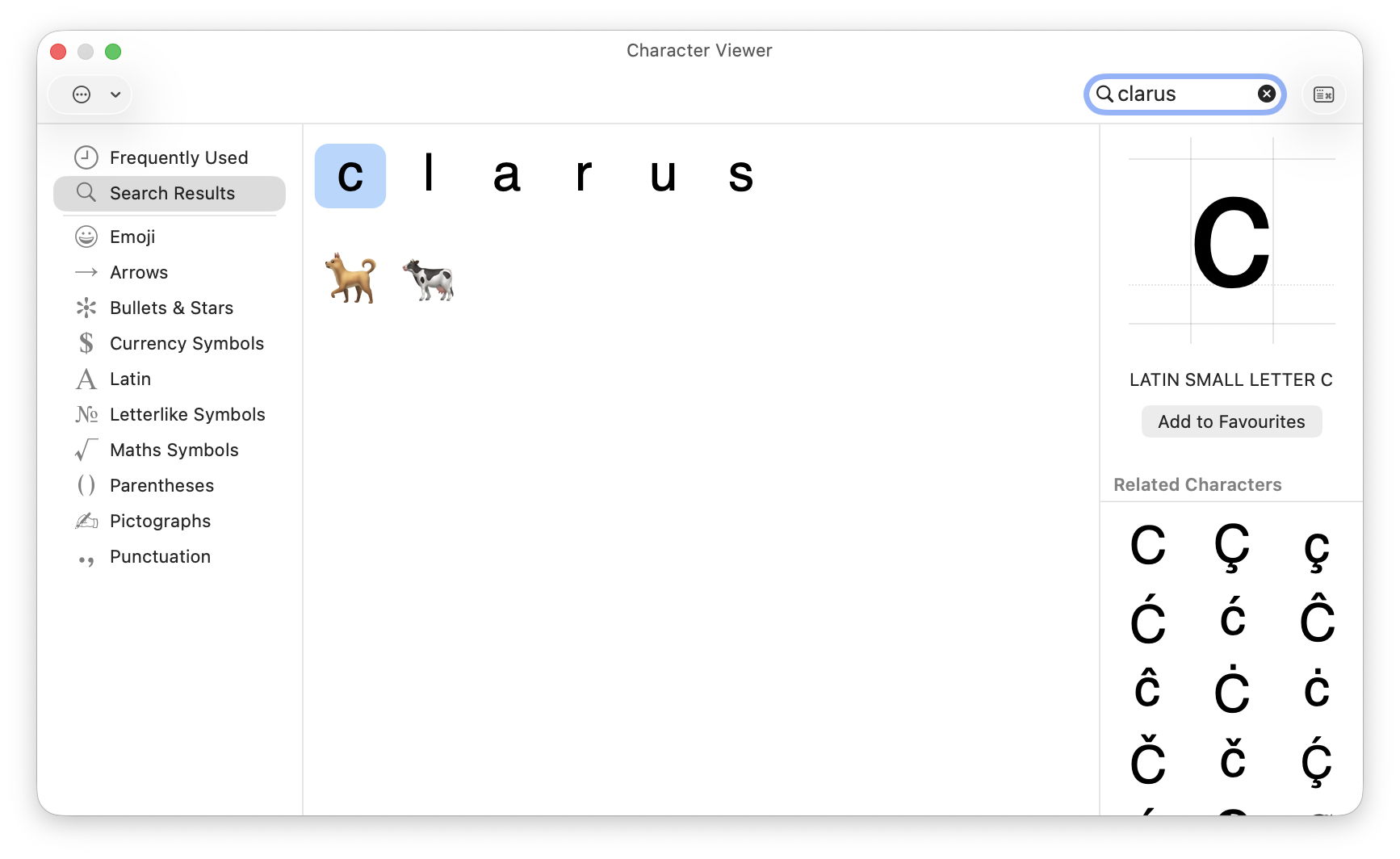
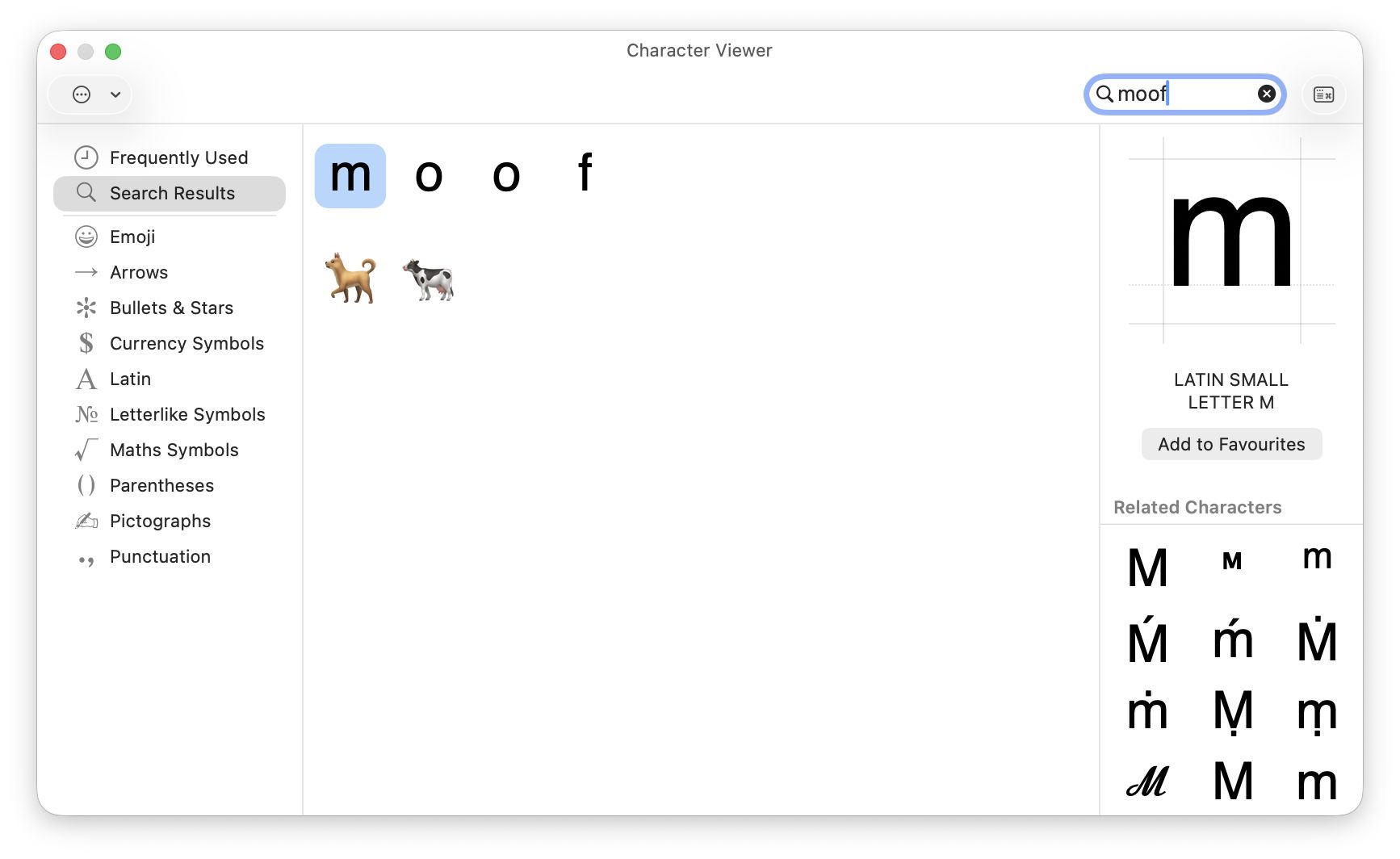
This mythical animal from the Mac bestiary has been tucked away as an Easter egg in the Emoji & Symbols viewer for many years. Type the letters clarus or moof (the sound it makes) into the search box of that viewer to see the two emoji figures of a dog and a cow, although neither of them resembles Clarus in appearance, as shown in the Page Setup window in recent macOS.
Marijuana leaves
More inaccessible, but apparently present for even longer, is a PNG image showing marijuana leaves embedded inside the Chess app. To see these, select Chess.app, and Show Package Contents. Work through the Contents, Resources and Styles folders and you’ll see two styles Fur and Grass, neither of which is offered in the app’s Settings. In the Grass folder, select Border.png to see a pattern of marijuana leaves.
I’ve been unable to find a way of accessing these as a style for the app, though. Chess also has a unique About window that not only contains the full GNU licence for the app, but offers a button to download the app’s source from Apple’s Open Source Releases page. Perhaps the intention is that you can build your own version of the app giving access to the Grass and Fur styles, making it the most convoluted Easter egg.
MAC wallpaper
According to a recent report in MacWorld, the colour-matched wallpapers provided for MacBook Neos spell out MAC.
Dont Steal Mac OS X
This is a kernel extension named Dont Steal Mac OS X.kext, found in /System/Library/Extensions, whose sole purpose is to contain Apple’s copyright statement, and in its own words “to protect Apple copyrighted materials from unauthorized copying and use.” Oddly, the current version claims copyright over the period 2006-2020 in its Info.plist, but 2006,2009 in its licence resource.
Minimise (defunct)
Until a few years ago, the yellow Minimise button in windows featured a set of Easter eggs that are claimed to have been a favourite of Steve Jobs. Clicking on that button with Control, Shift or Control and Shift keys held ran the animation at widely different speeds, and could be reversed when clicking on the minimised window in the Dock. These are described here, but have been removed since then.
RAM disk (defunct)
According to a relatively recent report in Tom’s Hardware, the ROM of Power Mac G3 models contains an Easter Egg of a hidden file when a RAM disk is created with the name secret ROM image.
Macs are well known for their longevity, and are substantially cheaper when purchased used. This is a good time to consider buying a used Mac, as prices for Intel models are continuing to fall, and earlier Apple silicon models are becoming more widely available. However, buying any used computer is higher risk than buying new. This article explains how to reduce that risk.
Official refurbs
If you’re looking for discounted recent models, then the best place is Apple’s refurb store, in your local version of this page. These should be effectively as new, and include relatively recent models, but you’re unlikely to make big savings here. They’re ideal if you enjoy unboxing, as refurbs ship in their standard packaging.
Resellers
Most countries have retailers who specialise in preparing and selling used Macs. Among the best known are:
These are staffed by Apple-trained technicians who check each Mac thoroughly. They offer a wider range of models, many of them at highly affordable prices. Most offer a return period, as well as a one-year warranty, and are subject to local consumer protection law.
Private vendors
My one and only golden rule is never to buy a used Mac without seeing it in the flesh beforehand. That bargain a thousand miles away could turn out to have been stolen, and even if it’s genuine you could still end up with a useless Mac. I’ve never heard of anyone buying a house or car without seeing it for themselves, and a Mac should be no different. I suppose it’s feasible to go through the following checks over FaceTime or Zoom, but there are so many skilled con artists around I wouldn’t risk it.
When you arrive and see the Mac you’re about to purchase, work systematically through the following.
Provenance
Your first and most important question is whether this Mac is the seller’s to start with. The best answer comes in the form of its original proof of purchase, giving its serial number. Check that matches the serial number in Hardware Overview in System Information. If it doesn’t, then thank them politely and leave as quickly as you can. While you’re looking in that section, if the Mac has a T2 or Apple silicon chip, at the foot of that information you’ll see its Activation Lock Status: if that’s enabled, make a careful note, as you’ll need to get that disabled before you take your new Mac away. Intel Macs without T2 chips don’t have that to worry about.
Establishing provenance gets more complicated if that Mac has had more than one previous owner, but the current owner should ideally have a chain of bills of sale to reassure you. If they don’t, then that Mac may well have a murky past that could catch up with you.
Condition
Once you have confidence that you’re dealing with the real owner of the Mac, check it out as thoroughly as you can, without rushing or stripping it down to its logic board. A careful and undistracted visual examination is important, and gives clues through its general cleanliness as to how well it has been cared for.
It would be comforting to run hardware diagnostics just in case, although that’s not a particularly sensitive check for incipient problems. In ideal circumstances you’d want to check wear and any errors on its internal SSD using DriveDx or another SMART utility, but you’re unlikely to get the chance. If you have a friend who is a hardware technician, they could be a real boon to take along, just as you should take a good mechanic when you check out a used car.
AppleCare
If the current owner has AppleCare cover on that Mac, they should in most cases be able to transfer that with its sale. This requires them to sign into My Support for the agreement number and details, and with the original sales receipt for that Mac, to contact Apple Support and give them your details as the new owner. Apple explains this here, with useful onward links.
Haggle
I wish you success in agreeing the best price.
Activation Lock (Intel T2, Apple silicon)
The last hurdle in a successful purchase is the one most often forgotten, and the cause of much buyer remorse. It’s all the fault of Activation Lock and Find My Mac. These ensure that the owner’s Apple ID and password are required before that Mac can be used, erased, or Find My Mac disabled. In effect they make that Mac useless to anyone else until Activation Lock has been disabled.
Macs with T2 or Apple silicon chips running Catalina or later, where the user has 2FA on their Apple ID, are likely to be protected by Activation Lock. There is an additional requirement, depending on their architecture:
Apple silicon Macs must have their security policy set to Full Security;
Intel T2 Macs must have startup security set to Secure Boot, with booting from external drives disallowed.
Activation Lock is most commonly enabled when Find My Mac is turned on, and turning that off also disables Activation Lock. That requires entry of the current user’s Apple ID password, so must be done by the seller before they part with their Mac.
There are other ways to disable it:
It’s automatically disabled when the owner runs Erase All Content and Settings, only available on T2 and Apple silicon models anyway.
Activation lock can be disabled in the owner’s account at www[.]iCloud[.]com/find by removing that Mac from the list of All Devices there.
If you have proof of purchase, you can request Activation Lock to be removed by Apple support, but that’s a last measure and not something you should ever choose.
Never take possession of someone else’s Mac while its Activation Lock is active, as it will only cause you trouble and grief.
Handover
If everything is going well, you should be ready for the Mac to be handed over to your possession, accompanied by a written record of the sale. The conclusion is best seen as a mutual arrangement, as it gives the seller confidence that any data on that Mac is completely erased, and you the confidence that you’re about to gain a Mac you can use.
If it’s an Intel Mac, confirm with one another that it starts up without requiring a firmware password. If it has a T2 or Apple silicon chip, use its Erase All Content and Settings together to ensure that all its old files are made unreadable, and to be certain that Find My Mac and Activation Lock are disabled. Sadly, erasing older Intel Macs without T2 chips is a slower and more complicated process.
Checklist
Inspect the Mac before handing over any money.
Check proof of purchase and serial number, noting Activation Lock status.
I hope you enjoyed Saturday’s Mac Riddles, episode 353. Here are my solutions to them.
1: The future was here 25 years ago when the fastest land animal arrived.
Click for a solution
Cheetah (Mac OS X 10.0)
The future was here (launched under the tagline of ‘the future is here’) 25 years ago (released on 24 March 2001) when the fastest land animal (a cheetah, despite Mac OS X 10.0 being far from the fastest) arrived.
2: This atelier came with more than a marathon four years ago.
Click for a solution
Mac Studio M1
This atelier (a studio) came with more than a marathon (the first Apple silicon Mac to feature an M1 Ultra chip) four years ago (announced 8 March and released 18 March 2022).
3: Wicked fast at 40 MHz, its special effects impressed 36 years ago.
Click for a solution
Macintosh IIfx
Wicked fast (it was dubbed ‘wicked fast’) at 40 MHz (the clock speed of its 68030 CPU and bus), its special effects (FX) impressed 36 years ago (released 19 March 1990).
The common factor
Click for a solution
They each celebrated their anniversaries this month.
I hope you enjoyed Saturday’s Mac Riddles, episode 352. Here are my solutions to them.
1: British sister of ANSI is Tahoe’s child of RSR.
Click for a solution
BSI
British sister of ANSI (The British Standards Institution, or BSI, is the UK equivalent of the American National Standards Institute) is Tahoe’s child of RSR (it’s the macOS 26 reimplementation of Rapid Security Responses from Ventura).
2: Puzzle vault in the Da Vinci code contains Safari.
Click for a solution
Cryptex
Puzzle vault in the Da Vinci code (in Dan Brown’s novel ‘The Da Vinci Code’, it’s a portable cylindrical vault resembling a combination lock, used to contain secret messages or precious objects) contains Safari (recent versions of macOS include two cryptexes, the App cryptex containing Safari, and the OS cryptex containing dyld caches).
3: The sound of a liquid hitting a surface could be 1 or its parent.
Click for a solution
Splat
The sound of a liquid hitting a surface (a splat) could be 1 or its parent (it’s Apple’s internal name for the cryptex updates in RSRs and BSIs).
The common factor
Click for a solution
They all refer to the sealed disk images used by recent versions of macOS.
I hope you enjoyed Saturday’s Mac Riddles, episode 351. Here are my solutions to them.
1: Show for recording or art, it isn’t as recent as you might think.
Click for a solution
Studio Display
Show (a display) for recording (a recording studio) or art (an art studio), it isn’t as recent as you might think (most recently 27-inch 5120 x 2880 from 2022, but an earlier series of models between 1998-2004).
2: Theatre exhibition was originally the largest of its kind.
Click for a solution
Apple Cinema Display
Theatre (a cinema) exhibition (a display) was originally the largest of its kind (the original model was the largest flat panel display on the market when it was launched in 1999, 22-inch, up to 1600 x 1024).
3: Gallery for pictures of the famous in greyscale only.
Click for a solution
Macintosh Portrait Display
Gallery (a display) for pictures of the famous (portraits) in greyscale only (available between 1989-1992, 15-inch with 640 x 870 in 256 shades of grey).

 Login
Login