Dragonflies have suffered a bad press for too long. Commonly known on both sides of the Atlantic as the devil’s darning needles, they’re more widely associated with evil, biting people, or even sewing their eyelids together, all categorically untrue. In reality they should be our friends, as they’re insectivorous, and amazingly effective at consuming biting flies.
Unfortunately, their associations in paintings are as bad as those old wives’ tales, and they have been depicted infrequently.
Ambrosius Bosschaert (1573–1621), Flower Still Life (1614), oil on copper, 30.5 x 38.9 cm, J. Paul Getty Museum, Los Angeles, CA. Wikimedia Commons.
Ambrosius Bosschaert (1573–1621) painted this Flower Still Life in oil on copper in 1614, during the early years of the Dutch Golden Age. At first its eclectic mixture of different flowers and flying insects appears haphazard, but they merit a deeper reading. The flowers include carnation, rose, tulip, forget-me-nots, lilies of the valley, cyclamen, violet and hyacinth, which could never, at that time, have bloomed at the same time. The butterflies, bee and dragonfly are as ephemeral as the flowers around them, confirming that it’s a vanitas painting.
Jan van Kessel the Elder (1626–1679), (title not known) (1653), oil on copper, dimensions not known, Galerie Müllenmeister, Solingen, Germany. Wikimedia Commons.
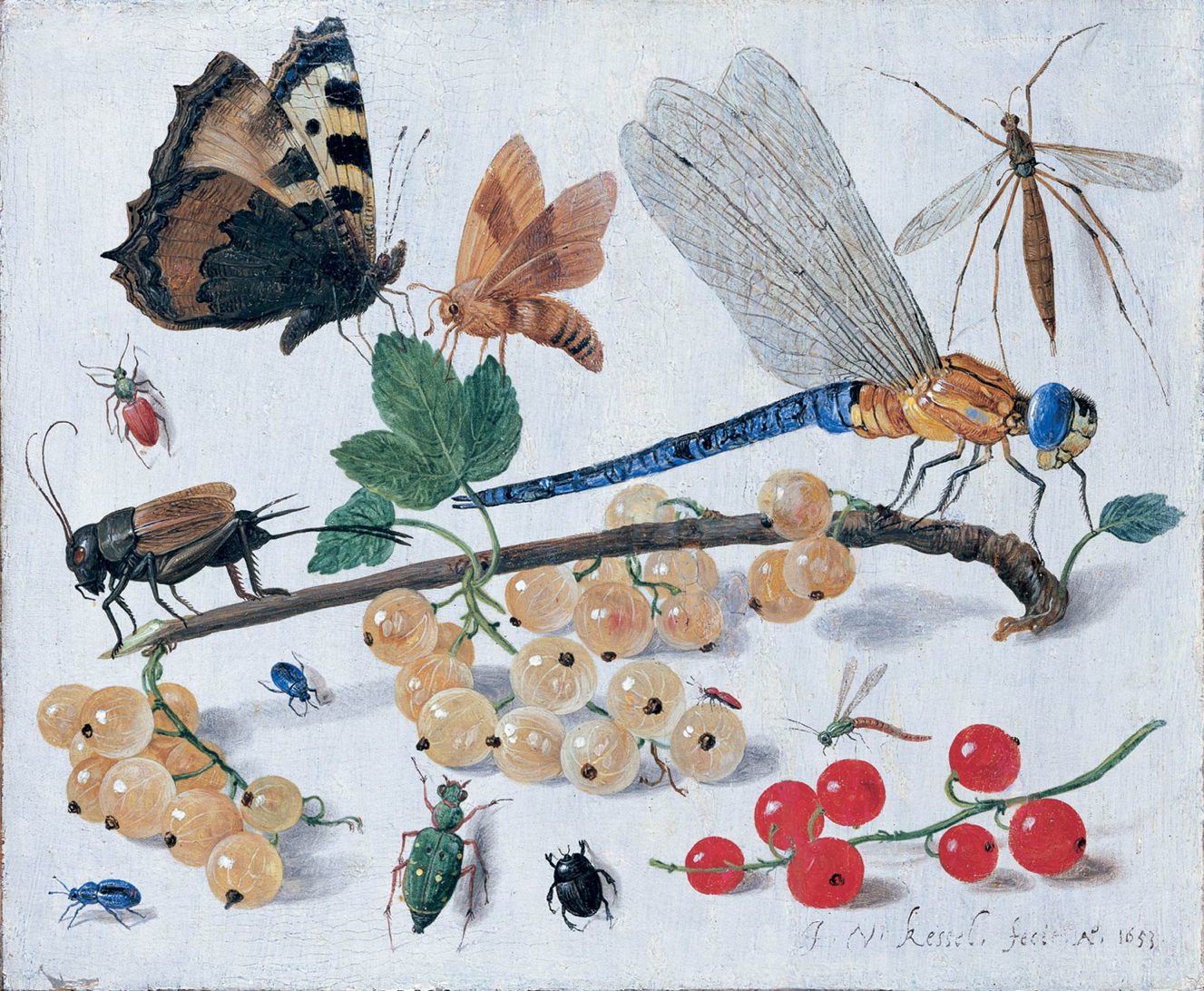
In 1653, Jan van Kessel the Elder painted this collection of insects and berries in oil on copper. The dragonfly shown appears to be a southern hawker (Aeshna cyanea), one of the most common large species found throughout Europe, although its thorax is unusually pale, suggesting it might be a young adult (teneral), or had discoloured after death.
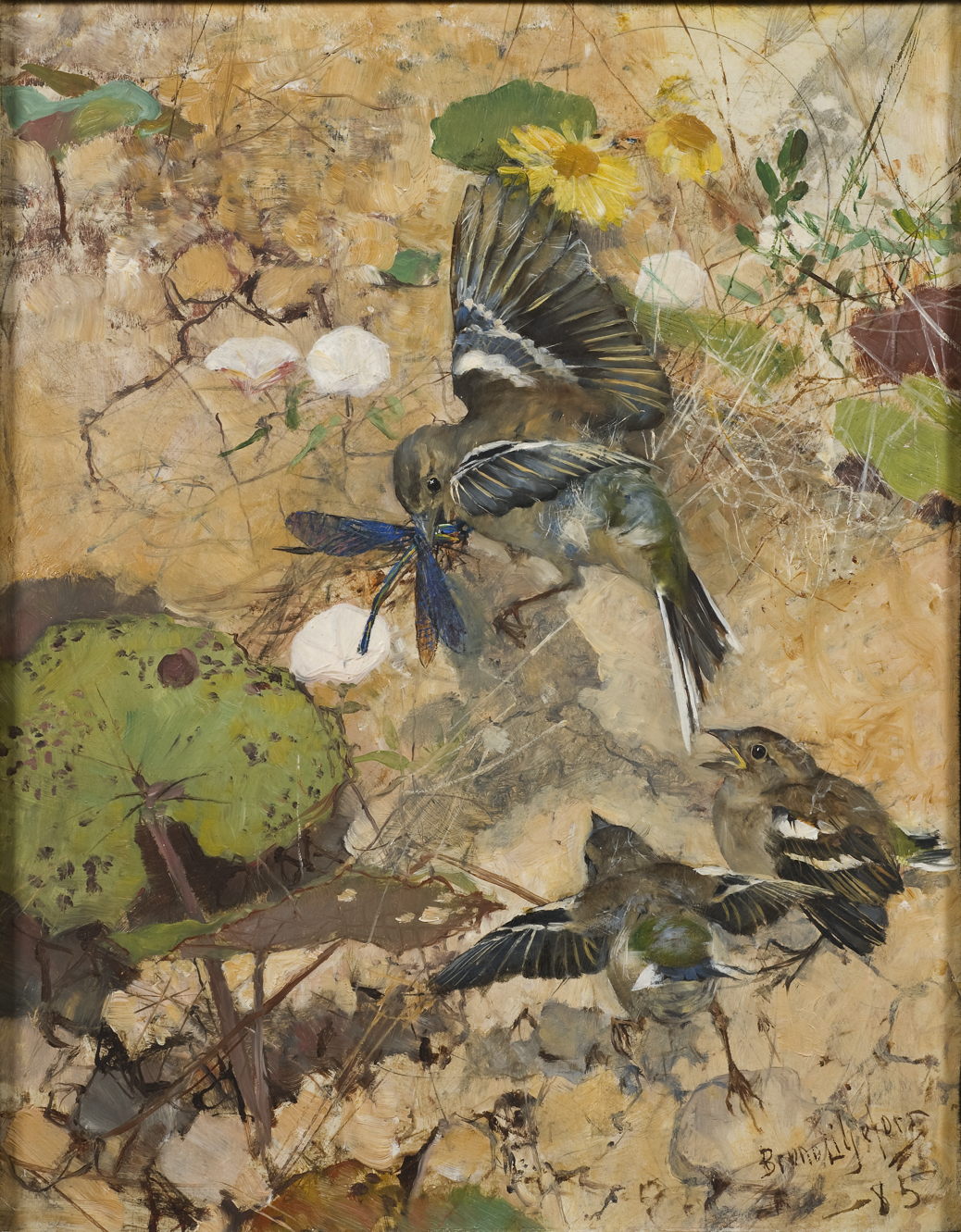
Bruno Liljefors (1860–1939), Chaffinches and Dragonflies. Five studies in one frame (1885), oil on panel, 33 x 25.5 cm, Nationalmuseum, Stockholm, Sweden. Wikimedia Commons.
The large meal seen in the centre of Bruno Liljefors’ Chaffinches and Dragonflies. Five studies in one frame (1885) is another common European species, the beautiful demoiselle (Calopteryx virgo). This is considerably smaller than the hawker seen above, and is more correctly termed a damselfly, as its pairs of wings are of equal length, and when resting are folded back against its body.
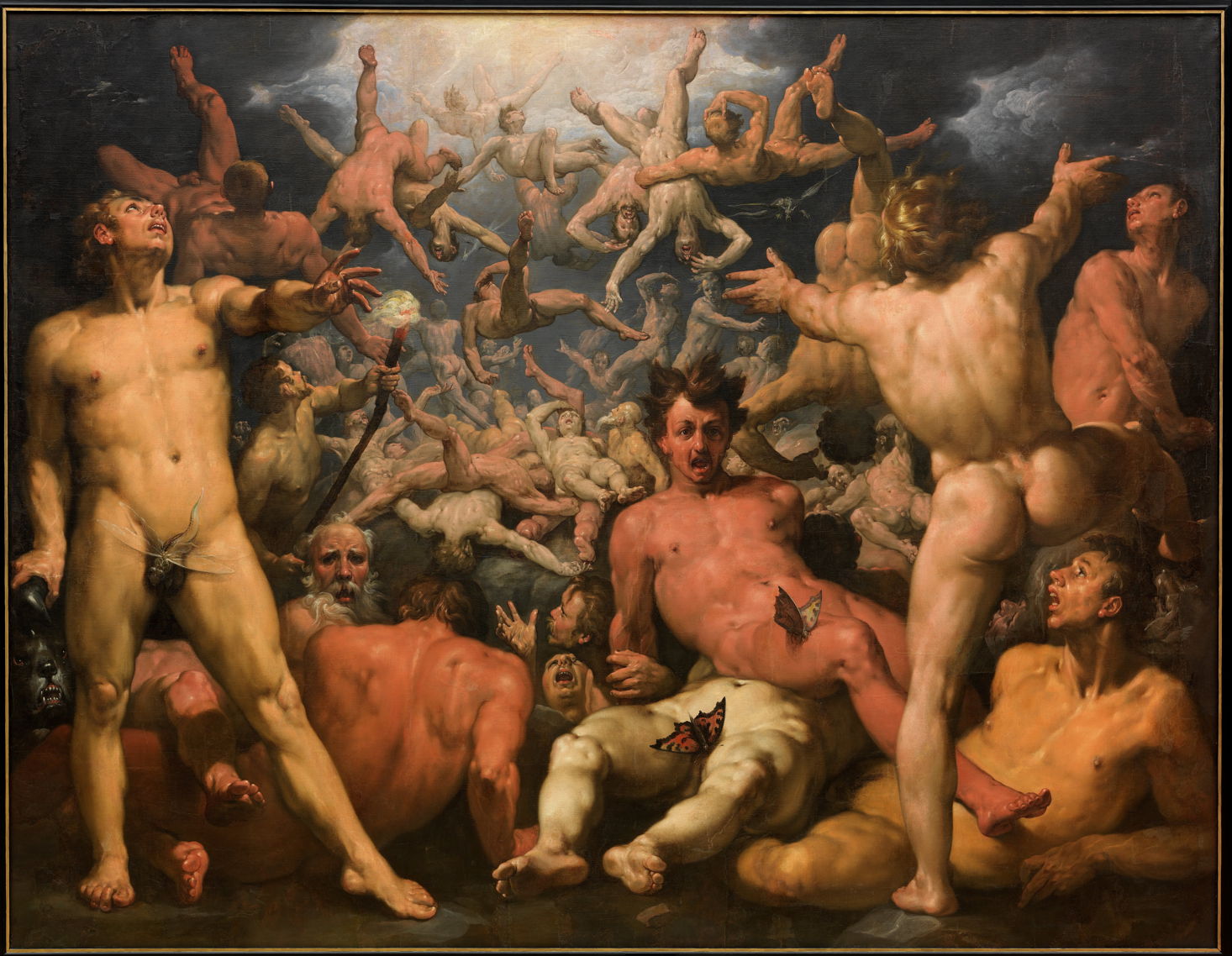
Cornelis van Haarlem (1562–1638), The Fall of the Titans (1588-90), oil on canvas, 239 x 307, Statens Museum for Kunst (Den Kongelige Malerisamling), Copenhagen, Denmark. Wikimedia Commons.
Cornelis van Haarlem’s The Fall of the Titans from 1588-90 might seem a strange painting in which to find flying insects. This shows the classical myth in which the gods have defeated the Titans who preceded them. As a result the Titans fell from the heavens and were imprisoned in Tartarus, or Hell, as shown here. It was claimed that flying insects were associated with the fire of the underworld, although the two butterflies and one dragonfly here appear quite incongruous.
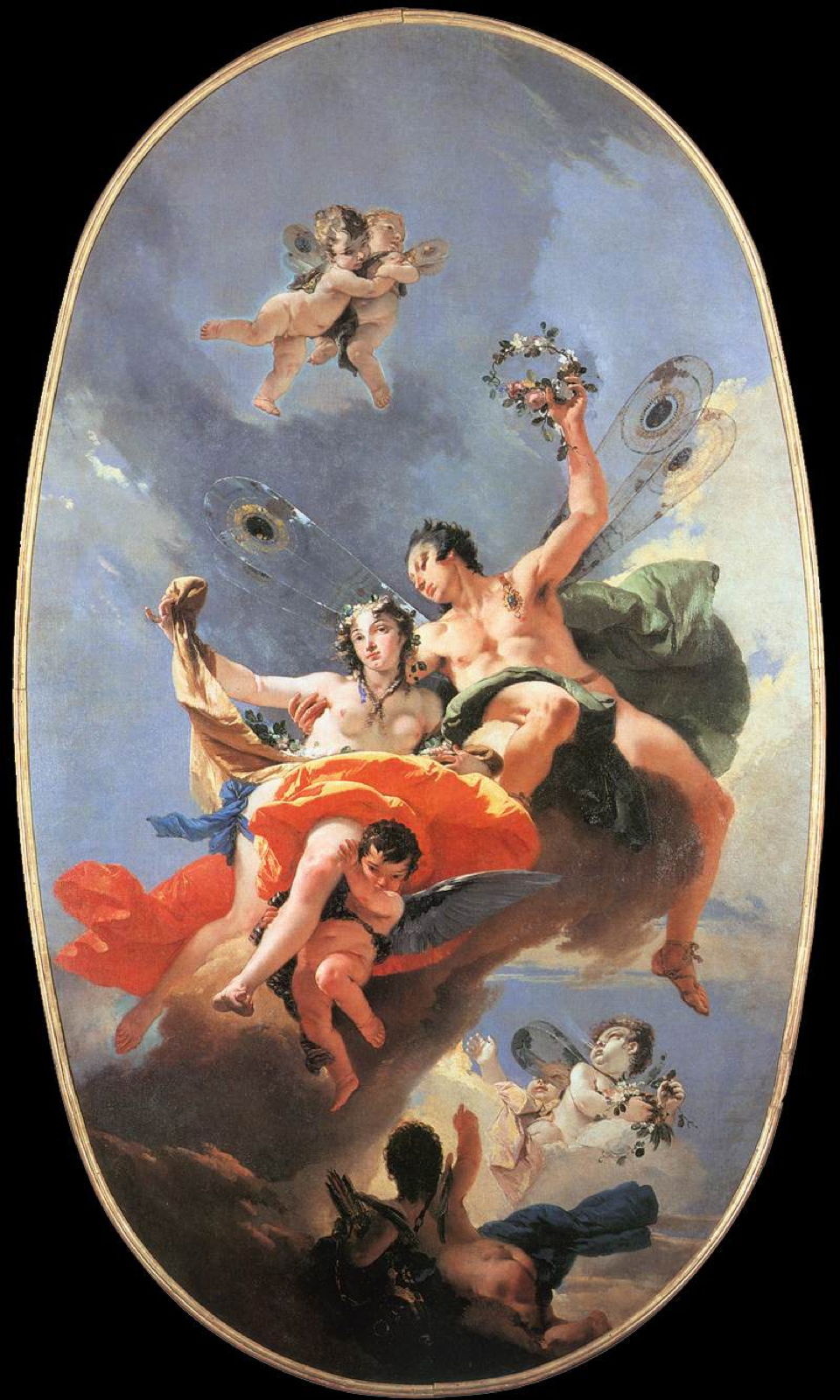
Giovanni Battista Tiepolo (1696–1770), The Triumph of Zephyr and Flora (1734-35), oil on canvas, dimensions not known, Ca’ Rezzonico, Venice, Italy. Wikimedia Commons.
Tiepolo’s The Triumph of Zephyr and Flora from 1734-35 refers to Ovid’s account in his Metamorphoses, and to Botticelli’s Primavera, with Zephyrus in flight with his arm around Flora, just about to crown her with a garland. Unusually, Zephyrus is given the wings of a dragonfly.
Elihu Vedder (1836–1923), Fortuna (date not known), oil on canvas, 55.9 x 40.6 cm, Private collection. The Athenaeum.
In the Roman religion, Fortuna (Greek equivalent Tyche) was the goddess of fortune and luck, both good and bad. More usually depicted as being veiled and/or blind, to indicate the chance involved, she was the embodiment of capriciousness. In this updated portrait of the goddess, Elihu Vedder shows her as a carefree, happy-go-lucky woman, with the wings of a dragonfly, sat next to a sack of gold coins. Vedder first visited Italy in 1858, and lived there from 1906 until his death seventeen years later, so he may well have been referring to Tiepolo’s Zephyrus, which was and remains in Venice.
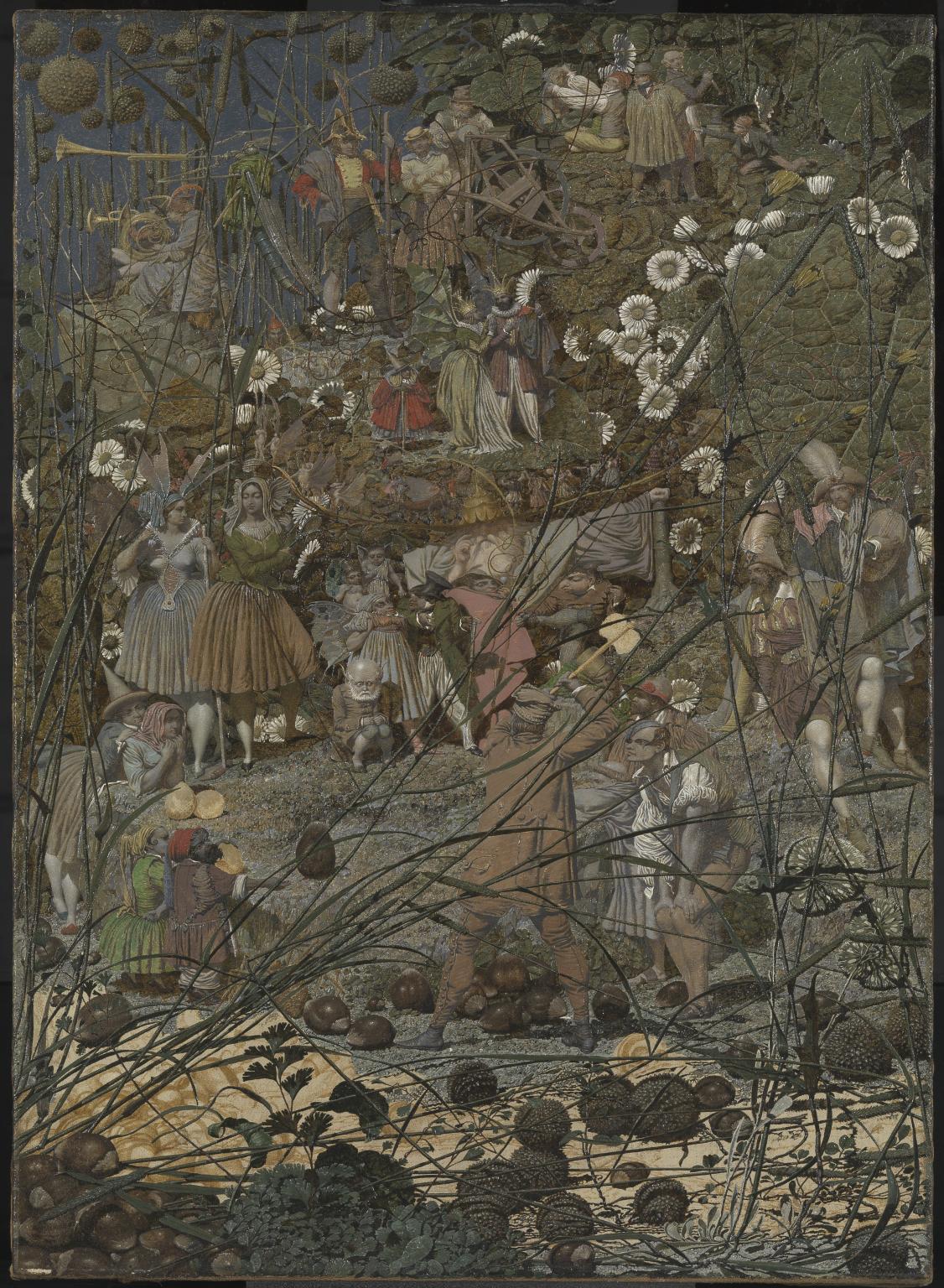
My last painting of a dragonfly is by far the most complex, and was made by Richard Dadd between 1855-64, when he was a patient in the Bethlem and Broadmoor psychiatric hospitals, after he had murdered his father.
Dadd’s The Fairy Feller’s Master-Stroke has its origins in Shakespeare’s plays, with its main content drawn from A Midsummer Night’s Dream. This looks through fine stalks of Timothy grass at a foreground of scattered hazelnuts and plane tree fruit. Although its perspective is flattened, the figures in the lower half of the painting are stood on a gently rising grassy sward, behind which is a steeper bank and stone walling. Those in the upper third of the painting appear to be on another level, which rises more steeply towards the top edge.
The scene is set in the night-time, although daisy flowers are still unnaturally open, and there is night sky visible at the upper left. The feller himself, a hewer or fellow, seen at the centre, is about to cleave a hazelnut with his axe to provide a new carriage for Queen Mab (pronounced Maeve, to rhyme with rave), who replaces Titania as the queen of fairyland.
Even the distant upper section of the painting is rich in its array of characters. Trumpeters at the left include two boys, given as a ‘tatterdemalion’ and a ‘junketer’, and an insect intended to be a dragonfly. To the right of them are the characters from the still-popular child’s counting saying, of tinker, tailor, soldier, sailor, rich man, poor man, beggar man, and thief, although not quite in that order. The dragonfly may have been based on another large species found throughout Europe, the emperor (Anax imperator).
In yesterday’s guide to dealing with apps that crash immediately you open them, I carefully avoided mentioning what you might find in the log. This article puts that right.
The list of common causes I gave is:
macOS intentionally crashed the app because of an error in code signing, or another serious security failure;
the app failed because it was in translocation;
the app couldn’t open a damaged or incompatible document;
the app had a problem with its Preferences.
Investigating these in the log is among the simplest tasks for those learning to access it, providing the app crashes reliably. Show the seconds value in the menu bar clock, and open the Applications folder containing the app. Select it as the seconds reach about 45, to allow time for its icon to be displayed, then double-click the app to run it as the seconds reach 00, but not a moment earlier. Don’t touch the mouse/trackpad or keyboard for at least 5 seconds, by which time the crash should have occurred and the notification or crash log should have been displayed.
Then open LogUI (or a substitute), and set it to extract and display all the entries for 5 seconds from 00 seconds. If you open a new window in LogUI the start time will be preset to the time you opened the app, all ready to get the log extract.
The double-click is easy to spot in the log, as it’s marked by four almost identical Activity entries with a yellow softball emoji, each reading something like AppKit Finder sendAction:
short entries that are quick to locate. Entries following the fourth of those then report what happened next.
Code signing errors
These are normally easy to recognise, as they start with a call to verify the signature, 00.940943 Finder sendAction:
00.963228 syspolicyd SecTrustEvaluateIfNecessary
00.963982 trustd SecKeyVerifySignature
that’s followed by an error that’s repeated many times, 00.981296 lsd com.apple.securityd MacOS error: -67030
Follow those down a bit further and you’ll see this reported in other subsystems 01.013084 com.apple.launchservices Error -67030 validating the signing information for [private], error=Error Domain=NSOSStatusErrorDomain Code=-67030 "(null)" UserInfo={SecCSArchitecture=arm64}
Normally, this will be checked again by AMFI (Apple Mobile File Integrity) 01.030162 amfid Entering OSX path for /Users/hoakley/Documents/000aa/DelightEd.app/Contents/MacOS/DelightEd
01.031629 amfid SecKeyVerifySignature
01.036291 amfid com.apple.securityd MacOS error: -67030
01.048491 error amfid com.apple.MobileFileIntegrity.framework Code failed basic validity check (error: -67030): Error Domain=NSOSStatusErrorDomain Code=-67030 UserInfo={SecCSArchitecture=[private]}
01.048857 amfid /Users/hoakley/Documents/000aa/DelightEd.app/Contents/MacOS/DelightEd not valid: Error Domain=AppleMobileFileIntegrityError Code=-420 "The signature on the file is invalid" UserInfo={NSURL=file:///Users/hoakley/Documents/
000aa/DelightEd.app/Contents/MacOS/DelightEd, NSLocalizedDescription=The signature on the file is invalid}
That’s confirmed and actioned by the kernel 01.048950 kernel AMFI: code signature validation failed.
01.052968 amfid com.apple.MobileFileIntegrity [private]: Broken signature with Team ID fatal.
01.053043 kernel AMFI: When validating /Users/hoakley/Documents/000aa/DelightEd.app/Contents/MacOS/DelightEd: The code contains a Team ID, but validating its signature failed. Please check your system log.
01.053052 kernel mac_vnode_check_signature: /Users/hoakley/Documents/000aa/DelightEd.app/Contents/MacOS/DelightEd: code signature validation failed fatally: When validating /Users/hoakley/Documents/000aa/DelightEd.app/Contents/MacOS/DelightEd: The code contains a Team ID, but validating its signature failed. Please check your system log.
01.053059 kernel validation of code signature failed through MACF policy: 1
01.053061 kernel check_signature[pid: 2718]: error = 1
01.053066 kernel proc 2718: load code signature error 4 for file "DelightEd"
01.053461 kernel AMFI: hook..execve() killing xpcproxy (pid 2718): Attempt to execute completely unsigned code (must be at least ad-hoc signed).
01.053624 kernel ASP: Sleep interrupted: ref 29, signal 0x100, pid: 2718
with the conclusion 01.053627 kernel ASP: Security policy would not allow process: 2718, /Users/hoakley/Documents/000aa/DelightEd.app/Contents/MacOS/DelightEd
You’re not likely to miss those.
Common error codes from signature validation include:
-2147409652 CSSMERR_TP_CERT_REVOKED, the certificate has been revoked
-67007 resource envelope is obsolete (version 1 signature)
-67008 unsealed contents present in the root directory of an embedded framework
-67013 resource envelope is obsolete (custom omit rules)
-67021 nested code is modified or invalid
-67023 invalid resource directory (directory or signature have been modified)
-67030 invalid Info.plist (plist or signature have been modified)
-67054 a sealed resource is missing or invalid
-67056 code has no resources but signature indicates they must be present
-67061 invalid signature (code or signature have been modified)
-67062 code object is not signed at all, which is by far the most common.
In this case, I had changed a single character in the app’s Info.plist, which broke its CDHashes, and resulted in the correct error code of -67030.
App translocation
In this case, you’re looking for two related pieces of evidence, that a process mentions the act of translocation, and that the app is run from a translocation location. Again, these normally aren’t hard to find.
Shortly after the double-click, 00.968186 Finder sendAction:
you should see mention of the creation of the translocation directory 01.040587 lsd com.apple.securityd SecTranslocateCreateSecureDirectoryForURL: created /private/var/folders/x4/
x00kny5x0_5dsnmmxhtw6hc80000gn/T/AppTranslocation/B9651238-6B8C-4750-BFAC-E0D1A327768C/d/DelightEd.app
A little further down the log you’ll see the app being referenced in that long path 01.069877 amfid Entering OSX path for /private/var/folders/x4/x00kny5x0_5dsnmmxhtw6hc80000gn/T/AppTranslocation/
B9651238-6B8C-4750-BFAC-E0D1A327768C/d/DelightEd.app/Contents/MacOS/DelightEd
01.090927 com.apple.runningboard _executablePath = /private/var/folders/x4/x00kny5x0_5dsnmmxhtw6hc80000gn/T/AppTranslocation/
B9651238-6B8C-4750-BFAC-E0D1A327768C/d/DelightEd.app/Contents/MacOS/DelightEd
and so on.
If you’re struggling to find those, select the Messages item at the right end of the toolbar in LogUI, type the app name into the search box there and press Return, to filter entries.
Failed to open document
Of the four common causes of early app crashes, these are hardest to find evidence in the log. This is because the only process likely to know what went wrong is the app itself, and few third-party apps write anything useful to the log. You might find a useful entry or two by setting that menu at the right end of LogUI’s toolbar to Processes, entering the app name into the search box, and pressing Return. However, in many cases there will be little or no useful information.
Preference file problems
My previous article referred only to standard preferences that are handled by cfprefsd. Some apps run their own preferences using their own code, and neither cfprefsd nor the defaults command covers them. If they have a problem when accessing those custom files, it’s most unlikely to be recorded in the log.
In other apps, you should look for evidence that the crash happened shortly after the cfprefsd service is connected to the app, to support the standard features.
Starting once again with the double-click 01.579559 Finder sendAction:
it may take some time for the opening stages to complete. You should then see the XPC connection between the app and cfprefsd being set up for both root and the user 01.638428 DelightEd com.apple.xpc [0x102cf6980] activating connection: mach=true listener=false peer=false name=com.apple.cfprefsd.daemon
01.638504 DelightEd com.apple.xpc [0x102cf7960] activating connection: mach=true listener=false peer=false name=com.apple.cfprefsd.agent
01.638563 cfprefsd com.apple.xpc [0xa252bdb00] activating connection: mach=false listener=false peer=true name=com.apple.cfprefsd.daemon.peer[2910].0xa252bdb00
01.638659 cfprefsd com.apple.xpc [0x86f2d3600] activating connection: mach=false listener=false peer=true name=com.apple.cfprefsd.agent.peer[2910].0x86f2d3600
The app will normally crash during or shortly after the loading of preferences, marked by entries like 01.641152 DelightEd Loading Preferences From User CFPrefsD
01.706158 DelightEd Loading Preferences From System CFPrefsD
These too can be found more easily by setting the menu at the right end of LogUI’s toolbar to Processes, entering the app name into the search box, and pressing Return.
Trees are prominent features of every continent apart from Antarctica, and even our more densely urban areas find room for a few of them. From our origins in East Africa to the city parks of New York, London and Tokyo, humans and trees have lived together. As a result, trees feature in a great many paintings. This series explores how they have been depicted in European and North American art from before the Renaissance to the early twentieth century.
Peter Paul Rubens (1577–1640), Landscape (c 1635-40), gouache, 24 × 45 cm, Hermitage Museum, Saint Petersburg, Russia. Wikimedia Commons.
Like many artists since, Peter Paul Rubens made studies of trees to support his studio paintings in oils. This one, known simply as Landscape, is a careful and quite detailed sketch in gouache (opaque watercolour) of a group of trees on the bank of a small river, painted during the last five years of his life. The evidence from the tree in the mid-right is that he constructed them anatomically, by putting in the structural curves and lines of the branches, then laying down areas of foliage, a method developed during the Renaissance and still widespread today.
This practice of painting studies from life was recommended by the great landscape artist and teacher Pierre Henri Valenciennes (1750-1819), who wrote in his book Elements of Practical Perspective for the Use of Artists: “Be sure to make several painted studies of beautiful trees, whether standing alone or in groups. Pay close attention to every detail of the bark, moss, roots, branches, and the ivy that surrounds and clings to them; above all, make good choices and study the variety of wood, bark, and foliage, which is of the utmost importance.” (Second edition, 1820.)
Landscape specialists like John Constable painted studies of trees throughout their career, to inform finished works.
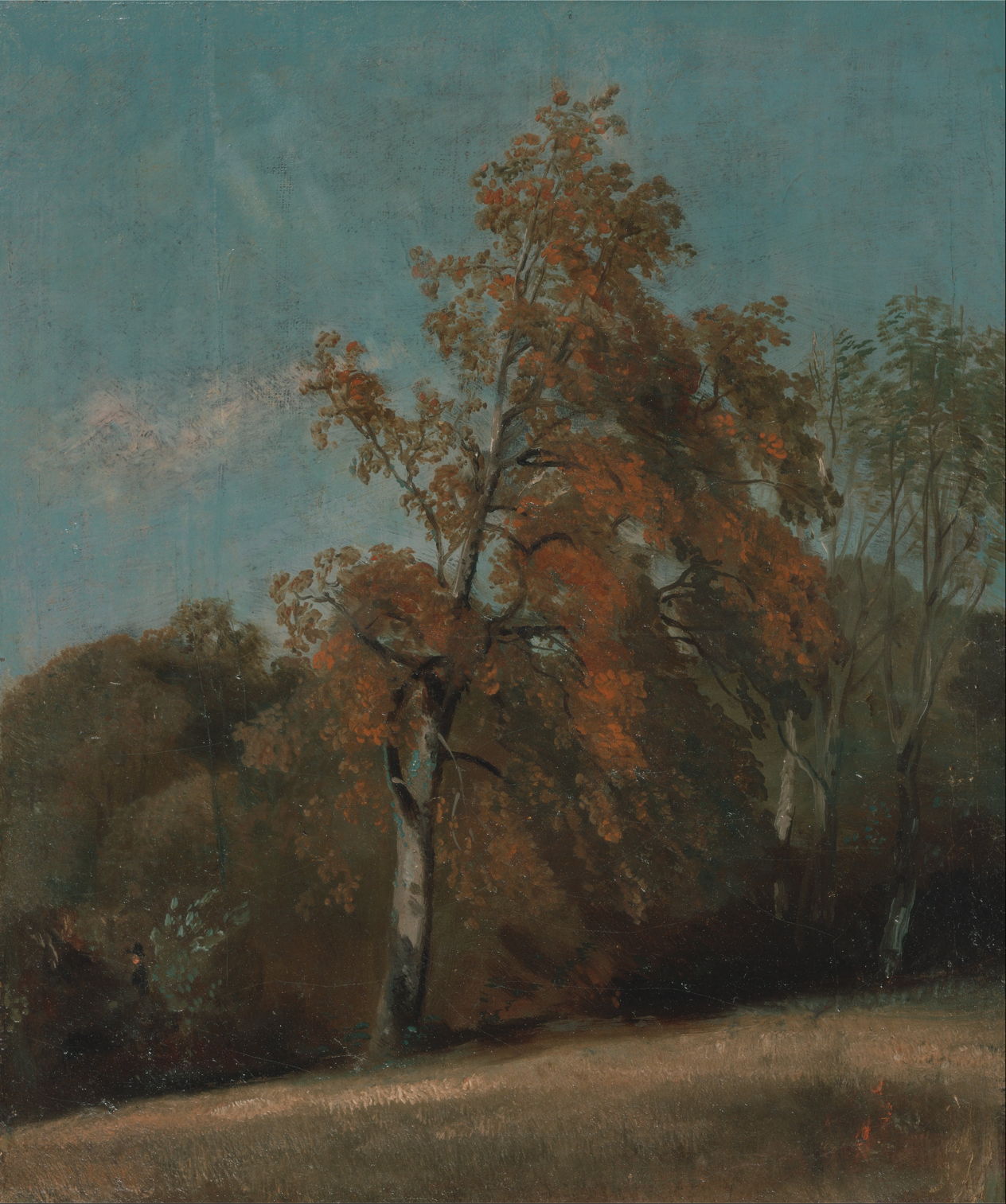
John Constable (1776–1837), Study of an Ash Tree (1801-3 or 1810-30), oil on canvas laid to artist’s board, 39.4 x 29.8 cm, Yale Center for British Art, New Haven, CT. Wikimedia Commons.
He learned to create plein air sketches in oils, which he used extensively for ‘skying’ particularly around Hampstead Heath near London, and for remarkable studies of trees, such as this ash, seen in its autumn colours. Here he too has taken the time to construct the tree anatomically, and to detail its foliage.
This continued through the middle of the nineteenth century, when landscape painting was evolving towards Impressionism.
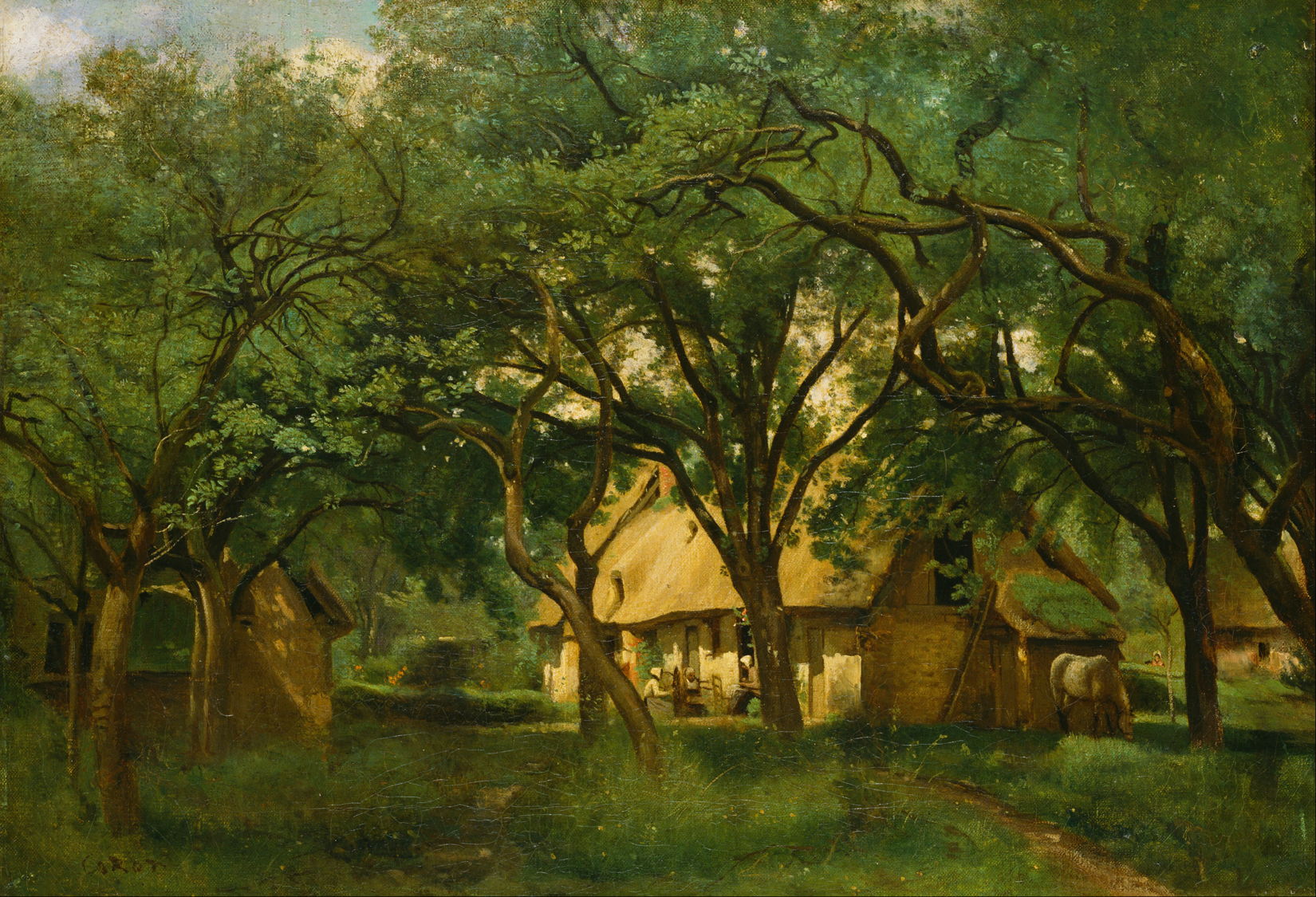
Jean-Baptiste-Camille Corot (1796–1875), The Toutain Farm, Honfleur (c 1845), oil on canvas, 44.4 × 63.8 cm, Bridgestone Museum of Art, Tokyo. Wikimedia Commons.
Camille Corot’s The Toutain Farm, Honfleur from about 1845 appears to be a finished studio painting, perhaps intended for the Salon. Its trees are marvellous and all but obscure and upstage the farmhouse beyond. Their sinuous limbs reflect his structured approach to painting their canopies with a catalogue of ways the trunk can give rise to branches. The canopy itself is shown in careful detail, although at the upper left it seems more vague and sketchy.
Europe has a rich and varied flora of tree species, and one of the challenges in painting its landscapes has been to capture their distinctive characteristics.
Jacob Isaakszoon van Ruisdael (1628/9–1682), Road through an Oak Forest (c 1646-7), oil on canvas, 65 x 85 cm, Statens Museum for Kunst, København, Denmark. Wikimedia Commons.
Jacob van Ruisdael gave insight into the stages in the life and looks of oak trees. In Road through an Oak Forest (c 1646-7) he captures the later life of a stag-headed oak on the left, which lost its crown long ago, a flush of new growth on a fallen trunk, and another still clinging onto life despite a great split at its base. Judging by the girth of their trunks, the oaks shown here are around 400 years old, making it likely they were saplings in the thirteenth century, possibly even earlier. They form a remarkable window in time back to the late Middle Ages.
Camille Pissarro (1830-1903), The Big Walnut Tree in Spring, Éragny (1894), oil on canvas, 60 x 73 cm, Private collection. Wikimedia Commons.
Camille Pissarro’s Big Walnut Tree in Spring, Éragny from 1894 celebrates a species that is a source of binder in oil paint, in walnut oil, although it’s used far less frequently than linseed. Its wood is also sought after, making this tree a long-term investment for the landowner’s heirs.
Vincent van Gogh (1853-1890), Cypresses (1889), oil on canvas, 93.4 x 74 cm, The Metropolitan Museum of Art, New York, NY. Wikimedia Commons.
Vincent van Gogh’s Cypresses (1889) are some of the best-remembered of all. As he moved style on beyond Impressionism, his swirling brushstrokes form solid but thoroughly living trees. These are most probably Italian cypresses, which are characteristic of the landscape around the Saint-Paul-de-Mausole asylum where he was living at that time, and throughout Provence.
Vincent van Gogh (1853-1890), Olive Grove (1889), oil on canvas, 72 x 92 cm, Kröller-Müller Museum, Otterlo. WikiArt.
In his Olive Grove (1889), those swirling strokes of foliage complement the tortuous curves of the branches and gnarled blue-grey trunks.
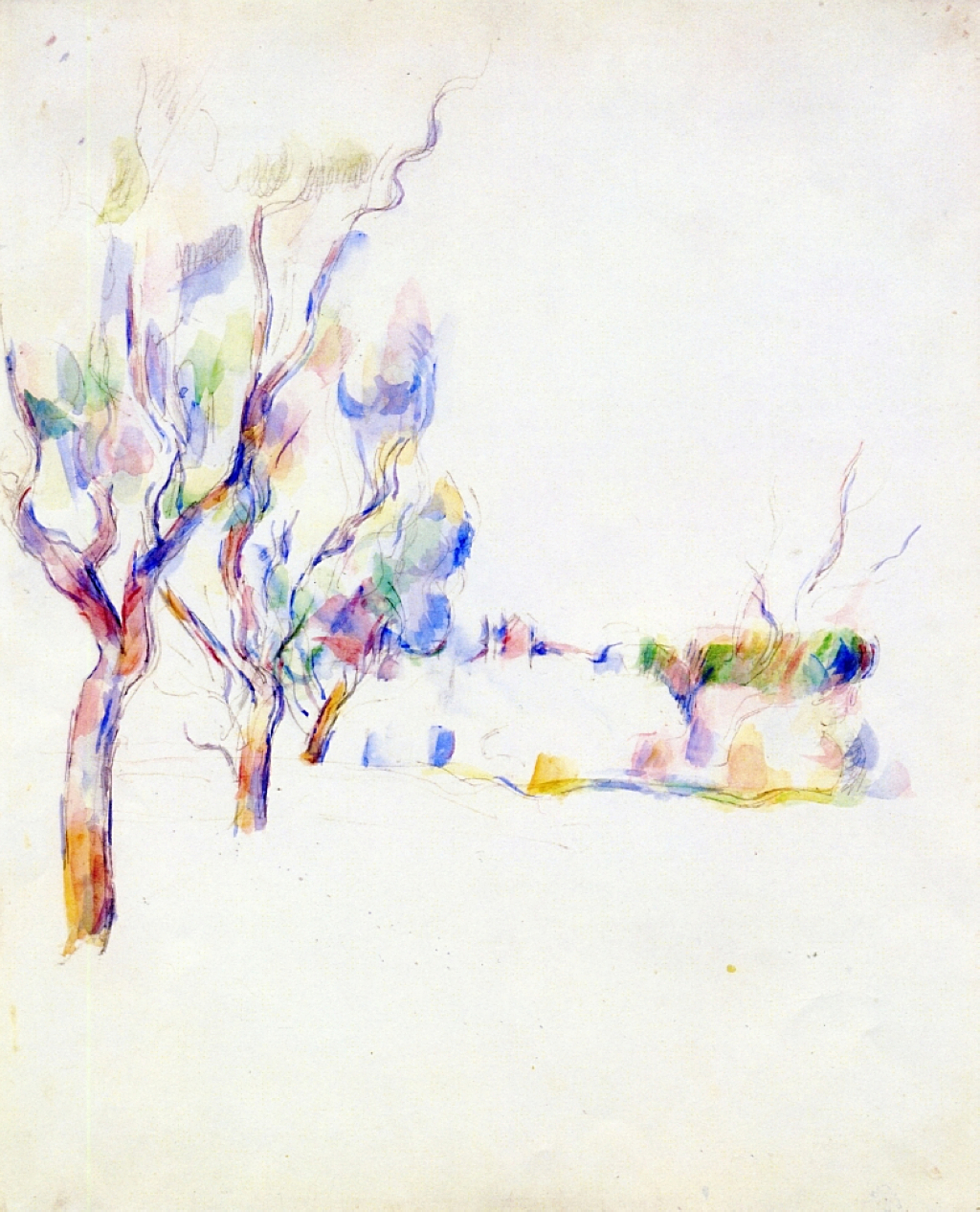
Paul Cézanne (1839–1906), Almond Trees in Provence (1900). Graphite and watercolour on paper, 58.5 x 47.5 cm, private collection (WikiArt).
Paul Cézanne’s oil paintings of trees, although abundant, show his emphasis on patterned brushstrokes in what is known as his constructive stroke. This isn’t true of his watercolours, as shown in Almond Trees in Provence (1900), where each tree rises in a flare of brilliant colours.
Paul Cézanne (1839–1906), Grand pin et terres rouges (Large Pine and Red Earth) (1890–95), oil on canvas, 72 x 91 cm, Hermitage Museum, St. Petersburg. Wikimedia Commons.
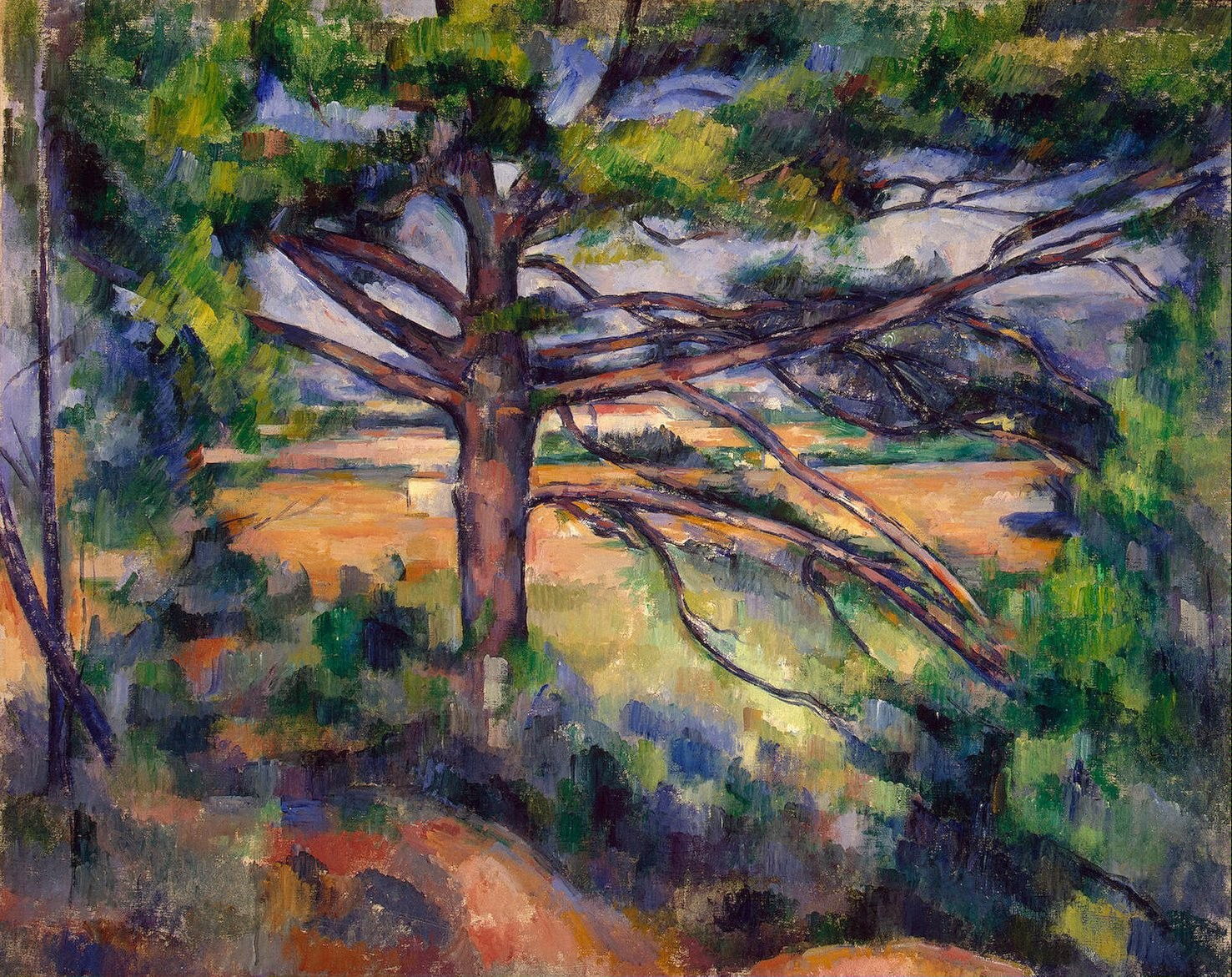
Cézanne’s constructive stroke became more prominent and started to dominate the structure of his oil paintings after 1890. In Large Pine and Red Earth (1890–5) it’s used throughout the foreground foliage and vegetation, and has even started to appear in some patches on the trunk.
Théo van Rysselberghe (1862-1926), Pine by the Mediterranean Sea (1916), oil on canvas, 81 x 199 cm, Centraal Museum, Utrecht. WikiArt.
Finally, Théo van Rysselberghe’s Pine by the Mediterranean Sea (1916) appears almost as substantial as the bleached rocks below it. Contrast between the lit segments and those in cast shadow behind is wide, as is seen on the shores of the Mediterranean.
I hope you will join me in exploring these and many other fine portraits of trees over the coming weeks.
One of the most common and frustrating problems with apps is when they crash as soon as you try to open them. Before that app has even had a chance to display its menu bar or splash screen, it has vanished, leaving you without a clue as to why. How could its developer release an app that can’t even run? Where do you look for clues as to what happened when the app was only there for an instant? Fortunately, this is when examining the crash log can be useful, and could help solve the problem.
Common causes include:
macOS intentionally crashed the app because of an error in code signing, or another serious security failure;
the app failed because it was in translocation;
the app couldn’t open a damaged or incompatible document;
the app had a problem with its Preferences.
Signs and logs
Depending on the type of Mac, the version of macOS it’s running, and the nature of the crash, you may see nothing at all, a simple notification, or a full crash report.
While panic logs can be impossible to recover if you miss them, app crash reports are almost invariably saved to disk, normally in the path ~/Library/Logs/DiagnosticReports, although in some cases you’ll have to look a bit harder there, or in /Library/Logs/DiagnosticReports. As the report’s name should start with the app name, they’re easy to identify, and double-clicking them opens the report in Console (one of its good uses).
Reading the crash log
In the upper Translated Report look for the following:
Path – check whether this is a long semi-random path typical of app translocation.
Code Type – on an Apple silicon Mac, check whether the app is running native on Arm, or translated by Rosetta 2.
Exception Type – this could be EXC_BAD_ACCESS (SIGKILL (Code Signature Invalid)) if macOS has crashed the app because of a code signing problem.
Termination Reason – this may be given as Namespace CODESIGNING, Code 2 Invalid Page or similar for code signature problems.
An exception type of EXC_CRASH (SIGKILL) indicates macOS terminated the app, and its crash report should give a Termination Reason with a code explaining the reason for the crash. Apple silicon Macs running recent versions of macOS are less likely to crash apps with signature problems, as they now tend to handle these in a dialog reporting the app is damaged and offering to remove it. Intel Macs with older macOS are more likely to crash the app and leave you wondering.
If you want to learn more about crash reports, they’re well documented for developers, starting from this master page. Worth reading are:
One recent and innocent cause of signing and notarisation errors occurs in apps that update themselves, normally using the popular Sparkle method. If an app had worked fine before it updated itself and then can’t start up, it may not have updated its code signature or notarisation correctly. This is easy to fix, by deleting the broken app and downloading a fresh copy of the current version. If that still crashes with a signature error, contact its developer as it may have a bigger problem.
Apparency, free from Mothers Ruin, is the definitive app for checking code signing and notarisation problems. It doesn’t just identify the problem, but explains it in careful detail.
If you’re absolutely certain that the app doesn’t contain any malicious code, you may be able to work around code signing errors by re-signing the app. Doing this to an app that might be malicious would be extremely dangerous, so you require great confidence in the app’s integrity.
Before proceeding any further, you might need to add Terminal to the list in the App Management section of Privacy & Security settings, otherwise your commands could be unable to make any changes to the app. Once you’ve done that, open Terminal and use the command codesign --remove-signature MyApp.app
to strip the existing signature from the app MyApp.app. Note that two hyphens precede remove-signature. When that’s done, use the command codesign --sign - MyApp.app
to sign that app with an ad hoc signature. Ad hoc signatures provide only limited security, as they don’t use an Apple-issued certificate for verification against a chain of trust. They’re widely used by malware as a result, and easily exploited.
If that doesn’t work you’ll need to refer the problem to the app’s developer, who should in any case be informed of any problems with their app’s code signature, notarisation or security checks.
App translocation
There are some circumstances in which perfectly good apps may prove unable to run as expected when they’ve been translocated, and some become stuck in translocation, continuing to crash each time you try to run them. If you’ve looked at the crash log, the Path given there should make it obvious if that app is being run in translocation.
The best solution is to try reinstalling the app. Delete the current copy, and download the app again from its source on the internet. If it comes as a compressed archive, decompress it, then move the app from the folder it came in to one of your Applications folders before trying to run it. Do this one app at a time, rather than as one of several, and ensure it doesn’t remain in the folder it came in. If that doesn’t help, contact its developer.
A more hazardous option is to strip the quarantine extended attribute from the download, but you should only consider that as a last resort as it reduces the security checks made by macOS.
Failed to open document
If the app was last quit with a document still open, and that document now has a serious incompatibility with the app, that can cause the app to crash when it’s next opened, and tries to re-open that document. The same effect can occur when an app is opened by opening one of its documents. Try opening the app alone before opening the document. If necessary you can enable Close windows when quitting an application, in the Windows section of Desktop & Dock settings, or move the offending document to a different volume so that app loses track of it.
Preference file problems
Apps that use Property List files stored in ~/Library/Preferences, or an equivalent in the app’s folder in the ~/Library/Containers folder, open them during app startup. If that preference file is malformed or corrupted, it can cause the app to crash when it tries reading it. This may not be easy to recognise in a crash log, although references there to cfprefsd, the path to the preference file, or UserDefaults are useful clues.
The best way to address this is to delete the app’s preference file, forcing the app to create a fresh default preference file, and open normally again. Although you can do this by locating the correct file and dragging it to the Trash, it’s more reliable to use the defaults command in Terminal, as that should delete the right copy and avoid overwriting it and causing the problem to recur. For this you’ll need the app’s formal ID, available from Apparency or taking a peek at the value for the CFBundleIdentifier key in its Info.plist. It should be in the form of a reverse URL like com.mothersruin.Apparency.
The command that you need to enter into Terminal is of the form defaults delete com.developer.appname
where com.developer.appname is the app’s ID or CFBundleIdentifier.
You should then be able to open the app, which will have to recreate its default settings, hopefully without crashing again.
Other causes
Most other potential causes tend to prolong app opening rather than causing it to crash. Apps that check for updates over the internet usually do so soon after opening, but should perform that check without blocking or crashing the app. Similarly, apps needing to connect to an external authorisation service more usually hang, leaving their Dock icon bouncing indefinitely.
Any damaged or incompatible app may well crash during opening. If you suspect that, check with the app’s support site that the version you are trying to run is the latest that’s compatible with your Mac and macOS. If in doubt, re-install the app.
Apple has released its regular weekly update to XProtect for all versions of macOS, bringing it to version 5346. As usual it doesn’t release information about what security issues this update might address.
This version removes 11 Yara rules for MACOS.f3edc61, MACOS.d1e06b8, OSX.Bundlore.D, OSX.OpinionSpy, OSX.DevilRobber.A, OSX.DevilRobber.B, OSX.Mdropper.i, OSX.FkCodec.i, MACOS.d4735e3, MACOS.HONKBOX.B, and MACOS.FLUFFYFERRET.CT, and many of the component rules for MACOS.ADLOAD. There are no changes in the Osascript rules in XPScripts.yr.
You can check whether this update has been installed by opening System Information via About This Mac, and selecting the Installations item under Software.
A full listing of security data file versions is given by SilentKnight and SystHist for El Capitan to Tahoe available from their product page. If your Mac hasn’t yet installed this update, you can force it using SilentKnight or at the command line.
If you want to install this as a named update in SilentKnight, its label is XProtectPlistConfigData_10_15-5346
Sequoia and Tahoe systems only
This update has already been released for Sequoia and Tahoe via iCloud. If you want to check it manually, use the Terminal command sudo xprotect check
then enter your admin password. If that returns version 5346 but your Mac still reports an older version is installed, you should be able to force the update using sudo xprotect update
This series looks at two contrasting groups of paintings featuring reflections: those of figures seen mostly in planar mirrors arranged vertically, such as that mounted on a dressing table, and those of landscapes seen reflected by a horizontal water surface like a lake. When intended to be faithful to nature, these should all adhere to the same optical principles.
Jan van Eyck (c 1380-1441), Portrait of Giovanni(?) Arnolfini and his Wife (detail) (1434), oil on oak panel, 82.2 x 60 cm. National Gallery, London. WikiArt.
Optical effects as a theme in the Northern Renaissance, as seen in Jan van Eyck’s most famous painting The Arnolfini Wedding, completed in 1434 (above), and in the landscape behind his Madonna of Chancellor Rolin, probably painted the following year (below).
Jan van Eyck (c 1390–1441), The Madonna of Chancellor Rolin (detail) (c 1435) oil on panel, 66 x 62 cm. Musée du Louvre, Paris (WikiArt).
Any faithful depiction of reflections on water should show the following:
a line joining any point on the original with its equivalent on the reflection will be vertical;
an object behind another object in the original will also remain behind that object in the reflection, as reflections preserve depth order;
the further back that an original object is from the water’s edge, the more its reflection will be cropped vertically;
vertical cropping loses the lower section of the original from the reflection, and the upper section remains in the reflection;
the view of each part of the original seen in the reflection will be that as seen from the points of reflection, those being lower than the observer and closer to the original;
what is seen on the (observer’s) left of the original appears on the left of the reflection, and what is seen on the right remains on the right of the reflection;
because the reflection is vertically inverted, what is seen at the top of the original appears at the bottom of the reflection.
Analogous principles apply to reflections in a vertical mirror.
Self-portraits almost invariably rely on painting the reflection seen in a plane mirror.
Clara Peeters (fl 1607-1621), Still Life with Flowers and Gold Cups of Honour (detail) (1612), oil on oak, 59.5 x 49 cm, Staatliche Kunsthalle Karlsruhe, Karlsruhe, Germany. Wikimedia Commons.
Defined by Marco Bertamini, Richard Latto and Alice Spooner as occurring “every time the observer sees both an actor (eg Venus) and a mirror, not placed along the observer’s line of sight, and concludes that Venus is seeing her reflection at the same location in the mirror that the observer is seeing.” They were intrigued by “the situations in which we as observers read the scene in a certain way, but the mirror itself is used (deliberately or not) to lead us down the wrong path. More specifically, the mirror shows us something that we accept as the view available to the actor in the scene. However, the actor has a different vantage point from us and therefore the laws of optics imply that he/she cannot be seeing what we see in the mirror.”
Diego Velázquez (1599–1660), Venus at Her Mirror, The Toilet of Venus (Rokeby Venus) (1644-48) [101], oil on canvas, 122.5 x 177 cm, The National Gallery, London. Image by Diego Delso, via Wikimedia Commons.
Where the artist manipulates a reflected image for an effect, whether or not that image remains faithful to optical principles.
Diego Velázquez (1599–1660), Las Meninas (The Maids of Honour, Velázquez and the Royal Family) (c 1656-57) [119], oil on canvas, 318 x 276 cm, Museo Nacional del Prado, Madrid, Spain. Wikimedia Commons.
Paintings by:
Albrecht Dürer (1471-1528)
Aelbert Cuyp (1620–1691)
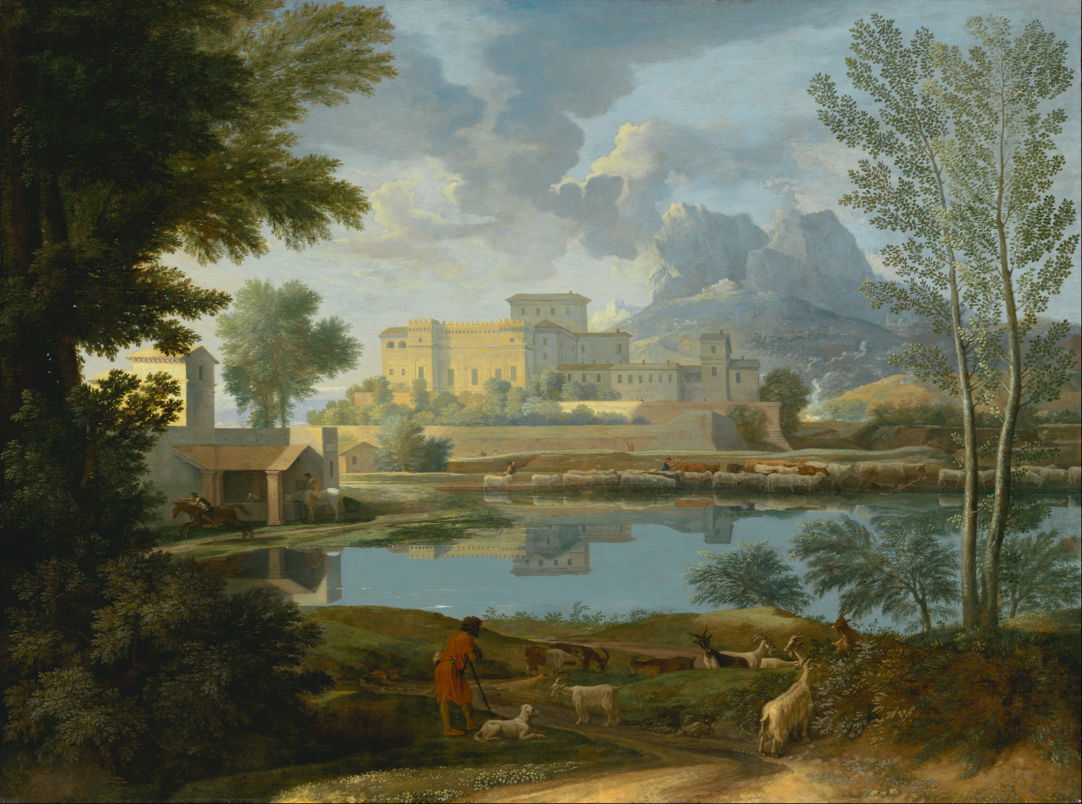
Nicolas Poussin (1694-1665), Landscape with a Calm (c 1651)
Claude Lorrain (1604/5–1682)
Canaletto (1697–1768)
Claude-Joseph Vernet (1714–1789)
Nicolas Poussin (1694-1665), Landscape with a Calm (c 1651), oil on canvas, 97 x 131 cm, J. Paul Getty Museum, Los Angeles. Digital image courtesy of the Getty’s Open Content Program.
Paintings by:
John Constable (1776–1837)
Joseph Mallord William Turner (1775–1851)
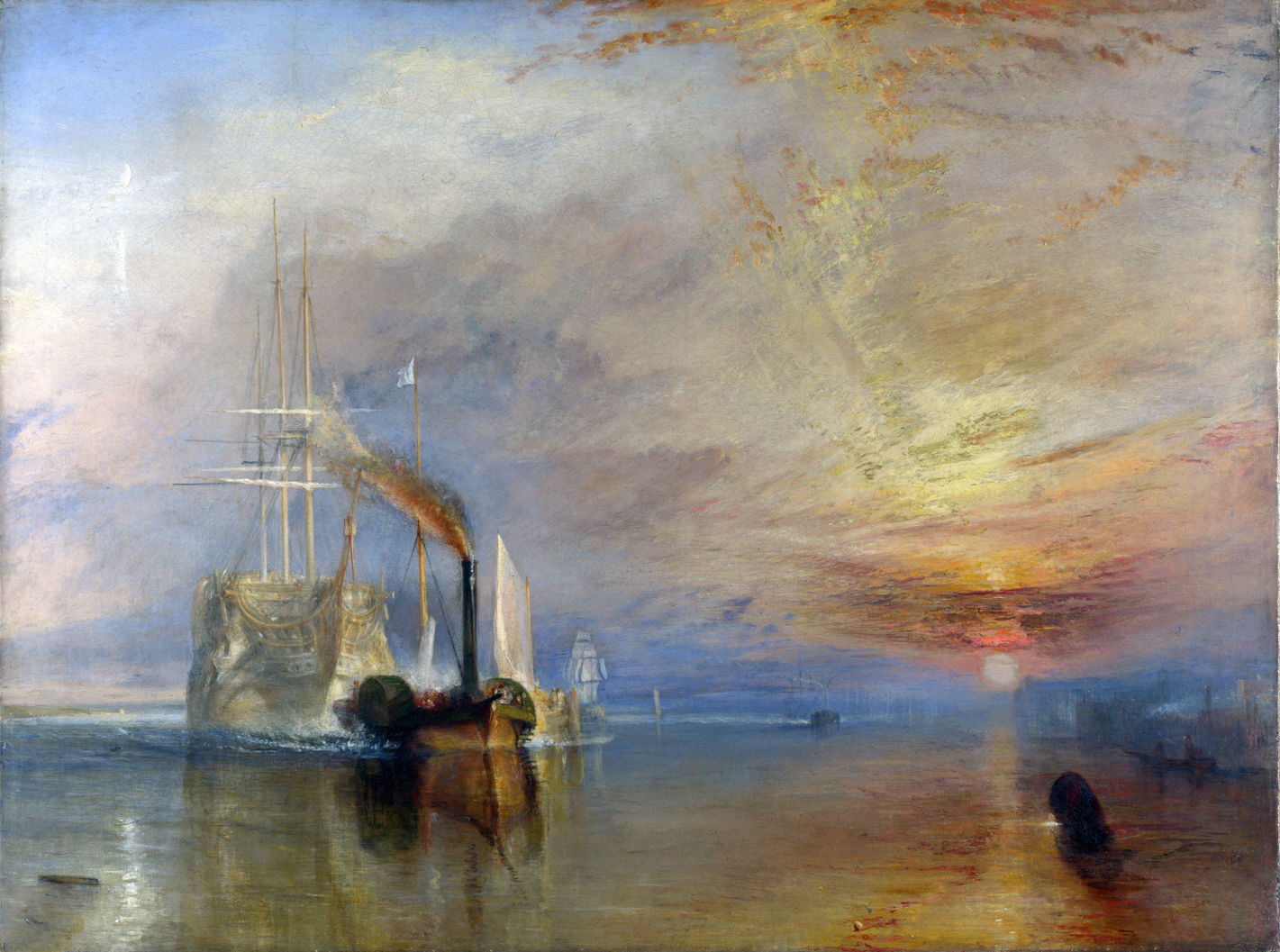
Joseph Mallord William Turner (1775–1851), The Fighting Temeraire tugged to her last Berth to be broken up (1839), oil on canvas, 90.7 × 121.6 cm, The National Gallery, London. Wikimedia Commons.
Paintings by:
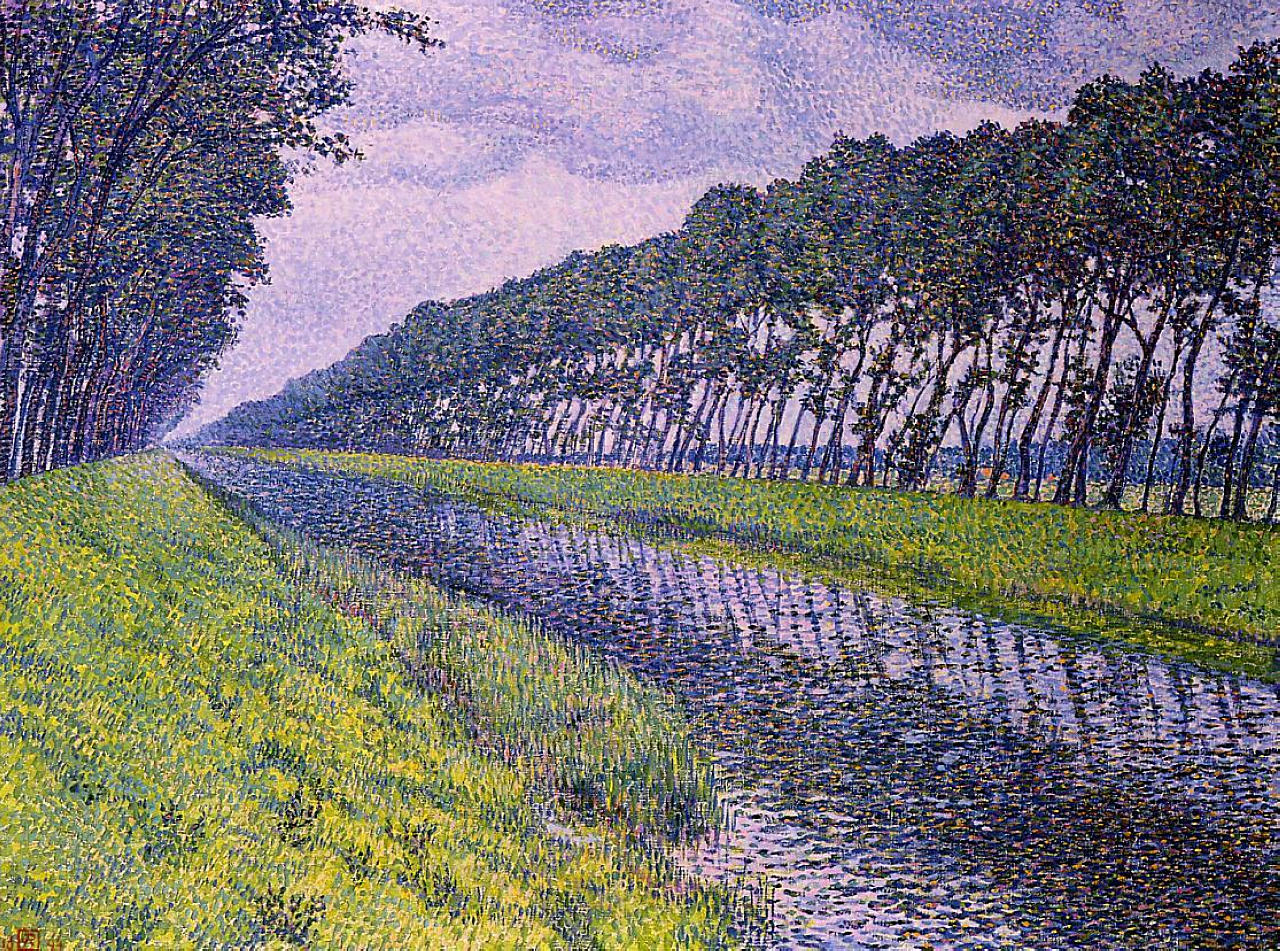
Gustave Caillebotte (1848–1894)
Martín Rico y Ortega (1833–1908)
Eilert Adelsteen Normann (1848–1918)
Laurits Andersen Ring (1854–1933)
Frits Thaulow (1847–1906)
Kazimierz Sichulski (1879–1942)
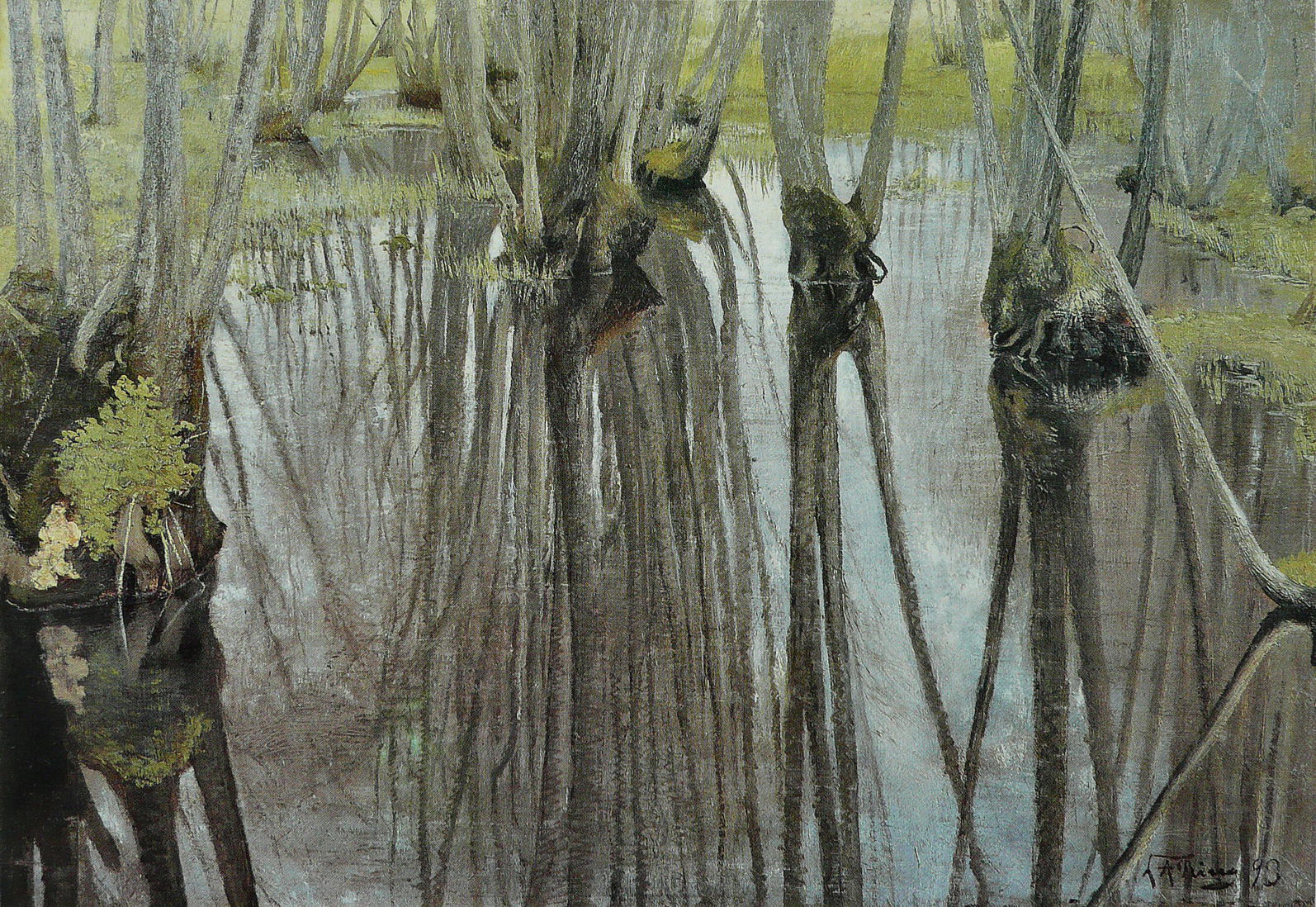
Laurits Andersen Ring (1854–1933), Alder Trunks (1893), oil on canvas, 52.9 x 73.5 cm, Collection of Her Majesty the Queen Margrethe II, Copenhagen, Denmark. Wikimedia Commons.
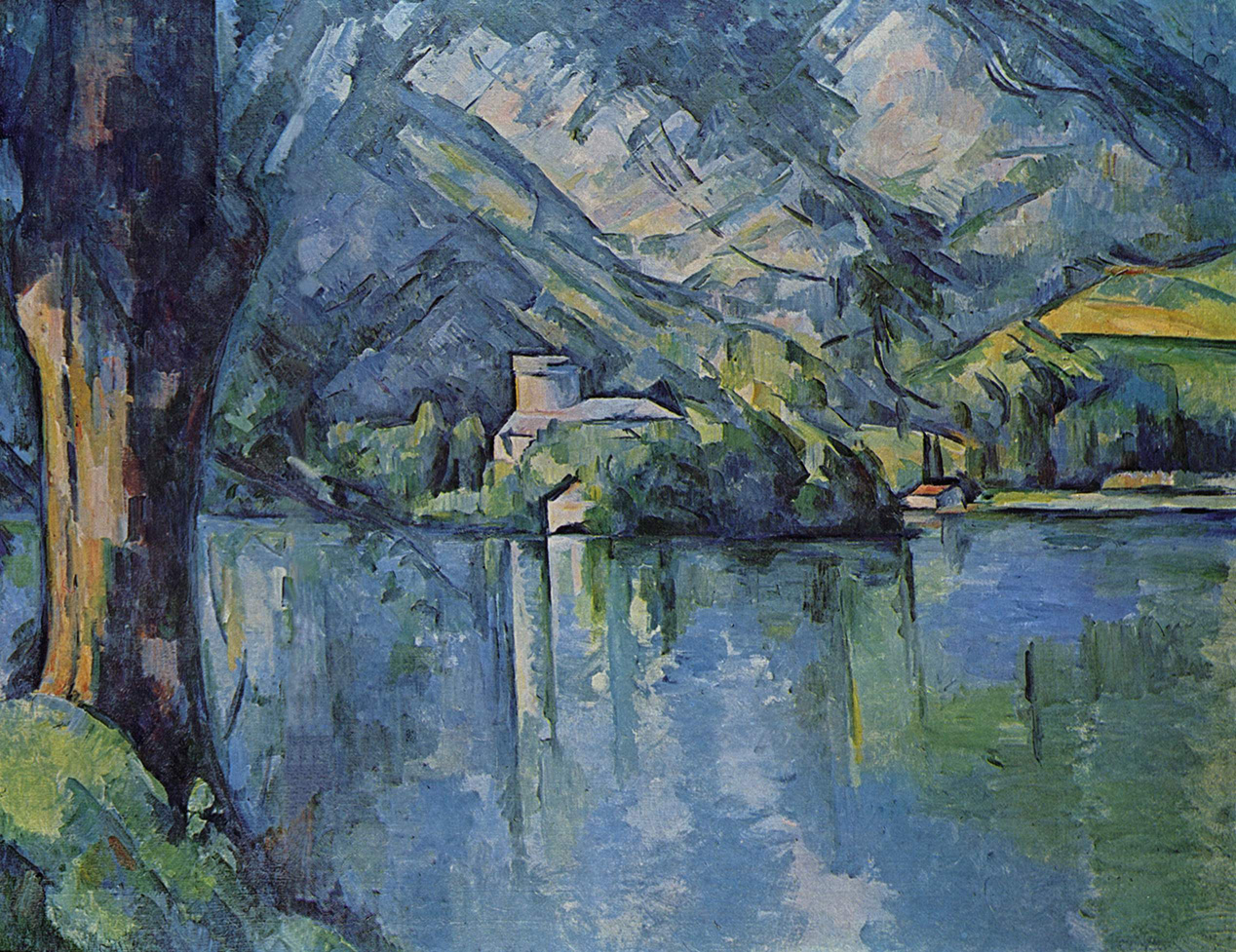
Paul Cézanne, Le Lac d’Annecy (Lake Annecy) (1896) (R805), oil on canvas, 65 x 81 cm, The Courtauld Gallery, London (Samuel Courtauld Trust) (P.1932.SC.60). Wikimedia Commons.
Paintings by:
Ferdinand Hodler (1853–1918)
Gustav Klimt (1862–1918)
Ferdinand Hodler (1853–1918), Rhythmic Landscape on Lake Geneva (1908), oil on canvas, 67 x 91 cm, Private collection. Wikimedia Commons.
References
Brook Taylor (1719) New Principles of Linear Perspective, or the Art of Designing on a Plane the Representations of All Sorts of Objects, in a more General and Simple Method than has been done before, London. (Not available online, and later editions omit much of the material on reflections.)
Cole, Rex Vicat (1921) Perspective, Seeley, Service and Co, London. (Available in various reprints, and Archive.org.)
de Piles, Roger (1708) Cours de Peinture par Principes, Paris. (Available at Archive.org.)
de Valenciennes P-H (1820) Élémens de Perspective Pratique à l’usage des artistes, 2nd edn., Paris.
With extended running time on battery and fast charging, your MacBook Air or MacBook Pro probably doesn’t spend long on mains (AC) power. What you may not have realised is that it does require mains power to perform some tasks, so there are benefits to periodically leaving it awake and running when connected to a mains power supply, to allow it time to catch up on those. This article examines the benefits.
Background tasks
If you look through the property lists used for macOS LaunchDaemons and LaunchAgents you’ll come across two keys used for their activities and background services that determine whether they run when powered by battery alone:
AllowBattery is set to true when the service can be run on battery, or to false when it can’t;
RequiresExternalPower, its converse, is set to true when it can’t be run on battery, or to false when it can.
Unfortunately Apple doesn’t explain either of these, and they’re omitted from the last systematic account of those property lists, which was last revised ten years ago. Neither are they mentioned in man launchd.plist. There is evidence, though, that they may not both apply to macOS. For XPC activities there’s a global variable XPC_ACTIVITY_ALLOW_BATTERY, whose default value is false for activities with a maintenance priority, but is true for utility priority activities. However, requiresExternalPower is normally used for Background Tasks in iOS/iPadOS/etc., and thus doesn’t appear to apply to macOS. Clear, up to date documentation would be very helpful, please, Apple.
Of the 878 property lists in /System/Library/LaunchAgents and LaunchDaemons in macOS 26.5, 47 set a value for the AllowBattery key, and many more assign maintenance priority to activities. Among the activities and services that appear unlikely to run when on battery alone are:
com.apple.corespotlightd.updateContacts in corespotlightd, which presumably updates search information for Contacts’ database;
com.apple.calendar.daemon.databasecleanup, performing maintenance on Calendar databases;
com.apple.cloudphotod.maintenance, performing maintenance on iCloudPhotos;
com.apple.photoanalysisd.backgroundanalysis and several other photoanalysisd services, used to analyse media content, particularly for indexing by Spotlight;
com.apple.photolibraryd.periodicmaintenance, performing maintenance on Photos libraries;
Of these the most noticeable are photoanalysisd services, which can flood the E cores when a laptop Mac is left connected to mains power, particularly when many images have been added or modified since the last session on mains. Those can in turn trigger copious Spotlight indexing activity with mds and related processes.
XProtect Remediator
Regular scans performed by XProtect Remediator (XPR) to detect and remove known malicious software can busy a whole E core for well over half an hour, and are accompanied by intense disk activity. Because of that, some of its services will only be run when a Mac is powered by mains.
Current property lists in XPR call for three types of scan:
Fast scan, run every 6 hours, when AllowBattery is set to true;
Regular scan limited by a timer, run every 24 hours, AllowBattery false;
Slow scan without any time limit, run every 7 days, AllowBattery false.
You should therefore expect daily XPR scans only to take place when your laptop is awake and connected to power. Fast scans don’t result in any of the distinctive reports from scan modules that are checked by utilities like XProCheck and SilentKnight, and appear to pass unrecorded in the log.
You can observe this yourself after starting your Mac up for the day. If it’s running on mains power and left alone for 10-15 minutes, XPR will usually start scanning with each of its modules. However, if you start your Mac up on battery and leave it for a couple of hours, there’s no sign of those scans starting.
Sparse bundles
Sparse bundles (disk images that store files inside a bundle folder rather than in a single file) need to be compacted occasionally to ensure they don’t grow larger than they need. Because compaction can take a long time and can’t be interrupted without risking the whole sparse bundle’s contents, by default it won’t be performed when a Mac is running on battery power. That can be overridden in some utilities like my own Spundle, and in the hdiutil command.
Catching up
If your MacBook Air or Pro spends much of its waking life running on battery, it’s a good idea to give it a break every few days by leaving it awake and powered from its mains adaptor for an hour or two. How often you should do that is more flexible. If you like to run a regular routine, scheduling it every 2-3 days should be sufficient, with a minimum frequency of once a week. An ideal routine for a laptop in frequent heavy use might be for a daily break at lunchtime.
If you want to tailor this more to demand, observe how long your laptop is running heavy loads from photoanalysisd and others when it’s taking a break on mains power, and adjust the frequency of those breaks until those periods of heavy load are sufficiently brief to fit in with your schedule.
These will also ensure your Mac gets at least one complete scan by XProtect Remediator each week.
I’m grateful once again to Michele for raising this question.
Venice became an important part of the southern Renaissance with the paintings of the Bellini brothers in the latter half of the fifteenth century, and flourished in the sixteenth century with their successors Giorgione, Titian, Tintoretto and Veronese. Venetian painting distinguished itself by emphasising colour over line and form, but there were also important differences in media.
From long before the Renaissance, the largest paintings in Europe were made using fresco on the walls and ceilings of churches and other religious buildings. Because Venice had been built on marshy islands in a lagoon, the walls of its buildings remained damp and proved unsuitable for classical fresco technique. Supplies of wood were also limited, and the fabrication of large wooden panels was impractical. It was in Venice that the largest paintings were thus made in oil paints on stretched canvas.
In other circumstances, what are considered to be large canvases might attain five or six metres (16-20 feet) in their longer dimension. This article shows a selection where that exceeds ten metres (33 feet), and in one case twenty-two metres (72 feet), all but one created by Jacopo Tintoretto and his workshop.
In 1559-60, Tintoretto painted two commissions for the church of Madonna dell’Orto, where he was to be buried. Each nearly fifteen metres (50 feet) high, they’re among his most spectacular.
Jacopo Tintoretto (c 1518-1594), The Last Judgment (c 1559-60) (E&I 77), oil on canvas, 1450 x 590 cm, Madonna dell’Orto, Venice, Italy. Image by Didier Descouens, via Wikimedia Commons.
The Last Judgment was probably painted first, and shows apocalyptic scenes from Biblical eschatology, notably the book of Revelation. To some extent, paintings of the last judgement are inevitably chaotic, as that is part of the event, but Tintoretto’s overall composition here isn’t as well-conceived as in the second of the pair. The painting has several focal passages, in particular the horizontal winged angel wearing orange shorts just over half way up, and the figure of Christ at its apex.
Jacopo Tintoretto (c 1518-1594), The Last Judgment (detail) (c 1559-60) (E&I 77), oil on canvas, 1450 x 590 cm, Madonna dell’Orto, Venice, Italy. Image by Didier Descouens, via Wikimedia Commons.
The lower sections show a dark base filled with contorted bodies blending in with rock and water, an underworld without the usual fire. Above is a band of sea green, in which there is a reprise of the flood, and bodies are washed along in a great wave. The middle then takes to the air, where figures sit on clouds still bringing rain to those in the waters below. The central crucifix seen at the foot isn’t part of the painting.
Jacopo Tintoretto (c 1518-1594), The Last Judgment (detail) (c 1559-60) (E&I 77), oil on canvas, 1450 x 590 cm, Madonna dell’Orto, Venice, Italy. Image by Didier Descouens, via Wikimedia Commons.
In the upper section, above the angel in orange, rays of light are streaming down from Jesus at the apex. Individual figures are now more readily distinguished, and some of them recognisable. At each side are winged angels with long trumpets, and a double band of black clouds marking the threshold of heaven. On the right, a martyr wearing a deep blue loincloth sits with his crucifix against his shoulder: he could be Saint Andrew.
Higher still is the mother of twins, her back to the viewer, looking up towards the heaped black cloud on which Jesus Christ sits at the centre, with the Virgin Mary on one side and Saint John the Baptist on the other. Particularly in the upper section, many of the figures are foreshortened and distorted.
Jacopo Tintoretto (c 1518-1594), Making of the Golden Calf (c 1559-60) (E&I 78), oil on canvas, 1450 x 580 cm, Madonna dell’Orto, Venice, Italy. Image by Didier Descouens, via Wikimedia Commons.
The second, the Making of the Golden Calf, shows one of the more memorable stories of Moses, from the book of Exodus in the Old Testament. During that epic journey from bondage in Egypt to the Promised Land, Moses left the Israelites for a period of forty days and nights, when he ascended Mount Sinai to be given the Ten Commandments. While he was away, the people demanded that Moses’ brother and deputy Aaron made them a graven image to worship.
He gathered all their gold, which was melted down and cast into the form of a calf, which they then worshipped. God told Moses that they had already fallen from his ways, so Moses descended from Sinai. He was so angry with the Israelites that he broke the two tablets containing the commandments. He burnt the golden calf, ground it to powder, scattered it on water, and made the people drink it. The only people who didn’t worship the calf were the tribe of Levi, who became the first priestly class.
Tintoretto’s overall design of this simpler narrative is clearer and well-organised. The lower half of the painting shows the golden calf and the Israelites worshipping and feasting around it. Just over half way up is Moses on the summit of the mountain, being delivered the tablets with the commandments, and above that is heaven, with the Israelites’ God.
Jacopo Tintoretto (c 1518-1594), Making of the Golden Calf (detail) (c 1559-60) (E&I 78), oil on canvas, 1450 x 580 cm, Madonna dell’Orto, Venice, Italy. Image by Didier Descouens, via Wikimedia Commons.
The graven image of the golden calf is being carried with difficulty by four men. Piles of golden jewellery, coins, and chain are still apparently being melted down. Sitting on a rock bench above, under an ornamental awning, are several young women, who are being dressed and prepared for ceremonies to take place with the idol. More people are seen feasting on the grass over to the left.
Jacopo Tintoretto (c 1518-1594), Making of the Golden Calf (detail) (c 1559-60) (E&I 78), oil on canvas, 1450 x 580 cm, Madonna dell’Orto, Venice, Italy. Image by Didier Descouens, via Wikimedia Commons.
In the upper section of the painting, Moses is stood on the top of the mountain, his arms outstretched to the sky, ready to receive the tablets containing the commandments. God still holds those, immediately above Moses, and two winged angels are just taking the tablets from him, to pass down to Moses. Around them and above are several other figures, flying around the clouds.
One last remark about these two exceptionally tall paintings: recognising that viewers would have to look up sharply to see their upper sections, Tintoretto projected their figures and other details as if they were ceiling panels. The higher up each canvas you look, the more the figures appear to be above you. That is an ingenious projection to enhance their visual impact.
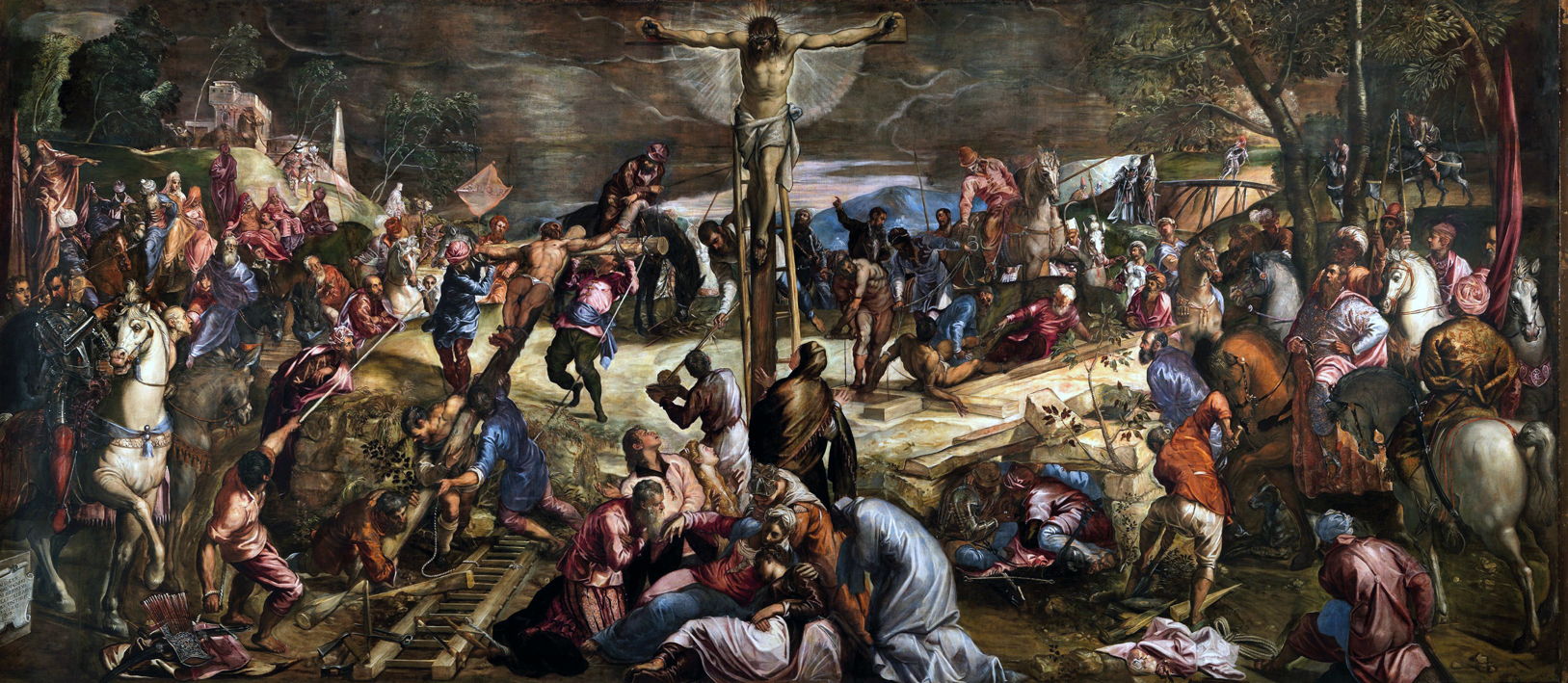
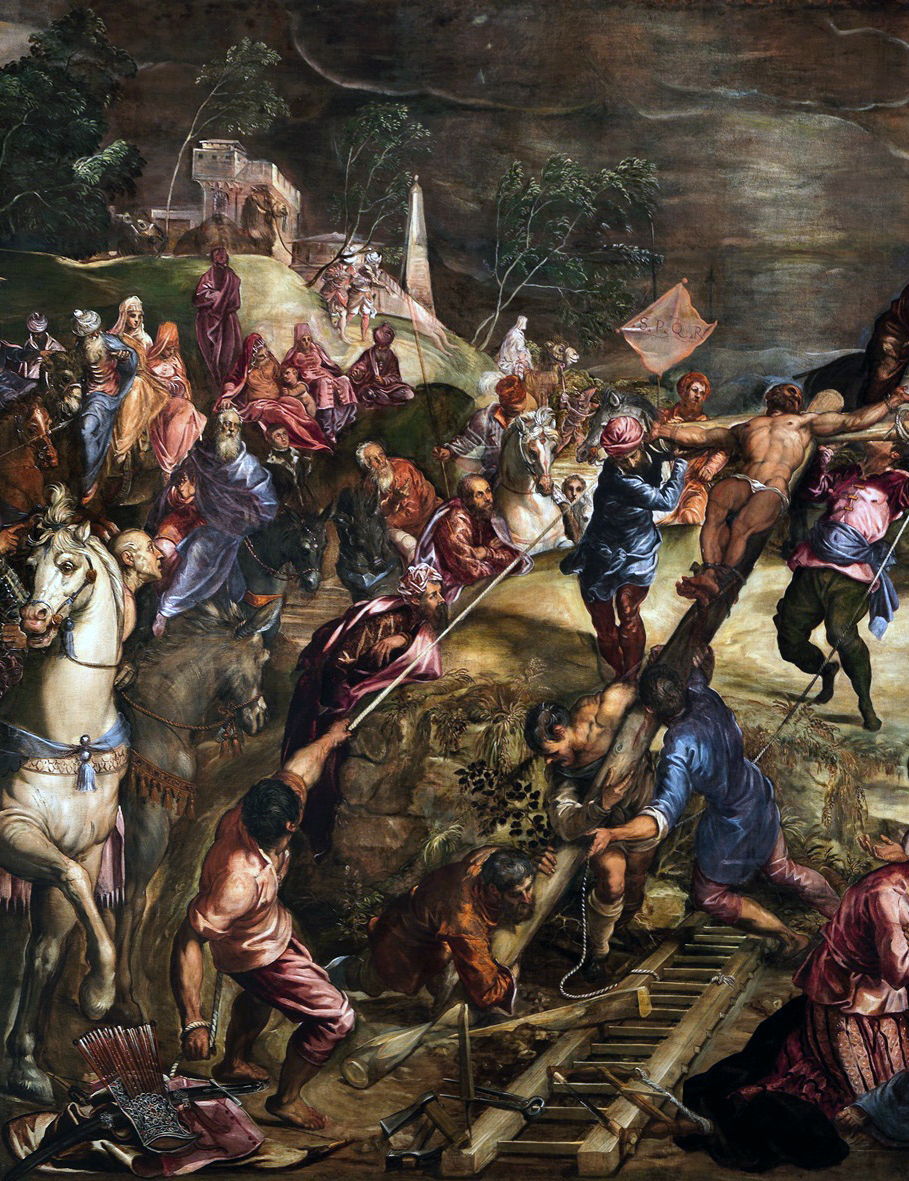
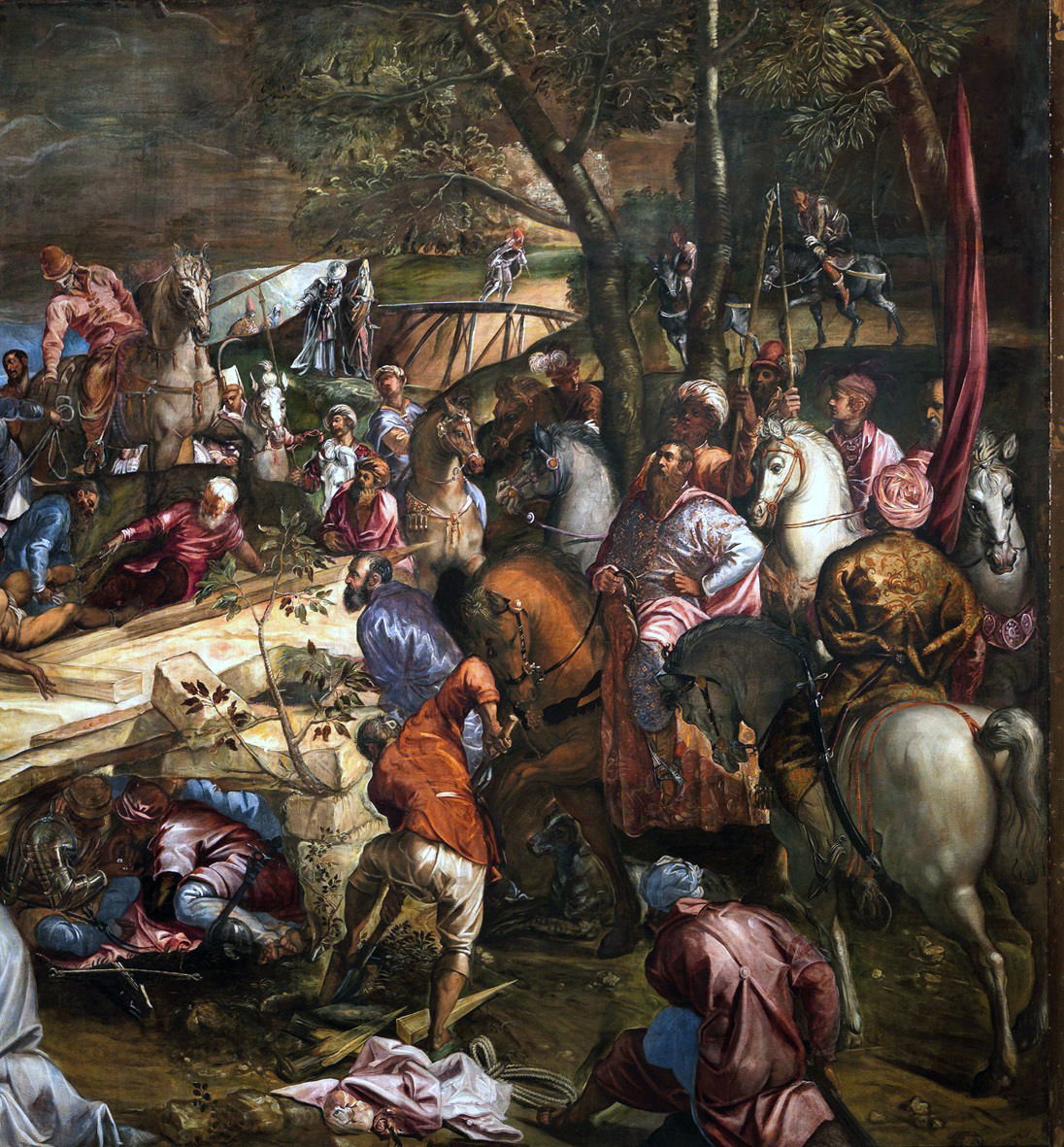
In 1565, commissioned by the Scuola Grande for its albergo, Tintoretto painted one of the major religious works of the century: his vast Crucifixion, more than 5 metres (17 feet) high, and 12 metres (40 feet) across.
Jacopo Tintoretto (c 1518-1594), The Crucifixion (E&I 123) (1565), oil on canvas, 536 x 1224 cm, Albergo, Scuola Grande di San Rocco, Venice, Italy. Wikimedia Commons.
He applied the lessons learned in his tall works for the Madonna dell’Orto. He makes use of space and uses a narrative technique based on the traditional ‘multiplex’ form popular during the Renaissance, in which its single image shows events at more than a single point in time, in an ingenious and modern manner. Naturally, the painting centres on Christ crucified, but the two thieves executed beside him are not shown, as would be traditional, already hanging from their crosses.
Jacopo Tintoretto (c 1518-1594), The Crucifixion (detail) (E&I 123) (1565), oil on canvas, 536 x 1224 cm, Albergo, Scuola Grande di San Rocco, Venice, Italy. Wikimedia Commons.
Instead, to the right of Christ, the ‘bad’ thief is still being attached to his cross, which rests on the ground. To the left of Christ, the ‘good’ thief is just being raised to the upright position. There is nothing in the well-known gospel accounts to make this anachronistic, but it’s most probable that the crucifixions were more simultaneous.
Spaced out around the canvas are relevant sub-stories from that whole. At the foot of Christ’s cross is his group of mourners, including the Marys. Each of the crosses has attendant workers, busy with the task of conducting the crucifixion, climbing ladders, hauling on lines, and fastening each victim to his cross. This mechanical and human detail brings the scene to life and adds to its credibility, and grim process.
Jacopo Tintoretto (c 1518-1594), The Crucifixion (detail) (E&I 123) (1565), oil on canvas, 536 x 1224 cm, Albergo, Scuola Grande di San Rocco, Venice, Italy. Wikimedia Commons.
The crowd on the left is more spread out than in an earlier version. In the distance is a flag bearing the letters SPQR representing the Roman Empire, and its link through Pilate. Most faces are turned towards Christ, with their eyes wide in awe.
Jacopo Tintoretto (c 1518-1594), The Crucifixion (detail) (E&I 123) (1565), oil on canvas, 536 x 1224 cm, Albergo, Scuola Grande di San Rocco, Venice, Italy. Wikimedia Commons.
On the right, in a small rock shelter suggestive of a tomb, two men are gambling with dice. To the right of them, a gravedigger has just started his work with a spade. The ruling class, perhaps Herod himself, have turned up on horseback, and they too stare wide-eyed at Christ.
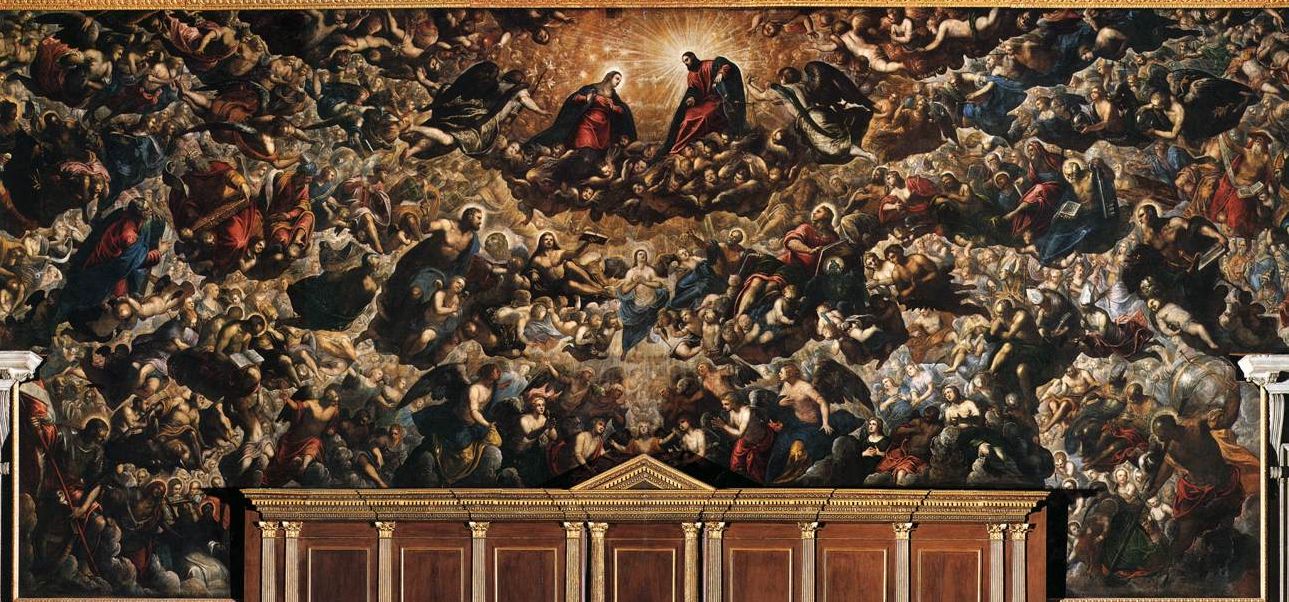
When the Doge’s Palace, or Palazzo Ducale, in Venice was destroyed by fire in 1577, it took with it a fresco from around 1365 by Guariento. Although initially unsuccessful in obtaining the commission to provide a replacement, with the death of Veronese in 1588, Tintoretto was invited to do so. By this time the artist was seventy, so much of the painting was performed by his son Domenico Robusti.
The room in which this painting was to be hung, the Sala del Maggior Consiglio, is one of the most majestic and imposing in the whole building, and was used for meetings of the Grand Council of Venice, at which it considered legislation and elected the city’s magistrates.
Jacopo Tintoretto (c 1518-1594) and Domenico Robusti, Paradise (E&I 298) (1588-1592), oil on canvas, 700 x 2200 cm, Sala del Maggior Consiglio, Palazzo Ducale, Venice. Wikimedia Commons.
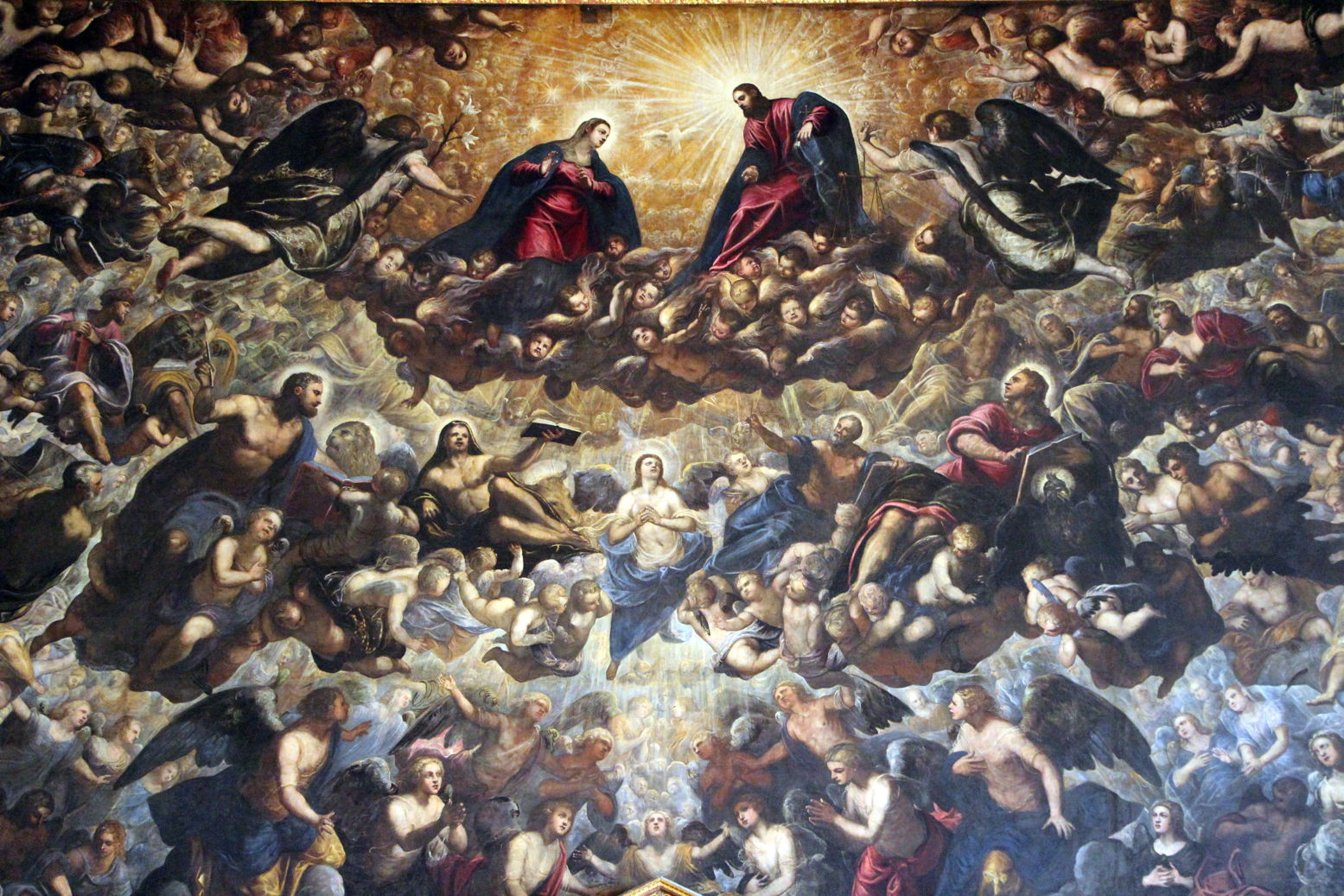
The resulting painting, which is seven metres (almost 23 feet) high and twenty-two metres (72 feet) across, was probably designed by Jacopo and largely entrusted to his son Domenico and the workshop to paint. In conformity with the rules of the commission, its composition focusses on the Coronation of the Virgin, inspired by Dante’s Paradise, as shown in the detail below.
Jacopo Tintoretto (c 1518-1594) and Domenico Robusti, Paradise (E&I 298) (detail) (1588-1592), oil on canvas, 700 x 2200 cm, Sala del Maggior Consiglio, Palazzo Ducale, Venice. Image by Sailko, via Wikimedia Commons.
At the top, the Virgin Mary, behind whom is her traditional symbol of the white lily, stands with Jesus Christ, in their matching red and blue robes. Between them is the white dove of the Holy Ghost, and all around are cherubic heads of infant angels. To the right are the scales of justice, also used for the weighing of souls.
Jacopo Tintoretto (c 1518-1594) and Domenico Robusti, Paradise (E&I 298) (detail) (1588-1592), oil on canvas, 700 x 2200 cm, Sala del Maggior Consiglio, Palazzo Ducale, Venice. Image by Sailko, via Wikimedia Commons.
Even at the height of his powers, and with his exceptionally fast brushwork, completing such a huge work would have been a major feat for Jacopo.
Jacopo Tintoretto (c 1518-1594) and Domenico Robusti, Paradise (E&I 298) (detail) (1588-1592), oil on canvas, 700 x 2200 cm, Sala del Maggior Consiglio, Palazzo Ducale, Venice. Image by Sailko, via Wikimedia Commons.
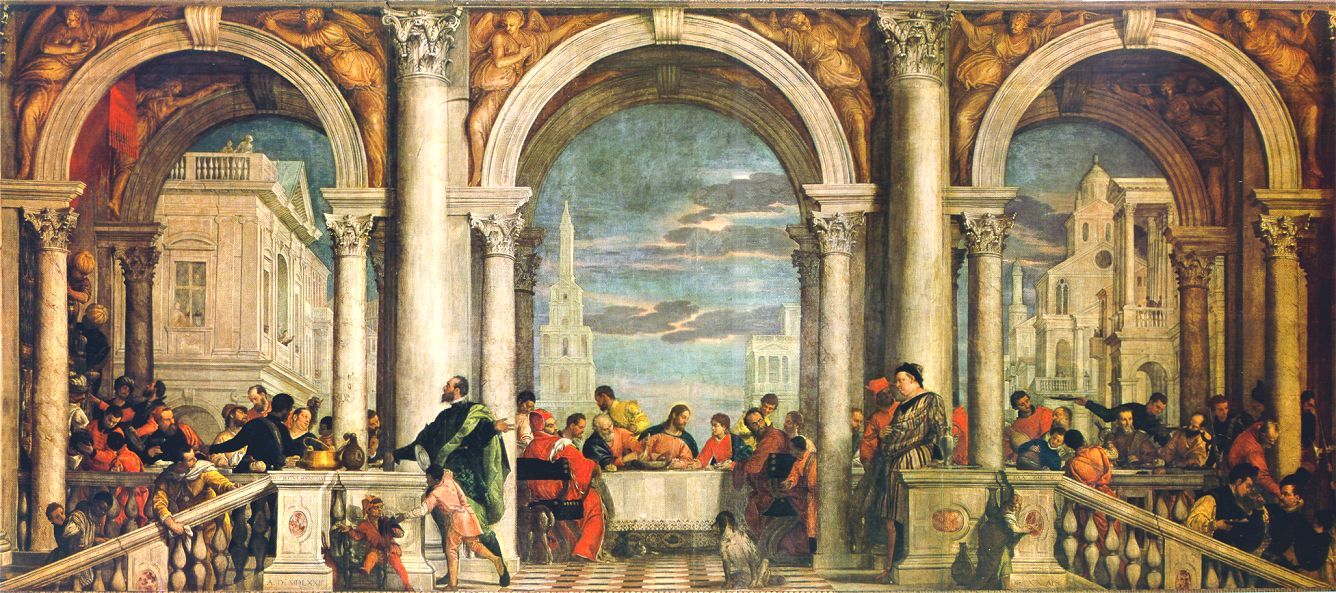
Paolo Veronese also made a name for himself with his earlier large canvases, but in 1573 exceeded them all in The Feast in the House of Levi, which wasn’t its original title.
Paolo Veronese (1528–1588), The Feast in the House of Levi (1573), oil on canvas, 555 × 1280 cm, Galleria dell’Accademia, Venice. Wikimedia Commons.
Veronese painted this thirteen metre-long (42 feet) scene for the refectory of the Dominican Friary of the Basilica di Santi Giovanni e Paolo, but it was intended to show the Last Supper, Christ’s last meal with his disciples before he was betrayed and crucified, at which he laid out the sacrament of Communion, a key part of Christian life ever since.
However, he over-reached himself, and the painting was deemed so offensive that he was brought before the Inquisition accused of blasphemy. Thankfully the Inquisition didn’t impose any penalty on Veronese himself, but required that he ‘correct’ the painting within a period of three months. This he did by changing its title, not its content, to The Feast in the House of Levi.
Christ is shown in the centre of the painting, further emphasised by his halo. In addition to the standard row of disciples, Veronese adds a rich collection of other figures, described by the Inquisition as “buffoons, drunken Germans, dwarfs and other such scurrilities”, more in the manner of a Venetian feast.
Selecting external Retina-resolution displays for use with Apple silicon Macs is extremely complicated. Even when you read Apple’s tech specs it’s often not clear exactly which combinations will work together. Thanks to the work of Parish Khan, this is now far simpler on his RetinaDesk site.
From the humble M1 MacBook Air with its single supported external display, to the eight you can drive from a Studio M2 Ultra or later, RetinaDesk details external display support for each model, provides tools to check essentials like cable bandwidth, and offers the definitive guide to 5K and 6K displays for Apple silicon Macs.
I’m sure you’ll find it useful. It’s free from advertising, sponsored content and AI, the only return to Parish comes from being an Amazon Associate, so making a tiny percentage on any monitor purchase you might make through the site’s Amazon link.
A few years ago I almost lost my main email addresses when their provider made changes. I had apparently missed a series of warning messages they had sent, as I had assumed those were just phishing attacks and deleted them without clicking on their links. Given that some days I get more than half a dozen potentially malicious emails claiming to come from that provider, I needed a better way to check the few that might be genuine. But how could I do that without putting myself at risk of a phishing attack?
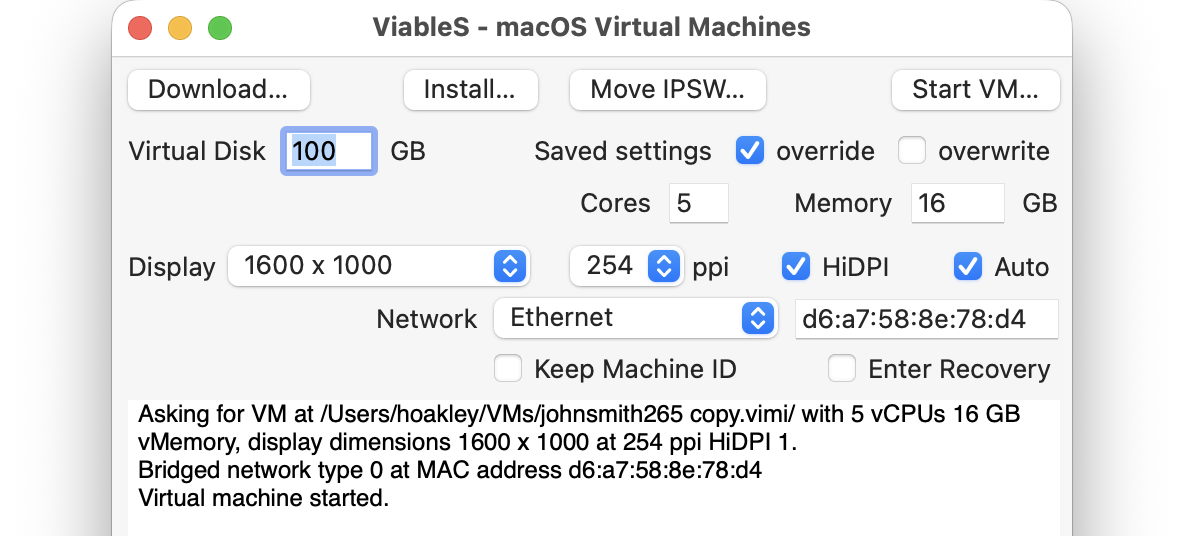
What I needed was a way to be able to click on a link safe in the knowledge that my Mac would be completely isolated from any consequences. The solution is to use a locked-down virtual machine running in total isolation from the host. This is supported in a special version of my free virtualiser Viable, named ViableS, or you may be able to do something similar using a different virtualiser.
First download the IPSW image file for the latest release of macOS, either directly using Viable or from the links to Apple’s source given by Mr. Macintosh. Use Viable to build that into a fresh 100 GB VM with a single user named John Smith and a password of password. That way any stolen secrets will be effectively anonymous, and won’t even reveal your username. At this stage, run the VM with shared folders so you can transfer in any apps you might want, and the link to the suspicious site.
If you’re going to use your locked-down VM again, rather than having to create a fresh VM every time, you can now duplicate it using Command-D. The VM’s disk image is stored as a sparse file, and duplication should result in a clone anyway, greatly reducing the space taken on disk.
Save the suspicious message to a PDF or similarly accessible file, and transfer that into the VM now. Once that’s all set up and ready to go, shut that VM down.
From here on, only run that VM using ViableS, as it runs in a sandbox and has no support for sharing folders with the host, although it obviously needs a network connection to let you follow the link in the saved message. All my virtualisers including ViableS have been granted the restricted entitlement to use bridged networking, so they get their own IP address rather than sharing the host’s, and that should allow their networking to be operated securely.
The VM is now as well protected and isolated from the host Mac as possible. The virtualiser is running in a sandbox, it has no shared access to files between host and VM, and is using a bogus name and password. To remind you that VM is locked down, ViableS adds a red goblin emoji to the window’s title bar. Having double-checked each of those settings, open the saved message in the VM and click on the suspicious link.
In this case, it took me to a fake version of the provider’s site built hastily using Webflow, where I was prompted to enter my email address and password, as if that would somehow ensure my email account wouldn’t be deleted. Take your time here and remember to enter your fake address and password, in my case j.smith@btconnect.com and password.
The rest of this fake proved non-functional. Whoever had set it up was clearly just harvesting user names and passwords, presumably to sell on for others to exploit in depth.
Other links might download a poisoned PDF, or take you to a ClickFix exploit.
Having reassured yourself that the email was phishing and not genuine, you can now shut down the locked-down VM and trash it. Virtualisation came to the rescue again.
The classical Greek hero Theseus had travelled overland to be reunited with his father Aegeus, King of Athens, where he narrowly escaped death by Medea’s poison. Following the example of his hero Heracles, he then killed the Marathonian Bull, in preparation for his most famous accomplishment, killing the half-bull, half-human Minotaur living at the centre of the Labyrinth on the island of Crete.
King Minos of Crete had been exacting a tribute of nine young men and nine maidens from Athens every nine years, who were taken to the Labyrinth to die. On the third such call for eighteen of Athens’ finest, its citizens accused Aegeus of being its cause. Although a matter of dispute as to how he accomplished it, Theseus went to Crete as one of those eighteen.
George Frederic Watts was apparently driven to paint The Minotaur in 1885 as a response to a series of articles in the press revealing the industry of child prostitution in late Victorian Britain. Those referred to the myth of the Minotaur, so early one morning he painted this image of human bestiality and lust. His Minotaur has crushed a small bird in its left hand, and gazes out to sea, awaiting the next shipment of young men and virgin women from Greece.
Because the Athenians knew that their young people weren’t going to return, the ship carrying them to Crete had black sails. On this occasion, though, Theseus gave its crew a white sail, telling Aegeus and the crew that when they returned, if he had been successful in killing the Minotaur, they would set that white sail as a sign.
Gustave Moreau (1826–1898), Athenians Being Delivered to the Minotaur (1855), oil, dimensions not known, Musée de Brou, Bourg-en-Bresse, France. Wikimedia Commons.
Gustave Moreau’s painting of Athenians Being Delivered to the Minotaur (1855) shows the victims as they were preparing to enter the Labyrinth. Wearing laurel wreaths to mark their distinction and sacrifice, the young men and women hold back while Theseus crouches, waiting to do battle with the beast, seen at the right.
Left to his own devices, Theseus’ chances were not good. However, Minos’ daughter Ariadne had fallen in love with him when she saw him compete in the funereal games preceding the act of sacrifice, and promised to assist in return for his hand in marriage afterwards. It was she who provided Theseus with a ball of thread which he deployed as he entered the Labyrinth, enabling him to retrace his steps once he had killed the Minotaur at its centre.
Henry Fuseli (1741–1825), Ariadne Watching the Struggle of Theseus with the Minotaur (1815-20), brown wash, oil, white gouache, white chalk, gum and graphite on moderately thick, moderately textured, beige wove paper, 61.6 x 50.2 cm, Yale Center for British Art, New Haven, CT. Wikimedia Commons.
In Henry Fuseli’s spirited mixed-media sketch of Ariadne Watching the Struggle of Theseus with the Minotaur (1815-20), Theseus appears almost skeletal as he tries to bring his dagger down to administer the fatal blow, and Ariadne resembles a wraith or spirit.
Charles-Édouard Chaise (1759-1798), Theseus, Victor over the Minotaur (c 1791), oil on canvas, dimensions not known, Musée des Beaux-Arts, Strasbourg, France. Image by Rama, via Wikimedia Commons.
Theseus, Victor over the Minotaur (c 1791) is one of only three paintings by Charles-Édouard Chaise known to survive. With its crisp neo-classical style, it shows Theseus standing in triumph over the lifeless corpse of the Minotaur. He is almost being mobbed by the young Athenian women whose lives he has saved. At the left, his thread rests on a wall by an urn, suggesting the young woman by it may be Ariadne; she is being helped by a young man.
There are conflicting stories as to what happened next, but Theseus and Ariadne departed from Crete, ending up on the island of Naxos, where Theseus abandoned her and sailed on. This has been depicted by many painters, although most have naturally concentrated on the jilted Ariadne rather than her betrayer Theseus.
John William Waterhouse (1849–1917), Ariadne (1898), oil on canvas, 151 x 91 cm, Private collection. Wikimedia Commons.
John William Waterhouse paints the moment that Ariadne (1898) starts to wake, as Theseus’ ship has just sailed. As she hasn’t yet realised she has been abandoned, she lies back at ease. On and under the couch are a couple of leopards, a clear reference to the imminent arrival of Dionysus.
Paulus Bor (circa 1601–1669), Ariadne (1630-35), oil on canvas, 149 x 106 cm, Muzeum Narodowe w Poznaniu, Poznań, Poland. Wikimedia Commons.
Paulus Bor’s portrait of Ariadne, painted in the period 1630-35, can only show her on Naxos, immediately after she has been abandoned, still clutching the thread by which she thought she had tethered him, now hanging at a loose end. On the wall above her are sketches she has made of her lover. She looks deeply lost in thought and gloom.
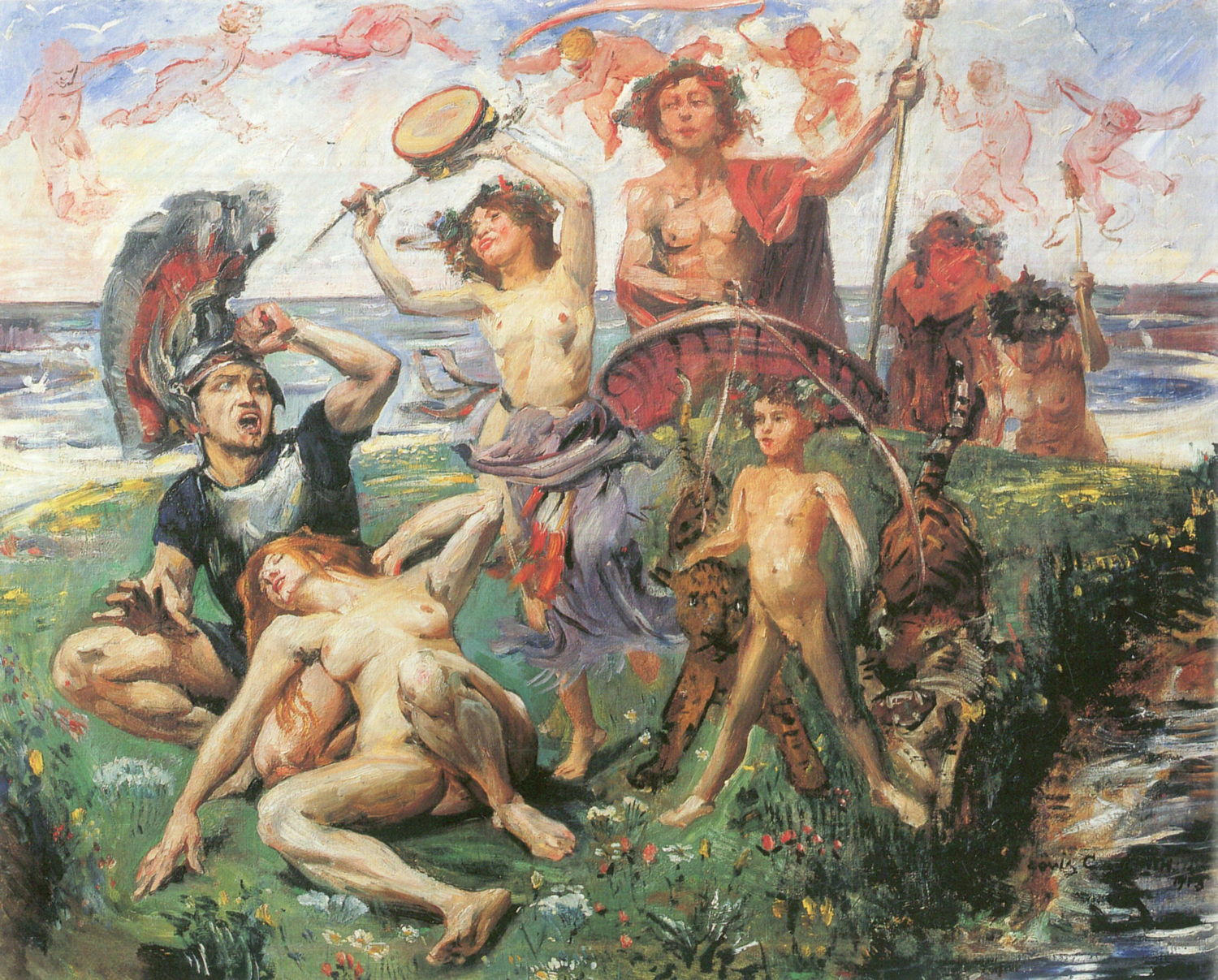
Lovis Corinth (1858–1925) Ariadne on Naxos (1913), oil on canvas, 116 × 147 cm, Private collection. Wikimedia Commons.
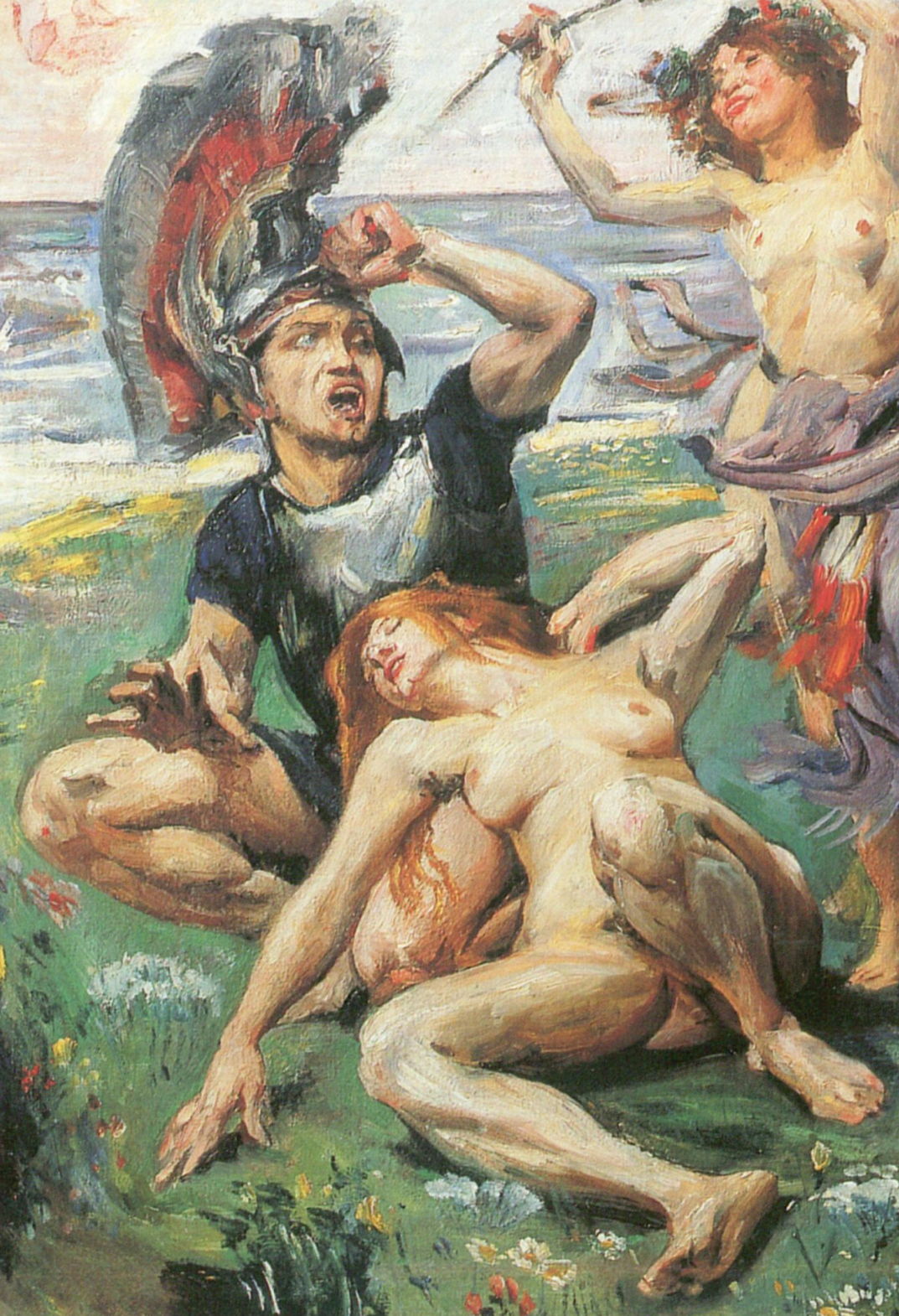
Lovis Corinth’s Ariadne on Naxos (1913) is one of his most sophisticated and masterly mythical paintings, inspired by the first version of Richard Strauss’s opera Ariadne auf Naxos (1912). The left third of the painting (detail below) shows Ariadne lying in erotic langour on Theseus’ left thigh. He wears an exuberant helmet, and appears to be shouting angrily and anxiously towards the other figures to the right.
Lovis Corinth (1858–1925) Ariadne on Naxos (detail) (1913), oil on canvas, 116 × 147 cm, Private collection. Wikimedia Commons.
Having called in briefly at Delos, Theseus and his ship returned to Athens. But in their delight and celebration, they forgot to hoist the white sail to indicate the success of their mission. Seeing their ship with its black sail still set, Theseus’ father King Aegeus threw himself from a cliff in despair, and died.
Theseus’ return to Athens thus brought an odd mixture of celebration at his success, and lamentation at the death of his father. Their ship was carefully preserved as a monument to Theseus’ accomplishment, and he set about transforming and growing the city by settling all the citizens of Attica in it. He promised government without a king, by means of democracy, making himself its commander in war and the guardian of its laws. He also had its currency struck into coins, and instituted the Isthmian (Olympic) Games.
Back on the island of Naxos, Ariadne went on to marry Dionysus, the couple had many children, and lived happily ever after.
I hope you enjoyed Saturday’s Mac Riddles, episode 361. Here are my solutions to them.
1: This second was actually the sixth and bumped up by 20.
Click for a solution
Macintosh II
This second (II) was actually the sixth (there had been five previous Mac models) and bumped up by 20 (its CPU was the first 68020 used in a Mac).
2: Its A5 followed the A4, without any one, and a third thinner.
Click for a solution
iPad 2
Its A5 (its chip) followed the A4 (the chip in the original iPad), without any one (there was no iPad 1), and a third thinner (it was claimed to be about 33% thinner than the original iPad).
3: First with a 750 followed the 604, but there was neither 1 nor 2.
Click for a solution
Power Macintosh G3
First with a 750 (it was one of the first Macs with a PowerPC 750 processor) followed the 604 (previous models had PowerPC 601-604 processors), but there was neither 1 nor 2 (Apple didn’t start naming Power Macs by generation until the G3).
The common factor
Click for a solution
They were each the first model in their series to be numbered, but didn’t start at 1.
Document versioning built into macOS is an unfinished masterpiece that promises much but never seems to have been developed as fully as it deserved. This article looks at how macOS can’t search saved versions, and how you can work around that.
In essence versioning is simple: apps that support it, and a great many do now, save a series of versions to the volume’s hidden and sealed database in the .DocummentRevisions-V100 folder at its top level. To access those versions you’d normally use the Time-Machine-like browser provided by the Browse All Versions command in the Revert To item in the app’s File menu. Whenever the app saves a document, the open document becomes the current version, and its saved state becomes the previous version. This works for manual saves, and for any automatic timed saves the app might make.
Unlike all other versioning systems, this is all handled automatically by macOS, and neither you the user nor the app developer has to make any effort to create or manage those versions. It really does come for free.
Unfortunately, all those saved versions in the version database fall outside the scope of Spotlight indexing, and Spotlight search can’t look inside any of the old versions saved in a volume’s version database. Surprisingly, the version browser doesn’t offer any search facilities either, as that’s presumably another feature intended for a future that never came.
This is a serious omission, as I access old versions not infrequently, and being able to search for them saves me laborious browsing. It might be a few hours or days after I removed a section from a document, that I realise I need it back. By that time it may well have vanished from Time Machine’s hourly backups, or the section may have been too transient to be retained there. But the chances are that the missing content will be safe inside a saved version, if only I can find it.
Pulling tricks with the hidden .DocumentRevisions-V100 folder isn’t a good approach to solve this. It’s clear from its contents that previous versions aren’t saved as discrete files, but it uses a chunking system to store what has changed between versions, for economy in space. Access supported by macOS is strictly limited to looking up saved versions for any given file in that volume, and there’s no way to search their contents like that.
One way around this is to save each document version as a separate file, allow Spotlight to extract their contents and add those to its indexes for that volume, then to search those files. This is quick and simple using my free utility Versatility. To demonstrate this, I picked two documents with a substantial number of versions:
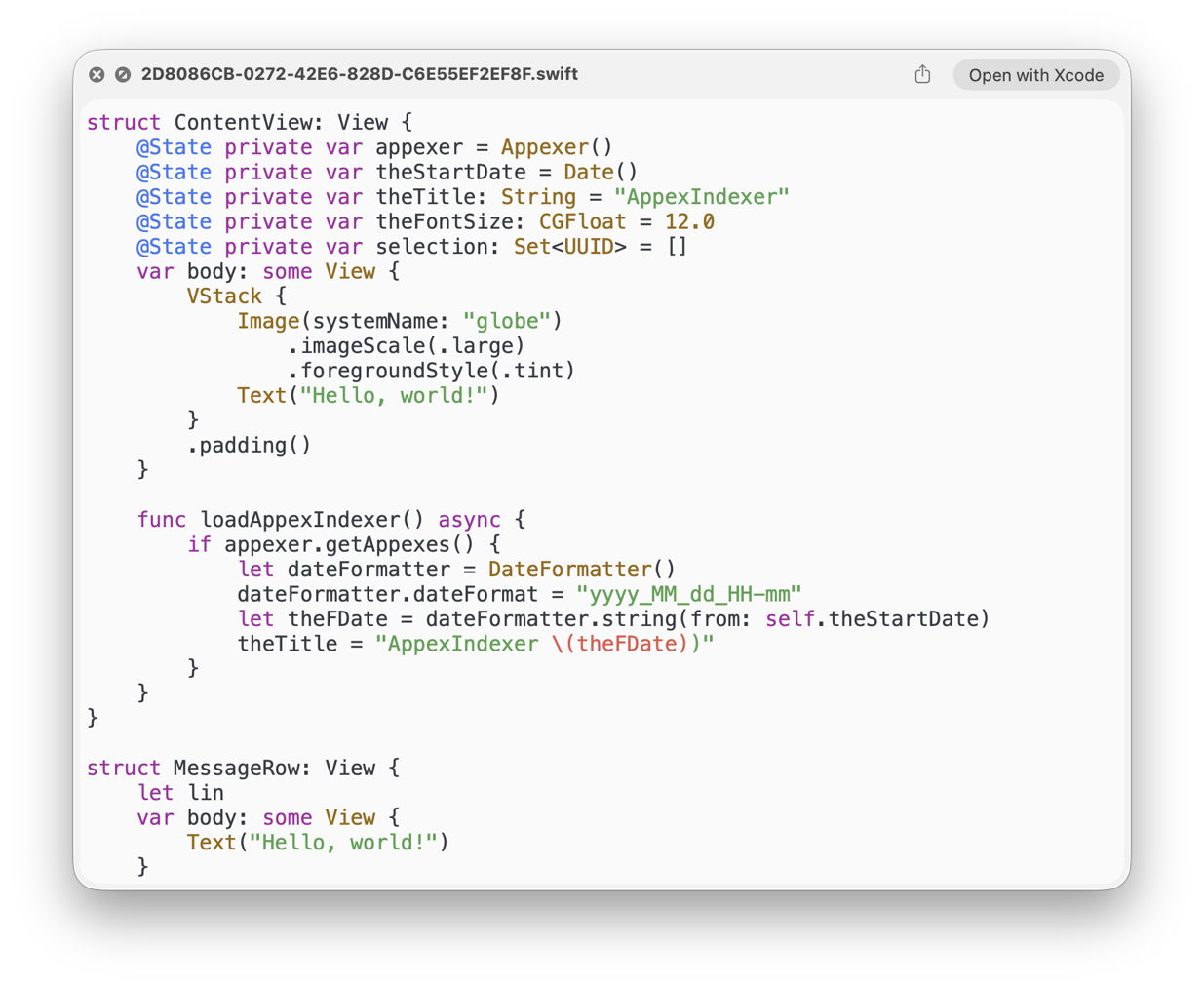
a Swift source code file edited in Xcode with 112 versions, with just one of them containing a function named loadAppexIndexer;
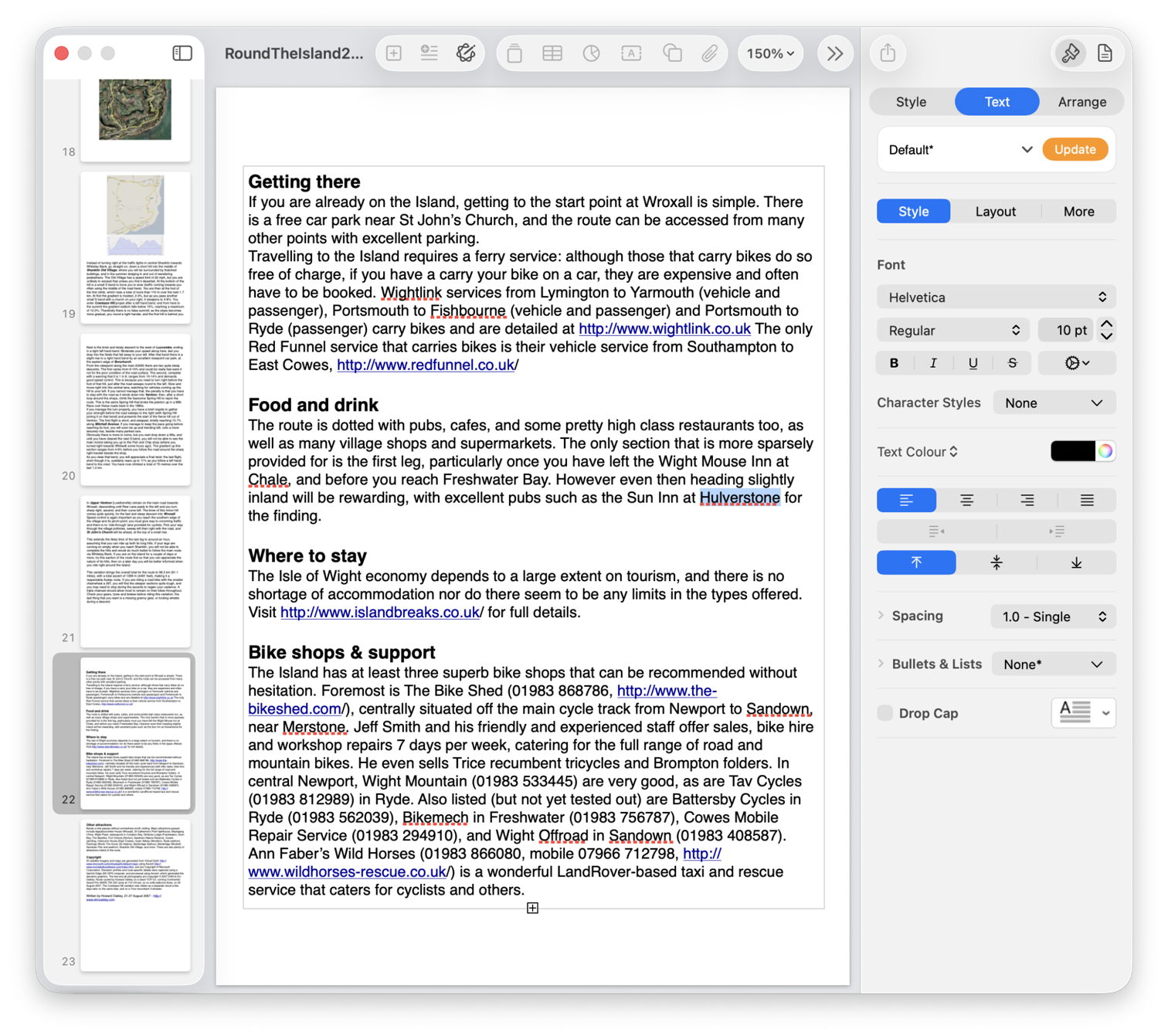
a large Pages document with a mere 49 versions, where I was looking for the first containing the placename Hulverstone.
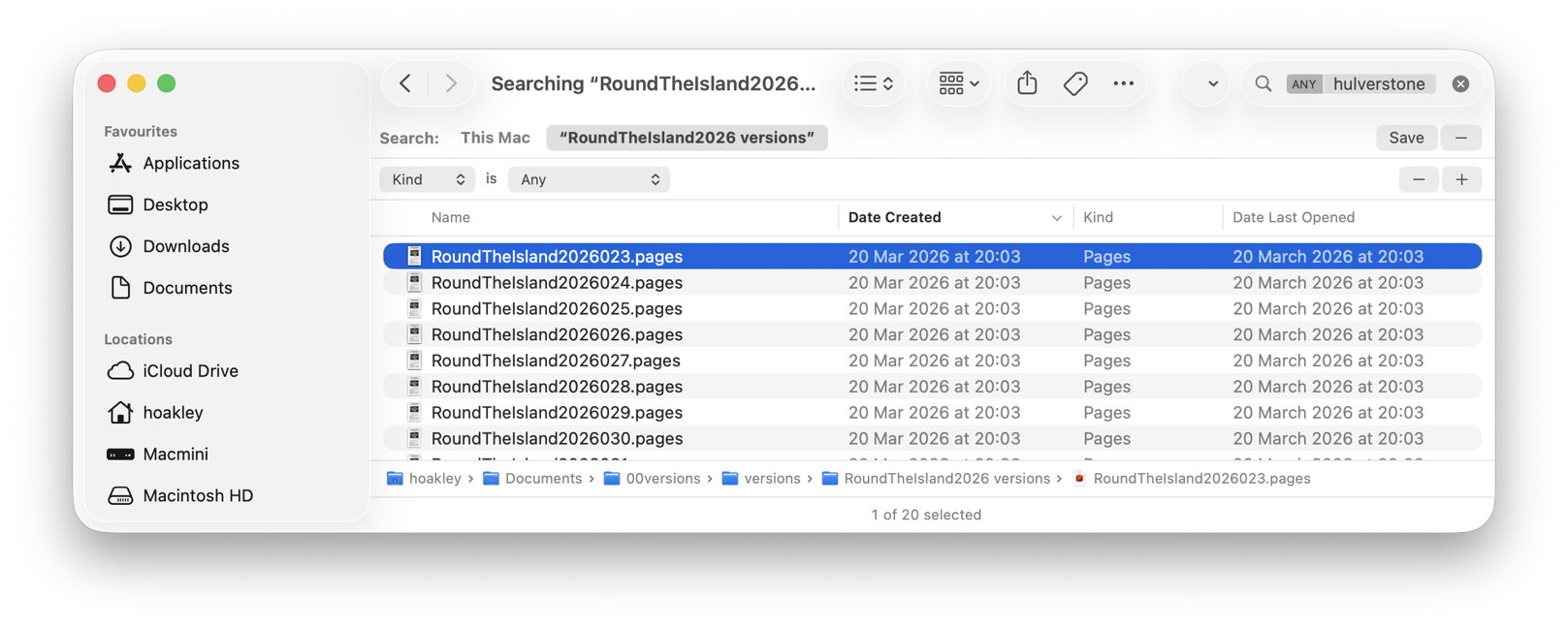
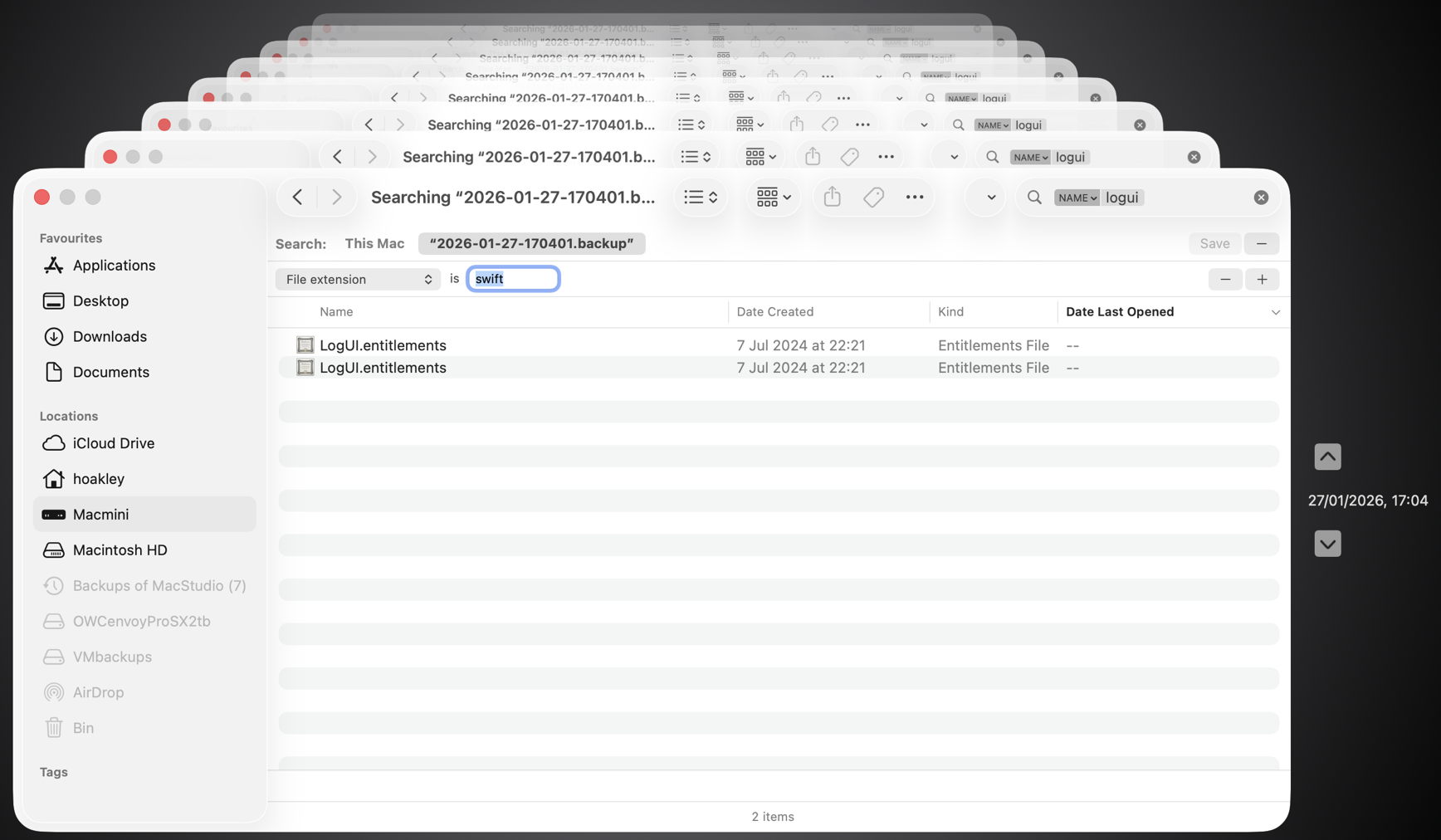
In both cases I started by dropping the current document onto Veratility’s window, and saving individual archived versions to a new folder alongside that original document. I then opened that archive folder in a Finder window, and converted that to a Find window with that command in the Finder’s File menu. I entered my term, loadAppexIndexer or Hulverstone, into the search box, and changed the search scope from This Mac to the open archive folder.
In the Swift code, Spotlight immediately found the term in the file numbered 033 by Versatility, and all versions from the file numbered 023 in the case of the Pages document.
With that Finder window still open I was then able to locate those versions in the original documents:
Using my free Revisionist, the version numbers start from 1, whereas Versatility starts them at 000. So I added 1 to the number in the filename, and previewed that version in Revisionist. In both cases that’s sufficient to copy content that had gone missing from the current version of the document, for example.
Using the version browser in XCode or Pages, I looked back for that version’s datestamp, given in the Finder window as its Date Created, and brought that old version up in the browser.
Once happy I had done what I wanted with that old version, I then trashed the archive folder created by Versatility.
To summarise the sequence:
drop the versioned document on Versatility’s window;
save the archive folder alongside the original document;
open a Finder Find window on that archive folder;
using the search box and find bars, locate the version(s) in the archive folder;
to open the versioned document in Revisionist, add 1 to its file version number;
to open in an app version browser, select the date of that version as shown in the Finder window;
Yesterday’s article examined Peter Paul Rubens’ masterwork Peace and War (1629-30), which he gave to King Charles I of England at the end of his diplomatic mission in London. Rubens returned to his busy workshop in Antwerp, and for the remaining decade of his life devoted himself to painting some of his greatest and most personal works.
His personal life changed greatly too: when he returned to Antwerp, he married the sixteen year-old Hélène Fourment, having lost his first wife four years earlier. In 1635, he bought a country estate near Antwerp, the Steen, which was to be his base until his death, and the subject of several of his finest landscape paintings over those years.
With Europe nearing the end of the Thirty Years’ War, Rubens was only too delighted to be commissioned to paint one of his final narrative masterpieces for Ferdinand de’ Medici, then the Grand Duke of Tuscany. Tuscany had been largely uninvolved in the war, and this time Rubens had no diplomatic mission to accomplish. He could afford to be frank in his story, and we are fortunate in having the artist’s own description of the painting as a reference.
Peter Paul Rubens (1577–1640), The Consequences of War (1637-38), oil on canvas, 206 x 342 cm, Palazzo Pitti, Florence, Italy. Wikimedia Commons.
The central figures in The Consequences of War (1637-38) are Venus and Mars. The god of war is advancing forcefully having just rushed from the temple of Janus, moving from left to right, with his sword bloodied and held low. His head is turned back to look at Venus, whose left arm is caught around his right, and who is clearly trying unsuccessfully to restrain him. Standing against the right thigh of Venus is a winged Cupid, child of Mars and Venus.
Drawing Mars forward is Alecto, her hair now looking more like that of a Fury but with few snakes visible, who bears a torch in her right hand. Monsters near her personify pestilence and famine, inseparable partners of war at that time. On the ground below Alecto is a woman with her back towards the viewer: she is Harmony, whose lute has been broken in the discord brought by war.
Nearby, also on the ground, is a mother with her child in her arms, symbolising the effect of war on families and their rearing. At the lower right corner is an architect clutching his instruments, indicating how fine buildings are thrown into ruin by war. Under the right foot of Mars is a book, showing how war tramples over the arts.
On the ground to the left of Cupid is a bundle of arrows or darts: these are not Cupid’s arrows of desire, but when bundled up would form the symbol of Concord; thus war breaks Concord. To their left is the caduceus and an olive branch, attributes of Peace, also cast aside.
The woman at the left in a black gown is the personification of Europe, whose globe, symbolising the Christian world, is carried by a putto behind her. Having endured the ravages of war for so long, her clothing is torn and she has been robbed of her jewels.
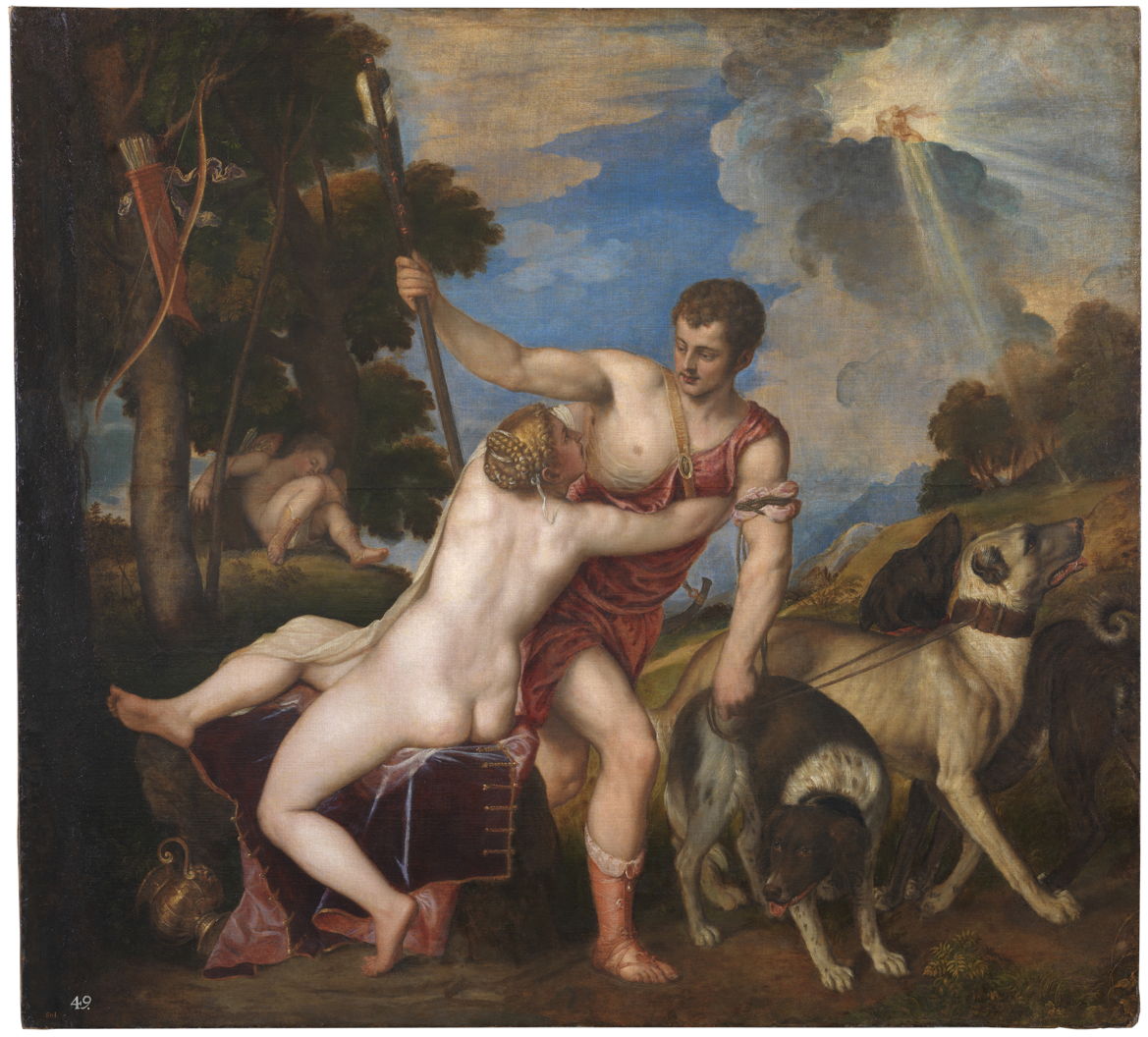
Venus and Mars are, in myth, well-known lovers. Venus is failing to restrain Mars from charging off to war, and in doing so, he is breaking their bond of love. This element of the composition had evolved over a long period, coming originally from Titian, and referring to another of Venus’ lovers, Adonis.
Titian (Tiziano Vecelli) (1490–1576), Venus and Adonis (1554), oil on canvas, 186 x 207 cm, Museo Nacional del Prado, Madrid. Wikimedia Commons.
Titian’s Venus and Adonis from 1554 shows Venus trying, again in vain, to prevent Adonis from going off to hunt, where he was to be killed by a wild boar. This was a favourite motif of Titian’s: no less than seven versions have been attributed to him from the period between 1553 and about 1560.
Peter Paul Rubens (1577–1640), Venus and Adonis (c 1610), oil on panel, 276 × 183 cm, Museum Kunstpalast, Düsseldorf, Germany. Wikimedia Commons.
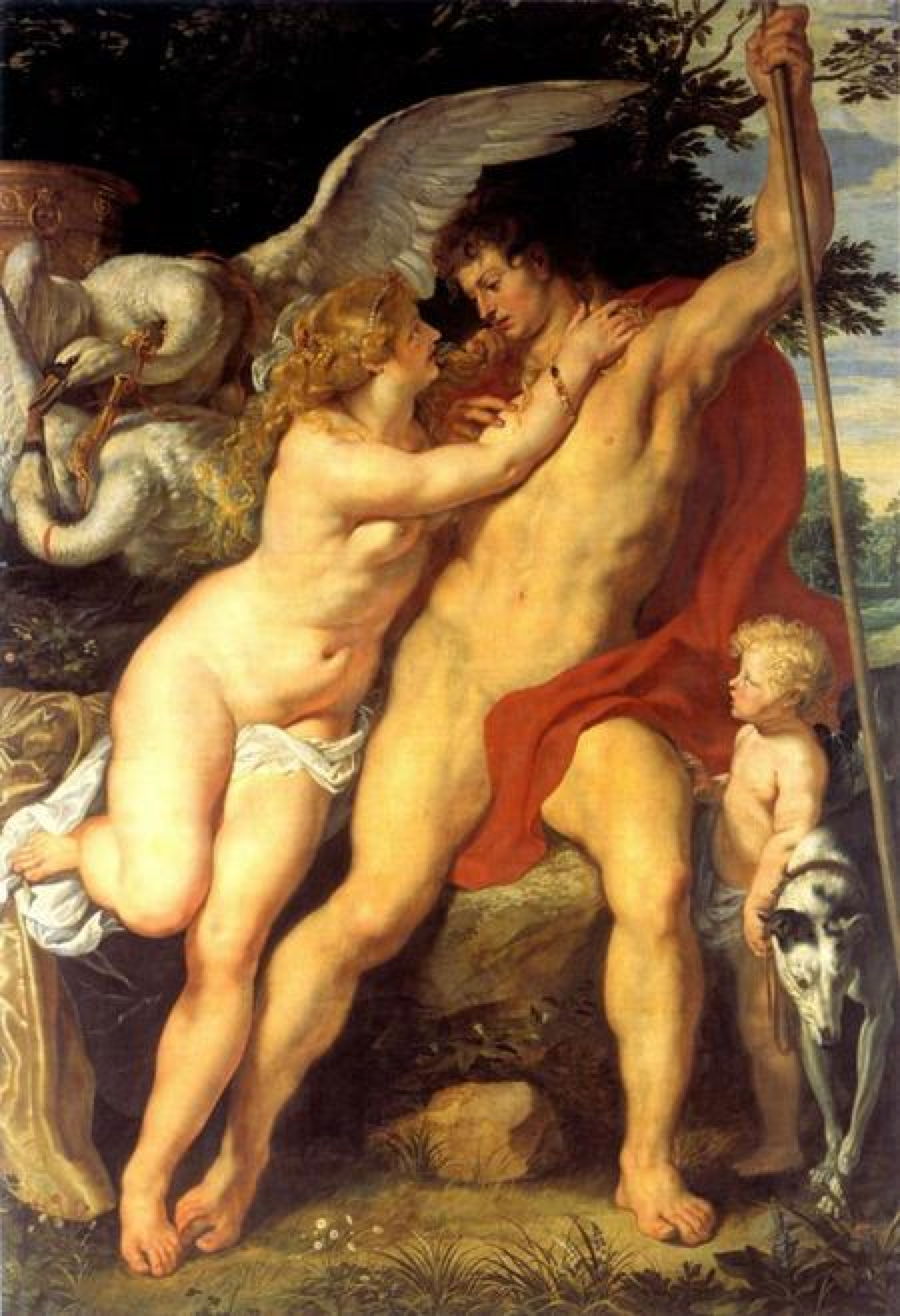
Rubens’ early painting of Venus and Adonis from about 1610, now in Düsseldorf, adopts a similar compositional approach, with Adonis facing the viewer and about to move to the right, but Rubens turns Venus’ body to face the viewer more.
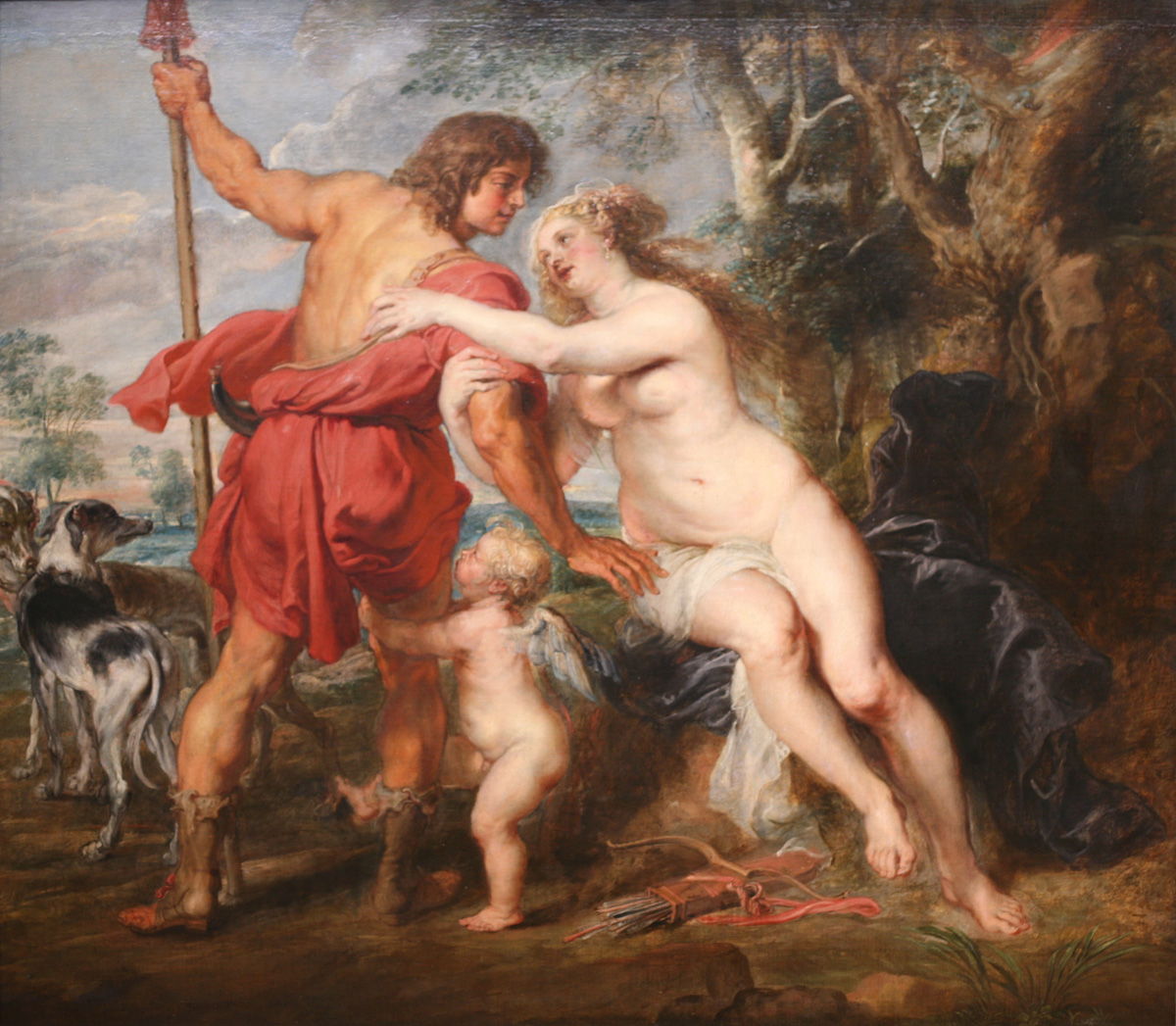
Peter Paul Rubens (1577–1640), Venus and Adonis (c 1635), oil on canvas, 194 × 236 cm, The Metropolitan Museum of Art, New York, NY. Wikimedia Commons.
His much later Venus and Adonis from about 1635, now in the Met in New York, reverses the image as if it had been made from a print, and turns Adonis so that his back is towards the viewer. He is now about to move beyond the picture plane, away from the viewer. For The Consequences of War, Rubens keeps Venus in a similar position, but turns Mars to move straight along to the right in a more forceful and unconstrained action.
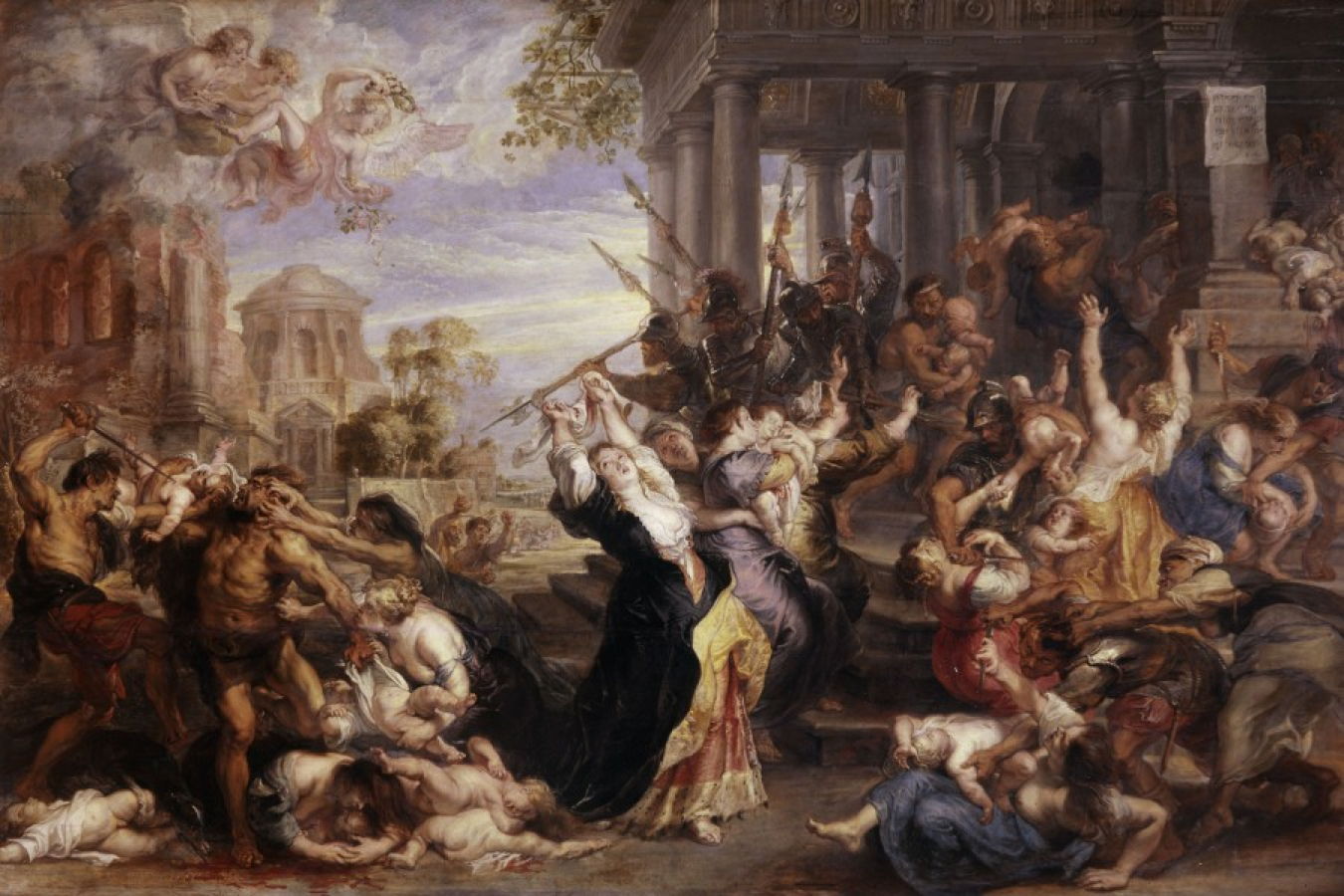
Peter Paul Rubens (1577–1640), The Massacre of the Innocents (c 1638), oil on oak, 198.5 x 302.2 cm, Alte Pinakothek, Munich, Germany. Wikimedia Commons.
The figure of Europe has an even more contemporary reference, to a nearly identical woman in the centre of Rubens’ The Massacre of the Innocents (c 1638). She too is in distress, although here she is not a personification in the way that she is in The Consequences of War.
Perhaps the most telling comparison is with Rubens’ The Triumph of Victory (c 1614), made when he was young and the finest painter in Flanders. The Treaty of Antwerp had been signed in 1609, and the city was flourishing in the Twelve Years’ Truce which ensued.
Peter Paul Rubens (1577–1640), The Triumph of Victory (c 1614), oil on oak panel, 161 x 236 cm, Gemäldegalerie Alte Meister, Kassel, Germany. Wikimedia Commons.
Painted for the Antwerp Guild of St George, its organisation of archers, Mars dominates, his bloody sword resting on the thigh of Victoria, personification of victory. She reaches over to place a wreath of either oak or laurel on Mars, and holds a staff in her left hand. At the right, Mars is being passed the bundle of crossbow bolts that make up the attribute of Concord.
Under the feet of Mars are the bodies of Rebellion, in the foreground, who still holds his torch, and Discord, on whose cheek a snake is crawling. The bound figure resting against the left knee of Mars is Barbarism.
Nearly a quarter of a century later, with the experience that his work as a diplomat had brought, Rubens had expressed a completely different view of war. His Peace and War (1629-30) and The Consequences of War (1637-38) should hang in the office of every head of state, from the White House, to the Kremlin Senate, to 10 Downing Street, and the Ryongsong Residence in North Korea.
Just over six months ago a series of weird bugs came to light in Spotlight indexing. The first report was that plain text files beginning with the characters LG are never indexed, so their contents can never be found by Spotlight search. The mystery deepened when the same was discovered for text files beginning with the characters NPA or Draw. It was appropriately Drew who worked out the common factor behind this apparently bizarre connected behaviour: all three files are identified as not being text by the old Unix utility file(1), used to recognise file types by ‘sniffing’ their contents.
You can verify that by creating a plain text file with any of those three sets of characters at its start, then running the command file on that file. In the case of one beginning with Draw, file will identify it as RISC OS Draw file data, even though the file has an extension of txt or text and a UTI of public.plain-text. At that the RichText mdimporter, which analyses all text-based files for metadata to enter into Spotlight’s indexes, throws its hands up in horror and refuses to index the file’s contents. Change those opening characters in that file, perhaps by adding a leading space, and all of a sudden the mdimporter works as expected.
Following our collaborative effort here, particularly Drew’s insight, we realised this bug has been silently blocking the indexing of seemingly random text files for the last three years or more. What remained unanswered at the time was what that mdimporter was doing running file(1) on files whose UTI made it clear that they were in plain text, not some long-forgotten binary vector graphics format from 1989. I believe I now have an answer, thanks to my recent work on QuickLook’s qlgenerators.
QuickLook’s generators take advantage of the hierarchical structure of UTIs. Rather than accepting the most specific UTIs such as public.jpeg, Image.qlgenerator works with all files whose UTI conforms to the generic UTI of public.image, and then undertakes its own format detection. This enables it to generate correct thumbnails and previews of HEIC images that have been given the incorrect extension of jpg, for instance.
Similarly, a Swift source-code file with the extension of swift and the UTI of public.swift-source is handled by the Text.qlgenerator because public.swift-source conforms to public.plain-text, the UTI required for use of that generator.
What if Spotlight’s mdimporters were to work the same?
We know the built-in RichText.mdimporter is used to extract metadata for a wide range of files containing text, which all conform to the generic UTI of public.text. It then classifies them on the basis of their contents to work out what to index. What if that’s performed using file(1), so rejecting perfectly valid text files as ancient binary vector graphics files, and so on?
We can’t get the same direct evidence from the log that I obtained for QuickLook, as Spotlight is far less informative in its log entries. We can get clues from looking at output from mdimport and mdls, though. While a non-deviant text file contains a metadata attribute extracted by its importer as kMDItemTextContent containing the text in the file’s data, that’s missing from a text file starting with any of the three known triggers. In turn that’s associated with the attribute _kMDItemPrimaryTextEmbedding containing ‘vec_data’ listed by mdls, which is also missing for the deviant files.
There is hope that a third party might be able to undercut RichText.mdimporter by providing a bug-free importer for public.plain-text, but that relies on the built-in importer targeting public.text rather than public.plain-text. The best solution would be for Apple to fix the identification of text files instead of relying on file(1), which dates from 1973. Given that these deviant files work perfectly with QuickLook’s generator, it appears Apple has already solved this problem there. So I suspect this bug in RichText.mdimporter will never be fixed in Sequoia or Tahoe.
With the first beta-release of macOS 27 just a couple of weeks away, this leaves those using the last Intel Macs stuck with Spotlight indexing that will never work on some text files, assuming that at some point in the not too distant future this bug is finally fixed in an Arm-only macOS. This is all sadly familiar from the loss of 32-bit support in the transition from Mojave to Catalina, when little if any effort was devoted to making Mojave as free of bugs as possible before it was abandoned in the rush forward to 64-bit.
It would have been far better to be able to look back in fondness with macOS that worked better, than looking back in anger at what never got fixed.
One last thing to remember is that, when Apple does fix this bug, you’ll have to force Spotlight indexes to be rebuilt on each of your Mac’s volumes to ensure that the contents of these files are incorporated. We learned that last time there was a serious bug in the same importer, which failed to index the contents of RTF files.
Seventeenth century Europe was ravaged by war. Between 1618 and 1648, much of what is now Germany suffered the Thirty Years’ War, with widespread famines, epidemic disease, and the slaughter of battle. This spilled over to the Netherlands and Belgium, and beyond. Warfare at that time used weapons which individually had limited killing power, but wherever there was war, largely mercenary armies stripped the land of food and supplies, laying waste to large tracts of countryside, and bringing infectious diseases to kill many of the local population.
In the midst of that, some of the old Masters managed to flourish, among them Peter Paul Rubens (1577–1640), arguably the greatest narrative painter in Western art, and an accomplished international diplomat.
Rubens was no stranger to the consequences of religious persecution, conflict, and war. His Protestant parents had fled Antwerp for Cologne before his birth, he returned to Antwerp with his widowed mother in 1589 to be raised as a Catholic, and from 1600 he travelled throughout Europe, including Italy, Spain, France, England, and the Low Countries.
In 1629, he returned from a period in Madrid where he had worked with Diego Velázquez, then spent a little time back in his workshop in Antwerp before travelling to London, where he stayed until April the following year. A relatively peaceful country during the war on the European mainland, England’s stable period during Queen Elizabeth I’s reign had ended with her death in 1603; two years later Guy Fawkes and conspirators had tried to blow up the House of Parliament, and the Civil War broke out in 1642.
Rubens was now in his early fifties, internationally successful, and able to choose his own motifs. He had developed his sophisticated visual language of narrative over three decades of painting stories. Acting as envoy to King Philip IV of Spain, he was trying to agree peace between Spain and King Charles I of England. Among his tools was one of his greatest narrative paintings, Minerva Protects Pax from Mars or Peace and War, painted when he had been in England and left there as a gift to its king.
Rubens’ painting, now in the National Gallery in London, is crowded with more than a dozen figures drawn from classical myths. Until you have identified them and understood their roles and meaning, its reading remains elusive.
Its central figures are those of Ceres, here in the role of Pax, personification of peace, and Minerva behind her. In attendance are Mars, Hymen, Plutus, and Alecto, with sundry Bacchantes, a satyr, putti, and the attributes of Bacchus and Mercury. It’s like an away day from Olympus, or part of an index to Ovid.
Ceres and Minerva are at the heart of the painting. Rubens shows Ceres expressing milk from her left breast, which arcs into the mouth of her son Plutus, the god of wealth, who is grasping her left arm.
Peter Paul Rubens (1577–1640), Venus, Mars and Cupid, oil on canvas, 195.2 × 133 cm, Dulwich Picture Gallery, London. Wikimedia Commons.
The figures of Ceres and Plutus are almost identical to those of Venus and Cupid in Rubens’ earlier Venus, Mars and Cupid (c 1633), which introduces ambiguity to her figure. However, in this painting Cupid is shown with wings, and his traditional bow and arrows. In Peace and War, the infant is clearly not Cupid as he has neither wings nor bow and arrows: there he is Plutus.
Being the goddess of agriculture, grain crops (hence cereal), and maternal relationships, Ceres stands for values strongly associated with the benefits of peace: bread rather than starvation, fertility rather than barrenness and pestilence. Her son Plutus represents the growth of wealth in times of peace.
Although the figure immediately behind Ceres might be mistaken for a man (Mars, perhaps), her staff and helmet are characteristic of Minerva, the goddess with a curiously mixed portfolio of wisdom, industry, and war, a hangover from her part-Etruscan origins. Immediately above her is a winged putto carrying a caduceus, a short staff with wings at the top and entwined snakes, normally an attribute of Mercury, but also associated with commerce. That putto leans forward to place a laurel wreath, the crown of the victor and a symbol of peace, on Ceres’ head.
Minerva is pushing away the bearded figure of Mars, god of war, who is wearing his characteristic black armour. Rubens painted Mars not infrequently, and was flexible with his age and appearance, which vary according to context. With Venus and Cupid above, he is a young, clean-shaven man.
Peter Paul Rubens (1577–1640), Venus and Mars (1632-35), oil, 133 x 142 cm, Musei di Strada Nuova, Genoa, Italy. Wikimedia Commons.
In Venus and Mars (1632-35) he appears more like an ageing general than a warrior, and Venus is also past the beauty of her youth. Perhaps they had succumbed too often to the temptations of Bacchus, seen behind brandishing an empty glass.
At the far right of Peace and War is Alecto, the Fury responsible for dealing with the moral offences of humans, usually by driving them mad. Rubens refrains from giving her snakes in her hair, but emphasises madness, the madness of war.
On the opposite (left) side of the painting is a Bacchante holding her tambourine (tympanum) aloft, and another bearing earthly riches at her left side. A satyr crouches low over a leopard, and proffers a cornucopia filled with fruit to the figures at the right.
This group is associated with Bacchus. Although he is not present, his chariot is normally drawn by leopards or similar big cats, and he is accompanied by Bacchantes. This is shown well in Lovis Corinth’s marvellous painting of Ariadne on Naxos (1913) below.
Lovis Corinth (1858–1925) Ariadne on Naxos (1913), oil on canvas, 116 × 147 cm, Private collection. Wikimedia Commons.
Bacchus’ age and appearance are remarkably variable. In Ruben’s later Bacchus (1638-40), he is old and grotesquely obese, but still accompanied by his big cats.
Peter Paul Rubens (1577–1640), Bacchus (1638-40), oil on canvas transferred from panel, 191 × 161.3 cm, Hermitage Museum Государственный Эрмитаж, Saint Petersburg, Russia. Wikimedia Commons.
This painting was completed not long before Rubens’ death from the consequences of gout, and may be the artist’s personal reflection on the result of sustained familiarity with Bacchus.
On the other side of the cornucopia from the Satyr is a small group of children, and a winged putto or Cupid, led by Hymen, who bears his characteristic torch. The god of marriage has led the products of marriage to the fruit of peace and plenty. These figures were painted from the children of one of King Charles’ diplomats, Sir Balthasar Gerbier, who was both an artist and Rubens’ host while he was in England.
Rubens’ story is clear: push war and its associated madness away, and you will enjoy peace, prosperity, and a thriving, well-nourished population.
King Charles made peace with France and Spain, but couldn’t get on with his own parliament; he therefore ruled England without a parliament for the “eleven years’ tyranny”. Collapse of power was inevitable after that: he faced Scottish and Irish rebellions, then in 1642 found himself in a civil war. He was executed on 30 January 1649.
Rubens returned to Antwerp in 1630, where he painted a second masterwork on the subject of peace and war, the centrepiece of tomorrow’s article.
In case you haven’t got the message from the last few weeks looking at Spotlight and QuickLook, UTIs (Uniform Type Identifiers) are important, but not always as critical as they could be. To understand how macOS copes with misleading UTIs, I have a little demonstration you can try in the privacy of your own Mac.
All you need for this is an image with some Exif metadata. Those taken by an iPhone are particularly suitable, as they usually contain rich Exif information about which model took that image, focal length, aperture, exposure time and more. In my case, the image is in HEIC format. If you have my apps UTIutility and SpotTest, you can also explore UTIs more thoroughly, and inspect the metadata from images that gets indexed by Spotlight, but those are optional extras.
A file with the extension HEIC or heic is assumed to have the UTI public.heic, which conforms to public.heif-standard, and that in turn conforms to public.image, the parent of most image formats in macOS. The Help book for UTIutility shows these in a dense diagram.
Select that image in the Finder’s Column view to inspect its public metadata. While the image is selected, open Show Preview Options in the View menu and enable all the metadata listed there to be shown in previews.
You should then have a good preview pane with lots of metadata below it.
Next open a new Finder window and set it to Find. Using the search criterion popup menu, enable the Device model attribute, or another your image has metadata for, and search for that attribute, here iPhone XR, and you should see your image among the hits.
If you have SpotTest to hand, drop your image on its Drop Window. Being an image, it will crash mdimport, so the information you’ll see will be the metadata fields from Spotlight’s indexes, which should include the Device model as kMDItemAcquisitionModel.
So far, everything has worked as expected, but we’re now going to throw a spanner in the works by changing the extension on that image from HEIC to jpg, which changes the image’s UTI to public.jpeg, although that still conforms to public.image.
Its basic thumbnail icon now changes to a generic JPEG icon, so we’ve managed to confuse the basic thumbnailing scheme in QuickLook. But it’s still shown in the preview pane correctly, with all its metadata intact.
This is because that image has its larger thumbnails and previews generated by the qlgenerator for public.image, and that goes out of its way to parse the file data correctly, and recognise this is really a HEIC not a JPEG. If you’ve left the Finder Find window open, you’ll see that continues to find the image as if nothing had happened, as Spotlight also imports metadata using a common mdimporter for public.image, rather than relying on the more specific UTIs of public.jpeg or public.heic.
Finally, change the file’s extension to text, and you’ll see a preview of its text content, and it vanishes from the Find window too. That’s because text files are handled by their UTI of public.text, which includes public.rtf and others. Those don’t check the file data to ensure they’re not images, so the file is now being handled by the wrong qlgenerator and mdimporter, and won’t make any sense. As public.text formats don’t support Exif data, that isn’t extracted either, as you can see in SpotTest.
Change the extension back to heic, and you’ll see how quickly the right qlgenerator and mdimporter correct its thumbnails, previews, and search discovery, thanks to UTIs.
Mythological worlds in classical Mediterranean civilisations often appear confusing and contradictory when stories and beliefs of many centuries and different cultures are merged, as happened in post-classical painting. What might appear to be a single distinctive attribute, such as a snake coiled along the length of a staff, then becomes a muddle.
There are two common combinations of snakes coiled around a rod or staff. Hermes (Roman Mercury) has a caduceus as his attribute, consisting of a rod or staff with a pair of entwined serpents along its length, and sometimes they are shown bearing small wings. This signifies his swiftness as a messenger. The rod of Asclepius (which has several alternative spellings) should have but a single serpent coiled around it, and is associated with healing and medicine, and remains so today long after its divine origins have been forgotten.
Although not known for his paintings of secular stories, William Blake’s Judgement of Paris (c 1806-17) was one of a pair made for Thomas Butts, the other being Philoctetes and Neoptolemus on Lemnos, a more obscure story leading to the death of Paris.
As with almost every artist before and since, Blake shows the three contestants naked in front of Paris, just at the moment that the golden apple is awarded to Aphrodite. Hera and Athena, standing either side of her, are visibly upset. Above them is the naked figure of Hermes, with his caduceus and its pair of intertwined serpents, and a winged helmet. The demonic figure at the top left is presumably a harbinger of the death and destruction to come in the Trojan War.
Pierre-Auguste Renoir (1841–1919), The Judgment of Paris (c 1908-10), oil on canvas, 73 x 92.5 cm, Hiroshima Museum of Art, Hiroshima, Japan. Wikimedia Commons.
Renoir’s account of The Judgment of Paris, from about 1908-10 is a carefully composed image of the same moment of peripeteia. Watching on is Hermes, complete with his winged helmet, sandals, and caduceus.
Abraham Bloemaert (1564–1651), Mercury, Argus and Io (c 1592), oil, 63.5 x 81.3 cm, Centraal Museum, Utrecht, The Netherlands. Wikimedia Commons.
The most popular scene in Ovid’s intertwined stories of the rape of Io and the murder of Argus is that of Hermes lulling Argus to sleep. However, hardly any painters depict Argus having the hundred eyes specified in the Metamorphoses. Abraham Bloemaert is an exception, in his carefully composed Mercury, Argus and Io (c 1592). Hermes is playing his flute at the left, his caduceus at his feet, as Argus falls asleep in front of him, his additional eyes visible over the surface of his head.
David Rijckaert (III) (1612–1661), Philemon and Baucis Giving Hospitality to Jupiter and Mercury (date not known), oil on panel, 54 x 80 cm, Private collection. Wikimedia Commons.
David Rijckaert’s undated Philemon and Baucis Giving Hospitality to Jupiter and Mercury gives the most popular account of the elderly couple entertaining the two gods. Hermes (left) and Zeus (left of centre) are seated at the table, with Philemon (behind the table) and Baucis (centre) waiting on their every need. Once again, Hermes is distinguished by his caduceus as well as a more contemporary winged hat.
Rod of Asclepius
Giovanni Battista Cipriani (1727–1785), Aesculapius Holding a Staff Encircled by a Snake (date not known), media and dimensions not known, Wellcome Library, London. Courtesy of Wellcome Images images@wellcome.ac.ukhttp://wellcomeimages.org, via Wikimedia Commons.
In the eighteenth century, Giovanni Battista Cipriani drew Aesculapius Holding a Staff Encircled by a Snake, following the classical tradition.
Johannes Zacharias Simon Prey (1749-1822), Aesculapius, Apollo and Hippocrates (1791), oil, dimensions not known, Wellcome Library, London. Courtesy of Wellcome Images images@wellcome.ac.ukhttp://wellcomeimages.org, via Wikimedia Commons.
Johannes Zacharias Simon Prey painted this group of Aesculapius, Apollo and Hippocrates in 1791. Asclepius, holding his distinctive rod, is shown in the centre of the trio, with Hippocrates, the less legendary ‘father of medicine’, to the right, clutching the basal half of a human skull, and Apollo, father of Asclepius, behind. They have entered a contemporary pharmacy, where an assistant uses a large mortar and pestle, and another works the bellows of a furnace.
Inevitably, the distinction between Hermes’ caduceus and the rod of Asclepius has been lost more recently, and many symbolic representations of medicine have erroneously used a caduceus.
For the last 15 years or so, local Time Machine backup storage has been required to be included in the volumes that are indexed by Spotlight. We also know too well that they have been indexed, as it has been common for their indexing to take longer than the backup they have just made. Some time around the release of Sonoma, those indexing sessions became less noticeable, but unless you tried to search your backups, you probably didn’t notice any change. For, as far as I can tell, Spotlight doesn’t currently appear able to search Time Machine backups reliably, at least not in Sequoia or Tahoe, although this may not be universal.
For most purposes, the ability to search backups is essential. If you have a series of more than 100 backups over the last couple of years, finding a lost file by inspecting each backup individually is a frustrating waste of time, and requires you to know where to look in each. Even if full content and metadata searching aren’t feasible, the ability to search on file attributes such as name, extension and datestamps is surely fundamental.
As we’ve come to expect, Apple’s documentation isn’t in the least bit helpful. What is surprising is that the instructions given are almost identical for every version of macOS from Mojave to Tahoe.
That page opens with a bold promise: “If you use Time Machine to back up your Mac, you can use Spotlight to initiate a search of Time Machine to recover lost or deleted items.”
That’s just what I’m looking for, so how do I do that? “On your Mac, open a Finder window, then type a search word or phrase in the search field in the upper-right corner. Refine the results by specifying search criteria using the search bar.”
Everything’s good so far, but as the document I’m looking isn’t there, how do I search for it in my backups? “Click the Time Machine icon in the menu bar, then choose ‘Browse Time Machine backups’.”
That opens the Time Machine app, blows away my search criteria, and lists the volumes including Macintosh HD and my backup storage, as of now. So how do I search for the file that I accidentally deleted a couple of hours ago?
“Use the arrows and timeline to browse the Time Machine backups.” But that’s looking for the missing file, not searching those backups for it.
If I now step back through my backups to reach one that I know contains that file, I can restore it. But if I type anything into the search field, nothing is found. If I change the scope of the search to that backup, the window title changes but its contents remain blank, and there isn’t even a busy spinner to indicate a search is in progress.
With a little fiddling, I managed to get some results for other searches. Here’s an example where I was looking for files whose name contains logui with the extension swift.
Here I ended up with 102 hits, all of them old Fortran source files, none of which meets either of those criteria.
This time the two items found had appropriate names, but a completely different extension.
Undeterred, I left my Mac for over 24 hours, and tried again, only to discover the hourly backup containing my missing file had already been deleted. However, searching for files whose name contains logui with the extension swift proved just as futile. As I can’t disable Spotlight indexing on that volume without macOS telling me that it’s required to be indexed by Spotlight, neither can I force that volume to be reindexed.
There are third-party alternatives, including BackupLoupe and Find Any File (FAF). The former tellingly needs to create and maintain its own indexes, and FAF appears to work fairly reliably but takes an age to search each backup in turn.
In case this was a problem with one set of backups, I have now created a new backup set that suffers identical problems, and have reproduced this in both Sequoia and Tahoe, running on vastly different hardware. My conclusion is that using Spotlight to search Time Machine backups no longer works, and the instructions given by Apple are also broken. If you’ve managed to get reliable search working across your Time Machine backups without resorting to a third-party product, I’d be very grateful if you could explain how you did it.
Over the last months I have shown examples of the Naturalist painting that became popular in Europe during the late nineteenth century, although it is now neglected or glossed over in modern accounts of that period. This concluding article provides a table of contents, and an illustrated list of some of the better-known painters who were Naturalists for substantial periods in their careers.
Jules Bastien-Lepage (1848–1884), Les Foins (Haymakers) (1877), oil on canvas, 160 x 195 cm, Musée d’Orsay, Paris. Wikimedia Commons.
Most prominent of the Naturalist painters until his early death in 1884, his Haymakers (1877) is a pioneering composition, with its high horizon and fine detail in the foreground. Together these give the impression that the whole canvas is meticulously realist, although in fact much of its surface consists of visible brushstrokes and other painterly marks. At the same time its deep recession and broad inclusion of land gives it the illusion of a wide-angle panorama, enhancing the exhaustion and desolation of its figures.
Jules Bastien-Lepage (1848–1884), Pas Mèche (Nothing Doing) (1882), oil on canvas, 132.1 x 89.5 cm, Scottish National Gallery, Edinburgh, Scotland. Wikimedia Commons.
Pascal Dagnan-Bouveret (1852–1929), Une noce chez le photographe (A Wedding at the Photographer’s) (1879), oil on canvas, 120 x 81.9 cm, Musée des Beaux-Arts, Lyon, France. Wikimedia Commons.
Émile Friant (1863–1932), The Meurthe Boating Party (Reunion of the Meurthe Boating Party) (1887), oil on canvas, 110 x 166 cm, Musée de l’École de Nancy, Nancy, France. Wikimedia Commons.
Gustave Caillebotte (1848–1894), Les Raboteurs de parquet (The Floor Scrapers) (1875), oil on canvas, 102 x 147 cm, Musée d’Orsay, Paris. Wikimedia Commons.
Although now known as an Impressionist, he also painted in Naturalist style.
Erik Henningsen (1855–1930), Evicted (1892), oil on canvas, dimensions not known, Statens Museum for Kunst (Den Kongelige Malerisamling), Copenhagen, Denmark. Wikimedia Commons.
Charles Frederic Ulrich (1858–1908), The Glass Blowers (1883), oil on canvas, 47.8 × 58.4 cm, Museo de Arte de Ponce, Ponce, Puerto Rico. Wikimedia Commons.
Born in New York City, trained in the Royal Academy in Munich, Germany.
Antonino Gandolfo (1841–1910)
Antonino Gandolfo (1841–1910), Evicted (Let he who is without sin cast the first stone) (1880), oil on canvas, 88 x 63 cm, location not known. Image by Luigi Gandolfo, via Wikimedia Commons.
It always happens when you’re in a rush to get your MacBook Pro ready. When you try to eject its external disk, macOS tells you that volume or disk can’t be unmounted or ejected because “one or more programs may be using it”, and asks you whether you want to force it. Should you resort to force, or is there a better way?
Whatever you choose, don’t just disconnect the cable of an external disk. Not only will your Mac complain, but you could end up damaging the contents of its files, or even the file system on that volume. That would only worsen your problem.
Try again or force eject
If every second counts, you can cancel and try again, or go straight to force ejection, if it’s offered. macOS will then try to identify the processes that are still accessing that volume or disk, and kill them, before trying again to eject it. That can take time, and seldom appears successful even if you allow a minute or two for it to complete. However, when it does work, it’s likely to be the fastest solution.
If you encounter this problem when trying to run First Aid on a volume or container in Disk Utility, it’s often best to select the offending volume or container and unmount it using the tool in Disk Utility’s toolbar. You should also double-check that you’re trying the correct volume: if it’s one of the current boot volume group, System or Data, then you’re better off running First Aid in Recovery mode anyway.
Best options
When you have time to address this properly, or all else has failed, there are at least two good options, Jettison and Sloth.
Jettison, $6.95 from St. Clair Software, provides a menu bar control you can use to eject individual or all external disks, and will also do that automatically before sleep or after the display powers off. Every laptop Mac user should have this ready for ejecting external disks.
Sloth is free and open source by Sveinbjorn Thordarson, who now provides it fully signed and notarised. It’s an excellent wrapper for the lsof command detailed below, and tells you which processes you’d have to kill before that disk can be safely ejected.
Sloth
Using Sloth to tackle this problem is quick and simple. Open the app, and at the upper right select the volume you want to unmount. That will list all the processes currently known to be accessing that volume, excluding those running as root. To enable those to be shown, click on the padlock to the left of the blue Refresh button at the bottom right, and authenticate.
You can then select each process you want to kill in turn, and click on the Kill Process button at the foot of the window. Once that list is clear you should be able to unmount that volume and eject the disk without further complaint.
Sloth does a great deal more, so it’s worth taking some time to explore that with the aid of its Help page. There are alternatives, but Sloth is long-established and its author has now modernised it to include Sparkle update support and more.
lsof
If you’d rather use Terminal, the command you’re looking for is lsof.
To discover which files are open on any volume, use the command sudo lsof /Volumes/myVol
where myVol is the name of the volume. If you’re unsure how to enter a volume name containing a space, locate it in the Finder’s listing for your Mac, and drag and drop that into Terminal. Once you’ve entered that, type your admin user password at the prompt, and you’ll see a list with entries like mds 367 root 33r DIR 1,28 192 2 /Volumes/External2
mds 367 root 35u REG 1,28 0 87 /Volumes/External2/.Spotlight-V100/Store-V2/3DD5246F-9AEA-4F0E-9A53-AA63783C3C70/journalExclusion
which are the files and directories open on that volume. This needs to be run using sudo, as otherwise you won’t see any files that are opened by processes running as root, which are most often the culprits. Some recommend using grep, but that shouldn’t be necessary, as lsof is capable of its own filtering.
The information given about each open file contains, from the left:
an abbreviated name of the command associated, here mds, the Spotlight metadata server;
the open mode, as the single character following two digits, e.g. 33r is opened for read access only, while 35u is opened for read and write access;
the type, DIR meaning directory, and REG meaning a regular file;
the full path to the file or directory.
Once you know which processes are accessing files on that volume, you can decide whether to open the listing in one of Activity Monitor’s views, such as CPU or Disk, select that process, and click on the Stop tool to kill it.
Summary
Never disconnect an external drive without ejecting it first.
If you’re pushed for time, a force eject might work.
Jan van Eyck’s famous double-portrait of the Arnolfini Wedding (1434) introduced mirror-play, but didn’t quite demonstrate its use to extend the scene depicted because of the small size of its reflected image. Surprisingly it appears that four centuries were to pass before reflections became more widely adopted for this purpose, although I’m sure they had already been used for it in interior decoration.
One of the earliest of my examples refers back to the Arnolfini Wedding in its use of a circular and non-planar mirror.
The dates and background to Ford Madox Brown’s unfinished painting Take your Son, Sir! remain unclear. It’s thought that Brown started work on this in 1851, although it shows his second wife Emma with their newborn son. Their first son, Oliver, wasn’t born until 1855, and their second, Arthur, in September 1856, suggesting that he didn’t start this until at least 1855. It’s generally held that this shows not Oliver, who lived until 1874, but Arthur, who died aged ten months in July 1857, at which time Brown abandoned the painting. The detail seen reflected in the mirror is of a contemporary living room and a man, presumably a self-portrait.
A few years before that, William Holman Hunt’s The Awakening Conscience, painted over the period 1851-53, employs the reflection seen in a much larger mirror to add substantial detail to its unresolved narrative. This places the scene in a small if not cramped house in the leafy suburbs of London, in reality Saint John’s Wood, where this couple are clearly in an extra-marital relationship.
Rebecca Solomon (1832-1886), The Appointment (1861), media and dimensions not known, The Geffrye, Museum of the Home. Wikimedia Commons.
Rebecca Solomon’s Appointment (1861) is another early problem picture, with a deliberately open-ended narrative set in an interior. A beautiful woman stands in front of a mirror, and looks intently at a man, who is only seen in his reflection in the mirror, and stands in a doorway behind the viewer’s right shoulder. The woman is dressed to go out, and is holding a letter in her gloved hands.
Alfred Stevens (1823–1906), The Japanese Parisian (1872), oil on canvas, 105 × 150 cm, Musée d’art moderne et d’art contemporain, Liège. Wikimedia Commons.
In 1872 Alfred Stevens’ The Japanese Parisian filled its canvas with the reflection of the face of his model framed by floating flowers, which must be behind the viewer.
William Holman Hunt (1827–1910), Dolce Far Niente (1865-75), oil on canvas, 99 × 82.5 cm, Private collection. Wikimedia Commons.
Soon after William Holman Hunt had completed his Awakening Conscience above, he started work on another painting using a smaller circular mirror to extend the scene and its reading, Dolce Far Niente, which may have been started as early as 1859 but wasn’t completed until 1875. The reflection in the mirror above the woman’s head shows this to be a domestic scene, with another figure leaning over a large wooden bureau or a dressing-table, perhaps.
So far, these examples have all appeared to conform to optical principles. It was Édouard Manet who challenged those.
Édouard Manet (1832–1883), A Bar at the Folies-Bergère (1882), oil on canvas, 96 x 130 cm, The Courtauld Gallery, London. Wikimedia Commons.
His Bar at the Folies-Bergère from 1882 poses the problem of resolving the optically impossible, no matter how you try to read it. This forlorn young woman is serving at the bar in front of her, with what is presumed to be a large mirror behind showing a reflection that doesn’t match its original. Arranged on the bar are assorted bottles of beers and spirits, that on the far left bearing the artist’s signature. According to the reflection, the audience at the Folies-Bergère are watching the show under the light of a huge chandelier.
John William Waterhouse (1849–1917), Circe Offering the Cup to Odysseus (1891), oil on canvas, 149 x 92 cm, Gallery Oldham, Manchester, England. Wikimedia Commons.
John William Waterhouse’s Circe Offering the Cup to Odysseus from 1891 develops the circular mirror of the Arnolfini Wedding into a key narrative device. Circe sits on her throne, holding up a krater for Ulysses to drink, with her wand in the other hand. The viewer is Ulysses, seen preparing to draw his sword in the large mirror behind the sorceress. On the left side of the mirror is his ship.
In the closing years of his career, Waterhouse returned with an even larger mirror at the centre of his story.
John William Waterhouse (1849–1917), “I am Half Sick of Shadows” said the Lady of Shalott (1915), oil on canvas, 100 x 74 cm, Art Gallery of Ontario, Toronto, Canada. Wikimedia Commons.
His “I am Half Sick of Shadows” said the Lady of Shalott (1915) is the third and last of his paintings based on the poem The Lady of Shalott by Alfred Lord Tennyson (1809–1892), published in 1833 and 1842. This recounts part of the Arthurian legends, the tragedy of Elaine of Astolat, as retold in an Italian novella from the 1200s from which it draws its title.
The Lady of Shalott lives in a castle connected to Camelot by a river. She’s subject to a mysterious curse confining her to weaving images on her loom, and mustn’t look directly at the outside world, although she can view it using a mirror. Tennyson calls these reflected images ‘shadows of the world’, and this painting depicts the stanza from the poem:
But in her web she still delights
To weave the mirror’s magic sights,
For often thro’ the silent nights
A funeral, with plumes and lights,
And music, went to Camelot:
Or when the moon was overhead,
Came two young lovers lately wed;
‘I am half sick of shadows,’ said
The Lady of Shalott.
The circular image behind her isn’t a window, but a mirror revealing Camelot with its winding river. Although this includes her loom, the castle can’t be real, but one of “the mirror’s magic sights”.
My last example, painted just before the Second World War by Paul Nash, extends this deeper into the unconscious.
Landscape from a Dream (1936-38) was inspired by Freud’s theories of the significance of dreams as reflections of the unconscious. Nash locates this collection of incongruous objects on the Dorset coast, a landscape he associated with the praeternatural. Dominating the scene is a large framed planar mirror, almost parallel with the picture plane.
Stood at the right end of the mirror is a hawk staring at its own reflection, which Nash explained is a symbol of the material world. To the left, the mirror reflects several floating spheres, referring to the soul. The reflection shows that behind the viewer is a red sun setting in a red sky, with another hawk flying high, away from the scene. To the right of the hawk is a five-panelled screen made of glass, through which the coastal landscape can be seen: it’s a screen which doesn’t screen.
With an understanding of how QuickLook provides thumbnails and previews, you can be systematic when tackling its problems, although thankfully those are infrequent if not rare.
Generic icon
By far the most common problem with QuickLook thumbnailing is when a file’s specific thumbnail isn’t shown, but a generic icon for that type of file appears instead. This has been particularly common since the release of macOS Sequoia, as that ended support for older third-party generators in qlgenerators. To be able to extend the range of types supported by thumbnailing, third-party generators must now be supplied as appexes stored in an app bundle’s PlugIns folder or similar.
To pin this down, you’ll first need to discover the UTI of the files whose icons can no longer be turned into specific thumbnails. One easy way to do that is in my free UTIutility. Type in the file’s extension, press Return and the app will tell you that file’s UTI and those it conforms to.
You next need to discover which generator handles those UTIs. The official way to do that is using the command qlmanage -m
but that now only lists qlgenerators supplied in macOS, as qlgenerators. To see listings of others as well, open my free Mints and click on its QuickLook button.
For qlgenerators, you’re given the file UTI, the path to the qlgenerator file, and (when available) its version number, e.g. com.adobe.pdf/System/Library/QuickLook/PDF.qlgenerator (1002.2.3)
App extensions are divided into two, first those providing Previews, and second those for Thumbnails, e.g. com.apple.applescript.text/Applications/PreviewCode.app/Contents/PlugIns/Code Previewer.appex
If no generator handles the file’s UTI, ascend the list of UTIs it conforms with to discover which generator should attempt to. If you think an old qlgenerator is the problem now, contact the app’s developer and ask whether they intend supporting macOS with an appex replacement.
Occasionally you may come across an extension conflict, in which the same extension is used for another UTI, resulting in the wrong generator trying to create a thumbnail.
The nuclear option for any QuickLook problem is to reset its caches, using the command qlmanage -r
Although its effects might be to slow thumbnail generation for a while, it’s unlikely to prove any more damaging.
Digging deeper
If you have to go any deeper than that, you’re going to need to capture good log extracts to enable diagnosis. As far as Icon Services, QuickLook and related features are concerned, it’s essential to disable log privacy before going any further, or you’ll be driven crazy by all those messages gutted and rendered meaningless by censorship.
Even then, log entries refer to key items such as files and folders using references that may appear opaque. Some abbreviate file names and directories as ‘B{14}1.jpg’ for BeltedGalloways1.jpg, and ‘t{5}s’ for testims, as well as referring to them by hex numbers like 0xBBDBEFDB0. Another common habit in log entries is to refer to files by their inode number, either as an ino, or in a full URL such as file:///.file/id=6571367.243284. The use of UUIDs is also common, for example as uuid:0AD8986E-6325-4FF1-92FD-9FD3C15D57EA.
Example thumbnail generation
This was initiated by a mouse click, following which a thumbnail isn’t immediately available from cache.
This leads to the file’s UTI type being looked up in the dictionary of those known to be handled by bundled qlgenerators. These are the log entries most important to those hunting generator problems.
01.017971 QuickLookSupport com.apple.quicklook | No exact match found in type dictionary 0xc352a7ae0 for 'public.jpeg' #UTI

01.018010 QuickLookSupport com.apple.quicklook | Getting 5 for 'icon flavor' from UTI 'public.image' #UTI

01.018012 QuickLookSupport com.apple.quicklook | Getting 5 for 'icon flavor' from UTI 'public.jpeg' #UTI

01.018765 QuickLookThumbnailingDaemon com.apple.quicklook | Generating thumbnail for <QLThumbnailItem: 0xc351c36c0> (size (16.0, 16.0)) with badge type 1 with extension <QLThumbnailExtension: 0xc354ec540>
That thumbnail is then entered into the store and its index.
Once in the Thumbnail Cache, loading should be very quick, typically around 0.0001 seconds from start to the thumbnail being set as displayable.
Example missing generator
This shows some of the salient log entries made when a file type doesn’t have a generator available, in this case for an IconComposer icon file.
This is most obvious from UTI dictionary lookup
00.690352 QuickLookThumbnailingDaemon com.apple.quicklook | About to generate a thumbnail locally from URL: file:///Users/howardoakley/Documents/mints%20icon/Mints.icon/

00.690897 QuickLookSupport com.apple.quicklook | No exact match found in type dictionary 0xb933cfce0 for 'com.apple.iconcomposer.icon' #UTI

00.690957 QuickLookSupport com.apple.quicklook | No exact match found in type dictionary 0xb933cfce0 for 'com.apple.package' #UTI

00.691040 QuickLookSupport com.apple.quicklook | No exact match found in type dictionary 0xb933cfce0 for 'public.directory' #UTI

00.691092 QuickLookSupport com.apple.quicklook | No exact match found in type dictionary 0xb933cfce0 for 'public.item' #UTI

00.691098 QuickLookSupport com.apple.quicklook | Caching NSNULL as icon flavor for 'public.item' #UTI

00.691100 QuickLookSupport com.apple.quicklook | Caching NSNULL as icon flavor for 'public.directory' #UTI

00.691101 QuickLookSupport com.apple.quicklook | Caching NSNULL as icon flavor for 'com.apple.package' #UTI

00.691102 QuickLookSupport com.apple.quicklook | Caching NSNULL as icon flavor for 'com.apple.iconcomposer.icon' #UTI

00.691797 QuickLookThumbnailingDaemon com.apple.quicklook | Generating thumbnail for <QLThumbnailItem: 0xb92e10500> (size (16.0, 16.0)) with badge type 1 with extension <QLThumbnailExtension: 0xb934000e0>
The resulting error refers to the missing generator, not the file whose thumbnail is being generated.
00.769110 error QuickLookThumbnailing com.apple.quicklook | Generation error for request <QLFileThumbnailRequest:0x8cb0a8140 maximumSize=(16.00, 16.00) minimumSize=(0.00,0.00) scale=2.0 item=<QLThumbnailItem: 0x8cb014dc0>> : Error Domain=NSCocoaErrorDomain Code=260 "The file couldn’t be opened because it doesn’t exist."
The solution is to generate a placeholder icon as the ‘most representative’.
When that is accessed later for use in the Preview pane, that’s made clear.
02.773702 Finder com.apple.AppKit | ISImage reported a placeholder, image rep is providing a placeholder image for <ISBundleIcon 0xbd0165d10> Bundle URL: file:///System/Library/CoreServices/Finder.app/ type: (null) tag: (null) tag class: (null) digest:96BABFB5-FBB5-0662-25FA-99CA1A147F30
Once the generator has been made available, in this case by running the IconComposer app for the first time, it can be used to generate a thumbnail and preview. Note this requires the appex to be launched first.
02.409348 QuickLookSupport com.apple.quicklook | No exact match found in type dictionary 0xbd01fcf00 for 'com.apple.iconcomposer.icon' #UTI

02.409406 QuickLookSupport com.apple.quicklook | Getting <QLGenerator Package.qlgenerator> for 'Generator' from UTI 'com.apple.package' #UTI

02.409408 QuickLookSupport com.apple.quicklook | Getting <QLGenerator Package.qlgenerator> for 'Generator' from UTI 'com.apple.iconcomposer.icon' #UTI

02.676198 ExtensionFoundation com.apple.extensionkit | Extension `/Applications/Icon Composer.app/Contents/PlugIns/Icon Composer QuickLook Preview.appex/Contents/MacOS/Icon Composer QuickLook Preview` of type: `` launched.
To see almost all these log entries if you’re using LogUI, fetch all the entries for the period in question, then use its Search feature to display only those with a subsystem of com.apple.quicklook.
Apple has released its regular weekly update to XProtect for all versions of macOS, bringing it to version 5345. As usual it doesn’t release information about what security issues this update might address.
This version adds one new Yara rule for MACOS.SILLYSTRAW.IMA, which appears to be a new genus, and in the Osascript rules in XPScripts.yr it adds a new rule for MACOS.OSASCRIPT.TADE and amends the existing rule for MACOS.OSASCRIPT.SYPR.
You can check whether this update has been installed by opening System Information via About This Mac, and selecting the Installations item under Software.
A full listing of security data file versions is given by SilentKnight and SystHist for El Capitan to Tahoe available from their product page. If your Mac hasn’t yet installed this update, you can force it using SilentKnight or at the command line.
If you want to install this as a named update in SilentKnight, its label is XProtectPlistConfigData_10_15-5345
Sequoia and Tahoe systems only
This update has already been released for Sequoia and Tahoe via iCloud. If you want to check it manually, use the Terminal command sudo xprotect check
then enter your admin password. If that returns version 5345 but your Mac still reports an older version is installed, you should be able to force the update using sudo xprotect update
The other three-dimensional objects that are commonly painted more or less artistically are drinking vessels, pots and plates make from clay. With the total loss of paintings from classical Greece, those now form its only record of visual art, and those decorated pots are in many of the best collections of art.
Unknown Artist, Meeting of Electra and Orestes at the Tomb of Agamemnon (340-330 BCE), Paestan red-figure bell-krater, Museo Arqueológico Nacional de España, Madrid. Image by Marie-Lan Nguyen, via Wikimedia Commons.
For example, this depiction of the Meeting of Electra and Orestes at the Tomb of Agamemnon from 340-330 BCE shows Orestes meeting his sister Electra at their father’s tomb, on a bell-krater. This type of vessel was used to mix water with wine, and was introduced in the early fifth century BCE. Although not obvious from this view, it has the form of a bell.
Greek pottery was painted using fine-grained clay slip, in either of two techniques. Earlier black-figure technique applied the slip to the areas of the figures, which turned black during three-phase firing. This krater is painted using the later red-figure technique, where the slip is used to turn the background black. Other colours including red and white were also used, as seen here.
During the Middle Ages, Arabic cultures developed a new technique based on glazing the surface of the pottery using tin compounds, to produce an opaque white surface that could be painted using a wide range of coloured glazes. When adopted in Europe, this became known as maiolica, and flourished in the Renaissance.
Francesco Xanto Avelli (c 1487–1542), Hypermnestra Watching Lynceus Take Her Father’s Crown (1537), earthenware plate with tin glaze (maiolica), 2.3 × 25.5 cm, Walters Art Museum, Baltimore, MD. Wikimedia Commons.
This maiolica plate painted by Francesco Xanto Avelli in 1537 shows Hypermnestra Watching Lynceus Take Her Father’s Crown. Lynceus (labelled here as ‘Lino’) has taken Danaus’ crown, and is about to put him to the sword. Hypermnestra stands at a window, most probably not that of a dungeon. Below its lintel is a Cupid bearing the famous saying omnia vincit amor, love conquers all, which actually comes from Virgil’s last Eclogue and is unrelated to the narrative.
Virgiliotto Calamelli (1531-1570), Cadmus and Harmonia (c 1560), Faenza maiolica ceramic, dimensions not known, Museo Internazionale delle Ceramiche, Faenza, Italy. Wikimedia Commons.
Virgiliotto Calamelli’s ceramic telling of Cadmus and Harmonia from around 1560 is a brilliant depiction of Ovid’s story. He chooses a late moment, in which Cadmus’ transformation into a snake is complete, and Harmonia’s has reached her abdomen.
This was followed by the painting of porcelain following existing conventional paintings.
Nicolas Lancret (1690–1743), Brother Philippe’s Geese (c 1736), oil on copper, 27..3 x 35.2 cm, The Metropolitan Museum of Art (Purchase, Walter and Leonore Annenberg and The Annenberg Foundation Gift, 2004), New York, NY. Courtesy of The Metropolitan Museum of Art.
In about 1736, Nicolas Lancret painted the story of Brother Philippe’s Geese in oil on copper, as one of a pair, among a larger group of his paintings of La Fontaine’s fables.
Artist not known, Scene from Brother Philippe’s Geese (1745), Chinese painted porcelain plate, 22.9 cm diam, The Metropolitan Museum of Art (Friends of European Sculpture and Decorative Arts Gifts, 2016), New York, NY. Courtesy of The Metropolitan Museum of Art.
That became so popular that it was reproduced in prints, such as those by Nicolas de Larmessin (1684–1755) in which the image is naturally reversed, and here on a porcelain plate exported from China in 1745. This artist could only have worked from one of those prints.
During the eighteenth century, painted porcelain became popular for a wide range of objects.
Georg Kordenbusch (1731-1802), Scenes from the Life of Christ (1750), baptismal bowl, Kunstgewerbemuseum Berlin, Berlin. By User:FA2010, via Wikimedia Commons.
Georg Kordenbusch’s painted baptismal bowl shows four Scenes from the Life of Christ (1750). As these are intended for viewing from above the bowl, and normally by a group gathered around it, the layout of the scenes shouldn’t be orientated for viewing from a single position.
In his earlier years, the great British equestrian painter George Stubbs started painting on enamel, and during the 1770s produced some larger works for Josiah Wedgwood, the successful pottery entrepreneur.
George Stubbs (1724-1806), Reapers (1795), Enamel on Wedgwood biscuit earthenware, 76.8 x 102.9 cm, Yale Center for British Art, New Haven, CT. Wikimedia Commons.
Stubbs’ Reapers from 1795 is painted in enamel on Wedgwood biscuit earthenware, and is strongly reminiscent of early harvest paintings of the Brueghels.
Anonymous, Figure group Rinaldo and Armida (c 1791-95), moulded lead-glazed earthenware, enamelled in colours, Lakin & Poole, Staffordshire, Victoria and Albert Museum, London. Photo by Andreas Praefcke, via Wikimedia Commons.
Manufactured by Lakin & Poole in the Staffordshire pottery district in England around 1791-95, this moulded lead-glazed earthenware, enamelled in colours, celebrates a scene from Tasso’s epic Jerusalem Delivered, which was being revived at the time.
Anonymous, after Angelica Kauffmann, Rinaldo and Armida (c 1798), porcelain cup and saucer, Kaiserliche Porzellanmanufaktur, Wien. Collection of the Prince of Liechtenstein, Vaduz-Vienna. By Gryffindor, via Wikimedia Commons.
Here a painting of a similar theme by the enormously popular Angelica Kauffmann has been enamelled onto a porcelain cup and saucer by Kaiserliche Porzellanmanufaktur, Wien, in about 1798. The image of a Saracen witch entrancing, seducing, and abducting a warrior from the First Crusade may seem strange to accompany your cup of coffee.
Among those who exhibited at the First Impressionist Exhibition in Paris in 1874 was the highly accomplished painter in enamel Alfred Meyer. He first exhibited in the Salon of 1864, and two years later was awarded a medal for his work shown there. He was an active member of the Impressionist’s company, and following its winding up he joined with Pissarro and others in establishing an alternative group, l’Union, in August 1875, which was structured as a trades union rather than a company.
He painted and gilded this on Sèvres porcelain in 1866. He was later appointed Professor at the École Bernard Palissy in Paris, where he rediscovered processes used by the ancient enamelers of the Limousin. He also worked for the Sèvres porcelain factory, the houses of Vever and Falize, as well as independently, and continued to exhibit his work at the Salon.
Georgette Agutte (1867–1922), Decorated Plate (1909), paint on pottery, dimensions not known, Musée de Grenoble, Grenoble, France. Image by Milky, via Wikimedia Commons.
Although never popular among painters, there have always been a few who have continued to paint pottery. This nude on a decorated plate was painted by Georgette Agutte in 1909.
Most apps rely on settings that persist each time you use them, whether they’re exposed to the user in a Settings dialog or just records of the size and placement of their windows. In Classic Mac OS those were often saved to the app’s resources or those of its documents. In Unix there are plain text config files that may serve similar purposes. Mac OS X inherited a novel alternative from NeXTSTEP, a human-readable property list to store serialised objects.
Mac OS X replaced the old format of those preference files with two formatting schemes, with XML the standard for app preferences. Those property lists consist of a dictionary of key-value pairs, such as
<dict>
<key>metricUnits</key>
<true/>
<key>filePrefix</key>
<string>MyFile</string>
</dict>
to set metricUnits to true and filePrefix to the string “MyFile”. At first those were stored in plain text, but by Mac OS X 10.4 they had become stored in a more efficient binary format, the binary property list, or bplist.
Defaults and their server
As these preference files became near-universal, Apple built support for them into Mac OS X, as User Defaults. With settings as preferences and now defaults, the next step was to provide a defaults server, cfprefsd, to automatically open an app’s preferences as that app started up, and make those key-value pairs available to the app when it’s running. Instead of each app having to do that for itself, macOS provides it as a service with a standard API for fetching and saving those key-value pairs.
cfprefsd is transparent to the developer, whose code simply accesses key-value pairs as they are required. cfprefsd may opt to keep the whole preference file in memory, and manages it however it sees fit. Thus the property list’s contents on disk may not represent those held in memory for the app, and any changes to the property list file may be overwritten when cfprefsd saves changed values from memory.
For a simple app, working with cfprefsd should be straightforward. The app’s preference property list is opened by cfprefsd shortly after the app is launched, and the app’s code works through UserDefaults to make any changes to key-value pairs while the app is running. As the app is shutting down, cfprefsd updates the preference file, and the user is once again free to change or delete that property list as they wish. However, there’s ample scope for that to become more complicated, or to misuse it.
Problems
Many apps today aren’t that simple in their structure, and use helper apps and other executable code that may still be running with access to the app’s preferences even though the main app is shut down. When the user thinks it’s safe to modify the contents of that property list, it may still be in the care of cfprefsd. The preferred approach then is to use the defaults command tool, which should work with cfprefsd rather than competing against it.
In the past, UserDefaults and cfprefsd weren’t always reliable, and some developers worked around their problems with a combination of the official API and performing their own direct manipulation of preference files. Those dangerous practices should have died out now.
Because an app’s preferences are accessed early as it’s being launched, any bugs or incompatibilities in those key-value pairs can have fatal effects before the app is fully open. For example, if a new version of an app reuses an existing preference key with a different data type, if it reads an old version of its preferences, that will throw an error. If that’s not handled well, that can cause the new version of the app to crash when launched.
Fortunately, all apps have to be able to create their own preference file when they’re first run. There’s scope for further bugs there, when the file created isn’t updated to work with changed key-value pairs in a newer version of the app. That may result in an app that crashes when launched even when there’s no existing preference file saved, a problem for which there’s no workaround.
Finally, many apps have multiple preference files. If they run in a sandbox, the copy they use normally is in the Data/Library/Preferences folder in their container, in ~/Library/Containers. But they may also have a different property list in ~/Library/Preferences, and sometimes a master copy in /Library/Preferences as well. While I’m sure cfprefsd knows which to access, you may need to check by inspecting each file’s timestamps.
Changing settings
There are only two safe and robust ways to change settings in preference files or user defaults: an app like Prefs Editor that works through cfprefsd, or the command tool defaults which does much the same.
If you’re certain that no app or other process might still be accessing its preferences, so they will have been safely saved to disk, you should be able to open a preferences file and edit it using a good text editor that can work with bplists, such as BBEdit, or remove the file altogether to force the app to create a new one.
defaults should be simple to use in most circumstances, although it can get complicated if you need to specify hosts, or to manipulate complex data types. Start by identifying the domain name of an app with saved preferences, which should look like a URL reversed, such as co.eclecticlight.Consolation2. This is the preferences file name, less its extension. To list all the key-value pairs for that preference file use the command defaults read co.eclecticlight.Consolation2
What that listing doesn’t tell you is the data type of those values. Those in double quotation marks “” are strings of plain text, but numbers without quotation marks can be Booleans, integers or real numbers. If in doubt, use a command like defaults read-type co.eclecticlight.Consolation2 textStartTime
to tell you the data type for the key textStartTime.
Check an individual key-value pair by specifying the key in a command like defaults read co.eclecticlight.Consolation2 textStartTime
to return the value 08:16:13
which must be a string because of its contents.
To change that value, use a command like defaults write co.eclecticlight.Consolation2 textStartTime "18:10:43"
and check that’s been written correctly by repeating the defaults read command.
To set data types other than strings you must specify the type explicitly, as in defaults write co.eclecticlight.Consolation2 noUpdateCheck -bool "TRUE"
where you can use TRUE, FALSE, YES or NO for the new value.
The final essential defaults commands let you remove complete key-value pairs, as in defaults delete co.eclecticlight.Consolation2 noUpdateCheck
or the whole preference file defaults delete co.eclecticlight.Consolation2
If you make a mess of the preferences file, don’t be afraid to restore it from a recent backup, or to delete the whole thing and let the app build a new one from scratch.
Finally, these days with the threat of ClickFix malware, never copy and paste any command into Terminal without understanding exactly what it does, and checking it thoroughly before pressing Return.
Key points
Don’t mess with preferences files carelessly.
Use a preferences editor that works with cfprefsd, or the defaults command in Terminal.
For more simple tasks, using the defaults command should be straightforward.
If a simple app isn’t running, you should be able to get away with editing or deleting its preferences file directly, if you pick the correct one.
Never blindly paste any command into Terminal. Beware ClickFix!
Although legend held that Theseus was the founder of the city of Athens, it’s probably more accurate to attribute to him its early growth and development. Despite being ranked among the great heroes of classical Greece, he also displayed fundamental flaws. For a long time, the life of Theseus was as celebrated a series of myths as those of Heracles, Jason or Aeneas.
In about 1340-41, Giovanni Boccaccio wrote an epic poem of almost ten thousand lines Teseida, or The Theseid, which in turn inspired The Knight’s Tale in Chaucer’s Canterbury Tales.
Paolo da Visso (1431–1481) Scenes from Boccaccio’s Teseida (date not known), front of a cassone, further details not known. Wikimedia Commons.
Paolo da Visso painted these three scenes from Boccaccio’s epic on the front of a cassone, a visual equivalent of Plutarch’s account of the adventures of Theseus.
Like Perseus, Theseus had complicated origins. His mortal father, Aegeus the king of a far smaller Athens, had been childless, but following the prophecy of the oracle at Delphi, the King of Troezen got him drunk and packed him off to bed with his daughter Aethra. She was instructed in a dream to leave Aegeus asleep, and to go to a nearby island, where she was also impregnated by the god Poseidon. Theseus, who is presumed to have been conceived that night, was thus considered to have double paternity, by god and man, a qualification for the heroes of myth.
After he had buried his sword and sandals under a massive rock, Aegeus returned to Athens. He told Aethra that when his son grew up, she should tell him to move the rock, as a test. If he succeeded, then he should take the sandals and sword as evidence of his paternity.
When Theseus was old enough, his mother Aethra showed him the rock, and told him Aegeus’ instructions. Theseus moved the rock, found the sandals and sword, and then undertook an epic journey overland to his father in Athens.
Laurent de La Hyre (1606–1656), Theseus And His Mother Aethra (1635-36), oil on canvas, 141 × 118.5 cm, Szépművészeti Múzeum, Budapest, Hungary. Wikimedia Commons.
One of the earliest depictions of the young Theseus is Laurent de La Hyre’s Theseus And His Mother Aethra (1635-36). This shows the lad lifting a heavy pillar to reveal a pair of shoes and a sword.
Nicolas Poussin (1594–1665) and Jean Lemaire (1598–1659), Theseus Recovering his Father’s Sword (c 1638), oil on canvas, 98 x 134 cm, Musée Condé, Chantilly, France. Wikimedia Commons.
In one of his rare collaborative paintings, Nicolas Poussin worked with Jean Lemaire to tell this fragment of the story in Theseus Recovering his Father’s Sword, from about 1638. They draw a marked contrast between the two actors: Theseus, destined to be a great hero, looks rough and brutish, while his mother Aethra wouldn’t look out of place standing in for the Madonna.
Nicolas-Guy Brenet (1728–1792), Aethra Showing her Son Theseus the Place Where his Father had Hidden his Arms (1768), oil on canvas, 50.2 × 59.7 cm, Los Angeles County Museum of Art, Los Angeles, CA. Wikimedia Commons.
Nicolas-Guy Brenet’s more sketchy Aethra Showing her Son Theseus the Place Where his Father had Hidden his Arms (1768) adds a river god for good measure, and has Aethra giving Theseus marching orders to go find his father.
Antonio Balestra (1666–1740), Theseus Discovering his Father’s Sword (c 1725), oil on canvas, 287 x 159 cm, Private collection. Wikimedia Commons.
Antonio Balestra’s Theseus Discovering his Father’s Sword (c 1725) makes Theseus look less than enthusiastic to follow his mother’s directions.
Aethra told her son to travel by sea to take the sword and sandals to his father, but inspired by Heracles he chose to travel overland instead.
Like his hero, Theseus had a series of adventures on this journey. He first killed Periphetes, who had wielded a large club at him; impressed by this club, he took it and killed another opponent, Sinis, raped his daughter and made her pregnant. Theseus went out of his way to meet the fearsome Crommyonian Sow, which he also killed. Coming to the borders of Megara, Theseus met Sciron, whom he threw down a cliff to his death, and killed another two people before reaching the city.
Theseus found Athens, and his father’s court, in disarray, with the king cohabiting with the sorceress Medea, who had promised to cure his lack of children. Aegeus remained unaware of Theseus’ true identity, but invited him to a banquet, at which Medea, acting in conspiracy with the king, tried to get Theseus to drink from a goblet laced with the poison aconite.
Luckily for Theseus, just before he was going to drink from the goblet, he drew his father’s sword, making as if to carve the meat with it. Aegeus recognised the sword, realised that his guest who was just about to drink poison was his son, and knocked the goblet from Theseus’ hand to stop his lips from touching it.
Antoine-Placide Gibert (1806-1875), Theseus Recognised by his Father (1832), oil, dimensions not known, Musée des Beaux-Arts, Bordeaux, France. Image by VladoubidoOo, via Wikimedia Commons.
In Antoine-Placide Gibert’s Theseus Recognised by his Father (1832), the three principal actors are arranged almost linearly across the canvas. Just left of centre, Theseus stands, his head in profile, the fateful cup in his left hand, and his father’s sword in his right. The king is just right of centre, looking Theseus in the eye, and appearing animated if not alarmed. At the far right is Medea, her face like thunder, sensing that her plot to kill Theseus is about to fall apart.
Hippolyte Flandrin (1809–1864), Theseus Recognized by his Father (1832), oil on canvas, 114.9 × 146.1 cm, École nationale supérieure des Beaux-Arts, Paris. Wikimedia Commons.
Hippolyte Flandrin’s Theseus Recognized by his Father beat Gibert’s painting for the Prix de Rome in 1832, and has a more neoclassical look, as if influenced by Jacques-Louis David. With a view of the Acropolis in the background, this shows the moment immediately after Aegeus has recognised his son, and the cup of aconite lies spilt on the table. Theseus, conspicuously naked, stands in the middle of the canvas, his father’s sword held rather limply in his right hand. Aegeus stands to the left of centre, talking emotionally to his son.
Of all the characters shown in this painting, it’s Medea who is the most fascinating. Stood at the far left, she appears to be on her way out. She is po-faced, and looks as if she has come not from Greece, but from central Asia.
Aegeus then declared Theseus to be his heir and successor as King of Athens. This was opposed by the sons of Pallas, who tried to attack the city. Theseus was tipped off by one of their men, surprised his opponents, and killed the lot of them. Like his hero Heracles, Theseus then set out to deal with the problem posed by the Marathonian Bull, captured it, and drove it through the city of Marathon before sacrificing it to Apollo. He then went on to battle with another bull, this time on the island of Crete.
I hope you enjoyed Saturday’s Mac Riddles, episode 360. Here are my solutions to them.
1: With parents born in 1984 and 1989, it was born a server and raised with aqua.
Click for a solution
Mac OS X
With parents born in 1984 (Classic Mac OS) and 1989 (NeXTSTEP), it was born a server (first released as Mac OS X Server 1.0 in 1999) and raised with aqua (its initial GUI, explained by Steve Jobs as “when you saw it you wanted to lick it”).
2: First with Face ID and no Home to go to in 2017.
Click for a solution
iPhone X
First with Face ID (it was the first iPhone to feature it) and no Home to go to (it was the first iPhone without a Home button) in 2017 (announced in September, and released in November).
3: It shocked without MIDI in 2009, and ten years later went solo.
Click for a solution
QuickTime X
It shocked without MIDI in 2009 (it first shipped with Snow Leopard, and dropped MIDI support), and ten years later went solo (when Catalina was released in 2019, support for previous 32-bit QuickTime was removed, leaving just QuickTime X).
The common factor
Click for a solution
They each use the Roman numeral X for decimal 10, and should be pronounced ‘ten’ rather than ‘ecks’.

 Login
Login