Normal view

There are new articles available, click to refresh the page.
Before yesterdayMain stream

Who called git, and how Claude was caught red-handed

By: hoakley
17 March 2026 at 15:30

When the same unusual dialog appears twice within a few days for two different people, you begin to suspect a pattern. This article explores a rabbit hole that involves git, the log and the fickleness of AI.

On 8 March, Guy wondered whether an XProtect update earlier this month could have been responsible for a dialog reading The “git” command requires the following command line developer tools. Would you like to install the tools now? As the request seemed legitimate but its cause remained unknown, we mulled a couple of possible culprits, and he went off to investigate.

Five days later, after he had installed the update to SilentKnight 2.13, Greg emailed me and asked whether that might be responsible for exactly the same request appearing on his Mac. This time, Greg had consulted Claude, which asked him to obtain a log extract using the pasted command
log show --start "2026-03-13 07:07:00" --end "2026-03-13 07:10:00" --style compact --info | grep -E "14207|spawn|exec|git|python|ruby|make"

Armed with that extract, Claude suggested that SilentKight had been the trigger for that dialog.

I reassured Greg that, while SilentKnight does rely on some command tools, it only uses those bundled with macOS, and never calls git even when it’s feeling bored. While I was confident that my app couldn’t have been responsible, I wondered if its reliance on making connections to databases in my Github might somehow be confounding this.

While I knew Claude was wrong over its attribution, the log extract it had obtained proved to be conclusive. Within a few minutes of looking through the entries, I had found the first recording the request for command line tools:
30.212 git Command Line Tools installation request from '[private]' (PID 14205), parent process '[private]' (parent PID 14161)
30.212 git Command Line Tools installation request from '[private]' (PID 14206), parent process '[private]' (parent PID 14161)

As ever, the log chose to censor the most important information in those entries, but it’s dumb enough to provide that information elsewhere. All I had to do was look back to discover what had the process ID of 14161, as its parent. Less than 6 seconds earlier is:
24.868 launchd [pid/14161 [Claude]:] uncorking exec source upfront

Just to be sure, I found matching entries for SilentKnight and the system_profiler tool it called after the attempt to run git:
30.153 launchd [pid/14137 [SilentKnight]:] uncorking exec source upfront
30.336 launchd [pid/14139 [system_profiler]:] uncorking exec source upfront

There was one small mystery remaining, though: why did Claude’s log show command also look for process ID 14207? That was the PID of the installondemand process that caused the dialog to be displayed:
30.215 launchd [gui/502/com.apple.dt.CommandLineTools.installondemand [14207]:] xpcproxy spawned with pid 14207

Following its previous denial, when Claude was confronted with my reading of the log, it accepted that its desktop app had triggered this dialog. Its explanation, though, isn’t convincing:
“the Claude desktop app calls git at launch — likely for one of a few mundane reasons like checking for updates, querying version information, or probing the environment. It’s not malicious, but it’s poorly considered behavior for an app that can’t assume developer tools are present on every Mac.”

In fact, it was Guy who had probably found the real reason, that the Claude app has Github as one of its four external connectors. However, that shouldn’t give it cause to try running the git command, resulting in this completely inappropriate request.

Conclusions

  • Claude might know how to use the log show command, but it still can’t understand the contents of the Unified log.
  • If you’re ever prompted to install developer command tools to enable git to be run, suspect Claude.
  • What a fickle and ever-changing thing is an AI.*

I’m very grateful to Greg and Guy for providing the information about this curious problem.

* This is based on a well-known English translation of a line from Virgil’s Aeneid, Book 4: “Varium et mutabile semper femina”, “what a fickle and ever-changing thing is a woman”. While all of us should dispute that, there’s abundant evidence that it’s true of Claude and other AI.

How localisation confused SilentKnight 2.13

By: hoakley
16 March 2026 at 15:30

I’d like to apologise to those of you who ended last week downloading two new versions of SilentKnight, instead of the one that I had intended. This article explains how the second came about.

SilentKnight is heavily dependent on discovering key facts about the Mac that it’s running on. One of the first it needs to know is whether it’s looking at a plain Intel Mac, one with a T2 chip, or an Apple silicon Mac, as that determines how it should go about checking which version of firmware it’s running, and much else.

Over the last five years, SilentKnight has relied on the command-line equivalent of the System Information app, system_profiler. Surprisingly that doesn’t have a single field that draws a clear distinction between those types of Mac. The closest it comes to doing that is the information shown for the Controller item, or
system_profiler SPiBridgeDataType
in Terminal:

  • Intel Macs without a T2 chip return no information, as they’re not considered to have a controller in this sense.
  • Those with T2 chips return a Model Name of Apple T2 Security Chip.
  • Apple silicon Macs give the iBoot (or, from 26.4, mBoot) firmware version number.

While that has worked for five years, for SilentKnight version 2.13 I decided to slightly extend the text it looks for, to ” T2 ” to reduce the chance of false positives now that Apple silicon results are becoming more diverse. That worked fine on my two Intel Macs with T2 chips, but broke weirdly in a MacBook Pro tested by Jan, to whom I’m deeply grateful for the early report of this problem. Jan’s MacBook Pro was thoroughly confused, found and reported the correct T2 firmware but told them it should be running a more recent version of iBoot, for Apple silicon Macs.

It turned out that Jan’s MacBook Pro is running German as its primary language, so instead of reporting Apple T2 Security Chip in system_profiler it returned Apple T2-Sicherheits-Chip, and ” T2 ” couldn’t be found to confirm it wasn’t an Apple silicon Mac. The simple fix was to remove the trailing blank from the search term, which becomes ” T2″.

Although system_profiler can return its information in plain text, JSON or XML formats, its content is the same in all three, with localised text that’s dependent on that Mac’s primary language setting. Besides, its XML is exceptionally verbose, squeezing a few lines of information into 262. I was surprised by this five years ago, when I first came across it when trying to parse the list of Apple silicon security settings.

locales01

Here you can see those for a Mac using Dutch localisation. Instead of responses like
Secure Boot: Full Security
using Dutch for your Mac’s primary language turns that into
Secure Boot: Volledige beveiliging
When SilentKnight tries to work out whether your Mac is set to Full Security, that means it would have to look up the response in a dictionary containing every possible language.

Not only that, but these localised responses vary between different sections and data types.

locales02

The above responses to system_profiler with French set as the primary language demonstrate that has no effect on Hardware data, where core types are given in English, but changes those in Controller’s Boot Policy. To discover which change, you have to test with many different language settings, as none of this is documented, of course.

At that time I spent several days trying to get an unlocalised response by running system_profiler in an English environment, but that had no effect, and there was no way to bypass this localisation. As this language dependency limits the usefulness of the command tool, I argued that its output shouldn’t be localised at all.

Now, five years later, I have been bitten again, and apologise for putting you through two updates to SilentKnight when there should only have been one.

Previously

Bad design makes macOS a Tower of Babel

SilentKnight 2.14 is ready for new firmware versions

By: hoakley
13 March 2026 at 15:30

Apple silicon Macs are about to undergo change to the numbering of their firmware versions. Accounts from beta-testing of the next minor update to macOS 26 Tahoe, version 26.4, indicate that future firmware will no longer be numbered as iBoot 13822.101.6, but as mBoot 18000.101.6 instead. This has major consequences for my free utility SilentKnight, which checks and reports the version of firmware installed. Version 2.14 should address that change in readiness for the release of the 26.4 update, and is particularly recommended for use on Apple silicon Macs.

This change was first reported in macOS 26.4 beta 2, and has apparently been sustained in the two subsequent beta releases, confirming that it’s an intended change, and not a bug.

There are currently two places in System Information that report a Mac’s firmware version, either the main Hardware section (also accessible in system_profiler SPHardwareDataType), or the Controller item within that section (or system_profiler SPiBridgeDataType).

Intel Macs without a T2 chip don’t report anything for their Controller, but those with T2 or Apple silicon chips reveal that they have a T2 or give an iBoot firmware version there. All three types of Mac also give a System Firmware Version in the Hardware overview.

This can get more confusing if you update or install macOS to an external disk. That will normally update the Mac’s firmware if the version of macOS installed on the external disk comes with more recent firmware. For example, if your Apple silicon Mac is currently running macOS Tahoe 26.3.1, it should have an iBoot firmware version of 13822.81.10. If you were to install Tahoe 26.4 to an external disk, as that has a more recent version of iBoot firmware, that should update the version installed in your Mac, and that remains so even when you start it up from its internal SSD.

As far as I can tell at present, this can result in internally inconsistent reporting. When running 26.3.1 from its internal SSD, that Mac will report its old iBoot version in the Controller section, but its new mBoot version in the Hardware section. Although that could change by 26.4 release, it might remain in all older versions, so providing lasting confusion.

As Apple hasn’t documented this change, I don’t know whether this will apply to all Apple silicon Macs updated to macOS 26.4, or to those updated to the matching versions of Sequoia or Sonoma. Therefore this new version of SilentKnight doesn’t attempt to check these new mBoot versions, and merely reports those found as well as it can. Once I know more, I will endeavour to interpret the results.

SilentKnight version 2.14 for macOS 11.5 and later is now available from here: silentknight214
from Downloads above, from its Product Page, and via its auto-update mechanism.

Please let me know how you get on with these new firmware version numbers.

Note: version 2.14 now fixes a bug that failed to recognise T2 Macs correctly in certain localisations including German. Thanks to Jan for reporting this so promptly.

Behind the scenes: SilentKnight and updates

By: hoakley
6 March 2026 at 15:30

Not too long ago, macOS usually only checked for system software updates once a day. If your Mac’s routines didn’t coincide with Apple’s release of updates, they might arrive a day or two late, and sometimes they were left a lot longer. When I started writing this blog over 11 years ago, one of my goals was to spread information about those updates, so we could all have confidence that our Macs were as well protected as possible and got bugs fixed promptly. In those days, those mostly involved vulnerabilities in Java and Adobe Flash Player.

At first, this was all about what Apple has always been worst at, communicating. In spite of the unsung efforts of its engineers, Apple has chosen to remain as silent as possible about bugs and security. The only time I’m aware that its silence was broken was back in July 2019, when it released an update to its Malware Removal Tool MRT to remove a hidden web server installed by Zoom’s installer, and even then the information was passed on furtively.

Just before Christmas 2016, I released the first version of LockRattler to check and report on security systems, among them the installed version of XProtect. That was widened to include firmware version checks in EFIcientC in July 2019, which quickly turned into SilentKnight.

SilentKnight, and its more basic cousin Skint, compare versions of security data installed on your Mac with lists of those current, a simple task until you realise that Apple doesn’t provide any list of current versions of XProtect and others, nor of Mac firmware. Instead of being able to check with Apple, SilentKnight has to look these up in databases that I maintain on my Github.

For example, the most active of those is XProtect, currently updated most weeks. I keep a watch on the availability of its updates using the same tools that you have: SilentKnight, and the xprotect command in Terminal. Rather than running them once a day, I do this whenever I suspect an update is imminent. Some days I only check once, just to be sure a surprise update hasn’t appeared, but when I think we’re due for an update, I may run them every hour or more frequently.

When SilentKnight strikes gold, I first install the update here, and analyse what it changes. This is straightforward for XProtect, which holds its content in five files in the Resources folder inside its bundle. Using BBEdit, I compare the contents of the update with the previous version, and summarise those. This is a little more complex with XProtect Remediator, as that not only contains executable binary scanning modules, but a set of Bastion rules used by the Behavioural XProtect.

Since the release of macOS Tahoe, XProtect has been installed in two locations, the newer of which is updated separately over an iCloud connection, so I now have to check the version available from there.

Once I know that new version is available, I update the skint1 and sysupdates property lists on Github, so your SilentKnight and Skint will know about the update when they next check. I then put together an article announcing the update with the details of what has changed, post it here, and announce that on X (formerly Twitter).

The last step is to add that information to the list of updates on SilentKnight’s product page, and my main page listing all updates, and update version numbers in separate pages for those still using LockRattler, which can’t check my databases.

How quickly that all happens depends on how quickly I can identify the update, and when I can download and analyse it. If Apple releases the update after I have gone to bed, I’m afraid I won’t be able to do that until the following morning, as happened earlier this week. But if you thought my system was run automatically from some database maintained by Apple, I’m afraid that’s not the case, as it’s all down to SilentKnight and me.

If your Mac installs an update before I have updated my databases, SilentKnight will inevitably expect your Mac still to be using the older version, as that’s what’s listed in the database. When it discovers that it’s using a newer version, it will report that as an error. Please bear with it, as I shouldn’t take long to install and analyse the update, and correct the version number in the database.

Checking firmware versions and updates is more complicated again, as I have to maintain separate lists of the latest versions for each model. You can see those in my Github as well.

Is it worth all this effort? If you want to ensure that your Mac is running the current version of its security data such as XProtect, I don’t know of any alternative. If you know, then please tell me, as it could save me and SilentKnight a lot of effort.

Finally, my Github data is open to all. If you want to use it in your own tools, then feel free. However, if you intend using it commercially, thus to make money from my labour, please discuss it with me first.

What can you do when Software Update can’t?

By: hoakley
5 March 2026 at 15:30

What can you do when you know there’s an update available, but your Mac is pretending there isn’t? I’m here referring to those delivered through Software Update, so come from Apple’s software update servers. Although there are several ways to talk to it, all such updates rely on the softwareupdated service, giving you a choice of solutions.

Check the obvious

Before going any further, check that updates aren’t being blocked because there’s insufficient free space on your Mac’s startup disk, and a laptop has ample charge in its battery or is running on mains power.

Restart

Sometimes softwareupdated seems to lapse into a coma, and the best way to wake it up is to restart your Mac. Don’t expect it to jump into action as soon as you’ve logged in, but give it five minutes first.

Safe mode

If a standard restart doesn’t do the trick, start your Mac up in Safe mode, leave it five minutes, and try again. Although Apple no longer includes this as one of the purposes of Safe mode, by disabling third-party extensions it gives softwareupdated every opportunity to do what it’s there for.

SilentKnight

If you haven’t been using my free SilentKnight to check for updates, this is a good time to do so. Because it calls softwareupdated with an undocumented option, that sometimes kicks it into action. If all you want to do is download the latest XProtect or other security data update, SilentKnight can do that for you, even if you don’t want to update macOS.

While you can download and install macOS updates in SilentKnight, that doesn’t display a progress bar and lacks other features found in Software Update in System Settings. If SilentKnight’s checks find a macOS update you want to install, you’re therefore better off opening Software Update and obtaining the update from there.

Where it comes into its own is in dealing with concurrent macOS updates and security data updates, as it makes it easy for you to download and install single updates and leave others alone. That’s explained here.

XProtect in Sequoia and Tahoe

These most recent versions of macOS have to update two copies of XProtect, and inconveniently use different mechanisms for each. Their primary copy relies on the xprotect command tool, whose command
sudo xprotect update
should obtain a copy via iCloud and install it in the right place, provided that Apple has released it through iCloud. Their secondary copy is updated in the normal way by SilentKnight, Software Update or softwareupdate.

softwareupdate

This command tool is the most direct interface to softwareupdated, and that used by SilentKnight, but you need to know its secret options if you’re going to get the best out of it.

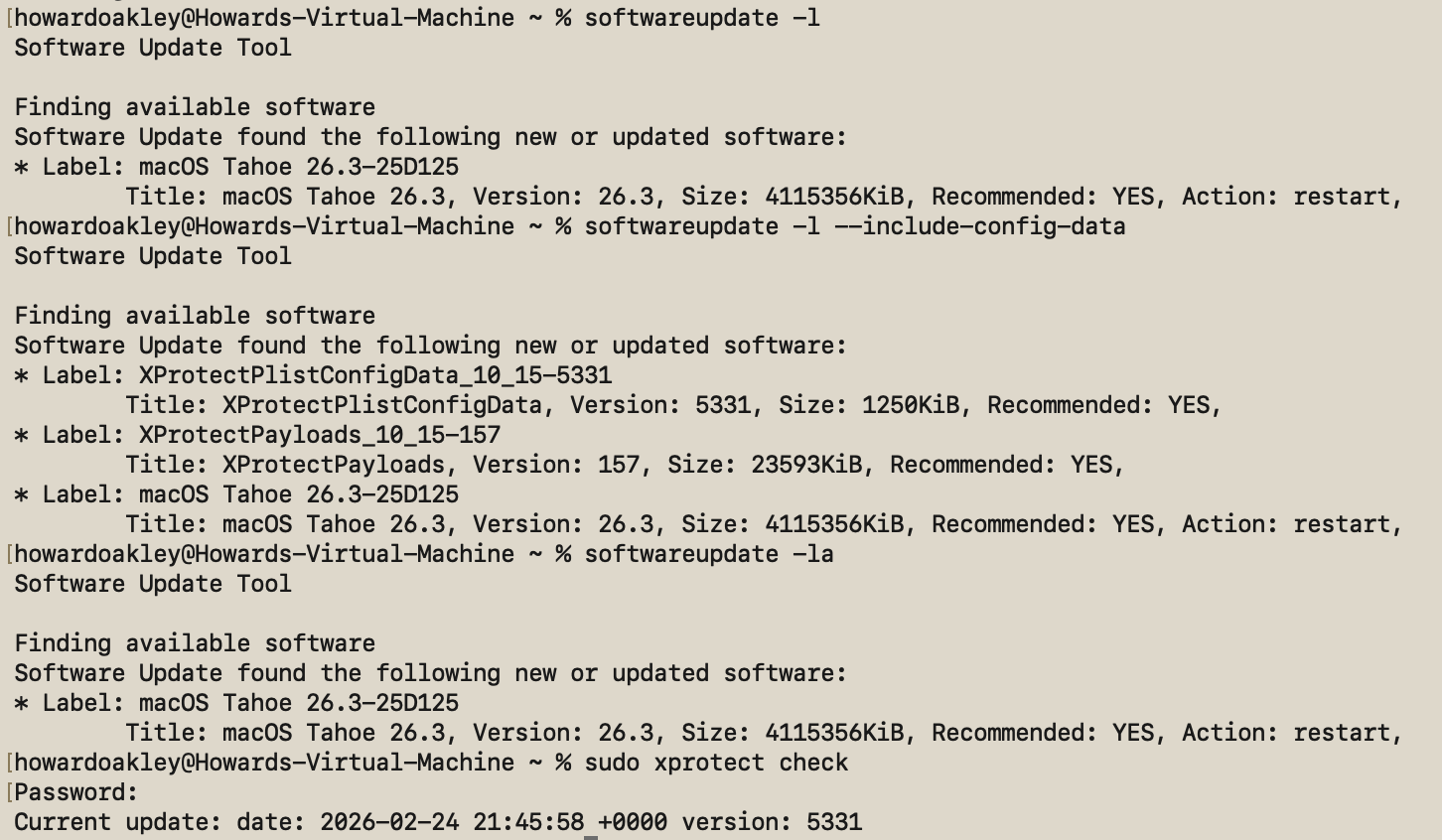
If all you want is a list of available macOS updates,
softwareupdate -l
works fine, and using -la does much the same. Neither will display security data updates like those for XProtect or XProtect Remediator, though. To see those, use the undocumented option
softwareupdate -l --include-config-data
and that should provide the full list. As you’ll probably want to download them individually, use the command
softwareupdate -i --include-config-data updatename
where updatename is the word given as the Label in the listing.

Another invaluable feature of softwareupdate is its list of full installers available for direct download. That’s generated by
softwareupdate --list-full-installers

The current list includes:

  • Tahoe 26.1, 26.2, 26.3
  • Sequoia 15.7.2, 15.7.3, 15.7.4
  • Sonoma 14.8.2, 14.8.3, 14.8.4
  • Ventura 13.7.8
  • Monterey 12.7.4, 12.7.6
  • Big Sur 11.7.10, 11.7.11
  • Catalina 10.15.6, 10.15.7 builds 19H2, 19H15
  • Mojave 10.14.6
  • High Sierra 10.13.6

but that given will include only those compatible with the Mac used to obtain the list. When you want to download one of them, use the command
sudo softwareupdate --fetch-full-installer --full-installer-version 11.7.11
giving the version you want. If you want a different version, then check with one of the sites that provides links to a fuller list, such as Mr. Macintosh.

Avoid using the option to download but not install updates, based on softwareupdate -d, as downloads can go missing from /Library/Updates where you’d expect them, and this doesn’t work at all for macOS updates.

On Apple silicon Macs only, you can use the command
sudo softwareupdate --install-rosetta --agree-to-license
to download and install Rosetta 2 and avoid its normal installation dialog.

Checklist

  • Check free space and (in laptops) power.
  • Restart and try again.
  • Start up in Safe mode and try there.
  • Try SilentKnight.
  • In Sequoia and Tahoe, XProtect also needs separate xprotect command.
  • softwareupdate -l --include-config-data
  • To install individual update softwareupdate -i --include-config-data updatename

New build of SilentKnight 2.12 for Tahoe 26.4 beta testers

By: hoakley
5 March 2026 at 01:23

If you are testing beta-releases of macOS Tahoe 26.4 and use SilentKnight, you will be aware that betas 2 and 3 cause it to crash on launch, on Apple silicon Macs. This is because the firmware version returned by these betas is completely different from all others for Apple silicon Macs for the last five years. As a result of that, SilentKnight doesn’t recognise them as Apple silicon Macs, and tries to obtain their firmware versions in a way that’s only compatible with older Intel Macs.

I’m very grateful to all those beta-testers who informed me of this problem, and those who sent me crash logs.

I have now incorporated a workaround into a new build of this version. Although this doesn’t attempt to interpret the new firmware version number, which will be reported as requiring updating, this has been tested against beta 3 and does now recognise Apple silicon Macs, and shouldn’t crash. Although this should also be compatible with all other Macs and macOS that support SilentKnight version 2.12 build 59, it’s only required on 26.4 beta 2 and later. It also won’t be offered through SilentKnight’s auto-update mechanism, so if you want it, please download build 61 from here: silentknight212v61

As Apple has never documented firmware version numbers, despite revealing them in System Information, I have absolutely no idea whether this change is intentional, whether it will be used in 26.4 release, or whether it’s simply a bug. I’m hoping the last of those, because changing firmware version numbering is a sure way to create havoc, as Apple should have learned from the past.

Last Week on My Mac: Bugs of wonder

By: hoakley
1 March 2026 at 16:00

Last week Apple released the second beta of macOS 26.4 to developers, and almost immediately I was receiving reports that SilentKnight crashed on launch in that new beta. Given how unusual that has been in previous versions, I was grateful to hear so quickly, and for so many of you to provide crash reports. As usual they don’t point to anything specific, but led me to wonder whether something might have broken in AppKit in that beta.

But there’s a strange observation reported by SilentKnight’s old predecessor LockRattler, which continues to work normally in 26.4 beta 2: that reports a bizarre iBoot firmware version number from Apple silicon Macs. Instead of a number like 13822.101.2 that I might have expected, LockRattler gives “mBoot-18000.100.10.0.1”, which is random nonsense. Yet it’s listed in a mammoth compilation of iBoot version numbers in the Apple Wiki as an occasional fault.

“mBoot-18000.100.10.0.1” is a problem for SilentKnight, as it tries to make comparisons between firmware version numbers to see whether that installed in your Mac is older or more recent that the version number it expects. If it didn’t do that, every beta-tester would be driven crazy by its persistent reports that their Mac’s firmware is out of date, when in fact it’s that for the next version.

Comparing numbers is of course simple, but I’ve been unable to find anywhere in the API that returns numbers for firmware versions. Wherever they’re available, they’re reported as strings of arbitrary characters, leaving SilentKnight the task of recovering three integers (in the case of iBoot) from what in this case turns out to be rubbish. This is further complicated by the fact that different architectures return strings with different structures: for plain Intel Macs, they should look like “2094.80.5.0.0”, those with T2 chips extend to “2094.80.5.0.0 (23.16.13120.0.0,0)”, and Apple silicon is simpler again with “13822.81.10”. What could have been a simple task is turned into lots of additional code.

It also raises the question of how any beta-release could be put in the hands of external testers when it can’t even report its firmware version correctly. Most of us draw clear distinctions between alpha and beta releases, and this strongly suggests that Apple doesn’t undertake any purposeful alpha testing before release as a beta. Either that or it’s well aware of significant bugs that it doesn’t inform beta-testers about. I fear the answer could be both, and I’m wondering whether trying to make sense of reported firmware versions is too fraught to be reliable.

My main use of SilentKnight here is to check for updates released for the security tools in macOS, primarily XProtect and XProtect Remediator. You may recall that Apple’s last update to XProtect Remediator on 17 February, bringing it to version 157, contained a strange change, which I reported as “the Bastion rules appear to correct a group of typos in the definition for bastion-common-system-binary”.

There were six typos in all, in a definition for bastion-common-system-binary introduced back in version 153 six months ago, on 5 August last year. I shouldn’t need to point out the errors in the original definition:
(define bastion-common-system-binary
(require-all
(process-attribute is-platform-binary)
(require-not
(require-any
(signing-identifier "com.apple.osascript")
(signing-identifier "com.apple.zsh")
(signing-identifier "com.apple.bash")
(signing-identifier "com.apple.sh")
(signing-identifier "com.apple.ksh")
(signing-identifier "com.apple.osacompile")
(signing-identifier "com.apple.python2")
(signing-identifier "python3")
(signing-identifier "ccom.apple.pbcopy")
(signing-identifier "ccom.apple.pbpaste")
(signing-identifier "ccom.apple.cat")
(signing-identifier "ccom.apple.curl")
(signing-identifier "ccom.apple.dd")
(signing-identifier "ccom.apple.cp")
(signing-identifier "com.apple.perl")))))

Instead of “ccom.apple.pbcopy”, it should of course have read “com.apple.pbcopy”, and the same for the other five signing-identifiers below that.

I’m delighted that Arnaud Abbati has explained eloquently the consequences of those typos in a wonderful article in his blog. I won’t steal his thunder here, but agree with his conclusion: “Six months of security updates, and nobody noticed. It missed engineering. It missed testing. It missed code review. It missed QA. It missed whatever metrics pipeline is supposed to validate that the rules actually match real binaries.”

There are times when I wonder what really does go on in Apple. When it releases a beta that can’t even tell what its firmware version is, and its security intelligence tool is broken for six months because of obvious typos, it does make you wonder.

❌
❌