
Normal view

There are new articles available, click to refresh the page.
Before yesterdayMain stream

Is that signing certificate still valid?

By: hoakley
20 January 2026 at 15:30

The general rule with security certificates is that they’re only valid until their expiry date. When the certificate for a website expires, your browser should warn you if you try to connect to that site, and it will normally refuse to make the connection as a result. Thankfully, Apple’s signing certificates generally work differently.

When Apple adopted code signing using certificates that it issues, it recognised that applying that policy would result in apps having expiry dates enforced by their certificates, so applies a different rule. When a developer signs an app using their Developer ID Application certificate, a trusted timestamp is included to verify when that signing took place. Provided the certificate was valid at that time, and hasn’t been revoked since, the certificate is deemed valid by macOS.

The same principle applies to Developer ID Installer certificates used to sign install packages, only for several years they weren’t given trusted timestamps. As a result of that, those old installer certificates were only valid as long as the certificate.

Apple changed that several years ago, since when installer packages have normally been given trusted timestamps, so they now work the same as Developer ID Application certificates, and can still be run successfully after their certificate has expired, provided that it was valid at the time in their trusted timestamp, and hasn’t been revoked since. However, this has only recently been reflected in Apple’s guidance to developers, and is different from the account I gave here last week.

Check validity

Trying to open the app or installer package usually isn’t the best way to check whether its certificates are valid. Although you may sometimes be given an informative explanation, in most cases macOS will simply report the item is damaged and needs to be removed, leaving you in the dark as to what the problem might be.

The best way to check the validity of Apple’s certificates is using Apparency for apps, and Suspicious Package for installer packages. They will provide a detailed explanation of why the signature is valid or not.

Apps

Apps supplied from the App Store are signed not by the developer, but by Apple. According to Apple’s current account, their signatures will remain valid as long as the developer remains a member of its Developer Program.

Apps supplied independently are signed by their developer using their Developer ID certificate issued by Apple. Provided that the app’s certificate was valid at the time it was signed, and that certificate hasn’t been revoked by Apple, that will remain valid indefinitely. The same appears to apply to notarisation, which should remain valid unless Apple revokes it.

Although there’s nothing to stop developers using certificates from third party authorities, macOS doesn’t recognise those and will normally block the app from being run. If you ever come across one, contact its developer and tell them the certificate they’re using is wrong.

Installers

Older installers are likely to have been signed without a trusted timestamp. If that’s the case, they will cease being valid when their certificate expires.

More recent installers should have a trusted timestamp, in which case their signature will remain valid unless Apple revokes their certificate.

Complications

Some certificates, most notably those used by macOS installers and updaters, also rely on the intermediate Apple Worldwide Developer Relations certificate, which underwent a hiatus on 24 October 2019 when an old certificate expired and was replaced by a new one, which expires on 20 February 2030. That expiry will still limit the validity of some old signatures.

Some apps require restricted entitlements, issued by Apple to allow them to access features that are normally not allowed, such as making snapshots and bridge networking in macOS VMs. Although those should expire well into the future, they can rarely have their own expiry problems that could prevent an app from running.

Examples
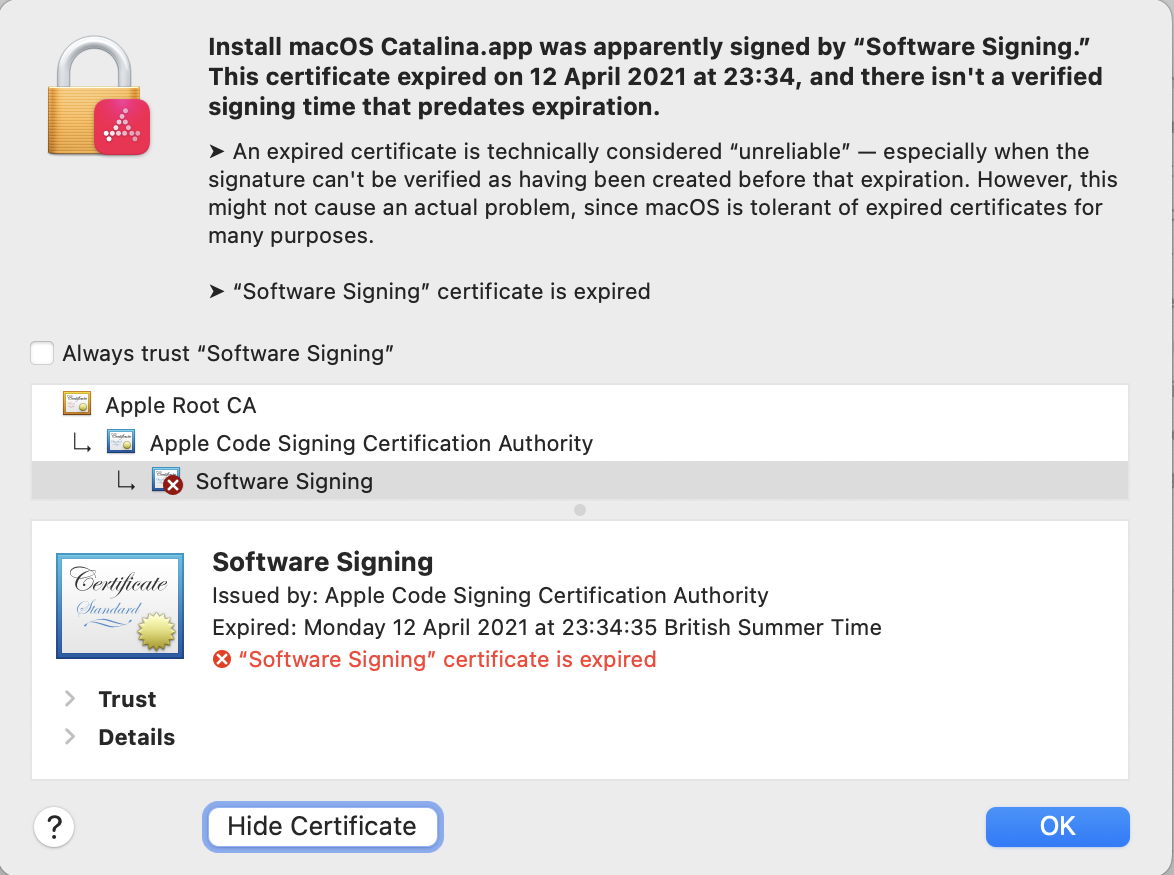
This old Catalina installer app was signed without a trusted timestamp. Now that its certificate has expired, it’s likely to be unusable.
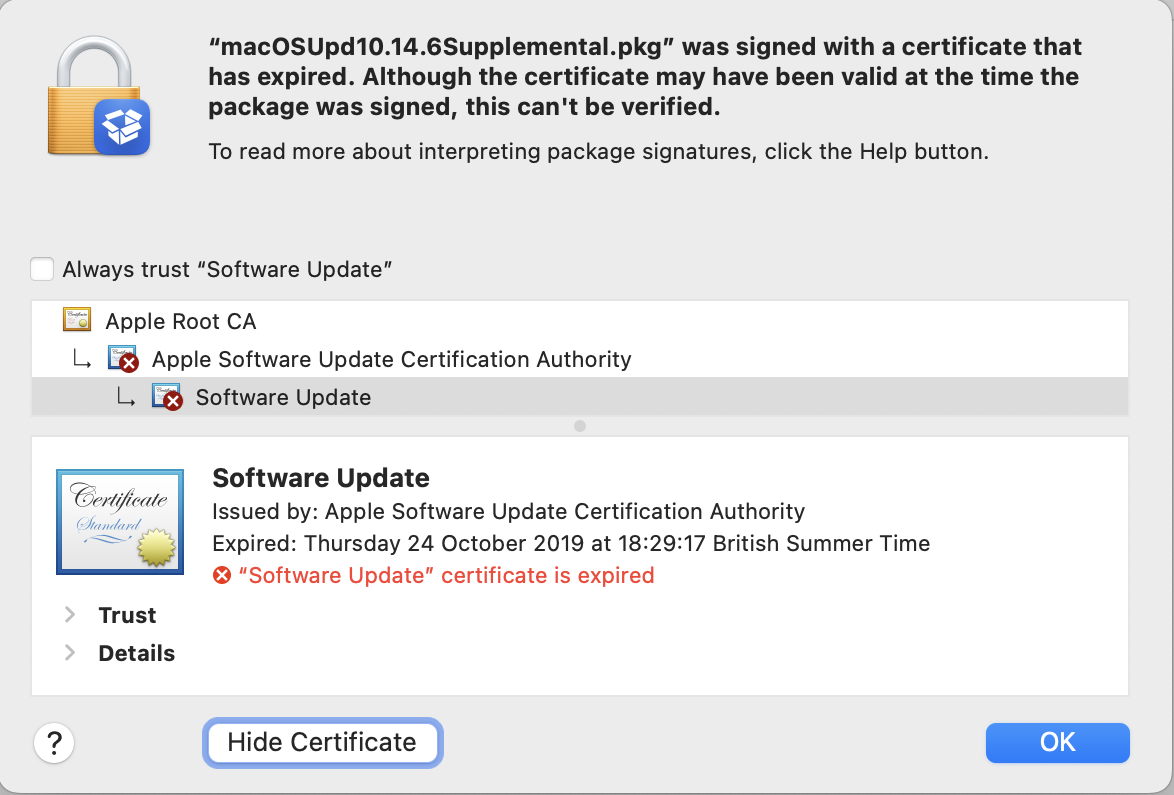
This macOS update installer package was also signed without a trusted timestamp, its certificate expired in the 2019 hiatus, and it’s now unusable.
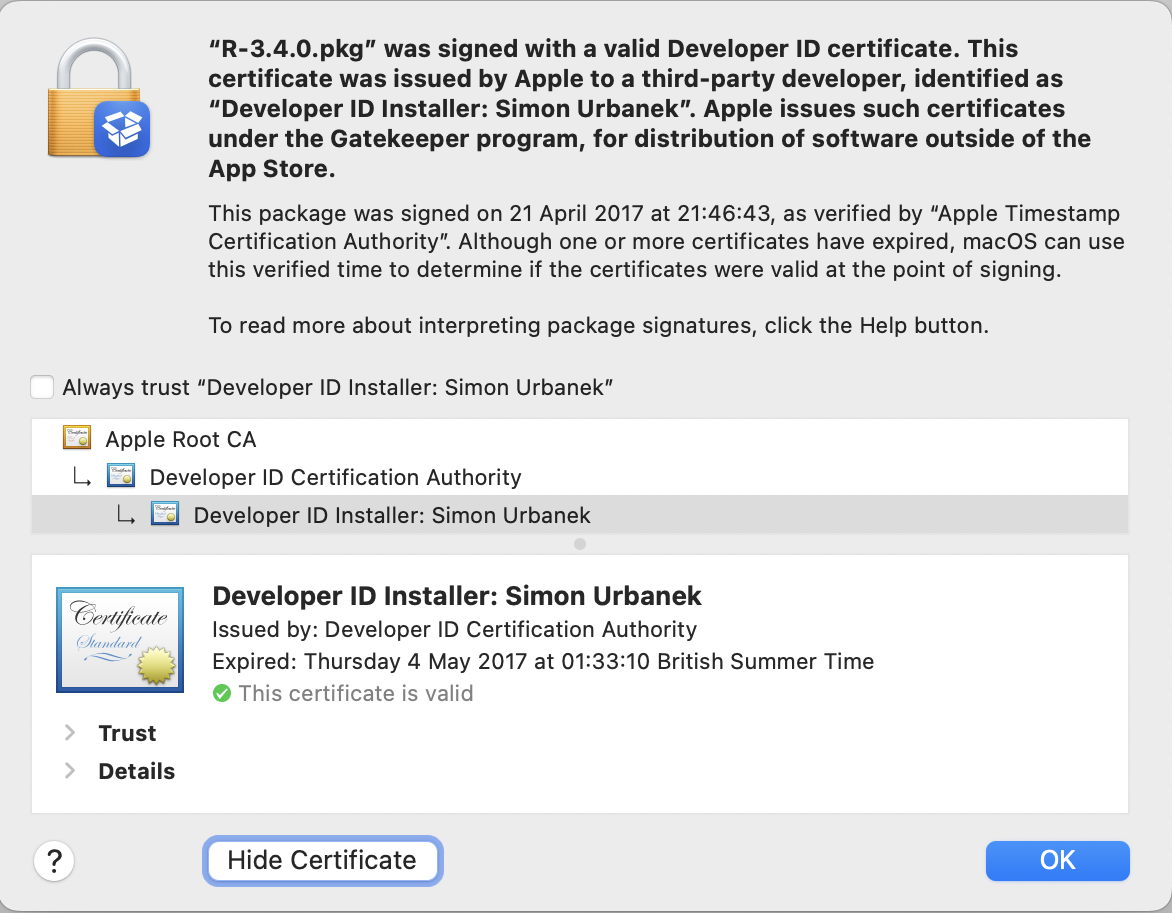
This third-party installer package was signed in 2017, but has a trusted timestamp. Even though its certificate expired in May 2017, because it was still valid at the time of the trusted timestamp it should still be deemed valid.
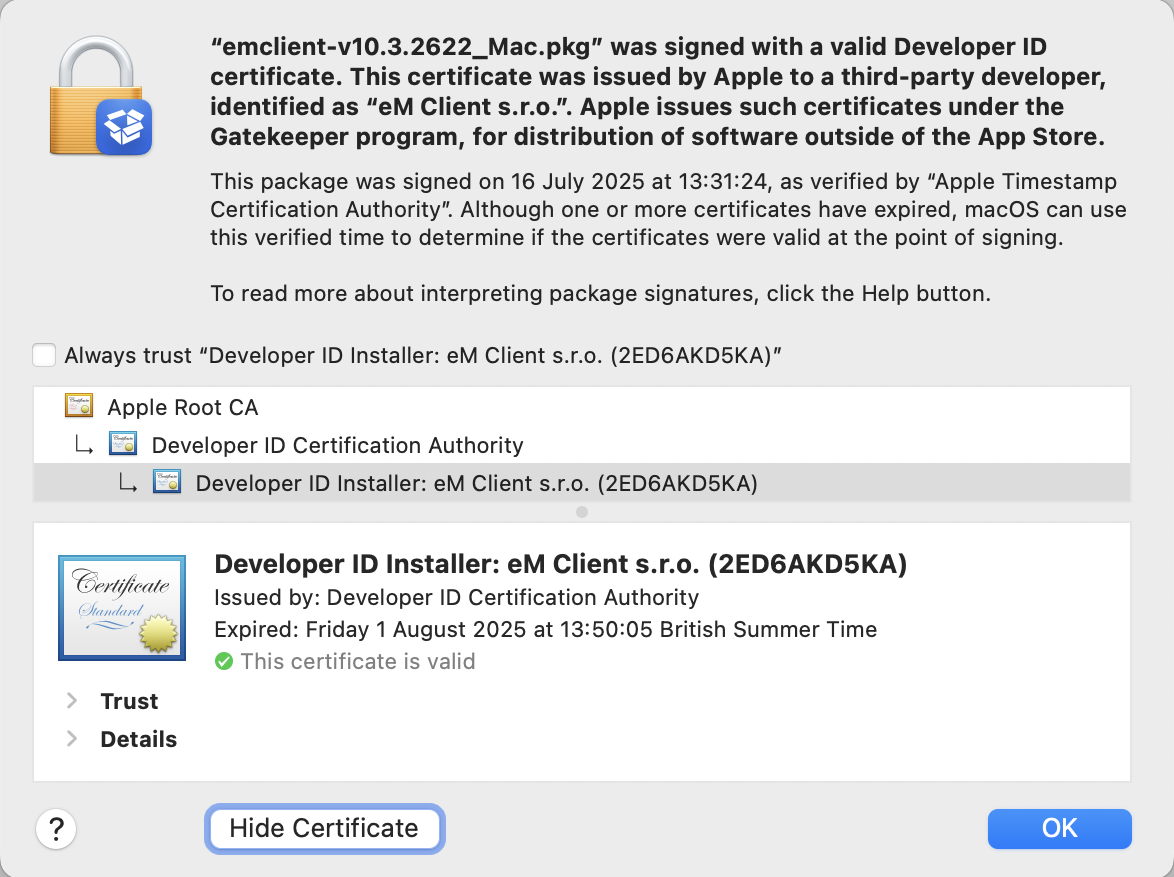
This third-party installer package was only signed last July, but its Developer ID Installer certificate expired the following month. Because its certificate was valid at the time of the trusted timestamp it’s still deemed valid.

Further reading

Signing certificates (Apple)
Developer ID and provisioning profiles (Apple)
Apple Intermediate Certificate Expiration (Apple)

I’m very grateful to Quinn for drawing my attention to this.

What’s happening with code signing and future macOS?

By: hoakley
17 January 2026 at 16:00

This year marks the twentieth anniversary of Apple’s announcement of the introduction of code signing, although it wasn’t unleashed until Mac OS X 10.5 Leopard the following year (2007). I doubt whether there’ll be crowds gathering to celebrate the occasion, but 2026 also marks the parting of the ways for Intel and Apple silicon Macs, as Tahoe is the last version of macOS to run on Intel processors. There have already been rumours that will bring changes to code signing and what code will run on Arm cores.

Apple had long maintained that users would remain able to run unsigned code in macOS, but that changed in November 2020 with the first Apple silicon models. Since then, all executable code run on those new Macs has to be signed. What hasn’t been mandatory is the use of a developer certificate for the signature. Instead, all build systems now sign code using an ad hoc signature by default, when no developer certificate is available. This enables ordinary users to build their own apps and command tools locally, and run them on their own Macs, as many continue to do. The same applies to codeless apps such as Web Apps introduced in Sonoma, which are automatically signed ad hoc by macOS.

Those who develop apps and command tools for distribution to others have been told to sign their code using their developer certificate, then to get it notarised by Apple. Although that’s by no means universal, and there are still a few apps that don’t fit the process well, the great majority of those distributed outside the App Store should now come signed with a developer certificate and notarised.

Unlike some other operating systems, the only developer certificates recognised by macOS are those issued by Apple, but they’re provided free as one of the benefits of its $99 annual subscription to be a registered developer, as are unlimited notarisations.

The next concern for many is what happens when a developer certificate expires. On other systems, certificate expiry can result in apps suddenly becoming unusable, but that isn’t the case with macOS. So long as the certificate was valid at the time it was signed, macOS will recognise it as being valid at any time in the future. This isn’t the case, though, with developer installer certificates, used to sign installer packages: those must be valid at the time of installation, and the same applies to Apple’s own macOS and other installers. That continues to catch out both developers and users.

So as far as Intel Macs are concerned, the arrival of macOS 27 this coming autumn/fall won’t affect their access to apps, provided they’re supplied in Universal format, with x86 code. Many major software vendors have aligned their support period with Apple’s, so those apps should remain fully supported on Intel Macs until Apple’s support for macOS 26 ends in the autumn/fall of 2028. The sting here is that depends on upgrading to Tahoe: stick with Sequoia and that support is likely to end a year earlier, in 2027.

If you’ve switched to Apple silicon, you may be concerned as to when macOS will cease providing Rosetta 2 support for the few remaining apps that aren’t already Universal. Apple has stated its intention that full Rosetta translation support will end with macOS 27, although it intends to retain “a subset of Rosetta functionality aimed at supporting older unmaintained gaming titles” beyond that. In practice, that means most x86 apps and command tools will stop working in macOS 28, in the autumn/fall of 2027.

From then on, if you want to be able to run x86 code using Rosetta 2 translation, that will have to be in a virtual machine running macOS 27 or earlier. For once, the continuing inability of macOS VMs to run most App Store apps should have little or no effect. For installers whose installer certificate has expired, this may be a blessing, as it’s easier and less disruptive to set the clock back in a VM.

Apple has given no warnings, yet, of any changes to requirements for developer certificates, notarisation, or ad hoc code signing to come in macOS 27 or beyond. Given the time required for the adoption of code signing and notarisation, those would appear unlikely in the foreseeable future.

Key dates

All events occur with the autumn/fall release of the new version of macOS.

2026 (this year)

Intel Macs: Tahoe enters security-only support; new versions of some 3rd party products may be Arm-only
Apple silicon Macs: first single architecture macOS.

2027

Intel Macs: Sequoia becomes unsupported
Apple silicon Macs: full Rosetta 2 support ends.

2028

Intel Macs: Tahoe becomes unsupported; major 3rd party products likely to lose support.

Further reading

A brief history of code signing on Macs

Apple’s Inside Code Signing series for developers:
TN3125 Provisioning Profiles
TN3126 Hashes
TN3127 Requirements
TN3161 Certificates

❌
❌