Apple has just released updates to XProtect for all supported versions of macOS, bringing it to version 5330, and to XProtect Remediator for all macOS from Catalina onwards, to version 157. As usual, Apple doesn’t release information about what security issues these updates might add or change.
Yara definitions in this version of XProtect add two new detection rules for MACOS.BONZAI.RECO and MACOS.BONZAI.FAGOBNCO. The XPScripts.yr scripting rules make several amendments to the criteria for MACOS.OSASCRIPT.DUST.
XProtect Remediator doesn’t change the list of scanner modules.
The Bastion rules appear to correct a group of typos in the definition for bastion-common-system-binary, but don’t have any other changes.
You can check whether these updates have been installed by opening System Information via About This Mac, and selecting the Installations item under Software.
A full listing of security data file versions is given by SilentKnight and SystHist for El Capitan to Tahoe available from their product page. If your Mac hasn’t yet installed this update, you can force it using SilentKnight or at the command line.
If you want to install these as named updates in SilentKnight, their labels are XProtectPayloads_10_15-157 and XProtectPlistConfigData_10_15-5330.
Sequoia and Tahoe systems only
This XProtect update has now been released for Sequoia and Tahoe via iCloud. If you want to check it manually, use the Terminal command sudo xprotect check
then enter your admin password. If that returns version 5330 but your Mac still reports an older version is installed, you should be able to force the update using sudo xprotect update
Among the other activities you may see shortly after you’ve logged in to macOS Tahoe are a check for system software updates available from Apple’s servers, an initial Time Machine backup, and sometimes a set of XProtect Remediator scans. This article explains how those are dispatched by Duet Activity Scheduler and Centralised Task Scheduling, the DAS-CTS system.
DAS
Shortly after user login, DAS starts gathering its budgets enabling it to score activities, including thermal policies, shared memory and energy. It then loads saved activities by group, and solicits activities for resubmission and inclusion in its lists to be dispatched and run. It then periodically evaluates the activities in those lists, to determine which should and should not be run at that time.
In the early minutes after login, it may only have around 126 candidates in its lists, some of which it identifies as ‘passengers’, and doesn’t evaluate for the time being. For those activities it does evaluate, it arrives at a score between 0 and 1, and decides which it should dispatch next.
SoftwareUpdate
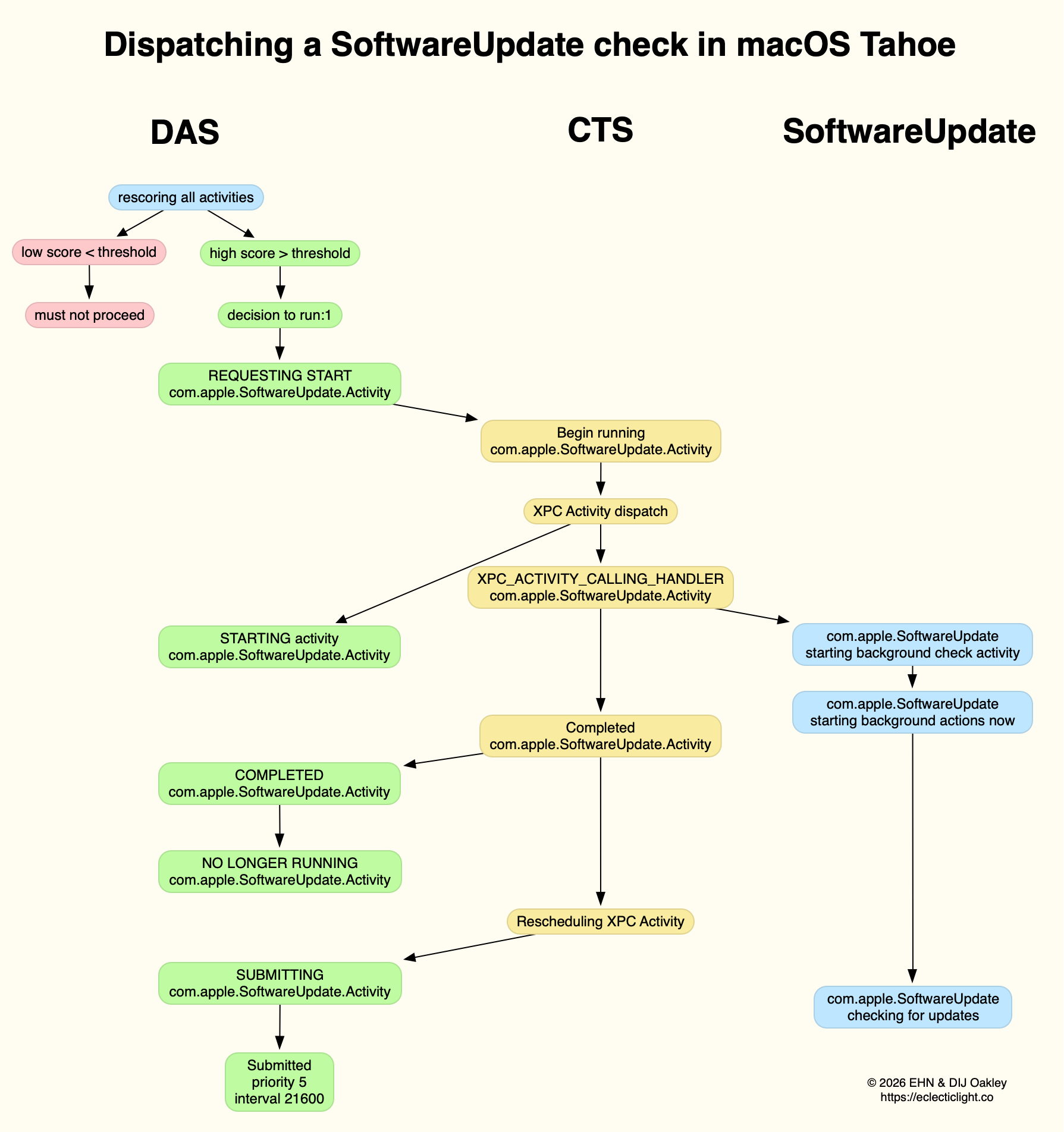
This normally reaches a score sufficient to be dispatched in the first few minutes after user login. That DecisionToRun is recorded in the log, and DAS requests CTS to start com.apple.SoftwareUpdate.Activity as root via XPC. This starts a dialogue between DAS and CTS, leading to the handler com.apple.SoftwareUpdate being called. That in turn starts its background check, and proceeds to check for updates.
CTS considers that activity is completed, and informs DAS of the fact. The activity is then rescheduled with DAS, in this case with a priority of 5, at an interval of 21,600 seconds, or 6 hours. Thus, SoftwareUpdate should check for new system updates approximately every 6 hours when your Mac is running, although the exact time of its dispatch by DAS will vary according to other activities and general conditions such as temperature and resource availability.
This is summarised in the diagram below.
In practice, the time between DAS deciding to run SoftwareUpdate and it running is likely to be less than 0.1 second, and online checks should be initiated within a further 0.1 second.
Time Machine backup
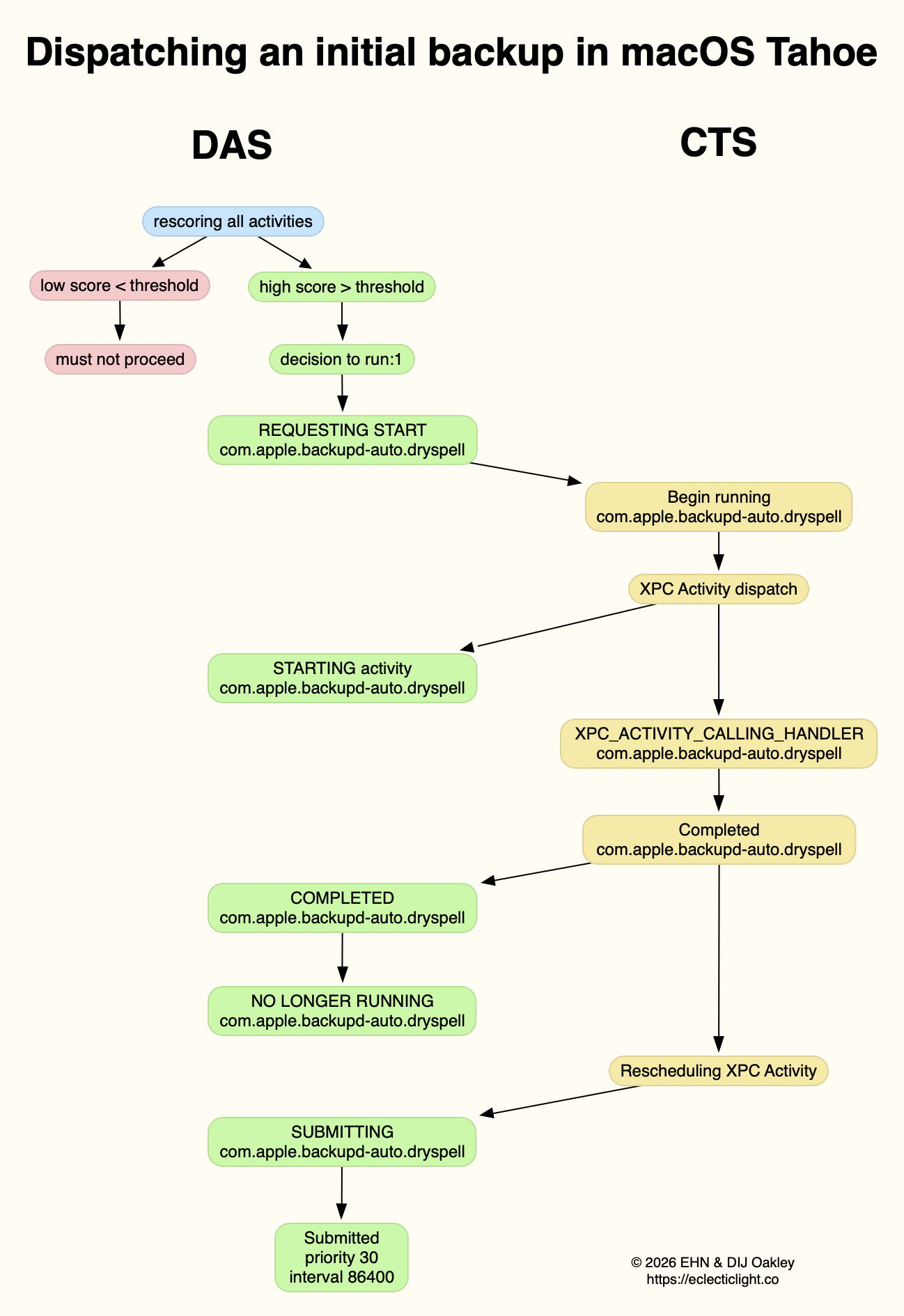
Automatic backups are normally delayed for the first 5 minutes after startup, and during that time DAS should decide not to proceed to dispatch them. When it does give them the go ahead, the activity dispatched is known as com.apple.backupd-auto.dryspell, indicating that it’s the initial backup made after startup. This too is run as root.
A similar dialogue between DAS and CTS is established, as shown in the diagram below.
What is distinctive here is that com.apple.backupd-auto.dryspell doesn’t result in the immediate initiation of a backup, but instead runs backupd-helper, and that can be delayed significantly before backupd itself is run to perform the backup. Although backupd-helper should be running within 0.2 seconds of DAS deciding to run the sequence, it may be a further 10 seconds before backupd itself is actively backing up. This is presumably because of other sustained and intense activities competing for resources at that time.
Dispatch of com.apple.backupd-auto.dryspell thus differs from the diagram below, showing dispatch of an ordinary automatic backup after the initial one, in macOS Sequoia.
com.apple.backupd-auto.dryspell is rescheduled by DAS at a priority of 30, and an interval of 86,400 seconds, or 24 hours, so it should work neatly for Macs that are powered up each day.
XProtect Remediator
Dispatch of a set of XPR scans is less predictable, as they’re likely to occur at roughly 24 hour intervals, but only when the Mac is running on mains power, and when it’s otherwise lightly loaded. If that happens to be the period of relative calm ten minutes or more after logging in, then background activity will be prolonged as the set of XPR scans is run.
By the time XPR was ready to scan here, DAS had a total of 600 pending activities, of which 254 were considered to be ‘passengers’. It therefore evaluated 74 activities, two of which were com.apple.XProtect.PluginService.daemon.scan, to be run as root, and com.apple.XProtect.PluginService.agent.scan as user. On some occasions, DAS will hold one of those from dispatch until the other is complete, but in this case it approved both to run simultaneously. Those went through a similar dialog between DAS and CTS, resulting in com.apple.XProtectFramework starting both as timed scans with standard priority, within less than 0.2 seconds of the decision by DAS to dispatch them.
As those were both timed scans, when XPR’s timers expired they were cancelled before fully completing. However, once a week XPR scans should be run without that timer, allowing them to finish all their scans.
XPC Activity states
If you follow CTS log entries for XPC activity, you’ll come across numeric states ranging between 0-5, such as 32.474139 com.apple.xpc.activity _xpc_activity_set_state: com.apple.SoftwareUpdate.Activity (0xb8ac3a080), 2
Those are documented in Apple’s source code as:
0 XPC_ACTIVITY_STATE_CHECK_IN, check-in has been completed;
1 XPC_ACTIVITY_STATE_WAIT, waiting to be dispatched and run;
2 XPC_ACTIVITY_STATE_RUN, now eligible to be run;
3 XPC_ACTIVITY_STATE_DEFER, to be placed back in its wait state with unchanged times;
4 XPC_ACTIVITY_STATE_CONTINUE, will continue its operation beyond the return of its handler block, and used to extend an activity to include asynchronous operations;
5 XPC_ACTIVITY_STATE_DONE, the activity has completed.
I hope this had given insight into what your Mac is up to during the first few minutes after you log in, why Apple silicon Macs show such high CPU % for their Efficiency cores, and how this results from important background activities.
When I started writing this blog over 11 years ago, there was plenty of malware around, but unless you failed to update Flash or Java, or downloaded ‘warez’, you were most unlikely to come across any in the wild. Over the last couple of months we have been running into AMOS/SOMA stealers in poisoned search results, ready to trap the most innocent. Apple’s security engineers are being kept busy, and earlier this week updated XProtect to version 5327.
That XProtect update was unusual, as its main set of malware detection rules didn’t change, but a relatively new component underwent major revision, a file named XPScripts.yr. This checks for OSAScript contents including AppleScript, and was only introduced in XProtect 5322 on 4 November 2025. At that time it had two rules, one looking for browser names and the other for cryptocurrency and related tools identified in scripts. XProtect 5327 now has a total of 14 OSAScript rules looking for a wide range of contents typical of known malware. Checks against the rules in XPScripts.yr are called off separately from those in the main Yara rules, when the Open Scripting framework is preparing to run an OSAScript.
It might seem odd that this latest malware starts by the unsuspecting user running an obfuscated and malicious command in Terminal, then relies on OSAScript, but this lightweight approach has been proving highly effective, apparently. The best way to penetrate macOS security protection is to get the user to do it for you.
In the recent past, malicious apps coached the user through bypassing the requirement for notarization by showing them how to do it. These stealers step you through running the script they need to get started, by downloading their payload using curl, to ensure that it doesn’t get put in quarantine.
What happens next has been detailed by Stuart Ashenbrenner and Jonathan Semon of Huntress. What you’d download is a malicious bash script that runs a series of commands hosted from Terminal. This first obtains the current user’s name, then prompts them to enter their password. This is the second key stage in the attack, and it will keep trying if you fob it off with anything other than the admin user’s valid password, so it can use that to sudo its next stage into place, and start using a mixture of OSAScript scripts and a single-file Mach-O executable in a hidden file at the top level of your Home folder. Those are tucked away alongside its copy of your username and password for when it needs them next. That executable is only ad-hoc signed, though.
The malware also installs a LaunchDaemon to ensure its code is loaded during startup, and then runs its checks every second, looping all the time in the background. According to analysis of its Mach-O executable, it exfiltrates all the SmartCard data, cryptocurrency wallets, saved browser passwords, contents of keychains, and other secrets it can get its hands on.
This malware and its method of attack change rapidly as it’s detected and taken down by those inadvertently hosting it. Late last year it was exploiting ChatGPT and other AI conversations. This year it has been using articles in Medium, and will continue popping up wherever and whenever it can. Its shell scripts and OSAScripts are quick to change to evade static detection. Even its Mach-O executable is altered frequently: when Ashenbrenner and Semon saw it last year, that was named .helper. The attack seen from Medium changed that to .mainhelper, and I’m sure it has already changed identities again.
There does appear to be one unintended consequence of XProtect’s new-found skills at checking OSAScripts: you may find that XProtect Remediator’s scans run out of time more readily, and report PluginCanceled with a status code of 30 more often now. But at least once a week it should extend the period allowed for its scans long enough to complete them all.
Let’s hope that XProtect’s new checks stem the tide of this malware.

 Login
Login