Normal view

There are new articles available, click to refresh the page.
Before yesterdayMain stream

Last Week on My Mac: Intel Macs will be stuck with bugs

By: hoakley
24 May 2026 at 15:00

Just over six months ago a series of weird bugs came to light in Spotlight indexing. The first report was that plain text files beginning with the characters LG are never indexed, so their contents can never be found by Spotlight search. The mystery deepened when the same was discovered for text files beginning with the characters NPA or Draw. It was appropriately Drew who worked out the common factor behind this apparently bizarre connected behaviour: all three files are identified as not being text by the old Unix utility file(1), used to recognise file types by ‘sniffing’ their contents.

You can verify that by creating a plain text file with any of those three sets of characters at its start, then running the command file on that file. In the case of one beginning with Draw, file will identify it as RISC OS Draw file data, even though the file has an extension of txt or text and a UTI of public.plain-text. At that the RichText mdimporter, which analyses all text-based files for metadata to enter into Spotlight’s indexes, throws its hands up in horror and refuses to index the file’s contents. Change those opening characters in that file, perhaps by adding a leading space, and all of a sudden the mdimporter works as expected.

Following our collaborative effort here, particularly Drew’s insight, we realised this bug has been silently blocking the indexing of seemingly random text files for the last three years or more. What remained unanswered at the time was what that mdimporter was doing running file(1) on files whose UTI made it clear that they were in plain text, not some long-forgotten binary vector graphics format from 1989. I believe I now have an answer, thanks to my recent work on QuickLook’s qlgenerators.

QuickLook’s generators take advantage of the hierarchical structure of UTIs. Rather than accepting the most specific UTIs such as public.jpeg, Image.qlgenerator works with all files whose UTI conforms to the generic UTI of public.image, and then undertakes its own format detection. This enables it to generate correct thumbnails and previews of HEIC images that have been given the incorrect extension of jpg, for instance.

Similarly, a Swift source-code file with the extension of swift and the UTI of public.swift-source is handled by the Text.qlgenerator because public.swift-source conforms to public.plain-text, the UTI required for use of that generator.

What if Spotlight’s mdimporters were to work the same?

We know the built-in RichText.mdimporter is used to extract metadata for a wide range of files containing text, which all conform to the generic UTI of public.text. It then classifies them on the basis of their contents to work out what to index. What if that’s performed using file(1), so rejecting perfectly valid text files as ancient binary vector graphics files, and so on?

We can’t get the same direct evidence from the log that I obtained for QuickLook, as Spotlight is far less informative in its log entries. We can get clues from looking at output from mdimport and mdls, though. While a non-deviant text file contains a metadata attribute extracted by its importer as kMDItemTextContent containing the text in the file’s data, that’s missing from a text file starting with any of the three known triggers. In turn that’s associated with the attribute _kMDItemPrimaryTextEmbedding containing ‘vec_data’ listed by mdls, which is also missing for the deviant files.

There is hope that a third party might be able to undercut RichText.mdimporter by providing a bug-free importer for public.plain-text, but that relies on the built-in importer targeting public.text rather than public.plain-text. The best solution would be for Apple to fix the identification of text files instead of relying on file(1), which dates from 1973. Given that these deviant files work perfectly with QuickLook’s generator, it appears Apple has already solved this problem there. So I suspect this bug in RichText.mdimporter will never be fixed in Sequoia or Tahoe.

With the first beta-release of macOS 27 just a couple of weeks away, this leaves those using the last Intel Macs stuck with Spotlight indexing that will never work on some text files, assuming that at some point in the not too distant future this bug is finally fixed in an Arm-only macOS. This is all sadly familiar from the loss of 32-bit support in the transition from Mojave to Catalina, when little if any effort was devoted to making Mojave as free of bugs as possible before it was abandoned in the rush forward to 64-bit.

It would have been far better to be able to look back in fondness with macOS that worked better, than looking back in anger at what never got fixed.

One last thing to remember is that, when Apple does fix this bug, you’ll have to force Spotlight indexes to be rebuilt on each of your Mac’s volumes to ensure that the contents of these files are incorporated. We learned that last time there was a serious bug in the same importer, which failed to index the contents of RTF files.

How to check whether Spotlight is getting the right metadata

By: hoakley
8 May 2026 at 14:30

Spotlight can only search the metadata it has entered in its indexes. As I demonstrated a couple of days ago in two test cases, some metadata may be present in a file and available for indexing, but may not be added to those indexes. This normally occurs because of a problem or bug in the mdimporter responsible for extracting metadata and passing it for storage in the indexes. Fortunately, macOS provides a method of identifying that, using two command tools.

Commands

The first command
mdimport -t -d2 filename
lists all its known metadata recognised by the mdimporter used. Currently, that may crash persistently for some types of file such as images.

The second command
mdls filename
lists all indexed metadata for that file, and shouldn’t crash.

mdimport – aspirations

Output from mdimport is a long catalogue of all the metadata attached to and associated with that file. This starts with a statement of the file examined, tells you its type as a UTI, and reveals which mdimporter was used:
Imported '/Users/hoakley/Documents/0xattrtests/testtext1.text' of type 'public.plain-text' with plugIn /System/Library/Spotlight/RichText.mdimporter.

It then tells you how many metadata attributes it found
35 attributes returned

Those are listed, starting with those found in extended attributes, prefaced by :EA:
":EA:kMDItemLastUsedDate" = "2026-05-04 18:52:32 +0000";

Then come standard file metadata
":MD:kMDItemPath" = "/Users/hoakley/Documents/0xattrtests/testtext1.text";
"_kMDItemContentChangeDate" = "2026-05-04 11:34:50 +0000";

The main body lists all the rest with the prefix kMDItem common to metadata
kMDItemContentCreationDate = "2026-05-04 11:34:49 +0000";

Among those are the UTI of the file, and its more general types in the UTI tree. These can explain why a file appears to have been processed by the wrong mdimporter
kMDItemContentType = "public.plain-text";
kMDItemContentTypeTree = ("public.plain-text", "public.text", "public.data", "public.item", "public.content");

There’s a long series of entries giving the long form of the file type in multiple languages
kMDItemKind = {en = "Plain Text Document"; };

Text content that has been indexed isn’t given in this form of the command, but a summary is:
kMDItemTextContent = "<<< Text content of 4968 characters >>>";

Those are the metadata that should then be passed to Spotlight to be stored in its indexes, but not necessarily what does get stored. To discover that, we need the mdls output. Note that additional metadata obtained by mediaanalysisd and the CGPDF Service aren’t included in this, as they operate separately from mdimporters and normally after significant delay.

mdls – reality

This output is far shorter, and contains entries in Spotlight’s indexes for that file, except for indexed text content. The only way to assess that is by searching for text it should contain.

This should match metadata attributes seen in the mdimport output, such as
_kMDItemDisplayNameWithExtensions = "testtext1.text"
kMDItemContentCreationDate = 2026-05-04 11:34:49 +0000
kMDItemContentType = "public.plain-text"
kMDItemKind = "Plain Text Document"

Examples

Plain text file with extended attributes

mdimport:
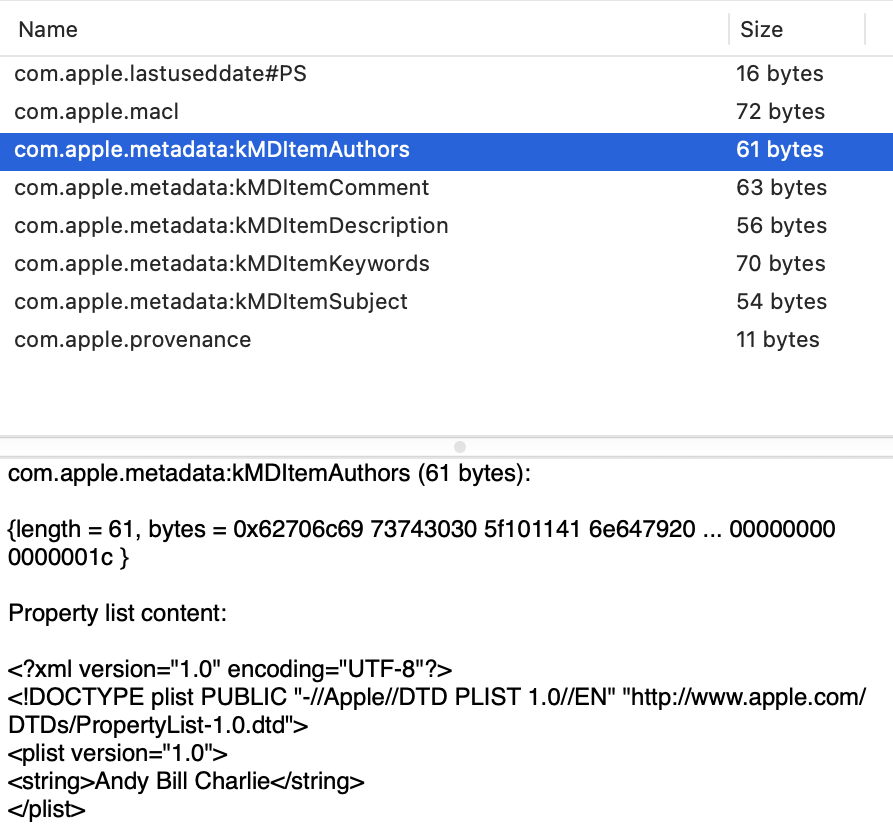
“:EA:kMDItemAuthors” = “Andy Bill Charlie”;
“:EA:kMDItemComment” = “A. regular comment.”;
“:EA:kMDItemDescription” = “A description.”;
“:EA:kMDItemKeywords” = “keyword1,ketwird2,keyword3”;
“:EA:kMDItemSubject” = “The subject.”;

mdls:
kMDItemAuthors = (“Andy Bill Charlie”)
kMDItemComment = “A. regular comment.”
kMDItemDescription = “A description.”
kMDItemKeywords = (“keyword1,ketwird2,keyword3”)
kMDItemSubject = “The subject.”

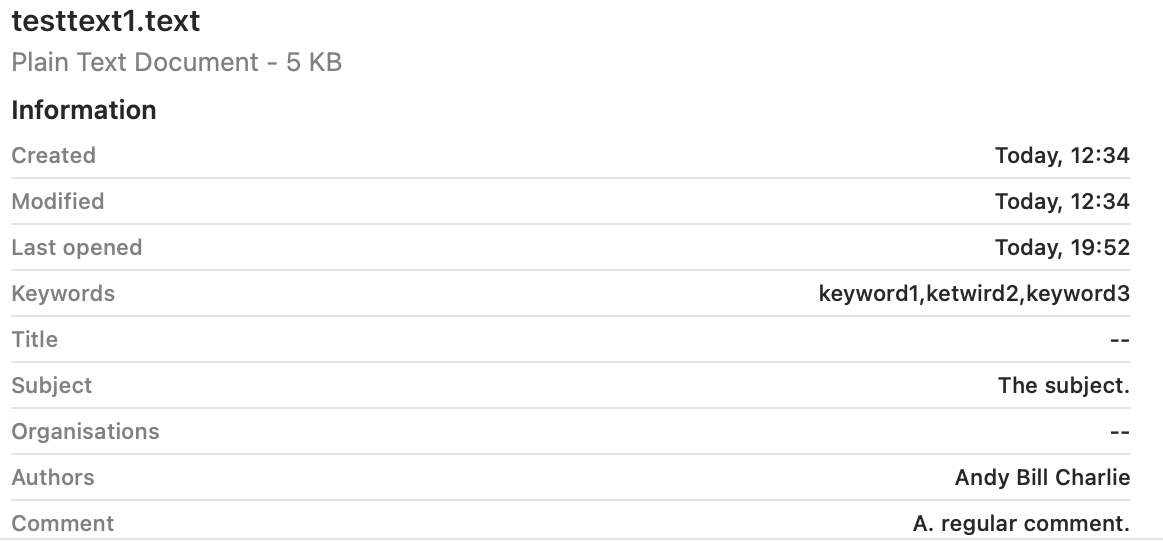
Metadata attributes were faithfully added to Spotlight’s indexes.

RTF file with extended attributes

mdimport:
“:EA:kMDItemAuthors” = “Andy Bill Charlie”;
“:EA:kMDItemComment” = “A. regular comment.”;
“:EA:kMDItemDescription” = “A description.”;
“:EA:kMDItemKeywords” = “keyword1,ketwird2,keyword3”;
“:EA:kMDItemSubject” = “The subject.”;
kMDItemAuthors = “<null>”;
kMDItemComment = “<null>”;
kMDItemKeywords = “<null>”;
kMDItemSubject = “<null>”;

The last four are those obtained from the (absent) Info metadata embedded in the file data, and conflict with those from four of the extended attributes.

mdls:
kMDItemComment = “A. regular comment.”
kMDItemDescription = “A description.”
kMDItemKeywords = (“keyword1,ketwird2,keyword3”)
kMDItemSubject = “The subject.”

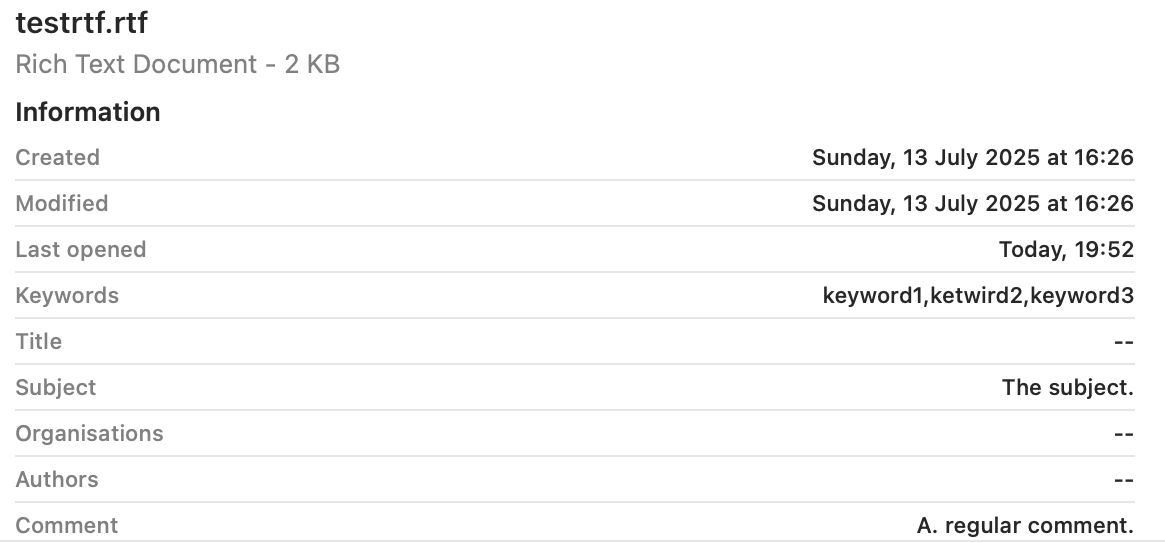
These reveal that Spotlight’s indexes captured four of the five extended attributes, and ignored the null values for the Info metadata. However, kMDItemAuthors is missing, presumably because of a bug in the mdimporter.

I’m considering whether it might be useful to add these to SpotTest, to help diagnose problems.

How macOS can ignore and hide metadata

By: hoakley
6 May 2026 at 14:30

When I was researching yesterday’s article about storing and managing metadata, I encountered some unexpected behaviour that merited deeper investigation. This article explains how that can lead to macOS ignoring and hiding metadata.

Spotlight is about more than just search, as it runs the metadata services for macOS. Those ingest information about files, contents of their extended attributes, metadata extracted from file data such as EXIF in images, and indexed text content. When the Finder needs to populate the fields of a Get Info dialog, or those shown in a Preview pane, it calls on Spotlight’s volume indexes to provide the data. The process of analysing and extracting metadata is thus important to a wider range of features beyond search, and it’s concerning when metadata known to be present is unexpectedly missing.

To determine what might be going wrong, I took six test files in macOS 26.4.1:

  • two plain text files, indexed by /System/Library/Spotlight/RichText.mdimporter
  • one RTF file, indexed by /System/Library/Spotlight/RichText.mdimporter
  • one PDF file, indexed by /System/Library/Spotlight/PDF.mdimporter
  • one JPEG and one PNG screenshot, indexed by /System/Library/Spotlight/Image.mdimporter.

To each I attached five xattrs containing distinctive test text:

  • com.apple.metadata:kMDItemAuthors, known in the Finder’s Find search terms as Authors;
  • com.apple.metadata:kMDItemComment, known as Comment, and distinct from Finder or Spotlight Comment;
  • com.apple.metadata:kMDItemDescription, known as Description;
  • com.apple.metadata:kMDItemKeywords, known as Keywords;
  • com.apple.metadata:kMDItemSubject, known as Subject of this item.

I then used the Finder’s Find window to search for part of the contents of each of the extended attributes for each of the test files. I also viewed each file in a Preview pane, with maximal display of information, as described here, and in a Get Info dialog.

For each file, I ran the following two commands:
mdimport -t -d2 filename
to list all its known metadata recognised by mdimporter. That crashed for both the image files, a bug that has been long present. I also ran
mdls filename
to list indexed metadata, which didn’t crash.

Search results

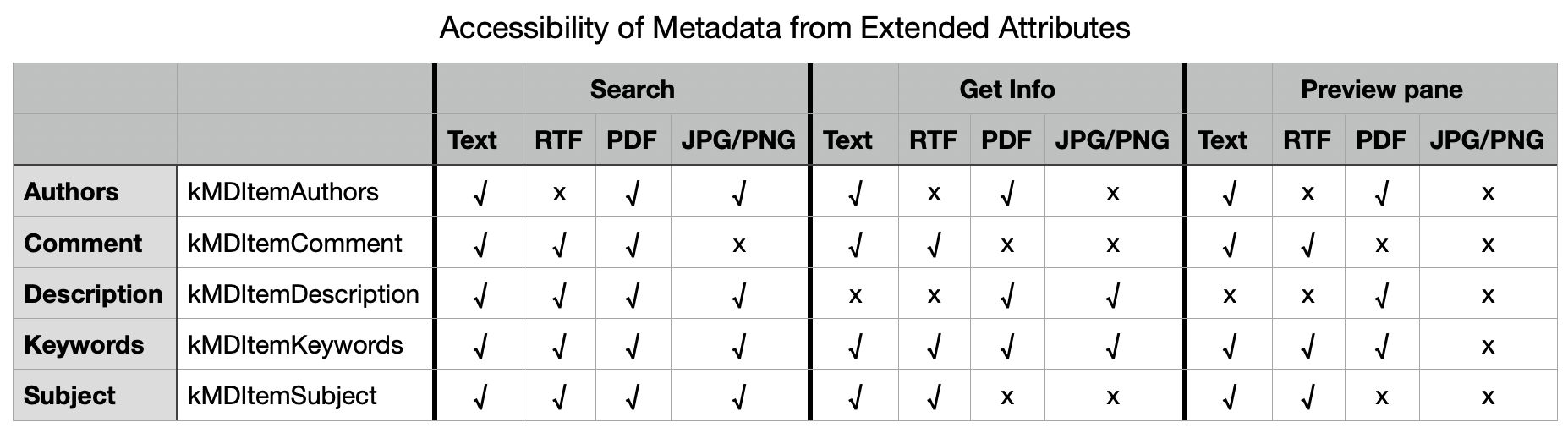
Search worked as expected and proved successful for all files with Description, Keywords and Subject. However, I was unable to find Authors metadata for the RTF file, and Comment metadata couldn’t be found for the JPEG or PNG images.

Finder preview pane

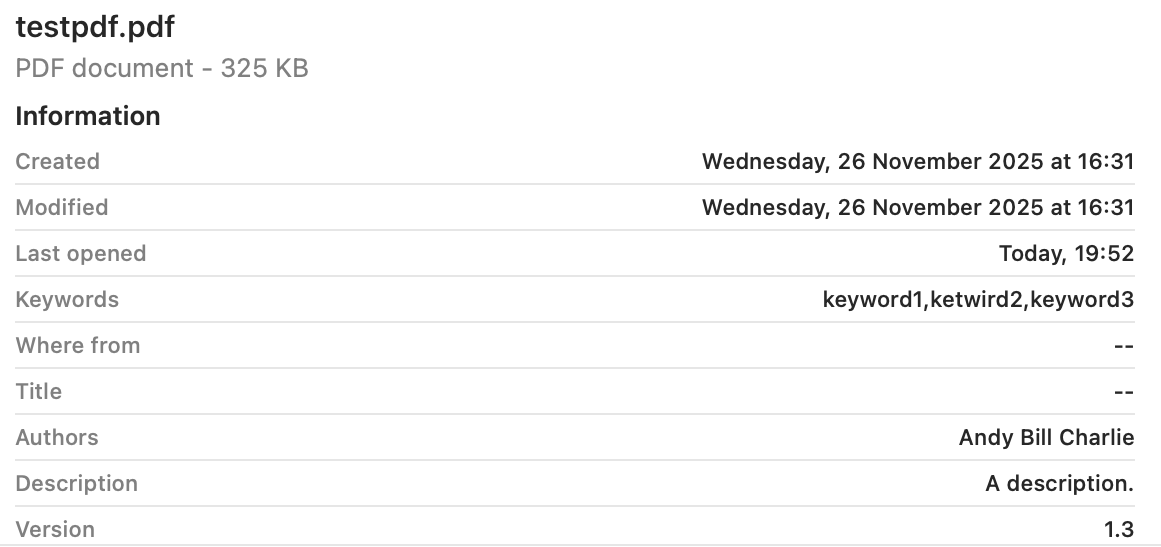
The two image formats displayed none of the metadata used. Otherwise Keywords was shown in each, Subject and Comment were omitted from PDF, and Authors and Description omitted from RTF.


These are summarised in the table below.

There are two serious failures shown here, failure to index Authors metadata correctly in the RTF file, and failure to index Comment metadata correctly in the JPG and PNG files. Otherwise all failures appear to be the result of design decisions over which types of metadata should be displayed in the Finder.

Failure to index Authors in RTF

From the mdimport listings, all five xattrs were recognised correctly and should have been indexed. However, there were additional [null] listings for four of them, including Authors, presumably derived from the absent RTF Info section, an optional feature in the format and often absent. Separate testing revealed that, for the Authors metadata alone, the content extracted from the Info section of the RTF overrode that obtained from the xattr, even when it was null. Adding the authors to the Author (note the singular) entry in Info restored its indexing and search, but using the text in RTF Info rather than the xattr.

There are thus two related bugs here:

  • The Author field from RTF Info metadata should be indexed into its own field, to avoid conflict with any com.apple.metadata:kMDItemAuthors xattr present.
  • Only com.apple.metadata:kMDItemAuthors xattr content should be indexed into Authors.

Failure to index Comment in JPG/PNG

No mdimport listing was available for these image files because of the tool crashing persistently. However, it’s clear that the contents of Comment was taken not from the xattr, but from the EXIF UserComment, which had been set by macOS to Screenshot when that screenshot had been made. That metadata should surely have been indexed into a separate category such as a new kMDItemUserComment to avoid such collisions.

There are again two related bugs:

  • The UserComment field from EXIF metadata shouldn’t be indexed into Comment, but into its own field.
  • Only com.apple.metadata:kMDItemComment xattr content should be indexed into Comment.

Conclusions

  • There appear to be indexing bugs in /System/Library/Spotlight/RichText.mdimporter and /System/Library/Spotlight/Image.mdimporter. This is the third bug I have investigated in RichText.mdimporter.
  • Those can lead to incorrect indexing in kMDItemAuthors (Authors) and kMDItemComment (Comment) respectively.
  • They limit significantly the usefulness of those xattrs as metadata in macOS.
  • Of the five metadata xattrs tested here, only one, kMDItemKeywords (Keywords), appears both reliable for search and displayed generally in the Finder.
  • kMDItemDescription or Description, and kMDItemSubject or Subject are reliable for search, but aren’t displayed well in the Finder.
  • Aside from these bugs, poor display coverage in the Finder limits the usefulness of these xattrs.
  • Investigating bugs in Spotlight mdimporters can be challenging, particularly when mdimport is so prone to crash.

❌
❌