Login
LoginTitles
在澳洲歌剧网站注册会员时,发现 Title 居然有 136 个。吓到了,虽然我知道这种偏门 title 有很多,但真正在一般网站见到,还是第一次;比 gender 还多。还是你们歌剧佬会装……
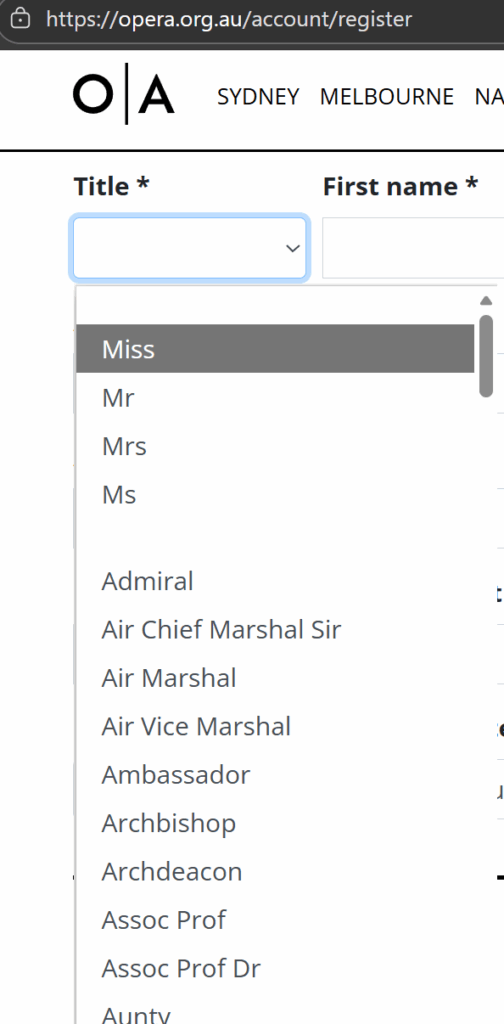
把这些 title 扒下来,问 AI 出了一份说明,不保证准确,就看个乐子吧:
- Miss: 用于未婚女性的称谓。
- Mr: 用于成年男性的称谓,通常不涉及婚姻状况。
- Mrs: 用于已婚女性,通常后面跟着丈夫的姓氏。
- Ms: 用于女性的称谓,不特指婚姻状况,适用于希望避免性别角色的场合。
- Admiral: 海军的高级军官,通常指海军上将。
- Air Chief Marshal Sir: 英国皇家空军的高级军官,通常是空军元帅,带有“Sir”的称谓表示荣誉。
- Air Marshal: 空军的高级军官,通常在军衔上低于空军元帅。
- Air Vice Marshal: 空军的副军官,通常在军衔上低于空军元帅和空军大将。
- Ambassador: 大使,代表一个国家在另一个国家进行外交事务的高级官员。
- Archbishop: 大主教,负责监督多个教区的高级神职人员。
- Archdeacon: 教区的高级神职人员,通常负责管理教区内的事务。
- Assoc Prof: 副教授,通常在学术界中担任教学和研究职务。
- Assoc Prof Dr: 副教授,且拥有博士学位。
- Aunty: 亲属称谓,通常用于称呼母亲或父亲的姐妹,或作为对女性的亲切称呼。
- Baron: 男爵,通常是欧洲贵族体系中的一种称谓。
- Baroness: 女男爵,女性的贵族称谓。
- Bishop: 主教,负责管理教区的高级神职人员。
- Brig Gen: 准将,通常是军队中的高级军官。
- Brigadier: 准将,负责指挥一个旅或类似单位的军官。
- Brother: 对男性修士或兄弟的称谓,通常用于宗教团体。
- Canon: 教士,通常指在教会中担任特定职务的神职人员。
- Captain: 队长,通常是指负责某个团队或单位的领导者。
- Colonel: 上校,军队中的高级军官。
- Commander: 指挥官,通常负责指挥某个单位或任务。
- Commissioner: 委员,通常是负责特定事务或机构的高级官员。
- Commodore: 海军的军衔,通常在海军中负责指挥多个舰艇。
- Consul: 领事,负责在外国保护本国公民和促进商业事务的官员。
- Councillor: 顾问,通常在地方政府中担任职务。
- Count: 伯爵,欧洲贵族中的一种称谓。
- Countess: 女伯爵,女性的贵族称谓。
- Dame: 女爵士,通常是对女性的荣誉称谓。
- Dean: 院长,通常负责管理学院或学术部门的职务。
- Deputy Lord Mayor: 副市长,协助市长工作的官员。
- Dr: 博士,通常指拥有博士学位的人。
- Emeritus Professor: 名誉教授,通常是退休后仍被认可的教授。
- Father: 神父,通常用于天主教或东正教的神职人员。
- Federal Magistrate: 联邦法官,负责处理特定法律事务的法官。
- First Lieutenant: 一等中尉,军队中的军衔。
- Flt. Lt.: 飞行中尉,空军中的军衔。
- Frau: 德语中对已婚女性的称谓,相当于“Mrs”。
- General: 将军,军队中的高级军官。
- Governor: 州长或省长,负责管理一个州或省的官员。
- Her Excellency: 对女性高级官员的尊称,通常用于大使或国家元首。
- Her Excellency Dr: 对女性博士的尊称,通常是指大使或重要官员。
- Her Excellency Madam: 对女性高级官员的尊称。
- Her Excellency Mrs: 对已婚女性高级官员的尊称。
- Her Excellency Ms: 对女性高级官员的尊称,适用于不特指婚姻状况。
- Her Excellency Prof The Hon: 对女性教授及荣誉称谓的尊称。
- Her Excellency Professor: 对女性教授的尊称。
- Her Excellency The Honourable: 对女性高级官员的尊称,通常用于政治职位。
- Her Honor Judge: 对女性法官的尊称。
- Herr: 德语中对男性的称谓,相当于“Mr”。
- His Excellency: 对男性高级官员的尊称,通常用于大使或国家元首。
- His Excellency Dr: 对男性博士的尊称,通常是指大使或重要官员。
- His Excellency Gen the Hon: 对男性将军及荣誉称谓的尊称。
- His Excellency Gen the Hon Sir: 对男性将军及骑士的尊称。
- His Excellency Lt General: 对中将的尊称。
- His Excellency Mr: 对男性高级官员的尊称。
- His Excellency Professor: 对男性教授的尊称。
- His Excellency The Hon: 对男性高级官员的尊称,通常用于政治职位。
- His Hon Act Jus: 对法官的尊称,通常用于法律界。
- His Hon Justice: 对法官的尊称。
- His Honor Judge: 对男性法官的尊称。
- Honorary Consul: 名誉领事,通常是非职业领事,负责促进国家利益。
- Judge: 法官,负责审理案件的法律官员。
- Justice: 司法官,通常指高级法官。
- Lady: 对女性的尊称,通常用于贵族或有地位的女性。
- Lieutenant: 中尉,军队中的军衔。
- Lieutenant Colonel: 中校,军队中的军衔。
- Lieutenant Commander: 海军中的中级军官。
- Lieutenant General: 中将,军队中的高级军官。
- Lord: 贵族,通常是指拥有土地或权力的男性。
- Lord Mayor: 大城市的市长,通常是在某些国家的特定称谓。
- Madam: 对女性的尊称,通常用于正式场合。
- Madame: 法语中对女性的尊称,相当于“Mrs”或“Ms”。
- Maestro: 大师,通常用于音乐领域,指优秀的指挥家或作曲家。
- Magistrate: 地方法官,负责处理轻微案件的官员。
- Major: 少校,军队中的军衔。
- Major General: 少将,军队中的高级军官。
- Marquis: 侯爵,欧洲贵族中的一种称谓。
- Master: 小男孩或年轻男性的称谓,或指掌握某种技能的人。
- Mayor: 市长,负责管理城市的官员。
- Messeur: 法语中的男性称谓,相当于“Mr”。
- Messrs: 法语中对多位男性的称谓,相当于“Messieurs”。
- Min.: 部长,通常指政府部门的负责人。
- Mister: 男性称谓,通常用于成年男性。
- Mlle: 法语中对未婚女性的称谓,相当于“Miss”。
- Mons: 法语中对男性的称谓,相当于“Mr”。
- Mr Justice: 对法官的尊称,通常用于英国法律系统。
- Mssrs: 对多位男性的称谓,通常用于正式场合。
- Mx: 性别中立的称谓,适用于不愿意标明性别的人。
- Pastor: 牧师,通常指基督教教会的领导者。
- Premier: 总理,通常指国家或省的首席行政官。
- Prince: 王子,通常是皇室成员。
- Professor: 教授,大学或学院的高级教师。
- Professor Dr: 教授且拥有博士学位的人。
- Professor The Hon: 教授及荣誉称谓的结合。
- Rabbi: 拉比,犹太教的宗教领袖。
- Rear Admiral: 海军的后勤将军,通常负责海军的后勤事务。
- Rector: 学院或大学的院长或校长。
- Reverend: 牧师,通常用于基督教教会的神职人员。
- Reverend Canon: 教区的高级神职人员,通常是主教的助手。
- Reverend Dr: 拥有博士学位的神职人员。
- Reverend Father: 天主教的神父称谓。
- Reverend Professor: 拥有教授职称的神职人员。
- Second Lieutenant: 二等中尉,军队中的军衔。
- Sen Dame: 女性的贵族称谓,通常是对已婚女性的尊称。
- Senator: 参议员,负责立法事务的官员。
- Senator The Hon: 对获得荣誉的参议员的尊称。
- Sergeant: 军队中的军衔,通常负责指挥士兵。
- Signor: 意大利语中对男性的称谓,相当于“Mr”。
- Signora: 意大利语中对女性的称谓,相当于“Mrs”或“Ms”。
- Sir: 对男性的尊称,通常用于骑士或有地位的人。
- Sister: 对女性修女或姐妹的称谓,通常用于宗教团体。
- Superintendant: 监督者,通常负责管理某个机构或部门。
- Superintendent: 负责管理学校或其他机构的官员。
- The Hon: 对获得荣誉的人的尊称,通常用于政治职位。
- The Hon Dr: 对获得荣誉的博士的称谓。
- The Hon Justice: 对获得荣誉的法官的称谓。
- The Hon Mr: 对获得荣誉的男性的称谓。
- The Hon Mr Justice: 对获得荣誉的法官的称谓。
- The Hon Mrs: 对获得荣誉的已婚女性的称谓。
- The Hon Senator: 对获得荣誉的参议员的称谓。
- The Hon. Dr: 对获得荣誉的博士的称谓。
- The Honorable Sir: 对获得荣誉的骑士的称谓。
- The Honourable: 对获得荣誉的人的尊称,通常用于政治职位。
- The Honourable Dame: 对获得荣誉的女爵士的称谓。
- The Rev: 牧师的缩写。
- The Rt Hon: 对获得荣誉的人的尊称,通常用于政治职位。
- The Rt Hon Baroness: 对获得荣誉的女男爵的称谓。
- The Rt Hon The Lord: 对获得荣誉的男爵的称谓。
- The Rt Rev: 对主教的尊称。
- The Very Reverend Dr: 对高级神职人员的尊称,通常是拥有博士学位的牧师。
- Uncle: 亲属称谓,通常用于称呼父母的兄弟。
- Vice Adm: 海军的副上将,通常是负责海军的高级军官。