I hope that you enjoyed Saturday’s Mac Riddles, episode 336. Here are my solutions to them.
1: Interchange of wealthy words but not plain.
Click for a solution
rich text
Interchange (the format was intended for interchange of documents) of wealthy (rich) words (text) but not plain (not plain text).
2: Microsoft’s proprietary medical practitioner from 1983 until 2007.
Click for a solution
doc
Microsoft’s proprietary (although it has been reversed, it remains proprietary) medical practitioner (a doc) from 1983 until 2007 (although it has changed substantially over that period, it came with Word for MS-DOS in 1983, and was replaced by docx in Word 2007).
3: 2003-2007 = 1,050 afterword.
Click for a solution
WordML
2003-2007 (it was introduced in Microsoft Word 2003, and superseded by Office Open XML in Microsoft Word 2007) = 1,050 (ML in Roman numerals) afterword (after ‘Word’).
I hope that you enjoyed Saturday’s Mac Riddles, episode 335. Here are my solutions to them.
1: Xeon and the first T2 made this the most costly of its line.
Click for a solution
iMac Pro
Xeon (it has an Intel Xeon W processor) and the first T2 (it was the first model to include the T2 chip) made this the most costly of its line (it remains the most expensive iMac).
2: The first laptop with Intel, M1 and M5, it has never quite reached 18 inches.
Click for a solution
MacBook Pro
The first laptop with Intel (Core Duo, 2006), M1 (2020, alongside MacBook Air) and M5 (2025), it has never quite reached 18 inches (the largest has been 17 inches).
3: Last incision went from KeyGrip to Women of Wrestling.
Click for a solution
Final Cut Pro
Last (final) incision (cut) went from KeyGrip (its original name, before it was bought by Apple from Macromedia) to Women of Wrestling (the first full broadcast quality widely distributed TV show produced using FCP, in 2000).
I hope that you enjoyed Saturday’s Mac Riddles, episode 333. Here are my solutions to them.
1: Black leopard exposé of 2003 could fax.
Click for a solution
Mac OS X 10.3 Panther
Black leopard (a panther) exposé (Exposé was one of its new features) of 2003 (released 24 October 2003) could fax (it was the first Mac OS X to come with integrated support for faxing).
2: Officially a 750, it brought the fastest notebook in the world in 1997.
Click for a solution
G3
Officially a 750 (its proper name is the PowerPC 750), it brought the fastest notebook in the world (the PowerBook G3) in 1997 (first Macs with the G3 came in November 1997).
3: Came with a plus, bulging trash and SCSI.
Click for a solution
System 3
Came with a plus (it shipped with the Mac Plus in January 1986), bulging trash (it was the first version of Mac OS to show the Trash bulging when it had items inside it) and SCSI (it was the first version to support SCSI devices).
I hope that you enjoyed Saturday’s Mac Riddles, episode 332. Here are my solutions to them.
1: I came in 1998, Bondi blue with USB.
Click for a solution
iMac
I (the start of its name) came in 1998 (it was released on 15 August 1998), Bondi blue (the colour of the first model) with USB (it was the first with USB ports).
2: I came a year later, with a PowerBook ID and AirPort.
Click for a solution
iBook
I (the start of its name) came a year later (it was released on 21 July 1999), with a PowerBook ID (its model ID was PowerBook2,1) and AirPort (it was the first with built-in Wi-Fi).
3: I came two more years later, with the smallest hard disk and LCD, and a thousand songs.
Click for a solution
iPod
I (the start of its name) came two more years later (it was released on 23 October 2001), with the smallest hard disk (5 GB) and LCD (2 inch), and a thousand songs (its launch tagline was ‘a thousand songs in your pocket’).
The common factor
Click for a solution
They each start with the letter i, something initially hated by Steve Jobs, and were aimed at the consumer.
I hope that you enjoyed Saturday’s Mac Riddles, episode 331. Here are my solutions to them.
1: A red Canadian named by Jef and after John came in 1984.
Click for a solution
Macintosh
A red (the fruit is also known as the McIntosh Red) Canadian (it’s the national apple of Canada) named by Jef (the Macintosh was named by Jef Raskin after his favourite apple) and after John (the apple is named after John McIntosh, who discovered it in 1811) came in 1984 (when the first Mac was released).
2: A wonder for cooking led by Larry came in 1993.
Click for a solution
Newton
A wonder (the fruit is known as the Newton Wonder) for cooking (it most commonly is, as it’s too sour for eating uncooked) led by Larry (Apple’s Newton development was led by the late Larry Tesler) came in 1993 (Apple’s Newton was released in 1993, and it was abandoned in 1996).
3: This fruit from Newtown flopped between 1996-97.
Click for a solution
Pippin
This fruit (another apple) from Newtown (the apple is the Newtown Pippin) flopped between 1996-97 (Apple’s Pippin was released in 1996, and abandoned the following year).
The common factor
Click for a solution
They are each Apple products named after varieties of apple fruit.
I hope that you enjoyed Saturday’s Mac Riddles, episode 329. Here are my solutions to them.
1: Two credentials or 762 should be superseded by passkeys.
Click for a solution
2FA
Two credentials (two-factor authentication uses two secrets, such as a password and a PIN code sent separately) or 762 (0x2FA in decimal) should be superseded by passkeys (a modern and more secure replacement).
2: Notably from Autodesk but once by Claris, it’s 3,245.
Click for a solution
CAD
Notably from Autodesk (vendors of AutoCAD and other computer-aided design software) but once by Claris (ClarisCAD, 1989-1991), it’s 3,245 (0xCAD in decimal).
3: From the Mac II until replaced by USB, 2,779 was quite enough.
Click for a solution
ADB
From the Mac II (Apple Desktop Bus, introduced as the peripheral interface for Mac II and SE) until replaced by USB (it was, with the iMac), 2,779 (0xADB in decimal) was quite enough (it didn’t support hot-swapping, which could result in electrical damage).
The common factor
Click for a solution
They are all hexadecimal numbers as well as abbreviations.
I hope that you enjoyed Saturday’s Mac Riddles, episode 328. Here are my solutions to them.
1:
Carlos Schwabe (1866–1926), Evening Bells (1891), watercolour, dimensions not known, Museu Nacional de Belas Artes (MNBA), Rio de Janeiro, Brazil. Wikimedia Commons.Click for a solution
Angels
Schwabe’s painting shows a chain of angels emerging from a belfry.
2:
Gustave Doré (1832–1883), The Demons Threaten Virgil (c 1857), engraving, dimensions and location not known. Image by Karl Hahn, via Wikimedia Commons.Click for a solution
Daemons
Doré’s engraving shows The Demons Threaten Virgil, from his illustrations to Dante’s Inferno.
3: James Bond, Jason Bourne, George Smiley, Modesty Blaise
Click for a solution
Agents
They are each (secret) agents: James Bond from Ian Fleming, Jason Bourne from Robert Ludlum, George Smiley from John le Carré, and Modesty Blaise from Peter O’Donnell.
The common factor
Click for a solution
They are each run by launchd from property lists in folders titled LaunchAngels (new in Tahoe), LaunchDaemons and LaunchAgents.
Here are this weekend’s Mac riddles to entertain you through family time, shopping and recreation.
1:
Carlos Schwabe (1866–1926), Evening Bells (1891), watercolour, dimensions not known, Museu Nacional de Belas Artes (MNBA), Rio de Janeiro, Brazil. Wikimedia Commons.
2:
Gustave Doré (1832–1883), [title withheld] (c 1857), engraving, dimensions and location not known. Image by Karl Hahn, via Wikimedia Commons.
3: James Bond, Jason Bourne, George Smiley, Modesty Blaise.
To help you cross-check your solutions, or confuse you further, there’s a common factor between them.
I’ll post my solutions first thing on Monday morning.
Please don’t post your solutions as comments here: it spoils it for others.
I hope that you enjoyed Saturday’s Mac Riddles, episode 327. Here are my solutions to them.
1: Lost rocket platform as an app for your apps.
Click for a solution
Launchpad
Lost (it has been removed from Tahoe) rocket platform (a launchpad) as an app for your apps (what it was, an app for launching other apps).
2: Burning telegraph and lynx now disconnected.
Click for a solution
FireWire
Burning (fire) telegraph (wire) and lynx (Texas Instruments’ name for FireWire, IEEE 1394) now disconnected (support has been dropped from Tahoe, although oddly its kernel extensions are still present).
3: Happy Christmas 2017 is sad September 2025 for the most powerful Mac.
Click for a solution
iMac Pro
Happy Christmas 2017 (although announced the previous June, it shipped in December 2017) is sad September 2025 (it’s one of the T2 models dropped from Tahoe) for the most powerful Mac (when introduced, it was described as “the most powerful Mac ever made”, at least until the Mac Pro 2019).
One of the many fine details in macOS is its built-in support for a content caching service, both as server and client. This can be used for local distribution of macOS and other system updates, App Store updates, Apple media content such as Music and movie purchases, and iCloud content.
This appears to have originated as one of the new services added to Mac OS X Server 10.4 Tiger in April 2005, initially confined to a Software Update server. Apple’s online services were growing rapidly at the time, with the iTunes Store opening in 2003, and the first of its App Stores for iOS launching in 2008. Those were followed by the iCloud service in 2011. To cater for those, Apple added a separate Content Caching server by OS X Server 2 in 2012.
This shows the Software Update service in OS X Server 2 in 2012, with a list of some of the updates it had in its cache at the time.
At that time, a client Mac’s Software Update pane in System Preferences had to be pointed at the local server for that to be used instead of Apple’s. However, that didn’t work with App Store caching, for which the /Library/Preferences/com.apple.SoftwareUpdate.plist file had to be edited manually on each client to add a new property specifying the IP address of the local server.
macOS Server 5 in 2015 extended this further.
Features of the Software Update server then included the ability to limit the server’s bandwidth in its link back to Apple’s servers, and to control local network bandwidth used to transfer updates from the server to clients.
Amazingly, its original documentation is still available online here, and instructions for setting up clients remain here.
The Caching service worked with all content and apps provided by the Mac App and iTunes Stores, which of course included OS X updates, and is explained here. By this time, Macs and iOS devices connected to the local network would automatically find a server when it was running; there was minimal configuration for the server, and none for the clients.
When macOS 10.13 High Sierra was released in 2017, that brought update and content caching services to client Macs, and no longer required macOS Server, which was already in its terminal decline. These were configured in a new Content Caching feature added to the Sharing pane in System Preferences.
In essence, you designated one or more Macs as ‘parents’, to serve their cached content to ‘children’, which can themselves host caching services, to allow tiered setups. Initially, parents also needed to share their internet connection, required a minimum of iOS 10.3 for iOS devices, required a wired Ethernet connection to your router, and couldn’t sleep, so had to be run on mains power.
Although the content caching service has become quite widely used since, it’s never been as popular as it deserves. It remains remarkably simple to set up, as seen in these screenshots from 2020.
Clicking on the Options button let you set the cache location and its size.
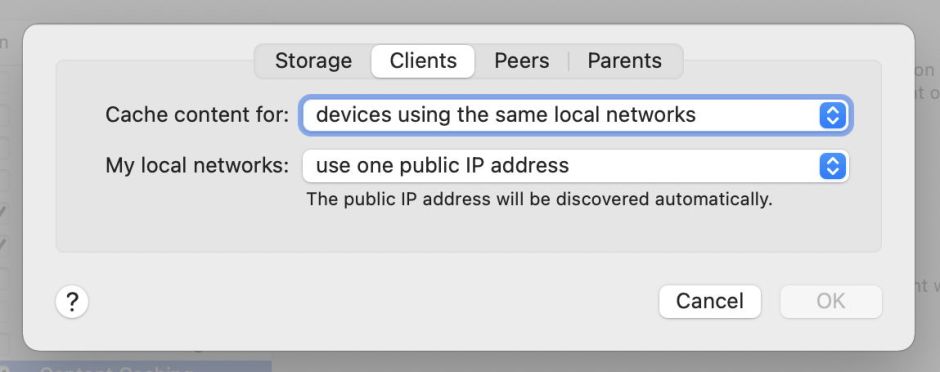
Tabs were made available if you held the Option key before clicking the Options button, which then became Advanced Options. That let you set up clients, as well as other servers functioning as peers or parents, on more extensive networks.
These remain essentially the same today in Tahoe.
When Apple changed macOS updates in Big Sur, life became more complicated. When updating Apple silicon Macs, the first GB of macOS updates had to be downloaded direct from Apple’s servers, and it was only after that the remainder of the update could be obtained from a local caching server.
Apple has further extended the types of content that can be cached locally, to include
macOS updates normally obtained through Software Update or the command tool softwareupdate;
internet Recovery images from macOS 10.13.5 onwards when obtained in Recovery mode;
apps and their updates supplied through the Mac and iOS App Stores;
GarageBand downloadable content;
iCloud documents and data, including Photos libraries;
Apple Books;
downloadable components for Xcode.
Most recently Rosetta 2, screen savers, wallpaper and AI models have been added to the list. Apple’s reference document is here.
Advanced server configurations are catered for by the command tool AssetCacheManagerUtil which can also provide performance information, and there are two additional tools available, AssetCacheLocatorUtil and AssetCacheTetheratorUtil. On the server, performance information is most readily accessed in Activity Monitor’s Cache view, which provides summary statistics for the local cache.
This includes the total size of data served for the last hour, 24 hours, 7 days, and 30 days. To view those graphically, the time period for the charts at the foot can be changed by using it as a popup menu.
These show what happened on my content caching server during the macOS 11.4 update in 2021, for which almost 30 GB still had to be downloaded from Apple’s servers, while just over 20 GB was served from its cache.
Over the last 20 years or so, Software Update and Content Caching services have been remarkably reliable, but in June 2022 there was a period during which updates to XProtect and XProtect Remediator failed to install correctly when attempted through a content caching server. Apple never explained what the cause of that was, but it was eventually fixed and hasn’t recurred since.
Then, out of the blue, iOS and iPadOS 26 introduced a new feature to identify and test a connected caching server.
To access this, in Settings > Wi-Fi tap the ⓘ button on your current active network, scroll to the bottom and tap Content Caches. Tap the active cache to see full details, together with a download test. Don’t bother looking for an equivalent feature in macOS 26 Tahoe, though, as it isn’t available yet. How odd.
The original 128K Mac from 1984 came with a single Motorola 68000 processor running at 8 MHz that could only run one app at a time. Yet today’s Macs come with multiple CPU cores that can comfortably run several substantial apps simultaneously, while running a Time Machine backup and other tasks in the background. This brief history outlines the journey between them.
A processor with a single core and no support for multi-tasking runs one sequence of instructions at a time. When those call for an operating system function to be performed, the running app is interrupted to hand control over to the system, and once that has completed, control is passed back to the app. That’s what the first Macs did until Andy Hertzfeld wrote Switcher, released by Apple in April 1985. This allowed the user to switch between running more than one app, but was still limited to running just one of them at a time.
Multitasking
Over the next couple of years, some third-party utilities were produced to go further than Switcher, but it wasn’t until 1987 that MultiFinder replaced Switcher, and was integrated into System 7 in 1991. Developed by Erich Ringewald and Phil Goldman, this brought cooperative multitasking, which was to become the mainstay of classic Mac OS.
In computers with a single processor core, multitasking is a way of cheating to give the impression that the processor is doing several things at once, when in fact all it’s doing is switching rapidly between two or more different programs. There are two fundamental models for doing that:
cooperative multitasking, in which individual tasks yield to give others processing time;
preemptive multitasking, in which a scheduler switches between tasks at regular intervals.
When a processor switches from one task to the next, the current task state must be saved so it can be resumed later. Once that’s complete, the next task is loaded to complete the context switch. That incurs overhead, both in terms of processing and in memory storage, which are less when switching between lightweight tasks. Different strategies have been adopted to determine the optimum size of tasks and overhead imposed by context switching, and terminology differs between them, variously using words such as processes, threads and even fibres, which can prove thoroughly confusing.
Classic Mac OS thus has a Process Manager that launches apps in cooperative multitasking. This works well much of the time, but lets badly behaved tasks hog the processor and block other tasks from getting their fair share. It’s greatly aided by the main event loop at the heart of Mac apps that waits for control input to direct the app to perform work for the user. But when an app charges off to spend many seconds tackling a demanding task without polling its main event loop, that app could lock the user out for what seems like an age.
In February 1988 Apple released the first Unix for Macintosh, A/UX, which came with preemptive multitasking. That was added to Mac OS in 1996 in System 7.5.3, in Multiprocessing Services, and further enhanced in Mac OS 8.6 three years later. Cooperative multitasking was also supported by the Thread Manager.
Threads
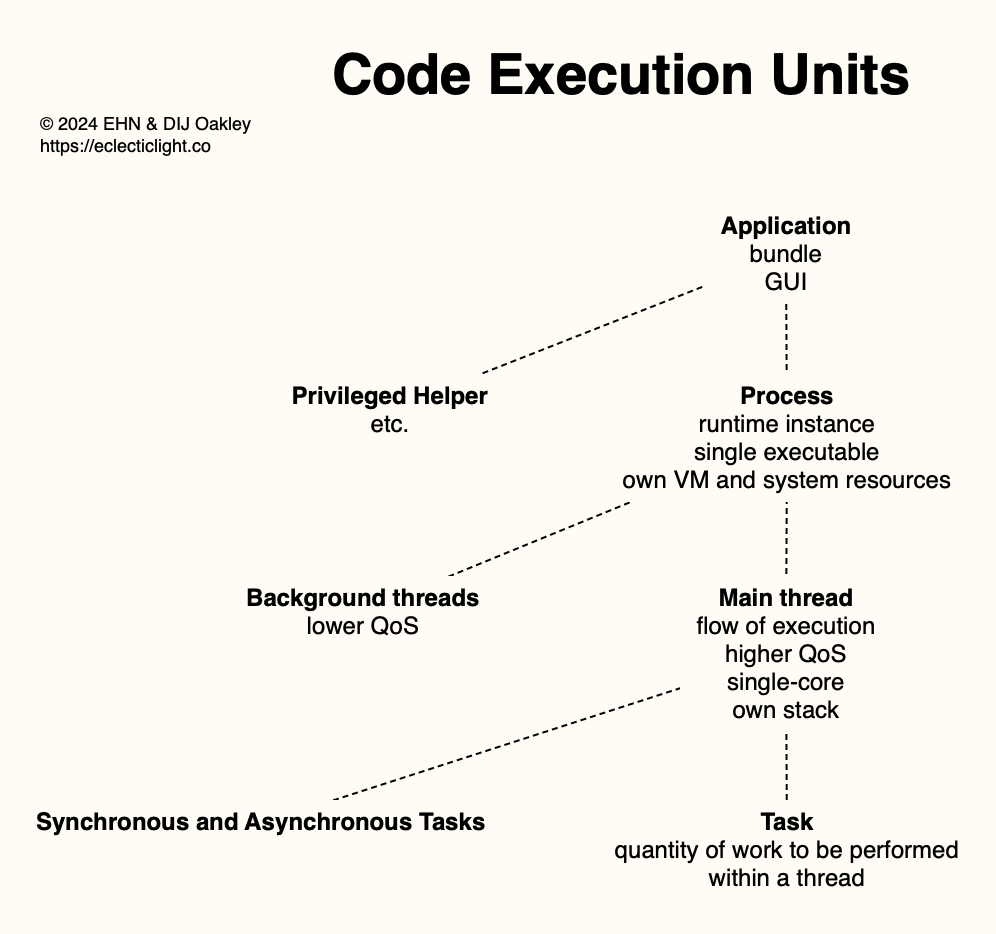
In 2000 Apple’s hardware and software changed radically. Its first Macs with dual processors (apart from the Power Mac 9600/200MP that was available briefly in 1997) came in PowerPC 7400 (G4) chips in Power Mac G4 desktop systems, and Mac OS X brought several types of thread that could be used to manage processing on multiple processors or CPU cores, together with preemptive multitasking. Thread types include low-level Mach threads, higher-level POSIX threads or Pthreads that replaced Multiprocessing Services, Java Threads, Cocoa’s NSThreads, and cooperatively scheduled threads using the Carbon Thread Manager. The following diagram summarises Apple’s current terminology.
In most cases, we’re considering applications with a GUI, normally run from a bundle structure. These can in turn run their own code, such as privileged helper apps used to perform work that requires elevated privileges. In recent years, there has been a proliferation of additional executable code associated with many apps.
When that app is run, there’s a single runtime instance created from its single executable code, and given its own virtual memory and access to system resources that it needs. This is a process, and listed as such in Activity Monitor, for example.
Each process has a main thread, a single flow of code execution, and may create additional threads, perhaps to run in the background. Threads don’t get their own virtual memory, but share that allocated to the process, although they have their own stack. On Apple silicon Macs they’re easy to tell apart as they can only run on a single core, although they may be moved between cores, sometimes rapidly.
Within each thread are individual tasks, each a quantity of work to be performed. These can be brief sections of code and are more interdependent than threads. They’re often divided into synchronous and asynchronous tasks, depending on whether they need to be run as part of a strict sequence.
In 2005 the Power Mac G5 was the first Mac to use dual-core PowerPC G5 processors, then the iMac 17-inch of the following year used Apple’s first Intel Core Duo processor with two cores.
Grand Central Dispatch
In 2009 Mac OS X 10.6 Snow Leopard introduced a new dispatcher, named Grand Central Dispatch (GCD) after Grand Central Terminal in New York City, and that was enhanced in macOS Sierra a decade later. More recently it has been referred to simply as Dispatch.
At its heart, GCD is a dispatcher managing queues of tasks, activating those that need most to be run, and leaving the less pressing to wait a bit longer. It has its own queues, as well as those assembled by apps. Some are run as simple queues with a first in first out rule, others using sophisticated heuristics to determine relative priorities. There’s a detailed account of GCD internals in Jonathan Levin’s book *OS Internals volume 1, and Apple’s current developer documentation is here.
GCD was introduced for Macs with multiple identical cores, to support their symmetric multiprocessing (SMP), and with the release of the first Apple silicon Macs in November 2020 it has managed queues of threads to be dispatched for execution on two CPU core types, Performance and Efficiency. Core allocation is now managed according to the Quality of Service (QoS) assigned to each thread. When used on SMP processors with no contention for core availability, QoS has limited effects on thread performance, but performance on P and E cores may differ by a factor of 10.
Over the last 41 years, macOS has gained thorough support for getting the best performance from multiple tasks, threads, and processes in chips that contain up to 32 CPU cores of two types – a far cry from that single 68000 processor.

 Login
Login