
Reading view

There are new articles available, click to refresh the page.

Why the macOS 26.4 update appears to freeze

Many discovered how long 5 minutes could last when they updated from macOS 26.3.1 to 26.4. Right at the end of its Preparation phase, Software Update showed there were only 5 minutes remaining for far longer. This article reveals what went wrong with that update.

My observations come from a Mac mini M4 Pro running a vanilla installation of macOS Tahoe, being updated from 26.3.1 (a) with the BSI installed, to 26.4. Times and details are taken from log extracts covering the final 14 minutes of the update, immediately prior to the reboot for its installation.

Preparation

At almost exactly 18:43:00, softwareupdated reported that the PREPARING_UPDATE phase was in progress, with 70% complete on the progress bar, and 20 minutes remaining. Periodic preparation activities were then reported in the log, mainly verifying components to be installed as part of the update. One of the longest of those, /usr/standalone/i386/Firmware.scap, took nearly 6.5 minutes alone, although you might wonder why that’s required on an Apple silicon Mac!

Eleven seconds later, softwareupdated changed the progress bar to display 10 minutes remaining, with 71% completed. Just 1.5 seconds later that changed again to display 5 minutes remaining with 94% complete. Six seconds after that, with 5 minutes still displayed, the log records 98.6% was complete.

The log and progress bar then remained stuck at 5 minutes remaining and 98.6% complete for the next 11 minutes and 47 seconds, before changing to 99.9% complete and no time remaining.

These are plotted in the chart below.
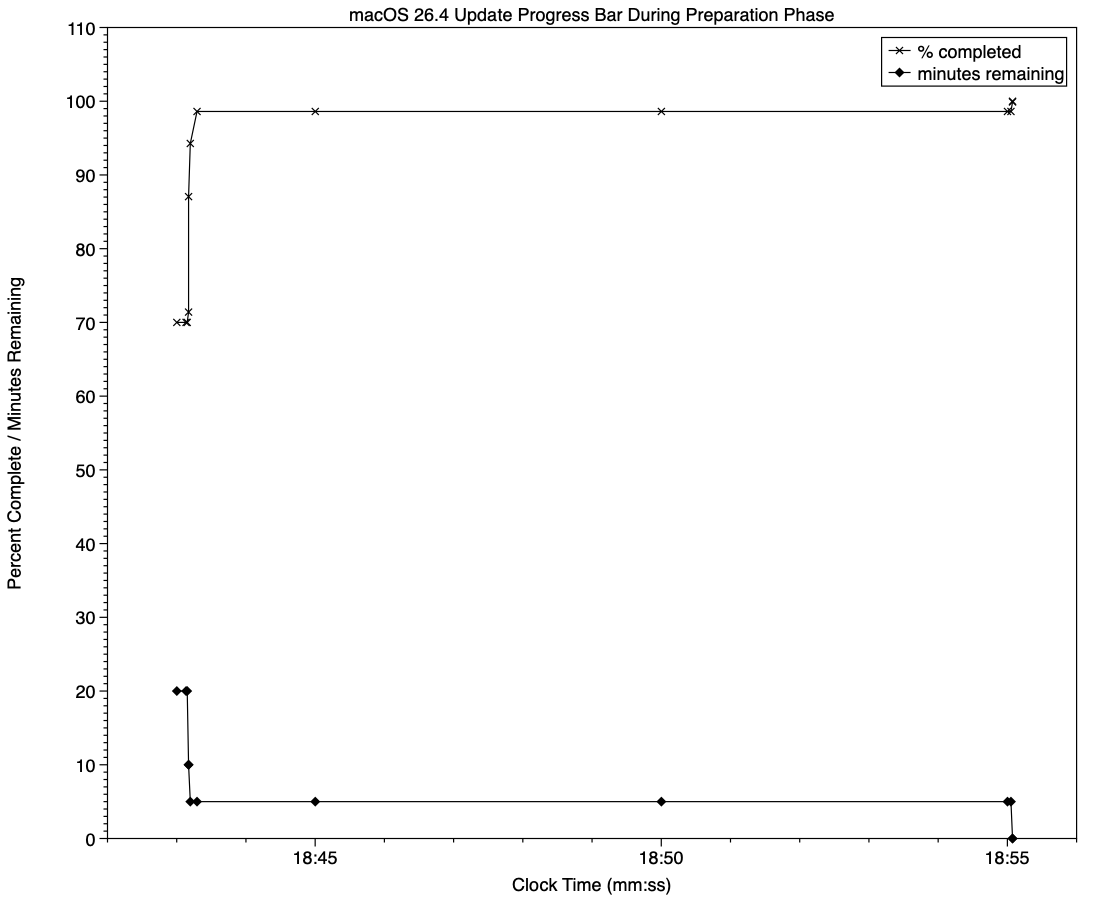
The final 5 minute period started at 18:43:12, and lasted until 18:55:04, as reflected in the long period of 98.6% completion (upper line) and 5 minutes remaining (lower line).

The “5 minutes” remaining actually took 12 minutes and 7 seconds, although log entries make it clear that preparation continued throughout that time, with further verifications and “Preparing system volume…”. Those details were reported as ActionText for progress monitoring, but curiously aren’t accessible to the user at the time.

Log entries record softwareupdated keeping detailed records of progress over this period, though. For example:
18:51:32.924688 softwareupdated PrepareUpdate PROGRESS (Continue) | state:{
ActionText = "Preparing system volume...";
ElapsedTime = 490;
ExpectedTime = 1335505;
PercentBytesComplete = "48.05373989419242";
PercentComplete = "4.701870471432042";
}

But those aren’t reflected in the progress bar.

Once the update had completed that preparation phase, extensive checks were performed to ensure it was correctly configured, and components were moved into place in the ‘stash’ to be used during installation. One second after successful completion, softwareupdated locked the controller state and waited for the reboot to start installation. Rebooting followed less than two minutes later.

What went wrong?

The macOS 26.4 update for Apple silicon Macs was large, and the work required to verify its contents and complete its preparation was incorrectly reported in both percent completion and time remaining. Even in smaller updates, some form of progress needs to be shown in the progress bar during these later stages of preparation, or users may be mislead into thinking the update has frozen or failed, and could for example restart their Mac to try updating again.

What should the user do?

When an update claims there’s only 5 minutes left, that could readily extend to longer, possibly on slower Macs as long as 30 minutes or more. Unless there’s evidence that the update has gone wrong at this stage, you should leave your Mac to complete it, as it almost certainly will. If you’re still in doubt and want to confirm that the update hasn’t frozen, open Activity Monitor and look for around 100% CPU from softwareupdated or related processes, and disk activity.

Unfortunately, there’s nothing the user can do to accelerate macOS updates.

What has changed in macOS Tahoe 26.4?

The update to bring macOS Tahoe up to version 26.4 is hefty at around 7.15 GB (more than double that if you’re unlucky), and reflects a great deal of bug fixes and improvements in almost every subsystem. Apple provides three good sets of release notes:

  • General release notes include the addition of an option to use compact tabs in Safari, Freeform’s new Creator Studio enhancements, and a facility for Purchase Sharing in Family Sharing. Oh, and the requisite eight new emoji.
  • Enterprise release notes are extensive, but contain little for the non-enterprise user.
  • Security release notes list over 70 fixes, many of which are significant, but none are reported as being known to be exploited in the wild at present.

The new build number of 26.4 is 25E246. The Darwin Kernel version is 25.4.0, and XNU 12377.101.15~1.

Apple silicon firmware is updated to a completely different version numbering system, and is now reported as mBoot version 18000.101.7. If you’re running SilentKnight older than version 2.14 (71), then it’s likely that it will crash as a result of this change in firmware version. Please use version 2.14 from here.

Firmware in Intel Macs with T2 chips remains with the previous system, and is updated from 2094.80.5.0.0 (iBridge 23.16.13120.0.0,0) to 2103.100.6.0.0 (iBridge 23.16.14242.0.0,0).

Looking through the bundled apps and /System/Library, there are a great many increments in build numbers reflecting the extensive changes made. Here are a few of the more substantial changes found.

In bundled apps:

  • Books goes from version 8.1 to 8.4
  • Freeform, version 4.3 to 4.4
  • iPhone Mirroring, version 1.5 to 1.6
  • Music, version 1.6.3 to 1.6.4
  • Safari, version 26.3.1 (21623.2.7.111.2) in BSI (a) to 26.4 (21624.1.16.11.4)
  • TV, version 1.6.3 to 1.6.4
  • Audio MIDI Setup, version 3.7 to 3.8
  • Digital Color Meter, version 6.10 to 6.11
  • Screen Sharing, version 6.2 (758.1) to 6.1 (760.4), note the reduction in version number.

In /System/Library:

  • AGX kernel extensions all have build increments
  • AppleDiskImages2 kext has a build increment
  • AppleEmbeddedAudio kext and its plugin kexts have build increments
  • AppleIntel Graphics kexts have version increments
  • AppleStorageDrivers kext and its plugin kexts have build increments
  • APFS is updated from 2632.80.1 to 2811.101.1, suggesting a substantial change has been made
  • new private frameworks include ASMExclaveSupport, AccelerateOpt, AlwaysOnExclavesDaemon, AnteroAgent, AppRemoteAssets, AudioPasscodeDSP, BNNSOdieDelegate, CookingData, CoreTransparency, DynamicPrefetching, InAppFeedback, NanoPassKit, PartnerVisualSearch, a whole family of Unilog frameworks, and a group of iCloudWeb frameworks
  • mdimporters updated include those for Application, CoreMedia, Mail, Office, iWork but not RichText.

After seeing the new CookingData private framework, I looked out for RecipeKit, but was disappointed not to see it.

This is probably going to be the last such substantial update to macOS Tahoe, as much of Apple’s engineering effort is transferring to make macOS 27 ready for release as a beta at WWDC in early June.

How localisation confused SilentKnight 2.13

I’d like to apologise to those of you who ended last week downloading two new versions of SilentKnight, instead of the one that I had intended. This article explains how the second came about.

SilentKnight is heavily dependent on discovering key facts about the Mac that it’s running on. One of the first it needs to know is whether it’s looking at a plain Intel Mac, one with a T2 chip, or an Apple silicon Mac, as that determines how it should go about checking which version of firmware it’s running, and much else.

Over the last five years, SilentKnight has relied on the command-line equivalent of the System Information app, system_profiler. Surprisingly that doesn’t have a single field that draws a clear distinction between those types of Mac. The closest it comes to doing that is the information shown for the Controller item, or
system_profiler SPiBridgeDataType
in Terminal:

  • Intel Macs without a T2 chip return no information, as they’re not considered to have a controller in this sense.
  • Those with T2 chips return a Model Name of Apple T2 Security Chip.
  • Apple silicon Macs give the iBoot (or, from 26.4, mBoot) firmware version number.

While that has worked for five years, for SilentKnight version 2.13 I decided to slightly extend the text it looks for, to ” T2 ” to reduce the chance of false positives now that Apple silicon results are becoming more diverse. That worked fine on my two Intel Macs with T2 chips, but broke weirdly in a MacBook Pro tested by Jan, to whom I’m deeply grateful for the early report of this problem. Jan’s MacBook Pro was thoroughly confused, found and reported the correct T2 firmware but told them it should be running a more recent version of iBoot, for Apple silicon Macs.

It turned out that Jan’s MacBook Pro is running German as its primary language, so instead of reporting Apple T2 Security Chip in system_profiler it returned Apple T2-Sicherheits-Chip, and ” T2 ” couldn’t be found to confirm it wasn’t an Apple silicon Mac. The simple fix was to remove the trailing blank from the search term, which becomes ” T2″.

Although system_profiler can return its information in plain text, JSON or XML formats, its content is the same in all three, with localised text that’s dependent on that Mac’s primary language setting. Besides, its XML is exceptionally verbose, squeezing a few lines of information into 262. I was surprised by this five years ago, when I first came across it when trying to parse the list of Apple silicon security settings.

locales01

Here you can see those for a Mac using Dutch localisation. Instead of responses like
Secure Boot: Full Security
using Dutch for your Mac’s primary language turns that into
Secure Boot: Volledige beveiliging
When SilentKnight tries to work out whether your Mac is set to Full Security, that means it would have to look up the response in a dictionary containing every possible language.

Not only that, but these localised responses vary between different sections and data types.

locales02

The above responses to system_profiler with French set as the primary language demonstrate that has no effect on Hardware data, where core types are given in English, but changes those in Controller’s Boot Policy. To discover which change, you have to test with many different language settings, as none of this is documented, of course.

At that time I spent several days trying to get an unlocalised response by running system_profiler in an English environment, but that had no effect, and there was no way to bypass this localisation. As this language dependency limits the usefulness of the command tool, I argued that its output shouldn’t be localised at all.

Now, five years later, I have been bitten again, and apologise for putting you through two updates to SilentKnight when there should only have been one.

Previously

Bad design makes macOS a Tower of Babel

Last Week on My Mac: Bugs of wonder

Last week Apple released the second beta of macOS 26.4 to developers, and almost immediately I was receiving reports that SilentKnight crashed on launch in that new beta. Given how unusual that has been in previous versions, I was grateful to hear so quickly, and for so many of you to provide crash reports. As usual they don’t point to anything specific, but led me to wonder whether something might have broken in AppKit in that beta.

But there’s a strange observation reported by SilentKnight’s old predecessor LockRattler, which continues to work normally in 26.4 beta 2: that reports a bizarre iBoot firmware version number from Apple silicon Macs. Instead of a number like 13822.101.2 that I might have expected, LockRattler gives “mBoot-18000.100.10.0.1”, which is random nonsense. Yet it’s listed in a mammoth compilation of iBoot version numbers in the Apple Wiki as an occasional fault.

“mBoot-18000.100.10.0.1” is a problem for SilentKnight, as it tries to make comparisons between firmware version numbers to see whether that installed in your Mac is older or more recent that the version number it expects. If it didn’t do that, every beta-tester would be driven crazy by its persistent reports that their Mac’s firmware is out of date, when in fact it’s that for the next version.

Comparing numbers is of course simple, but I’ve been unable to find anywhere in the API that returns numbers for firmware versions. Wherever they’re available, they’re reported as strings of arbitrary characters, leaving SilentKnight the task of recovering three integers (in the case of iBoot) from what in this case turns out to be rubbish. This is further complicated by the fact that different architectures return strings with different structures: for plain Intel Macs, they should look like “2094.80.5.0.0”, those with T2 chips extend to “2094.80.5.0.0 (23.16.13120.0.0,0)”, and Apple silicon is simpler again with “13822.81.10”. What could have been a simple task is turned into lots of additional code.

It also raises the question of how any beta-release could be put in the hands of external testers when it can’t even report its firmware version correctly. Most of us draw clear distinctions between alpha and beta releases, and this strongly suggests that Apple doesn’t undertake any purposeful alpha testing before release as a beta. Either that or it’s well aware of significant bugs that it doesn’t inform beta-testers about. I fear the answer could be both, and I’m wondering whether trying to make sense of reported firmware versions is too fraught to be reliable.

My main use of SilentKnight here is to check for updates released for the security tools in macOS, primarily XProtect and XProtect Remediator. You may recall that Apple’s last update to XProtect Remediator on 17 February, bringing it to version 157, contained a strange change, which I reported as “the Bastion rules appear to correct a group of typos in the definition for bastion-common-system-binary”.

There were six typos in all, in a definition for bastion-common-system-binary introduced back in version 153 six months ago, on 5 August last year. I shouldn’t need to point out the errors in the original definition:
(define bastion-common-system-binary
(require-all
(process-attribute is-platform-binary)
(require-not
(require-any
(signing-identifier "com.apple.osascript")
(signing-identifier "com.apple.zsh")
(signing-identifier "com.apple.bash")
(signing-identifier "com.apple.sh")
(signing-identifier "com.apple.ksh")
(signing-identifier "com.apple.osacompile")
(signing-identifier "com.apple.python2")
(signing-identifier "python3")
(signing-identifier "ccom.apple.pbcopy")
(signing-identifier "ccom.apple.pbpaste")
(signing-identifier "ccom.apple.cat")
(signing-identifier "ccom.apple.curl")
(signing-identifier "ccom.apple.dd")
(signing-identifier "ccom.apple.cp")
(signing-identifier "com.apple.perl")))))

Instead of “ccom.apple.pbcopy”, it should of course have read “com.apple.pbcopy”, and the same for the other five signing-identifiers below that.

I’m delighted that Arnaud Abbati has explained eloquently the consequences of those typos in a wonderful article in his blog. I won’t steal his thunder here, but agree with his conclusion: “Six months of security updates, and nobody noticed. It missed engineering. It missed testing. It missed code review. It missed QA. It missed whatever metrics pipeline is supposed to validate that the rules actually match real binaries.”

There are times when I wonder what really does go on in Apple. When it releases a beta that can’t even tell what its firmware version is, and its security intelligence tool is broken for six months because of obvious typos, it does make you wonder.

What has changed in macOS Tahoe 26.3?

For once, Apple’s bland statement that “this update provides important bug fixes and security updates” may be the best overview of what has changed in macOS Tahoe 26.3. There are few version changes that stand out, but a lot of smallish build increments that suggest some bugs, at least, have been fixed.

Security is another matter, with around 52 vulnerabilities addressed and listed here. Those include one that Apple reports has been exploited in a sophisticated attack against an older version of iOS. For that alone, this update is compelling if you’ve already upgraded to Tahoe.

There are three entries in Apple’s release notes for enterprise, although none should affect those outside enterprise environments.

What Apple doesn’t reveal is that it has improved, if not fixed, the shortcomings in Accessibility’s Reduced Transparency setting. When that’s enabled, at least some of the visual mess resulting from Liquid Glass, for example in the Search box in System Settings, is now cleaned up, as the sidebar header is now opaque. It’s a small step, but does address one of the most glaring faults in 26.2.

The build number of the release version of 26.3 is 25D125. There are firmware updates all round, bringing iBoot to 13822.81.10, and Intel T2 firmware to 2094.80.5.0.0 with iBridge 23.16.13120.0.0,0.

Significant version increments in bundled applications include:

  • Freeform from 4.2 (630.61.2) to 4.3 (630.81.1)
  • Music from 1.6.2 to 1.6.3
  • Passwords from 2.2 (21623.1.14.11.9) to 2.3 (21623.2.7.11.6)
  • Safari from 26.2 (21623.1.14.11.9) to 26.3 (21623.2.7.11.6)
  • TV from 1.6.2 to 1.6.3.

Significant changes seen in /System/Library include:

  • PosterBoard app has been removed from CoreServices
  • Kernel extensions in the AGX family have substantial changes in build numbers
  • AppleT6022CLPCServer has been added as a new kext
  • There are two new kexts to support Thunderbolt, AppleThunderboltUSBType2DownAdapter and AppleThunderboltUSBType2UpAdapter, perhaps to support new hardware features in future M5 models?
  • APFS from version 2632.40.17 to 2632.80.1
  • MPSHost, a new framework for Metal performance shaders, has been added
  • New private frameworks include BinaryAssetTag
  • Spotlight mdimporters updated to new build numbers include Application, Automator, CoreMedia and Mail, but not RichText.

I look forward to hearing of any fixes or improvements you find.

Postscript:

I’m grateful to @Remo_Pr0 for drawing my attention to the fact that the updated version of OpenSSH included writes a scary warning about post-quantum key exchange algorithms when a connection is made to a system that doesn’t support post-quantum methods.

Emscripten Fetch 接口的一个潜在内存泄漏问题

近日发现了一个非常刁钻的可能引起基于 Emscripten 编译的 WASM 程序内存泄漏的问题。Emscripten 工具链提供了 Fetch 功能模块,这个模块允许我们调用浏览器的 fetch 接口来进行网络访问。

一个使用 fetch 接口的简单例子是:

1
2
3
4
5
6
7
8
9
10
11
12
13
14
15
16
17
18
19
20
21
22
23
24
#include <stdio.h>
#include <string.h>
#include <emscripten/fetch.h>

void downloadSucceeded(emscripten_fetch_t *fetch) {
printf("Finished downloading %llu bytes from URL %s.\n", fetch->numBytes, fetch->url);
// The data is now available at fetch->data[0] through fetch->data[fetch->numBytes-1];
emscripten_fetch_close(fetch); // Free data associated with the fetch.
}

void downloadFailed(emscripten_fetch_t *fetch) {
printf("Downloading %s failed, HTTP failure status code: %d.\n", fetch->url, fetch->status);
emscripten_fetch_close(fetch); // Also free data on failure.
}

int main() {
emscripten_fetch_attr_t attr;
emscripten_fetch_attr_init(&attr);
strcpy(attr.requestMethod, "GET");
attr.attributes = EMSCRIPTEN_FETCH_LOAD_TO_MEMORY;
attr.onsuccess = downloadSucceeded;
attr.onerror = downloadFailed;
emscripten_fetch(&attr, "myfile.dat");
}

Fetch API 提供了一些比较高阶的功能,一种一个比较重要的功能是,他可以将下载的内容缓存到 IndexDB 中,这个缓存机制能够突破浏览器自身的缓存大小的限制(一般超过 50MB 的文件浏览器的自动缓存机制会拒绝缓存)。但是这个缓存机制会导致内存泄漏。

1 泄漏产生的过程

在开头的例子中,我们需要再 onerror 和 onsuccess 回调中调用 emscripten_fetch_close 接口来关闭 fetch 指针代表的请求。在关闭过程中,fetch 使用的数据缓存区将会被回收。这个过程如下:

1
2
3
4
5
6
7
8
9
10
11
12
13
14
15
16
17
18
19
20
21
22
23
EMSCRIPTEN_RESULT emscripten_fetch_close(emscripten_fetch_t* fetch) {
if (!fetch) {
return EMSCRIPTEN_RESULT_SUCCESS; // Closing null pointer is ok, same as with free().
}

// This function frees the fetch pointer so that it is invalid to access it anymore.
// Use a few key fields as an integrity check that we are being passed a good pointer to a valid
// fetch structure, which has not been yet closed. (double close is an error)
if (fetch->id == 0 || fetch->readyState > STATE_MAX) {
return EMSCRIPTEN_RESULT_INVALID_PARAM;
}

// This fetch is aborted. Call the error handler if the fetch was still in progress and was
// canceled in flight.
if (fetch->readyState != STATE_DONE && fetch->__attributes.onerror) {
fetch->status = (unsigned short)-1;
strcpy(fetch->statusText, "aborted with emscripten_fetch_close()");
fetch->__attributes.onerror(fetch);
}

fetch_free(fetch);
return EMSCRIPTEN_RESULT_SUCCESS;
}

可以看到,回收并非总会发生, emscripten_fetch_close 函数会对 fetch 的部分状态进行检查,如果检查失败,则会返回一个 EMSCRIPTEN_RESULT_INVALID_PARAM 的错误码,并且不会执行后续的清理过程(`fetch_free)。被检查的两属性中,fetch->id 是我们需要关注的对象。fetch->id 这个属性作为 fetch 的唯一标识符,是用来建立起 C++ 端的请求对象和 JS 端的请求对象的映射的。id 的值在 JS 端分配。查看源码中的 Fetch.js 文件,

1
2
3
4
5
6
7
8
9
10
11
12
function fetchXHR(fetch, onsuccess, onerror, onprogress, onreadystatechange) {
// ...

var id = Fetch.xhrs.allocate(xhr);
#if FETCH_DEBUG
dbg(`fetch: id=${id}`);
#endif
{{{ makeSetValue('fetch', C_STRUCTS.emscripten_fetch_t.id, 'id', 'u32') }}};

// ...

}

这是唯一的一处 id 复制。这段代码位于 fetchXHR 函数中,这意味着只有发起了 XHR 请求时,id 才会被分配。那么,如果缓存存在呢?这时不会调用 fetchXHR 函数(而是调用 fetchLoadCachedData 函数)。这意味着回调函数中我们试图调用 emscripten_fetch_close 函数来关闭请求并回收资源时,这个回收过程无法进行,这导致了内存泄漏。

2 怎么解决这个问题

要解决这个问题我们只需要强行让 fetch->id == 0 的检查无法通过即可,我们可以在 emscripten_fetch_close 调用前,强行设置 fetch->id 为一个非零值。那么什么值合适呢?如果我们取值和已有的请求的 id 相同,那么 emscripten_fetch_close 可能将那个请求关闭。研究 id 分配的过程(即 Fetch.xhrs.allocate 的实现)

1
2
3
4
5
6
// libcore.js
allocate(handle) {
var id = this.freelist.pop() || this.allocated.length;
this.allocated[id] = handle;
return id;
}

可以看到,id 是顺序分配的,且使用过的 id 会被回收使用(freelist)。因此我们可以设置一个较大的值,只要同一时间最大的并发请求数量不超过这个值,那就是安全的。我一般选择设置为 0xffff。 那么,正确的关闭请求的方式是:

1
2
3
4
if (fetch->id == 0) {
fetch->id = 0xffff;
}
emscripten_fetch_close(fetch);
❌