Freeform joins Creator Studio, with advanced tools and a premium content library
Purchase Sharing in Family Sharing
and eight new emoji.
Security release notes for 26.4 list over 70 fixes, those for Sequoia 15.7.5 list about 56, and those for Sonoma 14.8.5 list about 50. None are reported as being known to be exploited in the wild at present.
Firmware in Apple silicon Macs is updated to a new mBoot firmware version numbering system, with the current version given as 18000.101.7. The macOS build number is 25E246, and Safari is version 26.4 (21624.1.16.11.4). Firmware in Intel Macs with T2 chips is updated from 2094.80.5.0.0 (iBridge 23.16.13120.0.0,0) to 2103.100.6.0.0 (iBridge 23.16.14242.0.0,0).
If you’re running SilentKnight older than version 2.14 (71), then it’s likely that it will crash as a result of the change in firmware version. Please use version 2.14 from here.
I’ll be posting an analysis of what has changed later today.
Updated 09:15 25 March 2026 with firmware details for Intel Macs.
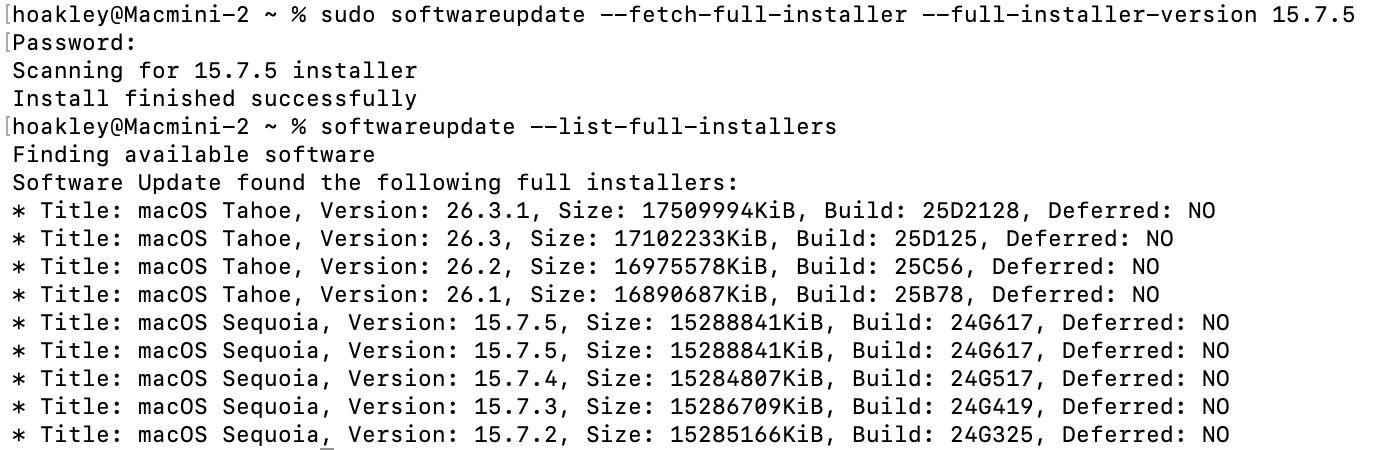
After reading today’s article here about fixing software update problems and the softwareupdate command tool, two eagle-eyed readers, Gurt and upstreamer, insisted that they were being offered two full installers for macOS Sequoia 15.7.5. Although for one of them this might have occurred because of previous membership in a beta-testing programme, that didn’t explain them both. I therefore checked again this evening, and was surprised to see the list of available updates does now offer two apparently identical full installers for macOS Sequoia 15.7.5 Build 24G617.
To find these yourself, simply enter the following in Terminal: softwareupdate --list-full-installers
If you fancy downloading either of them, use the command sudo softwareupdate --fetch-full-installer --full-installer-version 15.7.5
That should download the Installer app into your Applications folder.
Software Update doesn’t offer 15.7.5 as an update for Sequoia 15.7.4. There’s no mention of the release of 15.7.5 anywhere else, in particular Apple’s security release notes page, and I can’t see anyone else mentioning this as a newly released update. Has it been released prematurely by accident, perhaps? Or has someone forgotten to finish a job off?
Postscript
Apple has now rectified what had been an inadvertent public release of a release candidate for 15.7.5. Hopefully the next time it appears, it will be the final release.
Apple has released updates to macOS, to bring Tahoe to version 26.3, and security updates for Sequoia to version 15.7.4, and Sonoma to 14.8.4.
The Tahoe update downloads in around 3.7 GB for an Apple silicon Mac, and 2.5 GB for an Intel Mac.
Apple seems to have forgotten what 26.3 fixes or improves, writing just “this update provides important bug fixes and security updates”.
Security release notes for Tahoe 26.3 are here, and list around 52 vulnerabilities addressed, including one that has been previously used in an attack on iOS. Sequoia 15.7.4 has about 30 fixes listed here, and Sonoma 14.8.4 has about 36 listed here.
The build number of 26.3 is 25D125, and iBoot firmware is updated to version 13822.81.10. Safari is version 26.3 (21623.2.7.11.6).
I’ll update this post with further information as I get it. and will later provide details of significant changes in version numbers.
Of all the privacy protections in macOS, those for local networking are among the most recent and the least understood. Introduced in macOS Sequoia, they’re related to protection introduced earlier in iOS and iPadOS version 14, but different, and could trip you up when you’re least expecting yet another privacy prompt.
Fundamental rule
Any process running on your Mac that tries to make a connection to a local network address, to send or receive network packets without being forwarded by a router, requires privilege to do so. Without that privilege being allowed, the system will block it.
That sounds draconian, but most common uses are subject to exemptions, as a result of which the Local Network section in Privacy & Security settings remains empty.
All non-exempted apps and other processes start without any privilege. Those that try to make a local network connection result in the user being prompted to allow or deny their access. Your decision is then recorded in that app’s new entry in the Local Network section, and you can then set that to allow or deny its future access. For that to happen, the responsible app needs an additional item in its property list to explain to you why it requires that access, something that should appear in any prompt for access.
As with other privacy controls in macOS, this is applied for each individual user.
Major exceptions
In macOS, the following are automatically given local network access and don’t appear in Local Network settings:
any daemon (except agents) started by launchd
any process running as root
command tools run from Terminal or using SSH, including their child processes; however, there are reports that closing Terminal while child processes are still running can lose their exemption, and cause their local connection to be broken
traffic from Safari and WebKit (WKWebView)
access to a local DNS server or network proxy
high-level services using Bonjour internally, including AirPlay, printing, device discovery and accessory setup.
Those exempt the majority of processes regular users are likely to run.
Listening for and accepting incoming TCP connections doesn’t require any privilege, nor does receiving an incoming UDP unicast. Resolving a local DNS name, ending in .local, does require privilege, though, as do all Bonjour operations other than those exempted above.
Known problems
A process with a short life that immediately fails if it can’t complete a local network operation may not trigger a user prompt, and can continue to fail repeatedly as it can’t be granted the privilege. Apple recommends changing the code so that it doesn’t exit immediately after failure, to allow the prompt to be displayed and access granted.
There’s currently no way to reset an app’s Local Network setting.
Prompts to grant the privilege of local network access can appear out of the blue when an app accesses certain third-party libraries. It can be hard to trace the origins of those, but if you can work out which app is most probably responsible, you can report this to its developer.
Local network privacy, like other similar protection, relies on tracking apps by their code signature, so works best with code signed with certificates issued by Apple, rather than ad hoc signatures. It also relies on the UUID of the main executable code; in some cases that may be absent, or shared with other code, and can then behave unpredictably. These should be raised with the app developer.
Key points
macOS Sequoia and Tahoe apply restrictions to local network connections. Although few are likely to encounter them, don’t be surprised to be prompted to allow or deny a local network connection. Control those in the Local Network section in Privacy & Security settings as necessary.

 Login
Login