When the same unusual dialog appears twice within a few days for two different people, you begin to suspect a pattern. This article explores a rabbit hole that involves git, the log and the fickleness of AI.
On 8 March, Guy wondered whether an XProtect update earlier this month could have been responsible for a dialog reading The “git” command requires the following command line developer tools. Would you like to install the tools now? As the request seemed legitimate but its cause remained unknown, we mulled a couple of possible culprits, and he went off to investigate.
Five days later, after he had installed the update to SilentKnight 2.13, Greg emailed me and asked whether that might be responsible for exactly the same request appearing on his Mac. This time, Greg had consulted Claude, which asked him to obtain a log extract using the pasted command log show --start "2026-03-13 07:07:00" --end "2026-03-13 07:10:00" --style compact --info | grep -E "14207|spawn|exec|git|python|ruby|make"
Armed with that extract, Claude suggested that SilentKight had been the trigger for that dialog.
I reassured Greg that, while SilentKnight does rely on some command tools, it only uses those bundled with macOS, and never calls git even when it’s feeling bored. While I was confident that my app couldn’t have been responsible, I wondered if its reliance on making connections to databases in my Github might somehow be confounding this.
While I knew Claude was wrong over its attribution, the log extract it had obtained proved to be conclusive. Within a few minutes of looking through the entries, I had found the first recording the request for command line tools: 30.212 git Command Line Tools installation request from '[private]' (PID 14205), parent process '[private]' (parent PID 14161)
30.212 git Command Line Tools installation request from '[private]' (PID 14206), parent process '[private]' (parent PID 14161)
As ever, the log chose to censor the most important information in those entries, but it’s dumb enough to provide that information elsewhere. All I had to do was look back to discover what had the process ID of 14161, as its parent. Less than 6 seconds earlier is: 24.868 launchd [pid/14161 [Claude]:] uncorking exec source upfront
Just to be sure, I found matching entries for SilentKnight and the system_profiler tool it called after the attempt to run git: 30.153 launchd [pid/14137 [SilentKnight]:] uncorking exec source upfront
30.336 launchd [pid/14139 [system_profiler]:] uncorking exec source upfront
There was one small mystery remaining, though: why did Claude’s log show command also look for process ID 14207? That was the PID of the installondemand process that caused the dialog to be displayed: 30.215 launchd [gui/502/com.apple.dt.CommandLineTools.installondemand [14207]:] xpcproxy spawned with pid 14207
Following its previous denial, when Claude was confronted with my reading of the log, it accepted that its desktop app had triggered this dialog. Its explanation, though, isn’t convincing:
“the Claude desktop app calls git at launch — likely for one of a few mundane reasons like checking for updates, querying version information, or probing the environment. It’s not malicious, but it’s poorly considered behavior for an app that can’t assume developer tools are present on every Mac.”
In fact, it was Guy who had probably found the real reason, that the Claude app has Github as one of its four external connectors. However, that shouldn’t give it cause to try running the git command, resulting in this completely inappropriate request.
Conclusions
Claude might know how to use the log show command, but it still can’t understand the contents of the Unified log.
If you’re ever prompted to install developer command tools to enable git to be run, suspect Claude.
What a fickle and ever-changing thing is an AI.*
I’m very grateful to Greg and Guy for providing the information about this curious problem.
* This is based on a well-known English translation of a line from Virgil’s Aeneid, Book 4: “Varium et mutabile semper femina”, “what a fickle and ever-changing thing is a woman”. While all of us should dispute that, there’s abundant evidence that it’s true of Claude and other AI.
I expected my first internship to be baptism by fire. As the most junior doctor to two teams of neurosurgeons, I knew I’d learn plenty of new skills, among them performing lumbar punctures. Within the first few days I had been guided through that, and for much of the next six months I averaged one every couple of days. In the 45 years since I completed that job, I haven’t performed another lumbar puncture, ventricular tap, tracheostomy, or any of the other techniques I had learned. I suppose if it was a matter or life or death, I could just about remember how to drill a burr hole in an emergency, but all those other skills have now faded, some in a matter of months.
Skill fade is a distinctively animal trait, and a function of our brain. It comes in degrees: the slight fade you get from a good vacation is quickly overcome once you’ve got your feet back under the desk; more noticeable amounts from a longer maternity or sickness absence might merit a couple of weeks ‘returning to work’; and after a year or two you’ll probably need a period of formal retraining.
For the last year or so there have been increasing concerns raised over the effects of AI on critical thinking, and the Harvard Gazette published an interesting range of opinions last November. There has been extensive discussion about the dangers of ‘cognitive atrophy’ and impairment of critical thought, but less about longer-term skill fade.
I write code because I enjoy doing so. I’m not good at coding by any means, but over the forty years that I’ve been learning to code I have had a great deal of pleasure. It’s a creative act, like painting, involving a rich range of cognitive skills including plenty of art. At the end you have created something of substance, that might also benefit others.
So when someone comes along and advises me to start using Claude or another AI to write code for me, I can’t understand why I might want to stop coding and learn how to brief something else to steal my pleasure, any more than I might ask an AI to make me a painting. Moreover, were I to hand over one of my pleasures in life to AI, I know I’d find it progressively harder to code myself. While I might grow increasingly skilled at getting the AI to do much of the work, I’d also become increasingly dependent on its coding skills rather than mine.
At my age, that would remove one of my defences against the onset of dementia, and free up time to go painting more often. But what would it mean to a young engineer at the start of what they intend to be a bright career? At a time when their skills should only be developing, they’d be letting them fade. And who is going to have skills to transfer when they teach the next generation?
This extends beyond coding. Many of us are handing our writing to AI for it to summarise, one of its undisputed strengths. I started learning to write summaries before I turned 11, and have continued to develop and refine those skills for 60 years. If you’re only 20 now and leave this task to your favourite AI, how long before your summarising skills fade away?
Of course the vendors of AI want your dependence on their products. For a modest $200 to $3,600 a year you can abandon most of your independent skills to Claude, ChatGPT or Grok. If that was investing in further development of your skills, I could see the sense in that. While there are plenty of substitutes for cognitive challenges and critical thought you’re getting AI to do, there’s no substitute for developing and maintaining your essential professional skills.
I’m not advocating that you should avoid AI altogether; there are times when it has its uses, and skilful use of any tool can always be turned to advantage. But if you write code, summaries or whole novels, you need to retain and develop your own skills alongside that. Like morphine, AI has great powers, but overused it can so readily become both addictive and destructive.
There are only two ways a painter can depict reflections on water in accordance with optical reality: they can paint exactly what they see when in front of the motif, or they can understand optical principles sufficiently to recreate what they would have seen. This article looks at how those worked out in landscape paintings to the end of the eighteenth century.
Jan van Eyck (c 1390–1441), The Madonna of Chancellor Rolin (detail) (c 1435) oil on panel, 66 x 62 cm. Musée du Louvre, Paris (WikiArt).
Look in the landscape behind Jan van Eyck’s Madonna of Chancellor Rolin (c 1435) and you’ll see one of the earliest examples of the meticulously accurate depiction of reflections on water. These could only have resulted from careful studies made in front of the motif.
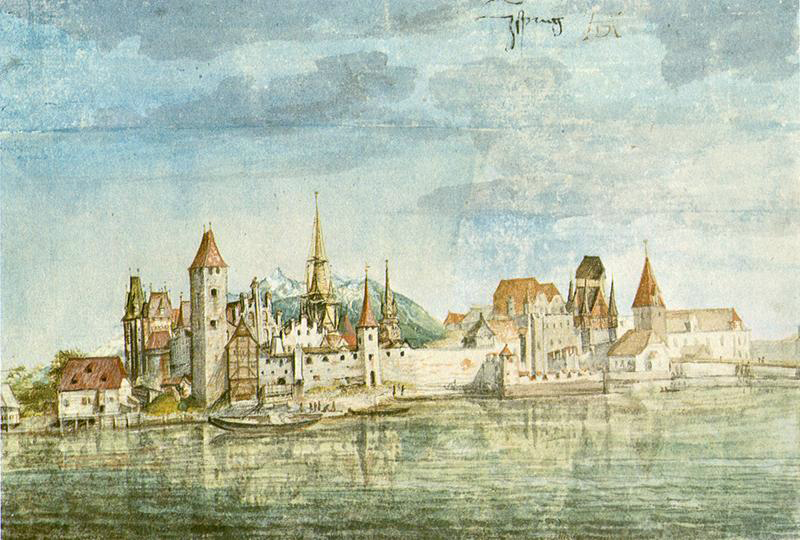
Albrecht Dürer (1471-1528), View of Innsbruck (c 1495), watercolour on paper, 12.7 x 18.7 cm. Albertina, Vienna (WikiArt).
For Albrecht Dürer painting this View of Innsbruck in about 1495, this watercolour is evidence that he both recognised the challenge, and went to the trouble to paint what he actually saw, even though the overall geometry isn’t perfect, with its downward slope to the left.
Following the Northern Renaissance, other landscape painters continued this tradition, into the Dutch Golden Age.
Aelbert Cuyp (1620–1691), View on the Rhine (c 1645), oil on panel, 27.4 x 36.8 cm, Fondation Custodia, Paris. Wikimedia Commons.
Although Aelbert Cuyp’s View on the Rhine from about 1645 isn’t optically perfect and must at least have been finished in the studio, it demonstrates his care in trying to be faithful in its reflections.
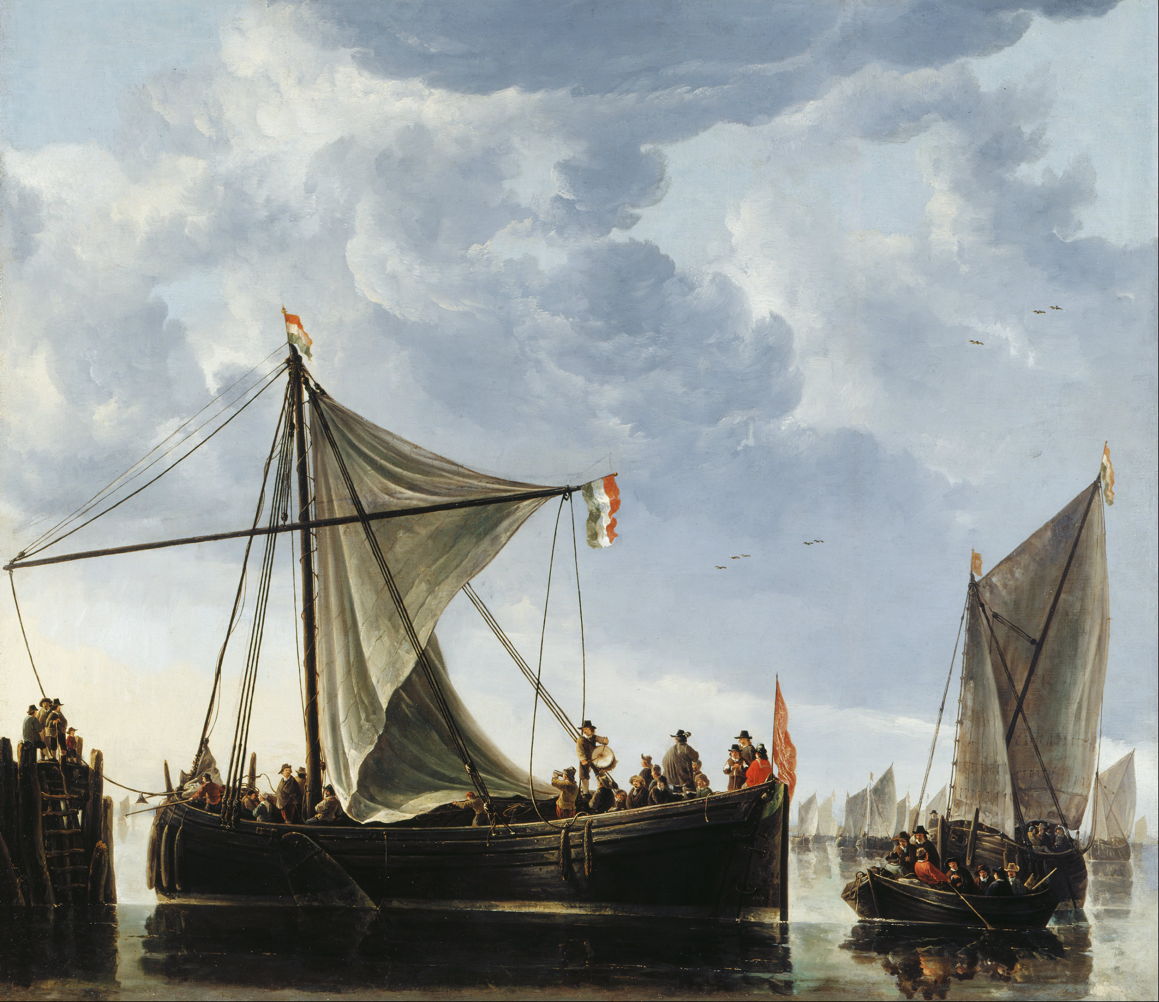
Aelbert Cuyp (1620–1691), The Passage Boat (c 1650), oil on canvas, 124 x 144.4 cm, Royal Collection of the United Kingdom, UK. Wikimedia Commons.
Cuyp’s larger and more detailed painting of The Passage Boat from about 1650 is similarly attentive, implying the use of careful studies made in front of the motif.
Aelbert Cuyp (1620–1691), The Valkhof at Nijmegen (c 1652-54), oil on wood, 48.8 x 73.6 cm, Indianapolis Museum of Art, Indianapolis, IN. Wikimedia Commons.
Cuyp’s grand view of The Valkhof at Nijmegen from about 1652-54 is a fine example from later in his career.
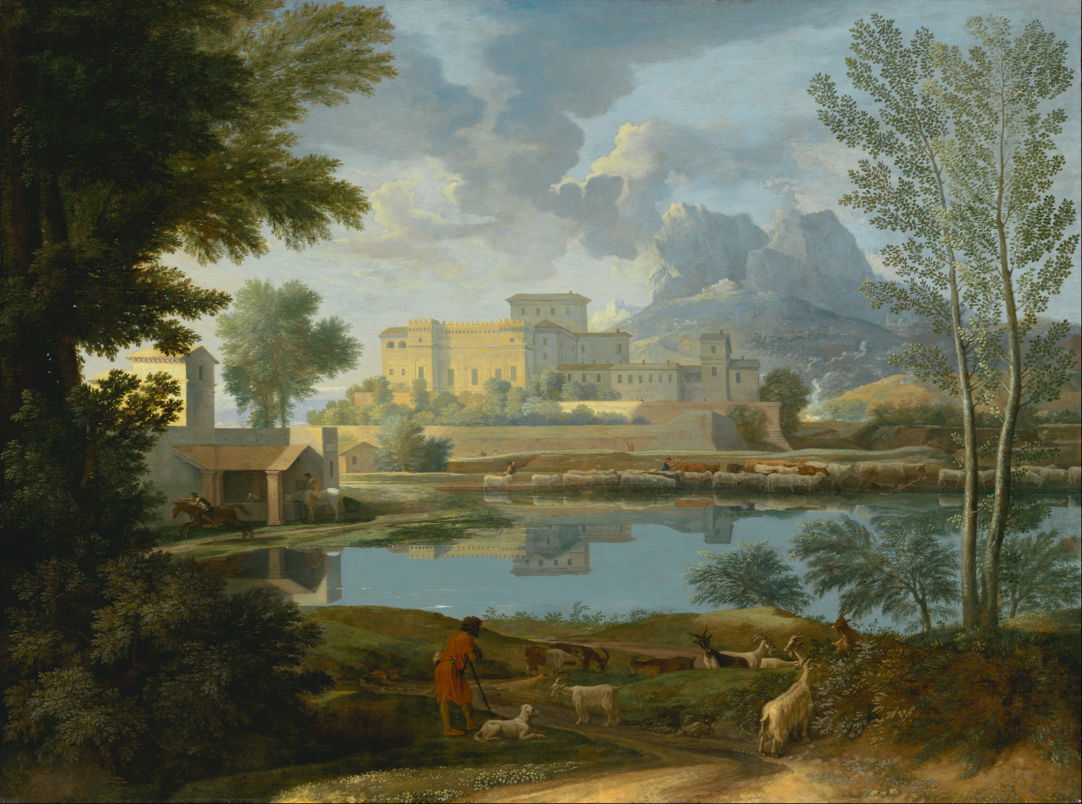
Nicolas Poussin (1694-1665), Landscape with a Calm (c 1651), oil on canvas, 97 x 131 cm, J. Paul Getty Museum, Los Angeles. Digital image courtesy of the Getty’s Open Content Program.
At about the same time, Nicolas Poussin used extensive reflections to augment the placid atmosphere in his idealised Landscape with a Calm (c 1651). The upper parts of the Italianate mansion, together with the livestock on the far bank of the lake, are painstakingly reflected on the lake’s surface, telling the viewer that there isn’t a breath of breeze to bring ripples to disturb those reflections.
Nicolas Poussin (1594–1665), Landscape with a Calm (detail) (c 1651), oil on canvas, 97 x 131 cm, J. Paul Getty Museum, Los Angeles. Digital image courtesy of the Getty’s Open Content Program.
Closer examination of the reflections reveals small disparities, though. Poussin has broken the rule of depth order in painting the brown reflection of one of the cattle that is well behind the sheep at the edge of the lake, and there are inaccuracies obvious in the reflection of the villa. Those may well be the result of his assembling passages from the original plein air studies he used to build this composite.
Nicolas Poussin (1594–1665), Landscape with a Calm (detail) (c 1651), oil on canvas, 97 x 131 cm, J. Paul Getty Museum, Los Angeles. Digital image courtesy of the Getty’s Open Content Program.
His reflections appear most accurate in the passage showing horsemen at the left end of the lake. These make interesting comparison with Poussin’s contemporary Claude Lorrain, who appears to have avoided tackling the problems posed by reflections.
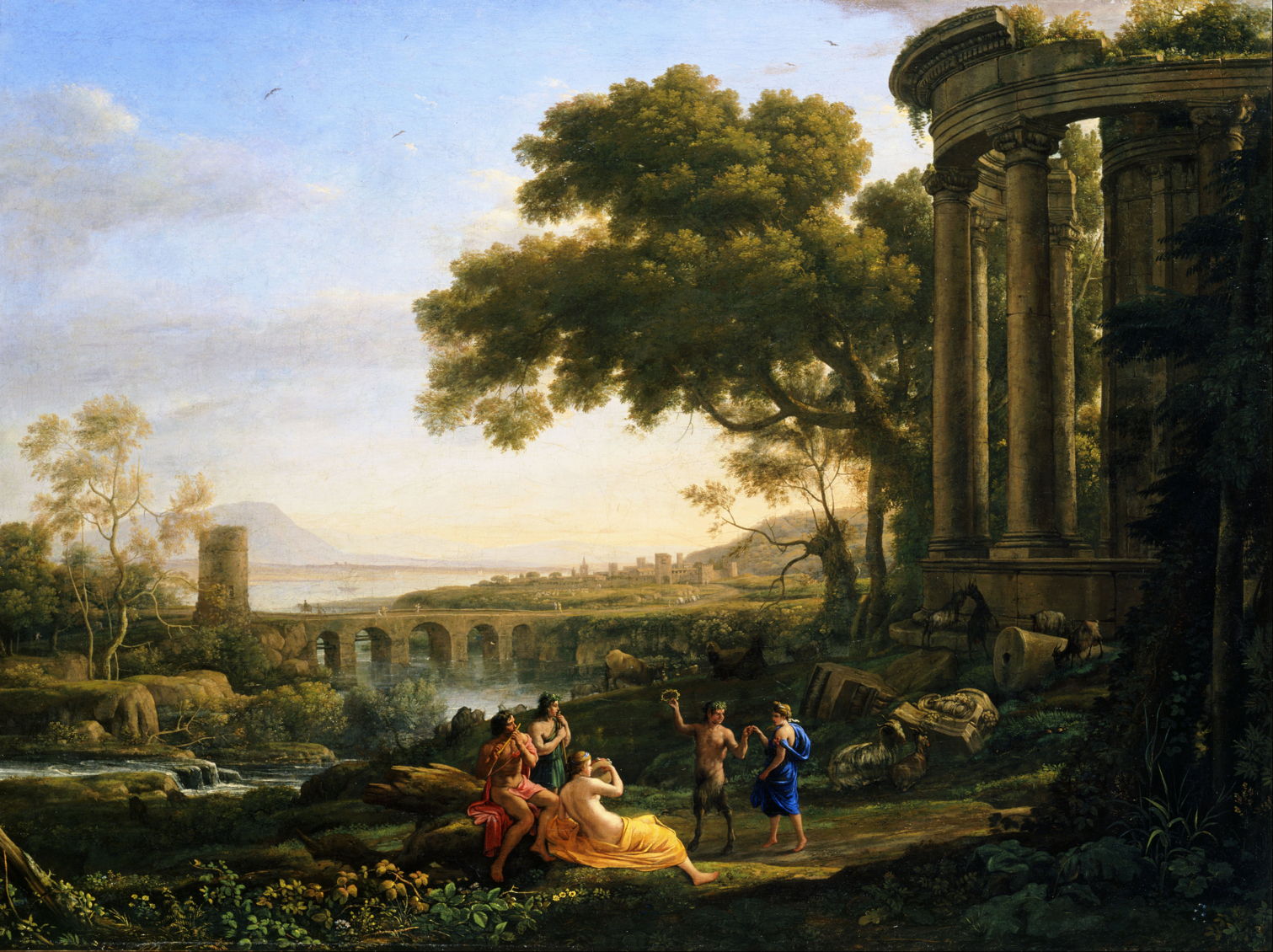
Claude Lorrain (1604/5–1682), Landscape with Nymph and Satyr Dancing (1641), oil on canvas, 99.7 x 133 cm, Toledo Museum of Art, Toledo, OH. Wikimedia Commons.
In Claude’s Landscape with Nymph and Satyr Dancing from 1641, another idealised composite assembled from the artist’s library of sketches, little attempt is made to depict the reflection of the prominent viaduct. What has been shown is unaccountably darker than the original, and vague in form. Most of Claude’s other paintings that could have included reflections show water surfaces sufficiently broken to avoid tackling the problem.
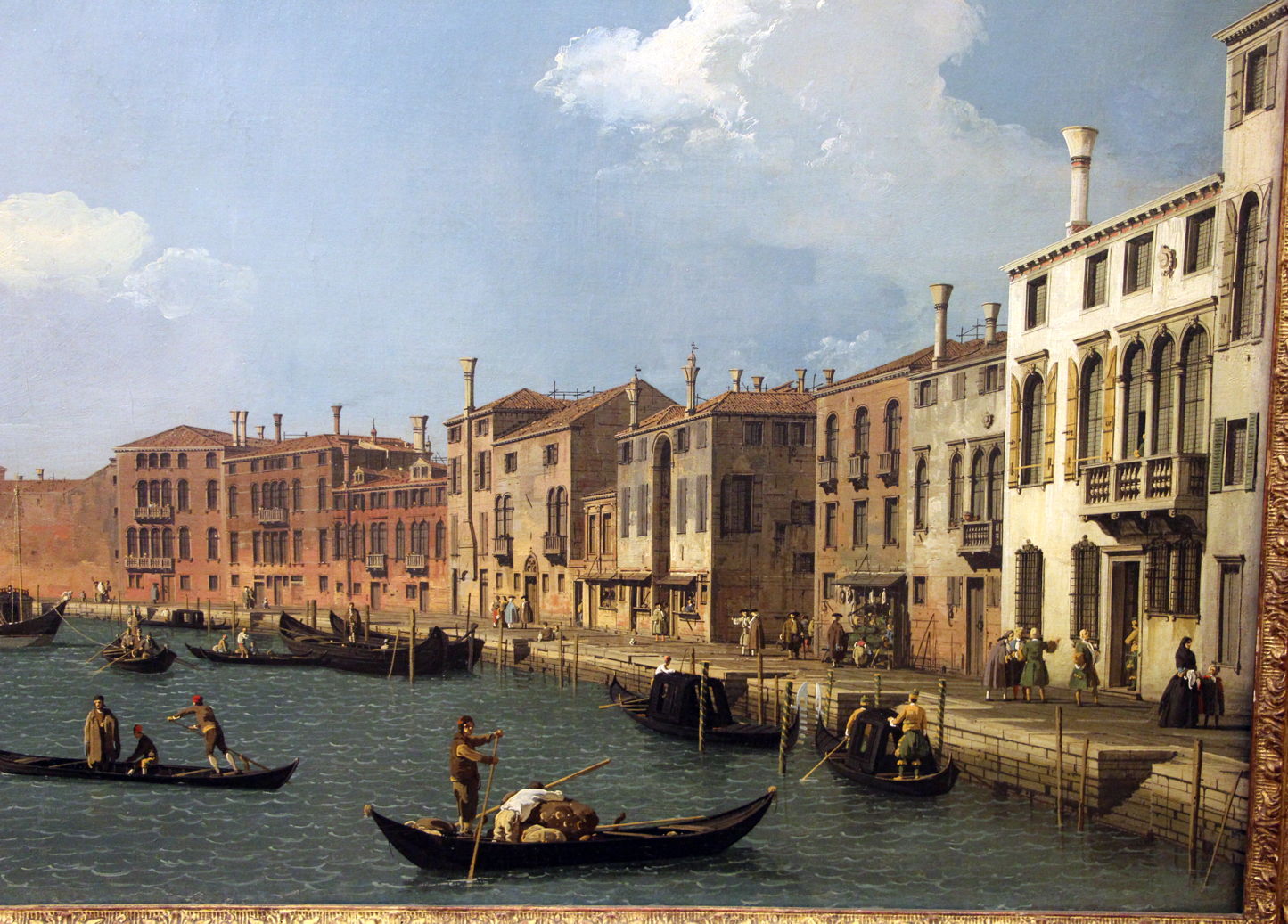
Canaletto (Giovanni Antonio Canal) (1697–1768), Canale di Santa Chiara, Venice (c 1730), oil, dimensions not known, Musée Cognacq-Jay, Paris. Image by Sailko, via Wikimedia Commons.
Paintings of Venice and London by Canaletto in the eighteenth century are also largely devoid of reflections. In his Canale di Santa Chiara, Venice from about 1730 the gondola in the left foreground has no reflection at all, and its three figures are similarly absent from the surface of the water.
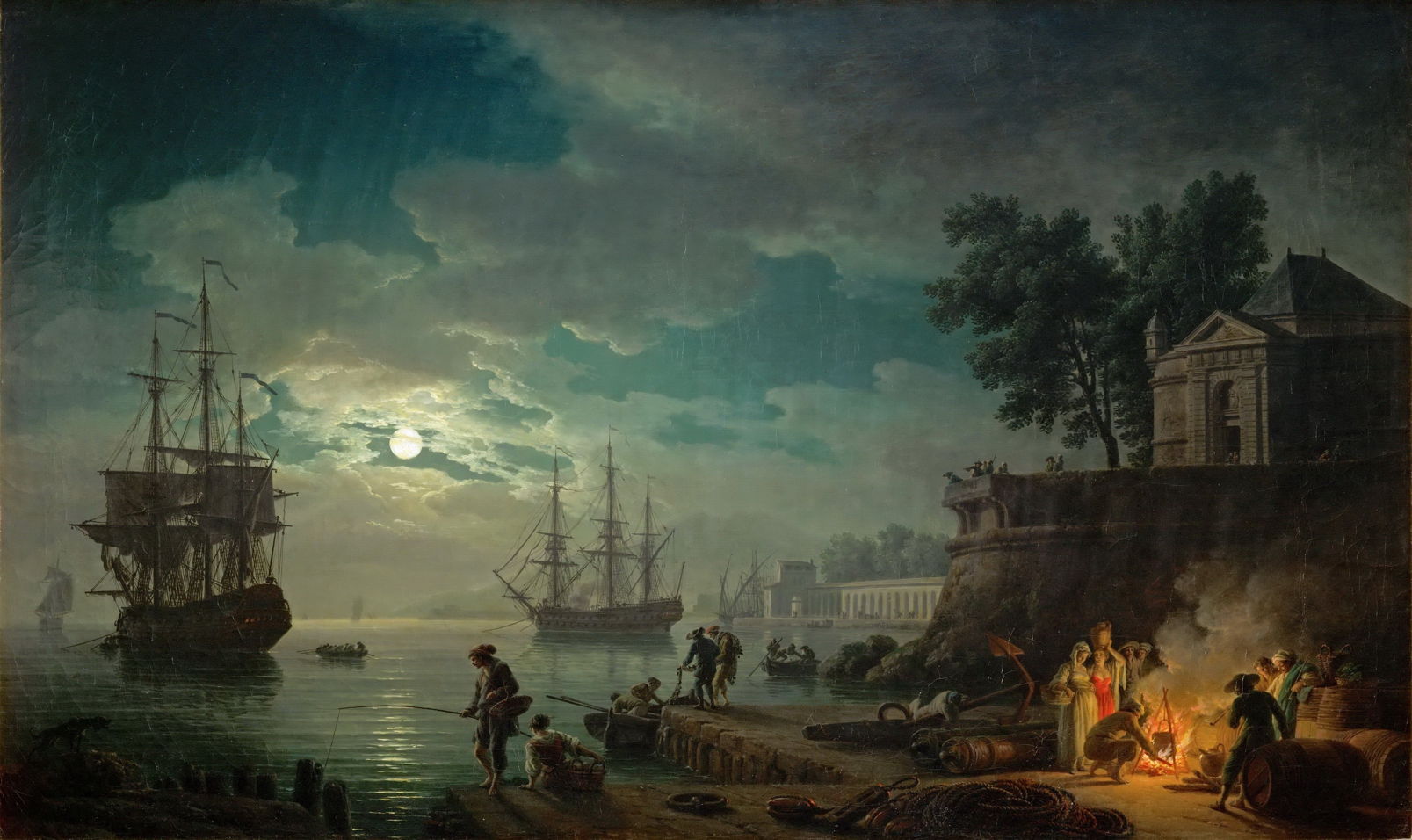
Claude-Joseph Vernet (1714–1789), Seaport by Moonlight (c 1771), oil on canvas, 98 x 164 cm, Musée du Louvre, Paris. Wikimedia Commons.
Reflections return in the studio paintings of those whose sketches made in front of the motif were sufficiently detailed to include them. Among them is Claude-Joseph Vernet, whose Seaport by Moonlight from about 1771 appears faithful. Sadly, none of his preparatory drawings or sketches appear to have survived, although they were a key influence on the next generation of landscape artists.
得出的结论是,我们根本不是什么 AI 驯兽师,就是 AI 的养料,自以为在白嫖 AI 的算力,其实是巨头在白嫖你的「人生」。
▲不同大模型的隐私数据具体情况,以及大模型的训练数据来源。每列代表一个聊天机器人,每行代表一种具体的隐私处理操作(例如默认使用聊天进行训练、是否提供清晰退出机制、无限期保留/定期删除对话、是否利用聊天数据来优化体验),和数据来源(用户上传的文件、反馈、公开网络数据等)。「是」表示该公司的隐私政策明确指出其使用该来源的数据训练 AI 模型,「否」表示明确声明不使用,而「未说明」则表示未涉及该来源或内容模糊不清。
如果非要说在这个时代,AI 大模型的护城河是什么,我想这些珍贵的人类对话输入,一定能排上号。
这场 150 万人的抵制,十分令人感慨。它或许也标志着 AI 的竞争逐渐走进入了下半场。在算力、参数量和跑分数据逐渐趋同的今天,大多数的用户不再盲目崇拜最强的模型。
同时还开始有了许多新的考量,例如这家公司在给谁服务?它在用谁的钱?它会如何对待我的隐私?
当 AI 越来越像一个无所不知的虚拟伴侣时,它背后的公司底色,或许某天会变成悬在我们头顶的一把达摩克利斯之剑。
Anthropic 的内部团队正在利用 Claude Code 彻底改变他们的工作流程。无论是开发者还是非技术人员,都能借助它攻克复杂项目、实现任务自动化,并弥补那些曾经限制生产力的技能鸿沟。
为了深入了解,我们采访了以下团队:
通过这些访谈,我们收集了不同部门使用 Claude Code 的方式、它对工作带来的影响,以及为其他考虑采用该工具的组织提供的宝贵建议。
数据基础设施团队负责为公司内所有团队整理业务数据。他们使用 Claude Code 来自动化常规的数据工程任务、解决复杂的基础设施问题,并为技术和非技术团队成员创建文档化工作流,以便他们能够独立访问和操作数据。
利用截图调试 Kubernetes
当 Kubernetes 集群出现故障,无法调度新的 pod 时,团队使用 Claude Code 来诊断问题。他们将仪表盘的截图喂给 Claude Code,后者引导他们逐个菜单地浏览 Google Cloud 的用户界面,直到找到一个警告,指出 pod 的 IP 地址已耗尽。随后,Claude Code 提供了创建新 IP 池并将其添加到集群的确切命令,整个过程无需网络专家的介入。
为财务团队打造纯文本工作流
工程师向财务团队成员展示了如何编写描述其数据工作流程的纯文本文件,然后将这些文件加载到 Claude Code 中,以实现完全自动化的执行。没有任何编程经验的员工只需描述“查询这个仪表盘,获取信息,运行这些查询,生成 Excel 输出”等步骤,Claude Code 就能执行整个工作流,甚至会主动询问日期等必要输入。
为新员工提供代码库导览
当新的数据科学家加入团队时,他们会被指导使用 Claude Code 来熟悉庞大的代码库。Claude Code 会阅读他们的 Claude.md 文件(文档),识别特定任务所需的相关文件,解释数据管道的依赖关系,并帮助新人理解哪些上游数据源为仪表盘提供数据。这取代了传统的数据目录和发现工具。
会话结束时自动更新文档
在每项任务结束时,团队会要求 Claude Code 总结已完成的工作并提出改进建议。这创建了一个持续改进的循环:Claude Code 根据实际使用情况帮助优化 Claude.md 文档和工作流指令,使后续的迭代更加高效。
跨多个实例并行管理任务
在处理耗时较长的数据任务时,团队会为不同项目在不同的代码仓库中打开多个 Claude Code 实例。每个实例都能保持完整的上下文,因此即使在数小时或数天后切换回来,Claude Code 也能准确地记住他们当时正在做什么以及任务进行到哪里,从而实现了无上下文丢失的真正并行工作流管理。
无需专业知识即可解决基础设施问题
解决了通常需要系统或网络团队成员介入的 Kubernetes 集群问题,利用 Claude Code 诊断问题并提供精确的修复方案。
加速新员工上手
新的数据分析师和团队成员无需大量指导,就能迅速理解复杂的系统并做出有意义的贡献。
增强支持工作流
Claude Code 能够处理比人类手动审查大得多的数据量,并识别异常情况(例如监控 200 个仪表盘),这是人力无法完成的。
他们建议使用 MCP 服务器而不是 BigQuery 命令行界面,以便更好地控制 Claude Code 的访问权限,尤其是在处理需要日志记录或存在潜在隐私问题的敏感数据时。
分享团队使用心得
团队举办了分享会,成员们互相演示他们使用 Claude Code 的工作流程。这有助于传播最佳实践,并展示了他们自己可能没有发现的各种工具使用方法。
Claude Code 产品开发团队使用自家的产品来为 Claude Code 构建更新,扩展产品的企业级功能和 AI 智能体循环功能。
通过“自动接受模式”快速构建原型
工程师们通过启用“自动接受模式”(Shift+Tab)并设置自主循环,让 Claude 编写代码、运行测试并持续迭代,从而实现快速原型开发。他们将自己不熟悉的抽象问题交给 Claude,让它自主工作,然后在接手进行最后润色前,审查已完成 80% 的解决方案。团队建议从一个干净的 git 状态开始,并定期提交检查点,这样如果 Claude 跑偏了,他们可以轻松回滚任何不正确的更改。
同步编码开发核心功能
对于涉及应用程序业务逻辑的更关键功能,团队会与 Claude Code 同步工作,提供带有具体实现指令的详细提示。他们实时监控过程,确保代码质量、风格指南合规性和正确的架构,同时让 Claude 处理重复的编码工作。
构建 Vim 模式
他们最成功的异步项目之一是为 Claude Code 实现 Vim 快捷键绑定。他们要求 Claude 构建整个功能,最终实现中大约 70% 的代码来自 Claude 的自主工作,只需几次迭代即可完成。
生成测试和修复 bug
在实现功能后,团队使用 Claude Code 编写全面的测试,并处理在代码审查中发现的简单 bug。他们还使用 GitHub Actions 让 Claude 自动处理像格式问题或函数重命名这样的 Pull Request 评论。
代码库探索
在处理不熟悉的代码库(如 monorepo 或 API 端)时,团队使用 Claude Code 来快速理解系统的工作方式。他们不再等待 Slack 上的回复,而是直接向 Claude 提问以获取解释和代码参考,从而大大节省了上下文切换的时间。
更快的功能实现
Claude Code 成功实现了像 Vim 模式这样的复杂功能,其中 70% 的代码由 Claude 自主编写。
尽管对“JavaScript 和 TypeScript 知之甚少”,团队仍使用 Claude Code 构建了完整的 React 应用,用于可视化强化学习(RL)模型的性能和训练数据。他们让 Claude 控制从头开始编写完整的应用程序,比如一个 5000 行的 TypeScript 应用,而无需自己理解代码。这一点至关重要,因为可视化应用相对上下文较少,不需要理解整个 monorepo,从而可以快速构建原型工具,以便在训练和评估期间了解模型性能。
处理重复的重构任务
当遇到合并冲突或半复杂的文件重构时——这些任务对于编辑器宏来说太复杂,但又不足以投入大量开发精力——他们就像玩“老虎机”一样使用 Claude Code:提交当前状态,让 Claude 自主工作 30 分钟,然后要么接受解决方案,要么在不成功时重新开始。
创建持久性分析工具而非一次性笔记本
团队现在不再构建用完即弃的 Jupyter 笔记本,而是让 Claude 构建可重复使用的 React 仪表盘,这些仪表盘可以在未来的模型评估中重复使用。这很重要,因为理解 Claude 的性能是“团队最重要的事情之一”——他们需要了解模型在训练和评估期间的表现,而这“实际上并非易事,简单的工具无法从观察一个数字上升中获得太多信号”。
零依赖任务委托
对于完全不熟悉的代码库或语言中的任务,他们将整个实现委托给 Claude Code,利用其从 monorepo 中收集上下文并执行任务的能力,而无需他们参与实际的编码过程。这使得他们在自己专业领域之外也能保持生产力,而不是花时间学习新技术。
在让 Claude 工作之前保存你的状态,让它运行 30 分钟,然后要么接受结果,要么重新开始,而不是试图费力去修正。重新开始的成功率通常比试图修复 Claude 的错误要高。
必要时为了简化而打断它
在监督过程中,不要犹豫,停下来问 Claude “你为什么这么做?试试更简单的方法。” 模型默认倾向于更复杂的解决方案,但对于简化方法的请求反应良好。
产品工程团队致力于开发如 PDF 支持、引用和网页搜索等功能,这些功能将额外的知识引入 Claude 的上下文窗口。在大型、复杂的代码库中工作意味着不断遇到不熟悉的代码部分,花费大量时间来理解特定任务需要检查哪些文件,并在进行更改前建立上下文。Claude Code 通过充当向导,帮助他们理解系统架构、识别相关文件并解释复杂的交互,从而改善了这种体验。
第一步工作流规划
团队将 Claude Code 作为任何任务的“第一站”,要求它确定在进行 bug 修复、功能开发或分析时需要检查哪些文件。这取代了传统上在开始工作前手动浏览代码库和收集上下文的耗时过程。
跨代码库独立调试
团队现在有信心处理不熟悉代码库部分的 bug,而无需向他人求助。他们可以问 Claude “你觉得你能修复这个 bug 吗?我看到的行为是这样的”,并经常能立即取得进展,这在以前由于所需的时间投入是不可行的。
通过内部测试进行模型迭代测试
Claude Code 自动使用最新的研究模型快照,使其成为他们体验模型变化的主要方式。这为团队在开发周期中提供了关于模型行为变化的直接反馈,这是他们在之前的发布中从未体验过的。
消除上下文切换的开销
他们不再需要复制粘贴代码片段并将文件拖入 Claude.ai,同时还要详细解释问题,现在可以直接在 Claude Code 中提问,无需额外的上下文收集,从而显著减少了心智负担。
增强了处理不熟悉领域的信心
团队成员可以独立调试 bug 并调查不熟悉代码库中的事故。
在上下文收集中节省了大量时间
Claude Code 消除了复制粘贴代码片段和将文件拖入 Claude.ai 的开销,减轻了心智上的上下文切换负担。
加速轮岗员工上手速度
轮岗到新团队的工程师可以快速熟悉不熟悉的代码库并做出有意义的贡献,而无需与同事进行大量咨询。
提升开发者幸福感
团队报告称,随着日常工作流程中的摩擦减少,他们感到更快乐、更高效。
将其视为迭代伙伴,而非一次性解决方案
不要指望 Claude 能立即解决问题,而是把它当作一个与你一起迭代的合作者。这种方法比试图在第一次尝试中就获得完美的解决方案效果更好。

 Login
Login