Reading view

There are new articles available, click to refresh the page.

Solutions to Saturday Mac riddles 361

I hope you enjoyed Saturday’s Mac Riddles, episode 361. Here are my solutions to them.

1: This second was actually the sixth and bumped up by 20.

Click for a solution

Macintosh II

This second (II) was actually the sixth (there had been five previous Mac models) and bumped up by 20 (its CPU was the first 68020 used in a Mac).

2: Its A5 followed the A4, without any one, and a third thinner.

Click for a solution

iPad 2

Its A5 (its chip) followed the A4 (the chip in the original iPad), without any one (there was no iPad 1), and a third thinner (it was claimed to be about 33% thinner than the original iPad).

3: First with a 750 followed the 604, but there was neither 1 nor 2.

Click for a solution

Power Macintosh G3

First with a 750 (it was one of the first Macs with a PowerPC 750 processor) followed the 604 (previous models had PowerPC 601-604 processors), but there was neither 1 nor 2 (Apple didn’t start naming Power Macs by generation until the G3).

The common factor

Click for a solution

They were each the first model in their series to be numbered, but didn’t start at 1.

I look forward to your putting alternative cases.

Saturday Mac riddles 361

Here are this weekend’s Mac riddles to entertain you through family time, shopping and recreation.

1: This second was actually the sixth and bumped up by 20.

2: Its A5 followed the A4, without any one, and a third thinner.

3: First with a 750 followed the 604, but there was neither 1 nor 2.

To help you cross-check your solutions, or confuse you further, there’s a common factor between them.

I’ll post my solutions first thing on Monday morning.

Please don’t post your solutions as comments here: it spoils it for others.

为折叠 iPhone 和苹果 AI 做足准备|苹果 WWDC 提前剧透

今日凌晨,苹果正式发布了今年 WWDC 全球开发者大会的邀请函。

WWDC 26 将于北京时间 6 月 9 至 13 日举行。

今年的 WWDC,除了会正式公布「27」系列系统之外,开发侧重点仍将集中在 Apple Intelligence 后续进展、体验优化等等。

自然,其中也少不了一些苹果针对 AI 时代的软件生态的提前布局。

图|MacRumors

爱范儿今年同样将前往 WWDC 现场,为大家带来 WWDC 系列活动的专题报道,届时请锁定爱范儿主站、微信公众号、小红书和微博上的系列内容。

iOS 27:玻璃、专业相机和 AI Siri

对于 iOS,我们首先需要明确的是:

液态玻璃(Liquid Glass)设计在 iOS 27 中不会退场,它就在那里,稳稳地接住你。

就像刚更新的 iOS 26.5,苹果对于液态玻璃效果的微调也将持续到 iOS 27 里,直到大家习惯或者接受它的视觉风格。

除了继续优化液态玻璃的视觉效果,iOS 27 也被很多媒体和开发者预测为是一次「雪豹」式的更新——

比起新功能,删除陈旧代码、优化性能表现、调整视觉效果和改善整体流畅度将成为这一代 iOS 的主要更新方向。

在支持范围方面,iOS 27「据称」将会支持到 iPhone 12 系列和 iPhone SE 3 为止。

换言之,iPhone 11 系列及更早的机型将无法更新 iOS 27。

而在继续优化液态玻璃的同时,iOS 27 还有可能会在一些小细节的层面,为我们「管中窥豹」一下今年 9 月份即将到来的折叠屏 iPhone。

图|MacRumors

当然,苹果肯定不会在 WWDC 上直接展示有关大屏和横屏布局的优化措施。

但在后续的开发者课堂中,大概率会出现有关自适应 app 布局、不同长宽比 UI 设计规范之类的相关内容。

几乎可以肯定的是,今年 WWDC 上,苹果会在涉及到 iOS 的内容和课程里添加一些有关侧边栏和分屏(或者 Stage Manager)相关的内容,为横屏布局做出铺垫

另外,本次 WWDC 上我们还可能会见到苹果开放一些更加深层的相机 API,或者一些全新的相机玩法。

这些本质上都是为 iPhone 18 Pro 上可能到来的相机「专业模式」做好准备。

根据计划,苹果会让 iOS 27 的相机 app 更具自定义性,用户可以调整相机界的功能开关布局,比如闪光灯、EV、模拟光圈、照片风格和长宽比等等。

图|Shima Zamil

最后不得不提的还有 AI Siri ——

根据彭博社的预测,iOS 27 将会是 Apple Intelligence 官宣两年之后的「汇总落地」。

iOS 27 版本的 Siri 中,苹果预计会拓展跨 app 信息提取、屏幕内容识别、模拟连续操作、app 深层功能集成等等多方面的 AI 能力,努力追赶甚至看齐 Gemini 在 Pixel 上的功能范围。

图|Google

更有甚者,传说中的「对话式」Siri 也有希望在今年 WWDC 上亮相,或者至少看到一些相关的底层功能。

相比以前那个问一句答一句的智能助手,Siri 将会获得类似 ChatGPT 那样的「人味」对话功能。

并且在 Siri 对话中也支持多模态内容,甚至可能会取代原本的「聚焦搜索」功能:

聚焦搜索(左)和 Siri 搜索(右)

至于那些 iOS 26 里面已经存在的 AI 功能,比如图乐园、Genmoji、写作工具之类的,它们在 iOS 27 中也主要将迎来性能优化,并且在新的 Siri app 里面获得单独的入口。

macOS 27:圆角、触屏和 Intel

对于那些熬夜观看 WWDC 的 Mac 用户来说,看苹果整活王 Craig Federighi 怎样宣布今年的 macOS 系统名称,始终是不可或缺的一环。

图|MacRumors

继去年 Tahoe(太浩湖)之后,苹果的商标注册列表上还剩下很多加利福尼亚州的特色。你觉得 macOS 27 的系统代号会是什么?

和 iOS 27 一样,今年 macOS 27 的重点同样是继续打磨液态玻璃优化系统性能,以及落地更多的 AI 功能

不过就像爱范儿之前提到的:

macOS 26 的 UI 问题不止于液态玻璃,不统一的圆角、过于密集的小图标,以及辨识度过低的系统 app 图标,联手造成了 macOS 26 的可读性问题。

图|Reddit

除了赶紧优化系统 UI 之外,macOS 27 的另一大潜在看点则是它对于触屏功能的支持。

彭博社苹果专家马克·古尔曼去年和今年都曾密集爆料过,苹果正在计划开发一款采用触控 OLED 屏幕的 MacBook Pro,上市时间可能在 2027 年内。

图|9To5Mac

macOS 27 虽然不会在 WWDC 上就大张旗鼓地宣传「新增触控支持」,但大概率会按照苹果的风格,做出一些为触控功能铺路的举措——

比如新增多种尺寸的 UI 控件规范、优化 macOS 支持的缩放比例范围、新增一些看上去不太适合鼠标键盘的图标动画等等。

AI 方面,macOS 27、iOS 27 和 iPadOS 27 预计都将迎来一次「相册」更新,照片编辑器里的 AI 工具不再只有橡皮擦,大家习惯的 AI 扩图、自动优化、重构图甚至 3D 照片等等都有望加入。

图|AppleInsider

至于 AI Siri 本身的功能,比如「对话式」沟通、屏幕内容识别、系统级自动化功能等等,macOS 27 能够得到的更新和 iOS 27 差不多。

这也是 iPhone、iPad 和 Mac 处理器同源带来的优势之一。

坏消息是:macOS 27 极有可能会排除所有使用 Intel 处理器的 Mac 产品,仅支持 Apple Silicon 型号的 Mac。

这就意味着 2019 款 16 寸 MacBook Pro、2023 款至强处理器 Mac Pro 等等顶级产品都将无缘 macOS 27,为苹果的英特尔时代画上第二个句号。

图|MacWorld

另有开发者指出,苹果也在逐步停止 Rosetta 2(x86 到 ARM 转译)的更新。

macOS 27 预计将是最后一个完整支持 Rosetta 2 的版本,敦促第三方开发者及时更新 ARM 架构的 app。

稳扎稳打的 27 年

总的来说,和谷歌努力推荐的「Android 全形态化」不同,苹果今年 WWDC 的路线依然是以稳健为主。

iOS、iPadOS 和 macOS 各自的领域划分很明确,虽然产品形态更新,但系统短期内不会出现类似谷歌 Aluminum OS 那样的融合现象。

图|Geeky Gadgets

对于「液态玻璃」来说,在缝缝补补一年多之后,苹果的确需要静下心来,先处理一些由于玻璃 UI 和 AI Siri 烂尾导致的系统基础体验问题了。

至少对于一些旧设备来说,优化后的 iOS 27 很可能会比 iOS 26 更值得更新。

附 WWDC 26 日程表,感兴趣的读者可以通过苹果开发者官网(https://developer.apple.com/cn)注册并参与在线课程:

#欢迎关注爱范儿官方微信公众号:爱范儿(微信号:ifanr),更多精彩内容第一时间为您奉上。

Solutions to Saturday Mac riddles 360

I hope you enjoyed Saturday’s Mac Riddles, episode 360. Here are my solutions to them.

1: With parents born in 1984 and 1989, it was born a server and raised with aqua.

Click for a solution

Mac OS X

With parents born in 1984 (Classic Mac OS) and 1989 (NeXTSTEP), it was born a server (first released as Mac OS X Server 1.0 in 1999) and raised with aqua (its initial GUI, explained by Steve Jobs as “when you saw it you wanted to lick it”).

2: First with Face ID and no Home to go to in 2017.

Click for a solution

iPhone X

First with Face ID (it was the first iPhone to feature it) and no Home to go to (it was the first iPhone without a Home button) in 2017 (announced in September, and released in November).

3: It shocked without MIDI in 2009, and ten years later went solo.

Click for a solution

QuickTime X

It shocked without MIDI in 2009 (it first shipped with Snow Leopard, and dropped MIDI support), and ten years later went solo (when Catalina was released in 2019, support for previous 32-bit QuickTime was removed, leaving just QuickTime X).

The common factor

Click for a solution

They each use the Roman numeral X for decimal 10, and should be pronounced ‘ten’ rather than ‘ecks’.

I look forward to your putting alternative cases.

Saturday Mac riddles 360

Here are this weekend’s Mac riddles to entertain you through family time, shopping and recreation.

1: With parents born in 1984 and 1989, it was born a server and raised with aqua.

2: First with Face ID and no Home to go to in 2017.

3: It shocked without MIDI in 2009, and ten years later went solo.

To help you cross-check your solutions, or confuse you further, there’s a common factor between them.

I’ll post my solutions first thing on Monday morning.

Please don’t post your solutions as comments here: it spoils it for others.

下个月的苹果 WWDC,假如 iCloud 变成 iClaw……?

距离苹果全球开发者大会 WWDC 还有一个月不到的时间,彭博社又送上关于苹果新系统的全新爆料:

苹果准备对 macOS 27 的界面进行一轮小幅调整,进一步完善「液态玻璃」设计语言的视觉表现。

但问题在于,对于如今的 Mac 来说,除了需要继续打磨的 UI,最迫切的更新显然远不止于此。

液态玻璃,缝缝补补又一年

对比 iPhone 以及 iPad,Mac 的性能和续航都更有盈余,实际上 macOS 26 的界面,视觉效果要更接近去年 WWDC 上面演示的「满血版」液态玻璃。

不过,液态玻璃立项之初,就是专门为 OLED 屏幕设计的,而目前所有 Mac 产品都在使用 LCD 屏幕,在呈现半透明、阴影和玻璃质感的方面,效果不如 OLED。

于是 macOS 26 的一些高透明效果和阴影,会导致列表和文字可读性下降——这也是「液态玻璃」被一直诟病的问题。

和 iOS 27 一样,macOS 27 也将仔细打磨液态玻璃,让它更接近苹果一开始设想的效果:兼顾透明度和可读性,同时进一步优化能耗表现。

不过,macOS 26 在 UI 上的问题根本不止于液态玻璃本身,不对齐的圆角、大量分散注意力的小图标,以及重新设计后辨识度大打折扣的应用图标,对可读性和美观层面都造成了一定的影响。

图源:Daring Fireball

苹果评论员 John Gruber 对于 macOS 液态玻璃的点评相当一针见血:作为一种「内容优先」的设计语言,液态玻璃让系统 UI 隐身于媒体之后,在 iPhone 上或许能行,但作为强调生产力而非内容消费的桌面平台,Mac 包含大量的窗口、组间,因此复杂性更高,仍然需要应用界面保证清晰的结构、分明的功能区域,和强辨识度的界面。

在 Stephen Lemay 接任设计总监一职后,这位在苹果服务近 30 年的老将表现让人期待——Lemay 以公司内部的高口碑和稳定发挥著称,或许也称得上是苹果内部目前最懂苹果系统界面的人。

在他的把控下,macOS 27,以及 iOS 27 如何扭转液态玻璃褒贬不一的口碑,回到实用性和美感并举的方向,确实值得期待。

但对于 macOS 来说,界面上的「拨乱反正」固然必要,却已经不是最重要的更新了。

对苹果而言,未来系统的更新有两条主线:一方面,优化系统稳定性,另一方面,则是为 Apple 智能预备好。

最好的 AI 载体,需要一个 AIOS

根据彭博社爆料,苹果打算为「Apple 智能」打造一个「Extensions」功能,允许用户更换第三方 AI 模型,例如 Google Gemini、Claude 等等。

Siri 除了会集成到邮件、短信、相册等应用,自己也会化身聊天机器人,成为一个单独的应用。更多 AI 功能还会覆盖文本、图像等生成与编辑任务。

但这些更新,说实话更多还是做 AI 的单点功能,并非系统级别的编排能力,并未能进一步发挥 Mac 硬件上的优势。

今年年初的龙虾热,让 Mac mini 这个前年才火过的产品,又再一次出圈,这次火到苹果自己也没库存了,「入门版」在官网彻底售罄。

Mac 和 Windows 在不少层面上互有胜负,但在 AI 的问题上,Mac 作为「最佳 AI 容器」的论断几乎毫无争议。

关于这个问题,爱范儿已经出过一篇文章详细讨论。简单来说,就是因为 Mac 不管是 UNIX 系统底层还是集成运存的硬件架构,都非常契合 AI Agent 和大模型的运行方式,并且由于 ARM 架构的特性,运行功耗低还静音,非常适合 AI 常驻。

这更像是「无心插柳柳成荫」,苹果其实一开始并没有围绕 AI 去打造自己的 Mac,却无意间完成了所有 AI 的技术储备,严格意义上说是一种「适配度优势」。

从这个角度看,macOS 即使什么都不做,本身 Mac 也已经是一个很好的 AI 平台。苹果完全可以走 App Store 的逻辑,让用户自己部署想要的第三方 AI 智能体,自己继续扮演「收过路费」的角色。

这确实也是苹果长期以来的做法:在移动互联网兴起之时,苹果没必要自己做搜索引擎和网购平台。而 AI 时代,大众的需求变化万千,有人需要一个能剪辑的 Agent,也有人需要一个搞科研的 AI,必须要靠第三方满足。

在今年 5 月的财报会议上,苹果特别提到了 AI 公司 Perplexity 的智能体产品 Personal Computer,认为这种产品很好利用了 Mac 平台的能力。

既然觉得人家做得不错,何不自己上手做一个「iClaw」?

第三方 AI 百花齐放固然很好,这和苹果自己做一个却并不冲突,并且很多事情,只有第一方能做得好,能做得让人放心。

第三方应用再强,也很难自然获得系统级的上下文,苹果不可能将最底层的权限开放,只有系统底层自己能对文件位置、窗口状态、本地个人数据知道一清二楚,而 AI 应用的体验,往往就卡在了这些权限边界之上。

其实苹果并不是没有这种想法,那个迟迟没能推出的 AI Siri,其实就有着类似的构想,可以读取用户的文本和应用窗口,可以跨应用进行检索和处理。

对比 iPhone 和智能手机,AI 应用的主流使用场景其实还是在于桌面端,这也是为什么 Mac 能成为今年最热门的 AI 硬件,但苹果却没有继续在 macOS 的系统层面,赋予 Mac 足够分量的原生 AI 能力。

隔壁的 Windows 阵营在这方面要激进不少,系统层面有「Recall」和 「Copilot」这样的 AI 功能入口,联想和荣耀这样的 OEM 厂商,甚至为产品准备了开箱即用的龙虾应用,砍掉了门槛,并因为和本地深度集成,能节省不少 Token。

微软自己也已经坐不住了,据悉正在将原本只能你问我答的 Copilot,改造成一个 24/7 在线的数字分身,实现类龙虾能力。

对比 OpenAI、Anthropic 或者 Google,说实话我更愿意将这些敏感的数据,交给在隐私保护方面更上心的苹果。

更深一步,macOS 最缺少的不是 AI 应用,而是 AI 时代的「基建」。Mac 已经准备好了 AI 大有可为的土壤,但 macOS 还没能成为一个真正意义上的「AI 系统」。

苹果不仅可以做自己的 AI 智能体能力,也需要把模型、权限、上下文、自动化和跨应用任务重新梳理,让系统成为 AI 工作流的原生中介,成为一个掌控所有 AI 的「任务集散中心」。

就像是智能体运行所需要的「个人知识库」,现在我们用文件夹也可以搭建,但它还不够好用。

苹果完全可以自己承接这个环节,用户靠 Mac 自带的工具搭建、生成一个「知识库」文件,它可以和 Apple ID 绑定,利用 iCloud 流转,这样不管用哪一家的智能体服务,都能快速调用自己的知识库,不用从头开始配置,同时还能保证自己的内容被苹果的隐私政策保护。

并且,这些配置的模块都能整合进入 Apple 的订阅系统之中,iClaw 和 Token 也能成为苹果在 AI 时代提供的增值服务。

iClaw 示意图,AI 生成

实际上,苹果已经开始了这样的进程。在 macOS 26.1 中,苹果集成了「模型上下文协议」,一个面向不同 AI 的通用开放标准,Agent 可以通过这个协议,访问用户的个人数据;苹果的基础模型框架,让 macOS 开发者可以调用系统内置的基础模型,零网络延迟,零 API 费用,数据不离开设备。

作为计算机图形系统的祖师爷,macOS 在过去的数十年间都是围绕「应用」构建的桌面系统。

在接下来十年,应用和图形界面还会是人机交互的主流,因此 macOS 27 要将界面风格修缮得更好,当然非常重要。

但未来五十年甚至更远,AI 都会成为无可避免的主旋律,macOS 不可避免会被进一步改造,成为一个围绕「任务」运转的 AIOS。

#欢迎关注爱范儿官方微信公众号:爱范儿(微信号:ifanr),更多精彩内容第一时间为您奉上。

Solutions to Saturday Mac riddles 359

I hope you enjoyed Saturday’s Mac Riddles, episode 359. Here are my solutions to them.

1: Could in theory be 995 or unreal apparatus for running old macOS.

Click for a solution

VM

Could in theory be 995 (Roman numerals VM, although that’s not how the Romans would have done it) or unreal (virtual) apparatus (machine) for running old macOS (one of their purposes).

2: More than a superlative manager at the heart of 1.

Click for a solution

Hypervisor

More than a superlative (hyper) manager (supervisor) at the heart of 1 (it’s central to virtualisation).

3: Unreal input and output from Rusty Russell for 1.

Click for a solution

Virtio

Unreal (virtual) input and output (I/O) from Rusty Russell (it was originally proposed by him) for 1 (it provides the device support for VMs).

The common factor

Click for a solution

They’re all involved in virtualisation on Apple silicon.

I look forward to your putting alternative cases.

Saturday Mac riddles 359

Here are this weekend’s Mac riddles to entertain you through family time, shopping and recreation.

1: Could in theory be 995 or unreal apparatus for running old macOS.

2: More than a superlative manager at the heart of 1.

3: Unreal input and output from Rusty Russell for 1.

To help you cross-check your solutions, or confuse you further, there’s a common factor between them.

I’ll post my solutions first thing on Monday morning.

Please don’t post your solutions as comments here: it spoils it for others.

Solutions to Saturday Mac riddles 358

I hope you enjoyed Saturday’s Mac Riddles, episode 358. Here are my solutions to them.

1: Thinly dispersed line of people could save lots of space.

Click for a solution

sparse file

Thinly dispersed (sparse) line of people (a file) could save lots of space (what a sparse file can do).

2: Identical copy of rasp when duplicated.

Click for a solution

clone file

Identical copy (a clone) of rasp (a file) when duplicated (what is created when you duplicate a file in the Finder).

3: Steadfast 7.92 inch two-way volume connector.

Click for a solution

firmlink

Steadfast (firm) 7.92 inch (link, an old imperial measure of length equal to this) two-way volume connector (a firmlink is just that, between System and Data volumes).

The common factor

Click for a solution

They’re all distinctive features of the APFS file system.

I look forward to your putting alternative cases.

Saturday Mac riddles 358

Here are this weekend’s Mac riddles to entertain you through family time, shopping and recreation.

1: Thinly dispersed line of people could save lots of space.

2: Identical copy of rasp when duplicated.

3: Steadfast 7.92 inch two-way volume connector.

To help you cross-check your solutions, or confuse you further, there’s a common factor between them.

I’ll post my solutions first thing on Monday morning.

Please don’t post your solutions as comments here: it spoils it for others.

Solutions to Saturday Mac riddles 357

I hope you enjoyed Saturday’s Mac Riddles, episode 357. Here are my solutions to them.

1: John’s afterword was dropped in 13.

Click for a solution

PostScript

John’s (it was developed by John Warnock and Charles Geschke) afterword (a postscript) was dropped in 13 (deprecated in macOS 12.3, it was removed in macOS 13 Ventura).

2: Painted people who merged with Scots, from QuickDraw to Catalina.

Click for a solution

PICT

Painted people who merged with Scots (the Picts), from QuickDraw to Catalina (the graphics format for QuickDraw, support was largely dropped in macOS 10.15 Catalina).

3: Brisk march for panoramas was lost from X in 2009.

Click for a solution

QuickTime VR

Brisk march (quick time) for panoramas (it introduced many of us to interactive panoramas) was lost from X in 2009 (it was removed from QuickTime X, which came with Mac OS X 10.6 Snow Leopard in 2009).

The common factor

Click for a solution

They are abandoned graphics-based formats. See: PostScript, PICT, and QuickTime.

I look forward to your putting alternative cases.

Saturday Mac riddles 357

Here are this weekend’s Mac riddles to entertain you through family time, shopping and recreation.

1: John’s afterword was dropped in 13.

2: Painted people who merged with Scots, from QuickDraw to Catalina.

3: Brisk march for panoramas was lost from X in 2009.

To help you cross-check your solutions, or confuse you further, there’s a common factor between them.

I’ll post my solutions first thing on Monday morning.

Please don’t post your solutions as comments here: it spoils it for others.

Solutions to Saturday Mac riddles 356

I hope you enjoyed Saturday’s Mac Riddles, episode 356. Here are my solutions to them.

1: Lowing and barking as you’d expect to hear from Clarus.

Click for a solution

moof

Lowing and barking (it’s claimed to be a mixture of the lowing of a cow and the barking of a dog) as you’d expect to hear from Clarus (from the original dogcow identified by Scott ‘Zz’ Zimmerman, named Clarus by Mark ‘The Red’ Harlan in 1987. See this brief history).

2: Alert heard in the battle between two Apples was replaced in Big Sur.

Click for a solution

Sosumi

Alert (it was an alert sound introduced in 1991) heard in the battle between two Apples (it was a defiant pun on Apple Computer’s use of music in its products, in conflict with Apple Corps’ claimed trademark for the music of the Beatles) was renamed in Big Sur (when it was replaced by Sonumi, although it’s still named Sosumi in /System/Library/Sounds).

3: Arpeggio or shattering glass heard with a Sad Mac.

Click for a solution

Chimes of Death

Arpeggio (it was originally an upward major arpeggio) or shattering glass (later models made the sound of glass being shattered) heard with a Sad Mac (displayed at the same time to indicate a severe problem that prevents normal startup in a Classic Mac).

The common factor

Click for a solution

They are sounds distinctive to Macs.

I look forward to your putting alternative cases.

Saturday Mac riddles 356

Here are this weekend’s Mac riddles to entertain you through family time, shopping and recreation.

1: Lowing and barking as you’d expect to hear from Clarus.

2: Alert heard in the battle between two Apples was replaced in Big Sur.

3: Arpeggio or shattering glass heard with a Sad Mac.

To help you cross-check your solutions, or confuse you further, there’s a common factor between them.

I’ll post my solutions first thing on Monday morning.

Please don’t post your solutions as comments here: it spoils it for others.

Solutions to Saturday Mac riddles 355

I hope you enjoyed Saturday’s Mac Riddles, episode 355. Here are my solutions to them.

1: Covid, smallpox, nVIR, but no more.

Click for a solution

virus

Covid (a coronavirus), smallpox (the variola virus), nVIR (a virus affecting Classic Mac OS, first reported in 1987), but no more (viruses are now almost unheard of for macOS).

2: Wooden animal concealing Greeks like DubRobber.

Click for a solution

Trojan

Wooden animal (the original Trojan horse from the Trojan War) concealing Greeks (it did, and ensured they were taken into the city of Troy) like DubRobber (a macOS Trojan also known as XCSSET, identified in 2020).

3: A thief like Amos can arrive by clickfix.

Click for a solution

stealer

A thief (a stealer) like Amos (AtomicStealer, AMOS, or SOMA, identified in 2023) can arrive by clickfix (now one of the most common means of its delivery).

The common factor

Click for a solution

They are types of malware that have affected Macs.

I look forward to your putting alternative cases.

Saturday Mac riddles 355

Here are this weekend’s Mac riddles to entertain you through family time, shopping and recreation.

1: Covid, smallpox, nVIR, but no more.

2: Wooden animal concealing Greeks like DubRobber.

3: A thief like Amos can arrive by clickfix.

To help you cross-check your solutions, or confuse you further, there’s a common factor between them.

I’ll post my solutions first thing on Monday morning.

Please don’t post your solutions as comments here: it spoils it for others.

Solutions to Saturday Mac riddles 354

I hope you enjoyed Saturday’s Mac Riddles, episode 354. Here are my solutions to them.

1: In favour of a Scot who was mostly the biggest for almost 20 years until last month.

Click for a solution

Mac Pro

In favour (pro) of a Scot (Mac) who was mostly the biggest (apart from the trash can years, it was the largest model of Mac) for almost 20 years until last month (introduced August 2006, discontinued 26 March 2026).

2: Waterproof novel with a magnetic latch until 2019.

Click for a solution

MacBook

Waterproof (a mac) novel (a book) with a magnetic latch (it was Apple’s first laptop with a magnetic lid closure) until 2019 (when it was discontinued).

3: Opening shot for unknown number like a pizza box in a rack.

Click for a solution

Xserve

Opening shot (a serve in tennis) for unknown number (x) like a pizza box (it looks like one) in a rack (it was Apple’s only Mac intended to be mounted in a rack).

The common factor

Click for a solution

They are all discontinued model series.

I look forward to your putting alternative cases.

Saturday Mac riddles 354

Here are this weekend’s Mac riddles to entertain you through family time, shopping and recreation.

1: In favour of a Scot who was mostly the biggest for almost 20 years until last month.

2: Waterproof novel with a magnetic latch until 2019.

3: Opening shot for unknown number like a pizza box in a rack.

To help you cross-check your solutions, or confuse you further, there’s a common factor between them.

I’ll post my solutions first thing on Monday morning.

Please don’t post your solutions as comments here: it spoils it for others.

Mac Easter eggs

Easter eggs are part of the tradition of this time of year, and the term applied to concealed features in computer hardware or software. It seems to have originated in early video games, although the first record is in the command make love on DEC PDP-10 mainframes in 1967-68. Macs have had their fair share over the years, although Steve Jobs seems to have disliked them, and is reported to have banned them. Here are a few that I’ve come across in more recent years.

Clarus the Dogcow

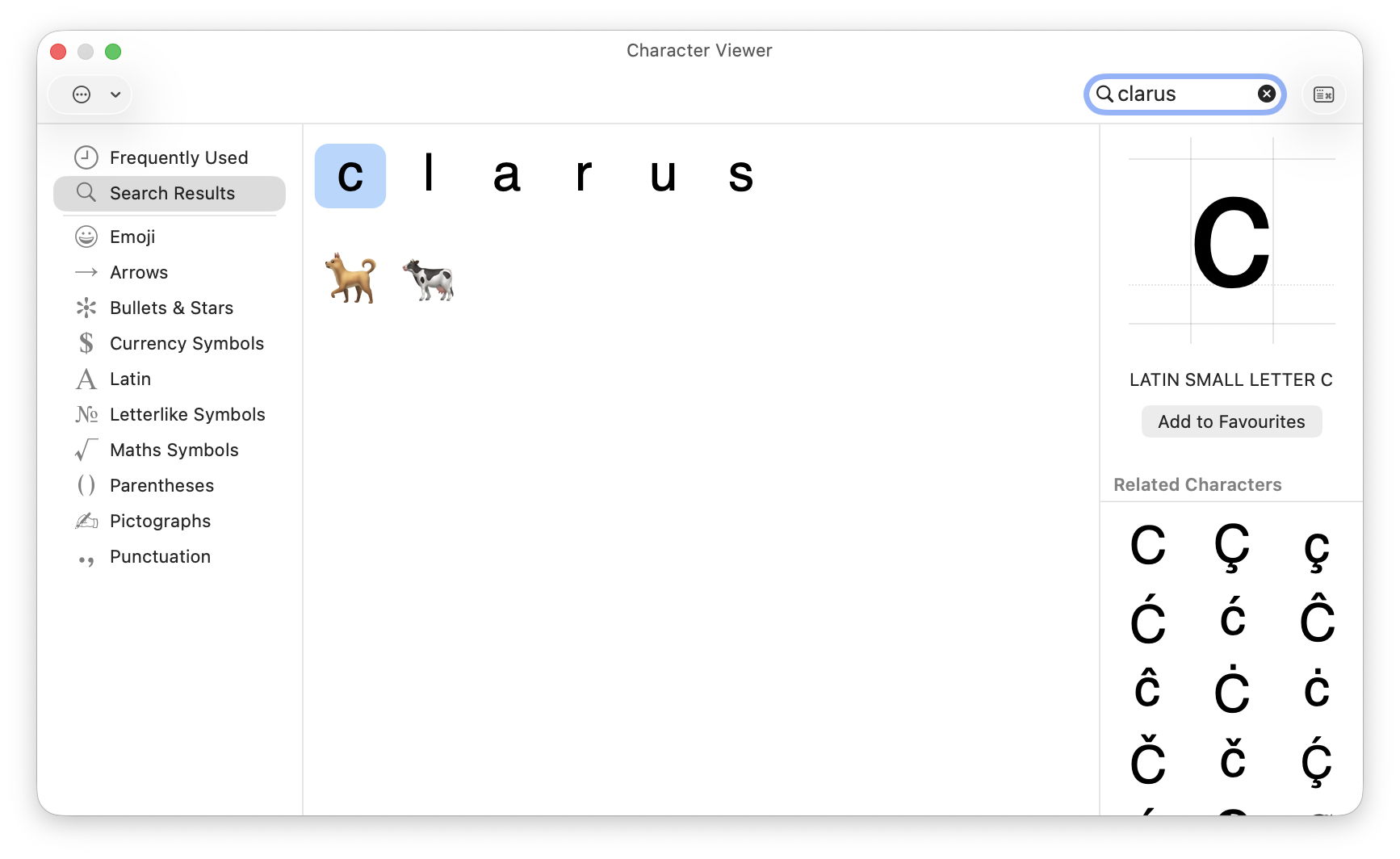
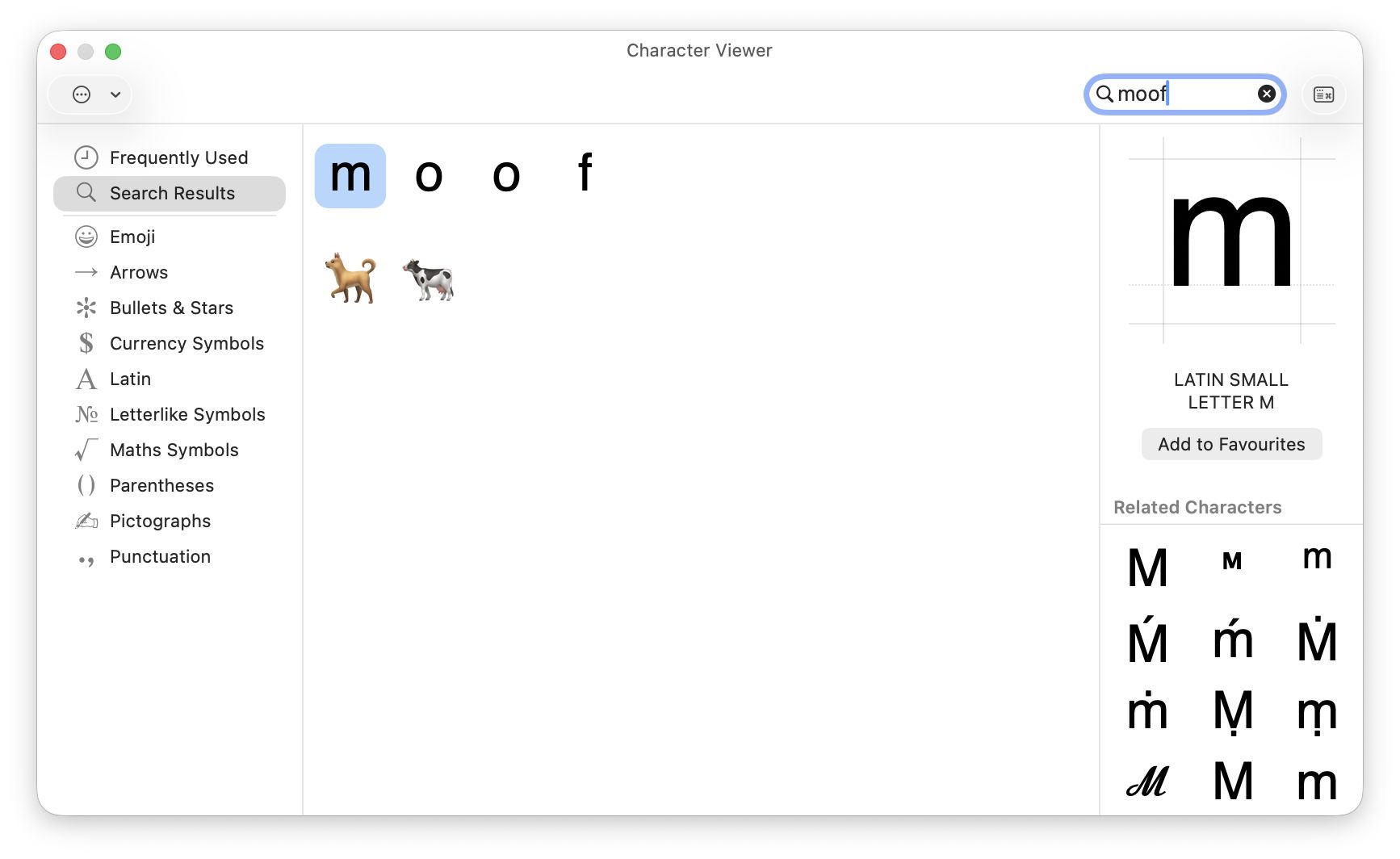
This mythical animal from the Mac bestiary has been tucked away as an Easter egg in the Emoji & Symbols viewer for many years. Type the letters clarus or moof (the sound it makes) into the search box of that viewer to see the two emoji figures of a dog and a cow, although neither of them resembles Clarus in appearance, as shown in the Page Setup window in recent macOS.

Marijuana leaves

More inaccessible, but apparently present for even longer, is a PNG image showing marijuana leaves embedded inside the Chess app. To see these, select Chess.app, and Show Package Contents. Work through the Contents, Resources and Styles folders and you’ll see two styles Fur and Grass, neither of which is offered in the app’s Settings. In the Grass folder, select Border.png to see a pattern of marijuana leaves.

I’ve been unable to find a way of accessing these as a style for the app, though. Chess also has a unique About window that not only contains the full GNU licence for the app, but offers a button to download the app’s source from Apple’s Open Source Releases page. Perhaps the intention is that you can build your own version of the app giving access to the Grass and Fur styles, making it the most convoluted Easter egg.

MAC wallpaper

According to a recent report in MacWorld, the colour-matched wallpapers provided for MacBook Neos spell out MAC.

Dont Steal Mac OS X

This is a kernel extension named Dont Steal Mac OS X.kext, found in /System/Library/Extensions, whose sole purpose is to contain Apple’s copyright statement, and in its own words “to protect Apple copyrighted materials from unauthorized copying and use.” Oddly, the current version claims copyright over the period 2006-2020 in its Info.plist, but 2006,2009 in its licence resource.

Minimise (defunct)

Until a few years ago, the yellow Minimise button in windows featured a set of Easter eggs that are claimed to have been a favourite of Steve Jobs. Clicking on that button with Control, Shift or Control and Shift keys held ran the animation at widely different speeds, and could be reversed when clicking on the minimised window in the Dock. These are described here, but have been removed since then.

RAM disk (defunct)

According to a relatively recent report in Tom’s Hardware, the ROM of Power Mac G3 models contains an Easter Egg of a hidden file when a RAM disk is created with the name secret ROM image.

I look forward to your sharing more.

Reference

Wikipedia

Buying a used Mac

Macs are well known for their longevity, and are substantially cheaper when purchased used. This is a good time to consider buying a used Mac, as prices for Intel models are continuing to fall, and earlier Apple silicon models are becoming more widely available. However, buying any used computer is higher risk than buying new. This article explains how to reduce that risk.

Official refurbs

If you’re looking for discounted recent models, then the best place is Apple’s refurb store, in your local version of this page. These should be effectively as new, and include relatively recent models, but you’re unlikely to make big savings here. They’re ideal if you enjoy unboxing, as refurbs ship in their standard packaging.

Resellers

Most countries have retailers who specialise in preparing and selling used Macs. Among the best known are:

These are staffed by Apple-trained technicians who check each Mac thoroughly. They offer a wider range of models, many of them at highly affordable prices. Most offer a return period, as well as a one-year warranty, and are subject to local consumer protection law.

Private vendors

My one and only golden rule is never to buy a used Mac without seeing it in the flesh beforehand. That bargain a thousand miles away could turn out to have been stolen, and even if it’s genuine you could still end up with a useless Mac. I’ve never heard of anyone buying a house or car without seeing it for themselves, and a Mac should be no different. I suppose it’s feasible to go through the following checks over FaceTime or Zoom, but there are so many skilled con artists around I wouldn’t risk it.

When you arrive and see the Mac you’re about to purchase, work systematically through the following.

Provenance

Your first and most important question is whether this Mac is the seller’s to start with. The best answer comes in the form of its original proof of purchase, giving its serial number. Check that matches the serial number in Hardware Overview in System Information. If it doesn’t, then thank them politely and leave as quickly as you can. While you’re looking in that section, if the Mac has a T2 or Apple silicon chip, at the foot of that information you’ll see its Activation Lock Status: if that’s enabled, make a careful note, as you’ll need to get that disabled before you take your new Mac away. Intel Macs without T2 chips don’t have that to worry about.

Establishing provenance gets more complicated if that Mac has had more than one previous owner, but the current owner should ideally have a chain of bills of sale to reassure you. If they don’t, then that Mac may well have a murky past that could catch up with you.

Condition

Once you have confidence that you’re dealing with the real owner of the Mac, check it out as thoroughly as you can, without rushing or stripping it down to its logic board. A careful and undistracted visual examination is important, and gives clues through its general cleanliness as to how well it has been cared for.

It would be comforting to run hardware diagnostics just in case, although that’s not a particularly sensitive check for incipient problems. In ideal circumstances you’d want to check wear and any errors on its internal SSD using DriveDx or another SMART utility, but you’re unlikely to get the chance. If you have a friend who is a hardware technician, they could be a real boon to take along, just as you should take a good mechanic when you check out a used car.

AppleCare

If the current owner has AppleCare cover on that Mac, they should in most cases be able to transfer that with its sale. This requires them to sign into My Support for the agreement number and details, and with the original sales receipt for that Mac, to contact Apple Support and give them your details as the new owner. Apple explains this here, with useful onward links.

Haggle

I wish you success in agreeing the best price.

Activation Lock (Intel T2, Apple silicon)

The last hurdle in a successful purchase is the one most often forgotten, and the cause of much buyer remorse. It’s all the fault of Activation Lock and Find My Mac. These ensure that the owner’s Apple ID and password are required before that Mac can be used, erased, or Find My Mac disabled. In effect they make that Mac useless to anyone else until Activation Lock has been disabled.

Macs with T2 or Apple silicon chips running Catalina or later, where the user has 2FA on their Apple ID, are likely to be protected by Activation Lock. There is an additional requirement, depending on their architecture:

  • Apple silicon Macs must have their security policy set to Full Security;
  • Intel T2 Macs must have startup security set to Secure Boot, with booting from external drives disallowed.

Activation Lock is most commonly enabled when Find My Mac is turned on, and turning that off also disables Activation Lock. That requires entry of the current user’s Apple ID password, so must be done by the seller before they part with their Mac.

There are other ways to disable it:

  • It’s automatically disabled when the owner runs Erase All Content and Settings, only available on T2 and Apple silicon models anyway.
  • Activation lock can be disabled in the owner’s account at www[.]iCloud[.]com/find by removing that Mac from the list of All Devices there.
  • If you have proof of purchase, you can request Activation Lock to be removed by Apple support, but that’s a last measure and not something you should ever choose.

Apple’s guidance is here.

Never take possession of someone else’s Mac while its Activation Lock is active, as it will only cause you trouble and grief.

Handover

If everything is going well, you should be ready for the Mac to be handed over to your possession, accompanied by a written record of the sale. The conclusion is best seen as a mutual arrangement, as it gives the seller confidence that any data on that Mac is completely erased, and you the confidence that you’re about to gain a Mac you can use.

eacas

If it’s an Intel Mac, confirm with one another that it starts up without requiring a firmware password. If it has a T2 or Apple silicon chip, use its Erase All Content and Settings together to ensure that all its old files are made unreadable, and to be certain that Find My Mac and Activation Lock are disabled. Sadly, erasing older Intel Macs without T2 chips is a slower and more complicated process.

Checklist
  • Inspect the Mac before handing over any money.
  • Check proof of purchase and serial number, noting Activation Lock status.
  • Visual examination, check SSD health if possible.
  • Agree the price.
  • Transfer AppleCare if available.
  • Disable Activation Lock (in EACAS if available).
  • Obtain written record of sale.
  • Ensure no firmware password (Intel only).
  • Erase, preferably using EACAS where available.

Solutions to Saturday Mac riddles 353

I hope you enjoyed Saturday’s Mac Riddles, episode 353. Here are my solutions to them.

1: The future was here 25 years ago when the fastest land animal arrived.

Click for a solution

Cheetah (Mac OS X 10.0)

The future was here (launched under the tagline of ‘the future is here’) 25 years ago (released on 24 March 2001) when the fastest land animal (a cheetah, despite Mac OS X 10.0 being far from the fastest) arrived.

2: This atelier came with more than a marathon four years ago.

Click for a solution

Mac Studio M1

This atelier (a studio) came with more than a marathon (the first Apple silicon Mac to feature an M1 Ultra chip) four years ago (announced 8 March and released 18 March 2022).

3: Wicked fast at 40 MHz, its special effects impressed 36 years ago.

Click for a solution

Macintosh IIfx

Wicked fast (it was dubbed ‘wicked fast’) at 40 MHz (the clock speed of its 68030 CPU and bus), its special effects (FX) impressed 36 years ago (released 19 March 1990).

The common factor

Click for a solution

They each celebrated their anniversaries this month.

I look forward to your putting alternative cases.

Saturday Mac riddles 353

Here are this weekend’s Mac riddles to entertain you through family time, shopping and recreation.

1: The future was here 25 years ago when the fastest land animal arrived.

2: This atelier came with more than a marathon four years ago.

3: Wicked fast at 40 MHz, its special effects impressed 36 years ago.

To help you cross-check your solutions, or confuse you further, there’s a common factor between them.

I’ll post my solutions first thing on Monday morning.

Please don’t post your solutions as comments here: it spoils it for others.

Solutions to Saturday Mac riddles 352

I hope you enjoyed Saturday’s Mac Riddles, episode 352. Here are my solutions to them.

1: British sister of ANSI is Tahoe’s child of RSR.

Click for a solution

BSI

British sister of ANSI (The British Standards Institution, or BSI, is the UK equivalent of the American National Standards Institute) is Tahoe’s child of RSR (it’s the macOS 26 reimplementation of Rapid Security Responses from Ventura).

2: Puzzle vault in the Da Vinci code contains Safari.

Click for a solution

Cryptex

Puzzle vault in the Da Vinci code (in Dan Brown’s novel ‘The Da Vinci Code’, it’s a portable cylindrical vault resembling a combination lock, used to contain secret messages or precious objects) contains Safari (recent versions of macOS include two cryptexes, the App cryptex containing Safari, and the OS cryptex containing dyld caches).

3: The sound of a liquid hitting a surface could be 1 or its parent.

Click for a solution

Splat

The sound of a liquid hitting a surface (a splat) could be 1 or its parent (it’s Apple’s internal name for the cryptex updates in RSRs and BSIs).

The common factor

Click for a solution

They all refer to the sealed disk images used by recent versions of macOS.

I look forward to your putting alternative cases.

Saturday Mac riddles 352

Here are this weekend’s Mac riddles to entertain you through family time, shopping and recreation.

1: British sister of ANSI is Tahoe’s child of RSR.

2: Puzzle vault in the Da Vinci code contains Safari.

3: The sound of a liquid hitting a surface could be 1 or its parent.

To help you cross-check your solutions, or confuse you further, there’s a common factor between them.

I’ll post my solutions first thing on Monday morning.

Please don’t post your solutions as comments here: it spoils it for others.

Solutions to Saturday Mac riddles 351

I hope you enjoyed Saturday’s Mac Riddles, episode 351. Here are my solutions to them.

1: Show for recording or art, it isn’t as recent as you might think.

Click for a solution

Studio Display

Show (a display) for recording (a recording studio) or art (an art studio), it isn’t as recent as you might think (most recently 27-inch 5120 x 2880 from 2022, but an earlier series of models between 1998-2004).

2: Theatre exhibition was originally the largest of its kind.

Click for a solution

Apple Cinema Display

Theatre (a cinema) exhibition (a display) was originally the largest of its kind (the original model was the largest flat panel display on the market when it was launched in 1999, 22-inch, up to 1600 x 1024).

3: Gallery for pictures of the famous in greyscale only.

Click for a solution

Macintosh Portrait Display

Gallery (a display) for pictures of the famous (portraits) in greyscale only (available between 1989-1992, 15-inch with 640 x 870 in 256 shades of grey).

The common factor

Click for a solution

They’re some of Apple’s displays for Macs.

I look forward to your putting alternative cases.

Saturday Mac riddles 351

Here are this weekend’s Mac riddles to entertain you through family time, shopping and recreation.

1: Show for recording or art, it isn’t as recent as you might think.

2: Theatre exhibition was originally the largest of its kind.

3: Gallery for pictures of the famous in greyscale only

To help you cross-check your solutions, or confuse you further, there’s a common factor between them.

I’ll post my solutions first thing on Monday morning.

Please don’t post your solutions as comments here: it spoils it for others.

iPhone 修改 iOS 通话录音提示音指南

DUN.IM BLOG

DUN.IM BLOG

我们还年轻,可不想看到这个世界处在毫无自由、隐私的边缘。

iOS 26 中,Apple 终于引入了原生通话录音功能。出于隐私合规考虑,系统会在录音开始时强制播放 “This call is being recorded” 的语音提示。对于希望静默录音或自定义提示音的用户,目前唯一的解决方案是利用沙盒逃逸漏洞。

macOS

https://github.com/34306/bl_sbx

Windows

Use the bl_sbx exploit to hide the call-recording notification sound on iOS – YangJiiii/Disable-Call-Recording-BookRestore-

该方案并非传统的“越狱”,而是一种沙盒逃逸(Sandbox Escape)技术。它利用了 iOS 系统中两个守护进程之间的信任机制缺陷,实现对受限文件系统的写入。

在操作前,请务必备份数据,避免风险。

iPhone 修改/去除 iOS 通话录音提示音

由于目前自动化工具(如 Misaka26)尚未完全适配,使用 Python 脚本进行手动替换是较为稳妥的方式。

你需要一台电脑,并配置好 Python 3 环境。

你需要准备一个用于替换系统原声的音频文件。

iPhone 连接至电脑,并确保已点击“信任此电脑”。

操作完成后,请按照以下步骤验证是否成功:

不仅仅是编程,使用 Gemini CLI 日常指南!

DUN.IM BLOG

DUN.IM BLOG

我们还年轻,可不想看到这个世界处在毫无自由、隐私的边缘。

前几天最近随着 Claude Code 这个命令行 AI 代码工具的火爆,谷歌也耐不住寂寞推出了自己的同类产品 Gemini CLI,而且完全免费,非常顶。

不仅仅是编程,使用 Gemini CLI 日常指南!

下面会教你用 Gemini CLI 实现哪些能力:

首先他们是没有界面的,所有的操作都是在终端以命令行的方式展示。

然后就是也是 Agents 可以自动执行任务处理本地文件,同时内置了非常多的工具,比如谷歌搜索、阅读文件、查找文件、搜索文字、写入文件、保存记忆等,你输入 /tools 然后回车就可以让他列出目前支持的工具。

另外 Gemini CLI 也是支持 MCP 的,你可以安装其他的 MCP 工具帮助模型扩充上下文。

很多朋友说命令行是不是很复杂啊,我不会编程是不是会很难用。

其实并没有,如果你的网络环境正常,能够正常登录 Gemini CLI 的话,跟使用 Cursor 没有本质区别。

因为核心交互的时候还是主要为提示词输入框,命令行又不用你写,Gemini 写就行。

从这里开始我所有的演示都基于 Mac OS 的自带终端进行,Windows 大部分操作都是通用的,但是可能出问题概率比 Mac 复杂。

首先要做的第一步就是进入到我们的启动台,搜索终端两个字,搜到之后打开。

这时候你就看到一个空白界面里面写了些你看不懂的字,不要担心。

这里我建议我们想好要进行的任务之后,新建一个文件夹把需要的任务素材扔进去,然后按住 option 按键鼠标右键选择“将 XXXX 文件夹拷贝为路径名称”,这时候你就快速获得了这个文件夹的路径。

然后我们回到我们的终端窗口,输入 cd + 空格 + 你刚才复制的路径,接下来你终端的所有操作都只会影响这个文件夹的内容,不用担心把电脑搞坏。

到这一步我们终于开始安装 Gemini CLI 了,非常简单,你只需要输入下面的内容然后回车就行。

安装成功你就会看到这个界面,应该会先让你选择命令行的颜色主题,然后让你选择登录方式。

这里需要注意:终端的操作大部分时间需要用上下左右方向键来操作选项,选中之后按回车确认。

你只需要选择一个自己喜欢的主题之后,选择正常的谷歌账号登录,在拉起网页登录后关掉就行。

我这个这里已经登录了,所以没有这些选项,然后你就能看到提示词输入框了。

恭喜你到这里,你已经完成了 Gemini 的安装。

由于用的 NPX 的安装方式,所以你以后每次关掉终端重新使用 Gemini CLI 的时候都需要输入开始的那个命令,不过不用登录了,直接就能用。

另一种方法是输入下面这个命令,但是对于不会编程的人来说很麻烦,启动就是少输入点东西,输入 Gemini 就能启动。

最后由于命令行本身都是英文的,可能很多人会望而却步,这个时候你可以装个 Bob 这个翻译软件,支持划词翻译,看不懂的选项直接选中划词翻译就行。

装好之后我们可以来点基础用法了。

由于 Gemini 可以看到你的文件并且操作,而且它还有生成能力,本身模型还是多模态的,所以即使只用本身的工具也可以有很多用法。

首先是 Gemini CLI 本身支持谷歌搜索,你可以让他搜索指定内容给你写成文档,也可以对你本身的文档进行编辑。

当然搜索工具经常会限额,这个有点恶心,比如让他搜索歸藏的信息并且整理一个介绍文档。

你也可以让他分析你保存在本地的文章之后进行改写,生成新的文章。

比如我这里就让他把 Karpathy 的软件 3.0 文章改写成适合发布的博客文章,同时生成对应的推特发布版本,也可以对于会议总结之类的文档进行分析和处理。

记得我之前写的用 Curosr 这种 IDE 帮助分析 Obsidian ,把 Obsidian 当做本地知识库的方法吗,Gemini CLI 也可以,甚至更加强大。

你可以找到你的 Obsidian 文件夹打开之后启动 Gemini CLI,然后让 Gemini CLI 查找相关的内容。

比如我这里就让他检索我所有的剪藏文件,找到 MCP 相关的文章,然后给我生成一个带反向链接的《MCP 剪藏内容索引》文档,可以看到他完成的很好。

每个无序列表都有文件标题以及文章的总结,最后还有链接可以直达那个文章。

提到反向链接了,就不得不提 Obsidian 的一个知识图谱的功能,它可以把所有有反向链接的相关文档都链接起来,形成你自己的网状笔记网络,方便你学习和回顾。

但是反向链接需要你自己手动加,大部分人都没这个毅力,现在有了 Gemini CLI 问题解决了,可以让他帮你给你文件夹中的相关文档加反向链接。

不过这个需要的时间比较长,如果内容多的话可能得等一段时间。

由于本身 Gemini CLI 是多模态的的,所以你的图片也可以让他帮忙处理。

比如我打开了一个全是图片的文件夹,里面的图片名字乱七八糟的,这时候就可以让他分析图片内容之后根据图片内容给图片重新命名。

再重新命名之后我们也不能浪费他分析的图片内容。

我们都知道在训练图像模型或者 Lora 的时候需要对图像进行标注,大部分训练工具都是把标注放在一个跟图片命名一样的文本文件里,现在我们就可以让 Gemini CLI 来做这件事了。

可以看到他执行的非常完美,以往这些你还得找对应的工具,而且不好自定义要求,现在提示词就行。

Gemini CLI 除了可以读取文件和修改文件外也是可以控制系统设置的。

比如我们就可以写好自己日常对于软件和系统设置在不同工作时间的喜好,需要的时候一键完成所有操作的更改。

这里我就让他给我关掉浏览器,然后打开 Obsidian,降低系统音量,直接进入工作模式。

更进一步让他把操作写成脚本,之后你就可以直接双击脚本完成系统设置了。

我们肯定也有很多时候桌面或者文件没有整理乱七八糟。

这个时候就可以让 Gemini CLI 新建文件夹进行分类和整理。

但是这里得注意,不要让他整理过大的过于重要的文件夹,不然误删了就痛苦了。

这里我就让他把刚才的图像和标注文件新建了两个文件夹分别整理了。

上面都是些基本用法,你最近可能也看到了一些。

但是我发现结合一些本地软件,Gemini CLI 能实现对各种文件更加高级的处理,比如视频转 gif、youtube 视频下载、加水印、文档格式转换等。

这些就非常牛皮了,而且我们日常内容创作大部分都非常需要。

前面我们有了文档了,但是很多时候演示的时候总不能真给人看 Markdown 文档吧,能不能生成 PPT 呢?

可以的,朋友,必须可以,比如我这里就把前面我那个 MCP 索引文档的内容直接转换为 PPT 了。

这个依赖一个叫 Slidev 的项目,它可以用类似 Markdown 文档的格式将内容变成带有丰富样式的 PPT。

你不需要知道这个项目的细节,直接用我下面的提示词生成文件之后,复制文件到这个页面(https://stackblitz.com/github/slidevjs/new?file=slides.md)预览就行。

上面的 Slidev 不需要本地安装直接预览就行,接下来我们介绍一些需要本地安装的项目,这些本地的软件,非常强大,但是由于本身他们是没有界面的,阻碍的很多用户使用。

但是有了 Gemini 之后一切都解决了,提示词可以直接转换为驱动他们的命令行,也可以用提示词直接安装他们,你直接用就行。

首先先介绍一下 ffmpeg 这个项目,给予他你可以实现非常强的视频编辑能力,理论上剪映之类的视频编辑软件都是基于这个完成的。

你可以对本地的视频进行拼接、剪辑、增加文字、转换格式、转换分辨率、增加音乐,基本上你能想到的视频编辑能力他都能做到。

首先我们需要大概你需要处理视频的的文件夹,然后启动 Gemini CLI 第一个命令是让他安装 Homebrew。

然后安装完成后,让他用 Homebrew 帮你安装 ffmpeg。

看到没,跟网页哪些乱七八糟的要求都没关系,你只需要说两句话,就全部安装了。

然后我们就可以爽用了,先给我们指定的视频加个水印试试。

可以看到新的视频右上角果然有了一个水印,这种言出法随的感觉谁不喜欢,你不需要了解原理,你就只需要知道所有的视频编辑他都能帮你搞定。

然后我想要给视频配乐也可以,你只需要告诉他视频文件和音乐文件的名字就行,我甚至让他给音乐加上了淡入和淡出。

他先是获取了一下视频的时长,然后就开始操作了,然后搞定了,非常完美,严丝合缝,淡入淡出也加上了,可以看剪映界面预览的频谱。

我们很多时候需要把视频转换为序列帧,然后拿其中一帧进行处理,或者处理所有的帧,以前你是不是还得到处找这种工具,而且转换效果不一定好。

Gemini CLI 一句话就能搞定,处理的又快又好,而且节省了用网页工具上传下载的时间。

另一个常见的任务就是视频转 gif,尤其公众号有 10 个视频的限制,很多时候迫不得已得转成 gif 发布。

Gemini 捕捉到了高品质这个关键词还制作了调色板保证颜色还原度,最后处理的非常完美。

像 ffmpeg 这种宝藏项目还有很多,比如 yt-dlp 这个项目跟 ffmpeg 配合几乎可以下载你能想到的所有视频平台的视频。

我们还是可以让 Gemini CLI 帮我们安装 yt-dlp 这个项目就行。

然后直接提供视频链接他就会帮你下载,甚至可以批量下载多个视频或者一起连封面和视频一起下载,再也不需要忍受那些工具的垃圾网速了。

处理视频我们有 ffmpeg 这种项目,当然图片也有。

ImageMagick 是一个极其强大的工具集,你可以用它来转换格式、缩放、裁剪、旋转、添加滤镜、组合图片等等。

依然是老一套,先让 Gemini 帮我们安装

先来一个常见任务,我们设计师做外包经常用,在没结款之前给甲方低分辨率和带水印的图片,现在就可以直接批量完成。

这里我让他把所有图片宽边调整为 800 PX,然后统一加上带“内部资料”文字的水印。

中文的水印有些问题,后来改成英文就 OK 了,而且出错之后他自己开始用多模态能力检查修改后的图像了,发现 10% 不透明度的文字不明显,又自己重新改了一下,太聪明了。

然后再来一个常见的图像拼接需求,这种在媒体上发消息的时候经常需要,尤其是推特。

搞得不错,这几张图比例不同,所以没有对齐,可以在命令上加上统一比例这种要求就行。

文档格式转换也是常见的需求,相当多的公司工作文档还是 word,很多时候我发过去 .md 文件那边都不知道怎么办。

首先还是让 Gemini CLI 帮我们安装。

这个时候我们就可以利用 Pandoc 这个项目进行各种文档格式之间的互相转换,当然批量转换也是可以的。

可以看到转的很好,Markdown 的一些基本格式也都迁移了,不管是加粗还是无序列表有序列表。

好了教程到这里就结束了。

你可以用 Gemini CLI 控制这些已经非常成熟的命令行项目,基本上你所有的需求都能找到对应的项目。

不是只有 MCP 才能做 Agent,这些传统工具在有了 LLM 加持之后会更加强大。

看到这里,你可能会突然意识到:原来那些让我们望而却步的专业工具,其实一直都在那里等着我们。

史蒂夫·乔布斯说过的一句话:”技术应该是隐形的。” 今天的 Gemini CLI,正是让那些强大的命令行工具变得”隐形”——你不需要理解它们的工作原理,只需要说出你的需求。

更重要的是,这种改变不仅仅是效率的提升,而是创作门槛的彻底消失。

所以,如果你还在犹豫要不要试试 Gemini CLI,我想说:别让”我不会编程”成为你探索新世界的借口。 因为在这个新世界里,你需要的不是编程能力,而是想象力。

那些曾经高高在上的专业工具,现在都在静静等待着你的一句话。而你要做的,就是勇敢地说出你的需求。

因为最好的工具,是让你忘记它是工具的工具。

❌