Apple has released its regular weekly update to XProtect for all versions of macOS, bringing it to version 5346. As usual it doesn’t release information about what security issues this update might address.
This version removes 11 Yara rules for MACOS.f3edc61, MACOS.d1e06b8, OSX.Bundlore.D, OSX.OpinionSpy, OSX.DevilRobber.A, OSX.DevilRobber.B, OSX.Mdropper.i, OSX.FkCodec.i, MACOS.d4735e3, MACOS.HONKBOX.B, and MACOS.FLUFFYFERRET.CT, and many of the component rules for MACOS.ADLOAD. There are no changes in the Osascript rules in XPScripts.yr.
You can check whether this update has been installed by opening System Information via About This Mac, and selecting the Installations item under Software.
A full listing of security data file versions is given by SilentKnight and SystHist for El Capitan to Tahoe available from their product page. If your Mac hasn’t yet installed this update, you can force it using SilentKnight or at the command line.
If you want to install this as a named update in SilentKnight, its label is XProtectPlistConfigData_10_15-5346
Sequoia and Tahoe systems only
This update has already been released for Sequoia and Tahoe via iCloud. If you want to check it manually, use the Terminal command sudo xprotect check
then enter your admin password. If that returns version 5346 but your Mac still reports an older version is installed, you should be able to force the update using sudo xprotect update
Apple has released its regular weekly update to XProtect for all versions of macOS, bringing it to version 5345. As usual it doesn’t release information about what security issues this update might address.
This version adds one new Yara rule for MACOS.SILLYSTRAW.IMA, which appears to be a new genus, and in the Osascript rules in XPScripts.yr it adds a new rule for MACOS.OSASCRIPT.TADE and amends the existing rule for MACOS.OSASCRIPT.SYPR.
You can check whether this update has been installed by opening System Information via About This Mac, and selecting the Installations item under Software.
A full listing of security data file versions is given by SilentKnight and SystHist for El Capitan to Tahoe available from their product page. If your Mac hasn’t yet installed this update, you can force it using SilentKnight or at the command line.
If you want to install this as a named update in SilentKnight, its label is XProtectPlistConfigData_10_15-5345
Sequoia and Tahoe systems only
This update has already been released for Sequoia and Tahoe via iCloud. If you want to check it manually, use the Terminal command sudo xprotect check
then enter your admin password. If that returns version 5345 but your Mac still reports an older version is installed, you should be able to force the update using sudo xprotect update
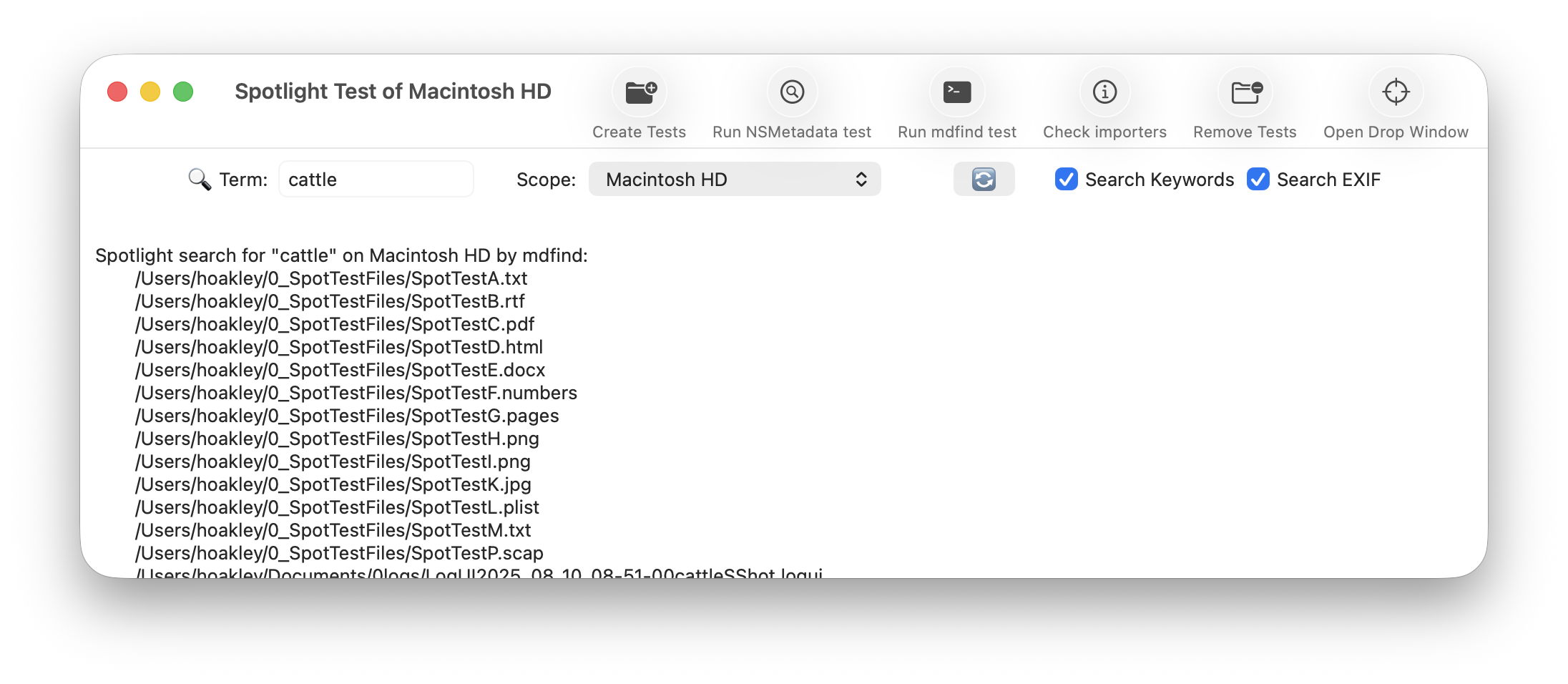
As promised, here is a new version of my free Spotlight test utility SpotTest, which will now display full information from two Spotlight command tools listing metadata for files.
To open its new Drop Window, either click on the new tool at the right end of the toolbar in its main window, or use the command in its Window menu. Then drag and drop files you want to inspect onto that window.
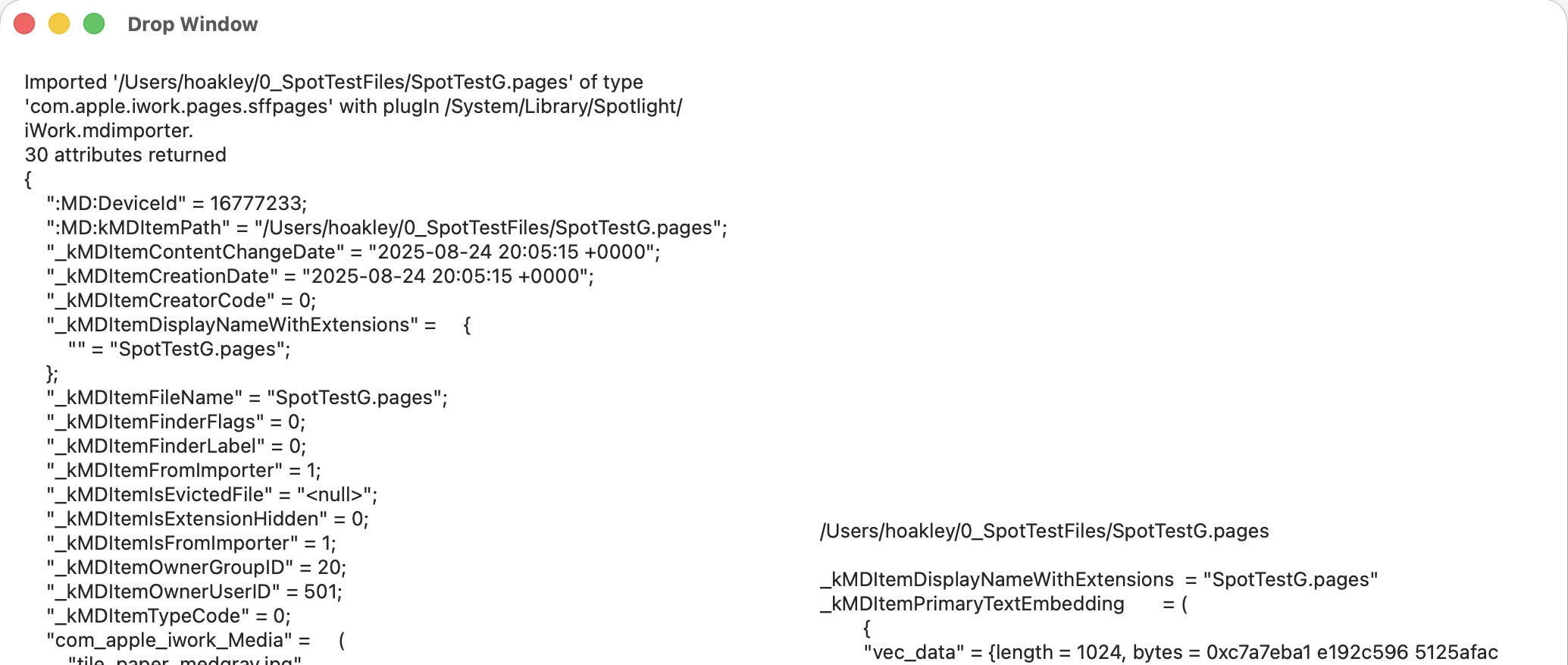
The app then runs two command tools on those files: mdimport -t -d2 filename
to list all known metadata recognised by the mdimporter used, and mdls filename
to list all indexed metadata.
That mdimport command currently crashes on most images, so won’t return any information about their metadata until Apple fixes the bug.
If you want to save the output in this Drop Window, select the file(s) output in its display, copy and paste it into a text editor or similar. You don’t have to keep the app main window open, and could use the Drop Window alone as a convenient way to inspect metadata.
As you’ll see, the length of mdimport output is significantly greater than that from mdls. Although there are matching entries, there’s no simple way to align those matches. Of all the possible layouts, I found this linked arrangement, where both outputs scroll alongside one another, the most effective for comparing their contents. It also allows you to view output for several files in the single window.
SpotTest version 1.2 is now available from here: spottest12
from Downloads above, and from its Product Page.
Tomorrow I’ll be using it to trace the paths of metadata from a source file to their display in the Finder.
Apple has released an update to XProtect for all versions of macOS, bringing it to version 5344. Version 5343 doesn’t appear to have been released. As usual it doesn’t release information about what security issues this update might address.
This version makes minor amendments to the Yara rules for MACOS.SHEEPSWAP.OBF.C, MACOS.SHEEPSWAP.OBFE.COMMON and MACOS.ADLOAD. There has been no change in the Osascript rules in XPScripts.yr.
You can check whether this update has been installed by opening System Information via About This Mac, and selecting the Installations item under Software.
A full listing of security data file versions is given by SilentKnight and SystHist for El Capitan to Tahoe available from their product page. If your Mac hasn’t yet installed this update, you can force it using SilentKnight or at the command line.
If you want to install this as a named update in SilentKnight, its label is XProtectPlistConfigData_10_15-5344
Sequoia and Tahoe systems only
This update has already been released for Sequoia and Tahoe via iCloud. If you want to check it manually, use the Terminal command sudo xprotect check
then enter your admin password. If that returns version 5344 but your Mac still reports an older version is installed, you should be able to force the update using sudo xprotect update
The update bringing macOS Tahoe to version 26.5 is modest in size and, apart from its security fixes, seems largely routine maintenance.
The only release notes worth reading are those listing vulnerabilities fixed, available here. Among the 69 listed there are 9 in the kernel, which must be the highest number in any recent macOS update. I wonder whether those have been swelled by AI, and one of the kernel bugs is credited to a researcher “with Claude and Anthropic Research”. There could of course be fixes resulting from early use of Mythos, but they’re unlikely to appear in a public list. None of the fixes listed are reported as being known to exist in the wild.
The new build number for 26.5 is 25F71. Apple silicon Macs have a firmware update bringing them to mBoot 18000.120.36, and Intel Macs with T2 chips are updated to 2103.100.6.0.0 (iBridge 23.16.15067.0.0,0).
Bundled apps have routine increments in version numbers:
Books, from version 8.4 to 8.5
Freeform, 4.4 to 4.5
Music, 1.6.4 to 1.6.5
News, 11.4 to 11.5
Passwords, 2.4 to 2.5
Safari, 26.4 (21624.1.16.11.4) to 26.5 (21624.2.5.11.4)
Stocks, 8.4 to 8.5
TV, 1.6.4 to 1.6.5.
Although there are abundant increments in build numbers reflecting routine maintenance, there are few substantial changes apparent in /System/Library, including:
In kernel extensions, the whole AGX series has a substantial change in version, as does AppleUSBAudio, and smbfs is updated to version 6.0.1
APFS is incremented to version 2811.120.14
There’s a new AppleAccountTransparency in private frameworks.
Apple has released the update to bring macOS Tahoe to version 26.5, and security updates for Sequoia and Sonoma to bring them to 15.7.7 and 14.8.7.
If you were expecting 15.7.6 or 14.8.6, then you’ll be as surprised as I was that Apple appears to have skipped those and gone straight on to x.x.7. I haven’t seen any explanation for this curious change in version numbering.
Download size for the 26.5 update on an Apple silicon Mac is around 3.8 GB, and the last 5 minutes of preparation takes maybe a tad longer than that. Intel Macs should download around 2.9 GB instead.
In Apple silicon Macs, firmware is updated to mBoot 18000.120.36, while Intel firmware is updated to 2103.100.6.0.0 (iBridge 23.16.15067.0.0,0).
Release notes are the bland and unhelpful statement that “This update includes enhancements, bug fixes, and security updates for your Mac.”
Security release notes are here for Tahoe with around 69 vulnerabilities fixed including more kernel bugs than I’ve ever seen in a single update, here for Sequoia with around 45, and here for Sonoma with a mere 43 or so.
Apple still hasn’t posted any enterprise release notes here but might think of something to report later.
Apple has released an update to XProtect for all versions of macOS, bringing it to version 5342. As usual it doesn’t release information about what security issues this update might address.
This version doesn’t appear to bring any additions or amendments to either the main Yara rules, or for Osascript rules in XPScripts.yr, but there has been extensive reformatting, tidying, and relabeling of lists.
You can check whether this update has been installed by opening System Information via About This Mac, and selecting the Installations item under Software.
A full listing of security data file versions is given by SilentKnight and SystHist for El Capitan to Tahoe available from their product page. If your Mac hasn’t yet installed this update, you can force it using SilentKnight or at the command line.
If you want to install this as a named update in SilentKnight, its label is XProtectPlistConfigData_10_15-5342
Sequoia and Tahoe systems only
This update has now been released for Sequoia and Tahoe via iCloud. If you want to check it manually, use the Terminal command sudo xprotect check
then enter your admin password. If that returns version 5342 but your Mac still reports an older version is installed, you should be able to force the update using sudo xprotect update
Apple has released an update to XProtect for all versions of macOS, bringing it to version 5341; the previous public release was 5338. As usual it doesn’t release information about what security issues this update might address.
This version amends the Yara rule for MACOS.PIRRIT.TWEN, and adds new rules for MACOS.AIRPIPE.IM, MACOS.EIGER.SUNOTO, MACOS.EIGER.BA and MACOS.MONCH.BA. Osascript rules in XPScripts.yr have amendments to those for MACOS.OSASCRIPT.BOZO, MACOS.OSASCRIPT.BOWISP and MACOS.OSASCRIPT.GEPEPA, and new rules added for MACOS.OSASCRIPT.DUCACI, MACOS.OSASCRIPT.DUCOOB and MACOS.OSASCRIPT.AMSCLUCL.
You can check whether this update has been installed by opening System Information via About This Mac, and selecting the Installations item under Software.
A full listing of security data file versions is given by SilentKnight and SystHist for El Capitan to Tahoe available from their product page. If your Mac hasn’t yet installed this update, you can force it using SilentKnight or at the command line.
If you want to install this as a named update in SilentKnight, its label is XProtectPlistConfigData_10_15-5341
Sequoia and Tahoe systems only
This update has now been released for Sequoia and Tahoe via iCloud. If you want to check it manually, use the Terminal command sudo xprotect check
then enter your admin password. If that returns version 5341 but your Mac still reports an older version is installed, you should be able to force the update using sudo xprotect update
Obtaining a definitive list of locations that are subject to privacy protection in macOS Tahoe 26.4 hasn’t been easy, and I’ve previously relied on information given piecemeal in WWDC sessions. This article reports the results of formal testing using a new version of my test app Insent, and brings some surprises.
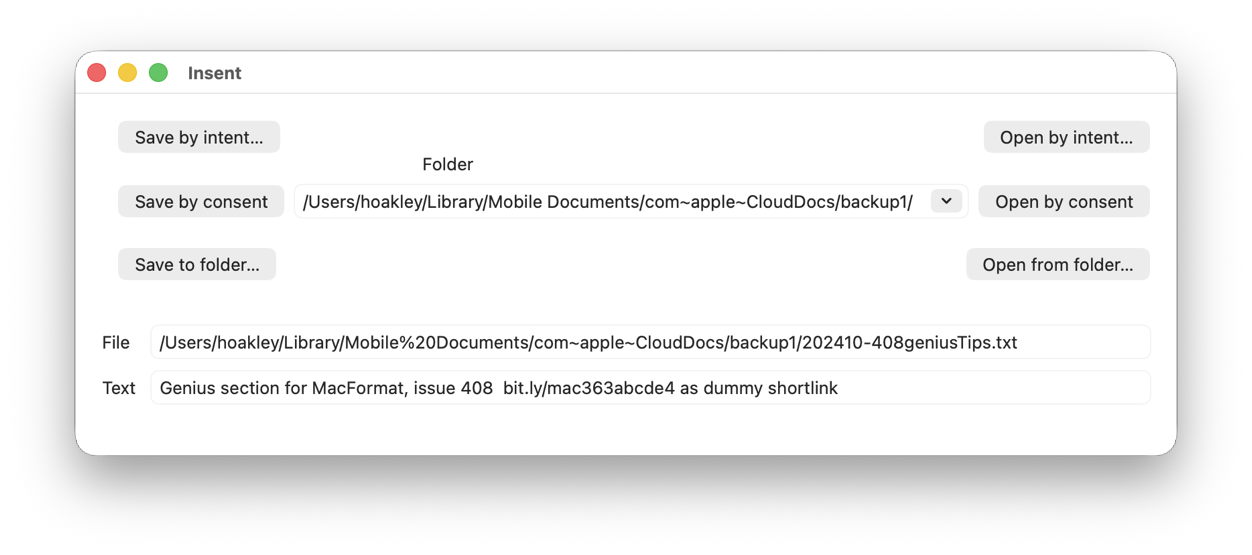
Insent version 1.2 now allows you to set the path to the folder to be used for its Save and Open by consent buttons, using a Combo box. That’s a combination of a popup menu including the three most popular locations, Desktop, Documents and Downloads, and an editable text box into which you can enter a custom folder path.
Save and Open by consent are actions in which the user doesn’t express their intent to write to or read from the protected location, for example in an Open and Save Panel, but the app’s code determines the path and file. Thus, to ensure the app’s access doesn’t compromise the user’s privacy, those actions may be blocked unless the user gives their consent in a dialog presented for TCC, the privacy manager.
In the Save by consent code, all Insent does is construct a URL to a new text file in that folder path, then tries writing a String to that URL using String.write() non-atomically. To open a text file from that folder path, it attempts to enumerate the contents of the directory at that URL using FileManager.default.contentsOfDirectory(), then iterates through the contents until it finds a text file to open. If it does, it tries to read that file using String(contentsOf: url), and displays the start of that String.
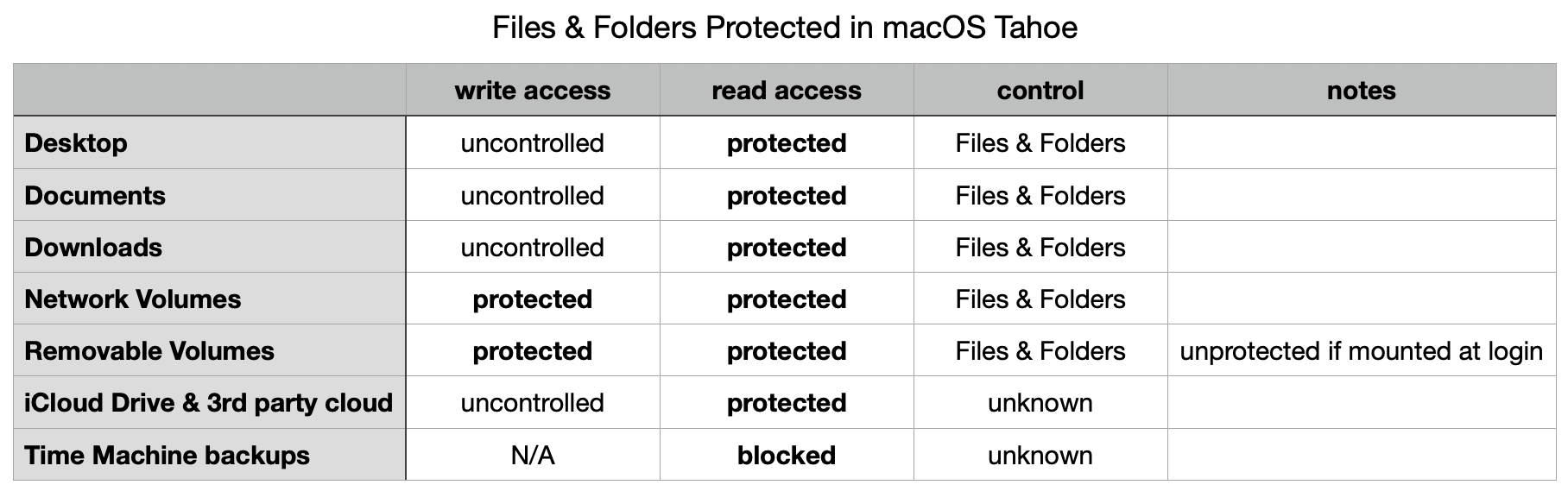
Only three locations conform to the standard control:
~/Desktop
~/Documents
~/Downloads
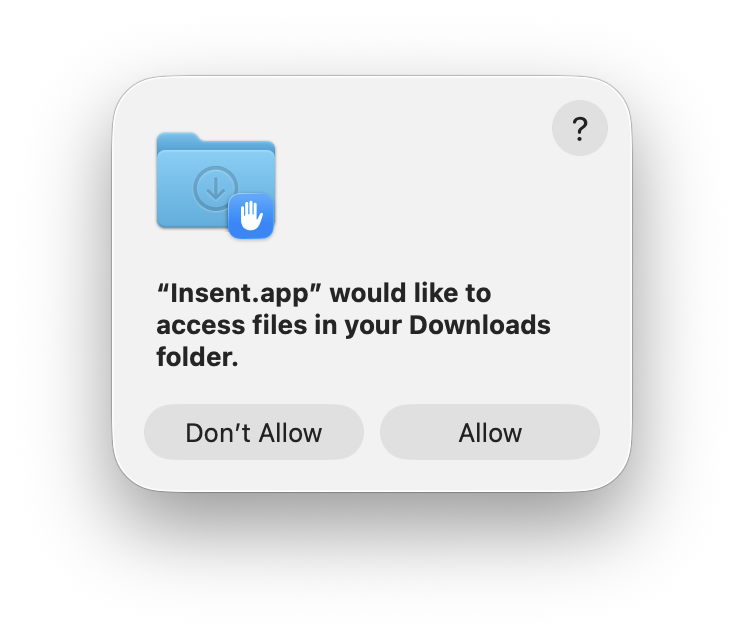
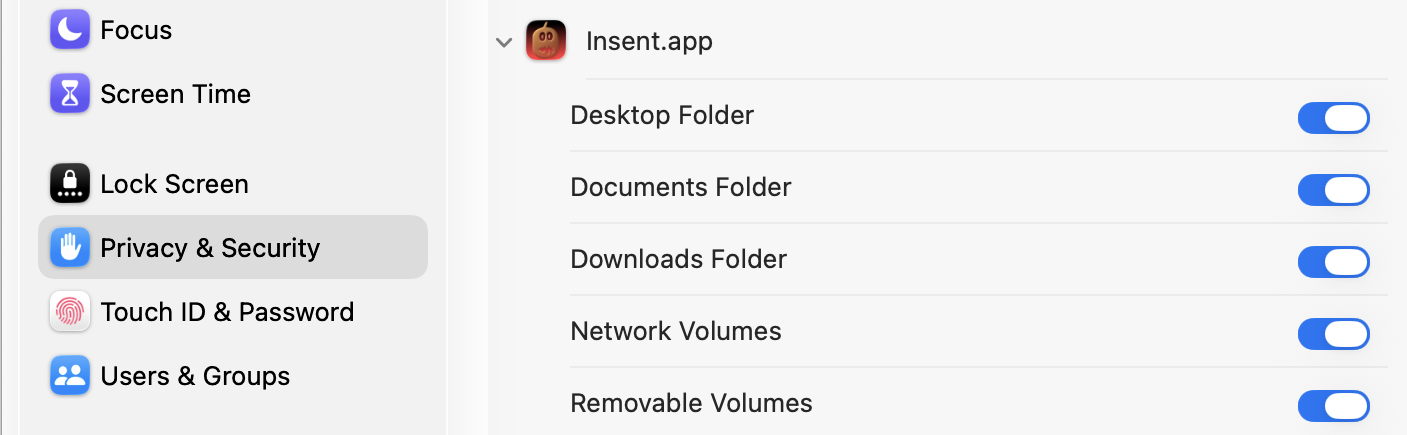
In each case, there is no control over writing to the location, but any attempt to list the contents of that folder elicits a request for consent, and results in an entry for Insent in the Files & Folders list in Privacy & Security settings.
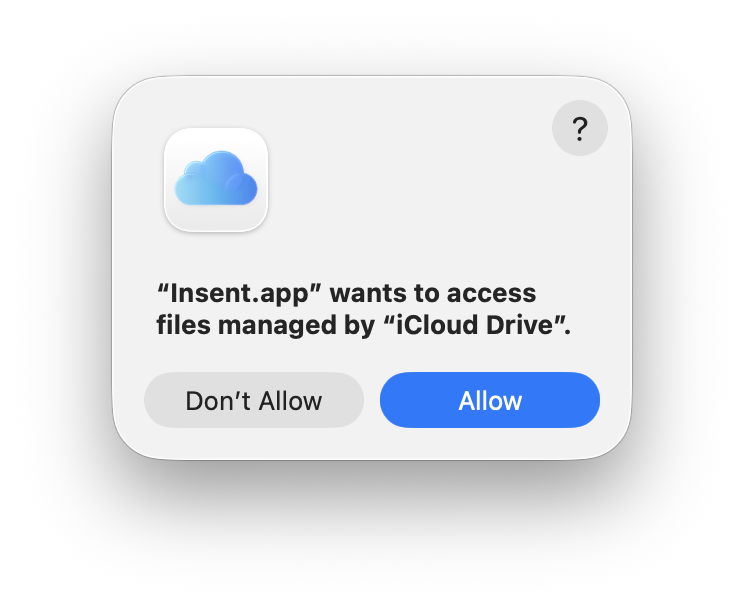
For iCloud Drive, and presumably third-party cloud services with equivalent privacy protection, there is no control over writing to the location, and listing folder contents requires consent, but no entry appears in the Files & Folders list, and I have been unable to discover any equivalent control elsewhere. Thus, once consent has been given, it appears to remain indefinitely, as the user doesn’t have a control to disable that access.
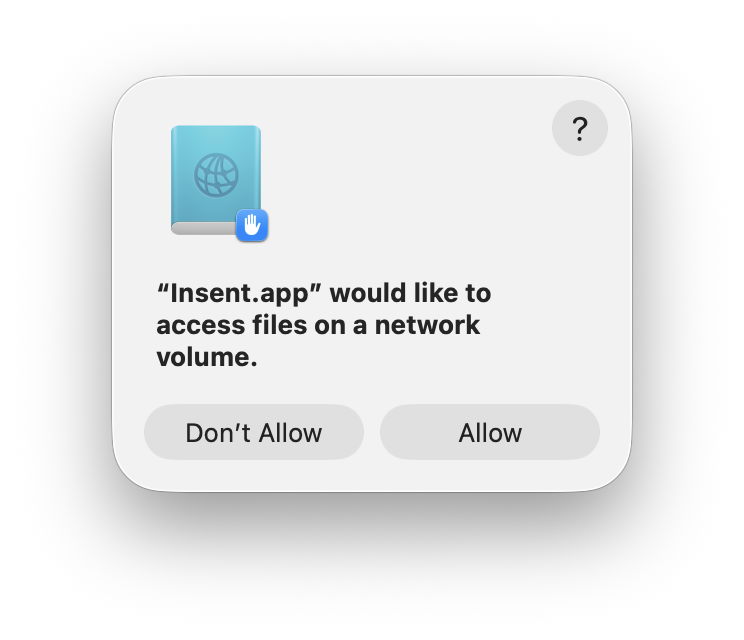
Removable Volumes and Network Volumes differ again, in that both Save and Open by consent require user consent, although giving consent to one action also grants it for the other. However, not all removable volumes are treated as protected. A Time Machine backup drive that is mounted automatically during startup, and has an additional volume not used for backups, wasn’t given any protection, while an SSD connected and mounted well after login was treated as a Removable Volume.
Although often listed as being subject to privacy protection, read access by consent was blocked for Time Machine backups, and they’re read only anyway.
One strange behaviour discovered during testing was the automatic addition of Insent to the Full Disk Access list, rather than individual Files & Folders. However, Full Disk Access hadn’t been granted, and when Insent was removed from that list, individual Files & Folders were shown instead.
There was no evidence of any other special locations among other standard folders in the user’s Home folder, although there are separate controls covering Photos access, and that to app databases, as listed in Privacy & Security settings.
The following table summarises privacy protection for special locations in macOS 26.4.
Insent version 1.2 is now available from here: insent12
Have fun trying to make sense of this protection.
Overnight, Apple has released its regular weekly update to XProtect, bringing it to version 5338. As usual it doesn’t release information about what security issues this update might address.
This version adds four new Yara rules for MACOS.BONZAIBREEZE, MACOS.BONZAIBUFFOON, MACOS.BONZAIBOOMER and BONZAIBUNNY, additions to the Bonzai family of what appear to be clickfix stealers. To accompany those are four new entries in the Osascript rules in XPScripts.yr, for MACOS.OSASCRIPT.BOPADO, MACOS.OSASCRIPT.BOSTA, MACOS.OSASCRIPT.BOMSPAA and MACOS.OSASCRIPT.BOMSPAB.
You can check whether this update has been installed by opening System Information via About This Mac, and selecting the Installations item under Software.
A full listing of security data file versions is given by SilentKnight and SystHist for El Capitan to Tahoe available from their product page. If your Mac hasn’t yet installed this update, you can force it using SilentKnight or at the command line.
If you want to install this as a named update in SilentKnight, its label is XProtectPlistConfigData_10_15-5338
Sequoia and Tahoe systems only
This update has now (as of 1700 GMT 10 April) been released for Sequoia and Tahoe via iCloud. If you want to check it manually, use the Terminal command sudo xprotect check
then enter your admin password. If that returns version 5338 but your Mac still reports an older version is installed, you should be able to force the update using sudo xprotect update
Apple has just released an update to macOS Tahoe, bringing it to version 26.4.1.
Apple’s Enterprise release notes reveal that this resolves “an issue where MacBook Air with M5 and MacBook Pro with M5 Pro or M5 Max failed to join 802.1X Wi-Fi networks while using content filter extensions.” Otherwise, this update has no published CVE entries, and no general user release notes.
The download is about 2.13 GB for Apple silicon Macs.
The build number is 25E253, just 7 builds since 26.4, and there don’t appear to be any firmware updates.
There are no changes in bundled app version or build numbers, even in Safari, and the only change in /System/Library is in the Private Framework for Icon Services in SwiftUI. I suspect that the bug fixed is in one or more binaries elsewhere in the SSV. However, this may fix more than that single bug, as iOS and iPadOS 26 also had a patch update yesterday for unidentified “bug fixes”.
Apple has overnight released its out-of-cycle update to XProtect for macOS prior to Sequoia, bringing it to version 5337. This update has already been released for macOS Sequoia and Tahoe, and this update provides the same version for those Macs still using on the older bundle location.
This version removes the Yara rule for MACOS.SOMA.MAENB, and makes no changes to the Osascript rules in XPScripts.yr.
You can check whether this update has been installed by opening System Information via About This Mac, and selecting the Installations item under Software.
A full listing of security data file versions is given by SilentKnight and SystHist for El Capitan to Tahoe available from their product page. If your Mac hasn’t yet installed this update, you can force it using SilentKnight or at the command line.
If you want to install this as a named update in SilentKnight, its label is XProtectPlistConfigData_10_15-5337
Sequoia and Tahoe systems only
This update has already been released for Sequoia and Tahoe via iCloud. If you want to check it manually, use the Terminal command sudo xprotect check
then enter your admin password. If that returns version 5337 but your Mac still reports an older version is installed, you should be able to force the update using sudo xprotect update
Apple has just released an out-of-cycle update to XProtect for macOS Sequoia and Tahoe only, bringing it to version 5337. As usual it doesn’t release information about what security issues this update might address.
This version removes the Yara rule for MACOS.SOMA.MAENB, and makes no changes to the Osascript rules in XPScripts.yr.
You can check whether this update has been installed by opening System Information via About This Mac, and selecting the Installations item under Software.
A full listing of security data file versions is given by SilentKnight and SystHist for El Capitan to Tahoe available from their product page.
Currently this update is only available for Macs running Sequoia or Tahoe. Those running earlier versions of macOS can only update to XProtect version 5336 via softwareupdate.
This update has only been released for Sequoia and Tahoe via iCloud. If you want to check it manually, use the Terminal command sudo xprotect check
then enter your admin password. If that returns version 5337 but your Mac still reports an older version is installed, you should be able to force the update using sudo xprotect update
Apple has just released its regular weekly update to XProtect, bringing it to version 5336. As usual it doesn’t release information about what security issues this update might address.
This version adds two new rules for MACOS.WANNABEWALLABY.IMA and MACOS.WANNABEWALLABY.STA, amends rules for MACOS.TIMELYTURTLE.DYHEOC, MACOS.SOMA.MAENA, and MACOS.SOMA.MAENB, and changes some rule UUIDs. In the Osascript rules in XPScripts.yr, it amends the rule for MACOS.OSASCRIPT.SYPR.
You can check whether this update has been installed by opening System Information via About This Mac, and selecting the Installations item under Software.
A full listing of security data file versions is given by SilentKnight and SystHist for El Capitan to Tahoe available from their product page. If your Mac hasn’t yet installed this update, you can force it using SilentKnight or at the command line.
If you want to install this as a named update in SilentKnight, its label is XProtectPlistConfigData_10_15-5336
Sequoia and Tahoe systems only
This update hasn’t yet been released for Sequoia and Tahoe via iCloud. If you want to check it manually, use the Terminal command sudo xprotect check
then enter your admin password. If that returns version 5336 but your Mac still reports an older version is installed, you should be able to force the update using sudo xprotect update
For those working with Rich Text without embedded images, my free editor DelightEd offers a suite of unique features. I wrote it when macOS Mojave introduced Dark appearance mode, with the primary purpose of composing Rich Text documents that work independent of appearance. For that it can set styled text on a background that ensures perfect readability in both Light and Dark modes.
Since then it has gained other unique features, including support for creating interlinear text, in which different translations or versions of the same document are interleaved line by line. It will also open PDF documents and automatically extract all their text content.
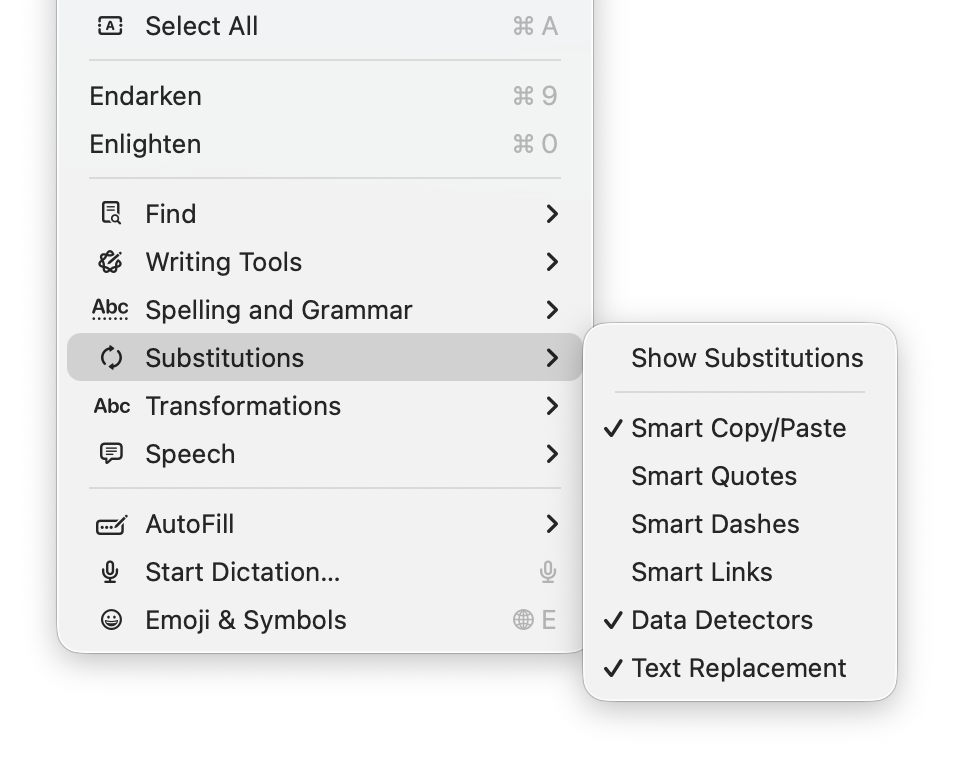
General features supported include Writing Tools (Apple silicon Macs), case transformations, and a full suite of substitutions. However, until this new version of DelightEd, substitution settings haven’t been saved in DelightEd’s app settings. Version 2.5 now puts that right: to set the app’s default substitutions, set them up using the Substitution command in its Edit menu, for instance enabling Smart Links.
Then save those to its settings using the Save Defaults command in the app’s menu. Each time you open DelightEd after that, its substitutions will start from those saved defaults.
DelightEd version 2.5 for macOS 11.5 Big Sur and later, including Tahoe, is now available from here: delighted25
from Downloads above, from its Product Page, and through its auto-update mechanism.
I’m very grateful to Manuel for asking for this to be fixed.
Apple has just released its regular weekly update to XProtect, bringing it to version 5335. As usual it doesn’t release information about what security issues this update might address.
This version adds two new Yara rules for MACOS.TIMELYTURTLE.OBDR and MACOS.SOMA.MAENB, and amends the existing rule for MACOS.SOMA.BYTE.SEQUENCE.B. In the Osascript rules in XPScripts.yr, it relocates those for TABUPA, REBUPA, DUVAST, DUCUHA and DUSTCO.
You can check whether this update has been installed by opening System Information via About This Mac, and selecting the Installations item under Software.
A full listing of security data file versions is given by SilentKnight and SystHist for El Capitan to Tahoe available from their product page. If your Mac hasn’t yet installed this update, you can force it using SilentKnight or at the command line.
If you want to install this as a named update in SilentKnight, its label is XProtectPlistConfigData_10_15-5335
Sequoia and Tahoe systems only
This update has already been released for Sequoia and Tahoe via iCloud. If you want to check it manually, use the Terminal command sudo xprotect check
then enter your admin password. If that returns version 5335 but your Mac still reports an older version is installed, you should be able to force the update using sudo xprotect update
The update to bring macOS Tahoe up to version 26.4 is hefty at around 7.15 GB (more than double that if you’re unlucky), and reflects a great deal of bug fixes and improvements in almost every subsystem. Apple provides three good sets of release notes:
General release notes include the addition of an option to use compact tabs in Safari, Freeform’s new Creator Studio enhancements, and a facility for Purchase Sharing in Family Sharing. Oh, and the requisite eight new emoji.
Security release notes list over 70 fixes, many of which are significant, but none are reported as being known to be exploited in the wild at present.
The new build number of 26.4 is 25E246. The Darwin Kernel version is 25.4.0, and XNU 12377.101.15~1.
Apple silicon firmware is updated to a completely different version numbering system, and is now reported as mBoot version 18000.101.7. If you’re running SilentKnight older than version 2.14 (71), then it’s likely that it will crash as a result of this change in firmware version. Please use version 2.14 from here.
Firmware in Intel Macs with T2 chips remains with the previous system, and is updated from 2094.80.5.0.0 (iBridge 23.16.13120.0.0,0) to 2103.100.6.0.0 (iBridge 23.16.14242.0.0,0).
Looking through the bundled apps and /System/Library, there are a great many increments in build numbers reflecting the extensive changes made. Here are a few of the more substantial changes found.
In bundled apps:
Books goes from version 8.1 to 8.4
Freeform, version 4.3 to 4.4
iPhone Mirroring, version 1.5 to 1.6
Music, version 1.6.3 to 1.6.4
Safari, version 26.3.1 (21623.2.7.111.2) in BSI (a) to 26.4 (21624.1.16.11.4)
TV, version 1.6.3 to 1.6.4
Audio MIDI Setup, version 3.7 to 3.8
Digital Color Meter, version 6.10 to 6.11
Screen Sharing, version 6.2 (758.1) to 6.1 (760.4), note the reduction in version number.
In /System/Library:
AGX kernel extensions all have build increments
AppleDiskImages2 kext has a build increment
AppleEmbeddedAudio kext and its plugin kexts have build increments
AppleIntel Graphics kexts have version increments
AppleStorageDrivers kext and its plugin kexts have build increments
APFS is updated from 2632.80.1 to 2811.101.1, suggesting a substantial change has been made
new private frameworks include ASMExclaveSupport, AccelerateOpt, AlwaysOnExclavesDaemon, AnteroAgent, AppRemoteAssets, AudioPasscodeDSP, BNNSOdieDelegate, CookingData, CoreTransparency, DynamicPrefetching, InAppFeedback, NanoPassKit, PartnerVisualSearch, a whole family of Unilog frameworks, and a group of iCloudWeb frameworks
mdimporters updated include those for Application, CoreMedia, Mail, Office, iWork but not RichText.
After seeing the new CookingData private framework, I looked out for RecipeKit, but was disappointed not to see it.
This is probably going to be the last such substantial update to macOS Tahoe, as much of Apple’s engineering effort is transferring to make macOS 27 ready for release as a beta at WWDC in early June.
Freeform joins Creator Studio, with advanced tools and a premium content library
Purchase Sharing in Family Sharing
and eight new emoji.
Security release notes for 26.4 list over 70 fixes, those for Sequoia 15.7.5 list about 56, and those for Sonoma 14.8.5 list about 50. None are reported as being known to be exploited in the wild at present.
Firmware in Apple silicon Macs is updated to a new mBoot firmware version numbering system, with the current version given as 18000.101.7. The macOS build number is 25E246, and Safari is version 26.4 (21624.1.16.11.4). Firmware in Intel Macs with T2 chips is updated from 2094.80.5.0.0 (iBridge 23.16.13120.0.0,0) to 2103.100.6.0.0 (iBridge 23.16.14242.0.0,0).
If you’re running SilentKnight older than version 2.14 (71), then it’s likely that it will crash as a result of the change in firmware version. Please use version 2.14 from here.
I’ll be posting an analysis of what has changed later today.
Updated 09:15 25 March 2026 with firmware details for Intel Macs.
Apple has just released its first public Background Security Improvement (BSI) for macOS 26.3.1 Tahoe, labelled as BSI (a)-25D771280a. Once installed, macOS will identify itself as version 26.3.1 (a), with a build number of 25D771280a.
You can install this through Privacy & Security Settings, in the Background Security Improvements section. It doesn’t appear listed in Software Update, although SilentKnight will offer it. Please don’t try to use SilentKnight to install this, though, as it will download successfully but fail to install unless you then use the BSI section in Privacy & Security settings, which will finish the job off.
Apple has now released details of the single vulnerability that this fixes, in WebKit. As a result it updates Safari from 26.3.1 (21623.2.7.11.7) to 26.3.1 (21623.2.7.111.2).
Following installation, your Mac will need to restart for the BSI to be applied.
Apple has just released its regular weekly update to XProtect, bringing it to version 5334. As usual it doesn’t release information about what security issues this update might address.
This version makes no changes to its main Yara rules. Changes to the OSASCRIPT rules in XPScripts.yr include amendments to more than a dozen of them, and two new rules are added for MACOS.OSASCRIPT.GEPEPA and MACOS.OSASCRIPT.TAPEPA. Several rules that previously added the property wide to their text now have wide ascii instead.
You can check whether this update has been installed by opening System Information via About This Mac, and selecting the Installations item under Software.
A full listing of security data file versions is given by SilentKnight and SystHist for El Capitan to Tahoe available from their product page. If your Mac hasn’t yet installed this update, you can force it using SilentKnight or at the command line.
If you want to install this as a named update in SilentKnight, its label is XProtectPlistConfigData_10_15-5334
Sequoia and Tahoe systems only
This update has now been released for Sequoia and Tahoe via iCloud. If you want to check it manually, use the Terminal command sudo xprotect check
then enter your admin password. If that returns version 5334 but your Mac still reports an older version is installed, you should be able to force the update using sudo xprotect update
Apple silicon Macs are about to undergo change to the numbering of their firmware versions. Accounts from beta-testing of the next minor update to macOS 26 Tahoe, version 26.4, indicate that future firmware will no longer be numbered as iBoot 13822.101.6, but as mBoot 18000.101.6 instead. This has major consequences for my free utility SilentKnight, which checks and reports the version of firmware installed. Version 2.14 should address that change in readiness for the release of the 26.4 update, and is particularly recommended for use on Apple silicon Macs.
This change was first reported in macOS 26.4 beta 2, and has apparently been sustained in the two subsequent beta releases, confirming that it’s an intended change, and not a bug.
There are currently two places in System Information that report a Mac’s firmware version, either the main Hardware section (also accessible in system_profiler SPHardwareDataType), or the Controller item within that section (or system_profiler SPiBridgeDataType).
Intel Macs without a T2 chip don’t report anything for their Controller, but those with T2 or Apple silicon chips reveal that they have a T2 or give an iBoot firmware version there. All three types of Mac also give a System Firmware Version in the Hardware overview.
This can get more confusing if you update or install macOS to an external disk. That will normally update the Mac’s firmware if the version of macOS installed on the external disk comes with more recent firmware. For example, if your Apple silicon Mac is currently running macOS Tahoe 26.3.1, it should have an iBoot firmware version of 13822.81.10. If you were to install Tahoe 26.4 to an external disk, as that has a more recent version of iBoot firmware, that should update the version installed in your Mac, and that remains so even when you start it up from its internal SSD.
As far as I can tell at present, this can result in internally inconsistent reporting. When running 26.3.1 from its internal SSD, that Mac will report its old iBoot version in the Controller section, but its new mBoot version in the Hardware section. Although that could change by 26.4 release, it might remain in all older versions, so providing lasting confusion.
As Apple hasn’t documented this change, I don’t know whether this will apply to all Apple silicon Macs updated to macOS 26.4, or to those updated to the matching versions of Sequoia or Sonoma. Therefore this new version of SilentKnight doesn’t attempt to check these new mBoot versions, and merely reports those found as well as it can. Once I know more, I will endeavour to interpret the results.
SilentKnight version 2.14 for macOS 11.5 and later is now available from here: silentknight214
from Downloads above, from its Product Page, and via its auto-update mechanism.
Please let me know how you get on with these new firmware version numbers.
Note: version 2.14 now fixes a bug that failed to recognise T2 Macs correctly in certain localisations including German. Thanks to Jan for reporting this so promptly.

 Login
Login