Reading view

There are new articles available, click to refresh the page.

The MACL extended attribute

Apple silently introduced the com.apple.macl extended attribute in macOS Catalina, as part of its new ‘privacy by user intent’ protection, as detailed here. Its first public mention came in October 2019, when Quinn “The Eskimo!” revealed its purpose and the fact that it contained a two-byte header of 01 00 and a UUID associated with the app that obtained access ‘by intent’.

It next caught the eye of Jeff Johnson, who described it in detail on 18 December 2019. It was he who first reported its most obvious problem: “It turns out that the com.apple.macl extended attribute is governed by System Integrity Protection, so the only way to delete it is to disable SIP, or boot into another volume and delete it from there. Thus, once you implicitly grant special access to a file, you can’t easily revoke that special access.”

It was soon associated with other problems: “open a PDF in Preview without saving it, and it will be given a quarantine flag but no com.apple.macl xattr. If you try to Save that to overwrite the original document, Preview promptly refuses, and may not even be able to write that file out under another name.”

Further details of how this MACL xattr are involved in privacy protection were given by Adam Chester in October 2020. He again described the contents as consisting of a two-byte header, incremented by now to 02 00, followed by a UUID representing the app with permission to access the file, and pointed out that UUID is “unique for each system, user and application”.

Armed with a way of generating an endless supply of MACL xattrs using my test app Insent, and a little crawling through xattrs using xattred, I set out to get further details of what they now contain and their life cycle.

Header

Their two-byte header follows one of two patterns:

  • the first byte incrementing from 01 (2019) to 08 (2025) over time, as if a version number, followed by either 00 or 40.
  • the first byte 00, followed by 43, 81 or C1.

These appear to determine the effect of the MACL, for example 08 00 granting access to a protected directory for listing its contents, and read access to files within it.

UUID

All UUIDs seen in MACL xattrs are version 4, so have largely random content, and are saved in binary form. As far as I’m aware, no one has yet discovered how to identify the app identified by these UUIDs, other than by finding another MACL xattr with the same, known app association. This is made more complex by the fact that the same app is identified by different UUIDs in different sessions, as explained below. As a result, once a Mac has restarted, there’s no way to match previous UUIDs with the apps they identified.

Presentation

Each header-UUID pair is packed consecutively in time order, the most recent last in the xattr, into blocks of four, totalling 72 bytes, with trailing space padded by zeroes, making the size of each MACL xattr a multiple of 72. The great majority of them consist of only 72 bytes.

Life cycle

Each new header and UUID is written to the xattr at the time that the kernel grants access to that directory or file, and apparently remains there indefinitely, with more recent header-UUID pairs being appended at the end.

Currently, in macOS 26.4, each app’s UUID is unique to that session, and restarting that Mac ensures the app will subsequently be identified using a different UUID. This may be the result of tokens used by the sandbox being invalidated on rebooting, as described by Adam Chester.

For example, here are the header-UUID pairs associated with Insent in three consecutive sessions, taken from the same MACL xattr on the ~/Desktop directory:

  • 0800 BF6F283B-2179-4155-AA30-FAA4C4B7ACBE
  • 0800 03475E10-B904-447A-87F0-641B3F61B377
  • 0800 86522100-DF0A-4AD2-BE42-F98A28374ECC

Within each session, each MACL xattr written for Insent to three different directories was the same.

MACL xattrs are still protected by SIP, in that any attempt to remove the xattr results in it being restored immediately.

The effect is that grants of access by intent were invalidated by restarting the Mac, as the previous UUID was no longer recognised as corresponding to Insent. Previous criticism that this special access persisted and couldn’t be revoked has been addressed, albeit crudely, as that does require restarting.

Summary

  • The com.apple.macl extended attribute was introduced in macOS Catalina to enable ‘privacy by user intent’.
  • Each record in the xattr consists of a two-byte header followed by a UUID.
  • Records are stored consecutively, most recent last, in 72-byte blocks with trailing zero padding in the last block, when necessary.
  • The header can have either of two forms, one starting with a version number from 01 to 08, followed by 00 or 40. The other form starts with 00, followed by 43, 81 or C1.
  • The UUID identifies the app granted access via the MACL xattr, but an app’s UUID changes after a restart, limiting tracking.
  • Currently, because restarting results in changed UUIDs, access granted by user intent should also be reset after a restart.
  • MACL xatrrs can’t be removed directly by the user as they’re protected by SIP.

Privacy: How locations are protected

Ten days ago, I drew attention to anomalies in privacy protection of locations that could mislead, in that Privacy & Security settings could claim an app didn’t have access to a protected folder when it did. This article proposes an explanation, and provides further details of protected locations and their behaviour. This is based on my test app Insent version 1.2, which you can use to explore these behaviours in the comfort of your own Mac.

Procedures

For the avoidance of any doubt, Insent is a simple macOS app that doesn’t run in an App Sandbox, doesn’t have any entitlements, but is notarized. Its two features of greatest interest here are Open by consent, and Open from folder buttons:

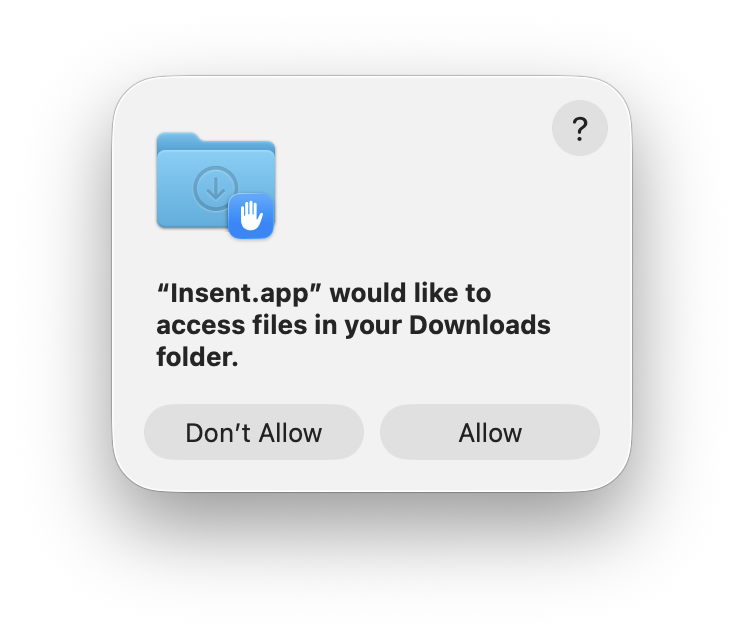
  • Open by consent constructs a folder path as a string without involving user action in an Open and Save Panel, then calls FileManager.default.contentsOfDirectory() to list files within that folder. If that’s successful, it randomly selects a text file from those, opens it, and displays the opening part of the text contents. This is opening that file by consent, as the app is given access to that folder by user consent through TCC’s privacy controls, by consenting to the standard dialog.
  • Open from folder displays an Open and Save Panel (NSOpenPanel) asking the user to select a folder. The URL returned from that is then used to call FileManager.default.contentsOfDirectory() to list files within that folder. If that’s successful, it randomly selects a text file from those, opens it, and displays the opening part of the text contents. This is opening that file by user intent, as the user has chosen that folder to be used. As a result, this doesn’t invoke TCC’s privacy controls.

Consent

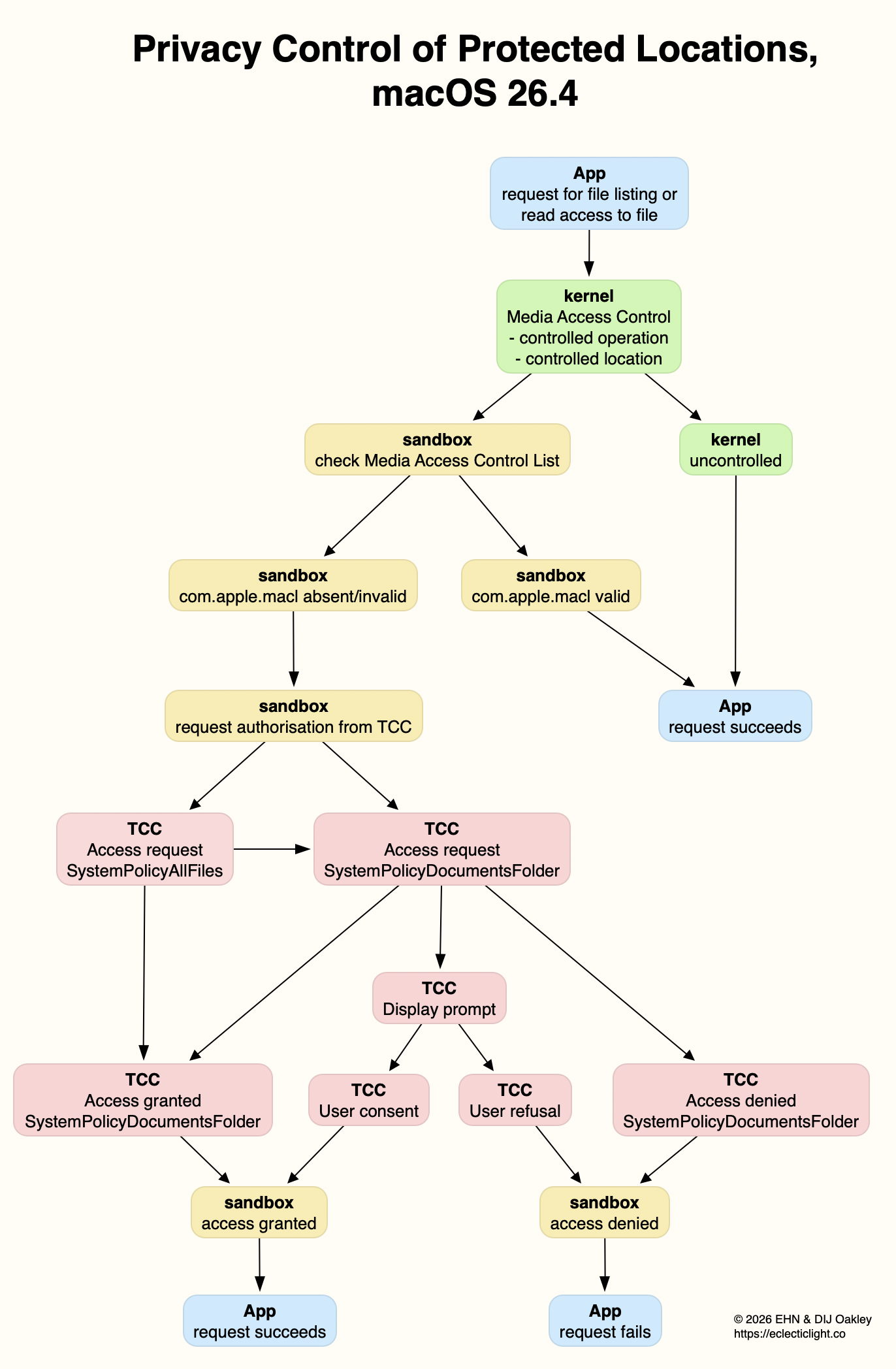
The mechanism used to list the contents of a protected folder and open a file from among those is the more obvious, and better documented. Even though the app itself isn’t running in an App Sandbox, the call is intercepted by sandboxd and passed to TCC for it to check whether current privacy policy for that app should allow the request. TCC first checks whether kTCCServiceSystemPolicyAllFiles applies, with the app being given Full Disk Access. If it does, then sandboxd is advised and the call to list the directory proceeds.

If kTCCServiceSystemPolicyAllFiles doesn’t apply, TCC checks for the location-specific service, including

  • kTCCServiceSystemPolicyDesktopFolder
  • kTCCServiceSystemPolicyDocumentsFolder
  • kTCCServiceSystemPolicyDownloadsFolder
  • kTCCServiceSystemPolicyRemovableVolumes
  • kTCCServiceSystemPolicyNetworkVolumes
  • kTCCServiceFileProviderDomain.

If that has been given, sandboxd is advised and the call proceeds.

If neither of those applies, then a standard consent dialog will be displayed. If the user allows that, then the location-specific service is granted, and sandboxd advised to proceed. As these steps are all documented in detail in the log, there’s no difficulty in following them there, and diagnosing their problems.

Intent

Although the log contains details of the use of the Open and Save Panel to select a folder, when a protected folder is listed by intent, there are no informative log entries at all. For example,
0.812549 Insent sendAction:
0.812607 Insent: trying to list files in /Users/hoakley/Desktop
0.813297 Insent: trying to look in /Users/hoakley/Desktop for text files
0.813373 Insent: trying to read from: /Users/hoakley/Desktop/00vlutest1pm.text
1.173727 Insent: read from: /Users/hoakley/Desktop/00vlutest1pm.text

where the first four are written consecutively in the log.

To understand what’s going on here we have to consider how sandbox behaviour might apply. This has been explained clearly for the App Sandbox by Mark Rowe, and the most relevant section there is about Mandatory Access Control in the kernel, towards the end: “The macOS kernel (XNU) provides a Mandatory Access Control Framework (MACF) that exposes around 300 policy hooks that can be used to approve or deny specific operations at a fine-grained level. Most of the policy hooks correspond to specific system calls or operations on the kernel’s file system abstraction (VFS). As the name implies, these policy hooks are mandatory and are applied to all clients that use the system calls or perform file system operations.”

So when Insent calls FileManager.default.contentsOfDirectory() to list files within a folder, its corresponding policy hook is called with a context including the directory and the caller.

This is where the next component comes into play: any com.apple.macl extended attribute saved to that directory. We still know remarkably little about those xattrs, despite them being so common. Here I turn to Adam Chester’s early account of how they’re used for protection by user intent. These Mandatory Access Control Lists (MACL) enable the sandbox to determine whether the request to list the contents of the directory should be approved. Because this all takes place within the kernel and its sandbox extension, no entries appear in the log.

The only evidence of this happening is the MACL xattr saved to the protected directory, and making sense of that isn’t easy. Each MACL is 72 bytes, and multiple MACLs can be concatenated into a single xattr as necessary. They’re protected by SIP, so can’t be stripped in place while that’s enabled.

Because this mechanism remains within the kernel and sandbox, it’s invisible to TCC, and to its controls in Privacy & Security. If an app has gained access to a protected location by intent, then that takes precedent over TCC’s controls, and results in the contradiction seen in Files & Folders, whereby access is disabled but still takes place. This isn’t a bug, but a feature of access by intent.

Mechanisms

The following diagram summarises how I think these two mechanisms operate.

For the sake of simplicity, I have omitted the final step between access being granted/denied by the sandbox, and the app, where of course it’s the kernel that either permits the app’s request for the operation, or blocks it and returns an error. (I’m grateful to Csaba Fitzl for drawing my attention to that.)

This explains why Apple has been so reluctant to document any of this, and why MACLs are so opaque. If an app were capable of creating its own functional MACLs, they would enable it to bypass TCC’s controls and gain access to any protected location. Unfortunately, the side effect is that TCC isn’t allowed insight into what the sandbox is up to, and there’s no transparency for the user.

Overview

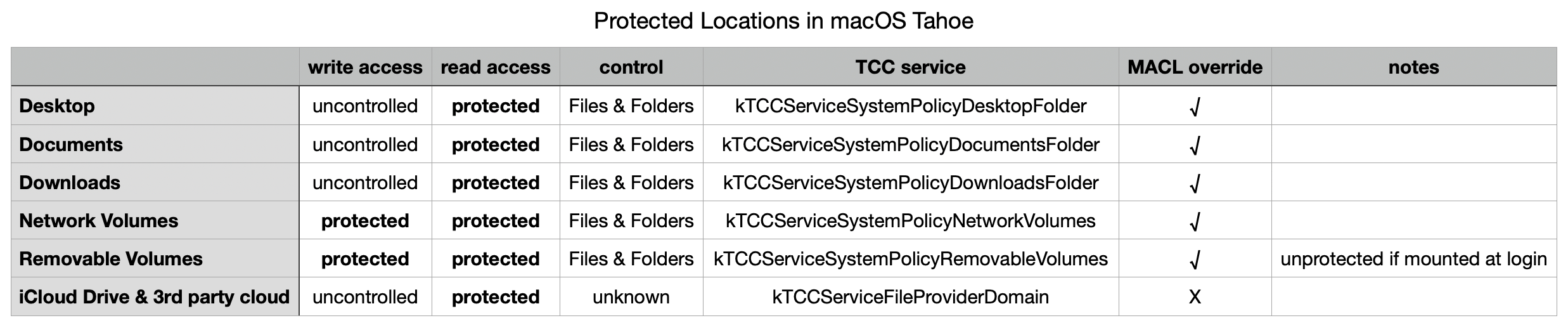
Even using a known and simple app like Insent, behaviours aren’t always consistent, and are susceptible to order effects and maybe even cosmic rays! There are also subtle differences between protected locations that can make generalisation unreliable. However, after extensive checks with Insent the following table gives an overview of protected locations in macOS 26.4.

The three common local folders ~/Desktop, ~/Documents and ~/Downloads are most consistent, with controlled read access, GUI controls in Files & Folders, and can be overridden by intent using MACL xattrs. Network volumes also appear to protect write access.

External volumes that are mounted automatically during startup don’t appear to count as being removable, but any that are mounted later have similar protection for both read and write, and can be overridden by intent using MACLs.

iCloud Drive and third-party cloud storage using the FileProvider API are more difficult to investigate, as I’ve still been unable to find any GUI control. It also doesn’t appear to be overridden by intent using MACLs, although its directories can still have com.apple.macl xattrs attached to them.

In addition to using any controls in Files & Folders, all TCC controls can be reset using tccutil, for example in
tccutil reset All co.eclecticlight.Insent
and that takes immediate effect, without a restart.

Restarting may be the best and perhaps only way (without disabling SIP) to reset MACLs. Although they can appear to persist at times, and the xattrs themselves don’t change, Adam Chester points out that tokens used by the sandbox are invalidated on rebooting, so maybe existing MACLs may not remain effective following a restart.

❌