Reading view

There are new articles available, click to refresh the page.

下个月的苹果 WWDC,假如 iCloud 变成 iClaw……?

距离苹果全球开发者大会 WWDC 还有一个月不到的时间,彭博社又送上关于苹果新系统的全新爆料:

苹果准备对 macOS 27 的界面进行一轮小幅调整,进一步完善「液态玻璃」设计语言的视觉表现。

但问题在于,对于如今的 Mac 来说,除了需要继续打磨的 UI,最迫切的更新显然远不止于此。

液态玻璃,缝缝补补又一年

对比 iPhone 以及 iPad,Mac 的性能和续航都更有盈余,实际上 macOS 26 的界面,视觉效果要更接近去年 WWDC 上面演示的「满血版」液态玻璃。

不过,液态玻璃立项之初,就是专门为 OLED 屏幕设计的,而目前所有 Mac 产品都在使用 LCD 屏幕,在呈现半透明、阴影和玻璃质感的方面,效果不如 OLED。

于是 macOS 26 的一些高透明效果和阴影,会导致列表和文字可读性下降——这也是「液态玻璃」被一直诟病的问题。

和 iOS 27 一样,macOS 27 也将仔细打磨液态玻璃,让它更接近苹果一开始设想的效果:兼顾透明度和可读性,同时进一步优化能耗表现。

不过,macOS 26 在 UI 上的问题根本不止于液态玻璃本身,不对齐的圆角、大量分散注意力的小图标,以及重新设计后辨识度大打折扣的应用图标,对可读性和美观层面都造成了一定的影响。

图源:Daring Fireball

苹果评论员 John Gruber 对于 macOS 液态玻璃的点评相当一针见血:作为一种「内容优先」的设计语言,液态玻璃让系统 UI 隐身于媒体之后,在 iPhone 上或许能行,但作为强调生产力而非内容消费的桌面平台,Mac 包含大量的窗口、组间,因此复杂性更高,仍然需要应用界面保证清晰的结构、分明的功能区域,和强辨识度的界面。

在 Stephen Lemay 接任设计总监一职后,这位在苹果服务近 30 年的老将表现让人期待——Lemay 以公司内部的高口碑和稳定发挥著称,或许也称得上是苹果内部目前最懂苹果系统界面的人。

在他的把控下,macOS 27,以及 iOS 27 如何扭转液态玻璃褒贬不一的口碑,回到实用性和美感并举的方向,确实值得期待。

但对于 macOS 来说,界面上的「拨乱反正」固然必要,却已经不是最重要的更新了。

对苹果而言,未来系统的更新有两条主线:一方面,优化系统稳定性,另一方面,则是为 Apple 智能预备好。

最好的 AI 载体,需要一个 AIOS

根据彭博社爆料,苹果打算为「Apple 智能」打造一个「Extensions」功能,允许用户更换第三方 AI 模型,例如 Google Gemini、Claude 等等。

Siri 除了会集成到邮件、短信、相册等应用,自己也会化身聊天机器人,成为一个单独的应用。更多 AI 功能还会覆盖文本、图像等生成与编辑任务。

但这些更新,说实话更多还是做 AI 的单点功能,并非系统级别的编排能力,并未能进一步发挥 Mac 硬件上的优势。

今年年初的龙虾热,让 Mac mini 这个前年才火过的产品,又再一次出圈,这次火到苹果自己也没库存了,「入门版」在官网彻底售罄。

Mac 和 Windows 在不少层面上互有胜负,但在 AI 的问题上,Mac 作为「最佳 AI 容器」的论断几乎毫无争议。

关于这个问题,爱范儿已经出过一篇文章详细讨论。简单来说,就是因为 Mac 不管是 UNIX 系统底层还是集成运存的硬件架构,都非常契合 AI Agent 和大模型的运行方式,并且由于 ARM 架构的特性,运行功耗低还静音,非常适合 AI 常驻。

这更像是「无心插柳柳成荫」,苹果其实一开始并没有围绕 AI 去打造自己的 Mac,却无意间完成了所有 AI 的技术储备,严格意义上说是一种「适配度优势」。

从这个角度看,macOS 即使什么都不做,本身 Mac 也已经是一个很好的 AI 平台。苹果完全可以走 App Store 的逻辑,让用户自己部署想要的第三方 AI 智能体,自己继续扮演「收过路费」的角色。

这确实也是苹果长期以来的做法:在移动互联网兴起之时,苹果没必要自己做搜索引擎和网购平台。而 AI 时代,大众的需求变化万千,有人需要一个能剪辑的 Agent,也有人需要一个搞科研的 AI,必须要靠第三方满足。

在今年 5 月的财报会议上,苹果特别提到了 AI 公司 Perplexity 的智能体产品 Personal Computer,认为这种产品很好利用了 Mac 平台的能力。

既然觉得人家做得不错,何不自己上手做一个「iClaw」?

第三方 AI 百花齐放固然很好,这和苹果自己做一个却并不冲突,并且很多事情,只有第一方能做得好,能做得让人放心。

第三方应用再强,也很难自然获得系统级的上下文,苹果不可能将最底层的权限开放,只有系统底层自己能对文件位置、窗口状态、本地个人数据知道一清二楚,而 AI 应用的体验,往往就卡在了这些权限边界之上。

其实苹果并不是没有这种想法,那个迟迟没能推出的 AI Siri,其实就有着类似的构想,可以读取用户的文本和应用窗口,可以跨应用进行检索和处理。

对比 iPhone 和智能手机,AI 应用的主流使用场景其实还是在于桌面端,这也是为什么 Mac 能成为今年最热门的 AI 硬件,但苹果却没有继续在 macOS 的系统层面,赋予 Mac 足够分量的原生 AI 能力。

隔壁的 Windows 阵营在这方面要激进不少,系统层面有「Recall」和 「Copilot」这样的 AI 功能入口,联想和荣耀这样的 OEM 厂商,甚至为产品准备了开箱即用的龙虾应用,砍掉了门槛,并因为和本地深度集成,能节省不少 Token。

微软自己也已经坐不住了,据悉正在将原本只能你问我答的 Copilot,改造成一个 24/7 在线的数字分身,实现类龙虾能力。

对比 OpenAI、Anthropic 或者 Google,说实话我更愿意将这些敏感的数据,交给在隐私保护方面更上心的苹果。

更深一步,macOS 最缺少的不是 AI 应用,而是 AI 时代的「基建」。Mac 已经准备好了 AI 大有可为的土壤,但 macOS 还没能成为一个真正意义上的「AI 系统」。

苹果不仅可以做自己的 AI 智能体能力,也需要把模型、权限、上下文、自动化和跨应用任务重新梳理,让系统成为 AI 工作流的原生中介,成为一个掌控所有 AI 的「任务集散中心」。

就像是智能体运行所需要的「个人知识库」,现在我们用文件夹也可以搭建,但它还不够好用。

苹果完全可以自己承接这个环节,用户靠 Mac 自带的工具搭建、生成一个「知识库」文件,它可以和 Apple ID 绑定,利用 iCloud 流转,这样不管用哪一家的智能体服务,都能快速调用自己的知识库,不用从头开始配置,同时还能保证自己的内容被苹果的隐私政策保护。

并且,这些配置的模块都能整合进入 Apple 的订阅系统之中,iClaw 和 Token 也能成为苹果在 AI 时代提供的增值服务。

iClaw 示意图,AI 生成

实际上,苹果已经开始了这样的进程。在 macOS 26.1 中,苹果集成了「模型上下文协议」,一个面向不同 AI 的通用开放标准,Agent 可以通过这个协议,访问用户的个人数据;苹果的基础模型框架,让 macOS 开发者可以调用系统内置的基础模型,零网络延迟,零 API 费用,数据不离开设备。

作为计算机图形系统的祖师爷,macOS 在过去的数十年间都是围绕「应用」构建的桌面系统。

在接下来十年,应用和图形界面还会是人机交互的主流,因此 macOS 27 要将界面风格修缮得更好,当然非常重要。

但未来五十年甚至更远,AI 都会成为无可避免的主旋律,macOS 不可避免会被进一步改造,成为一个围绕「任务」运转的 AIOS。

#欢迎关注爱范儿官方微信公众号:爱范儿(微信号:ifanr),更多精彩内容第一时间为您奉上。

Networking changes coming in macOS 27

Apple seldom gives advanced notice of significant changes coming in the next major version of macOS, before its first beta-release at WWDC. One significant exception to this are changes to networking that could impact enterprise users. This year, with just over six weeks to go before that first beta of macOS 27, we already have two warnings of what might be coming.

AFP and network storage

Apple made SMB its primary file-sharing protocol in OS X 10.9 Mavericks, over 12 years ago, and has repeatedly told us that support for its predecessor AFP will be removed in the future. It repeated those warnings with macOS Sequoia 15.5, but still hasn’t confirmed when AFP will be lost.

Those who are most likely to be affected by this are still using Time Capsules, or elderly NAS systems that don’t support SMB3. As removal of AFP support won’t be retrospective, provided that none of your Macs will be upgraded to macOS 27, you’ll still be able to use AFP for your file shares and Time Machine backups. But if you have an Apple silicon Mac and AFP support is dropped from macOS 27, that would leave you unable to upgrade without replacing your network storage.

TLS and servers

Most recently, Apple has warned that a future version of macOS, and its device OSes, will require connections to certain servers to be made using at least TLS 1.2, with additional requirements. I’m grateful to Rich Trouton’s Der Flounder blog for drawing attention to this.

Although Apple carefully avoids being too specific, it warns that this change could come “as early as the next major software release”, although one of the purposes behind its support article is to gauge the impact the change might have on its enterprise customers. If there would be major problems, it may decide to delay its introduction.

This change is more technical, and largely applies to servers involved in supporting MDM, DDM, Automated Device Enrolment, app distribution and installation, and Apple software updates. Fortunately, if you run a local Content Caching server, that won’t be affected.

Unlike the removal of AFP, it’s far harder to tell whether a connection to a server complies with the new rules, which require:

  • support for TLS 1.2 or later, with TLS 1.3 recommended,
  • use of ATS-compliant ciphersuites,
  • presentation of valid certificates meeting ATS standards.

The most reliable way to check is to audit connections made to each server, by screening log entries from the Mac or device. That’s further complicated by the fact that the log doesn’t normally gather the information that’s required. So the first step is to install a network diagnostics logging profile available from Apple. The support article explains how to collect a logarchive using sysdiagnose, and provides a monster predicate to extract relevant entries:
"p=appstoreagent|appstored|managedappdistributionagent|managedappdistributiond|ManagedClient|ManagedClientAgent|
mdmclient|mdmd|mdmuserd|MuseBuddyApp|NanoSettings|Preferences|profiled|profiles|RemoteManagementAgent|
remotemanagementd|Setup|'Setup Assistant'|'System Settings'|teslad|TVSettings|TVSetup|XPCAcmeService AND s=com.apple.network AND m:'ATS Violation'|'ATS FCPv2.1 violation'"

And yes, Apple is encouraging system administrators to copy and paste a command into Terminal, because there’s no GUI app in macOS that could be used to do that, although you can use it in Ulbow, and I suspect in LogUI with a little modification.

If you’re within the scope of this proposed change, you’ll need to read Rich Trouton’s account, and Apple’s full article. I wish you the best of luck. As with AFP, this change shouldn’t apply retrospectively.

Timescale

  • 27.0 developer beta due on 8 June 2026
  • 27.0 public beta due around 8 July 2026
  • 27.0 release most probably in mid-September 2026, only five months away.

Planning for macOS this summer

With macOS Tahoe already more than half way through its cycle, and Apple’s WWDC announced, now is a good time to plan your Mac’s calendar. This article peeks at what lies ahead for macOS over the next six months.

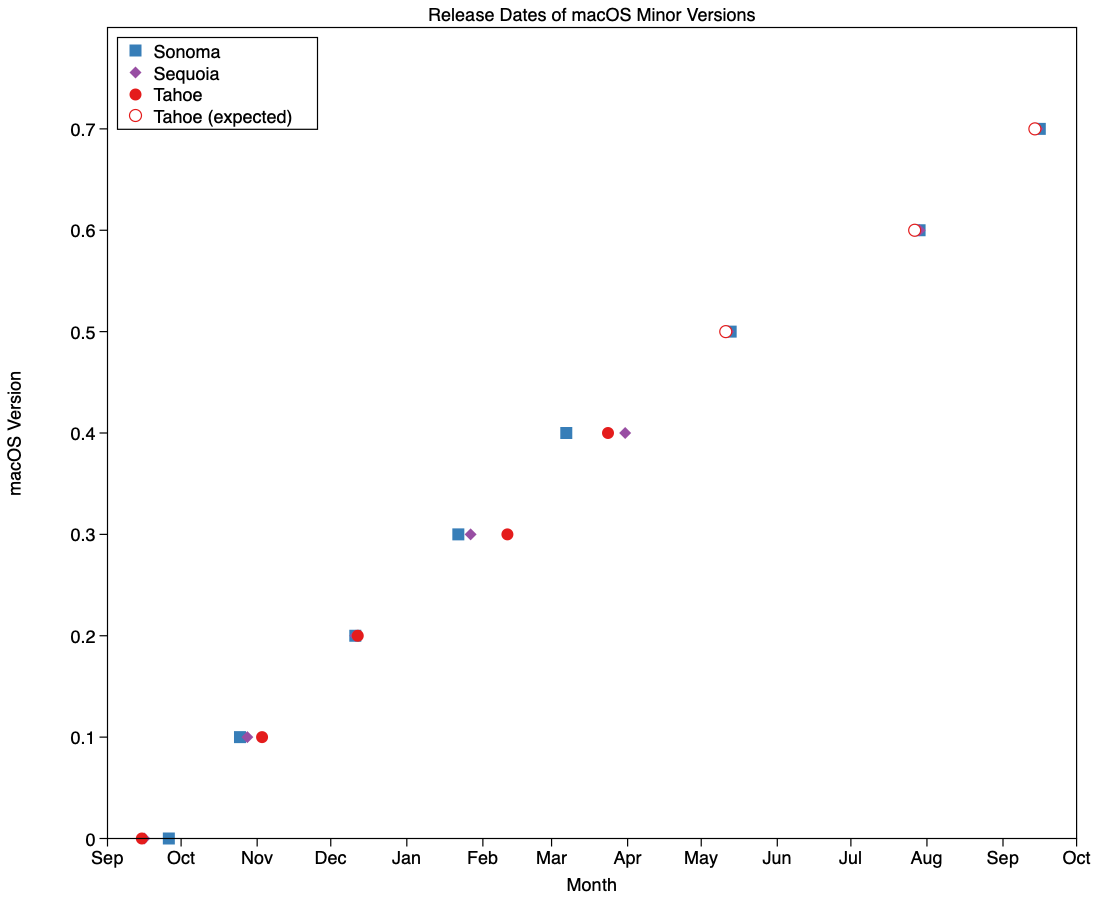
Since the pandemic disruption settled, minor version updates to macOS have become more regular. Looking across Sonoma, Sequoia and Tahoe, greatest variation in their timing has been in their x.3 and x.4 releases, that have varied between 22 Jan – 11 Feb, and 7 – 31 March, respectively. x.5 to x.7 have been more consistent, as they’re more tightly constrained by events including WWDC, the subsequent new beta season, and for some maybe even a vacation.

Those are summarised in the chart above, together with my predictions for the dates we should expect the remaining minor versions of Tahoe. Those should bring its cycle to look like:

  • 26.0 – 15 September 2025
  • 26.1 – 3 November 2025
  • 26.2 – 12 December 2025
  • 26.3 – 11 February 2026
  • 26.4 – 24 March 2026
  • 26.5 – 11 May 2026
  • 26.6 – 27 July 2026
  • 26.7 – 14 September 2026.

Where my forecasts are given in italics. Patch releases, such as 26.3.1, and BSIs occur outside that schedule. While we’re on the topic of BSIs, all indications are that Apple only intends to provide them for the current release of macOS, as it did with RSRs, which means that those Macs staying with Tahoe from 26.7 will no longer get them. It’s unclear how significant a loss that might prove.

WWDC this year is being held between 8-12 June, and will almost certainly bring the first developer beta release of macOS 27.0 (and all Apple’s other OSes). That’s likely to be made available to public beta-testers in early July. This is particularly significant this year, as it will be the first version of macOS to run exclusively on Apple silicon Macs.

For those with Intel Macs, or intending to remain with older versions of macOS, likely dates of release for scheduled security updates to Sonoma and Sequoia are:

  • 15.7.6, 14.8.6 – 11 May 2026
  • 15.7.7, 14.8.7 – 27 July 2026
  • 15.7.8, 14.8.8 – 25 August 2026
  • 15.8 – 14 September 2026.

The date at the end of August is possible, but less likely than the previous two. So far this year, security updates for Sonoma and Sequoia have been keeping reasonably close to those for Tahoe, in terms of vulnerabilities addressed, so the security gap between them has been rather less than in previous cycles.

However, the important message here is that it’s unlikely that Sonoma will receive any further security updates after the end of August this year. If your Mac is capable of being upgraded to Sequoia, now is the time to plan that, or it’ll all too quickly be September and your macOS will have lost its last support.

Similarly, if you’ve been holding back from upgrading to Tahoe in the hope that it will undergo interface improvements, I’m afraid that’s now looking increasingly unlikely. If it’s an Intel Mac capable of running Tahoe, there’s little point in avoiding making that decision any longer. There’s only limited time and scope left for improvement in macOS 26, with most engineers now more focussed on getting macOS 27 ready for WWDC.

Key forecasts

  • 26.5, 15.7.6, 14.8.6 – 11 May 2026
  • 27.0 developer beta – 8 June 2026
  • 27.0 public beta – 8 July 2026
  • 26.6, 15.7.7, 14.8.7 – 27 July 2026
  • 27.0, 26.7, 15.8 – 14 September 2026.

❌