Normal view

There are new articles available, click to refresh the page.
Today — 13 December 2025Main stream

A Trickle of Aid Reaches a Captured, War-Ravaged City in Sudan

13 December 2025 at 01:46
A local group negotiated permission from the paramilitary force controlling El Fasher, offering a rare glimpse into conditions after a massacre.

© Malam Darfur Peace and Development

A photograph released by Malam Darfur Peace and Development showing residents receiving sacks of millet the group delivered to El Fasher, in Sudan, on Dec. 2.
Before yesterdayMain stream

House Gives Bipartisan Approval to $900 Billion Defense Bill

11 December 2025 at 09:24
The legislation codifies President Trump’s agenda but includes a few measures challenging his policies and insisting on more consultation with Congress.

© Kenny Holston/The New York Times

Speaker Mike Johnson at the Capitol on Wednesday.

Nursing Home Owners Pocketed Millions as Patients Suffered, Report Says

11 December 2025 at 07:36
As the owners intentionally understaffed two New Jersey facilities and diverted Medicaid money for their own use, residents in the homes “suffered unnecessarily,” the state comptroller said.

© Lucas Jackson/Reuters

The owners of the Hammonton Center for Rehabilitation and Healthcare and Deptford Center for Rehabilitation and Healthcare were accused of purposely understaffing the homes.

三星三折叠上手:折起是手机,展开竟然是…电脑?

By: 马扶摇
2 December 2025 at 14:45

谁都没想到,传说了快两年的三星三折叠手机,就在 12 月一个憋闷的早晨默不作声的通过 Samsung Newsroom 发布了。

与早期的预测相同,三星为这款三折叠(tri-fold)产品起了一个波澜不惊的名字:Galaxy Z TriFold,没有跟随 Z Fold 系列的编号,相当于另起炉灶、重另开新线了。

自此,华为 Mate XT 系列终于不再是三折叠市场的独苗,而对于消费者来说——有竞争的市场,才是有进步的市场。

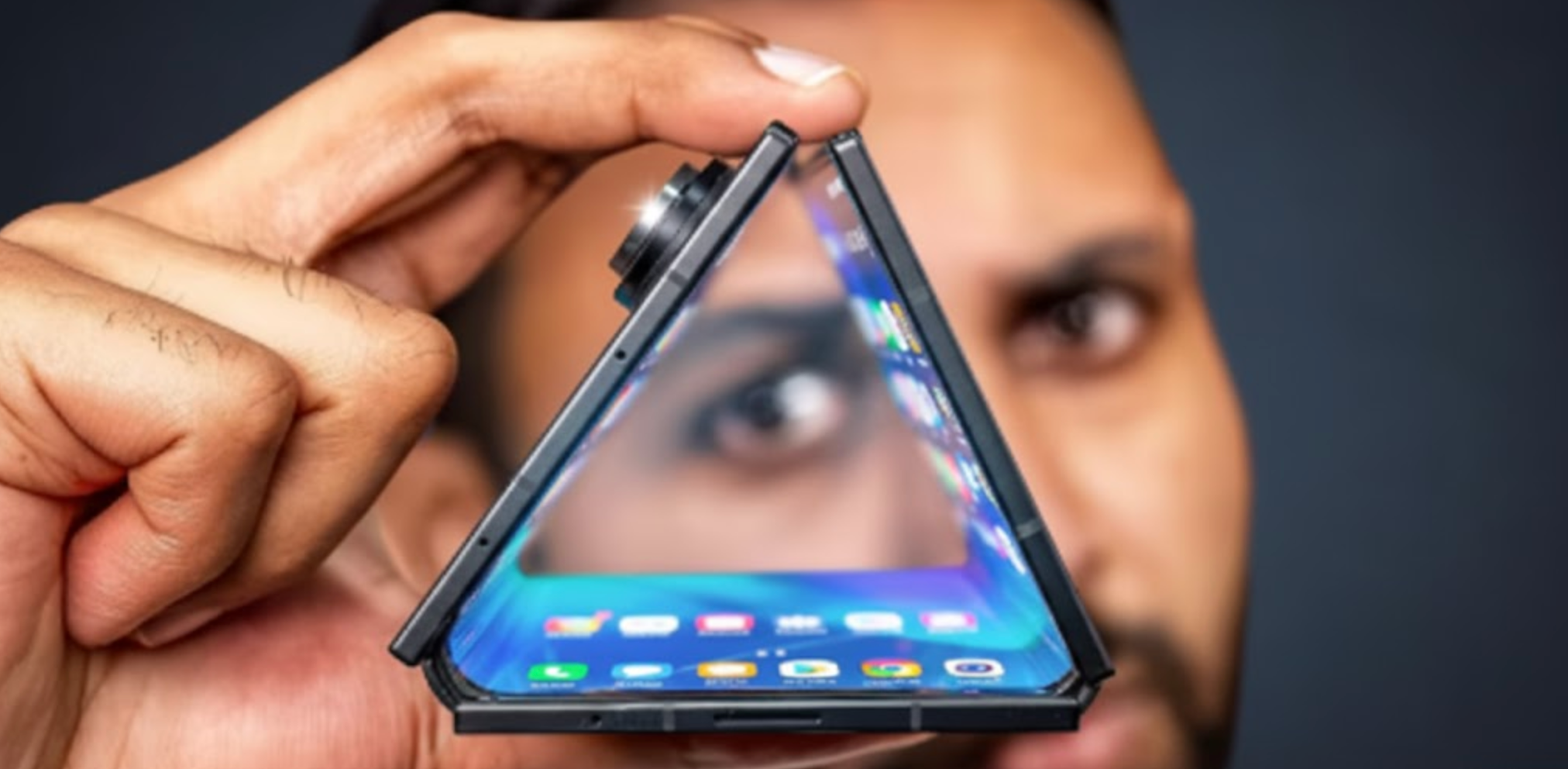
只不过它虽然叫做 Galaxy Z TriFold,但它的展开方式却不是「外翻内折」的 Z 字型铰链,而是类似叠被子一样的 G 型铰链——内屏的两侧向中间合拢,然后才能翻转使用背部的外屏。

▲ Mrwhosetheboss 上手

▲ Mrwhosetheboss 上手

这样一来,Galaxy Z TriFold 就只有「完全展开」和「完全关闭」两种使用形态,要么用分辨率 2160 x 1584 的 10 寸内屏,要么用 6.5 寸的外屏。

虽然它少了像华为 Mate XT 和 XTs 的双折叠使用形态,不过根据我们评测 XTs 时的实际经验,「三折叠手机的双折叠形态」并不是那么的常用,Galaxy Z TriFold 这样的取舍并没有什么问题。

为了容纳两侧厚度不同的机身,三星也对铰链进行了相当多工艺上的改进。

Galaxy Z TriFold 上面的「Armor FlexHinge」采用了双轨结构,让铰链两边的机身协同移动,即使重量不同,也能实现流畅和稳定的开合。

▲ Mrwhosetheboss 上手

▲ Mrwhosetheboss 上手

此外,Galaxy Z TriFold 也用上了国行 W 系列的陶瓷。它的 6.5 寸外屏为康宁大猩猩玻璃陶瓷 2.0,两侧的机身背板则采用了「陶瓷玻璃纤维增强聚合物背板」,相比 Z Fold7 的玻璃显著增强了抗裂性——

但坏处也显而易见:Galaxy Z TriFold 的三块亮面背板是毋庸置疑的指纹收集器,再加上它只有黑色一种配色,随用随擦是在所难免的了。

此外,三星也对折叠方式做出了规范,系统会在折叠的时候给出视觉提示,内屏没有完全展开的情况下是无法使用的,这和七月份泄露的系统预览图基本一致:

▲ Mrwhosetheboss 上手

▲ Mrwhosetheboss 上手

不过 Galaxy Z TriFold 虽然没有严格意义上的双折叠模式,但三星保留了翻开一侧屏幕用后摄自拍的功能,在功能性方面是没有什么严重缺失的。

▲ Mrwhosetheboss 上手

Galaxy Z TriFold 的内外屏规格均为三星 Z 系列的动态 AMOLED 2X,10 寸内屏的峰值亮度为 1600 尼特,背部 6.5 寸的外屏则可以达到 2600 尼特,规格几乎与 Z Fold7 如出一辙。

而和 Z Fold7 如出一辙的不只是外屏规格,Galaxy Z TriFold 同样搭载着 2 亿像素 f1.7 主摄、1200 万像素超广角和抽象的 1000 万像素 3 倍长焦——有这样的「扎实」参数,几乎不用期待它的拍照表现了。

▲ Mrwhosetheboss 上手

▲ Mrwhosetheboss 上手

此外,Galaxy Z TriFold 同样用着 Z Fold7 同款的骁龙 8 Elite for Galaxy 定制版处理器,无论何种容量都标配 16GB 内存,只有 512GB 和 1TB 两种 SKU,相比 12+526GB 的 Z Fold7 稍显厚道。

比较值得注意的是,三星在 Galaxy Z TriFold 上采用了一些新的材质工艺。比如这次除了传统的铝合金边框之外,Galaxy Z TriFold 的中轴盖板从铝换成了钛金属,可以有效防止面积更大的盖板上出现划痕。

现阶段,在「上万元」这个超高端价位段里,(除了 iPhone)怎么用软件来辅助提升硬件能力才是厂商的重点,而三星作为目前少数几个从手表到电视都有涉猎的「全生态」玩家之一,应该能为我们交出一份不错的答卷。

其中最主要、和华为 Mate XTs 差别最大的,就是三星 OneUI 里面引以为傲的 DeX 模式了。

▲ Mrwhosetheboss 上手

▲ Mrwhosetheboss 上手

三星在 Galaxy Z TriFold 上首次允许在不外接显示器的情况下激活 DeX 模式,在 10 寸的内屏上打开一套完全基于键鼠的准电脑级桌面,这一点要比 Mate XTs 上的「自由多窗」模式更彻底一些,用起来也的确更像小电脑了。

▲ Mrwhosetheboss 上手

▲ Mrwhosetheboss 上手

此外,Galaxy Z TriFold 的 DeX 模式还支持像 Windows 和 macOS 那样添加第二块虚拟桌面,用户可以快速在两个桌面的应用组之间切换,毕竟有了 16GB 就是比较豪爽。

只不过华为 Mate XTs 支持手写笔,而坚持深耕手写笔操作多年的三星似乎在慢慢放弃这条路。Galaxy Z TriFold 和今年的 Z Fold7 一样,同样是从物理上移除了手写笔的检测硬件,支持的外设只剩下了蓝牙键鼠。

▲ Mrwhosetheboss 上手

▲ Mrwhosetheboss 上手

只不过如果真的要用三折叠移动办公的话,一个专门的鼠标蓝牙还是要比华为 M-Pen 3 的「空鼠模式」实用许多的,当然,Mate XTs 也是能外接鼠标的。

此外,得益于谷歌和 OneUI 的双重加持,我们预计 Galaxy Z TriFold 对于软件的超宽屏适配会有一个比较好的表现——当然,仅限于规范开发的国外 app。至于极个别国产毒瘤 app 连华为都不做适配,自然也不会适配三星了。

▲ Mrwhosetheboss 上手

▲ Mrwhosetheboss 上手

目前,三星 Galaxy Z TriFold 的售价尚未公布,海外官网也仅仅显示从 12 月 9 日 10 点起接受预定。

根据三星的介绍,这款三折叠产品不会全球开售,而是 12 月 12 日在韩国首销,后续推广至中国、新加坡、阿联酋等区域,美版则要等到 2026 年第一季度。

不过好消息是,目前国行三星商店已经上线了新品预购入口,三星也在盖乐世社区表示将于 12 月 9 日早 10 点开启预售,但国行售价仍未公布。

根据部分海外博主的上手预测,Galaxy Z TriFold 最终的售价可能会落在 2400 美元左右(约合人民币 17000 元),国行的最终定价有希望落在 17999 档,但更多预测都怀疑三星会上调至 2 万元左右。

总之,作为目前全球三折叠手机市场的唯二玩家,华为和三星各自会在三折叠这个形态里玩出什么花样,还是相当让人期待的。

无论是 One UI vs 鸿蒙,还是 DeX vs 自由多窗,怎么让这些价格动辄两万多的「天顶星旗舰」实现软件带动硬件、戴着镣铐跳出最漂亮的舞蹈,才是真正的重中之重。

#欢迎关注爱范儿官方微信公众号:爱范儿(微信号:ifanr),更多精彩内容第一时间为您奉上。

爱范儿 | 原文链接 · 查看评论 · 新浪微博


周末新到索尼电视,发现投屏好难用,求解决方法!

By: rainfy
4 November 2025 at 14:13
rainfy:

电视是 7 系,自带的乐播投屏,播放 5 分钟之后就开始收费了。但是我记得拆新机,第一次用投屏的时候没有限制,但是立刻让我更新乐播,更新后就收费了。想回退到最开始状态,失败了~~ 换成了当贝投屏,不知道为什么,时不时会投不上,把当贝投屏的名字换一下又可以投屏了,体验还是不够好。 求解,有无其他解决方案?

The way of the Spartans 2

By: hoakley
2 November 2025 at 20:30

In the first of these two articles showing paintings of Spartans from the city-state in ancient Greece, I illustrated some of the laws laid down by the founder of its warrior tradition, Lycurgus.

When those laws were all in place and in practice, Lycurgus told an assembly of all Spartans that he needed to return to the oracle at Delphi to consult on one final measure. He made the Spartans take an oath to abide by these unwritten laws until his return, then departed for Delphi. There he obtained the approval of the oracle, which he recorded in writing and sent back to Sparta.

palmalycurgusgivinglaw
Jacopo Palma il Vecchio (c 1480-1528) or Bonifazio Veronese (1487-1553), Lycurgus Gives the Laws to the Spartans (date not known), oil on canvas, 209.5 x 209.5 cm, location not known. Wikimedia Commons.

This undated painting of Lycurgus Gives the Laws to the Spartans has been attributed to either Jacopo Palma il Vecchio (c 1480-1528) or Bonifazio Veronese (1487-1553). It shows an elderly Lycurgus apparently giving a volume of written law to the Spartans in the marketplace, but could equally be of Lycurgus addressing his last assembly of all Spartans before he left for his second visit to Delphi.

blondellycurgusofsparta
Merry-Joseph Blondel (1781–1853), Lycurgus of Sparta (1828), oil, dimensions not known, Musée de Picardie, Amiens, France. Wikimedia Commons.

Merry-Joseph Blondel’s portrait of Lycurgus of Sparta from 1828 also shows him as an older man, here with written scrolls on his right thigh. Given the oral nature of Lycurgus’ laws, this can only be interpreted as the moment that Lycurgus has written his message reporting the oracle’s approval of his laws, ready to send it back to the city.

Lycurgus then did something extraordinary in its selfless ingenuity: having put the whole of Sparta under oath to keep his laws until his return, he then starved himself to death, ensuring that oath could never expire. The laws of Lycurgus lasted through fourteen kings, and five hundred years, without change, until gold and other spoils of war entered Sparta during the reign of King Agis.

The single most celebrated event in Spartan history is the Battle of Thermopylae in 480 BCE, in which three hundred Spartan soldiers, with 700 Thespians and 400 Thebans, were claimed to have kept over one hundred thousand Persians at bay for three days. This is the more remarkable for the fact that the Spartans and their supporters fought to the death, following which the Persians overran Boeotia and captured Athens. It is thus an example of self-sacrifice in the face of overwhelming odds, resulting in most noble defeat.

davidleonidasthermopylae
Jacques-Louis David (1748–1825), Leonidas at Thermopylae (1814), oil on canvas, 392 × 533 cm, Musée du Louvre, Paris. Wikimedia Commons.

The only major painting that I have been able to discover of this is Jacques-Louis David’s Leonidas at Thermopylae (1814). Leonidas, the Spartan King and commander of the force, is at the exact centre of the painting, the viewer fixed in his emotionless gaze. Around him are his three hundred Spartan warriors, with supporting trumpeters, a lyre hanging on the tree, and laurel crowns being handed round.

David leaves some clues to his narrative in inscriptions, which have unfortunately become barely legible. A soldier has climbed up to carve an inscription in Greek at the upper left, the word HERAKLEOS appears on a plinth to the left of Leonidas, and by his right foot is an anachronistic piece of paper bearing more Greek words.

More subtle, perhaps, are the small groups driving pack animals along a narrow path at the upper right: the Persians were shown a mountain path around the narrow pass at Thermopylae, enabling them to gain an advantage over the Spartans.

Recent artistic interest in Thermopylae seems to have started around 1960, and first reached popular culture in Rudolph Maté’s 1962 movie, The 300 Spartans, which has been interpreted as comment on the Cold War at the time. This in turn inspired Frank Miller’s graphic novel 300, which was first published in 1998, and made into a highly successful movie of the same name by Zack Snyder, released in 2006.

In contrast, Sparta’s three wars against the state of Messenia are little-known. Gustave Moreau’s fascination for esoteric ancient history led him to start painting a scene from the Second Messenian War in about 660-650 BCE.

moreautyrtee
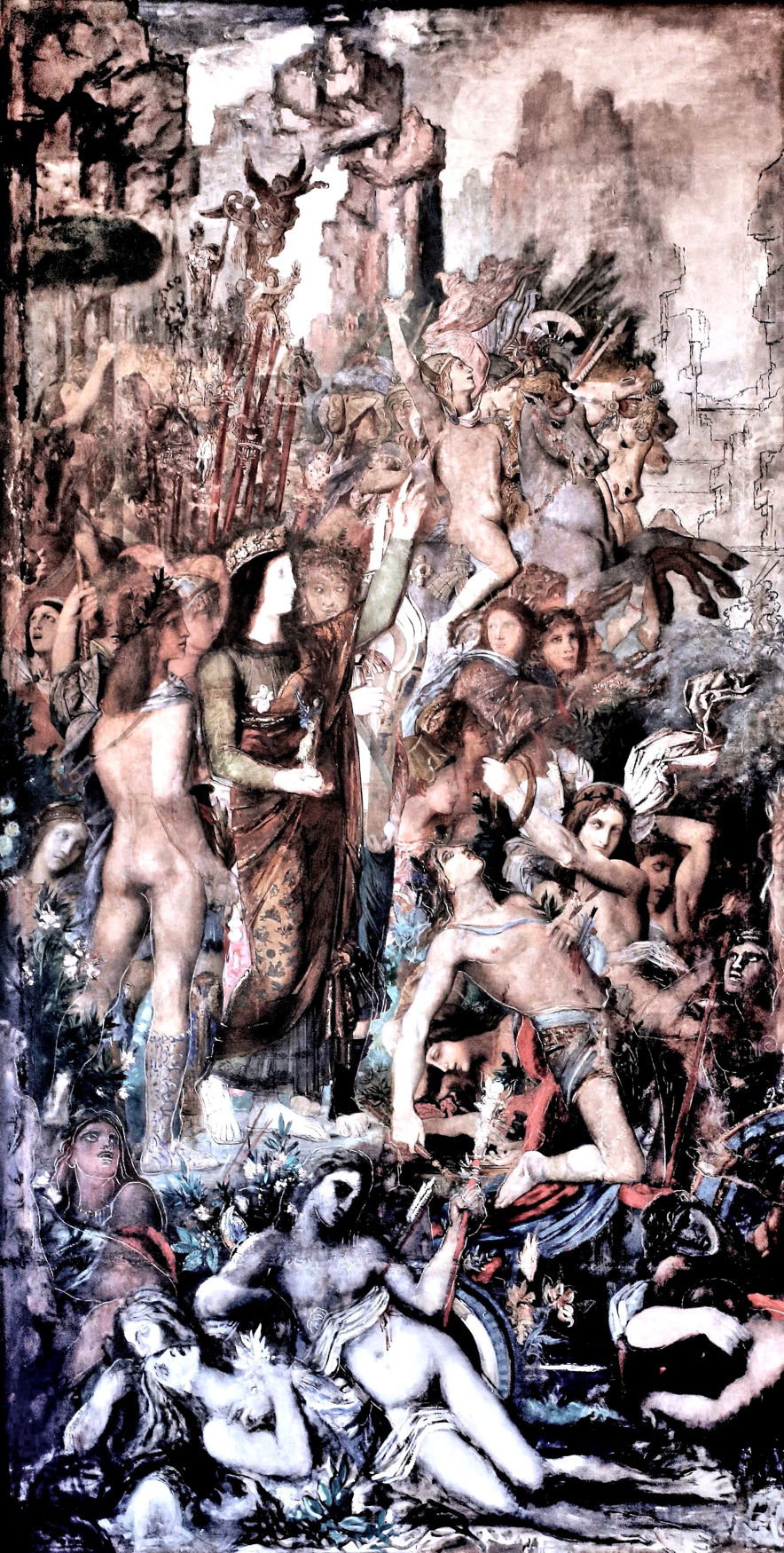
Gustave Moreau (1826–1898), Tyrtaeus Singing During the Combat (1860-, unfinished), oil on canvas, 415 x 211 cm, Musée National Gustave-Moreau, Paris. Image by jean louis mazieres via flickr, https://www.flickr.com/photos/mazanto/13943362382/in/photostream/

Moreau seems to have worked on Tyrtaeus Singing During the Combat in the early 1860s, abandoned it, then returned to have it enlarged in about 1883, and work it further for a period, before finally giving it up altogether.

moreautyrteed1
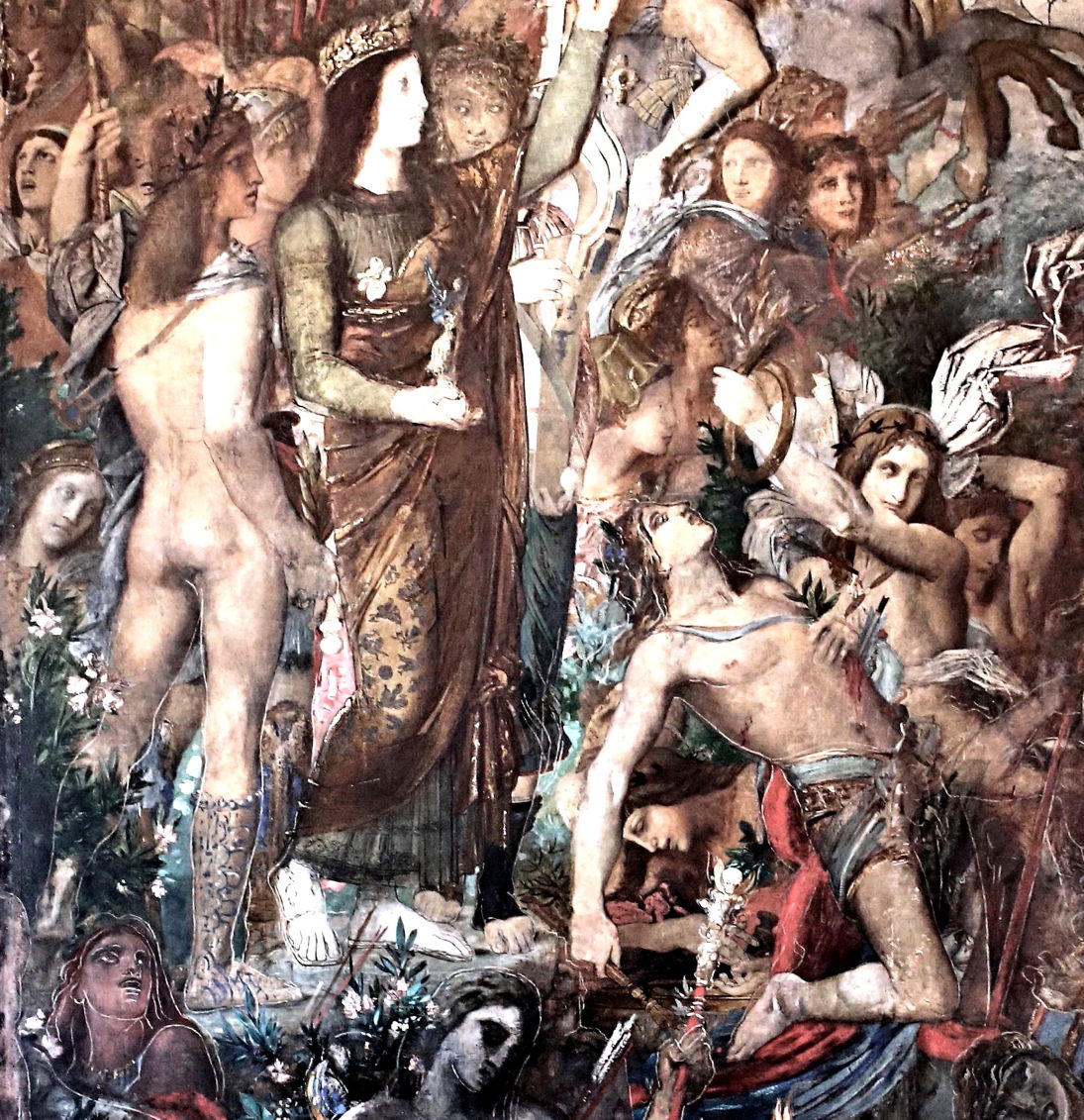
Gustave Moreau (1826–1898), Tyrtaeus Singing During the Combat (detail) (1860-, unfinished), oil on canvas, 415 x 211 cm, Musée National Gustave-Moreau, Paris. Image by jean louis mazieres via flickr, https://www.flickr.com/photos/mazanto/13943362382/in/photostream/

This detail shows much of his original painting, which is full to bursting with androgynous and near-naked young men. The priestess-like figure to the left of the centre appears to be Tyrtaeus, an elegiac Greek poet whose verse exhorted the Spartans to fight bravely against the Messenians. He is shown here in action, inspiring the young Spartan warriors to victory. The strange collage-like effect is a combination of Moreau’s emphasis on establishing the form of his figures, and I suspect edge-enhancement in the image’s processing.

Spartans also played a central role in the war with Troy, the result of Paris’s abduction of Helen, a Spartan woman whose origins are the subject of dispute. Later Roman accounts, the basis of most more recent paintings, claim she was the outcome of the union of Leda, wife of Tyndareus, King of Sparta, with Zeus, in the form of a swan. Those dating back to the time of the Cypria and the Epic Cycle are more complex, and make Helen’s mother Nemesis, the personification of public disapproval.

In the Greek version, Zeus appeared to Leda as a swan. Both he and Tyndareus impregnated Leda at about the same time, but as Zeus was then in the form of a swan, her twin pregnancies resulted in two eggs: one hatched into Castor, who was human because his father was Tyndareus; the other hatched into Polydeuces (Latin Pollux), who was divine as his father was Zeus. Despite their different fathers, the twins were known as the Dioskuroi, who were later to rescue Helen.

anonledaswan
Unknown follower of Leonardo da Vinci (1452–1519), Leda and the Swan (early 1500s), oil on panel, 131.1 × 76.2 cm, Philadelphia Museum of Art, Philadelphia, PA. Wikimedia Commons.

This interpreted copy of Leonardo da Vinci’s Leda and the Swan, probably painted in the early 1500s and now in the Philadelphia Museum of Art, summarises the later account of Helen’s unique birth, with two eggs and a fourth baby, Clytemnestra. Later paintings, perhaps wisely, concentrated on Leda and Zeus, and skipped the incredible egg phase altogether.

According to most accounts, when Helen was still under age, she was abducted by Theseus, the ‘hero’ who abandoned Ariadne on the island of Naxos. Helen’s adopted brothers the Dioskuroi were unimpressed by this, so they paid Theseus a visit, and persuaded him to return their step-sister. In return for her son’s offence, Aethra, mother of Theseus, was made Helen’s slave, and wasn’t freed until after the fall of Troy many years later.

gassieshelendelivered
Jean-Bruno Gassies (1786–1832), Castor and Pollux rescuing Helen (1817), oil on canvas, 113.2 x 145.4 cm, location not known. Wikimedia Commons.

Jean-Bruno Gassies’ painting of Castor and Pollux Rescuing Helen was runner-up in the Prix de Rome in 1817. The woman being escorted away at the left may have been intended to be Theseus’ mother Aethra, although she appears remarkably young.

Helen’s beauty only grew over time, and her hand was sought by many suitors in a contest organised by her brothers Castor and Polydeuces. Among those suitors were many prominent figures, including Odysseus. Helen’s father, King Tyndareus, feared that in choosing between her suitors he would offend and cause trouble. The suitors therefore agreed to swear an oath, under which they would all defend the successful suitor in the event that anyone should quarrel with them, the crucial Oath of Tyndareus. Under that, Menelaos, King of Sparta, was chosen as Helen’s husband.

Helen was the bribe offered by Aphrodite to Paris for judging her the winner of the golden apple of discord. For nine days, Helen’s husband Menelaos entertained Paris as a guest, while Paris plied her with gifts. On the tenth day, Menelaos was called away to Crete for his grandfather’s funeral. He left his house in Helen’s charge, reminding her to ensure their guests were well cared-for, although clearly not in the way that Paris was intending.

tintorettorapehelen
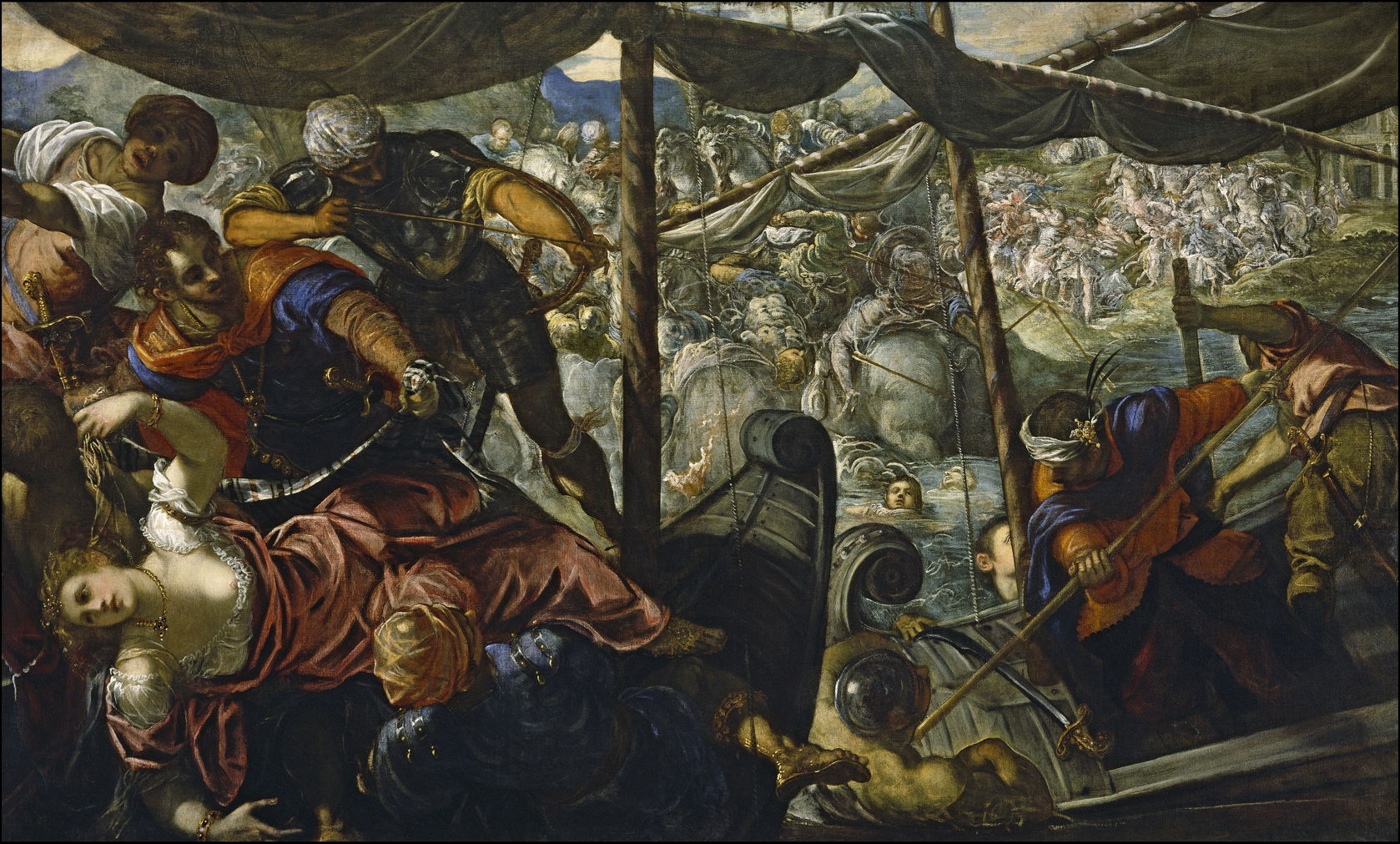
Tintoretto (1519–1594), The Rape of Helen (1580), oil on canvas, 186 x 307 cm, Museo Nacional del Prado, Madrid, Spain. Wikimedia Commons.

For Tintoretto, The Rape of Helen (1580) was nothing short of war. As an archer is about to shoot his arrow, and another Trojan fends off attackers with a pike, Helen, dressed in her finery, is manhandled onto Paris’s ship like a stolen statue.

Thus the Spartans were at the centre of the Trojan War.

The way of the Spartans 1

By: hoakley
1 November 2025 at 20:30

For all the untold number of paintings of classical myths, there are but a tiny number of works that strive to show historical events and scenes in the great classical civilisations. Even fewer of those show the most anomalous of the classical cultures, that of Sparta. Yet in recent years interest in Sparta, the Spartans, and their extreme way of life has risen, and is reflected in a wealth of modern imagery in graphic novels, movies, and computer games.

This weekend I look at some of the more significant paintings made of the Spartans prior to 1900.

Sparta was the capital of a city-state in ancient Greece, founded as a monarchy in about 930 BCE. The founder of its renowned warrior tradition was Lycurgus, who lived some time between 900-800 BCE and laid down much of the law and institutions of the Spartan state, although he refused to be its king.

delacroixlycurgusconsultingpythia
Eugène Delacroix (1798–1863), Lycurgus Consulting the Pythia (1835-45), oil on canvas, 32.8 x 41.2 cm, University of Michigan Museum of Art, Ann Arbor, MI. Wikimedia Commons.

Before Lycurgus implemented his reforms, he visited the Oracle at Delphi, who told him that the state which observed his laws would become the most famous in the world. Pythia, the high priestess at Delphi, is shown in Eugène Delacroix’s Lycurgus Consulting the Pythia (1835-45) listening intently to Lycurgus, before giving her prophesy.

Lycurgus was born into a Spartan family, and it’s most probable that he was the son of a reigning king of Sparta who lost his life when he was stabbed with a butcher’s knife as he intervened in a riot. Lycurgus’ older brother Polydectes inherited the throne, but died shortly afterwards.

Polydectes’ wife was pregnant at the time, so Lycurgus could only reign until that child was born: if a boy, then the child would succeed to the throne. After eight months of Lycurgus’ rule, a son Charilaüs was born, and Lycurgus proclaimed him king. To allay suspicion that he might try to usurp the authority of the new king, Lycurgus left Sparta and travelled. This gave him the opportunity to visit other kingdoms to learn of the strengths and weaknesses of the laws and institutions of Crete, the Ionians, and Egypt.

Lycurgus resolved to revolutionise Spartan society by introducing a completely new regime. He therefore visited the oracle at Delphi to discover whether his ideas were sound. The high priestess addressed Lycurgus as “beloved of the gods, and rather god than man”, and endorsed his proposals, that she said would be the best in the world.

His next task was to win over the senior Spartans, so they would be happy to implement his laws. Once he had convinced many of them, Lycurgus got thirty of them to go into the marketplace at dawn, and with their weapons to strike terror into those who opposed the proposals. King Charilaüs first fled to a refuge, then returned to give Lycurgus his support.

The changes made to Spartan law, institutions, and society were fundamental and extensive. Lycurgus established a Council of Elders with twenty-eight senators, to ensure that no king could become a tyrant, and the state couldn’t drift towards democracy. Land was redistributed uniformly and equally in lots: 30,000 in the surrounding countryside of Laconia, and 9,000 in the city of Sparta.

Lycurgus withdrew all gold and silver coinage, leaving only iron in circulation. He then devalued that currency, so that being rich in it would require a large store-room full of heavy iron coins. This forced equality in terms of money and possessions, and helped banish superfluous arts and trades, killing all luxury. To ensure a communal life for the good of society as a whole, he introduced common messing, so that Spartans all ate in large groups, on a simple but healthy diet.

Wealthy Spartans grew incensed with these changes, and started to stone Lycurgus, who was forced to flee from the marketplace. One young Spartan, Alcander, managed to blind him in one eye before he reached safety. Rather than have Alcander put to death, Lycurgus took him in as a servant and companion, so the young man became his most devoted follower, and convinced other opponents to support the reforms.

In his Lives, Plutarch provides considerable detail of the diet provided by these common messes, the fact that Spartan boys attended them, and there learned to withstand others jesting at them.

Lycurgus didn’t put these laws into writing, but established an educational system to instil them into future generations. Other unwritten laws included the requirement for all laws to remain unwritten, and the avoidance of extravagance in property, by the use of common building materials and standards.

vaneverdingenlycurgus
Caesar van Everdingen (1616/1617–1678), Lycurgus Demonstrates the Benefits of Education (1660-62), oil on canvas, 167 x 219 cm, Stedelijk Museum Alkmaar, Alkmaar, The Netherlands. Wikimedia Commons.

The narrative in Caesar van Everdingen’s Lycurgus Demonstrates the Benefits of Education from 1660-62 doesn’t appear to relate directly to Plutarch’s text, but shows a young Lycurgus with a couple of young Spartan men, their hair cropped short.

The new laws also regulated marriages and births. As Spartan men were away on military expeditions much of the time, Lycurgus gave their wives sole control when their husbands were away, and the title of Mistress. He ensured that unmarried Spartan women kept healthy, by prescribing that they too undertook running, wrestling, throwing the discus, and the javelin.

Spartan society appears to have been distinctive, perhaps unique, among the many small states of ancient Greece for its dedication to a single product: the perfect (male) warrior. From cradle to grave, males were reared, educated, trained, and worked for the single task of fighting the state’s enemies.

Because Spartan women had the crucial role of producing infant warriors, and of keeping the state going while their menfolk were away for long periods training and fighting, they were highly valued in those roles. They were even encouraged to acquire supporting skills, that enabled two Spartan women to become victors in the Ancient Olympic Games. Lycurgus urged young Spartan girls to engage in wrestling, presumably so that they could defend the homeland when their menfolk were absent.

The process of turning a male baby into an adult warrior is known as agoge, and is detailed in this fascinating Wikipedia article.

eckersbergthreespartanboys
Christoffer Wilhelm Eckersberg (1783–1853), Three Spartan Boys Practising Archery (1812), oil on canvas, 81 × 63.8 cm, Den Hirschsprungske Samling, Copenhagen, Denmark. Wikimedia Commons.

Christoffer Wilhelm Eckersberg’s Three Spartan Boys Practising Archery (1812) shows three young boys progressing through their training in basic military skills.

lebarbierspartanwomangivingshield
Jean-Jacques-François Le Barbier (1738–1826), A Spartan Woman Giving a Shield to Her Son (date not known), oil, further details not known. Wikimedia Commons.

Once old enough and sufficiently skilled, a young man would be given his shield by his mother, as shown in Jean-Jacques-François Le Barbier’s A Spartan Woman Giving a Shield to Her Son. The mother’s instructions would have been for her son to return either with his shield, or on it: he had to make a success of his training, or to die trying.

mussinieducationsparta
Cesare Mussini (1804-1879) (?), Education in Sparta (1850), oil, further details not known. Image by Pierre-Selim Huard, via Wikimedia Commons.

Education in Sparta (1850) was, I believe, painted by Cesare Mussini, or possibly his brother, and shows some of the less attractive aspects of the agoge, as one young man has clearly been overdoing the drink. There are also subtle allusions to the acceptance if not encouragement of pederastic relationships.

If this work is by Mussini, the quality of its paint layer should be superb, as Mussini used his own resin-based formulation for oil paints. These were so successful that he was able to sell the recipe to H Schmincke, whose company has continued to sell oil paints based on Mussini’s formulation ever since.

By far the most famous depiction of Spartans is a second attempt by Edgar Degas, Young Spartans Exercising from about 1860, now in the National Gallery in London.

degasyoungspartangirlschicago
Edgar Degas (1834–1917), Young Spartan Girls Challenging Boys (c 1860), oil on canvas, 97.4 x 140 cm, Art Institute of Chicago, Chicago, IL. The Athenaeum.

Degas’ first attempt, Young Spartan Girls Challenging Boys (c 1860), shown above, was abandoned, but gives insight into the second.

Four Spartan girls taunt six Spartan boys in front of a substantial building. Around that building is a group of Spartan women, presumably mothers of the boys and girls in the foreground, who are talking with Lycurgus. Behind that building is the city of Sparta, and in the distance to the left, behind the girls, is Mount Taygetus, where unfit Spartan babies were abandoned to see if they survived and merited life. Degas may at this stage have wanted to make the visual association between the girls, who would in due course become mothers, and the mountain where some of their infants would have to be abandoned.

degasyoungspartansfogg
Edgar Degas (1834–1917), Young Spartans Exercising (1860), oil on board, dimensions not known, Fogg Museum of Art, Harvard University, Cambridge, MA. The Athenaeum.

Young Spartans Exercising (1860) appears to be an oil study for his second version of this painting, adopting Degas’ revised composition.

degasyoungspartansexercising
Edgar Degas (1834–1917), Young Spartans Exercising (c 1860), oil on canvas, 109.5 x 155 cm, The National Gallery (Bought, Courtauld Fund, 1924), London. Image courtesy of and © The National Gallery.

Young Spartans Exercising (c 1860) was Degas’ most complete second version, which he listed for display at the Fifth Impressionist Exhibition in 1880, but doesn’t appear to have been shown there.

One of the boys, whose head is just visible in the first version, has been removed, but the two groups otherwise remain similar to the first version. The building in the middle distance has been removed to open the view out, and as a result the group of mothers with Lycurgus appears less prominent and more distant. The whole image has been stretched along its horizontal axis, moving Mount Taygetus to the left of the group of girls.

Degas had undoubtedly read Plutarch’s life of Lycurgus, including the passage:
He freed them from softness and delicacy and all effeminacy by accustoming the maidens no less than the youths to wear tunics only in processions, and at certain festivals to dance and sing when the young men were present as spectators. There they sometimes even mocked and railed good-naturedly at any youth who had misbehaved himself; and again they would sing the praises of those who had shown themselves worthy, and so inspire the young men with great ambition and ardour. For he who was thus extolled for his valour and held in honour among the maidens, went away exalted by their praises; while the sting of their playful raillery was no less sharp than that of serious admonitions, especially as the kings and senators, together with the rest of the citizens, were all present at the spectacle.

Degas continued to work sporadically on this painting, leaving it unfinished when he died. The artist never explained his intention, nor did he provide any clues as to how this painting should be read. Modern readings characteristically concentrate on gender contrasts and conflict, but all too often ignore its background, both visually and in historical context.

Marriages became open, in allowing both husband and wife to have relations with the partners of others. Sons were considered not to be ‘owned’ by their fathers, but by the state itself. Newborn infants were taken to a place called Lesche, where they were examined by elders, who decided whether the child was healthy and sturdy. If it was, it was assigned one of the 9,000 plots of land, and reared by its parents. Babies deemed frail or ill-formed were abandoned at Apothetae, a chasm at the foot of Mount Taygetus, to die.

The examination by elders at Lesche is the subject of two little-known paintings that appear to have a common origin. The first, claimed to be by Jacques-Louis David and titled Lycurgus of Sparta (1791), shows this process taking place, with a queue of young parents. A newly-born infant is being presented to the elders for their verdict, perhaps with Lycurgus acting as the organiser.

davidlycurgusofsparta
Jacques-Louis David (1748–1825), Lycurgus of Sparta (1791), oil on canvas, dimensions not known, Musée des Beaux-Arts, Blois, France. Wikimedia Commons.
lebarbiermagnanimitylycurgus
Jean-Jacques-François Le Barbier (1738–1826), The Magnanimity of Lycurgus (1791), oil on canvas, 131 x 170.9 cm, location not known. Wikimedia Commons.

This painting by Jean-Jacques-François Le Barbier is titled The Magnanimity of Lycurgus and was apparently made in the same year of 1791. All its key elements correspond to those in the David, as if one artist partly copied the other.

Plutarch provides lengthy details of the rearing and education of Spartan children, and the effects on Spartan culture. These he summarises thus:
[Lycurgus] trained his fellow-citizens to have neither the wish nor the ability to live for themselves; but like bees they were to make themselves always integral parts of the whole community, clustering together about their leader, almost beside themselves with enthusiasm and noble ambition, and to belong wholly to their country.

通过硬链接方式来衔接 PT 下载文件和 Jellyfin 库

15 November 2023 at 10:23

请注意,硬链接有一些限制:

  • 不能对目录创建硬链接,只能对文件创建。
  • 硬链接必须在同一文件系统中创建。
  • 当您删除源文件时,硬链接仍然保持对文件内容的访问,因为硬链接和源文件本质上是文件系统中相同文件内容的不同入口点。

我们可以通过 find + ln 来批量创建硬链接。要结合使用 findln 命令来为给定目录中的每个文件在另一个目录中创建硬链接,可以通过管道(pipe)将 find 命令的输出传递给 xargs 命令,然后使用 ln 创建硬链接。这种方法可以高效地处理大量文件和复杂的文件名。

以下是具体的步骤和命令示例:

  1. 使用 find 查找文件:首先,使用 find 命令来查找您想要链接的所有文件。确保只选取文件,不包括目录。

  2. find 的输出传递给 ln 命令:通过 xargsfind 命令的输出作为 ln 命令的输入。

这是一个具体的命令示例:

1
find /path/to/source-directory -type f -exec ln {} /path/to/destination-directory/ \;

这个命令解释如下:

  • find /path/to/source-directory:在 /path/to/source-directory 目录下查找文件。
  • -type f:确保只选取文件(file),不包括目录。
  • -exec ln {} /path/to/destination-directory/ \;:对于 find 命令找到的每个文件,执行 ln 命令创建硬链接。其中 {} 是一个占位符,代表 find 命令找到的每个文件的路径。

这个命令会在 /path/to/destination-directory/ 目录下为源目录中的每个文件创建一个硬链接。请确保目标目录已经存在,因为 ln 命令不会自动创建目录。同时,由于硬链接的限制,源文件和目标目录必须位于同一文件系统内。

Unraid 上 Nextcloud 的部署问题

3 September 2023 at 14:56

之前我写过一篇文章来吐槽 Nextcloud 的性能问题。当时我是尝试在群晖上试用 Nextcloud。考虑到我使用的群晖服务器的 CPU 性能比价差,因此我尝试在 Unraid 上部署 Nextcloud。但是性能差的问题仍然没有改观。不过近期在 Unraid 发布了 6.12.0 版本以后这个问题得到了很大的改观。

1 问题分析

问题出在 shfs 这个进程上。在 Unraid 中,这个进程负责将分散在各个 Disk 上的文件夹内容聚合成一个统一的目录库,这意味着如果我们要访问任何文件都需要通过 shfs 来查找文件,这也使得 shfs 成文高吞吐率场景下的一个性能瓶颈。之前我经常可以看到 shfs 的 CPU 占用飙升到 100% 甚至 200%。在新版的 Unraid 中提供了 exclusive access 的特性。 Exclusive 的是排他性,独占的意思。Exclusive Access 是指固定将一个目录放在一个 Disk 中,这样我们在访问这个目录下的文件时,就不需要通过 shfs 来检索目录,而是可以直接访问磁盘上的目录系统,从而降低开销。

另一方面,Exclusive 也意味着这个目录无法有效的利用磁盘阵列提供的存储池,而只能利用单磁盘空间。因此,Nextcloud 的数据文件夹是不能使用 Exclusive Access 的。不过好在数据文件的访问其实并不是主要瓶颈,造成 Nextcluod 卡顿的主要原因在对容器挂载的配置文件(也就是 appdata)里面的众多小文件的高频读写。

另一个需要指出的是,在 Unraid 中,尽管缓存有多个 SSD,但是这些 SSD 会预先通过 Raid 机制聚合成一个统一的缓存磁盘,对于 Shfs 来说这个缓存池就是一个单一的磁盘,因此对缓存池的访问可以启用 Exclusive Access

2 如何使用

要是用 Exclusive Access,首先需要再 Settings --> Global Share Settings 下打开(如下图,将 Permit exclusive shares 设置为 yes)。

但是在共享目录使用时,Exclusive Access 的含义是比较模糊的。因为 Share 的管理界面并不会提供一个可以由用户可以直接控制的选项来为具体的 Share 开启 Exclusive Access。事实上,Exclusive Access 是否会起作用是系统根据目录的状态来自动确定的。如前文所述,Exclusive Access 作用的前提是数据只位于一个磁盘中。因此,在 Permit exclusive shares 启用的前提下,如果某个 Share 的文件只可能位于一个磁盘中,那么 Exclusive Access 将自动启用。

要实现 Share 的文件只属于一个磁盘中,需要满足一下条件:

  1. Share 只启用了一个 Storage,没有 Secondary Storage
  2. 如果 Share 是存储在 Array 中的,在设置 Include disks 时只能选择一个磁盘;
  3. 如果是事先已经存在的目录,那么在满足上两条的情况下,还需要通过适当的 Mover 动作,将数据迁移到单一磁盘中。(注意如果之前 Share 是存在多个磁盘中时,做前两条修改,并不会自动将数据迁移到目标磁盘)

在本文的场景中,我们需要在 appdata 这个共享目录上启用 Exclusive Access,就可能需要进行必要的 Mover 操作。如果你看到 appdata 的 Share settings 页面中显示了如下 Exclusive access: no 的文字,进行如下操作:

  1. 出现这个状态,说明你的 appdata 并不完全位于缓存中,有一部分是位于阵列中的,此时我们需要让 Mover 将数据从阵列中移动到缓存中。注意:
    1. 如果在现在的状态下,你的 appdata 是 Cache only 的,但是你仍然看到 Exclusive access: no,这是因为曾经某个时刻你为 appdata 设置了阵列存储的选项(以老版本的术语来说,就是 use cache 不是 only,而是 yes 和prefer 的选项),那么在那个时间段内,shfs 可能会将数据文件调度到阵列上。此时即便你讲 appdata 设置为 cache only,Mover 也不会自动将文件从阵列迁移到缓存。修改共享目录的这些相关设置只会影响新文件,而不会直接影响已有文件。
    2. 在上面这种情况下,你需要首先恢复缓存-阵列两级缓存架构,然后将 Mover 行为设置为 prefer cache(在 6.12,0 的属于下,是将 Mover action 设置为 Array -> Cache。然后运行 Mover 完毕。这时 Mover 会将还停留在阵列上文件移动到缓存(当然前提是的缓存的空间要够)。
    3. 完成上面的操作之后,我们再将 appdata 设置为 cache only 的形式(Primiary Storage 为缓存,无 Secondary Storage),这时我们应该能够看到 Exclusive access 变成了 yes。

3 结语

上面的这套操作,能够极大改善 Nextcloud 在 Unraid 上的表现。其他的应用也会有很大的改观(例如 Jellyfin 的打开和搜索速度会有质的提升)。

Unraid: 解决 12 版本中网页界面无法打开的问题

17 August 2023 at 10:36

最近在 Unraid 升级 6.12.x 版本以后会偶发性的产生一个 Bug,其表现为 Unraid 网页无法打开(这里是指访问 Unraid IP 地址无法访问 Web 管理界面)。这个问题实际上是由于 Unraid 上的 Nginx 服务失去响应导致的。这种情况下我们只需要干掉 Nginx 进程并重启就可以了。

首先通过 ps -aux | grep nginx 找到 Nginx 主进程的 PID,然后通过 kill -9 <PID> 干掉进程。要再次启动 Nginx,可以运行

1
2
cd /etc/rc.d/
./rc.nginx start

注意通过 ./rc.nginx restart 在正常情况下可以重启 Nginx 服务,但是在 Nginx 处于无法响应的状态时,这个脚本无法杀死 Nginx 进程,必须要手动终止。

预言在应验:五年前所讨论的未来人机交互的新范式_6.ylog

By: Steven
16 June 2024 at 22:58

从 2024 年的今天,回望 2019 年的 Apple 和 Ive 团队,我们会发现有些变化和趋势似乎是早已注定的。在过往的观察和分析中,我们所预言的事情正在成为现实和主流。常言道以史为镜可以知兴替,今天再看当时的 Apple 和 Ive 团队,关于产品的演进思路和设计策略的变化都早有端倪,也能预见在 AI 席卷的浪潮下,Apple 将会如何应对。

在这一期,你会听到:

—- 二十年前的专利文件:通体透光的 iPhone

—- 国产厂商和 Apple 在设计上的差异

—- 成功的设计:AirPods 只是剪掉线的 EarPods

—- 塑料手机的设计巅峰:iPhone 5c

—- 刘海与机器视觉:早早布局的 AI 伏笔

—- 未来十年的人机交互:人和人之间怎么交互?

—- 设计策略上的「S型曲线」体现在哪里?

—- 产品路径上迷路的 iPad

—- 光洁的划痕:是矫情还是哲学?

—- 史上最佳手机壳:iPhone 5c 的多彩硅胶壳

—- 拟物化的残党,现在理解扁平化的先进性了吗?

|相关图片|

首款 Unibody 设计于 2008 年 10 月发布
截图来自:Designed by Apple in California

查看更多图片和设计讨论:Mac Pro 2019

|拓展阅读|

如何评价 iPhone X 的工业设计?

交互的王,时代的狂!万字详解灵动岛的今生来世!

十年轮回?经典进化!工业设计师深入解读 iPhone12!

从技术寿命 S 曲线,看阳极氧化铝的设计

抽象的产品,用户「界面」的设计

如何看待 Evans Hankey 从 Apple 设计团队离职?

注定会离职的 Jonathan Ive 和科技产品的设计趋势

|登场人物|

苏志斌:工业设计师,车联网智能硬件产品经理 / 联创,《设以观复》作者

王汉洋:AI 行业从业者,多档播客主播,《拯救东北1910》《山有虎》作者

|相关链接|

若你所使用的播客客户端未能完整显示插图,或遇网络问题未能正常播放,请访问:

荒野楼阁 WildloG 的地址:https://suithink.me/zlink/podcast/

阅读设计相关的各类文章:https://suithink.me/zlink/idea/

|其他社交网络媒体|

苏志斌 @ 知乎|SUiTHiNK @ 即刻 / 微博

苏志斌SUiTHiNK @ Bilibili / YouTube / 小红书

|联络邮箱|

suithink.su@gmail.com

欢迎在 小宇宙、Spotify、YouTube、Apple Podcast 收听本节目,期待你的留言。

焕新颜,更出彩:Firefox 89 的这些改变值得关注

1 June 2021 at 21:00

6 月 1 日,Firefox 89 进入稳定版推送通道,带来了自 2017 年 Firefox Quantum 问世以来最大的界面改动,以及众多细节改进。Mozilla 在博客中写道,设计师们权衡并简化了 Firefox 的交互体验,使其更易于在每台设备上使用,帮助用户提高效率、减少干扰。[1]

这一版本究竟带来了哪些新功能,有何亮点与不足?我们不妨在这篇文章中一探究竟。

注意:本文撰写于 6 月 1 日前,基于 Firefox Nightly 测试版本介绍。

全新的 Proton 设计语言

2017 年发布的 Firefox Quantum 采用了被 Mozilla 称为 Photon 的设计语言,Firefox 89 的界面设计则被命名为仅一字之差的 Proton。这可能与新版的重构思路有关,Firefox 设计团队调研了广大用户的日常使用习惯,绘制了如下图所示的交互热力图[2],希望在一次大版本更新中重新设计 UI 组件,并解决长期遗留的问题。因此,Firefox 产品高级总监 Mikal Lewis 表示,这次改版更像是在原版的基础上,由数不清的细节改进构成的整体。而最终呈现的效果,却大不相同。

Firefox 88 的工具栏交互热力图

从上图中,我们不难发现,在原版设计中,地址栏右侧的几个按钮利用率极低,更不用说二级菜单中的项目了。因此,Mozilla 已经在 Firefox 88 中将「截图」操作转移至右键菜单,89 则更进一步,移除了整个「页面动作」菜单。别担心,里面的老朋友都还在,右键单击标签页,选择发送到其它设备,也是更符合直觉的方法。Mozilla 力推的稍后阅读工具 Pocket 优先级再度提升,于主工具栏上占据一席之地。

Firefox 89 的工具栏设计

当然,不使用 Pocket 的同学大可点击「定制工具栏」,将 Firefox 改造为自己理想中的模样。图标重绘之外,这一功能与以前没多大差别,标题栏、工具栏与书签栏均支持高度自定义。「选项」、「附加组件」更名为更常见的「设置」、「扩展和主题」,从上个版本开始,截图也能添加到工具栏了。将视线转向底部,依然是熟悉的工具栏选项和主题管理。然而,点开密度菜单,问题就来了:我那么大一个紧凑布局呢?

定制工具栏

年初开始测试的 Proton 早期版本中,Mozilla 本打算完全移除 Firefox 的紧凑布局,原因你大概也能猜到:切换入口过深,难以被用户发现。[3]为了确保新版的默认配置适合大多数人,Mozilla 决定将其与普通布局合并,但仍为触屏设备用户保留触控布局。不用说,这一决策激起了社区的强烈抗议,妥协结果是只对新用户隐藏相关选项,并且可以自行配置显示。

如果你全新安装了 Firefox,想试试紧凑布局,只需在地址栏键入 about:config,选择接受风险并继续,然后搜索 browser.compactmode.show,将值切换为 true,即可在「定制工具栏」界面自由切换布局。但这并不代表万事大吉,Proton 的界面元素间距比旧版更宽,紧凑布局也只是略窄于原来的普通布局,对显示面积就是生产力的网页浏览器来说,着实有些倒退。

显示紧凑布局按钮

部分浏览器的工具栏高度对比

抛开些许不快,让我们来看看 Proton 设计语言的整体效果吧。简化工具栏布局、去除分隔线、收窄图标线条等措施多管齐下,Firefox 89 给我留下了更加清爽的印象,设计的一致性也更强。尽管在其它地方竭力减少 UI 层级,塑造扁平化体验,活动标签页却采用了浮动设计,与背景区分,直观明了。此外,后台标签的音频控件已合并至网站图标,不会多占一个位置了。

Firefox 89 的新标签页

菜单也得到了重新梳理,工具栏最右侧的应用程序菜单中,选项前的图标已不见踪迹,排序也有所变化。「我的足迹」被拆分为书签、历史、下载三项;编辑控制成为了工具栏中的独立按钮;定制工具栏等不常用功能统一收纳进「更多工具」;所有按钮均依照用途组织分类。在 Windows 平台,右键菜单由系统样式改为更美观的 Proton 风格;macOS 恰好相反,从带有 Firefox 特色的自定义样式换成了不加修饰的原生风格。

Windows 客户端菜单样式对比

除了桌面客户端,Firefox 移动版应用也迎来同步更新,为全平台换上 Proton 界面设计。Android 客户端将「受同步的标签页」从菜单栏调整至标签管理界面,新增手动同步按钮,使用更方便。Mozilla 还与 WebCompat 合作,允许用户报告无法正常渲染的网页,由志愿者请求网站所有者修复。iOS 客户端同样改进了标签页逻辑,并提升搜索体验,在地址栏添加搜索引擎图标,打开新标签页时自动弹出键盘。比较可惜的是,Android 版 Firefox 重构至今,仍未针对平板设备优化,希望 Mozilla 能在日后带来接近 iPadOS 的体验。

新版 Firefox 移动客户端

不容错过的其它细节改进

一望即知的设计革新之外,Firefox 89 还提供了例行的问题修复及功能改进,我们不妨在本节发掘这些潜藏于水面下的改动。

更严格的隐私保护策略

作为 Firefox 的主打卖点之一,Mozilla 一直在实践个人隐私保护领域的前沿技术。在 Firefox 89 中,隐私浏览模式会强制启用 Total Cookie Protection 特性,阻止所有跨网站 Cookie,包括但不限于跟踪性内容。你也可以在「隐私与安全」设置中启用增强型跟踪保护的严格模式,将它应用到所有窗口。Firefox 89 还带来了第二代 SmartBlock 功能,使用本地组件替换第三方脚本,拦截在线跟踪器的同时,保证网站正常运作。

增强型跟踪保护

macOS 客户端的一大步

Firefox 89 解决了 macOS 客户端的诸多历史问题,在广色域显示器上,网页颜色将不再过饱和;未标记的图像将被视为 sRGB,标记为 sRGB 的图像颜色将与 CSS 匹配;全屏浏览时,将鼠标指针移动至屏幕顶部不会导致标签栏被系统菜单栏遮挡,并提供隐藏工具栏的选项。更振奋人心的是,滑动至页面底端将触发弹性滚动效果,在触控板上两指双击还能缩放聚焦的内容。

智能缩放

新技术助力性能表现

Firefox 89 介绍了一种 Web 表单控件的非本机实现,提供全新的现代设计,改善了网页加载性能。在开发者方面,Firefox 89 已支持 Event Timing API 和 CSS 强制颜色查询,前者允许页面测量从用户首次交互到浏览器实际处理事件的延迟,后者将在操作系统启用高对比度等特殊配色方案时激活,确保更好的无障碍兼容性。

结语

近些年来,Firefox 的几乎每次界面改版,都会招致社区的巨大争议。虽然我同样对 Proton 砍掉紧凑布局感到不满,但 Mozilla 的不断探索却不应被否定。在微软「叛逃」Chromium 阵营后,独立的 Firefox 的存在更显得弥足珍贵,我也由衷希望为自由而生的 Firefox 能越来越好。

Firefox 89 正式版已于 6 月 1 日面向全球用户推送,如果正使用其它浏览器的你也跃跃欲试,可以前往 Firefox 官方网站 下载使用。

三星手机的「捷径」,如今更好用:Bixby 日常程序 +

13 May 2021 at 03:21

若想进阶 Power User,一款趁手的自动化工具必不可少,在移动设备上,iOS 快捷指令和 Android 平台的 Tasker 是个中翘楚,少数派已有数不清的文章介绍。对三星用户来说,其实还有另一个选择:Bixby 日常程序。它最初亮相于 2019 年的 Galaxy S10 系列发布会上,经过两年的迭代,易用性和功能性都有长足进步,覆盖了大部分日常情景。

四月底,三星旗下的另一款系统级增强工具 Good Lock 迎来家族新成员 Routine +,为 Bixby 日常程序添加了多项新特性,玩法更丰富的同时,也让它在生产力方面迈出一大步。这结论缘何而来,是否略显夸张,读罢本文,你应该会有答案。

日常程序,是什么?

鉴于 Bixby 日常程序的默认入口较深,也鲜有文章介绍,切入新功能前,我们不妨先熟悉下本体。如果你还不知道这是什么,请前往「设置 → 高级功能」启用「Bixby 日常程序」选项。为了方便日后查找和使用,我建议同时将其图标添加至应用程序屏幕。下拉通知栏,编辑按钮,还可以将开关添加至快捷面板,随时启用或停用。

启用 Bixby 日常程序

打开 Bixby 日常程序,三星已经为我们准备了数款预设的自动化流程,如在家时更改声音模式和快捷方式,连接耳机时读出特定应用的通知,运动时播放音乐并启用定位服务……点击即可预览具体操作,快速编辑或保存。滑至主界面底部,我们还能通过清晨、驾驶、睡前等推荐的生活情景,按提示一步步创建最适合自己的日常程序,掌握它的基础用法。

建议的日常程序

与可编程能力更强的 Tasker 相比,我更愿意将 Bixby 日常程序称为本地版 IFTTT:图形化用户界面,没有高昂的学习成本,逻辑也是最直观的「如果满足触发条件则执行指定操作」。作为一款预置应用,Bixby 日常程序主要覆盖 Android 系统功能,操作的分类和图标与「设置」一致,支持 Samsung DeX 等独占特性,还能与三星自家设备联动,控制智能家居,开启无线耳机的主动式降噪等。

if trigger then action

最简单的日常程序,也可能为我们省下不少时间。拿基础的「打开特定应用程序」触发条件来说,观影时启用杜比全景声、阅读时进入护眼模式、办公时解除屏幕方向锁定等常用操作,都可以交给 Bixby 日常程序处理。如果你始终开启眼睛舒适度保护,也可以设置为打开设计工具时还原屏幕色彩;在启用自适应旋转的平板电脑上,改成打开部分未适配手机应用时保持纵向显示更合适。最关键的是找准手机使用过程中的痛点,因地制宜。

如果应用程序打开

将多种操作组合,较为复杂的工作流程也不在话下,如:

  • 充电时,自动延长锁屏时间,并开启息屏提醒,不影响续航的同时随时查看通知;
  • 打开游戏,智能调整屏幕分辨率和刷新率,顺便开启无线耳机的游戏模式,降低音频延迟;
  • 连接车载蓝牙,则打开导航应用,读出短信通知,拒接来电并回信;
  • 借助「到达或离开指定地点」触发条件,可以在地铁站切换至 NFC 卡片模式或显示支付宝乘车码,在家和公司采用两套完全不同的手机配置方案。

一次触发,多种操作

当然,触发条件也不局限于一个,给我们更多施展空间。检测到睡眠状态且处于夜间,则开启免打扰模式并降低屏幕亮度;若是还忘记充电,再采取其它措施节省电量,以防关键时刻手机掉线。这种情况下,当日常程序结束时,就不必撤销所做的改动了。上课时段,若在教学区连接至校园 Wi-Fi,调整手机为静音,启动专注模式;想对自己更狠一点,「如果工作日打开摸鱼 App,则关闭摸鱼 App」的日常程序或许会有奇效。

更进一步

Bixby 日常程序的最大软肋,是仅支持预设动作。坐拥自定义 Bixby 快捷命令、读取 NFC 标签、过滤信息关键词等潜力巨大的触发条件,却不支持变量传递;「进入网站」操作离跳转 URL Scheme 只差一步,却必须以 http:// 开头,扩展性远不足以满足进阶用户的需求。

入门以上而专业未满,让 Bixby 日常程序的定位略显尴尬。即将介绍的 Routine +,则在维持易用性的前提下,一定程度上弥补了这个缺陷,我们不妨在下文见识一番。

不止多个加号 SAGA

Good Lock 是三星官方推出的系统定制工具,由功能各异的模块组成。从诞生初期的系统界面美化,到逐步添加的诸多实用特性,现已成为集定制主题、导航手势、通知过滤、多任务处理于一身的全能选手,是所有三星用户都值得安装的利器。如果你未曾听说,不妨阅读少数派的这两篇文章:

近期上线的 Routine + 模块,顾名思义,是 Bixby 日常程序专精,目前支持基于 Android 11 的 One UI 3.1。具体来说,它提供三种新触发条件和三种新操作,配合原有功能,实现更强大且精准的自动化流程。

条件

安装 Routine + 后,再次打开 Bixby 日常程序,你会发现触发条件最底部多出了相应分类,可以覆写指纹、按钮和 S Pen 的硬件设置。如遇熊孩子抢手机,兰花指一伸,直接进入与主系统隔离的儿童空间;S Pen 顺时针画个圈,设备便开始播放音乐,顺便启动番茄计时。按钮操作不妨与其它条件结合,例如上文提到的乘车码,改成在地铁站双击侧面按钮时打开,既方便又不用担心误触发。

新触发条件

操作

Bixby 日常程序的操作中,同样新增了 Routine + 类别,分别为触摸宏、模拟方向键和读出文字。后两者的应用面似乎较窄,需要方向键辅助的触屏应用本就少见,文字转语音也算不上高频操作。我暂时能想到的,只有用 S Pen 隔空玩贪吃蛇比较方便,以及收到催稿信息时能知会一声 TACTICAL NUKE INCOMING 了。触摸宏的画风则大不相同,有必要另起几段详细说明。

新操作

触摸宏的作用,是记录我们的点击、滑动等操作的时间、位置和次序,保存后随时调用,有点类似 Windows 平台的按键精灵。创建触摸宏时,需要先抵达目标界面,然后点击浮动工具栏的录制按钮,执行希望模拟的流程,测试成功后,点击保存即可。为规避 App 响应速度等因素带来的影响,我建议留出一定的容错空间;如果途中不慎误操作,可以回溯历史,依次删除上一步。

创建触摸宏

不用说,Bixby 日常程序自然能与 Bixby 快捷命令配合使用,触摸宏的出现,得以了却我长久以来的夙愿:用 Bixby 控制米家设备。提前录制好动作,创建相应的日常程序,指定一则合适的口令,就可以指挥 Bixby 替我们跑腿了。当然,不设置快捷命令,直接对 Bixby 说「启动 XX 日常程序」就行,Android 11 的电源菜单也远比这高效,但生活还是需要一点仪式感的,不是么?

君子动口即动手

触摸宏的真正价值在于重复的机械化行为,打开应用时点击跳过广告、接近公司时钉钉打卡、快速擦亮闲鱼宝贝、商城抢购热门商品、手机游戏挂机等高频操作,都可以用它轻松搞定。另一方面,导航手势也在触控操作范围内,进入其它 App 不影响触摸宏的录制。因此,只要图标的相对位置不变,一键签到多款 App 的日常程序并无理论障碍。实际运用中,需要保证 App 不会更新改版,可行性不高。

触摸宏的应用之一

纵有诸多限制,我仍将触摸宏视为能引发质变的新功能,跳出有限的预设命令,模拟脚本也难以完成的繁琐操作,极大地拓宽了 Bixby 日常程序的应用边界。由于以「录制」而非「编写」的形式呈现,使用门槛维持在较低水平,缺乏编程知识的普通用户也能掌握。如果在后续更新中,能引入简单的变量传递和识别文字点击特性,Bixby 日常程序将真正踏入专业范畴。

最后,有必要在这里提醒各位读者,借助触摸宏自动化抢券、挂机等行为有几率被判定为使用作弊脚本,导致账户遭到限制甚至封禁,还请谨慎设置,不要滥用。

分享

可能是由于此前的操作都比较简单,Bixby 日常程序并不支持同步,在设备间迁移数据成了麻烦事。新操作之余,Routine + 也带来了日常程序的导入与导出功能,分为二维码和 JSON 两种形式,与朋友分享自己的得意之作或者备份到云端都很方便。不过,导出的日常程序会丢失自定义图标信息,触摸宏也无法完整保留,必须在新设备上重新录制,期待进一步完善。

扫一扫,没惊喜

结语

目前来说,如果你有足够的动手能力和编程知识,Tasker 无疑更加强大,指纹解锁和 S Pen 手势等硬件触发条件也能通过 Logcat Entry 功能实现,可以说是 Bixby 日常程序的上位替代。

但对大多数普通三星用户来说,系统自带的 Bixby 日常程序无需另行付费,上手简单,直观易懂,功能也足以满足日常所需,是自动化工具入门的不二之选。

Routine + 和触摸宏的出现,赋予了 Bixby 日常程序更多可能,让它有能力满足一部分生产力需求。同时,得益于友好的录制方式以及对三星自家特性的充分利用,Bixby 日常程序实现了相较于 Tasker 的差异化亮点。两年间的多次改版与更新,证明了三星对它的重视程度,期待 Bixby 日常程序能维持现有的低门槛,加入更多专业功能,成为 One UI 不可不知的「必备应用」。

Android 电纸书体验报告 | 圆桌测评

5 April 2020 at 18:37

本文为 少数派 Android 电纸书圆桌测评 中本人负责的部分。

有了 Kindle,为什么还要买 Android 电纸书

坦白地说,我对此前使用的 Kindle Voyage 没有任何不满,它足够轻便,续航持久,生态成熟。然而,在一次次更新换代后,KV 成为了我手头唯一一款采用 Micro USB 接口的设备,迫使我出行时多准备一条数据线。在剃须刀也升级为 Type-C 后,我才决心入手一款 Android 电纸书,而更大的屏幕尺寸、更开放的系统体验等优势,很大程度上是为了让这个决定更合理而冒出来的。换句话说,先决定要买,再构思理由,可以说是相当不理性了。

然而,对我来说,这些都只是锦上添花的额外特性,真正促使我更换手头 Kindle Voyage 的,是屏幕尺寸。我们都知道,电纸书的核心功能是压方便面,KV 的 6 英寸身板足以应付合味道至大食桶的常见杯面型号,但如果你想尝尝炒面或干拌面,入手一部尺寸更大的墨水屏就成了当然之选。

更大的屏幕尺寸意味着什么

除了压泡面得心应手外,更大的屏幕尺寸还意味着更舒适的阅读体验。以我正在使用的文石 BOOX Note 为例,10.3 英寸的电子墨水屏约等于标准 A5 纸张大小,超过大多数单行本的 B6 尺寸,再加上对比度优化等系统功能,细节也能看得一清二楚,堪称漫画阅读利器。

不过,如果你想在墨水屏上阅读教材或文献资料等,10.3 英寸并不是最佳选择,与 A4 纸张相当的 13 英寸及以上方能挥洒自如。在我看来,B5 是个相对完美的尺寸:能轻松塞进大部分背包、砸到脸上不会毁容、比大部头教材轻便、裁边后亦可舒适阅读文献。

尺寸之外,最影响阅读体验的当属屏幕素质。我目前正在使用的文石 BOOX Note 分辨率为 1404×1872,折合 227 ppi,低于 iPad Pro 10.5″ 的 265 ppi 和 Kindle Voyage 的 300 ppi。在日常使用过程中,这一差距几乎无法察觉,但如果你看漫画时脸与屏幕贴贴,颗粒感就比较明显了。其他作者也提到过,文石的多种刷新模式和 DPI 调整让墨水屏体验非常出色。但没有背光让我的阅读场景比较受限,实际阅读效果基本取决于周边环境,我命由天不由我大抵如是。

开放系统的特别履职姿势

除了我独享的躺床上看漫画 Moment 外,文石 BOOX Note 还是一款新闻阅读利器。对于 Really Simple 的 RSS 格式来说,墨水屏不伤眼,不伤肾,轻便易携带,蹲坑好伴侣。得益于墨水屏的低功耗特性,我在写作时还会把它竖在桌边检视大纲、查阅资料等,相当好用。如果你倾向于开箱即用,文石 BOOX Note 与京东读书合作,提供类似 Kindle 的在线书城,京东 PLUS 会员还可以免费领取京东读书 VIP,借阅会员免费书籍。

当然,除了以上正经用法,Android 电纸书还有许多「骚」操作,例如改装成闹钟日历、智能音箱、离线下载服务器甚至外接显示器等。如果你的脑回路比较独特,还可以将它夹在实体书中作为书签、看 120 帧电影、做色盲测试等,可玩性相当高。

在这里,我也为大家推荐几款在墨水屏下表现出色的 Android 应用,希望能让你的电纸书更加好用。如果你不喜欢原生启动器,可以尝试专为墨水屏设计、支持更换图标还能看天气的 奶糖桌面;如果你不忘初心,Kindle微信读书AIReader 等都是优质选择;想了解天下事,不妨试试自带墨水屏模式的 RSS 阅读器 FeedMe;要预习 abandon,动画效果少、界面简洁的 墨墨背单词 在墨水屏下表现也相当出色。

无从评判的压感手写体验

差点忘了,文石 BOOX Note 的一大卖点是支持 4096 级压感的电磁笔,不过我对此不予置评,主要有以下原因:我的字很丑;我不会画画;我一般用 iPad Pro 记笔记;以及最重要的一点,入手不久,原装电磁笔就负气出走,至今未归,故而无从评测。

所以到底要不要买它呢

当年领到一个 136 块钱的红包,叠加活动价,最后以 1844 元入手文石 BOOX Note,性价比还不错。但你要问我是否推荐现在入手,我只能说还请三思,主要原因也有三点:

  1. 2018 年 3 月发布至今,BOOX Note 没有得到任何大版本更新,出厂 Android 6.0,至今坚守 6.0。这点我在此前的评测中已经提及,而随着时间推移,弊端也愈发显著,许多 App 只能使用旧版;

  1. 文石对系统的优化有些捉急,时常出现「XX 无响应」的弹框,甚至连自家的启动器 ContentBrowser 都可能崩溃,严重影响了正常使用。另一方面,BOOX Note 的系统还存在不少小 bug,续航也较为堪忧;

  1. 上个月,科大讯飞和掌阅都推出了彩色墨水屏设备,有理由相信下半年各品牌都会推出类似产品,现在显然不是购买电纸书的良机。而文石也在去年底发布了 BOOX Note 的继任机型,补齐了大部分短板,但其价格仍处于高位,不建议原价入手。

至于我自己,则在静候小米高级产品总监在知乎上疯狂暗示的,将在八月发布、采用 300 ppi、对标 Kindle Paperwhite 至 Oasis、让得到阅读器自叹弗如、可能还是彩色全面屏的新款多看电纸书,希望不会咕咕。

忘掉第三方,这 14 款系统自带 App 真的很好用

30 July 2019 at 18:19

如果你还在使用 64 GB 的手机,可能会时常面临存储空间不足的窘境。这时,除了忍痛清理相册和聊天记录外,还可以试试用系统自带的 App 代替部分第三方应用,节省空间的同时享受原生的丝滑体验。

在本文中,我就为大家整理了 14 款各系统平台的优秀自带 App 和使用技巧,希望你也能有新发现。

iOS

许多 iOS 用户的主屏幕角落都会有一个名为「删不掉」的文件夹,专门用来安置蒙尘的系统自带 App 们。如果你也曾这样做过,不妨再给它们一次机会,试试本章提到的使用技巧吧。

备忘录

近几年来,每次 iOS 大版本更新都会为备忘录添加新特性,也让它从纯粹的便签工具逐渐演变为了现在的全功能笔记应用。就像苹果官方介绍的那样,备忘录可以「轻松添加几乎任何内容」,无论是图片、文字、链接,还是表格、清单、手绘,它都来者不拒,还能直接扫描文稿,并自动裁边。

备忘录的一大优势,就是与 iOS 系统的深度整合。除了 iCloud 多端同步外,你还可以从主屏幕 3D Touch 菜单、通知中心小组件、控制中心快捷方式等位置快速创建新笔记,或者直接召唤 Siri 帮忙,这也是第三方笔记 App 难以做到的。

在即将正式推送的 iOS 13 中,苹果还大幅强化了备忘录的搜索功能,并进一步加入了 OCR 文字识别功能。简单来说,你可以直接搜索图片附件及手绘中的文字,准确率也相当高,甚至成功匹配了带连笔的潦草字符,可谓课堂笔记整理利器。

关联阅读:

提醒事项

在 iOS 13 中,提醒事项也得到了有史以来最重大的更新,加入了智能列表、自然语言识别诸多新特性。在本文中,我也将以 iOS 13 为基础介绍提醒事项的优势,帮助你在正式版发布后快速上手。

让我们从智能列表说起,iOS 13 的提醒事项加入了今天、计划、全部和旗标四个任务筛选维度,将任务按提醒日期、重要程度等分类。此外,提醒事项还支持创建子列表和子任务,通过简单的拖拽手势即可高效归纳日程。

iOS 13 的提醒事项还在键盘上方为我们安置了快捷工具栏,可以一键设置提醒日期、位置、旗标和图片附件等,不用手动点选或跳转至其它 App。此外,iOS 13 的提醒事项还支持简单的自然语言识别,如「明天上午 9 点」等,可以通过键盘选字栏填充。

使用提醒事项安排任务还有一项好处,那就是关联手机联系人,并获得智能提醒。你可以在任务详细信息设置页添加指定联系人,并在与 TA 通过短信或 iMessage 联系时收到通知提醒,不再遗忘任务。

关联阅读:

播客

随着时代的变迁,听播客这一小众的习惯也逐步走向大众视野。如果你还不确定要买 Pocket Casts 还是 Castro,不妨先试试 iOS 自带的播客 App。它支持调整播放速度、插播、待播、新单集提醒等功能,设计语言与 iOS 高度一致,简洁易用。

依托 iTunes 商店、品类齐全的内容资源是 iOS 原生播客 App 的另一长处。它不仅汇聚了全球优秀播客资源,还支持按听众人数、出品方等分类查询,并在详情页面底部提供了相似播客推荐,寻觅新欢更容易。

关联阅读:

Safari 浏览器

尽管 iOS 无法设置默认浏览器,打开链接时始终使用 Safari,但许多用户还是会选择安装一个第三方浏览器备用。其实,掌握一定技巧后,Safari 浏览器已经能满足我们的绝大部分需求。

Safari 技巧之一,是「长按」。出于简洁考虑,Safari 将不少功能选项都藏了起来,需要通过长按来唤醒。举例来说,长按多标签页界面下方的「加号」,可以查看最近关闭的标签页;长按网页浏览工具栏上的「前进」或「后退」按钮,可以查看操作历史记录;长按「书签」按钮,可以批量添加收藏、加入阅读列表;长按「多任务」按钮,则可以关闭全部标签页或新建无痕浏览标签页。

Safari 技巧之二,是「重按」,即 3D Touch。你可以在支持阅读模式的网页中重按地址栏左侧按钮,快速进入和退出阅读模式;也可以重按任意链接,进行预览和添加至阅读列表等操作;还可以重按 Safari 浏览器的桌面图标,执行快捷操作。

Safari 技巧之三,是「分享」,这也可以说是解决 Safari 痛点的不二法门。你可以将网页分享为 PDF 以添加标注;也可以分享给第三方 App 实现长截图、翻译等功能,最大限度地弥补原生功能的不足。

关联阅读:

Android

与被苹果直辖的 iOS 系统相比,开放的 Android 各 ROM 之间差异相当大,系统自带的 App 也各不相同。在本章中,我将介绍 4 款打着 Google 标的 App,希望它们的表现能胜过 MIUI 自带的竞争对手。(笑

Gboard

由于众所周知的原因,Gboard 在云词库方面远逊于国内竞品,但我仍将其作为心目中的最佳 Android 输入法。究其原因,首先是支持数百种输入方式,包括你或许根本没听说过的阿斯图里亚斯语、巴塔克曼特宁语等当地人都不一定常用的语言;也包括全拼、九键、手写、笔画等中文模式,还提供了 6 种主流双拼方案。如果你需要多语言混合输入,Gboard 很可能是唯一选择。

Gboard 的另一优势,是与 Google 的深度整合。你可以点击键盘左上角的 Google 图标,直接搜索网页,并在键盘内获知结果,无须跳转至其它 App。同样的,你也可以在网络中搜索表情包、GIF 动图等,并一键分享至聊天工具的输入框中,发送给好友。

此外,Gboard 还提供了不少实用功能,如剪贴板管理、文本编辑工具、悬浮键盘、单手模式、Google 翻译等。你还可以在 Gboard设置中更换键盘的主题背景,让它更适合你。

关联阅读:

Google Keep

iOS 有备忘录,Android 当然要用 Google Keep。作为一款轻量级的笔记工具,它可以添加文字、图片、绘图、录音、清单和提醒,并支持语音自动转文字。与备忘录不同的是,在 Keep 中添加的图片会统一安置在笔记正文上方,不支持图文混排,但更加醒目。

除了标签外,Keep 还支持自定义笔记的背景颜色,不同类别的笔记间互不干扰,一眼扫过就能找到想要的笔记。如果你已经参考完毕,还可以通过滑动手势将其归档,或者发送至 Google 文档进行下一步处理。

关联阅读:

Google 日历

与其使用课程格子、超级课程表等第三方 App 记录上课时间,我更偏向于使用日历来管理一切。在 Android 上,Google 日历可能是最佳选择之一。它采用了标准 Material Design 设计,还会为不同月份和特殊节日展示精美插画,别有一番趣味。

新建事件时,Google 日历支持活动、提醒和目标 3 种类型,分别对应日程安排、待办事项和习惯养成,均支持多设备同步。其中,在设定目标时,Google 日历会智能建议频率、持续时间等信息,并通过提问一步步引导完成设置。

Google 相册

不论从哪个角度来看,Google 相册都称得上同类应用中的翘楚。除了基础的本地相册管理外,它还提供了高画质照片无限容量上传、(已取消)强大的照片后期编辑、影集在线分享等功能。其中,照片后期编辑允许你添加滤镜、调整曝光、对比度、饱和度、色温等,还能在应用内调用其它修图工具。

得益于 Google 雄厚的 AI 技术积累,Google 相册可以智能识别照片中的面孔、事物、地点等,个人体验准确率高于 iOS 和 Windows 10 的自动分类功能。此外,Google 相册还会智能建议你归档屏幕截图、旋转照片方向、回顾往年今日等,甚至可以自动优化带瑕疵照片。

如果你想留住回忆,不妨利用 Google 相册的内建功能创建影集、影片、动画和拼贴,上传至云端,以供随时观看。Google 相册的影集功能支持添加文字说明和地点标记,用来记日记也毫无违和感;动画和影片功能支持将多张照片组合为动图或短视频;拼贴功能则是发朋友圈或微博的好帮手。

关联阅读:

macOS

如果你经常浏览少数派,或许对 macOS 上的知名效率工具都如数家珍。其实,不少 macOS 自带应用都传承着苹果优良传统,设计精美、功能够用,我们不妨在本章认识一下其中几位。

预览

预览可能是最被低估的 macOS 原生应用之一,你或许只把它当作鸡肋的图片查看器,却忽视了其强大的编辑功能。以图片为例,预览提供了画笔、形状、文本、签名等标注工具和调整颜色曲线、曝光、对比度、饱和度等后期处理工具;如果你正在阅读 PDF,预览还允许你添加高亮、下划线、删除线等,足以应付日常所需。

预览的另一项技能,是压缩、转换和合并图片及 PDF。你可以方便地调整图片尺寸、格式,达到压缩体积的目的。借助预览,你还可以轻松拼接合并多张图片,首先用预览打开想要添加上去的图片,随后按下 ⌘Command-C 复制,接着打开背景图片,按下 ⌘Command-V 即可,还能自由调整大小、位置等。

此外,你还可以用预览编辑 GIF 动图。打开 GIF 后,其包含的帧会依序展示在左侧边栏中,可以拖拽移动顺序、删除指定帧等。同样,如果你想给 GIF 添加图片,只需要直接把它拖进来进行了,预览会自动保存更改。

关联阅读:

词典

在 macOS 上查询单词释义,最简单的方式莫过于三指轻点触控板,召唤自带的词典应用。但由于词库较少、入口较隐蔽,许多人还是会选择安装欧路词典、有道词典等第三方应用。

其实,经过一番调教,macOS 原生词典 App 也可以很好用。比如饱受诟病的词库,就可以通过安装网络上的第三方词典文件来解决。以使用最广泛的 MDX 格式为例,你可以通过 GitHub 上的 PyGlossary 项目来转换为 macOS 格式;StarDict 文件则可以使用 DictUnifier 转换。完成后,将得到的词典文件移动至 /Library/Dictionaries 即可正常使用。

除了三指点击触控板外,你还可以在设置中将触发手势更改为单指用力点按,或者选中单词后右键查询,也可以通过聚焦搜索直接查询生词。当然,更直观的方法是打开词典 App,在上方的搜索框内输入单词或短语。

关联阅读:

自动操作

iOS 上有快捷指令(Shortcuts)这一自动化效率利器,macOS 上则有自动操作(Automator)发挥相似的功效。它可以帮助我们创建应用程序、工作流程、工具插件、听写命令等,通过简单的拖拽即可设计出完整的自动化流程,并保存以供日后使用。

选定要创建的脚本类型后, 你应该会看到下图所示的界面。其中,左侧是操作库,表示自动操作可以执行的命令种类;右侧是编辑区域,可以将左侧的操作拖拽组合进去,与快捷指令操作方法类似。自动操作支持包括 Shell、JavaScript、AppleScript 脚本等在内的近百种操作,还能够与第三方 App 集成。

活用自动操作,你就可以实现图床上传、解压缩、自动整理文件夹、批量重命名、提取 PDF 中文字、合并 PDF、转换图片格式、拼接截图等进阶玩法,不妨前往 少数派 Automator 标签 下了解更多。

关联阅读:

Windows 10

曾经,Windows 的自带系统应用还是被人嫌弃、被各修改版精简的存在。但在 Windows 10 发布后,基于UWP 架构的全新系统应用走入了我们的视线,其中也不乏精品,比如本章将介绍的 3 款应用。

邮件

从 Outlook 到 畅邮 折腾一圈后,我最终还是用回了 Windows 10 的原生邮件应用。要问原因,首先是颜值过关,半磨砂的流畅设计语言、可随心定制的主题颜色和布局、精美的背景图片选择等都令它从一众竞品中脱颖而出。

颜值之下,Windows 10 邮件应用的功能也令我满意。智能分类重要邮件、优雅高效的滑动手势、多账户聚合管理、与日历、人脉、待办集成,都让它成为了不输 Outlook 的邮件客户端。如果你的邮箱地址较多,还可以将主账户单独固定在「开始」菜单,即时获知新动态。

计算器

今年三月,微软宣布将 Windows 10 自带计算器开源,并将代码完整上传至了 GitHub,一时间吸引了各路开发者目光。这一项目不仅收获了近 1.8 万 star,还被移植到了 iOS、Android 等平台上,从侧面可以看出其质量之高。

那么,Windows 10 计算器究竟高在何处?除了流畅设计和精致的交互效果外,它还支持全键盘操作、科学模式、进制转换、日期推算等,并提供了货币、体积、长度、重量、温度、能量、面积、速度、时间、功率、数据、压力和角度等十余种进制转换工具。如果发布在 App Store 中,至少可以收费 30 元了。(逃

截图和草图

经过数次迭代与重构,在 Windows 10 五月版更新中,系统自带的截图功能已经成为了可与第三方应用一较高下的存在。除了基础的全屏截图、窗口截图外,Windows 10 原生截图还允许你绘制任意形状的截图区域,并占用 PrtSc 键,使用更友好。

截图完成后,自然要标注。点击截图成功的通知后,你就能够进入草图绘制窗口。微软为你准备了铅笔、记号笔、荧光笔和直尺等工具选择,虽然缺失了我们常用的形状、马赛克等工具,但应急使用还是绰绰有余的。

结语

经常上少数派的用户容易养成这样一种习惯:遇到需求,先搜索有没有合适的第三方 App,并愿意为之付费。其实,在很多情况下,系统自带的 App 已经提供了针对性的功能,而且占用内存更低、使用门槛也更简单。下次遇到这种问题,不妨试试给原生应用一次机会,让系统功能物尽其用。

macOS 系统安装 adb 及使用 adb 命令刷机

By: fengooge
29 April 2024 at 09:06
一直以来,在 macOS 系统上给 Android 手机刷机,都是打开 VMware 虚拟机,将下载好的刷机文件拖入虚拟机中,使用 Google 提供的&nbsp;platform-tools 工具刷入。今天尝试了一下直接在 macOS 系统上刷机,操作过程记录如下:1、使用 Homebrew 安装 platform-tools 工具包打开 macOS 系统的「终端」工具,输入如下命令安装 platform-tools:brew install --cask android-platform-tools如果安装过程出现错误,根据提示进行调整,使用代理工具时应开启 tun 模式。当提示“android-platform-tools was successfully installed!”则代表安装成功。安装成功后重启「终端」再使用。2、检查手机与 mac 电脑的连接状态1)手机重启进入

逆向拼多多上的「关灯神器」,实现蓝牙遥控开关灯

By: prin
1 May 2022 at 05:01

依稀记得以前在某个友链博主那边看到过一篇文章,讲的是因为他们寝室所有人都懒得下床关灯,所以就用树莓派和舵机做了个远程遥控关灯的小玩意儿,当时我就感叹,果然懒才是第一生产力。

自从今年初开始出来租房住,突然就感觉睡前关灯变得好麻烦好麻烦。我的房间里是有好几盏灯的,床头的开关只能控制其中的两盏,剩下的开关在另一个地方,另外还有一个总开关位于进门的门厅处。于是我就陷入了两难之境:

  • 不用总开关:每天睡前把灯一一关掉,第二天回家又得一一开回来;
  • 直接用总开关:开关离床太远,关完灯要摸黑上床,早上起来又得先过去开灯。

不爽,太不爽了!现在都讲究智能家居,我这他喵的是智障家居啊……

作为租房一族,咱们也没法对灯啊开关啥的做电气改造(不然直接换个智能开关就完事儿了),只能使用一些「非侵入式」的方案。首先想到的就是上面提到的开发板 + 舵机,搜了一下似乎已经烂大街了,有不少成熟的方案(ESP8266 居多)。

不过我还是低估了我的懒癌,连动手都不想动了,于是直接去万能的某宝搜索「关灯神器」:

light-switch-products

(为什么不是某宝?别问,问就是消费降级)

哎呀,没想到还真有现成的,竟然还能红外 + 手机遥控,不错哦!

入手「关灯神器」

所谓关灯神器,其实也是一个能接收红外和蓝牙信号的主板,加上一个舵机来控制开关。

product-unboxing

我买的这款是 🐻 卡通款,还带了个小夜灯功能,聊胜于无吧。内置锂电池供电,可以通过 micro USB 接口充电。开模挺精准,普通 86 型墙壁开关完美适配,通过无痕胶和滑槽安装,可以卸下来充电,总体还是挺满意的。

然而,这玩意最操蛋的其实是软件部分……除了附带的红外遥控器,如果想要用手机遥控它开关灯,竟然只能用微信小程序!

微信小程序……小程序……程序……序……

讲道理,我第一次知道微信小程序是还有提供蓝牙能力的,而且还真有人用,我和小伙伴们表示都孤陋寡闻,惊了个呆。

但是这我 TMD 就很不爽了,关个灯我还要打开微信,还得用你的小程序?

rnm

作为一个合格的折腾星人,自然不能如此任人宰割。不就是一个蓝牙设备嘛,小程序能遥控,我难道就不能遥控了?

逆向「关灯神器」小程序

这里主要用到的是 wxappUnpacker 这个工具对小程序解包、反混淆。以 Android 手机为例,小程序的包文件位于:

/data/data/com.tencent.mm/MicroMsg/{hash}/appbrand/pkg/xxxxx.wxapkg

这个目录一般需要 root 权限才能访问,但不巧的是哥已经不折腾 Magisk/Xposed 好多年,手上已经没有 root 过的机器了……不过天无绝人之路,我想起来 MIUI 有自带一个应用数据备份功能,可以备份 App 的 /data 目录。

这玩意儿备份出来的东西其实就是标准的 Android 备份格式 (.ab) 前面加了个自己的文件头,去掉头就可以吃了(划掉),用 Hex Editor 删掉文件头部 414E44 以前的部分,就可以直接当做 .ab 文件处理了。

miui-backup-hex-editor

(谢谢你,雷军!金凡!)

我这里用的是 android-backup-extractor,完整流程如下:

# MIUI 的备份目录adb pull /sdcard/MIUI/backup/AllBackup/20220501_010000/ ./# 去掉 .bak 文件的头部后另存为 .ab 文件java -jar ./abe.jar unpack '微信(com.tencent.mm).ab' mm.tar# 小程序位于 apps/com.tencent.mm/r/MicroMsg/{hash}/appbrand/pkg/*.wxapkgtar xvf mm.tar

目录下可能会有很多小程序的 .wxapkg 包,这里就只能按照时间一个一个试过去了……拿到正确的小程序包以后,使用 wxappUnpacker 解包:

./bingo.sh xxx.wxapkg

解包出来呢,大概就是这样的:

wxapkg-extracted

接下来就是在源码里找控制逻辑和通信值了,看看有没有加密什么的。不得不说,小程序这种前端技术做的东西,确实和裸奔没什么区别,真的能叫做逆向吗……标题党实锤了(作为一个前端仔,看到这些东西就像回家了一样)

随便看了一圈,发现这家制造商的业务线是真的广,光看里面内置的设备类型就有:风扇、茶吧机、干衣机、夜灯、颈椎按摩仪、腰部按摩器、足部按摩器、足浴器、水暖毯、灭蚊器、加湿器、电暖器、按摩椅,感觉像是专门给人生产贴牌智能硬件的,然后遥控模块和小程序用的都是同一套,十分强大。

下面贴几块处理过的关键代码:

// 遥控按钮的入口<i-btn  hover  bindtap="remoteIR"  icon="icon-power"  id="0"  label="大灯"  type="round-big"></i-btn>// 按钮事件处理function remoteIR(e) {  var id = e.currentTarget.id;  // cmd = "01" + "807F" + "12"  // 每种产品都有不同配置,前两个都是固定的,最后的 "12" 代表开关大灯,"08" 为氛围灯  // 还有 "01" 定时十分钟,"03" 定时三十分钟,以及氛围灯亮度等等  var cmd = config.irType + config.irAddr + config.irCMD[id].value;  this.sendCMD("3201", cmd);  this.vibrateLong();}function sendCMD(e, B) {  // format2Byte 函数的作用其实就是补零到 4 位,比如 6 -> 0006  // s = "fe010006320101807F12";  var s = "fe01" + format2Byte(((e.length + B.length) / 2).toString(16)) + e + B;  sendData(s);}

下面的 sendData 也就是实际调用微信小程序 SDK 蓝牙能力的地方:

function sendData(n) {  // ArrayBuffer(10) = FE 01 00 06   32 01 01 80   7F 12  var t = new Uint8Array(    n.match(/[\da-f]{2}/gi).map(function (n) {      return parseInt(n, 16);    })  ).buffer;  wx.writeBLECharacteristicValue({    // 蓝牙设备 ID    deviceId: this.globalData.deviceInfo.deviceId,    // 对应的服务 UUID    serviceId: this.globalData.deviceInfo.serviceId,    // 可写入的特征值 UUID    characteristicId: this.globalData.deviceInfo.writeCharacteristicsId,    // 写入值    value: t,    success: function (n) {},    fail: function (n) {},  });}

简单来说,就是通过 BLE (Bluetooth Low Energy, 蓝牙低功耗) 协议连接开关设备,通过读写对应 Characteristic 的值与其通信,实现设备的控制(如开关灯)。

手动连接设备发送开关灯指令

好了,所有需要的数值现在都已经到手了,下面就尝试跳过微信小程序,手动连接设备发送指令,看看能不能正常操作吧。

这里我用到的是 BLE-调试工具 这个 Android 应用,打开后扫描蓝牙设备,找到并连接「关灯神器」。如果不知道具体是哪个设备,就选看起来比较可疑的。

然后在设备的 Service 中,找到带有 WRITE 属性的特征值 (Characteristic),就是我们用来通信的特征值了。点旁边的写入按钮,把上面逆向出的值填进去……

android-ble-test

见证奇迹的时刻,灯关上了!再次写入同样的值,灯又打开了!

欧耶✌️

还有其他的指令值也可以试一试,比如最后两位改成 08 就是开关氛围灯,等等。

写一个 Android App

想要让这个开关更“智能”,单靠手动操作手机遥控肯定是不够看的。因为手头没有开发板(听说现在树莓派都被炒上天了,不懂),所以还是让闲置的手机发挥余热吧。

好在之前学的那点 Android 开发还没有全忘光,基于 Android-BLE 这个库(其实上面我们用来测试的 App 就是这个库的 demo)和小程序里扒出来的控制逻辑糊了一个遥控 App 出来(代码放在 GitHub):

ble-light-switch

可以看到界面非常简约,不过比什么微信小程序可好用多了。幸福感 UP!

等以后有时间的话,再捣鼓捣鼓接入一下 Home Assistant,加几个自动化,不用动手直接喊 Siri 关灯,岂不美哉?(dreaming)

demo

参考链接

❌
❌