Nobel Peace Prize for Venezuela’s María Corina Machado Draws Criticism

© Adriana Loureiro Fernandez for The New York Times

© Adriana Loureiro Fernandez for The New York Times

© Marian Carrasquero for The New York Times
![]()
AI 编程火了这么久,无论是开发者还是我们普通人,都能让 AI 来帮忙做个小游戏、捣鼓点小工具。
有时候还真别说,那些 AI 做的小玩意,的确能起到点作用。很多读者也经常在留言区评论,现在最好的编程模型是什么?
Claude 4.5 + Cursor 自一直是很多开发者的首选,但它们由于种种原因对中国用户都不太友好,结果是花同样的钱开会员,有可能很多模型都用不了。
好消息,这次我们不会被「卡脖子」了。
![]()
昨天,字节发布了他们的编程工具,TRAE 3.0,我们体验了一下,在某种程度上,TRAE 可以说就是一个国产版 Cursor,甚至部分功能做得比 Cursor 还要好。
![]()
其中,最核心的功能 SOLO 模式,是之前所有同类产品,没有探索过的 AI 编程工具形态。它提供了 SOLO Coder 和 SOLO Builder 两个智能体,一个针对专业的开发者用户,处理复杂的项目开发问题;一个针对个人和小团队,真正做到一句话做个产品,能上线发布的产品。
这两个 SOLO 智能体,把过去传统软件开发,涉及到的全部工作基本都包揽了。目前 SOLO 模式正在限免期,前往 trae.ai 下载安装,登录之后就能免费体验到 15 号。
![]()
限免期之后,TRAE 的会员计划也比 Cursor 更良心,首月是 3 美元,次月开始 10 美元。和免费用户的区别就是在模型调用、快速响应上的额度分配不同。
SOLO 模式其实最早是在 TRAE 2.0 的时候推出的,当时只是用来快速生成一个应用。而更新的 TRAE 3.0 版本中,是把快速生成的应用,能做得更复杂,还给专业开发者带来了更高效的功能。
![]()
之前,我们使用大多数的编程产品,或者就是要 ChatGPT、Gemini 这些通用助手,来进行 vibe coding。
本质上还是,我们单纯地跟模型进行对话,解决某一个具体的问题,最后的产出也比较有限,一般就是一个我们看都看不懂的代码文件,点个预览就够了。
但现在,TRAE SOLO 模式改变了过去传统的开发工具、或者 AI 聊天编程产品的形态。它整体的布局更像一个大模型助手的智能体界面,没有了中间的代码编辑器,最左边也不是文件管理器,而变成了任务列表。
SOLO Coder:面向复杂项目开发
TRAE 提供了 Coder 和 Builder 两个选项,SOLO Coder 主要是针对复杂的项目开发,更专业的应用场景。一般是我们有现成的项目,可以通过 Coder 来完成一些项目迭代、Bug 修复和架构重构等。
![]()
我们选择了一个 GitHub 上的开源项目,动辄上千上万行的代码,根本看不懂。然后直接问他有没有什么更好的网络结构等组件,可以让这个方法的效果更好。
![]()
▲ 指令下达后,直接开始执行,帮我完成各种包的安装,实时跟随会自动切换不同的工具面板。
前几天我刷社交媒体,看到有人在问,大家在 vibe coding 等结果的过程中一般做什么。
有人说真正的 Vibe 是应该打开手机开始刷视频,也有人说会盯着 AI 的每一步操作,防止它莫名其妙删库跑路,还有说再开一个 Agent 来执行其他任务。
SOLO 模式似乎也考虑到了这一点,在任务处理过程中,是可以多任务并行的,意思是我们可以同时执行多个项目。同时,SOLO 智能体在调用不同的工具过程中,会可视化全部的工具调用流程、自动切换不同的工具面板,TRAE 把这一点叫做「实时跟随」。
![]()
和 TRAE 2.0 会显示当前使用的模型不同,在 Claude 彻底断供之后,TRAE 3.0 在 SOLO 模式下,只会显示 Max 模型,且不能自定义选择模型。
SOLO Builder:从零构建一个应用
SOLO Coder 还是有点太专业了。另一个智能体,SOLO Builder 在某种程度上,则是一款很典型的 vibe coding 产品,和我们之前分享过的 Lovable 一样,它主打的是从零开始,一句话构建一个产品。
但不同的是,SOLO Builder 能凭借 TRAE 自身强大的开发环境,真正做出一个大规模可用的产品,不会停留在做一个小玩意路线上。
![]()
一款应用从构思到最后真正上架到 App Store,中间要完成的需求分析、UI 设计、系统环境等等,都可以在 SOLO Builder 中,通过 AI 来完成。TRAE 提供了包括编辑器、文档、终端、浏览器、Figma、智能体、MCP在内的多个工具。
![]()
▲ 开始写项目需求文档和技术架构文档
通过调用不同的工具,仿佛真的有一个助手在操作我们的电脑:在写清楚产品需求文档后,默默地又开始写代码来实现,最后再自己测试代码、部署整个项目;把产品经理、程序员、测试、运维的活全干了。
我们输入了一个需求,是让它做一个摸鱼 APP。得到了对应的文档之后,SOLO Builder 不会立刻执行,而是让我们先确认这个计划是否可行。此刻我们就是项目经理,告诉 AI 来 Align(对齐)一下颗粒度,不行就要 AI 再回去修改文档。
在 SOLO Coder 智能体,同样有「Plan 计划」的开关,先让模型规划怎么做,我们再确认。
![]()
一切顺利,我们得到了最后的摸鱼 App,TRAE 还贴心的提供了一个推荐操作,让我们把项目部署到 Vercel(托管网站的平台)上,而不仅仅是本地访问。
![]()
不过,SOLO 模式目前还只在国际版推出,国内版本可以通过加入候补名单,等待上线。
![]()
▲候补链接:https://www.trae.cn/solo
虽然国内版本还没有 SOLO 模式,但是字节最新的豆包编程模型,已经在 TRAE 国内版上线了。
![]()
▲Doubao-Seed-Code 生成的技能五子棋页面截图
Doubao-Seed-Code 是字节这周二发布的一款全新模型,它专门在 Agentic 智能方面,进行了深度优化;在多个编程相关的基准测试中,表现结果全面领先国产的同类模型;此外,它的输入输出还做到了国产模型的最低价。
用直观的例子说明,在相同 Tokens 数量的任务下(0-32k 输入区间),Claude Sonnet 4.5 完成需要约 4.05 元,GLM-4.6 要 0.77 元,而 Doubao-Seed-Code 的成本是 0.34 元。
![]()
![]()
▲配合字节的 TRAE 编程产品,在 SWE-Bench 上的得分更高;以及使用成本更低
Doubao-Seed-Code 的亮点还包括,它支持最高 256K 的上下文长度,能应付一般的长代码文件。它也是国内第一个支持视觉理解能力的编程模型;通俗点讲,就是不用自己口头描述做什么,一张设计稿、截图,就能自动生成对应的内容。
模型提供的 API 调用,支持在 Claude Code 中使用,也对字节跳动自家的编程开发工具 TRAE,Cursor、Codex CLI、Cline 等主流的开发生态,实现了全面的兼容。
目前,Doubao-Seed-Code 可以在火山方舟大模型体验中心、TRAE 中国版直接使用,也可以透过平台的 API 调用。
![]()
▲ https://www.volcengine.com/experience/ark?model=doubao-seed-code-preview-251028
在 TRAE 中国版,还提供了 Kimi K2,GLM 4.6,以及 DeepSeek、Qwen 等常见国产编程模型。
![]()
▲ https://www.trae.cn/
我们也在火山引擎官网、TRAE 、以及 API 调用几种方式里,体验了这款全新的编程模型,不能说吊打 Claude,但是配合自身的编程开发环境、和超低的费用,很难不让人心动。
模型能力实测,一张草图生成一个项目
视觉理解是 Doubao-Seed-Code 的一大亮点,但其实从图片复制网页,甚至是在 AI 大语言模型流行之前,就已经有类似的应用。而多模态的能力,现在也基本上成为了每个模型的标配。
我们从网上找了一张手绘的网页布局图片,直接让它根据这张草图,生成对应的前端页面。
![]()
还原度还是很高的,复制代码拿过来直接用作自己的项目,或者再要它添加一些处理的逻辑,神笔马良的即视感。
除了这种照搬图片的内容,我们还找了一张大家熟知的游戏截图,Flappy Bird,但是截图里面就是几根柱子。上传截图并提问,你认识这个游戏吗?用一个单页的 HTML 实现它。
![]()
虽然简陋了一点,但是 Douban-Seed-Code 在深度思考的过程,一眼就看出来这是 Flappy Bird 的游戏。最后的实现,把小鸟直接换成了一个原点,但确实是一张图就能生成游戏。
火山方舟的模型体验中心更多是一种 Playground 的存在;Doubao-Seed-Code 的发布,直指当下火热的 AI 编程赛道。
![]()
字节也专门为 Doubao-Seed-Code 在 TRAE 中的表现进行过优化,与 TRAE 深度结合的豆包编程模型,在对应的编程基准测试中,甚至拿到了超过 Claude 4.5 Sonnet 的成绩。
和网页版处理不同,在本地使用,意味着我们的主动权更大。我们直接把过去几篇 APPSO 的文章放到项目文件夹,然后在 TRAE 里和模型对话,要它根据这些文件,帮我制作个人作品集。
![]()
在豆包编程模型的介绍资料里,我们看到字节用了一套大规模的 AI 强化学习系统,来完成智能体的学习训练。
![]()
在 TRAE 中运行了一会儿了,就得到了最后的个人作品集网页,说实话总结得很不错,在精选文章那一部分,都是 AI 自动帮我配的图片。
除了直接使用,豆包编程模型还提供了 API 的方式,能够配置到 Claude Code 之类的工具中。
我们之前在介绍 Google 全家桶时,分享过 Gemini CLI(和 Claude Code 类似的命令行终端工具)的使用体验,基本上能减去我们找各种第三方工具的繁琐。
在火山引擎的官网,字节更是直接给出了完整的将 Doubao-Seed-Code 配置到 Claude Code 的详细步骤,我们只需要照着教程走,就能得到一个不会被断供的 Claude Code。
![]()
▲ https://console.volcengine.com/ark/region:ark+cn-beijing/model/detail?Id=doubao-seed-code
简单配置之后,我们就可以进入到 Claude Code 的页面,并且显示当前的模型时 doubao-sseed-code-preview-251028。
![]()
字节这波发 Cursor 平替 SOLO 模式,又发 Claude 4.5 平替 Doubao-Seed-Code,能看出来是真的很想把 AI 编程做到极致,毕竟这是现在的大热门。
有多热,代表性产品 Cursor 在最新一轮融资后,估值来到了 300 亿美元,并且它几乎可以确认,将是历史上最快达到 10 亿美元 ARR 的公司。
![]()
▲图表由 GPT-5.1 生成,显示这些公司从成立到实现 10 亿美元的 ARR,需要多长时间。图片来源:X@Yuchenj_UW
而前些天,柯林斯词典也宣布,把 Vibe Coding 作为 2025 年度词汇;这一年来,无论是不是学计算机专业的,多多少少都已经接触到了 AI 编程。
简单的「帮我生成一个贪吃蛇的游戏」、到复杂的大型项目管理,代码完全变成了向 AI,而更少面向开发者的语言。
这种趋势也在大多数的基础模型,把编程能力作为主要卖点的背景下,变得越来越流行。如果在去年问一个 AI 编程的用户,他会选择什么模型,毫不犹豫地说,一定是 Claude 3.5。
![]()
到了今年这个时候,Claude 断供看起来反而是倒逼了我们一把。国产的编程模型有了智谱的 GLM 4.6、阿里的 Qwen Coder、Minimax M2、月之暗面的 Kimi K2 Thinking,个个都榜上有名;今天又多了一个选择,Doubao-Seed-Code。
模型之外,工具的演变也没停下来,从只是生成代码然后预览,到现在 TRAE 要把软件开发一条龙全面服务到位。即便现在说 AI 编程,要全面取代程序员还不太可能,但让 AI 手搓一个微信,未来三五年说不定真的能做到。
#欢迎关注爱范儿官方微信公众号:爱范儿(微信号:ifanr),更多精彩内容第一时间为您奉上。
If you’ve left plates coated with egg for a while, you’ll know how difficult its residue can be to remove. No one knows when people first took advantage of this in paints, but earliest surviving examples date from late classical times. By the Renaissance, egg yolk was popular as a binder in artists’ paints, and the technique of egg tempera was used to create many of the masterpieces of the day.
Pure egg tempera technique uses the proteins, fats and other constituents of the yolk of fresh hens’ eggs as its binder; being water-based, water is its diluent. Applied thinly to an absorbent ground such as powdered chalk in a gesso, this quickly sets to form a hard if not brittle paint layer which, unlike glue tempera, can’t readily be removed by water.
Because egg tempera forms such a hard paint layer but is applied thinly, it’s prone to cracking unless the support is rigid and doesn’t change dimensions over time. Early egg tempera paintings were almost exclusively made on wood, but more recently stretched canvas has been used instead. That can lead to cracks and eventual mechanical failure of the paint layer. Egg tempera on wood panel was the favoured combination for easel paintings during the early Renaissance, particularly in Italy.
The finest paintings in egg tempera use only fresh eggs; as eggs age, particularly when they’re not refrigerated, separating the yolk becomes more difficult, and the resulting paint layer doesn’t appear as strong.
Since the nineteenth century, some paint manufacturers such as Sennelier have offered tubed paints with egg as their main binder, but with the addition of some drying oil to form an egg-oil emulsion. These have some of the properties of pure egg tempera, but are more versatile in their handling, and can be used like gouache and even, to a degree, like oil paints. These appear to have been derived from recipes recorded during the Renaissance.

Earliest European examples of egg tempera, such as Margarito d’Arezzo’s The Virgin and Child Enthroned, with Scenes of the Nativity and the Lives of the Saints from the middle of the thirteenth century, often incorporate extensive gilding and today might appear ‘primitive’.

Even the earliest paintings in egg tempera can be remarkably well preserved, such as Duccio’s Healing of the Man born Blind from the early fourteenth century. Although it only forms a thin paint layer, egg yolk is sufficient to preserve high levels of chroma in the pigments.

As the modelling of flesh and clothing became more realistic, egg tempera proved more than sufficient for the task.

One of the finest early works painted entirely in egg tempera is the anonymous Wilton Diptych in London’s National Gallery. Thought to have been made in France at the end of the fourteenth century, its exquisite detail would have been painted in multiple thin layers using fine brushes, much like miniatures painted on vellum.


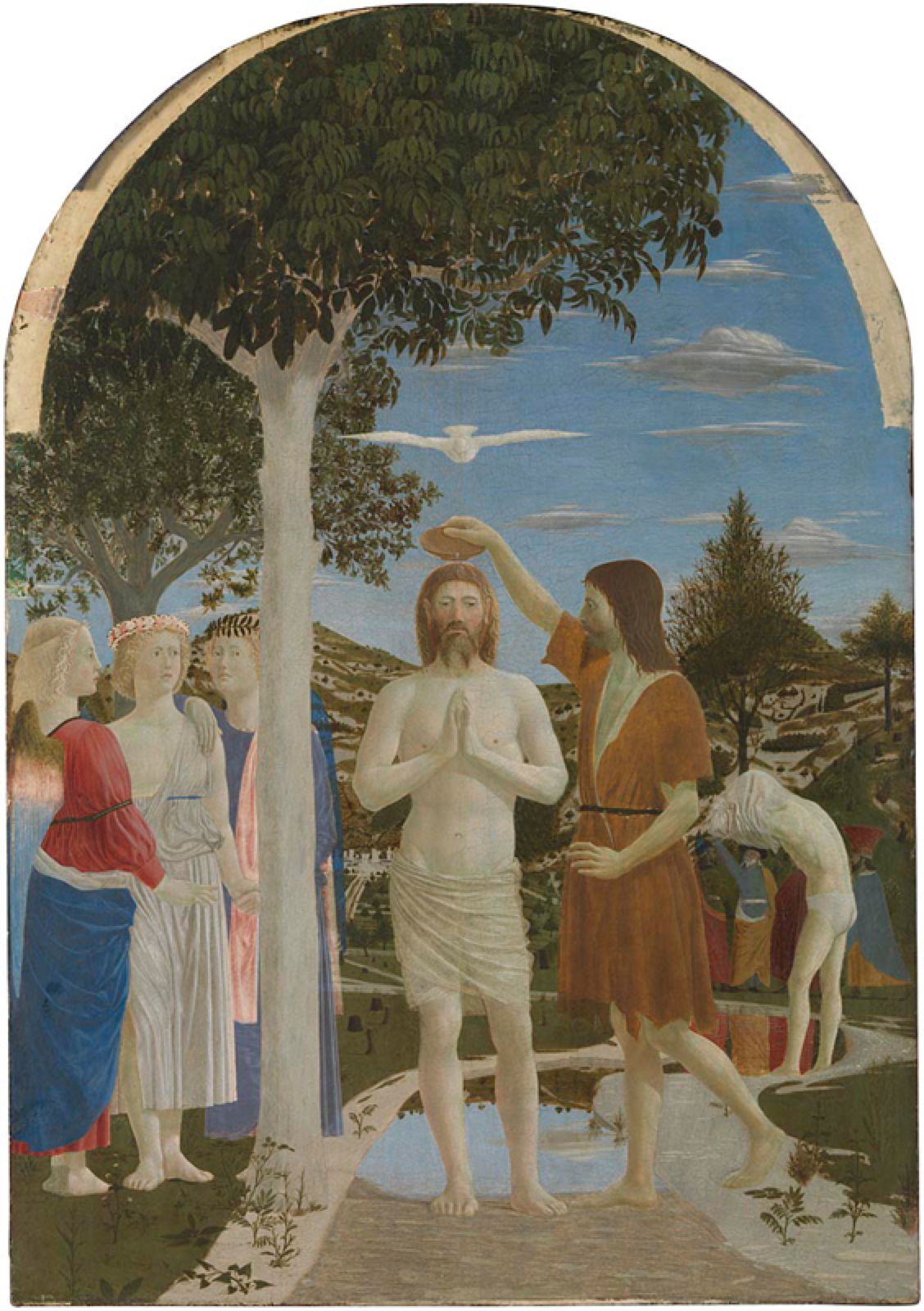
But it was in Italy that painting in egg tempera reached its apogee, with masters like Masaccio, in his Santa Maria Maggiore Altarpiece from about 1428-29 (above) and Piero della Francesca’s Baptism of Christ (below) of a decade later.

During the fifteenth century, egg tempera was progressively replaced by oils in Italy, as it had been earlier in the Northern Renaissance.

Uccello’s large panel of the Battle of San Romano incorporated some drying oils, including walnut and linseed, although it was still fundamentally painted in egg tempera.

By the end of the fifteenth century, many studios had changed to oils. Among the last large egg tempera paintings are Botticelli’s Primavera (above) and The Birth of Venus (below), from the 1480s. The craft labour involved in producing these large works must have been enormous. Although Primavera was painted on a panel, Venus is on canvas, making it more manageable given its size of nearly 2 x 3 metres (79 x 118 inches).


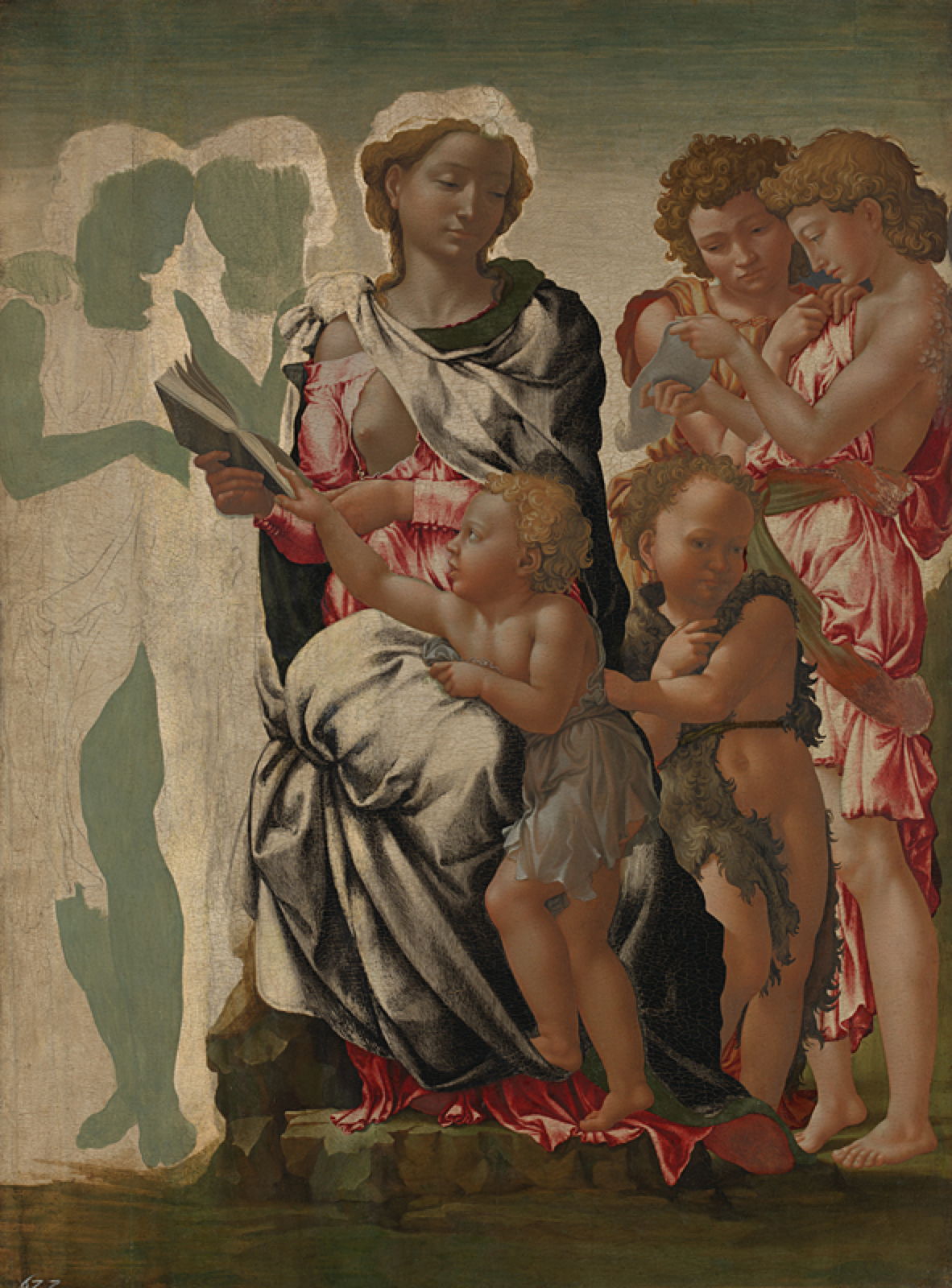
In the closing years of the fifteenth century, Michelangelo kept to the hallowed tradition of egg tempera on wood in this unfinished painting of the Virgin and Child known now as The Manchester Madonna. This shows how he painstakingly completed each of the figures before moving onto the next, and the characteristic green earth ground.
By this time, the only common use for egg tempera was in the underpainting before applying oils on top. This remains a controversial practice: performed on top of gesso ground it can be successful, but increasingly studios transferred to oils. Egg tempera didn’t completely disappear, though. With so many fine examples of how good its paintings both look and age, there were always some artists who have chosen it over oils.

Some nineteenth century movements that aimed to return to the more wonderful art of the past experimented again with egg tempera. In the late 1870s, John Roddam Spencer Stanhope started to use the medium, and made one of his finest works, Love and the Maiden (1877), using it.

A later exponent who was rigorous in his technique was Adrian Stokes, who used it to great effect in this landscape of Autumn in the Mountains in 1903.
But for my taste, the greatest painter in egg tempera since the Renaissance has to be one of the major artists of the twentieth century: Andrew Wyeth (1917–2009). As his works remain in copyright, I recommend that you browse his official site, where you can see just how effective egg tempera can be in the hands of a great master. It may not be as popular as in the past, but egg tempera still has a great deal to offer.

Earlier in this series, I showed an example of the origin of all modern paintings in the decorated caves of pre-history. As shelters became buildings, our ancestors continued to paint their walls, using a technique now known as secco wall or mural painting, where wet paint is applied to dry stone or plaster.

Secco has been widely used outside Europe, and can still be seen in some very old European wall paintings, such as those in Braunschweig Cathedral, including Christ Pantocrator, thought to date from the early thirteenth century. Long before that was created, though, wall painting advanced to improve adhesion between its paint layer and ground. In secco technique, only thin layers of pigment can be used, resulting in weak colours, little detail, and the need for periodic re-painting as pigment is gradually lost over time.
Artists experimented with different binders and secco techniques. Although dry plaster is more absorbent and a better ground than bare stone, success has been limited, and failure a constant danger. At some time before about 1700 BCE, one of the Mediterranean cultures discovered that it was possible to apply paint onto a layer of wet plaster, and the technique of fresco (strictly, buon fresco) was born.

The Romans loved frescos that made their rooms look as if they were in a spacious outdoors, like this from the House of the Golden Bracelet in Pompeii.
In fresco, the support remains the wall or ceiling of the building, but the ground is absorbent wet plaster applied to that surface. Pigment is diluted in water and applied directly to the ground while the latter is still wet; this allows the paint to be absorbed into the ground, providing good and durable bonding of the pigment. Plaster is made using lime, derived from crushed limestone, and sets by reaction with carbon dioxide in the air to form calcium carbonate (from which both chalk and limestone are composed) and water, which evaporates during drying.
Techniques became even more refined, with the use of additional layers of plaster prepared in specific ways, to which red pigment sinopia might be added, allowing the artist to draw construction and other lines to assist in final painting. Because these frescos are on a grand scale, transferring the design of a painting from final sketch to the wall or ceiling is also a challenge.
The central problem for the painter is that, to be successful, fresco has to be painted onto the plaster when it is still wet. That means only a limited area can be plastered and painted each day, known as giornate (singular giornata), a day’s work. For all but the smallest of ground-level fresco paintings, work has to be undertaken at height, from a scaffold, posing the very real risk that the artist would fall, or the scaffolding fail. Many fresco painters have fallen at work, some suffering serious injuries or death as a result.
Despite all these practical difficulties, some of the most important European works of art are frescos painted during the Renaissance in places of worship with their high walls and ceilings.

Masaccio’s magnificent fresco of The Holy Trinity in the Basilica of Santa Maria Novella in Florence, was painted in 1426-28. At the outset he would have made a preliminary plan including his giornate starting at the top and working downwards. Once ready to start the painting, a team of carpenters will have erected wooden scaffolding to give the artist and his assistants access to the whole of that section of the wall, to the full height of over six metres (21 feet). The first stage would then have been completed by assistants, who laid a rough under-layer of plaster known as the arriccio over the whole wall, and left it to dry for several days. This layer often contains abrasive sand particles to provide a key for the final layer of plaster.
Once that had dried completely, Masaccio and his assistants transferred the drawings onto the surface of the arriccio. This may have been performed by scaling up from the squared drawing and painting with sinopia, or full-size drawings may have been pricked to make holes in the paper and a bag of soot banged against the sheet held against the wall, a technique known as pouncing. Masaccio is known to have used both techniques, and may well have used each in different sections of this work.
On each day of painting, assistants would prepare the colours by mixing pigments in water. The day’s supply of plaster, the intonaco, is then prepared by mixing water with lime. That day’s giornata is covered with a thin layer of intonaco, and about an hour later Masaccio started painting into it. He then had about eight hours before it dried and he could apply no more fresh paint. Like many of the best fresco painters, Masaccio extended his painting time by using paint mixed with milk or casein and a little lime, effectively a lime-based casein medium, which could be laid onto dry intonaco.
The geometric requirements of this painting also merited special measures. When the intonaco was first applied, it was marked to indicate key construction lines, such as those in the barrel-vaulted ceiling, and down the pillars at the side. The remains of these incised lines are still visible when the fresco is viewed in raking light. In this case, there is evidence that Masaccio used lengths of string attached to a nail sunk at the vanishing point of the linear projection, below the base of the cross.

Although we think of frescos as being fixed, this one has now been moved twice within the same church, which hasn’t helped its appearance. During conservation work and movement of Masaccio’s painting in the 1950s, the opportunity was taken to study its construction. Leonetto Tintori drew up a plan of all the identified construction lines and edges of giornate; I have sketched in the latter from a reproduction of a drawing made at that time, which has since been destroyed.
It’s estimated the whole painting would have required some 24 giornate, although because of the long history of damage and attempts at its restoration, that number remains flexible. Assuming that Masaccio painted six days a week, that would have required a minimum of four weeks working for at least ten hours each day. Fresco painting doesn’t permit easy alterations either: if any repainting was required and couldn’t be accomplished using dry technique, that day’s giornata would have to be removed, replaced and repainted.

Giornate can sometimes become obvious over time, as shown in Giotto’s fresco in the Scrovegni Chapel in Padua, Italy.

Perhaps the most famous fresco is Michelangelo’s The Last Judgement (1536-41) in the Sistine Chapel of the Vatican. It covers an area of 13.7 by 12 metres (539 by 472 inches), and took over four years to complete.
In the eighteenth and nineteenth centuries, fresco became relatively neglected.

Some new frescos were commissioned for places of worship and other public buildings, and in the early nineteenth century Johann Friedrich Overbeck painted a series telling the story of Torquato Tasso’s epic Jerusalem Delivered, in the Casa Massimo in Rome. There are similar series showing Dante’s Divine Comedy and other long narratives, which are particularly suited to the medium.

In 1845, the Scottish artist William Dyce was invited to paint frescos for the Royal Family, for which he travelled to Italy to learn technique. On his return in 1847, he painted this curious composition in Queen Victoria and Prince Albert’s new and luxurious holiday palace of Osborne House, at East Cowes, on the Isle of Wight. Neptune Resigning to Britannia the Empire of the Sea (1847) is an impressive fresco, and remains in pristine condition at the top of the main staircase in the house.

Frescos have continued in religious painting, with artists such as Sergei Fyodorov painting them in churches and cathedrals, and for the occasional trompe l’oeil. John Dixon Batten’s The Creation of Pandora was painted anachronistically in egg tempera on a fresco ground by 1913. Batten was one of the late adherents of the Pre-Raphaelite movement; this painting was deemed unfashionable in 1949, and was put into storage and quietly forgotten until its rediscovery in 1990.

New frescos are still painted in some public buildings too. This work by Finnish painter Akseli Gallen-Kallela is one of a series he painted in the National Museum of Finland in Helsinki in 1928, but most other wall paintings of the twentieth century, such as those of John Singer Sargent in public buildings in Boston, have been painted in oils on canvas rather than buon fresco.
Frescos aren’t the only way of making very large and monumental paintings for places like churches, though. The walls of Venetian buildings are particularly unsuitable for secco or fresco, because they remain so damp all year round. Hence the painters of Venice were innovators in constructing very large canvases, and you will find few frescos there as a result.

The humble domestic chicken is probably the most common and widely distributed farm animal. It originated in about 8,000 BCE in south-east Asia and spread its way steadily across every continent except Antarctica. It probably reached Europe before the Roman Empire, and since then has been commonplace. Perhaps because of its small size and frequent presence, it features in relatively few paintings.
The cruel sport of cockfighting accompanied its spread, and is depicted in Jean-Léon Gérôme’s first successful painting in 1846.

This motif had started from a relief showing two adolescent boys facing off against one another. Gérôme felt he needed to improve his figurative painting, and after Delaroche’s advice decided to develop that image by replacing one of the boys with a girl. In both Greek and English (but not French) the word cock is used for both the male genitals and a male chicken, and the youthful Gérôme must have found this combined visual and verbal pun witty and very Neo-Greek.
There’s a curious ambivalence in its reading too: two cocks are fighting in front of the young couple. Is one of the birds owned by the girl, and if so, is it the dark one on the left, which appears to be getting the better of the bird being held by the boy? Either way, it’s a lightly entertaining reflection on courtship and gender roles, and a promising debut. The Cock Fight earned Gérôme a third-class medal, and he sold the painting for a thousand francs. With the benefit of favourable reviews from critics, the following year brought him lucrative commissions, and a growing reputation.
A dead chicken plays a significant role in one of Rembrandt’s most famous group portraits.

His vast group portrait of The Night Watch (1642) is the most famous of all those of militia in the Dutch Republic. It features the commander and seventeen members of his civic guard company in Amsterdam. Captain Frans Banninck Cocq (in black with a red sash), followed by his lieutenant Willem van Ruytenburch (in yellow with a white sash) are leading out this militia company, their colours borne by the ensign Jan Visscher Cornelissen. The small girl to the left of them is carrying a dead chicken, a curious symbol of arquebusiers, the type of weapon several are carrying.
For a young child, cockerels can appear large and threatening, as used by Gaetano Chierici in a delightful visual joke.

His undated painting of A Scary State of Affairs calls on our experience of the behaviour of cockerels and geese. An infant has been left with a bowl on their lap, and their room is invaded first by cockerels, then by those even larger and more aggressive geese. The child’s eyes are wide open, their mouth at full stretch in a scream, their arms raised, and their legs are trying to fend the birds away.
Being among the most humble and everyday domestic species, chickens seldom make the limelight in religious narratives.

Murillo’s Adoration of the Shepherds from about 1650 is an exception featuring unusual additional details including the old woman carrying a basketful of eggs, and chickens in front of the kneeling shepherd.
In most paintings including chickens, though, they are just extras in the farmyard.

Paulus Potter’s Figures with Horses by a Stable (1647) includes finely painted horses, chickens, a dog, and distant cattle, with a magnificent tree in the centre and a sky containing several birds.

In Chickenfeed from 1867, Hans Thoma tackles this genre scene in a traditional and detailed realist style.

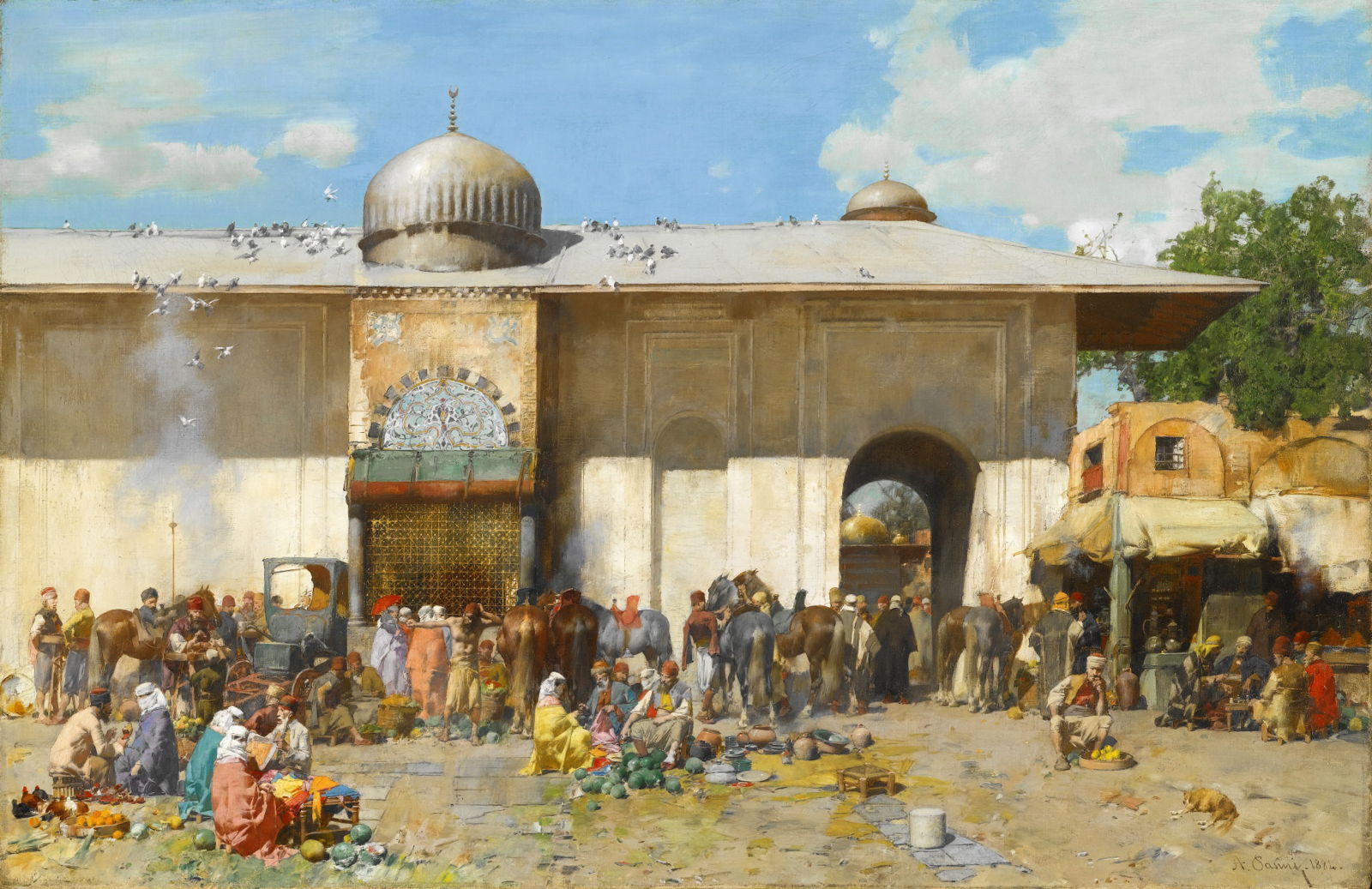
Alberto Pasini’s Market Scene from 1884 has an eclectic mixture of produce, ranging from live chickens to pots and the artist’s signature melons.

Évariste Carpentier’s undated Eating in the Farmyard, an example of the rural deprivation which sparked Naturalist art, shows two kids surrounded by animals and birds in this much-used space.

Here, Carpentier’s old woman is busy Feeding the Chickens.

Friedrich Eckenfelder’s Zollernschloss, Balingen from about 1884-5 shows a small yard just below the back of this castellated farm in Germany, with its lively flock of chickens.

Gustav Klimt had probably painted his first small landscapes between 1881-87, and returned to the genre more seriously in about 1896. This work, variously known as After the Rain, Garden with Chickens in St. Agatha, or similar, is thought to have been painted when Klimt stayed in the Goiserer Valley with the Flöge family in the summer of 1898.
Very occasionally, a chicken may come as something of a surprise.

Hieronymus Bosch’s Ship of Fools, a fragment from a larger Wayfarer triptych painted in 1500-10, is actually a small boat, into which six men and two women are packed tight. Its mast is unrealistically high, bears no sail, and has a large branch lashed to the top of it, in which is Bosch’s signature owl. Its occupants are engaged in drinking, eating what appear to be cherries from a small rectangular tabletop, and singing to the accompaniment of a lute being played by one of the women. A man has climbed a tree on the bank to try to cut down the carcass of a chicken from high up the mast.

Halo 从 2.0 版本开始支持了全文搜索功能,自带的 Lucene 搜索引擎在轻度使用场景下可以满足需求,但在重度依赖搜索功能的场景下,可能在搜索速度和用户体验上存在不足,这时我们会更推荐使用独立的搜索引擎。
本文将介绍如何使用
部署 Meilisearch 服务通常有两种方式:你可以选择自行在服务器上托管,或者使用 Meilisearch 官方提供的云服务。
访问
需要特别注意 Meilisearch 云服务的计费方式。
下面介绍两种常见的部署方式:
这种方式适合多个项目需要同时使用一个 Meilisearch 服务的场景。 部署完成后,你可以配置域名和反向代理来暴露服务到公网。
services:
meilisearch:
image: getmeili/meilisearch:v1.15
restart: unless-stopped
ports:
- "7700:7700"
environment:
- MEILI_ENV=production
// [!code highlight]
- MEILI_MASTER_KEY=<your-super-secret-master-key-here>
volumes:
- meilisearch_data:/meili_data
volumes:
meilisearch_data:
driver: local
结合 使用 Docker Compose 部署 Halo 的示例,将 Meilisearch 服务添加到
docker-compose.yml文件中。
通过这种方式部署之后,插件设置中的 Meilisearch 服务地址 应该是
http://meilisearch:7700(即服务在同一 Compose 网络下可通过服务名访问)
meilisearch:
image: getmeili/meilisearch:v1.15
restart: on-failure:3
networks:
- halo_network
volumes:
- ./meilisearch-data:/meili_data
environment:
- MEILI_ENV=production
// [!code highlight]
- MEILI_MASTER_KEY=<your-super-secret-master-key-here>
version: "3"
services:
halo:
image: registry.fit2cloud.com/halo/halo:2.21
restart: on-failure:3
depends_on:
halodb:
condition: service_healthy
networks:
halo_network:
volumes:
- ./halo2:/root/.halo2
ports:
- "8090:8090"
healthcheck:
test:
["CMD", "curl", "-f", "http://localhost:8090/actuator/health/readiness"]
interval: 30s
timeout: 5s
retries: 5
start_period: 30s
environment:
- JVM_OPTS=-Xmx256m -Xms256m
command:
- --spring.r2dbc.url=r2dbc:pool:postgresql://halodb/halo
- --spring.r2dbc.username=halo
- --spring.r2dbc.password=openpostgresql
- --spring.sql.init.platform=postgresql
- --halo.external-url=http://localhost:8090/
halodb:
image: postgres:15.4
restart: on-failure:3
networks:
halo_network:
volumes:
- ./db:/var/lib/postgresql/data
healthcheck:
test: ["CMD", "pg_isready"]
interval: 10s
timeout: 5s
retries: 5
environment:
- POSTGRES_PASSWORD=openpostgresql
- POSTGRES_USER=halo
- POSTGRES_DB=halo
- PGUSER=halo
// [!code focus:10]
meilisearch:
image: getmeili/meilisearch:v1.15
restart: on-failure:3
networks:
- halo_network
volumes:
- ./meilisearch-data:/meili_data
environment:
- MEILI_ENV=production
- MEILI_MASTER_KEY=<your-super-secret-master-key-here>
networks:
halo_network:
详细的部署方式可以参考 Meilisearch 官方文档:https://www.meilisearch.com/docs/learn/self_hosted/install_meilisearch_locally
之前 Halo 社区中已经有人开发了 Meilisearch 插件,但已经不再维护,因此这里我们选择使用 Halo 官方提供的插件。
下载插件,目前提供以下两种下载方式:
GitHub Releases:访问 Releases 下载 Assets 中的 JAR 文件。
安装插件,插件安装和更新方式可参考:https://docs.halo.run/user-guide/plugins
进入插件设置,配置 Meilisearch 服务地址 和 Master Key。索引名称 可以选择使用默认的 halo 或者自定义(如果你的 Meilisearch 服务会被多个项目使用,建议自定义索引名称)。

进入插件扩展配置,在 扩展点定义 中选择 搜索引擎,然后选择使用 Meilisearch。

配置完插件后,我们可以进入插件的 数据概览 页面,查看 Meilisearch 的索引数据。

在这个页面中,你还可以重建索引或测试搜索功能。

Lucene(默认搜索引擎)与 Meilisearch 的实际对比:
|
Meilisearch |
Lucene(默认) |
|---|---|
|
|
|
|
|
|
通过实际使用可以发现,Meilisearch 的搜索结果更加准确,搜索速度更快,并且支持更灵活的搜索语法,无需用户掌握复杂的搜索表达式即可获得理想的搜索结果。
如果配置完 Meilisearch 插件之后无法搜索,可以尝试重建一次索引。
安装 Meilisearch 插件之后仍然需要

在 Halo 社区中,导入 Markdown 和 Word 文档的需求一直很高,但社区一直缺乏完善的解决方案。其主要原因在于 Markdown 和 Word 的文档格式较为复杂,难以完美支持所有格式特性,且图片资源的处理存在技术难点。
现在,社区中已经有了一个插件可以很好地支持导入 Markdown 和 Word 文档,它就是
可以通过以下两种方式安装插件:
在 Console 内置的应用市场中搜索 内容助手 进行安装

安装并启用插件后,就可以在 Console 侧边菜单的工具中找到 文章导入 的入口。点击进入后,选择 Markdown 导入 选项卡即可开始导入,如下图:

选择 Markdown 文件:用于选择单个 Markdown 文档,支持 .md 格式文件。
选择 Markdown 文件夹:用于选择包含 Markdown 文档的文件夹。选择文件夹后,系统会自动扫描其中的所有 Markdown 文档以及图片资源(如有)。
选择图片文件夹:用于选择 Markdown 文档中引用的图片资源。选择文件夹后,系统会自动扫描其中的所有图片资源并在导入时自动关联。
转为富文本格式:默认情况下,导入的 Markdown 文档会保持原有的 Markdown 格式。如果勾选此选项,系统会将文档转换为富文本格式,便于后续使用 Halo 的默认编辑器进行编辑。
从其他博客平台或写作工具迁移文章内容
导入使用本地 Markdown 编辑器创作的文章
批量导入历史文档和资料
导入 Markdown 文档后,如果需要在 Console 中编辑文章,请确保已经安装了任意一个 Markdown 编辑器插件,否则无法正常打开编辑页面。
如果 Markdown 文档中引用了本地图片资源,请在导入前选择存放图片的文件夹,否则图片将无法正确上传和关联。
系统支持自动解析 Front Matter(文档头部的元数据),包括标题、别名(slug)、描述、摘要、分类、标签等信息。
选择 Markdown 文件:

选择图片文件夹(如果文档包含本地图片):

点击导入,等待导入完成:

检查文章与图片资源是否导入成功:


进入 文章导入 页面后,选择 Word(.docx)导入 选项卡,如下图:

选择 Word 文档:用于选择单个 Word 文档,支持 .doc 和 .docx 格式。
选择 Word 文档文件夹:用于批量选择包含 Word 文档的文件夹。
转为 Markdown 格式:默认情况下,导入的 Word 文档会转换为富文本格式。如果希望后续使用 Markdown 编辑器编辑文章,请勾选此选项将内容转换为 Markdown 格式。
将公司内部的 Word 文档转换为博客文章
配合
从传统文档工具迁移内容到现代化的管理平台
由于 Word 文档格式的复杂性,系统可能无法完美解析所有内容格式,建议导入后进行适当调整。
系统支持自动导入 Word 文档中的图片资源,但其他类型的嵌入对象暂不支持。
图片会上传到与个人中心关联的存储策略,请提前在用户设置中配置相关参数。
选择 Word 文档:

点击导入,等待导入完成:

检查文章是否导入成功:


除了核心的导入功能,内容助手还提供了丰富的内容管理功能:
支持 Markdown 与富文本格式的双向转换,让用户可以根据编辑需求灵活切换文档格式。你可以在文章管理页面点击文章的 ··· 按钮,在转换菜单中选择相应的格式转换选项,也可以在文章编辑页面顶部的编辑器选择框中选择 内容格式转换器 进行转换。

支持将文章导出为多种格式,方便内容备份和分享:
以原格式导出:保持文章的原始格式进行导出
转换为 Markdown 并导出:将文章转换为 Markdown 格式后导出
转换为 PDF 并导出:将文章转换为 PDF 格式进行导出

提供文章克隆功能,便于基于现有文章创建相似内容。克隆后的文章会自动在标题后添加"(副本)"标识,并生成新的别名以避免冲突。

以上功能都可以在文章管理页面点击文章的 ··· 按钮找到相应选项。
内容助手插件为 Halo 用户提供了完整的文档导入和内容管理解决方案,有效解决了 Markdown 和 Word 文档的导入难题。插件不仅支持智能处理图片资源,还提供了格式转换、文章导出、文章克隆、内容复制等丰富功能,能够满足大部分用户的内容管理需求。
无论你是从其他平台迁移内容,还是需要批量导入历史文档,内容助手都能为你提供便捷、高效的解决方案。如果你有文档导入或内容格式转换的需求,欢迎尝试使用内容助手插件。

现在已经为插件的 UI 部分提供了新的配置方式,rsbuildConfig 方法,可以更加方便的使用
Rsbuild 基于 Rspack 构建,提供了更完善的 loader 配置,所以在封装的时候就直接选择了 Rsbuild。
安装依赖:
pnpm install @halo-dev/ui-plugin-bundler-kit@2.21.1 @rsbuild/core -D
rsbuild.config.mjs:
import { rsbuildConfig } from "@halo-dev/ui-plugin-bundler-kit";
export default rsbuildConfig()
package.json 添加 scripts:
{
"type": "module",
"scripts": {
"dev": "rsbuild build --env-mode development --watch",
"build": "rsbuild build"
}
}
需要注意的是,为了适应新版的 ui/build/dist ,如果你要从已有的插件项目迁移到 Rsbuild,建议参考
import { rsbuildConfig } from "@halo-dev/ui-plugin-bundler-kit";
const OUT_DIR_PROD = "../src/main/resources/console";
const OUT_DIR_DEV = "../build/resources/main/console";
export default rsbuildConfig({
rsbuild: ({ envMode }) => {
const isProduction = envMode === "production";
const outDir = isProduction ? OUT_DIR_PROD : OUT_DIR_DEV;
return {
resolve: {
alias: {
"@": "./src",
},
},
output: {
distPath: {
root: outDir,
},
},
};
},
});
示例:
了解更多:
Halo 插件的 UI 部分(Console / UC)的实现方式其实很简单,本质上就是构建一个结构固定的大对象,交给 Halo 去解析,其中包括全局注册的组件、路由定义、扩展点等。 基于这个前提,在实现插件机制时,主要面临的问题就是如何将这个大对象传递给 Halo。当初做了非常多的尝试,最终选择构建为 IIFE(Immediately Invoked Function Expression,立即执行函数),然后 Halo 通过读取 window[PLUGIN_NAME](PLUGIN_NAME 即插件名)来获取这个对象。 构建方案采用 Vite,并提供了统一的构建配置。回过头来看,这个方案存在不少问题:
会污染 window 对象,虽然目前并没有出现因为这个导致的问题,但是从长远来看,这个方案并不是最优的。(当然,使用 Rspack 来构建并不是为了解决这个问题)
Vite 不支持 IIFE / UMD 格式的代码分割(主要是 Rollup 还不支持),无法像 ESM(ECMAScript Module)那样实现异步加载模块的机制。
基于第 2 点,如果插件中实现了较多的功能,可能会导致最终产物体积巨大,尤其是当用户安装了过多的插件时,会导致页面加载缓慢。
以
以此博客为例,gzip 之后也有 1.8M 的 bundle.js。
基于第 2 点,如果不支持代码分块(Chunk),也无法充分利用资源缓存,访问页面时,也会一次性加载所有插件的代码(即便当前页面不需要)。
基于以上问题,我开始寻找其他替代方案,最终通过翻阅 Rspack(Webpack 的 Rust 实现)的文档发现,Webpack 能够通过配置实现 IIFE 格式的代码分割,最终选择 Rspack 作为尝试。
安装依赖:
pnpm install @rspack/cli @rspack/core vue-loader -D
package.json 添加 scripts:
{
"type": "module",
"scripts": {
"dev": "NODE_ENV=development rspack build --watch",
"build": "NODE_ENV=production rspack build"
}
}
rspack.config.mjs:
import { defineConfig } from '@rspack/cli';
import path from 'path';
import process from 'process';
import { VueLoaderPlugin } from 'vue-loader';
import { fileURLToPath } from 'url';
// plugin.yaml 中的 metadata.name
const PLUGIN_NAME = '<YOUR_PLUGIN_NAME>';
const isProduction = process.env.NODE_ENV === 'production';
const dirname = path.dirname(fileURLToPath(import.meta.url));
// 开发环境启动直接输出到插件项目的 build 目录,无需重启整个插件
// 生产环境输出到插件项目的 src/main/resources/console 目录下
const outDir = isProduction ? '../src/main/resources/console' : '../build/resources/main/console';
export default defineConfig({
mode: process.env.NODE_ENV,
entry: {
// 入口文件,可以参考:https://docs.halo.run/developer-guide/plugin/basics/ui/entry
main: './src/index.ts',
},
plugins: [new VueLoaderPlugin()],
resolve: {
alias: {
'@': path.resolve(dirname, 'src'),
},
extensions: ['.ts', '.js'],
},
output: {
// 资源根路径,加载代码分块(Chunk)的时候,会根据这个路径去加载资源
publicPath: `/plugins/${PLUGIN_NAME}/assets/console/`,
chunkFilename: '[id]-[hash:8].js',
cssFilename: 'style.css',
path: path.resolve(outDir),
library: {
// 将对象挂载到 window 上
type: 'window',
export: 'default',
name: PLUGIN_NAME,
},
clean: true,
iife: true,
},
optimization: {
providedExports: false,
realContentHash: true,
},
experiments: {
css: true,
},
devtool: false,
module: {
rules: [
{
test: /\.ts$/,
exclude: [/node_modules/],
loader: 'builtin:swc-loader',
options: {
jsc: {
parser: {
syntax: 'typescript',
},
},
},
type: 'javascript/auto',
},
{
test: /\.vue$/,
loader: 'vue-loader',
options: {
experimentalInlineMatchResource: true,
},
},
],
},
// 这部分依赖已经由 Halo 提供,所以需要标记为外部依赖
externals: {
vue: 'Vue',
'vue-router': 'VueRouter',
'@vueuse/core': 'VueUse',
'@vueuse/components': 'VueUse',
'@vueuse/router': 'VueUse',
'@halo-dev/console-shared': 'HaloConsoleShared',
'@halo-dev/components': 'HaloComponents',
'@halo-dev/api-client': 'HaloApiClient',
'@halo-dev/richtext-editor': 'RichTextEditor',
axios: 'axios',
},
});
配置需要懒加载的路由或者组件:
在 index.ts 中配置路由:
import { definePlugin } from '@halo-dev/console-shared';
import { defineAsyncComponent } from 'vue';
import { VLoading } from '@halo-dev/components';
import 'uno.css';
// [!code --]
import DemoPage from './views/DemoPage.vue';
export default definePlugin({
routes: [
{
parentName: 'Root',
route: {
path: 'demo',
name: 'DemoPage',
// [!code --]
component: DemoPage,
// [!code ++:4]
component: defineAsyncComponent({
loader: () => import('./views/DemoPage.vue'),
loadingComponent: VLoading,
}),
...
},
},
],
extensionPoints: {},
});
注:推荐使用 defineAsyncComponent 包裹,而不是直接使用 () => import() 的方式,后者会在进入路由之前就开始加载页面的代码分块(Chunk),导致页面在加载期间没有任何响应。
构建产物示例:
❯ ll src/main/resources/console
.rw-r--r-- 191k ryanwang staff 16 Jun 10:47 359-3bebb968.js
.rw-r--r-- 83k ryanwang staff 16 Jun 10:47 962-3bebb968.js
.rw-r--r-- 4.1k ryanwang staff 16 Jun 10:47 main.js
安装依赖:
pnpm install sass-embedded sass-loader -D
rspack.config.mjs 添加配置:
import { defineConfig } from '@rspack/cli';
import path from 'path';
import process from 'process';
import { VueLoaderPlugin } from 'vue-loader';
import { fileURLToPath } from 'url';
// [!code ++]
import * as sassEmbedded from "sass-embedded";
...
export default defineConfig({
...
module: {
rules: [
...
// [!code ++:13]
{
test: /\.(sass|scss)$/,
use: [
{
loader: "sass-loader",
options: {
api: "modern-compiler",
implementation: sassEmbedded,
},
},
],
type: "css/auto",
},
],
},
...
});
如果你习惯使用 TailwindCSS 或者 UnoCSS 来编写样式,可以参考以下配置:
本文推荐使用
https://unocss.dev/ ,因为可以利用 UnoCSS 的https://unocss.dev/transformers/compile-class 来编译样式,预防与 Halo 或者其他插件产生样式冲突。
安装依赖:
pnpm install unocss @unocss/webpack @unocss/eslint-config style-loader css-loader -D
入口文件(src/index.ts)添加导入:
import 'uno.css';
rspack.config.mjs 添加配置:
import { defineConfig } from '@rspack/cli';
import path from 'path';
import process from 'process';
import { VueLoaderPlugin } from 'vue-loader';
import { fileURLToPath } from 'url';
// [!code ++]
import { UnoCSSRspackPlugin } from '@unocss/webpack/rspack';
...
export default defineConfig({
...
plugins: [
new VueLoaderPlugin(),
// [!code ++]
UnoCSSRspackPlugin()
],
...
module: {
rules: [
...
// [!code ++:5]
{
test: /\.css$/i,
use: ['style-loader', 'css-loader'],
type: 'javascript/auto',
},
],
},
...
});
uno.config.ts:
import { defineConfig, presetWind3, transformerCompileClass } from 'unocss';
export default defineConfig({
presets: [presetWind3()],
transformers: [transformerCompileClass()],
});
.eslintrc.cjs:
/* eslint-env node */
require('@rushstack/eslint-patch/modern-module-resolution');
module.exports = {
root: true,
extends: [
'plugin:vue/vue3-recommended',
'eslint:recommended',
'@vue/eslint-config-typescript/recommended',
'@vue/eslint-config-prettier',
// [!code ++]
'@unocss',
],
env: {
'vue/setup-compiler-macros': true,
},
// [!code ++:3]
rules: {
"@unocss/enforce-class-compile": 1,
},
};
以上就是针对 Halo 插件前端部分的 Rspack 配置。我已经对 Halo 官方维护的部分插件进行了迁移,几乎没有遇到什么问题,并且带来的收益非常明显:www.halo.run 和本博客的 bundle.js 在 gzip 之后仅有不到 200k,各个页面也只会在访问时加载所需的资源。
需要注意的是,我对这些构建工具并不算非常熟悉,所以配置仍然有优化空间。我们会持续优化,后续也会考虑提供一个通用的 CLI 或 Rspack 配置,期望实现如下效果:
rspack.config.mjs:
import { rspackConfig } from '@halo-dev/ui-bundler-kit';
export default rspackConfig({
...
});
或者基于 Rspack 包装一个 CLI:
plugin.config.mjs:
import { defineConfig } from '@halo-dev/ui-bundler-kit';
export default defineConfig({
...
});
package.json:
{
"scripts": {
"dev": "halo-ui dev",
"build": "halo-ui build"
}
}
感谢阅读,欢迎交流与指正!


在西西弗里偶遇这本书,随手翻了一下,被设定吸引了,就一下看了前九章。
二十三天后回到书店里把余下的二十二章看完了,满足的同时又觉得很失望。
满足的是,这个下午是我近一年来完整读完了一本书的时刻;失望的是,前半截一直吊着我胃口的摆渡世界的故事,最后居然演变成了俗气的爱情故事和死而复生的怪诞情节。我不喜欢这样的收尾。
但是,迪伦凭着自己的信念从死亡的世界回到人间这段路,这一路的勇气,是我愿意把第三颗星打上来的原因。书里的男女角色我都不怎么喜欢,无辜枉死的三十六岁女士也很莫名其妙,但对于此刻低气压的我而言,我喜欢迪伦一路冲过去的那份勇气和冒险的决心。
对多数人而言,读这本书是浪费时间。但我之所以感觉还行,是因为我太久没有体会到「完成」一件事时「结束」的那一刻了。哪怕这一刻并不欢欣鼓舞,但我完成了。


相对应的,前两天看完的两部片子,让我感到心里非常的舒坦。一个是贾玲的新电影《热辣滚烫YOLO》,另外一个是 Casey 最新的一条 vlog《Sisyphus and the Impossible Dream》。
一方面惊叹于贾玲真的一年瘦下来一百斤,练成了可以和职业拳击运动员打几下的状态;二来佩服于她为了实现这个目标所做的一切努力,一切向生活挥拳而做的事情。她不是瘦了,而是变了一个人,瘦下来只是一个副产品。
Casey 的 vlog 时间跨度长达 17 年。从大腿骨折,到跑进三小时以内,从二十来岁到四十多,一切的付出,就像西西弗斯一次次推石头上山,不仅过程令我震动,结果更是让我感受到了希望!
他俩是我 2024 年初的第一束光。

今年是全职维护 Halo 的第二年, 也是 Halo 快速成长的两年,这两年 Halo 的成长可以说比以前任何时间段都要快(虽然一共才 5 年),这如果要放在以前非全职的时候,当前 Halo 的状态我们可能花个三四年都达不到,虽然目前 Halo 依旧有很多可优化的空间。
关于 Halo 2023 年的一些总结:
一共发布了 12 个版本,截止到当前编写此文,即将发布 2.12。
Star 达到 30k。
终于上线了可用的应用市场,包括内置版,用户可以非常方便的下载和更新插件/主题。
应用市场支持付费应用,这为我们带来了一部分收益,但远远没有达到养活我们自己的地步。
插件和主题数量得到提升,也有了越来越多的社区开发者。
今年的一些规划:
应用市场支持开发者入驻,包括发布付费应用。
通过第一点,继续推进 Halo 的生态发展。
尝试一些其他的商业模式,争取达到一个正向循环。
对 Halo 本身的功能和稳定性进行持续优化。
重视文档。
虽然 Halo 需要推进一些商业模式来得以存活,但我们最大的坚持就是保证 Halo 本身的纯净和优雅,可以从我们应用市场看出,即便是我们提供了服务的应用市场内置版本,也是通过插件的形式集成到 Halo 的,如果用户不喜欢,完全可以直接卸载,不会有任何影响。
一些反思,以下是我们需要一直反思的事情:
Halo 的定位和面向群体。
Halo 是否真的满足了建站的需求,还是仅仅是内容管理。
基于第二点,为什么 Slogan 是突出的建站,但我们直到 2.12 还是没有针对页面进行一些有用的功能开发,比如可视化编辑网页内容。
可持续的商业模式。
好了,以上是关于 Halo 的一些总结和反思,以下是我个人的一些工作终结,直接看图吧。
![]()
来年对我自己的期望:
继续深耕技术,需要对巩固很多基础知识。
改变对产品某些地方的思维方式,尝试一些新的东西。
提高效率,需要加强对工作优先级的判断。
开始了解一些运营和商业的知识,对于一个做技术的人来做,这一步真的很难迈出。
依旧蓉飘中,这应该是是在成都的第 5 年了,成都虽然比不上北上广深那样的快节奏,但这主要还是分人吧,这两年基本上都投入到工作上了。
生活依旧很平淡,希望今年可以稍微改变一下。
今年最大的事应该就是结婚啦~
在这里分享一下在 2023 年用过的一些好软件、好的日用产品等。
Raycast 其实已经用了很久了,从最开始发布的时候就一直在用,已经成为了日常必备,不管是用来启动 App,还是利用其中的插件来完成一些其他 App 的集成,都非常好用。尤其是这个产品的细节,非常打动我,这个产品是我学习的对象。
贴一张来自 Raycast 的年终使用报告吧。
![]()
一个 Docker 以及 Linux 虚拟机的管理软件,非常轻量,没有官方 Docker Desktop 那样臃肿和那么多问题。这目前也是我的日常必备了,尤其是 Linux 虚拟机,如果我需要在 Linux 上测试一些东西,直接创建一个新的 Linux 实例即可,非常快速。
一个非常好用的数据状态管理库,在此之前,我在页面上获取数据基本都只是通过 Axios 请求,然后手动管理数据的状态,一旦页面复杂一点,数据的获取和管理将会比较复杂,代码也不够简洁。用了这个库之后,可以非常容易的做到:
简化数据请求的逻辑,可以使用声明式(配置式)的写法完成数据的请求和管理。
数据缓存、数据共享(组件之间)、重复请求去重。
监听设备网络状态、窗口聚焦监听。
请求重试,支持自行编写逻辑。
定时请求,支持自行编写逻辑,这对异步接口(需要定时重新刷新数据)非常友好。
分页和滚动加载。
依赖请求。
类似的库还有
来自 Vue 和 Vite 的核心开发人员
useLocalStorage:通常用于在浏览器临时保存一些用户偏好设置。
useRouteQuery:通常用于在地址栏保存数据列表的筛选项,方便在用户切换路由或者刷新页面之后可以回到之前的查询状态。
useFileDialog:用于简化上传文件的逻辑。
useEventListener:再也不用担心在组件 unmounted 的时候取消注册事件。
非常钦佩 Anthony Fu 在开源社区做出的贡献,尤其是 Vue 和 Vite 生态。
同样来自
如果你使用 Tailwindcss,也可以尝试使用 tailwindcss-plugin-icons,同样依赖于 Iconify,这个库可以将 SVG 编译到最终的 CSS 产物中。这个库会在我写 Halo 主题的时候用到。
近两年饱受颈椎问题困扰,经常会感到颈椎痛和甚至头晕,严重的时候早上起床之后都无法低头,一低头就非常刺痛。已经记不清去了多少次医院了,中医和西医都去过,还做了好几次针灸,但都没有根本解决问题,一段时间之后又会复发。于是开始怀疑是枕头的问题,于是在京东上东找西找发现了这个枕头,已经使用了大概五个月了,已经完全没有再颈椎痛过,只是偶尔会在久坐之后感到颈椎稍微有点僵硬。
原来这么久的颈椎问题是因为睡眠!可能是因为之前的枕头睡着会让颈部悬空,而这个枕头会刚好拖住我的颈椎。
如果你也有颈椎问题,不妨试着换个枕头。
在此之前,我一直以为我的 iPhone 拍照已经足够好,完全不需要相机,但购买之后发现相机拍出的质感是手机不能比的。不过 23 年没有太多机会出去玩,希望今年可以有空多出去走走。
非常佩服这家公司的产品,这个吹风机颜值高,转速快,可以让我早上早出门两分钟。
以上就是我 2023 的一些总结,希望 2024 更好!

2022 年 12 月 1 日,FIT2CLOUD 飞致云旗下开源建站项目 Halo( github.com/halo-dev )正式发布 v2.0 版本。这是 Halo 项目继 v1.0 版本后的第二个里程碑版本,研发团队采用全新架构进行项目重写,实现了从单用户机制向多用户体系的转变,提供全新设计的插件机制和主题机制,改进了附件管理方式,为用户提供富文本编辑器,同时提供后台全局搜索能力。
Halo 是一款好用又强大的开源建站工具,它让你无需太多的技术知识就可以快速搭建一个博客、网站或者内容管理系统。
截至目前(2022 年 12 月 1 日),Halo 已经在 Docker Hub 获得了超过 150 万次下载,GitHub Star 数突破 24 k,并拥有一百多名社区贡献者。我们在此对所有参与到 Halo 产品及社区建设的朋友们表达由衷的感谢。
Halo 1.0 版本仅支持单管理员机制,这极大限制了 Halo 的多人使用场景。在 Halo 2.0 中,我们引入了多用户及 RBAC 权限体系,支持多用户同时登录管理 Halo,并且支持用户权限的细粒度控制,可以为不同的用户分配不同的权限,从而实现不同的用户角色。
![]()
Halo 2.0 带来了全新设计的插件机制,这也是 2.0 版本底层架构变动的主要原因。在 Halo 1.0 时,我们因为无法对功能进行拓展,所以随着版本不断迭代会导致系统越来越臃肿。比如我们在 1.0 集成了市面上常见的云存储方案,但绝大部分用户都不会使用到所有的存储方案,这些功能对于 Halo 来说就变成了一种负担。在 Halo 2.0 中,我们将这些功能抽离出来,通过插件的形式进行集成,这样用户可以根据自己的需求自由选择,不再会因为一些不需要的功能而导致系统的臃肿。同时也可以实现不更新整个 Halo 应用,对插件进行单独更新,降低用户更新使用新功能的代价。
我们为插件机制提供了以下能力:
![]()
从上图可以看到:
相信随着我们对 Halo 的持续迭代和生态建设的持续投入,Halo 的插件生态会越来越丰富。
目前已支持 Halo 2.0 的插件可以访问 https://github.com/halo-sigs/awesome-halo 查阅。
Halo 2.0 在主题机制上,有以下主要改进:
![]()
我们为 Halo 2.0 提供了全新的默认主题,并命名为 Earth,我们计划在未来以太阳系成员的命名方式提供一系列的官方默认主题。
![]()
在 Halo 1.0 时,社区用户呼声比较高的需求之一就是改进附件管理方式。在 2.0 版本,我们全新设计了附件的功能,支持分组管理、存储策略等功能。分组管理功能可以帮助用户更好地组织管理不同使用场景的附件。存储策略功能可以让用户定义多个不同的附件存储位置,同时也可以通过插件来拓展外部云存储,比如上面提到的阿里云 OSS。
![]()
![]()
![]()
此外,选择附件时还可以通过插件支持更多的附件来源,比如上面提到的 Unsplash 插件,可以做到在编辑内容的时候直接从 Unsplash 网站选择配图。
![]()
在 2.0,为了解决 Markdown 编辑器无法对一些复杂的排版场景进行支持的问题,我们默认提供了富文本编辑器,它能够很好地支持图片插入、表格、任务列表等。不过考虑到部分用户对 Markdown 有较强的需求,我们将在后续版本中提供对 Markdown 格式编辑的支持。除此之外,你也可以通过安装插件的方式使用你最喜欢的编辑器。
![]()
我们在后台提供了全局搜索功能,可以快速搜索后台的页面、文章、附件、主题等资源。并且提供了快捷键(Ctrl + K,Mac 下为 Cmd + K)来快速打开搜索框,提高后台的操作效率。
![]()
在 Halo 1.0 的时候,我们搜索文章是通过 SQL 模糊匹配的方式来实现的,这种方式的搜索效率和准确性都不够理想。在 2.0 中,我们默认使用了 Apache Lucene 来提供搜索引擎的支持,也为主题端提供了通用的搜索框组件,大大提高了搜索功能的实用性。同样的,搜索引擎我们也支持通过插件来拓展,比如集成 Elasticsearch、MeiliSearch 等。
![]()
关于 Halo 2.0 的完整特性和变更日志,请访问 GitHub Release 页面(https://github.com/halo-dev/halo/releases)。
在 Halo 2.0 正式版发布之后,我们会继续完善 Halo 的功能和文档,并在每个月按时发布一个功能版本。同时将持续投入对 Halo 生态的建设,让用户能够更加方便的使用 Halo 搭建各式各样的网站,构建心中的理想站点。此外,我们也将在不久之后开启应用市场的开发,让用户获取主题、插件更加便捷。同时我们也会不断加大对前沿技术及用户体验的探索,让 Halo 朝着好用又强大的零代码建站工具的目标持续迈进。
Halo 此前的成绩离不开每一位参与者的贡献与支持,踏上这个新的起点,Halo 的未来也仍需各位共同努力。

距离我们 2020 年 9 月 24 号发布 1.4.0 已经过去了 545 天了,期间虽然有一些版本更新,但大多数都是 patch 修复版本。终于,在今天正式发布 1.5.0 版本。其中带来了大量的优化更新,下面为大家简单介绍一些亮点功能,详细更新日志可在本文末尾查阅。
在此版本中,新增了 contents 表专门用于存储文章内容。因为在以前的版本中,当站点有大量文章的时候会出现明显拖慢页面渲染速度的情况,这是因为在之前的版本中,查询文章列表会将内容字段也包含在其中,这就会导致数据越多就会越慢。所以在这个版本中,原本的 posts 表就不再包含 originalContent 和 formatContent 字段,在列表查询的时候也不会包含。需要注意的是,如果你是从 1.4 版本升级的话,目前我们是没有自动清空这两个字段的内容的。当然,你可以手动清空,以获得更好的效果。
性能对比:
ab -c 100 -n 10000 http://localhost:8090/1.4.17:
![]()
1.5.0:
![]()
注意:此测试可能并不是特别严谨,仅供参考。
目前后台已经修改为直接保存编辑器渲染的 html 内容,保证编写时和最终发布结果完全一致。另外,数学公式和 mermaid 图表已经针对此特性做了优化。数学公式仅需在前台引入 katex css 即可。mermaid 图表会被渲染为 svg 并保存,所以无需再引入 mermaid 依赖。
数学公式可以在前台引入:
<link rel="stylesheet" href="https://unpkg.com/katex@0.12.0/dist/katex.min.css" />
![]()
![]()
![]()
![]()
目前,我们已经统一使用 @halo-dev/markdown-renderer 进行 Markdown 渲染。
编辑器编辑区域修改为 Codemirror 编辑器,支持 Markdown 语法高亮,浏览文章会更加方便。
![]()
编辑器可以通过快捷键打开图片选择,目前也已经支持多选图片和选择之后直接插入文章。
![]()
预览区域支持代码块高亮。
![]()
支持更多 Markdown 标记语法。
![]()
表格编辑体验优化。众所周知,使用 Markdown 语法编写表格的体验是非常难受的,不仅编写困难,而且格式会非常难以阅读。所以我们使用了一个叫做 mte-kernel 的库来解决这个问题,不仅可以让编辑体验升级,而且会自动格式化表格。
![]()
在这个版本中,我们添加了对标签设置颜色的功能,灵感来自于 GitHub Issues 的标签颜色。这样可以比较直观地区分不同的标签。
![]()
![]()
重构了批量操作的逻辑,目前已经不需要提前通过文章状态筛选文章之后才能批量选择。可以任意批量选择之后进行文章状态的批量操作。
![]()
文章列表不再展示回收站的文章,改为单独为回收站提供一个入口。
![]()
文章设置弹窗进行了重构,改为更直观地显示方式,并且可以在弹窗中进行上下篇的切换。可以非常快速的预览文章设置并进行对文章设置的修改。
![]()
目前支持将鼠标放在附件项即可显示勾选图标,不再需要提前进入批量管理功能。
![]()
附件详情也和文章设置一样,修改为弹窗的形式,可以进行上下项的快速切换,方便预览以及进行修改删除等操作。
![]()
主题设置由原来的全屏抽屉形式改为单独的页面。并优化了布局,不再显示主题缩略图,将更多的空间留给设置表单。同时在界面上也展示了主题的相关信息。
![]()
![]()
评论表单中的邮箱地址不再作为必填项。 halo-dev/halo#1535 @jerry-shao
重构文章表结构。
contents 表存储文章内容,将不再使用 posts 表中的 originalContent 和 formatContent 字段。 halo-dev/halo#1617 @guqingformatContent 已经废弃,将在下一个大版本中移除。后续使用 content 字段代替。 halo-dev/halo#1617 @guqingcontent_patch_logs 表用于存储变更记录。 halo-dev/halo#1617 @guqing后台使用 @halo-dev/admin-api 进行接口请求。 halo-dev/halo-admin#378 @ruibaby @guqing
修改后台页面标题后缀,由 Halo Dashboard 改为 Halo。 halo-dev/halo-admin#426 @ruibaby
默认后台布局改为左侧菜单布局。 halo-dev/halo-admin#441 @ruibaby
重构文章/自定义页面编辑逻辑,改为保存前端渲染内容,放弃后端渲染。 halo-dev/halo-admin#439 halo-dev/halo-admin#440 halo-dev/halo-admin#449 halo-dev/halo#1668 @ruibaby @guqing
Content API 的评论列表接口不再返回 ipAddress 和 email 字段。 halo-dev/halo#1729 @guqing
themeId 获取主题详情和设置的接口。 halo-dev/halo#1660 @guqingalpha 版本,安装主题无法通过版本验证的问题。 halo-dev/halo#1705 @JohnNiangalpha 版本,安装主题无法通过版本验证的问题。 halo-dev/halo#1747 @JohnNianghalo-dev/halo-admin 常规依赖升级。 halo-dev/halo-admin#453 halo-dev/halo-admin#513 @ruibabyhalo-dev/halo-admin 修改用于切换后台样式的 less 依赖 CDN 为 unpkg。
全局绝对路径 选项设置错误的问题。halo-dev/halo#1396https://docs.halo.run/install/upgrade

https://docs.halo.run/install/upgrade

随着这个版本的发布,我们的官网和文档也发生了一些变更。变更之后和 Halo 相关的站点:
ID 别名型 文章路径类型。#1173日志点赞,文章上下页 接口。#1176https://docs.halo.run/install/upgrade

wordCount 字段,用于统计字数。#965tar.gz 类型文件的问题。#1057service halo stop。cp -r ~/.halo ~/.halo.bak。mv halo-latest.jar halo-latest.jar.bak。wget https://dl.halo.run/release/halo-1.4.0.jar -O halo-latest.jar。service halo start。~/.halo,当然,如果你使用 docker 部署,并修改了映射路径的话,就备份你的映射路径。
今天,收到一封教科书式的提问邮件。坦率地讲,这还是我第一次收到这种逻辑清晰、信息提供到位的提问。所以非常激动,特意水一篇文来和大家分享一下。
Ryan Wang:
你好,我是刚开始使用Halo的程序员。Halo是我接触过最优秀的作品之一,难以置信能够遇到如此优秀的博客系统,在我第一次了解到它的时候,我就决定用它来搭建一个博客。
在我安装好,顺利运行Halo之后,我迫不及待的尝试了几个主题,最后我觉得Journal非常符合我的个人喜好,同时惊喜的发现原来您也在用这款主题作为自己的主页。但随之而来我在这个主题上遇到了一个小问题。
【问题】
当在移动端显示时,博客主题的div向左偏移了一部分,同时最上方的折叠菜单栏无法正确显示,导致上下的中轴线不一样,页面总是左右滑动。
我尝试了自己调试,但在chrome上调整为手机显示后,却是正常,同时这个问题也不是在所有手机上都有问题,我使用了多款手机,发现个别手机上可以正常显示。
【截图】
以下截图为您和主题作者主页的正常截图,标题可居中显示,同时在下滑后可以显示在在折叠菜单栏。
![]()
以下是我的博客异常显示截图,标题不居中,下滑后折叠菜单栏也无法正确显示。
图1的空白处还有一个隐藏的链接,也是链接到我的主页,标题div整体偏左。
图2我将标题div边界显示出来了,确实偏左。
图3下滑后折叠菜单栏没有置顶显示。
图4是在chrome的调试模式下能够正确显示。
![]()
![]()
【资源】
Halo版本:v1.1.1
Journal主题:当前halo-dev/halo-theme-Journal仓库master最新版本,commit id:2747364e50880d44ae4ac8fcb1513352aa199039
尝试过的浏览器:
iphone xs: safari、chrome、微信内置浏览器 [均异常]
iPhone xs max: safari [异常]
Huawei mate30 pro: 自带浏览器、百度浏览器 [均异常]
Huawei p20: chrome [正常]
主页地址:http://xxxx(文章中就不写地址了)
由于我对前端相关技术非常不熟悉,自己调试很久都无法使其正确,特此咨询博主是如何解决的,若博主有时间,可否看下之前是否也遇到过类似问题,或是做过何种修改使其正确显示了。
期待您的回信,十分感谢!!
Your fans:xxxx(文章中就不写名字了)
2020年1月5日
虽说现在很多人(包括我),在发邮件的时候都不会太刻意在乎邮件格式,但是这种格式我看起来就是舒服,也有了阅读下去的欲望。
可以看到,上面的 【问题】 板块中,他有把问题简写为一小段,并特意标注,这样的话我就有可能能一下子了解问题所在,在我脑子里搜索一下是否有遇到过类似的问题。
紧接着 问题简述,随后就是问题的详细描述,附有多张截图。并把所有导致的问题全部描述了一遍。
从上面的描述就可以知道,他有在桌面版的 Chrome 中调试过主题,也在多款手机的浏览器中调试过,说明他有尝试通过自己解决问题,比如:是否和浏览器有关?是否和设备有关?都很显而易见。
他在最后面提供了 Halo 的版本,主题的版本以及 commit id。这是最方便我们定位问题的信息,有可能在某些情况,我们已经在最新版本修复了此问题,所以当你没有提供这些信息的时候,我们往往会问你软件的版本或者主题的版本。
这就不用我多说了,这是最直接了当方便我们调试的信息。
我就希望以后有同学抛出问题的时候,能多附带一些信息,比如详细日志,线上地址等等。真的,不为其他的,就为了不耽搁我们双方的时间,从而更加迅猛的帮你解决问题。某些时候真的不是不想解决你们遇到的问题,而且你们给出的信息实在过少,难以判断,而往往这时候我们又要向你问一些详细情况,这样一去一来不就耽搁时间了吗?
另外,感谢这位朋友愿意提供该邮件供我水这篇文章,我认为比我以前水的一些文章有价值多了,感谢。

原文地址:https://halo.run/archives/halo-and-webp
WebP的有损压缩算法是基于VP8视频格式的帧内编码[17],并以RIFF作为容器格式。[2] 因此,它是一个具有八位色彩深度和以1:2的比例进行色度子采样的亮度-色度模型(YCbCr 4:2:0)的基于块的转换方案。[18] 不含内容的情况下,RIFF容器要求只需20字节的开销,依然能保存额外的 元数据(metadata)。[2] WebP图像的边长限制为16383像素。
在 WebP 的官网中,我们可以发现 Google 是这样宣传 WebP 的:
WebP lossless images are 26% smaller in size compared to PNGs. WebP lossy images are 25-34% smaller than comparable JPEG images at equivalent SSIM quality index.

简单来说,WebP 图片格式的存在,让我们在 WebP 上展示的图片体积可以有较大幅度的缩小,也就带来了加载性能的提升。(摘自 https://nova.moe/re-introduce-webp-server)
那么如何优雅的在不替换图片地址的情况下,将图片转为 webp 格式然后输出呢?
这时候就可以使用 webp-sh 组织最新开源的 webp_server_go 了,它的大概原理就是:当我们请求一张图片的时候使用 web 代理工具转发到 webp_server_go 应用进行处理,处理完成之后返回 webp 格式的图片,并且会保留处理后的图片以供后面的访问。
目前大部分主流浏览器都已经支持了 webp 图片的显示,除了 Safari,但是不必担心,webp_server_go 会自动判断请求来源是否为 Safari,如果是,那么会返回原图。
下面将提供两种 web 服务器的代理方法。
此教程以 CentOS 7.x 为例,其他发行版本大同小异。另外,此教程只针对于 Halo,其他 web 程序可能在 config.json 部分有所不同,建议参考仓库的 README。
在 仓库 的 README 中已经大致讲解了部署方法,在这里针对 Halo 详细说明一下。
如果你有能力,也可以自行编译。
新建一个存放二进制文件和 config.json 文件的目录(可自定义):
mkdir /opt/webps
cd /opt/webps
下载二进制文件(最新版本请访问 releases):
wget https://github.com/webp-sh/webp_server_go/releases/download/0.1.0/webp-server-linux-amd64 -O webp-server
给予执行权限:
chmod +x webp-server
{
"HOST": "127.0.0.1",
"PORT": "3333",
"QUALITY": "80",
"IMG_PATH": "/root/.halo",
"EXHAUST_PATH": "/root/.halo/cache",
"ALLOWED_TYPES": ["jpg","png","jpeg"]
}
参数解释:
HOST:一般不修改。
PORT:webp_server_go 的运行端口。
QUALITY:转换质量,默认为 80%。
IMG_PATH:固定格式,/运行 Halo 的用户名/.halo
EXHAUST_PATH:固定格式,/运行 Halo 的用户名/.halo/cache
ALLOWED_TYPES:需要转换的格式
创建 service 文件:
vim /etc/systemd/system/webps.service
写入:
[Unit]
Description=WebP Server
Documentation=https://github.com/n0vad3v/webp_server_go
After=nginx.target
[Service]
Type=simple
StandardError=journal
AmbientCapabilities=CAP_NET_BIND_SERVICE
WorkingDirectory=/opt/webps
ExecStart=/opt/webps/webp-server --config /opt/webps/config.json
ExecReload=/bin/kill -HUP $MAINPID
Restart=always
RestartSec=3s
[Install]
WantedBy=multi-user.target
需要注意的是,ExecStart 命令中的程序路径和配置文件路径一定要正确,结合你的实际情况填写。
然后执行:
systemctl daemon-reload
systemctl enable webps.service
systemctl start webps.service
查看运行状态:
systemctl status webps.service
如果没有问题,那么会输出以下日志:
WebP Server is running at 127.0.0.1:3333
如果你的 Halo 是使用 Nginx 反向代理的话。
在 server 节点添加:
location ^~ /upload/ {
proxy_pass http://127.0.0.1:3333;
proxy_set_header X-Real-IP $remote_addr;
proxy_hide_header X-Powered-By;
proxy_set_header HOST $http_host;
add_header Cache-Control 'no-store, no-cache, must-revalidate, proxy-revalidate, max-age=0';
}
重载 Nginx 配置:
# 检查配置文件是否有问题
nginx -t
nginx -s reload
如果你的 Halo 是使用 Caddy 反向代理的话。
在你域名节点下添加:
proxy /upload/ localhost:3333 {
transparent
}
重启 Caddy:
service caddy restart
教程完毕,下面讲一下如何验证是否生效。
![]()
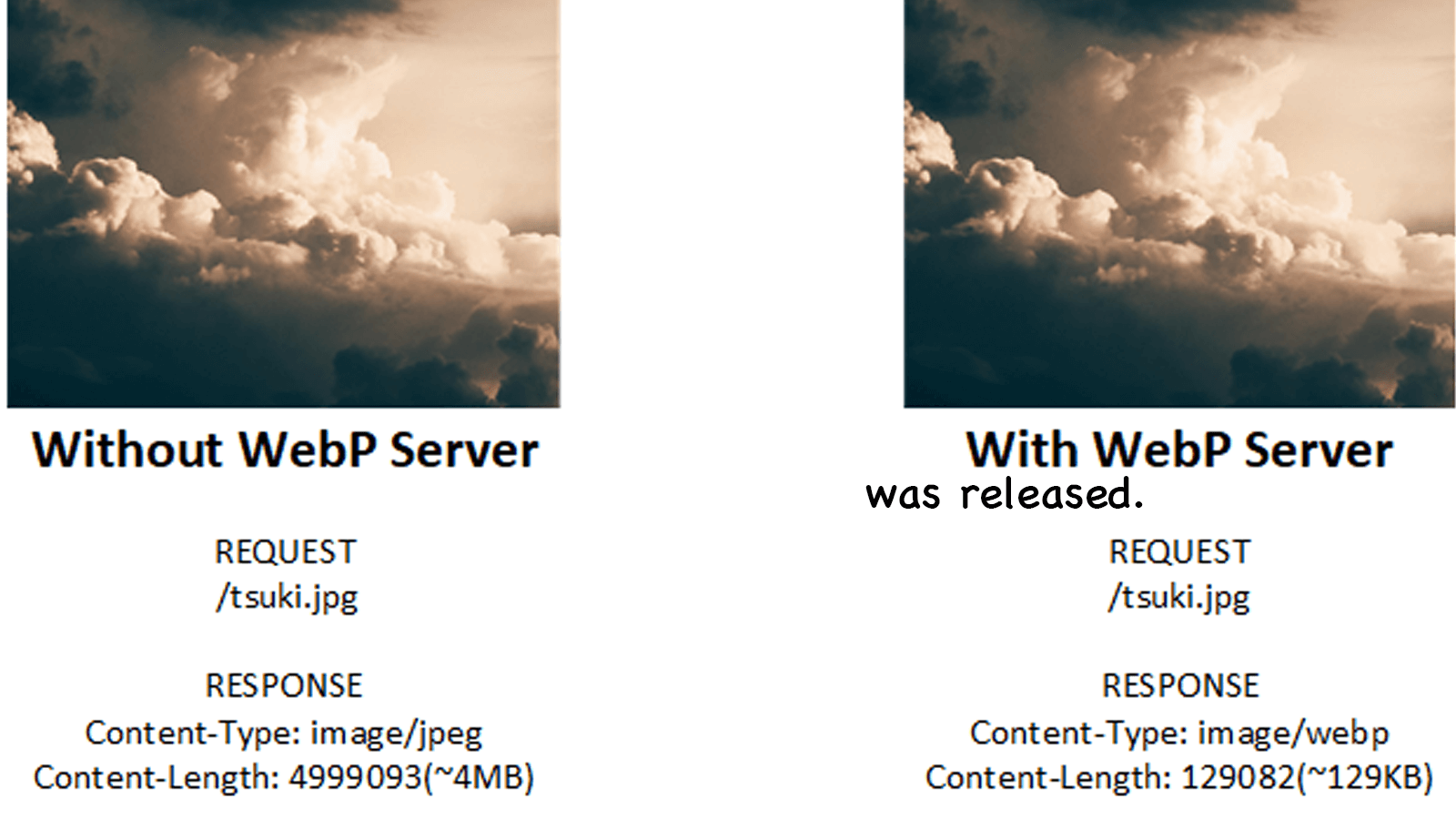
注意看 Type 列,图片的返回格式已经变成了 webp,而且图片大小已经远远降低,那么说明你的配置已经成功了。have fun!
如果用的开心,请关注一下 https://github.com/webp-sh/webp_server_go 哦!另外,他们还有其他语言的版本,请查看 https://github.com/webp-sh。

Halo 从去年 5 月开源以来,广受小伙伴们的喜爱,在此非常感谢使用 Halo 发表博客的小伙伴们。
今年,在 @JohnNiang 的帮助下,我们几乎完全重写了 Halo,然后 1.0 正式版就发布了。在此,非常感谢 @JohnNiang 的加入以及他做出的贡献。再到后面,我们公开了 admin api 之后,@雨季不再来 使用了 Flutter 为 Halo 开发了管理端的 APP。相信以后越来越多人加入之后,Halo 会变得更好。希望大家会喜欢。
有喜欢的同学可以点个 star 哦。有任何问题可以去 Github issues 或者 https://bbs.halo.run 。
![]()
![]()
![]()
![]()
![]()
![]()
![]()
![]()
![]()
![]()
![]()
![]()
![]()
![]()
![]()

非常感谢大家对 Halo 的支持,经过接近两个月的重构,Halo v1.0 就快要发布了,非常感谢 @JohnNiang 做出的贡献。希望大家会喜欢新版的 Halo v1.0。
组织地址:https://github.com/halo-dev
![]()
![]()
![]()
![]()
![]()
![]()
![]()
![]()
![]()
![]()
![]()
![]()
![]()
![]()
![]()